
Coding assessment tools: types, features and how to choose
The 5 types of coding assessment tools, the features worth paying for, what they cost and how to pick the right one with a two-week pilot.

Coding assessment tools are software platforms that test how well a developer actually writes, reads and debugs code before you hire them. They range from auto-graded screening tests to take-home projects and live coding interviews, and the right one depends on the role, the seniority and how many candidates you need to screen.
 ChatGPT
 Gemini
 Claude
 Grok
 Perplexity
TL;DR
- Coding assessment tools come in 5 types: automated screening tests, take-home projects, live coding interviews, AI and async technical interviews, and all-in-one skills platforms.
- Most hiring teams need two of them: an auto-graded screen for every applicant, then a live or project round for the shortlist.
- AI-assisted cheating is now the first feature to check. The Stack Overflow 2025 survey found 84% of developers use or plan to use AI tools, so a test without AI-help detection measures the wrong thing.
- Compare tools on language coverage, a real code editor, hidden test cases, plagiarism and AI-help detection, ATS sync and security certifications, not on question count alone.
- Pricing is usually per candidate, per credit or per seat. Ask what counts as a billable attempt before you sign.
- Pick by running a 2-week pilot on one live role and judge it on completion rate, hiring manager agreement and recruiter time saved.
Demand for developers is not slowing down. The US Bureau of Labor Statistics projects 10% job growth for software developers, QA analysts and testers from 2025 to 2035, with about 106,100 openings a year, according to its Occupational Outlook Handbook. More openings means more applicants to screen, which is exactly the job these tools do.

What are coding assessment tools?
Coding assessment tools are platforms that let hiring teams set programming tasks, run them in a controlled environment and score the results against the same standard for every candidate. A typical programming assessment gives the candidate a browser-based editor, a time limit and a task with hidden test cases, then returns a score, the submitted code and an activity log.
The category is also called a coding assessment platform or coding assessment software. The names mean the same thing: a tool that replaces "tell me about your Python experience" with evidence of what the candidate can do.
Three things separate a coding assessment tool from a generic quiz builder:
- A real coding environment: Candidates write and run code in an editor that supports the language, not a text box.
- Automatic scoring: Submissions are run against test cases, so a recruiter without an engineering background can still read the result.
- Integrity controls: Plagiarism checks, proctoring and AI-help detection show whether the work is the candidate's own.
For a deeper look at how individual programming tests are built and scored, see the complete guide to programming tests.
What are the main types of coding assessment tools?
Coding assessment tools fall into 5 types, and each one measures something slightly different. Most vendors cover more than one type, so treat these as formats you can mix, not as separate products you must buy.
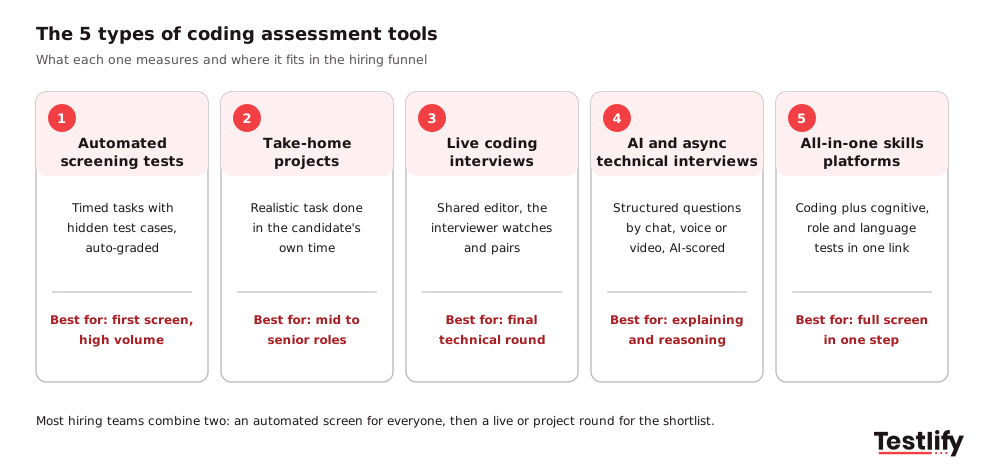
- Automated screening tests: Timed tasks with hidden test cases and auto-grading. A coding assessment test of this kind is the cheapest way to screen hundreds of applicants on the same task, and it suits the first stage of the funnel.
- Take-home projects: A realistic task, such as building a small API or fixing a bug in an existing repo, that the candidate completes in their own time. These show code quality and structure better than a timed puzzle, but they take longer to review and are harder to protect from outside help.
- Live coding interviews: A shared editor where an engineer watches the candidate code, asks questions and sometimes pairs with them. Live rounds show how someone thinks and communicates, so they suit the final technical round.
- AI and async technical interviews: Structured technical questions answered by chat, voice or video and scored against a rubric. These test how well a developer explains design choices and trade-offs, which a pass or fail on test cases cannot show.
- All-in-one skills platforms: Coding tasks alongside cognitive ability, role knowledge, language and personality tests in one candidate link. These suit teams that hire developers and non-technical roles on the same platform and want one full screen in a single step.
Key takeaway: The format you choose tells you more about a candidate than the vendor you choose. Decide what you need to see first, then find a tool that does that format well.
Which type of coding assessment tool fits each hiring stage?
The right type of coding assessment tool depends on where it sits in your funnel and how senior the role is. Early stages need speed and the same test for everyone; later stages need depth and a conversation.
Hiring stage | Candidates at this stage | Best tool type | What it shows | Typical length |
|---|---|---|---|---|
First screen | Hundreds | Automated screening test | Baseline skill in the stack, honesty of work | 30 to 60 minutes |
Second screen | 10 to 30 | AI or async technical interview | Reasoning, how the candidate explains code | 15 to 30 minutes |
Deep check (mid to senior) | 5 to 10 | Take-home project | Code quality, structure, tests, documentation | 2 to 4 hours |
Final round | 2 to 5 | Live coding or pair programming | Problem solving in real time, collaboration | 45 to 90 minutes |
Graduate and volume hiring | Hundreds to thousands | All-in-one skills platform | Coding plus aptitude and communication in one step | 45 to 75 minutes |
Two patterns cover most teams. For graduate and junior hiring, an automated screen followed by one live round is enough. For senior engineers, skip the long algorithm puzzle, use a short screen to confirm the stack, then spend candidate time on a project or a live round that looks like the real job.
Pro tip: Keep the total candidate time across all stages under about 3 hours for experienced engineers. Strong developers with offers elsewhere drop out of long processes first.
What features should coding assessment tools have?
Coding assessment tools should give you a realistic coding environment, scoring you can trust and data that flows into your existing hiring stack. Use this checklist when you compare vendors:
- Language and framework coverage: Every language in your job descriptions, plus SQL and the frameworks your team uses. Check the versions too.
- A real editor: Syntax highlighting, the ability to run code, and multi-file projects for senior roles rather than a single function in a text box.
- Hidden test cases and auto-grading: Candidates see sample cases while hidden ones decide the score, so nobody can hard-code the answer.
- Plagiarism and AI-help detection: Code similarity checks, copy and paste tracking, tab-switch tracking and signals for AI-written answers.
- Proctoring you can set per test: Webcam snapshots, screen recording and full-screen mode for a high-stakes screen, lighter settings for a friendly first step.
- Question library plus custom questions: Ready-made tasks by role and level, and the option to upload your own tasks so the test matches your codebase.
- Clear reports: A per-skill breakdown, the submitted code, a replay or activity log, and a way to compare candidates side by side.
- ATS integration: Invites and scores that sync with your applicant tracking system, so recruiters do not copy results by hand. See how Testlify integrations connect with common ATS and HRIS tools.
- Candidate experience: Clear instructions, a practice question, mobile-friendly non-coding sections and accessibility options.
If a vendor cannot show you every item on this list in a live demo, treat the missing ones as not available.
How do coding assessment tools handle AI-assisted cheating?
Coding assessment tools now handle AI-assisted cheating with a mix of prevention, detection and test design, because candidates have the same AI assistants that working developers use. The Stack Overflow Developer Survey 2025 found that 84% of respondents use or plan to use AI tools in their development process, up from 76% a year earlier, and 51% of professional developers use them daily.
That changes what a fair online coding assessment looks like. The strongest tools combine several layers:
- Prevention: Full-screen mode, copy and paste blocking, tab-switch limits and question randomization make it harder to paste a prompt into another window.
- Detection: Typing patterns, paste events, sudden jumps in code and AI-assistance flags are logged per question, so a reviewer can see what happened rather than trust a single score.
- Identity checks: Webcam snapshots, ID verification and face match confirm that the person taking the test is the person you will interview.
- Test design: Tasks based on your own codebase, short explanation questions after the code, and a live follow-up on the submitted solution are hard to fake with a chatbot.
Some teams go the other way and allow AI on purpose, then score how well the candidate reviews and corrects AI output. The same survey found 46% of developers distrust the accuracy of AI tools, so spotting a wrong answer from an assistant is a real job skill. Whichever policy you choose, write it in the test instructions so every candidate plays by the same rules.
For the controls Testlify uses, see anti-cheating and proctoring and how proctored live coding projects work.
Which coding assessment tools are worth a look in 2026?
The coding assessment tools worth a look in 2026 depend on the type you need. The names below are the ones that come up most often in buyer shortlists and in the search results for this topic; we list them by type rather than rank them, because the best choice depends on your stage and stack.
Tool type | Example tools buyers shortlist | Typical strength |
|---|---|---|
Automated screening tests | HackerRank, Codility, CodeSignal, HackerEarth, TestDome, Testlify | Large task libraries, auto-grading, high volume |
Take-home projects | CodeSubmit, Qualified, Coderbyte | Realistic multi-file tasks, code review workflow |
Live coding interviews | CoderPad, HackerRank, Codility, Testlify | Shared editor, pair programming, interview notes |
AI and async technical interviews | HireVue, CodeSignal, Testlify | Structured questions scored against a rubric |
All-in-one skills platforms | Testlify, TestGorilla, Mercer Mettl, iMocha | Coding plus aptitude, role and language tests |
Developer-only platforms tend to go deeper on coding: bigger libraries of algorithm and project tasks, more interview tooling for engineers, and community benchmarks. All-in-one platforms trade some of that depth for one place to test developers, analysts, support staff and sales hires, with one contract and one ATS integration.
For a ranked comparison with pros and cons, read our list of the best technical assessment tools and the roundup of coding challenge platforms for developer hiring. If you are moving away from one vendor, the HackerRank alternatives guide compares the main options.
How much do coding assessment tools cost?
Coding assessment tools are priced in 4 common ways, and the model matters as much as the headline number:
- Per candidate or per attempt: You pay for each test sent or started. This suits teams with uneven hiring.
- Credits: You buy a bundle of credits each month or year, and each candidate uses one. Check whether unused credits roll over.
- Per seat: You pay for each recruiter or interviewer who logs in, which can get expensive for large interview panels.
- Annual enterprise plans: Volume pricing with SSO, advanced proctoring, data residency and a dedicated account manager, usually quoted by sales.
Before you compare quotes, ask each vendor three questions: does a candidate who opens the link but never starts count as an attempt, are live interviews billed separately, and which features (ATS integration, white label, ID verification) cost extra. Testlify uses credits: you pay only when a candidate starts an assessment, and there is a 7-day free trial with no credit card. Full plans are on the pricing page.
How do you choose the right coding assessment tool?
The right coding assessment tool is the one that predicts who will do well in your team, at a cost and candidate time you can live with. A 5-step process gets you there without a long evaluation project.
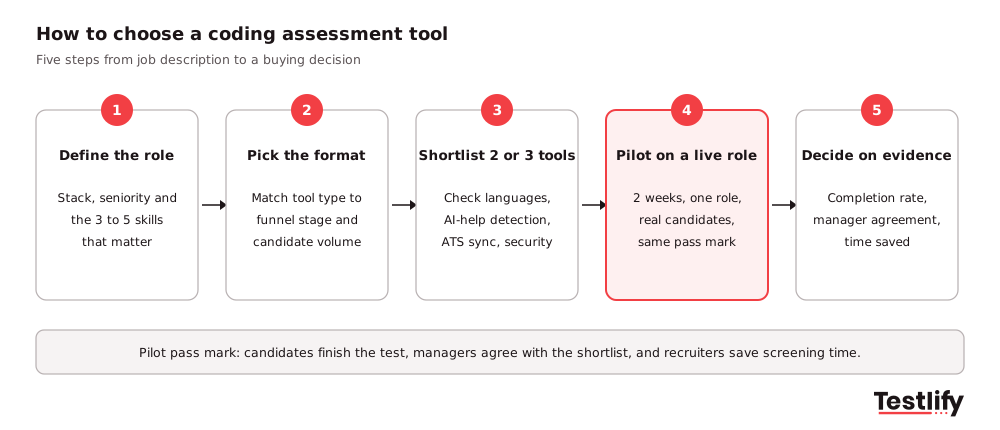
- Define the role: List the stack, the seniority and the 3 to 5 skills that separate a good hire from an average one. Your engineering lead should sign this off. To turn that list into tasks, follow our coding assessment design best practices.
- Pick the format: Use the stage table above to decide which tool types you need. Most teams need one screen and one deeper round.
- Shortlist 2 or 3 tools: Check each against the feature list, with extra weight on AI-help detection, ATS sync and security.
- Pilot on a live role: Run each tool for 2 weeks on one open role with real candidates and the same pass mark.
- Decide on evidence: Compare completion rate, how often hiring managers agree with the shortlist, and recruiter hours saved.
Skills evidence is what makes the pilot worth the effort. LinkedIn's Future of Recruiting 2025 found that 93% of talent acquisition professionals say accurately assessing skills is crucial for quality of hire, and that companies doing the most skills-based searches are 12% more likely to make a quality hire.
Two warning signs during a pilot: completion rates below about half of invited candidates usually mean the test is too long or unclear, and a shortlist your engineers keep overruling means the tasks do not match the job.
What should enterprise teams check before they buy?
Enterprise teams should check security, compliance and integration depth before they buy coding assessment tools, because these block a rollout far more often than features do. Ask for evidence, not a checkbox on a sales slide.
- Security certifications: A current SOC 2 Type II report and ISO 27001 certificate, plus a recent penetration test summary.
- Data protection: GDPR and CCPA terms, a data processing agreement, and a choice of data storage region if you hire in the EU or the Middle East.
- Access control: SAML single sign-on, two-factor authentication and role-based access so hiring managers see only their own roles.
- AI scoring rules: If a tool scores or ranks candidates automatically and you hire in New York City, Local Law 144 requires a bias audit within one year of use, a public summary of the results and notice to candidates.
- ATS depth: Two-way sync of invites, stages and scores with your ATS, tested in a sandbox before the contract is signed.
- Accessibility and accommodations: Extra time, screen reader support and a clear way for candidates to request adjustments.
How does Testlify fit as a coding assessment tool?
Testlify is an all-in-one skills assessment and interviewing platform, so it covers coding alongside the other tests a developer hire needs. Hiring teams use it for the automated screen, the live round and the AI interview in one place:
- Coding tests: A live coding environment in 45+ programming languages with auto-grading, plus coding questions inside role-based assessments. Browse the coding tests or a stack-specific test such as the Python test.
- One link, full picture: 3,500+ tests and 25+ question types, so a developer screen can include coding, cognitive ability and communication together.
- Interviews: Live coding and pair-programming interviews, plus Chat AI, Voice AI and Video AI interviews scored against the same criteria for every candidate.
- Integrity: 20+ proctoring checks, including AI-assistance detection, copy and paste tracking, webcam snapshots and full-screen enforcement.
- Fit with your stack: 100+ ATS and HRIS integrations, assessments in 15+ languages, ISO 27001 and SOC 2 Type II, and a third-party NYC Local Law 144 bias audit of the matching model completed on June 16, 2023.
G2 lists Testlify as a Leader and High Performer in Technical Skills Screening, and more than 1,500 talent teams use it. See how it works for engineering roles on the developer hiring page.
Ready to screen developers on real code?
Pick one open developer role, choose a ready-made test from the test library or build one from your job description, and send it to your next batch of applicants. Start a 7-day free trial with no credit card, or book a demo to plan an enterprise pilot.
Frequently asked questions (FAQs)
Related resources
View all
Candidate assessment
5 best practices for designing coding assessments

Candidate assessment
A comprehensive guide to online test integrity

Candidate assessment
How can HR measure assessment validity and reliability?

Candidate assessment
ATS integration with assessments: how it works and 8 benefits

Candidate assessment
Successful ATS integration stories from top companies

Candidate assessment
Are Employment Assessments Biased? The Data (and How to Fix It)
Get started.
Hire on proof, not resumes.
Run your first skills-based assessment free — no credit card required.