
17 social media recruiting tips for hiring teams in 2026
Seventeen tips to recruit on social media in 2026: pick platforms by role, post content people share, screen fairly, track hires by source.

The best social media recruiting tips come down to six moves: pick one or two platforms where your target candidates already spend time, post mostly people and culture content instead of job ads, turn employees into sharers, keep the apply step short on a phone, screen applicants on skills rather than profiles, and track every hire back to its source. The 17 tips below show how to do each one, grouped by stage, for in-house TA teams hiring at volume or for hard-to-fill roles.
TL;DR / Key takeaways
- Social media recruiting works best when you pick one or two platforms by role: LinkedIn for office and senior roles, Facebook for local and hourly roles, Instagram and TikTok for younger candidates.
- Gallup found 51% of US employees were job hunting or watching for openings in late 2025, and only 11% were actively looking. Social feeds reach the other 40%.
- Post about 70% people and culture content, 20% useful industry content and 10% job posts. Accounts that only post jobs lose followers fast.
- Employees reach more of the right candidates than a company page, so give them ready-made posts and recognize people who share.
- Screen social applicants with a short skills test, not their profiles. The EEOC bars recruiting methods and job ads that favor or discourage protected groups.
- Tag every social source in your ATS and judge each channel by qualified applicants and quality of hire, not likes.
 ChatGPT
 Gemini
 Claude
 Grok
 Perplexity
What is social media recruiting?
Social media recruiting, also called social recruiting, is the practice of using social platforms such as LinkedIn, Facebook, Instagram, TikTok and X to find, attract and hire candidates. Social media recruiting goes beyond posting a job link. It covers building an employer brand, sourcing passive candidates who are not job hunting, talking with people in comments and groups, and showing what work at your company is really like.
Think of it as the difference between a flyer on a notice board and an ongoing conversation with a talent community. The flyer reaches whoever walks past. The conversation builds a pipeline you can come back to every time a role opens.

Why do social media recruiting tips matter in 2026?
Social media recruiting tips matter because most of the people you want to hire are not on job boards. Gallup's Q4 2025 survey found that 51% of US employees were either actively looking for a new job (11%) or watching for opportunities (40%). The watchers rarely search job boards, but they scroll their feeds every day.
Done well, social media recruiting gives hiring teams five things:
- Wider reach: You reach the large group of people who would move for the right role but are not applying anywhere yet.
- A stronger employer brand: Every employee story and every reply to a candidate shows what working with you is like.
- Faster time to fill: A warm talent community means you are not starting from zero each time a role opens, which cuts time to fill.
- Better fit: Candidates see your culture before they apply, so the people who do apply know what to expect.
- Lower cost per applicant: Organic posts cost only time, and paid social often costs less per applicant than job board ads for local and hourly roles.
Which social media platform fits which roles?
The right social media platform depends on the role, not on where your marketing team is most active. LinkedIn suits office, technical and senior roles, Facebook suits local and hourly roles, and Instagram and TikTok suit younger and consumer-facing hires. Start with one or two platforms you can run well before adding more.
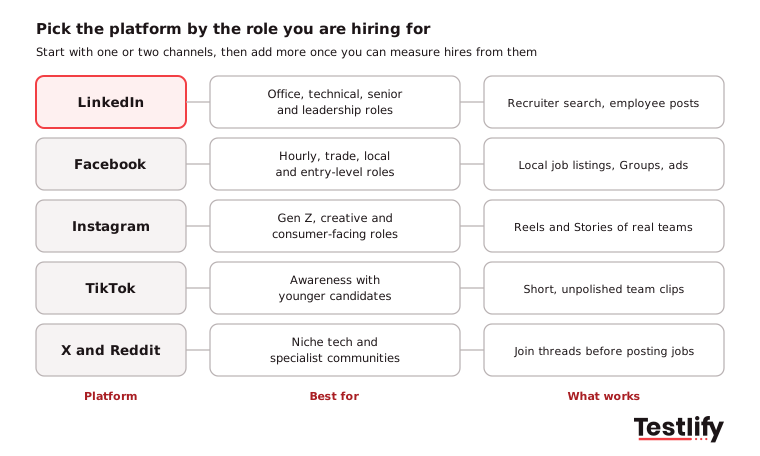
Reach in the table comes from Pew Research Center's 2025 survey of US adults, which found that eight in ten adults aged 18 to 29 use Instagram and about half of them use TikTok every day.
Facebook is worth a second look if you dropped it. TechCrunch reported in October 2025 that Facebook restored local job listings for US users, with a Jobs tab in Marketplace and listings in Groups and Pages, aimed at entry-level, trade and service roles. Candidates apply and chat with the employer through Messenger.
What social media recruiting tips help you plan?
Social media recruiting planning starts with the roles you hire for most, not with a content calendar. The five tips below set goals, find the channels that already work, and define who you are trying to reach, so every post later has a job to do.
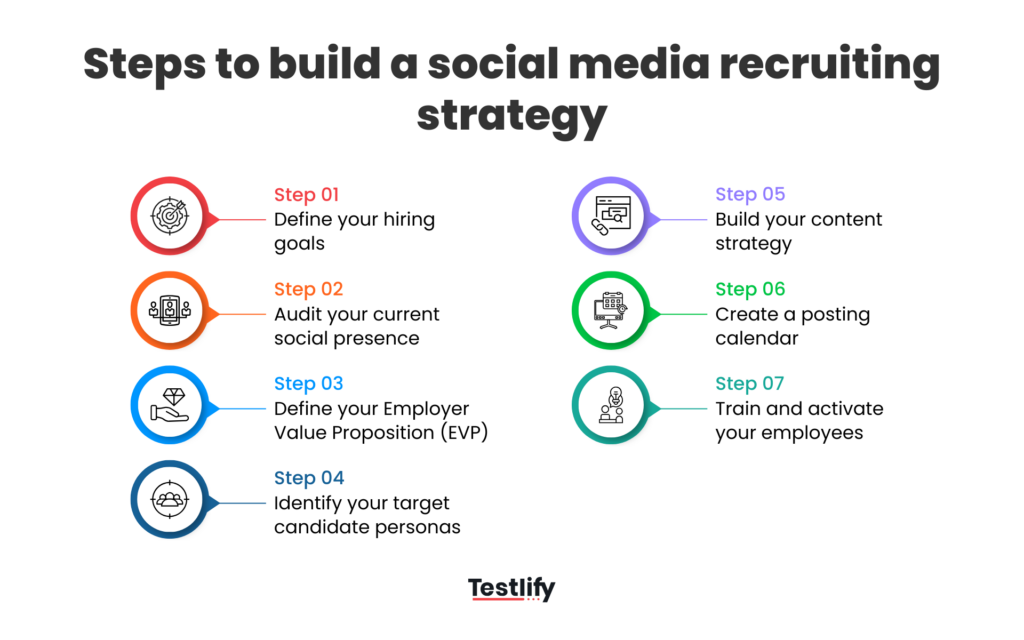
1. Set a hiring goal for each role family
Write down the roles you hire for again and again, and what you need from social for each one: volume for support or retail roles, a long-term pipeline for engineering, or a handful of senior hires. A goal like "20 qualified applicants a month for customer support" decides your platforms, budget and content mix. Pilot one role family or region first, then scale what works.
2. Find out where your best recent hires came from
Check your ATS source data and ask your last 20 good hires how they first heard about you. If most found you through an employee's LinkedIn post, that is your first channel. Then search your company name on each platform and look at your company pages and review sites the way a candidate would. Fix anything that tells the wrong story before you promote it.
3. Write an employer value proposition people can check
Your employer value proposition is the reason someone should work for you instead of a competitor. Make it specific and provable. "Great culture" means nothing. "20 days of paid learning leave and an annual conference budget" is something a candidate can verify with your employees. Typical EVP pillars are growth, flexibility, mission, pay and benefits, and team.
4. Build candidate personas before you pick channels
For each key role, answer five questions: What is their background and level? Which platforms do they use? What matters most to them in a job? What frustrates them about their current employer? What content do they engage with? The answers tell you where to post and how to write.
5. Treat active and passive candidates differently
Active candidates want a clear job post, a short form and a fast reply. Reach them with job posts, employee shares and ads. Passive candidates need a reason to think about moving. Reach them with culture content, useful posts about their field, groups they already belong to, and personal messages that mention their work.
Pro tip: Run one channel well for 90 days before you open a second. A dormant account with a few old posts does more harm to your employer brand than no account at all.
What social media recruiting tips work for content and engagement?
Social media recruiting content works when it shows real people and answers candidates' real questions. The seven tips below cover the content mix, video, employee advocacy, job posts, replies, communities and openness about your hiring process.
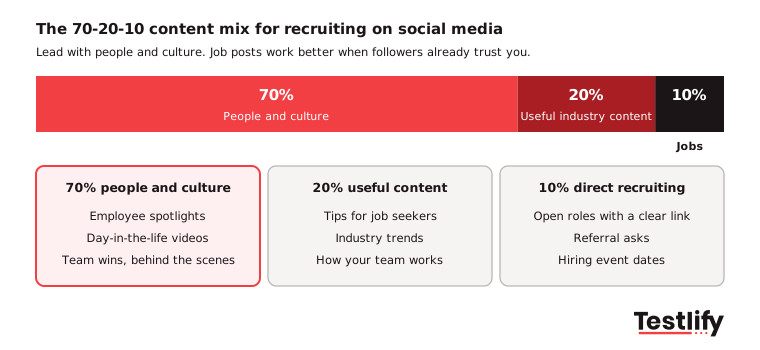
6. Follow the 70-20-10 content mix
Plan roughly 70% employer brand content (employee spotlights, team wins, behind the scenes), 20% useful industry content (tips, trends, how your team works) and 10% direct recruiting posts (open roles, referral asks, hiring event dates). Flip the ratio and lead with jobs, and followers drift away.
7. Lead with short, real video
Video outperforms text and static images on every major platform, and younger candidates expect it. SHRM reported in 2025 on a Zety survey in which 76% of Gen Z used Instagram for career content, against 34% for LinkedIn, and 46% said they had landed a job or internship through TikTok. A phone video of a hiring manager explaining the role, or a team member walking through a normal day, is enough. Keep it under 60 seconds and add captions for people watching with the sound off.
The same survey found 95% of Gen Z look at a company's social media before applying, and 55% admitted following inaccurate career advice on TikTok. Clear, accurate posts from your own team fill that gap.
8. Turn employees into advocates
Your employees' networks are full of people like them. A job shared by a team member reaches more of the right candidates than the same post from a company page. Build a simple advocacy program:
- Make sharing easy: Give employees ready-made captions, images and the job link.
- Recognize people who share: Thank them in team channels and connect sharing to your employee referral program.
- Create content people want to share: Spotlights on their own team work better than corporate announcements.
- Never force it: Advocacy only works when it is voluntary and authentic.
Tag employees you feature, with their permission. "Meet Sarah, who leads our support team in Austin" travels further than a stock photo.
9. Write job posts for people, and test the mobile apply link
On social media, candidates see your job post before they see your ATS. Drop the jargon, say what the role involves day to day, what success looks like after 90 days, and what the pay range and schedule are where you can share them. Our guide on how to write a job advert candidates read covers the wording.
Then open your own job link on a phone, from a DM or a comment, and apply. Most social browsing happens on mobile. If the form asks for a login, a resume upload and ten screens of questions, you lose people at the final step.
10. Reply to every comment and message
An unanswered question under a job post leaves a bad impression on the person who asked and on everyone who reads it later. Set a rule, such as a reply within one working day, and name who owns the inbox for each platform. Fast, human replies are one of the cheapest ways to improve candidate experience.
11. Join communities, trends and hashtags with care
Join the LinkedIn and Facebook groups, subreddits and hashtags where your target candidates already talk, and add something useful before you post a job. Use two or three hashtags per post: one branded, one for the role and one broad tag such as #hiring. Watch for platform changes, such as a shift toward short video, and adjust your mix instead of fighting the feed.
12. Be open about your hiring process
Candidates dislike black holes. Post what your hiring process looks like: the number of stages, the types of interviews or assessments, and typical timelines. Clear expectations reduce anxiety and drop-off, and they cut the number of "any update?" messages your team has to answer.
How should you use paid social ads for recruiting?
Paid social ads for recruiting work best as a boost for posts and roles that already perform organically, not as a replacement for them. Use ads when a role is urgent, the volume is high, or organic reach has stalled, and budget for testing two or three versions of each ad.
13. Target paid ads by role, skill and location
Layer targeting by location, job title, skills and interests so the ad reaches people who can do the job and get to the site. In the US, Meta's developer documentation notes that employment ads carry their own set of targeting restrictions, so check what Ads Manager allows before planning a campaign. Never write an ad that shows a preference for age, sex or any other protected trait.
14. Retarget people who viewed a job but did not apply
Many candidates look at a job page, get distracted and never come back. Retargeting shows them a reminder ad, ideally a short video about the team, a few days later. Cap how often each person sees an ad so the reminder does not turn into fatigue, and send them straight to the mobile apply page.
How do you screen social media candidates fairly?
Screening social media candidates fairly means judging them on job-related evidence, applied the same way to everyone. The two tips below replace profile scrolling with skills evidence and set clear rules for any review of public profiles.
15. Screen with skills, not profiles
Social media brings you more applicants, but a feed tells you little about who can do the job. Send everyone who applies from social the same short skills test for the role, then rank them on the results. Candidates who found you through a TikTok video and candidates referred by a senior engineer get the same fair shot, and recruiters stop guessing from profile photos and follower counts.
Watch the referral trap too. The EEOC says it is illegal to recruit in a way that discriminates, and gives the example of relying on word of mouth from a workforce that is mostly one ethnicity. The same page warns that job ad wording such as "recent college graduates" can discourage older applicants. Pair employee shares with open posts and score every applicant on the same test.
16. Write a social screening policy
If you review public profiles at all, put the rules in writing first and get your legal team to sign them off. The social media screening glossary entry covers the basics. A workable policy has three parts.
Look for (job-related) | Never base a decision on | How to run it |
|---|---|---|
Public work samples, portfolios, talks and articles | Race, color, ethnicity or national origin | Someone other than the hiring decision-maker does the review |
Professional conduct and communication style | Religion | Review only after a first screen, the same way for every finalist |
Consistency with the resume and work history | Sex, gender identity, sexual orientation or pregnancy | Record what was checked and why |
Evidence of the skills the role needs | Age, disability, genetic information or family status | Never ask for passwords or private access |
The EEOC also advises against asking for a photo before an offer. Looking at profile pictures during screening exposes much of the same information, which is another reason to start with a skills test and keep unconscious bias out of the first cut.
How do you measure social media recruiting?
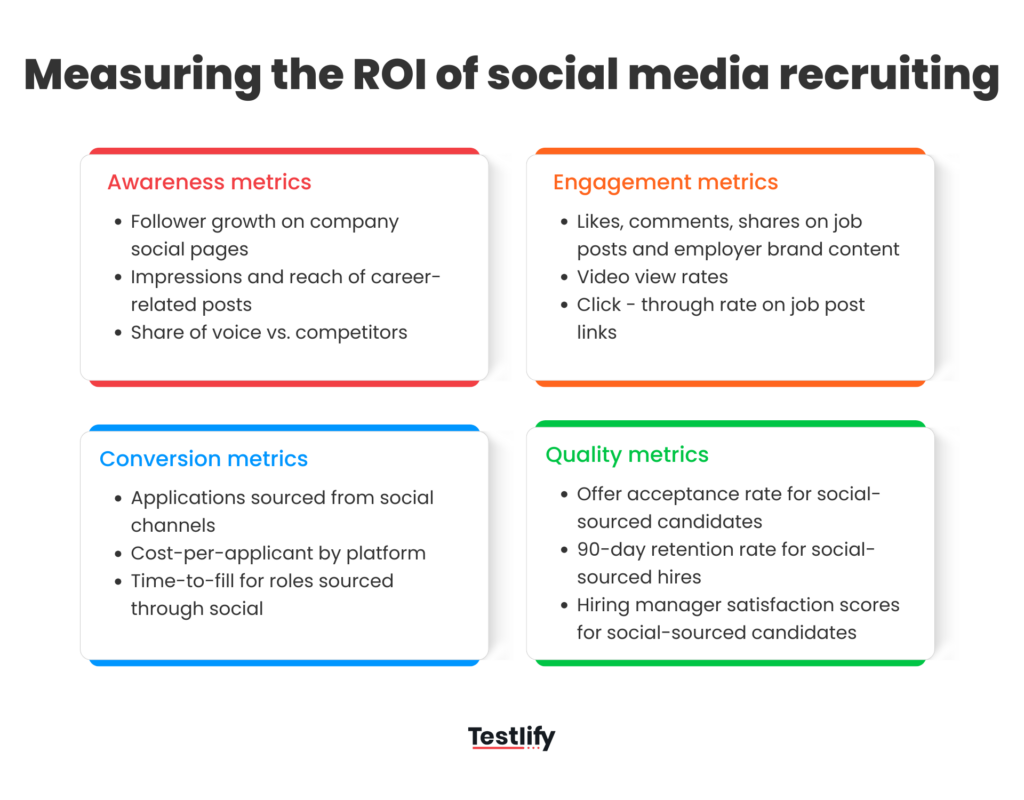
Social media recruiting is measured by qualified applicants, hires and quality of hire per channel, not by likes or followers. Tag every social source in your ATS, compare each channel at every step from reach to hire, and drop or fix the channels that bring clicks but no qualified people.
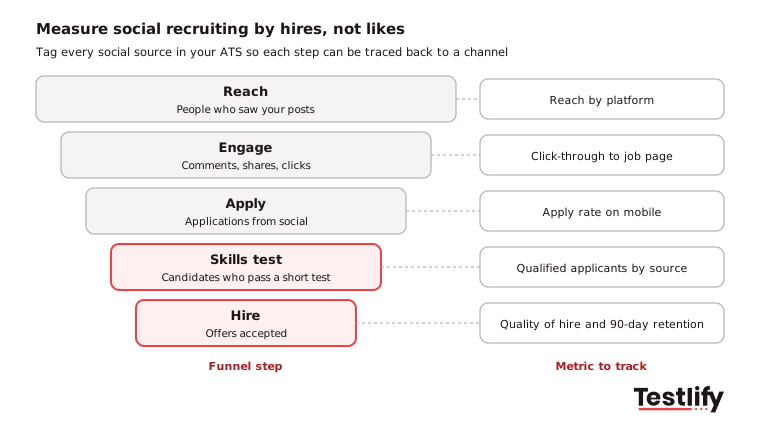
17. Tag every social source and track quality of hire
Set up a separate source in your ATS for each platform, and use tagged links in every post and ad so applications are counted correctly. Then track these metrics monthly:
Metric | What it tells you |
|---|---|
Applications by source | Which channels bring people to the apply step |
Qualified applicants by source | Which channels bring people who pass the skills test |
Time to fill by source | Whether your talent community shortens the hiring cycle |
Cost per qualified applicant | Organic time plus ad spend divided by qualified applicants |
Quality of hire and 90-day retention by source | Whether social hires perform and stay |
Quality of hire is the hardest metric and the most useful one. LinkedIn's Future of Recruiting 2025 found that 89% of TA professionals expect measuring quality of hire to matter more, but only 25% are highly confident they can measure it, and 93% say accurate skills assessment is crucial to improving it. Our guide on how to improve quality of hire shows how to set it up.
For software that schedules posts, runs employee advocacy and tracks social campaigns, see our comparison of social recruiting tools.
Key takeaway: A channel that brings 500 clicks and no qualified applicants is a cost, not a win. Judge every platform on qualified applicants and hires per hour or dollar spent.
How do these tips change by hiring scenario?
Social media recruiting tips change with the role you are filling: the platform, content and apply step that work for a senior engineer are wrong for a seasonal warehouse role. Four common scenarios:
- Hard-to-fill technical roles: Use LinkedIn, X and niche communities such as subreddits. Share engineering blog posts, open-source work and how your team solves hard problems. Technical talent responds to companies that respect the craft.
- Entry-level and volume roles: Use Facebook local job listings, Instagram and TikTok. Focus on pay, schedules and a two-minute mobile apply step. Our volume hiring page covers screening at that scale.
- Diversity recruiting: Feature employee voices from many backgrounds, partner with affinity groups on social, and check job post wording for bias. Candidates from underrepresented groups look at your social presence carefully before applying.
- Executive and leadership roles: Rely on LinkedIn and direct outreach. Personal messages and long-term relationships beat job posts for C-suite and VP hires.
Expect more AI in social sourcing and messaging, more short-form video job ads and more employee-made content in the next few years. Keep a person reviewing every rejection when AI helps sort candidates.
What social media recruiting mistakes should you avoid?
Social media recruiting mistakes usually come from treating social as a job board. Avoid these six:
- Only posting job openings: A feed of job ads reads like a classifieds page, and people unfollow.
- Ignoring comments and messages: Unanswered questions signal that candidates do not matter.
- Posting in bursts: Going loud during a hiring spike and silent afterward looks chaotic. Steady posting builds trust.
- A slow mobile apply flow: Attracting interest and then losing people to a clunky form wastes the whole effort.
- Making it all about the company: Candidates want to see the people they would work with, not logos.
- Running without a plan or metrics: Random posts with no audience, goal or tracking are noise. A one-page plan is enough to start.
What does a 30-day social recruiting plan look like?
A 30-day social recruiting plan moves from foundation to measurement in four weeks:
- Week 1, foundation: Audit your social presence, refine your EVP, pick your top one or two platforms for your main role family, and complete your company pages.
- Week 2, content: Build a 30-day calendar, list 10 employer brand ideas, film one employee spotlight video, and post three culture posts with no job ads yet.
- Week 3, activation: Brief employees on the goals, share caption templates for open roles, post your first job with a full write-up, and set up social sources in your ATS.
- Week 4, measurement: Review engagement and applications by post, check how many social applicants passed the skills test, adjust posting times, and book a monthly review.
How does Testlify fit into social media recruiting?
Testlify fits after the social click: it turns applicants from any channel into a ranked shortlist based on skills. Social media fills the top of the funnel, and a short role-specific assessment tells you who can do the job, so recruiters spend time on qualified people instead of profiles.
- A test for every role: Pick from 3,500+ tests in the Testlify test library, or let the AI test builder create an assessment from your job description in under a minute.
- Fair, consistent scoring: Every candidate gets the same questions and automatic scoring, with 20+ proctoring checks to keep results honest.
- Built for high volume: The AI resume screener scores resumes with an explainable match score, and invites can go out by WhatsApp as well as email.
- Fits your stack: Results sync to 100+ ATS and HRIS tools, so social source tags and test scores sit side by side.
- Global reach: Candidates can take assessments in 15+ languages.
Ready to turn social applicants into a shortlist?
Send your next batch of social media applicants a short skills test and see who can do the job before the first interview. Start a 7-day free trial of Testlify, no credit card required, and build your first assessment from your own job description.
Frequently asked questions

Director of Marketing
Akash Patange is the Director of Marketing at Testlify, where he works closely with HR leaders and recruiters to help organizations improve hiring outcomes. He writes about talent assessment, recruitment technology, and data-driven hiring practices.
LinkedInRelated resources
View all
Employer branding
What platforms offer white-labeling for talent assessments?

Employer branding
Silent quitting: signs, causes and how HR leaders respond

Employer branding
How to stay connected with top talent when not hiring

Employer branding
Mastering the art of employer branding on job sites

Employer branding
Candidate experience and employer branding: how your hiring process builds your brand

Employer branding
The importance of employer branding in talent acquisition
Get started.
Hire on proof, not resumes.
Run your first skills-based assessment free — no credit card required.