
Video interviewing: a complete guide for hiring teams
A hiring team's guide to video interviewing: live, one-way and AI formats, how to run each one, the pros and cons, and the laws to follow.

Video interviewing is the use of video to interview job candidates remotely, either live in real time or one-way, where candidates record answers to set questions that the hiring team reviews later. Hiring teams use it to replace phone screens, interview people in any location and compare every candidate on the same questions.
TL;DR / Key Takeaways
- Video interviewing comes in three formats: live interviews, one-way (recorded) interviews and AI video interviews that ask and score questions on their own.
- One-way and AI interviews fit the first screen and high-volume roles. Live video fits finalists, senior roles and panels.
- The biggest wins are speed, reach and consistency: no scheduling for the first round, no travel, and the same questions for every candidate.
- Candidates push back when AI is hidden. Greenhouse found 70% of job seekers were not clearly told AI would evaluate them, and 38% have walked away from a process over an AI interview.
- Tell candidates upfront what is recorded and scored, offer a practice question, and keep a person reviewing every decision.
- In New York City, AI scoring tools need a bias audit and 10 business days' notice. In Illinois, recorded interviews analyzed by AI need consent and must be deleted within 30 days of a request.
- Choose software on structured questions, scoring with evidence, integrity checks, ATS sync and data retention controls, then test it on one real role.
 ChatGPT
 Gemini
 Claude
 Grok
Grok Perplexity
What is video interviewing?
Video interviewing is a way of running job interviews over video instead of in person. The interviewer and the candidate can meet live on a video call, or the candidate can record answers to pre-set questions on their own schedule for the hiring team to review later. Both versions remove travel and most of the scheduling.
Video interviewing usually sits early in the hiring funnel. A recruiter sends a link after the application or resume screen, the candidate answers a handful of role-based questions, and the hiring team decides who moves on to a deeper interview, a skills test or a final round. Some teams also use live video for every round, including the final one, when the role is remote.
The format is now part of normal hiring rather than a pandemic stopgap. Recorded and AI interviews have spread fastest: Greenhouse's 2026 Candidate AI Interview Report, a survey of 2,950 active job seekers, found that 63% have already been interviewed by an AI, up 13 points in six months.

What are the types of video interviews?
Video interviews come in three types: live (synchronous) interviews, one-way (asynchronous) interviews and AI video interviews. Live interviews are real-time conversations. One-way interviews are recorded answers to fixed questions. AI video interviews add an AI interviewer that asks follow-up questions and scores each answer against the same criteria.
- Live video interviews: A recruiter or panel meets the candidate on a video call at a set time. Interviewers can probe, follow up and answer the candidate's questions about pay, team and culture.
- One-way video interviews: Also called pre-recorded, on-demand or self-paced interviews. Candidates see each question as text or a short video, get a short prep time and record an answer within a time limit. Read more on one-way interviews.
- AI video interviews: An AI interviewer runs a structured conversation by video, asks follow-ups based on what the candidate says and scores every answer against role-based criteria. A person reviews the result.
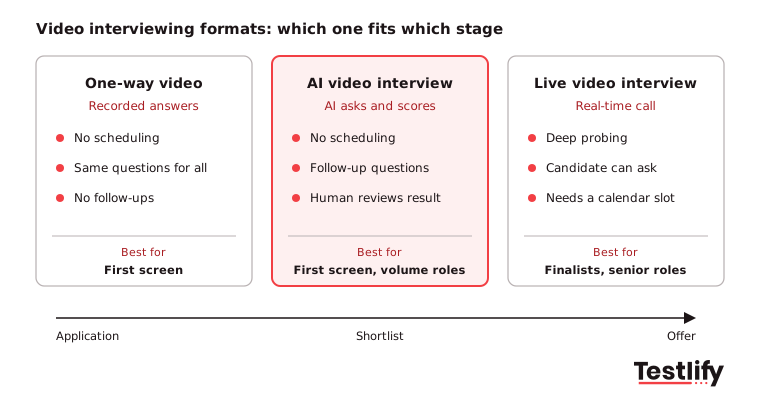
Live video interview | One-way video interview | AI video interview | |
|---|---|---|---|
Who asks the questions | Recruiter, hiring manager or panel | Pre-set questions, no one live | AI interviewer, with follow-ups |
Scheduling | Needed for every interview | None, candidate picks the time | None, candidate picks the time |
Best stage | Finalists, senior roles, panels | First screen, replaces the phone screen | First screen, high-volume roles |
Follow-up questions | Yes | No | Yes, within the set structure |
Candidate can ask questions | Yes | No | Limited |
Consistency across candidates | Depends on the interviewer | Same questions and time limits for all | Same questions and criteria for all |
Main risk | Interviewers drift off script | Feels impersonal, candidates drop out | Hidden AI use, weak scoring criteria |
Most teams combine the formats: one-way or AI video interviews to reach a shortlist, then live video for the rounds that follow. We have seen the biggest time savings when the recorded interview replaces the phone screen, not the final interview.
How does video interviewing work?
Video interviewing works in six steps: the team defines the skills the role needs, writes questions for each one, sets the interview up, invites candidates, reviews and scores the answers, and moves the best candidates to the next round. The steps are the same for live and recorded interviews; only who asks the questions changes.
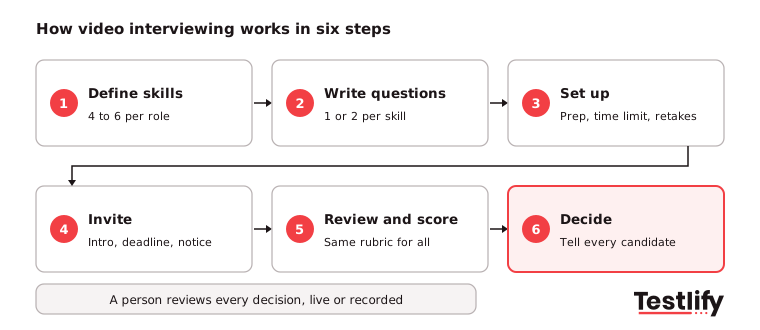
- Define the skills: Agree with the hiring manager on the four to six skills the role needs, such as communication, problem solving or objection handling.
- Write the questions: Write one or two questions per skill, mostly behavioral ("Tell me about a time...") and situational ("What would you do if..."). See how to create video interview questions.
- Set up the interview: For one-way and AI interviews, choose prep time (30 to 60 seconds is common), answer time (1 to 3 minutes), the number of retakes and a practice question. For live interviews, book the panel and share the link.
- Invite candidates: Send the link with a short intro to the role and company, the deadline, how long it takes and what is recorded.
- Review and score: Score every answer against the same rubric, ideally with two reviewers for borderline candidates. This guide on how to score video interview responses covers rubrics.
- Decide and follow up: Move the strongest candidates forward, and tell everyone else the outcome. Silence after a recorded interview is the most common complaint candidates have.
Pro tip: Keep one-way interviews to five or six questions and under 20 minutes in total. Longer interviews add little evidence and raise drop-off.
What are the pros and cons of video interviewing for employers?
Video interviewing helps employers screen faster, reach more candidates and compare them on the same questions, but it can feel impersonal, depends on technology and raises consent and data questions. The pros are strongest for high-volume and remote roles; the cons are mostly fixed by structure, clear communication and a human in the loop.
Pros of video interviewing:
- Faster first rounds: Recorded and AI interviews remove calendar back-and-forth, so the first round starts the day a candidate applies. Recruiters review answers in batches instead of running back-to-back calls.
- Wider talent pool: Candidates in other cities, countries or time zones, people with mobility issues and people who cannot take time off work can all interview without travel.
- Lower cost: No travel, rooms or long phone screens for the first round.
- Consistent evaluation: Every candidate answers the same questions under the same time limits, which makes comparison fairer than unstructured phone screens.
- Shareable evidence: Recordings can be shared with hiring managers who were not on the call, so decisions do not rest on one recruiter's notes.
- Better data: Scores per skill can be compared with on-the-job performance later. LinkedIn's Future of Recruiting 2025 found 89% of TA professionals expect measuring quality of hire to grow in importance, while only 25% feel highly confident they can measure it today.
Cons of video interviewing:
- Harder to read people: Body language and rapport are harder to judge on a screen, and some strong candidates come across poorly on camera.
- Technology problems: Poor internet, old devices and browser issues can hurt a candidate's answer for reasons that have nothing to do with skill.
- Feels one-sided: In one-way interviews, candidates cannot ask questions or get a reaction, which some find awkward and impersonal.
- Drop-off: Some candidates refuse recorded or AI interviews, especially for senior roles or when they were not told AI is involved.
- Privacy and compliance: Recording and AI analysis bring consent, retention and bias-audit duties (see the laws section below).
For a deeper look at the recorded format alone, read the pros and cons of pre-recorded video interviews.
How do you run an effective video interview?
Running an effective video interview takes the same structure as a good in-person interview plus a few video-specific habits: the same questions and rubric for every candidate, a technology check before the call, a professional setup and a backup plan. Structure matters more than format.
For live video interviews:
- Use a structured guide: Ask every candidate the same core questions and score them on the same rubric. A structured interview beats a free-flowing chat on a screen just as it does in person.
- Test the technology first: Check camera, microphone and internet before the candidate joins, and send the candidate a link to test their setup a day ahead.
- Set up a professional space: Use a quiet room, light from the front, a plain background and the camera at eye level. Look at the camera when you speak.
- Plan for failure: Agree on a phone number to switch to if the video drops, so a bad connection does not end the interview.
- Keep it shorter: Video calls tire people faster than meetings in a room. Plan shorter sessions and short breaks for panel days.
- Record only with consent: Tell the candidate if you record, why, and who will see it.
- Debrief straight away: Write scores and notes right after the call while the answers are fresh.
For one-way and AI video interviews:
- Introduce the company: Open with a short welcome video or text from the hiring manager, so candidates know who will watch their answers.
- Offer a practice question: A practice question that is not scored lets candidates test their camera and settle their nerves.
- Be clear on the rules: State the number of questions, prep time, answer time and whether retakes are allowed before the first question.
- Make it mobile-friendly: Many candidates answer from a phone. A tool that runs in the browser with no download removes a common drop-off point.
- Close the loop: Tell every candidate the outcome and when to expect it.
How do AI video interviews work?
AI video interviews work by having an AI interviewer ask role-based questions by video, listen to each answer, ask relevant follow-up questions and score every answer against criteria the hiring team sets. The result is a report per candidate with scores per skill and the recorded answer behind each score, which a person reviews before anyone moves forward.
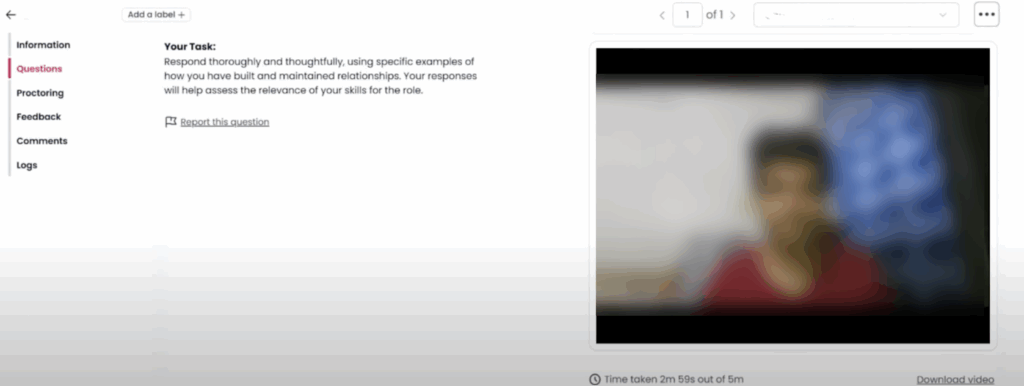
In Testlify, AI interviews come in three forms, so the format can match the job:
- Video AI interviews: Two-way conversations on camera for roles where presence and spoken communication matter, such as sales and customer-facing roles.
- Voice AI interviews: The same structure by voice only, for phone-heavy roles like inside sales, SDRs and support, where how a candidate sounds matters as much as what they say.
- Chat AI interviews: A text conversation that tests written communication, useful for chat support and roles where deals start with a message. See Chat AI interviews.
Testlify also runs classic one-way video and audio interviews for teams that want recorded answers without an AI interviewer. Behind every format, AI suggests competencies and scoring criteria from the job description, scores answers automatically and writes candidate insights: a per-skill breakdown, strengths and gaps, and suggested follow-up questions for the next round. A Reviewers Portal gives interviewers one place to watch answers, score and comment. See the video interviewing tool for the full feature set.
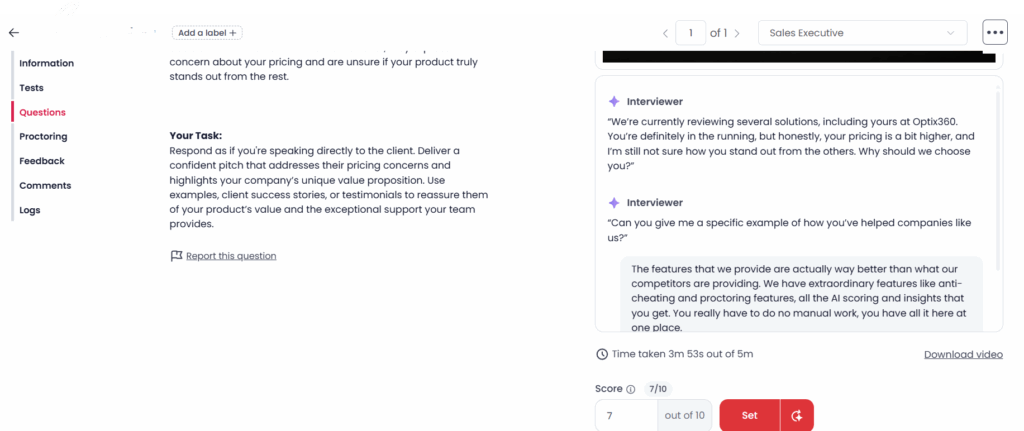
AI scoring is only as good as the criteria behind it. Write clear criteria per skill before switching AI on, and let reviewers see and override the evidence for every score.
How does video interviewing work for sales hiring?
Video interviewing works well for sales hiring because sales is a spoken, persuasive job: hearing a candidate handle an objection tells you more than a resume does. Sales teams use AI video interviews with role-play scenarios to screen SDRs, inside sales and account executives at volume, then use live video for final rounds with the sales leader.
Resume screens tend to reward experience over potential, and unstructured interviews lean on gut feel. A structured video interview puts every candidate through the same sales scenarios instead, for example:
- Objection handling: "A prospect says your price is 30% higher than a competitor's. What do you say?"
- Discovery: "Walk me through the first five minutes of a call with a new lead."
- Resilience: "Tell me about a quarter when you missed your target. What did you change?"
The channel should match the job. A field or enterprise rep is best judged on video, a phone-heavy SDR on voice, and a rep who sells over live chat or LinkedIn messages on a chat interview. Running two of the three gives a fuller picture of how a candidate pitches out loud and in writing.
Sales skill | Best interview channel | What reviewers look for |
|---|---|---|
Verbal clarity and persuasion | Video AI or Voice AI | Clear structure, a confident close |
Objection handling | Video AI or Voice AI | Acknowledges the concern, reframes value |
Listening and response fit | Voice AI | Answers the actual follow-up question |
Written communication | Chat AI | Tone, grammar, speed, clear next step |
Empathy and customer focus | Video AI | Asks before pitching, mirrors the buyer |
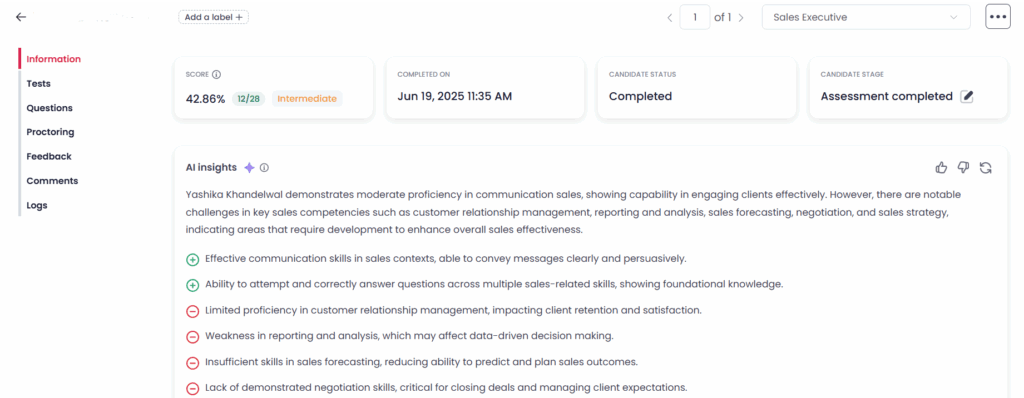
Skills tests filter for baseline knowledge before anyone records an answer. The sales executive test checks core skills like lead qualification, relationship management and objection handling, and the library also has sales manager and head of sales tests for coaching and leadership roles. Results, scores and recordings sync back to the ATS through Testlify's 100+ ATS and HRIS integrations, so recruiters do not switch between tools.
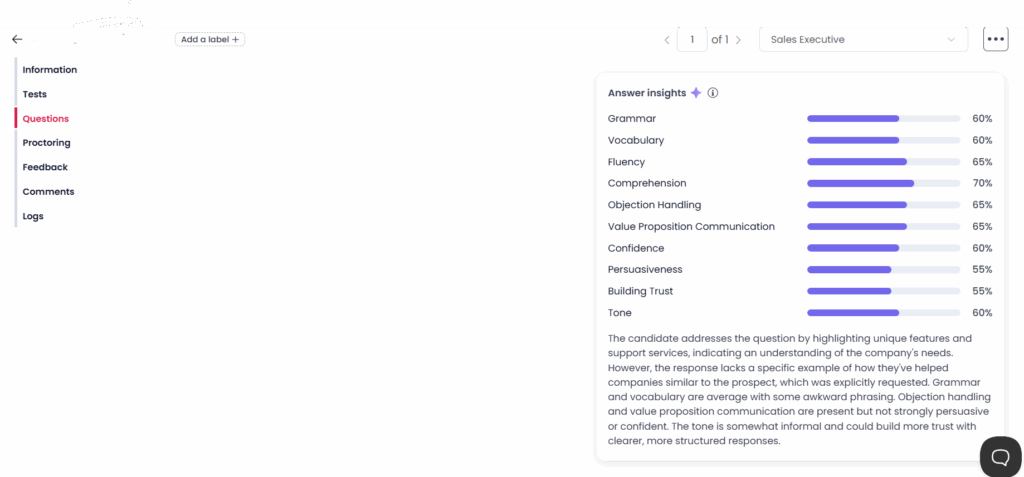
Reports let the hiring team compare candidates side by side, benchmark them against the whole applicant pool and share a link with the sales leader before the final round. See reporting and analytics for how the reports work.
How do candidates feel about video and AI interviews?
Candidates accept video interviews when they are clear and fair, and push back when AI is hidden or nobody follows up. According to the Greenhouse 2026 Candidate AI Interview Report, 70% of job seekers who faced an AI interview were never clearly told upfront that AI would evaluate them, and 38% have walked away from a hiring process because it included an AI interview.
The same report found that the most common trigger for walking away was a pre-recorded, AI-scored video interview with no human present (33%), and that 51% of candidates who completed an AI interview never heard back. Candidates are not asking for less AI: only 19% want less of it in hiring. They are asking for guardrails. The top requests were:
- A human option: the option to request a human interview (46%).
- Upfront disclosure: being told AI is used before the interview starts (44%).
- An explanation: knowing what the AI measures (39%).
- Human review: a person reviewing AI evaluations before any decision (38%).
What to tell candidates before a video interview:
- Format and length: live or recorded, how many questions, how long it takes and the deadline.
- What is scored and by whom: whether AI scores answers, what it looks at, and that a person reviews the result.
- Setup: a quiet, well-lit space, a working camera and microphone, a stable connection and a supported browser on a laptop or phone.
- Retakes and practice: whether retakes are allowed, and that a practice question comes first.
- Next steps: when they will hear back, whatever the outcome.
Good candidate experience also protects the employer brand. Greenhouse found that when AI interviews went well, 38% of candidates thought more positively of the employer.
What laws apply to video interviewing?
Video interviewing falls under privacy law everywhere and under AI hiring laws wherever AI analyzes or scores the interview. The main rules in 2026 are New York City's Local Law 144, the Illinois Artificial Intelligence Video Interview Act, and GDPR and UK GDPR for candidates in Europe and the UK. All of them expect notice, a lawful reason to record and limits on how long data is kept.
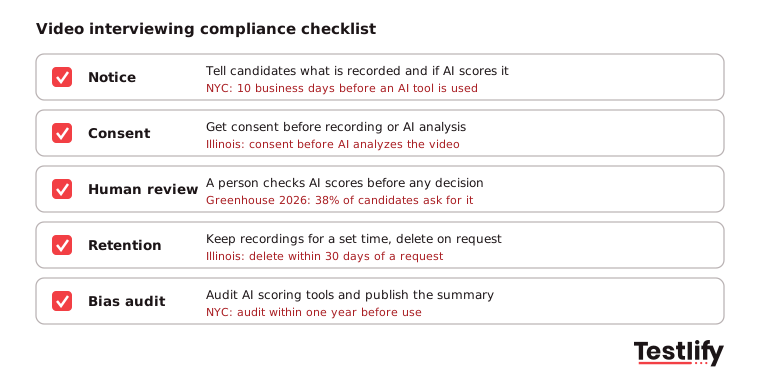
- New York City: Under Local Law 144, an employer cannot use an automated employment decision tool unless it had a bias audit within one year before use, a summary of the results is public, and candidates got notice 10 business days before use. Testlify's matching model completed a third-party NYC bias audit on June 16, 2023.
- Illinois: The Artificial Intelligence Video Interview Act (820 ILCS 42) requires employers that use AI to analyze recorded video interviews to tell applicants AI may be used, explain how it works and what it evaluates, and get consent first. Videos may only be shared with people needed to evaluate the applicant, and must be deleted within 30 days of a request, including copies. Employers that rely only on AI to choose who gets an in-person interview must report race and ethnicity data every year.
- Europe and the UK: Recording and analyzing interviews is processing personal data under GDPR and UK GDPR, so you need a lawful basis, a clear privacy notice, limited retention and a way for candidates to see or delete their data.
- Equal access: Offer an alternative, such as a phone or in-person interview, to candidates who cannot use video or need a reasonable accommodation.
- What you decide on: Never base decisions on appearance, accent, background or other things visible on video that are not related to the job.
Key takeaway: Disclose AI use upfront, get consent before recording, keep a person reviewing every rejection and delete recordings on a fixed schedule. Those four habits cover most of what the laws above ask for.
How do you stop fraud in video interviews?
Fraud in video interviews is stopped with identity checks, proctoring and question design that makes reading a script hard. Remote interviews make it easier for someone to read AI-written answers from a second screen, get help off camera or have another person interview in their place, so checks need to run during the interview, not after.
- Verify identity: Match a photo ID to the candidate's face at the start, and again at later stages.
- Watch the session: Use webcam snapshots, tab and window tracking, full-screen enforcement and face detection to flag outside help.
- Check the voice: Speech authenticity detection flags synthetic or played-back voices in voice and video answers.
- Ask follow-ups: Follow-up questions based on the candidate's own answer are much harder to script than a fixed question.
Testlify includes 20+ proctoring checks, AI-assistance detection, optional photo ID verification with face match, and speech authenticity detection for Voice AI and Video AI interviews. See anti-cheating and proctoring and this guide to prevent impostors in video interviews.
How do you choose video interviewing software?
Choosing video interviewing software starts with the format you need most: one-way and AI interviews for screening at volume, live video for later rounds, or both in one tool. Then compare tools on structure, scoring, integrity checks, candidate experience, integrations, and security and compliance, and test the shortlist on one real role before you buy.
What to check | Why it matters | Question to ask the vendor |
|---|---|---|
Formats | One tool for screening and later rounds | Do you support live, one-way and AI interviews? |
Structured questions | Same questions and criteria for every candidate | Can we write our own questions, rubrics and time limits? |
Scoring with evidence | Reviewers trust scores they can check | Can a reviewer see the answer behind every score and override it? |
Integrity checks | Remote interviews invite outside help | How do you detect impersonation, AI help and synthetic voice? |
Candidate experience | Drop-off costs you good candidates | Does it run in the browser on a phone, with a practice question? |
Languages | Global and multilingual hiring | Which languages can candidates answer in? |
Scheduling and reminders | Fewer no-shows in live rounds | Does it sync with our calendars and send reminders? |
Reliability and support | Bad video or slow help loses candidates | How does video hold up on slow connections, and how fast is support? |
ATS integration | No manual export | Do scores and recordings sync back to our ATS? |
Security and retention | Recordings are personal data | Where is data stored, for how long, and can we delete on request? |
Ask hard questions about data. The UK ICO's audit of AI recruitment tools in November 2024 made almost 300 recommendations to providers, after finding tools that let recruiters filter out candidates by protected characteristics and kept personal data indefinitely.
Testlify covers these points in one platform: one-way video and audio interviews and Video AI, Voice AI and Chat AI interviews alongside 3,500+ tests, 25+ question types and 15+ languages; scoring with AI insights and a Reviewers Portal; 20+ proctoring checks; two-way sync with 100+ ATS and HRIS tools; and ISO 27001, SOC 2 Type II, GDPR and CCPA compliance with a choice of data region.
Ready to try video interviewing with Testlify?
Testlify lets you build a one-way or AI video interview from your job description, add a skills test from the test library and get a ranked shortlist with the evidence behind every score. Start a 7-day free trial, no credit card required, and run your first video interview on a real role.
Frequently asked questions

Director of Marketing
Akash Patange is the Director of Marketing at Testlify, where he works closely with HR leaders and recruiters to help organizations improve hiring outcomes. He writes about talent assessment, recruitment technology, and data-driven hiring practices.
LinkedInRelated resources
View all
HR & recruitment
Recruitment Management System: A 2026 Guide for HR

HR & recruitment
How to build the right customer support team structure for your business?

HR & recruitment
Interview questions to ask while hiring a TypeScript developer
HR & recruitment
Top 35 R Developer interview questions (2026)

HR & recruitment
Interview questions to ask while hiring an ETL developer

HR & recruitment
Interview questions to ask while hiring a NoSQL developer
Get started.
Hire on proof, not resumes.
Run your first skills-based assessment free — no credit card required.