
Technical skills assessment: how to assess technical skills in 2027
A practical guide to technical skills assessments: types, skills to test by role, scoring, fairness, AI use and choosing the right tool.

A resume can say a candidate knows SQL, but it cannot show whether they can use it on a real problem. A technical skills assessment is a structured test that closes that gap: candidates do a version of the real work and everyone is scored on the same criteria.
This guide shows TA leaders, recruiters and HR teams how to run one. You will see the main types, which skills to test by role, how to score answers, keep tests fair and choose a tool.
TL;DR:
- A technical skills assessment is a structured test where candidates do a version of the real technical work. Everyone is scored on the same criteria.
- Test the three to five skills the role uses in its first six months. Write the list with the hiring manager and a subject-matter expert.
- Mix two or three formats by seniority. Juniors get short coding or knowledge tests, mid-level gets realistic tasks, seniors get system design and trade-offs.
- Keep screening tests to 30 to 60 minutes, rarely over 90. Save 1 to 3 hour work samples for a few finalists.
- Score with a written rubric covering correctness, approach, quality and communication. Weight correctness at 50% for juniors and 30% for seniors.
- Set an AI policy before testing. Stack Overflow's 2025 survey found 84% of developers use or plan to use AI tools.
- Never let one test decide alone. Pair it with a structured technical interview, and check scores against performance after six months.
 ChatGPT
 Gemini
 Claude
 Grok
 Perplexity
What is a technical skills assessment?
A technical skills assessment is a pre-employment test that measures the hard skills a job needs, using tasks that look like the work itself. Typical formats are coding challenges, knowledge tests, software simulations, practical assignments and structured technical interviews, each scored against criteria the team agrees before testing starts.
Technical skills are the job-specific abilities a person learns and applies with tools: programming languages, databases, cloud platforms, networking, spreadsheets, CAD software, lab equipment. Soft skills such as communication sit alongside them, and many teams test both, but a technical skills assessment focuses on the first group.
A good assessment does three things at once. It confirms the experience a candidate claims.
It also shows how candidates handle an unfamiliar problem and gives everyone the same chance to prove it. For a broader look at the category, see what technical assessments are and why they matter.

Why do technical skills assessments matter in hiring?
Technical skills assessments matter because resumes and unstructured interviews are poor evidence of technical ability. A test built from the real job shows who can do the work, cuts weak applicants before interview time is spent on them, and gives every candidate the same, comparable chance to prove their skills.
The pressure to get this right has not eased. SHRM's 2025 Talent Trends survey found that 69% of organizations still struggle to fill full-time roles, and AI use in HR tasks rose to 43% in 2025 from 26% a year earlier.
The main benefits for a hiring team:
- Job relevance: Candidates are measured on the skills the role uses today, not on job titles or degrees.
- Fewer skill gaps after hiring: Testing closes the gap between what a candidate claims and what they can actually do.
- Hidden talent: People without the usual background can show skills their resume never mentions, which widens the pool.
- Faster shortlists: Early testing filters out applicants who lack the basics, so interviewers spend time only on strong candidates.
- Fairer comparisons: Standard tasks and scoring reduce the influence of gut feel and first impressions.
- Better quality of hire: Teams can compare assessment scores with later performance and improve the test over time.
What are the types of technical skills assessments?
Technical skills assessments come in six main types: coding tests, knowledge tests, software simulations, practical assignments or work samples, case studies and structured technical interviews. Most teams combine two or three, because each type shows a different side of a candidate's ability.
Type | What it shows | Best for | Typical time |
|---|---|---|---|
Coding test | Correct, working code in a real language | Developers, data engineers, QA automation | 30 to 90 minutes |
Knowledge test (multiple choice, short answer) | Breadth of knowledge of a tool or concept | Screening large applicant pools, IT and support roles | 10 to 30 minutes |
Software simulation | Skill inside the actual tool, such as Excel or a terminal | Analysts, finance, IT support, office roles | 15 to 45 minutes |
Practical assignment or work sample | How a candidate handles a slice of the real job | Mid-level and senior hires, data and design roles | 1 to 3 hours, kept short |
Case study | Reasoning, trade-offs and how they explain them | Architects, analysts, consultants | 30 to 60 minutes |
Structured technical interview | Problem-solving approach, depth, communication | Final rounds, senior and lead roles | 45 to 60 minutes |
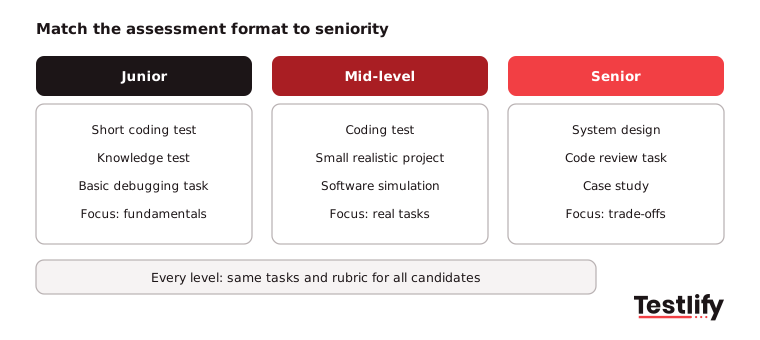
Seniority changes the mix. Junior candidates are best tested on fundamentals and learning speed with short coding or knowledge tests.
Mid-level candidates should face realistic tasks and small projects. Senior candidates need system design, code review and a live discussion of trade-offs, since a timed puzzle tells you little about how they lead technical work.
Which technical skills should you assess for each role?
The technical skills to assess for each role come from the job itself: list the tools and problems the person will face in the first six months, then test the three to five that matter most. The table below shows common starting points for technical roles inside and outside software teams.
Role | Core technical skills to test | Good assessment format |
|---|---|---|
Front-end developer | JavaScript or TypeScript, React or a similar framework, HTML and CSS, accessibility | Coding test plus a small UI task |
Back-end developer | Python, Java, Go or Node.js, APIs, SQL, testing | Coding test plus a multi-file project |
Data analyst | SQL, Excel or Google Sheets, a BI tool, statistics basics | Spreadsheet simulation plus SQL test |
Data scientist or ML engineer | Python, data wrangling, model evaluation, cloud ML services | Practical assignment on a real dataset |
DevOps or cloud engineer | Linux, AWS or Azure, Docker, Terraform, CI/CD | Knowledge test plus a hands-on scenario |
QA engineer | Test design, automation frameworks, bug reporting | Coding test plus a test-case writing task |
IT support specialist | Operating systems, networking basics, ticket triage | Knowledge test plus troubleshooting simulation |
Cybersecurity analyst | Network security, threat analysis, incident response | Scenario-based case study |
Mechanical or electrical engineer | CAD, engineering principles, safety standards | Role-specific knowledge test plus case study |
Two rules keep this list honest. First, write it with the hiring manager and a subject-matter expert on the team, not from a generic list of in-demand skills.
Second, test the skills the role uses now, and update the list when the stack changes. You can browse ready-made role tests in the Testlify test library.
How do you assess technical skills, step by step?
Assessing technical skills works best as a seven-step process: define the role, choose the formats, write the scoring rubric, set a fair time budget, test early in the funnel, follow up with a structured technical interview, and decide on the evidence. Each step fixes a common reason technical hiring goes wrong.
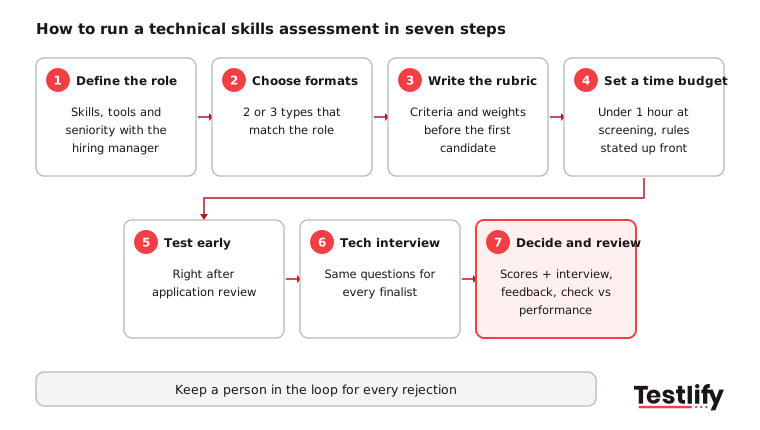
- Define the role and seniority: Agree with the hiring manager on the must-have skills, the tools, and the level expected. A clear definition lets recruiters and hiring managers screen against the same picture.
- Choose the formats: Pick the two or three types from the table above that match the role and seniority. A coder gets a coding test; an analyst gets a spreadsheet and SQL task.
- Write the scoring rubric first: Decide what a strong, acceptable and weak answer looks like before the first candidate starts. The rubric section below shows how.
- Set a fair time budget: Keep early screening tests under an hour and tell candidates how long the test takes, what it covers and whether tools are allowed.
- Test early: Place the assessment right after application review, so interviewers only meet candidates who have shown the basics.
- Follow up with a structured technical interview: Ask every finalist the same questions about how they solved the test, where they would improve it, and a recent project they led. Questions prepared by subject-matter experts, such as "How do you approach a task you are unsure of?" or "Which languages have you used in production?", also confirm the resume.
- Decide on the evidence, then review: Compare candidates on rubric scores, interview notes and benchmarks, give every candidate short feedback, and check test scores against performance after six months.
Pro tip: Run the test on two or three people already doing the job before you send it to candidates. If your own strong performers struggle or need far longer than the time limit, the test is wrong, not the candidates.
How should you score a technical skills assessment?
Scoring a technical skills assessment means rating every answer against a written rubric with weighted criteria, not just checking whether the final output is correct. A practical rubric covers four things: correctness, problem-solving approach, code or work quality, and how clearly the candidate explains their choices.
Criterion | What a strong answer shows | Suggested weight (junior) | Suggested weight (senior) |
|---|---|---|---|
Correctness | Works, handles edge cases, passes tests | 50% | 30% |
Approach | Breaks the problem down, picks a sensible method | 25% | 30% |
Quality | Readable, maintainable, tested, secure | 15% | 25% |
Communication | Explains trade-offs and assumptions clearly | 10% | 15% |
Use a simple 1-4 scale for each criterion, with a short description of each level, so two reviewers reach the same score. Automated scoring handles correctness well for coding and knowledge tests; a person should still review approach and quality on practical tasks.
Decide in advance whether you will use a pass mark or rank candidates. A pass mark suits high-volume screening, while ranking against a benchmark suits small, competitive shortlists.
For reading the results, see how to interpret technical assessment results.
How do you keep technical assessments fair and cheat-resistant?
Technical assessments stay fair when every task is job-related, every candidate gets the same conditions and accommodations, and the rules on outside help are clear. They stay cheat-resistant when the format, the questions and proctoring make it hard to pass with someone else's work.
Fairness: Use tasks tied to the real job and avoid trick puzzles, cultural references or tooling assumptions that favor one background. Under US law, the EEOC's guidance on employment tests says tests must be job-related and consistent with business necessity.
Employers must also offer reasonable accommodations in how tests are given. Track pass rates across groups and fix any task that screens out one group without a job reason.
AI tools: Decide your policy on AI before you test. The Stack Overflow 2025 Developer Survey found that 84% of developers use or plan to use AI tools, while 46% distrust the accuracy of what those tools produce.
Banning AI entirely may test a workflow nobody uses, and allowing it without checks hides who understands the code. Either allow AI and score how candidates check and improve its output, or block it and say so up front, then proctor the rule you chose.
Integrity: For remote tests, combine question randomization, non-searchable questions, copy and paste controls, tab and screen monitoring, webcam snapshots and plagiarism checks on code. Keep a person in the loop for flagged sessions instead of rejecting automatically.
More on remote setups in remote technical skills assessments.
Candidate time: Long unpaid take-home projects are a common complaint in recruiter and developer forums. Keep screening tests short, save longer work samples for the final few candidates, and tell people how their time will be used.
What mistakes should you avoid in a technical skills assessment?
The most common mistakes in a technical skills assessment are testing generic puzzles instead of the real job, scoring without a rubric, making the test too long, relying on one test alone, and never updating the questions. Each one costs good candidates or lets weak ones through.
Mistake | Why it hurts | What to do instead |
|---|---|---|
Generic puzzles or trivia | Measures test practice, not job skill | Use tasks from the role's real work |
No scoring rubric | Reviewers disagree and bias creeps in | Write criteria and weights before testing |
Tests over 90 minutes at the first stage | Strong, busy candidates drop out | Short screen first, longer task for finalists |
One test as the only decision | Misses approach, teamwork and growth | Pair with a structured technical interview |
Questions never refreshed | Answers leak online and the stack moves on | Review the question set every 6 to 12 months |
No AI policy | Candidates guess the rules; results are not comparable | State what is allowed and proctor it |
The upside of getting this right is a much wider pool. LinkedIn's Economic Graph research on skills-based hiring estimates that hiring on skills rather than past job titles could expand talent pools 6.1 times globally, and 8.2 times for AI roles.
What should you look for in technical skills assessment tools?
Technical skills assessment tools should cover the roles you hire for, run tasks in a realistic environment, score answers consistently, protect test integrity and fit into your ATS. Test any tool on one live role before you commit, and check the candidate's view as carefully as the recruiter's.
Use this checklist when you compare technical skills assessment platforms:
- Role coverage: Ready-made tests for your languages, frameworks and non-software technical roles, plus custom questions.
- Realistic environment: A real code editor with multi-file projects, software simulations and support for the languages you use.
- Scoring and reports: Automated scoring with a per-skill breakdown, weighted scoring, benchmarks and shareable reports.
- Integrity: Proctoring, AI-assistance detection, plagiarism checks and question randomization, with settings you control.
- Candidate experience: Clear instructions, sensible time limits, mobile-friendly tests where it makes sense, and multiple languages.
- Integrations: Two-way sync with your ATS so scores land where recruiters work.
- Compliance and security: An independent bias audit, data protection certifications and data residency options.
Key takeaway: A technical skills assessment is only as good as its link to the real job. Start from the role, score with a rubric, keep it short and fair, and use the results alongside a structured interview, never as the only signal.
How does Testlify help you run technical skills assessments?
Testlify lets hiring teams build a technical skills assessment from a job description, run it in a proctored environment and get a ranked, scored shortlist with the evidence behind every score. Tests, coding tasks and AI interviews sit in one platform.
- Tests for every technical role: 3,500+ ready-made tests, including programming, software skills, engineering and cognitive ability tests, with beginner, intermediate and advanced levels. The AI test builder creates a custom assessment from your job description.
- Real coding environment: Coding tests support 45+ programming languages, with auto-graded single-file questions and multi-file projects in a proctored VS Code environment. See how teams use it for developer hiring.
- 25+ question types: Coding, practical tasks, file upload, Google Sheets and Microsoft Excel tasks, video and audio answers, and Chat AI or Voice AI interviews.
- Integrity built in: 20+ proctoring checks, including tab monitoring, webcam snapshots, copy and paste blocking and AI-assistance detection, as part of Testlify's anti-cheating and proctoring features.
- Scoring you can explain: Automated scoring, per-skill breakdowns, weighted scoring, benchmarks and AI-written strengths and gaps for each candidate.
- Fits your stack: Two-way sync with 100+ ATS and HRIS tools, including Workday, Greenhouse, Lever and SAP SuccessFactors. See all ATS and HRIS integrations.
- Audited and global: Testlify's matching model completed a third-party bias audit under New York City Local Law 144, and tests run in 15+ languages. Read about the NYC bias audit.
Testlify is rated 4.7 on G2 and named a Leader in Technical Skills Screening, and more than 1,500 talent teams use it.
Ready to run your first technical skills assessment?
Build a role-specific technical skills assessment from your own job description and see a ranked shortlist with the evidence behind every score. Start a 7-day free trial of Testlify, no credit card required, or book a demo to see it on one of your open technical roles.
Frequently asked questions (FAQs)

Human Resources Lead
Snehi Parmar leads People at Testlify, owning hiring, culture, performance, and retention for a 90-person team. She writes on practical HR strategy and building people processes that scale.
Related resources
View all
Candidate assessment
Hiring technical talent: a step-by-step guide for 2026

Candidate assessment
What tools support voice responses for language proficiency testing?

Candidate assessment
Comment les évaluations intégrées à l'ATS fluidifient-elles les processus de recrutement ?
Candidate assessment
How to assess financial modeling and accounting skills pre-hire?

Candidate assessment
How do assessment libraries cover niche skills?

Candidate assessment
What’s the best way to combine psychometric tests with skills tests?
Get started.
Hire on proof, not resumes.
Run your first skills-based assessment free — no credit card required.