
Online coding assessment tools: how to choose and run them
How to pick and run online coding assessment tools for developer hiring: tool types, key features, AI rules, engagement and demo checks.

Online coding assessment tools let hiring teams test a developer's programming skills in a browser, with auto-graded tasks, integrity checks and a scored report, so every candidate takes the same test from wherever they live. Picking one is less about the longest feature list and more about matching the tool to your roles, your AI policy and your candidates.
 ChatGPT
 Gemini
 Claude
 Grok
 Perplexity
TL;DR
- Online coding assessment tools help recruiters evaluate developers' programming skills through standardized, browser-based tests before technical interviews.
- The four main assessment formats are coding screening tests, take-home projects, live coding interviews, and AI-assisted tasks.
- Look for features such as multi-language coding environments, automated scoring, hidden test cases, AI monitoring, proctoring, and ATS integrations.
- Keep initial coding assessments between 30 and 90 minutes, communicate AI usage rules clearly, and give candidates enough time to complete them.
- Use assessment results alongside structured interviews and hands-on tasks rather than relying on test scores alone.
- Testlify brings coding assessments, live coding interviews, technical and soft skills tests, cognitive assessments, and proctoring together in one platform, helping recruiters evaluate candidates across different roles without juggling multiple tools.

What are online coding assessment tools?
Online coding assessment tools are platforms that run programming tests over the web: the candidate writes and runs code in a browser IDE, the platform checks it against test cases, and the hiring team gets a score per skill. They suit any developer hiring, and they are built for distributed teams.
That matters because developer work is no longer tied to an office. The Stack Overflow Developer Survey 2025 found that 32.4% of developers work fully remote and about 37% work hybrid, with only 17.9% fully in person. If your engineers are spread out, your candidates are too, and a shared, scored test is the fairest way to compare them.
A good tool does three jobs for the hiring team:
- Screens on skill: it shows who can actually write working code before an engineer spends an hour in an interview.
- Keeps it consistent: every candidate gets the same task, time limit and scoring, which makes comparisons fair and easier to defend.
- Saves engineer time: auto-grading and ranked reports mean engineers only review the candidates worth a conversation.
What types of online coding assessment tools are there?
Online coding assessment tools fall into four types: short screening tests, take-home projects, live pair-coding interviews, and AI-assisted tasks. Many platforms now offer more than one, so the real choice is which formats you need at which stage.
Type | What the candidate does | Best stage | Typical length | Main trade-off |
|---|---|---|---|---|
Screening test | Solves short coding and multiple-choice tasks in a browser IDE, auto-graded | First screen, high volume | 30 to 90 minutes | Fast and fair, but less realistic than project work |
Take-home project | Builds or fixes a small multi-file project in their own time | After the screen, senior roles | 2 to 4 hours | Realistic, but long tasks lose candidates |
Live pair coding | Codes with an engineer in a shared editor over video | Final technical round | 45 to 60 minutes | Shows how they think and talk, but needs scheduling |
AI-assisted task | Works on a real task with an AI assistant allowed and logged | Any stage, newer roles | 45 to 90 minutes | Mirrors daily work, but needs a clear scoring rubric |
Unlike niche coding assessment tools, Testlify offers an all-in-one skills assessment and interviewing platform. It combines coding assessments with technical, cognitive, language, and soft skills tests, along with video interviews and other assessment formats. This allows recruiters to evaluate candidates across different roles using a single platform, without switching between multiple tools.
For a ranked comparison of named vendors, see our list of top coding assessment software for recruiters.
Which features matter most in a coding assessment tool?
A coding assessment tool earns its place with eight features: a real coding environment, coverage of your languages, auto-grading with hidden test cases, a clear AI policy, integrity signals, a good candidate experience, ATS sync, and useful reporting. Check each one against a real role, not a sales deck.
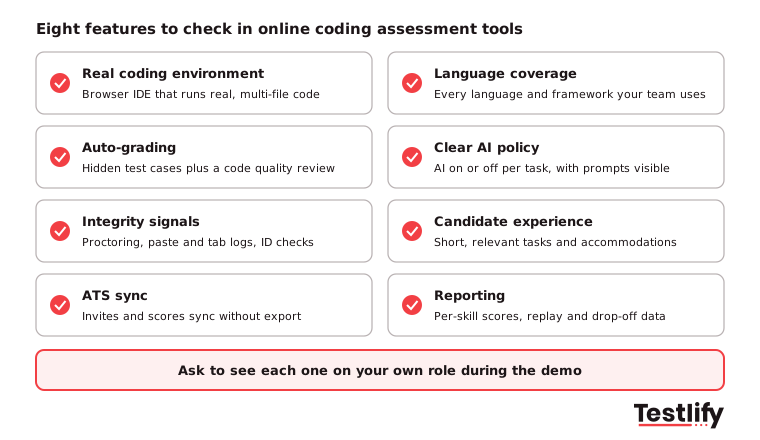
- Real coding environment: Candidates should write, run and debug code in an editor that feels like the one they use at work, including multi-file projects for mid-level and senior roles.
- Language coverage: List every language and framework in your stack today and the ones you plan to hire for next year, then check each is supported.
- Auto-grading: Hidden test cases catch code that only works on the visible examples. A reviewer should still be able to read the code for quality and structure.
- Clear AI policy: You should be able to switch AI help on or off per task and see what the candidate asked an assistant, if it was allowed.
- Integrity signals: Copy-paste tracking, tab and focus logs, webcam snapshots, and ID checks matter more when nobody is in the room.
- Candidate experience: Short instructions, a practice question, accessible design, and a way to request accommodations.
- ATS sync: Invites, status changes, and scores should move to and from your applicant tracking system without exports.
- Reporting: A score per skill, the code behind it, and a view of where candidates drop off.
Design matters as much as the tool. Our guide to designing coding assessments covers how to turn a job description into tasks that predict on-the-job work.
How do online coding assessment tools handle AI and cheating?
Online coding assessment tools handle AI in two ways: they either allow an AI assistant and record how the candidate uses it, or they block it and collect integrity signals that suggest outside help. The right setting depends on the task, and many teams use both in one test.
The pressure is real. In the Stack Overflow Developer Survey 2025 AI section, 84% of respondents said they use or plan to use AI tools in their development work, and 50.6% of professional developers use them daily. The same survey found 46% distrust the accuracy of AI output, which is a good reason to test whether candidates can check and fix what an assistant writes.
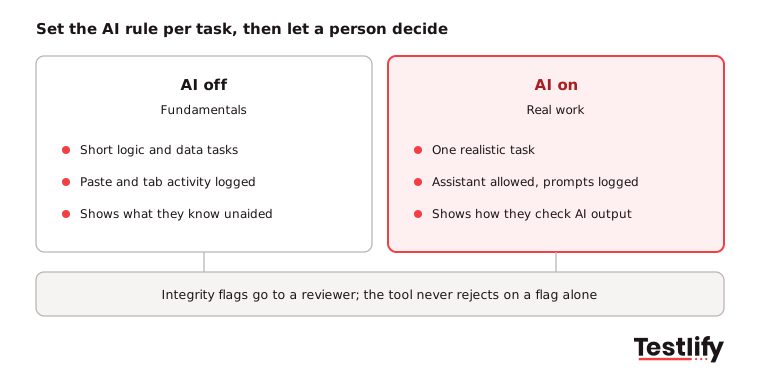
A practical policy for 2026:
- Fundamentals with AI off: Use short tasks on core logic and data structures where AI help is blocked and copy-paste is tracked.
- Real work with AI on: Use one realistic task where an assistant is allowed, then score the result and how well the candidate reviewed it.
- Tell candidates the rule: State in the invite which tasks allow AI. Most integrity problems start with unclear rules.
- Signals, not verdicts: Treat tab switches, pasted events, or a second face on camera as evidence for a reviewer. A person decides; the tool never rejects on a flag alone.
Pro tip: Follow every screening test with a short live round where the candidate explains their own code. Someone who did not write it rarely survives five minutes of questions about it.
What do remote coding assessment solutions need to get right?
Remote coding assessment solutions need to work for a candidate in another time zone, on an unknown laptop and internet connection, with nobody to ask for help. Five details decide whether they do: the completion window, device checks, clear instructions, identity checks, and accommodations.
- Completion window: Give candidates 3 to 5 days to start and a fixed timer once they begin. A Friday deadline set in San Francisco is a Saturday deadline in Bengaluru.
- Device and connection check: A system check before the test saves candidates from losing a timed attempt to a blocked webcam or a slow connection.
- Instructions in plain language: Explain the format, the number of tasks, the timer, the AI rule and what is recorded. Offer the instructions in the candidate's language where you can.
- Identity checks: For remote roles with access to code and customer data, an ID check and face match confirm the person taking the test is the person you will hire.
- Accommodations: Under US disability law, the ADA.gov guidance on hiring technology says employers must provide reasonable accommodations during hiring, tell applicants what technology is used and how they are evaluated, and give a clear way to ask for an accommodation such as extra time.
For the wider process around the test, see our guide to remote hiring.
How do you improve candidate engagement with coding assessments?
Candidate engagement with coding assessments improves when the test is short, clearly relevant to the job and explained before the candidate starts. Developers abandon tests that feel like unpaid work or a puzzle contest, and every drop-out is a candidate you paid to attract.
Hiring is still hard, which makes each finished test valuable. SHRM's 2025 Talent Trends report found that nearly 70% of organizations still struggle to recruit for full-time roles.
- Keep it short: Aim for 30 to 60 minutes for a first screen and no more than 90. Save longer project work for candidates who passed the screen.
- Make it look like the job: A task based on your real stack, such as fixing a bug in a small API, feels fair. Abstract puzzles feel like a hurdle.
- Write a human invite: Say why you use the test, how long it takes, what happens next, and when they will hear back.
- Show a practice question: A sample task lets candidates learn the editor before the timer starts.
- Close the loop: Send every candidate an outcome, and share a short score summary with those who ask.
- Watch the drop-off: Track where candidates start and stop. A task where many candidates quit is usually too long or unclear.
To decide which format fits each stage, see our guide to types of coding assessments and how to choose one.
How do you run an online coding assessment step by step?
Running an online coding assessment takes six steps: define the skills, build the test, invite candidates, run it with integrity checks, score and shortlist, and then follow up with a live round. The first role takes the most setup; later roles reuse the same template.
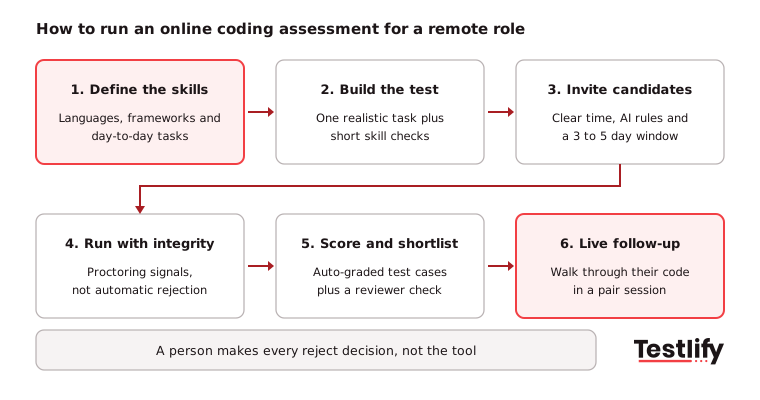
- Define the skills: Agree with the hiring manager on the languages, frameworks and daily tasks the role needs, and which of them are must-haves on day one.
- Build the test: Combine one realistic coding task with a few short skill checks. Set the timer, the AI rule and the passing score before anyone takes it.
- Invite candidates: Send invites from your ATS with a clear window, the expected time and a contact for questions.
- Run with integrity: Switch on the proctoring checks that fit the role, and tell candidates what is recorded.
- Score and shortlist: Let auto-grading rank candidates, then have an engineer read the code of everyone near the cut-off.
- Follow up live: Invite the shortlist to a pair-coding session where they extend or explain their own solution.
When results come in, use our guide on how to evaluate coding assessments to set cut-off scores and review borderline candidates.
What should you check in a coding assessment demo?
A coding assessment demo is worth your time only if the vendor builds a test for one of your real roles while you watch. Bring a job description and ask to see the candidate view, the scoring, the integrity report and the ATS sync, not a pre-recorded tour.
Ask these questions in every coding assessment demo:
- Can you build a test for this job description now, and how long does it take?
- Does the editor support our languages, multi-file projects and the frameworks we use?
- How do hidden test cases work, and can our engineers add their own?
- Can we allow AI on one task and block it on another, and what does the report show?
- Which integrity checks are included, and which cost extra per candidate?
- What does the candidate see from invite to result, and how are accommodations requested?
- How do scores reach our ATS, and how long does the integration take to set up?
- How is the tool priced: per candidate who starts, per seat or a flat fee?
Key takeaway: The best online coding assessment tools are the ones your engineers trust and your candidates finish. Judge every demo on a real role, your languages and your AI rules.
How do you know your coding assessment tool is working?
A coding assessment tool is working when more of the candidates it passes go on to receive offers, engineers spend less time in early interviews and new hires perform well. Track four numbers from the first role you run, and review them after one quarter.
Metric | What it tells you | Healthy direction |
|---|---|---|
Completion rate | Whether the test length and invite work for candidates | Up, or stable as volume grows |
Interview-to-offer rate | Whether the test passes the right people to engineers | Up |
Engineer hours per hire | How much screening time the tool saves | Down |
New hire performance at 6 months | Whether test scores match on-the-job results | Higher for high scorers |
Most teams find the last number the hardest. The LinkedIn Future of Recruiting 2025 report found that 93% of talent acquisition professionals say accurately assessing skills is crucial to quality of hire, yet only 25% are highly confident they can measure quality of hire at all. Linking assessment scores to performance reviews closes that gap.
How does Testlify support online coding assessments?
Testlify runs coding tests inside the same platform as its role, cognitive and language tests, so one assessment can check a developer's code and the skills around it. Hiring teams build a test from a job description, invite candidates from their ATS and get a ranked, scored shortlist.
- Coding in 45+ programming languages: Candidates code in a real-time IDE, and multi-file projects in Node.js, Python and Java run in a proctored VS Code environment. See Testlify coding tests.
- Auto-grading and flexible timing: Tests are auto-graded, durations can be 30, 60 or 90 minutes or a custom length, and test cases can be uploaded in bulk.
- Live coding interviews: Live coding and pair-programming interviews cover the follow-up round in the same platform.
- Integrity built in: 20+ proctoring checks, including AI assistance detection, copy-paste tracking, tab proctoring and webcam snapshots, with photo ID verification and face match available per attempt. See anti-cheating and proctoring.
- More than code: 3,500+ tests and 25+ question types, in 15+ languages, plus a drop-off report across multi-stage assessments.
- Fits your stack: Two-way sync with 100+ ATS and HRIS tools, including Greenhouse, Lever, Workday and SmartRecruiters. See integrations.
Ready to try an online coding assessment?
Build a coding test for one of your open roles and see the candidate view and the scored report for yourself. Start a 7-day free trial of Testlify, no credit card required, or book a demo to see a test built for your own role.
Frequently asked questions
Related resources
View all
Tech recruitment
How to use coding assessments to create a talent pipeline

Tech recruitment
Interview question to hire a marketing strategist

Tech recruitment
How to hire PHP developers: skills, cost, interview questions and process

Tech recruitment
How to Hire Cybersecurity Experts in 2026: A Complete Guide

Tech recruitment
7 Tips to hire a writer for your business

Tech recruitment
How to hire a cloud engineer: skills, tests and interview questions
Get started.
Hire on proof, not resumes.
Run your first skills-based assessment free — no credit card required.