
How to conduct effective pre-employment assessments in 2027
An 8-step guide to pre-employment assessments: choose the right tests, pilot them, set cut scores, block AI cheating and stay compliant.

Pre-employment assessments are standardized tests that candidates complete before an offer, so hiring teams can compare everyone on the skills the job needs instead of on resumes and interview impressions. Run well, they shorten shortlists, cut bad hires and give you a record you can defend. Run badly, they add a step candidates abandon and scores nobody trusts.
TL;DR:
- Pre-employment assessments work when every test maps to a skill the job needs, every candidate gets the same test, and the pass mark is set before anyone applies.
- Use two or three assessment types per role, not one long battery. A skills test plus one cognitive or situational judgment test covers most roles.
- Pilot the assessment on current employees whose performance you know before you send it to a single candidate.
- Keep the candidate-facing part under 45 minutes for most roles, and say upfront how long it takes and how results are used.
- Candidates now use AI to answer tests: a Gartner survey cited by SHRM found 39% used AI when applying, and 29% of those used it on assessment answers. Turn on proctoring.
- Treat the score as one input. A person reviews borderline and rejected candidates, which also keeps you in line with NYC Local Law 144 and the EU AI Act.
- Check completion rate, pass rate by group and new-hire performance every quarter, and retire any test that no longer predicts who does well.
 ChatGPT
 Gemini
 Claude
 Grok
 Perplexity
What are pre-employment assessments?
Pre-employment assessments are structured tests used during hiring to measure whether a candidate has the skills, knowledge and working style a specific job needs. Every candidate for the role takes the same test under the same conditions, and answers are scored against criteria agreed in advance, which makes candidates directly comparable.
You will also see them called an employment assessment, a pre-employment evaluation or a pre-hire test. They usually sit after the application and before interviews, so the interview time goes to the candidates most likely to succeed. Common formats include skills tests, cognitive ability tests, personality questionnaires, situational judgment tests and work samples.
A pre-placement assessment is related but different. In many countries, that term means a health or fitness check after a conditional offer, which follows its own rules and is not covered here.

Why do hiring teams use pre-employment assessments?
Hiring teams use pre-employment assessments to screen more applicants in less time, compare candidates fairly and raise the share of hires who succeed in the role. A resume tells you what someone claims. An assessment shows what they can do, before you invest interview hours in them.
The pressure on recruiters has not eased. SHRM's 2025 Talent Trends survey found that 69% of organizations still struggle to fill full-time roles, and that AI use in HR tasks rose to 43% in 2025 from 26% a year earlier. Teams are being asked to hire faster with the same headcount.
- Faster shortlists: Candidates take the assessment on their own time, and scoring is automatic, so a ranked shortlist is ready the day the role closes.
- Fairer comparisons: Everyone answers the same questions and is scored the same way, which reduces the pull of school names, accents and gut feel.
- Fewer wasted interviews: Hiring managers only meet people who have already shown the core skill.
- Better quality of hire: You hire on evidence of the work, not on how well someone interviews.
- A defensible record: Job-related tests and stored scores show why each decision was made if it is ever questioned.
Which types of pre-employment assessments should you use?
The right pre-employment assessments depend on what the role needs on day one. Most roles are covered by two or three types: a skills or job knowledge test for the hard skills, plus one cognitive, situational judgment or personality test for how the person thinks and works. Adding more rarely improves the decision and raises drop-off.
Assessment type | What it measures | Best for | Watch out for |
|---|---|---|---|
Skills test | Hands-on ability: coding, Excel, writing, accounting | Almost every role | Must match the tools the team really uses |
Job knowledge test | Facts and rules a role needs from day one | Regulated or technical roles | Dates fast as tools and rules change |
Cognitive ability test | Reasoning, numeracy, learning speed | Graduate, analyst and fast-changing roles | Use alongside job-specific tests, not alone |
Situational judgment test | Choices in realistic work scenarios | Customer-facing roles, team leads | Scenarios must reflect your workplace |
Personality and culture | Working style and preferences | Team fit conversations | Never a pass or fail gate on its own |
Work sample or simulation | A slice of the real job | Senior and specialist roles | Keep it short and paid if it is long |
Language test | Reading, writing, speaking level | Support, sales, global teams | Test the level the role needs, not perfection |
Testlify covers each of these, from cognitive ability tests to situational judgment tests. For a deeper look at each method and how to make your pre-employment hiring and assessment processes legally defensible, read our guide to the seven main assessment methods.
How do you conduct effective pre-employment assessments, step by step?
Building an effective pre-employment assessment process requires more than selecting a few tests and sending them to applicants. You need a structured approach that connects assessments to job requirements, establishes consistent evaluation criteria and ensures results help predict on-the-job performance.
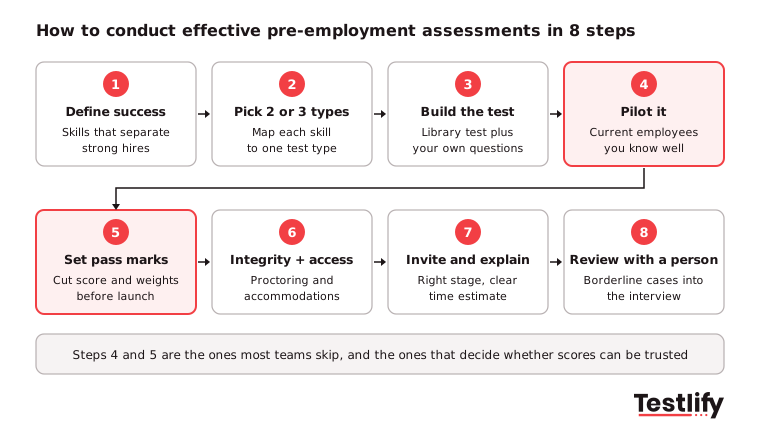
Here are eight steps to build a reliable pre-employment assessment process:
- Define what success looks like: Sit down with the hiring manager and one or two top performers. List the five to eight skills that separate a strong hire from an average one in the first six months. A short job analysis keeps this grounded in the real work rather than the old job ad.
- Pick two or three assessment types: Map each skill on your list to the type that measures it best. Drop any test that does not map to a listed skill.
- Build or choose the test: Start from a ready-made test where one fits, and customize questions for your tools, products and scenarios. Mix question formats, such as multiple choice for knowledge and a short practical task for applied skill.
- Pilot on current employees: Ask five to ten people already in the role, whose performance you know, to take it. If your best performers do not score higher than the rest, the test is measuring the wrong thing. Time the pilot too.
- Set pass marks and weights before launch: Decide the cut score, how much each section counts and what happens at each score band (advance, review, reject). Write it down. Deciding after you see the scores invites bias.
- Switch on integrity and accessibility settings: Choose proctoring checks that fit the role's risk, and set up a process for candidates who need accommodations such as extra time or a screen reader.
- Invite at the right stage and explain it: For volume roles, such as contact center agents or retail associates, send the test automatically from the ATS right after the application. For senior and specialist roles, test after a first conversation. Tell candidates how long it takes, what it covers and how the score is used.
- Review results with a person in the loop: Use the score to rank, then a recruiter reviews borderline and rejected candidates. Carry weak areas into a structured interview as follow-up questions.
Pro tip: Put the same assessment, pass mark and invite timing in writing for every role family. When the next requisition opens, the recruiter clones it instead of starting over, and every candidate for that role gets the same process.
How do you choose a pre-employment assessment tool?
The best pre-employment assessment tool for your team is the one that covers your role mix, fits your ATS and gives you scores you can explain. Before a demo, write down your roles, yearly candidate volume and must-have integrations, then ask every vendor the same questions so the answers are comparable.
Question to ask | Why it matters |
|---|---|
Does the library cover our tech and non-tech roles? | One tool for all roles saves contracts and training |
Can we customize tests or build one from a job description? | Generic tests miss your tools and scenarios |
Which proctoring and AI-detection checks are included? | Unproctored remote tests are easy to game |
Does it sync both ways with our ATS? | Recruiters will not copy scores by hand for long |
Can we see a per-skill breakdown and benchmark? | A single score is hard to explain to a hiring manager |
Has the scoring been bias audited, and can we see the summary? | Required for AI tools used in NYC and expected elsewhere |
How is candidate data stored, and in which region? | GDPR, CCPA and customer contracts depend on it |
How is pricing counted? | Per-candidate, per-seat and per-test models cost very different amounts at volume |
Run the shortlisted tool on one live role before you sign. Watch the completion rate, ask a few candidates how it felt, and check whether the hiring manager agrees with the top-ranked people.
How do you keep pre-employment assessments fair and legal?
Fair and legal pre-employment assessments test only skills the job needs, use the same test and pass mark for everyone in a role, offer accommodations, and are checked for unequal pass rates between groups. In the US, Title VII, the ADA and the ADEA all apply to tests, and AI-scored assessments now face extra rules.
The EEOC's guidance on employment tests and selection procedures says a test that screens out a protected group must be job-related and consistent with business necessity, and that employers must provide reasonable accommodations on tests under the ADA. It also tells employers to check that a test fits their specific job, even when the vendor supplies documentation.
Rule | Who it covers | What it asks of you |
|---|---|---|
Title VII, ADA, ADEA (US federal) | US employers | Job-related tests, no different cut scores by group, accommodations on request |
NYC Local Law 144 | Employers using automated tools to screen NYC candidates | Bias audit within one year of use, a public summary, and notice to candidates 10 business days before use |
EU AI Act | Providers and users of AI in recruitment in the EU | Treats AI used for hiring as high-risk, with human oversight, logging and documentation |
GDPR and similar privacy laws | Candidates in the EU, UK and other regions | A lawful basis, clear notice, data minimization and retention limits |
According to the NYC Department of Consumer and Worker Protection, enforcement of Local Law 144 began on July 5, 2023. The European Commission says the AI Act rules for high-risk areas such as employment apply from 2 December 2027, so teams hiring in Europe have a short window to put human review and documentation in place.
Key takeaway: Keep a one-page record for each role: the skills tested, why each matters, the pass mark, who reviews borderline cases and how accommodations are handled. That page answers most audit and candidate questions.
How do you stop candidates cheating with AI?
Stopping cheating in pre-employment assessments takes a mix of proctoring, question design and follow-up. Candidates now have AI assistants a tab away, so an unproctored multiple-choice test mostly measures who is willing to paste questions into a chatbot, not who has the skill.
The scale is real. SHRM reported in September 2026 that in a Gartner survey 39% of candidates used AI during the application process, and 29% of those used it to draft answers for assessments. A separate survey of 3,000 candidates found 6% admitted to some form of interview fraud.
- Proctoring checks: Full-screen mode, tab and copy-paste tracking, webcam snapshots and AI assistance detection catch most casual cheating.
- Question randomization: Pull questions from a larger pool so two candidates rarely see the same set.
- Practical tasks over trivia: A short coding task, spreadsheet model or written reply is harder to outsource than a fact question.
- Identity checks for high-stakes roles: Photo ID and face match stop someone else taking the test.
- Follow-up in the interview: Ask the candidate to walk through one of their answers. People who did the work can explain it.
We have seen teams over-correct and switch on every check for every role. Match the settings to the risk: a strict setup for remote engineering and finance roles, a lighter one for high-volume hourly roles where drop-off matters more. Testlify's anti-cheating and proctoring settings let you set this per assessment.
How do you know if your employment assessment is working?
An employment assessment is working when candidates finish it, pass rates are similar across groups, and the people who score well go on to perform well. Track a few numbers every quarter rather than a long dashboard nobody reads, and compare them with the period before you introduced testing.
Most teams agree this matters but few measure it. LinkedIn's Future of Recruiting 2025 found that over 90% of talent acquisition pros say accurately assessing skills is crucial for quality of hire, yet only 25% are highly confident they can measure quality of hire at all.
Metric | What good looks like | What to do if it is off |
|---|---|---|
Completion rate | Most invited candidates finish | Shorten the test, explain it better, send reminders |
Pass rate by group | Similar rates across gender, age and ethnicity | Review the questions and cut score with your legal team |
Time to shortlist | Falls after launch | Move the test earlier, automate invites from the ATS |
Hiring manager agreement | Managers agree with the top-ranked candidates | Revisit the skills list with the manager |
New-hire performance | High scorers rate higher at 90 days | Re-pilot, adjust weights, replace weak sections |
Candidate feedback | Candidates call it fair and relevant | Remove off-topic questions, share results where possible |
A quality of hire calculator gives you a simple baseline to compare against.
What are the most common assessment mistakes?
The most common assessment mistakes are process problems, not proof that testing does not work. The test is too long, measures the wrong skills, uses a pass mark nobody agreed on, or produces scores that hiring managers ignore. Across the teams we talk to, these six problems come up most often.
Mistake | What you see | Fix |
|---|---|---|
One generic test for every role | High scorers struggle in the job | Build per role family from the skills list |
Too long | Completion falls, strong candidates drop out | Cut to two or three sections and under 45 minutes |
Pass mark set after results | Accusations of moving the goalposts | Fix cut scores and weights before launch |
No pilot | Scores do not match who performs well | Test on current employees first |
No proctoring on remote tests | Suspiciously perfect scores | Turn on checks that match the role's risk |
Score used as the only decision | Good people rejected on one bad section | Human review for borderline and rejected candidates |
Bad candidate experience compounds all of these. A clear invite, a realistic time estimate and a quick result go a long way, and our guide to a positive candidate experience has more ideas.
How does Testlify help hiring teams assess candidates?
Testlify is an AI-native skills assessment and interviewing platform that turns a job description into a role-specific assessment, scores every response and ranks candidates, with explainable results and human oversight. It covers each of the eight steps above in one place, for tech and non-tech roles.
- Test library: 3,500+ tests across role-specific, software, coding, cognitive, situational judgment, language and personality types in the Testlify test library.
- AI test builder: Generate a custom assessment from a job description in under a minute, then edit it.
- 25+ question types: From multiple choice and coding to video, audio, file upload and spreadsheet tasks.
- 20+ proctoring checks: Including tab tracking, webcam snapshots, AI assistance detection and copy-paste blocking.
- ATS sync: 100+ ATS and HRIS integrations, including Workday, Greenhouse, Lever and SmartRecruiters, with two-way sync.
- Scoring and reports: Weighted scoring, per-skill breakdowns, benchmarks and AI-written candidate insights in the reporting and analytics view.
- Compliance: ISO 27001, SOC 2 Type II and GDPR, plus a third-party NYC Local Law 144 bias audit of its matching model.
- Global hiring: Assessments in 15+ languages.
More than 1,500 talent teams use Testlify, and it holds a 4.7 rating on G2.
Ready to run your next pre-employment assessment?
Pick one open role, list the five skills that matter most and build a short assessment around them. Browse the test library to find ready-made tests, start a 7-day free trial with no credit card, or book a demo to see the full workflow on your own roles.
Frequently asked questions (FAQs)

Human Resources Lead
Snehi Parmar leads People at Testlify, owning hiring, culture, performance, and retention for a 90-person team. She writes on practical HR strategy and building people processes that scale.
Related resources
View all
Candidate assessment
How to screen candidates for embedded systems developer
Candidate assessment
How to screen candidates for database developer

Candidate assessment
How to Screen Candidates for DevOps Engineer

Candidate assessment
How to Screen Game Developer Candidates: Skills & Interviews

Candidate assessment
How to screen candidates for Android developer

Candidate assessment
How to screen iOS developers: a 2026 guide for hiring teams
Get started.
Hire on proof, not resumes.
Run your first skills-based assessment free — no credit card required.