
How to integrate technical assessments into your recruiting process
A practical guide to adding technical assessments to your hiring: which test to use, where it sits, ATS sync, cheating and fair scoring.

Technical assessments are structured tests that ask candidates to do a sample of the real work, such as writing code, querying a database, or fixing a broken configuration, and score the result against a bar the hiring team sets in advance. Integrating them well is less about the test and more about the process around it: which competencies you measure, where the assessment sits in the funnel, what score moves someone forward, and which system keeps the record.
 ChatGPT
 Gemini
 Claude
 Grok
Grok Perplexity
TL;DR
- Place technical assessments between the application and the first live interview, and keep the screening test to 45 to 60 minutes.
- Name the two or three things a hire must do in week one, and set the cut-off score before anyone takes the test.
- Pilot each assessment on three current employees in the role. If strong performers score badly, the test is wrong.
- The Skills-First Talent Report 2026 with SHRM Labs found 32.8% of HR and TA leaders use no skills assessment at any hiring stage.
- Connect the assessment to your ATS with two-way sync, so a stage change sends the invite and the score returns automatically.
- Handle AI-assisted cheating in layers: identity checks, environment controls, reasoning-based questions, and a live walkthrough. Never auto-reject on a flag.
- Keep a person on every rejection near the cut-off line and compare pass rates by group every quarter.

What are technical assessments in recruiting?
Technical assessments in recruiting are job-specific tests that measure whether a candidate can do the technical work of a role, scored the same way for everyone. Common formats include coding challenges, SQL or data tasks, software simulations, debugging exercises, and knowledge tests on a specific stack. The output is evidence of skill, not a claim on a resume.
For a deeper look at the definition, benefits, and formats, read what technical assessments are and why they matter. The rest of this guide focuses on the harder question: how to fit technical assessments into your hiring process so they save time instead of adding friction.
Why integrate technical assessments into your hiring process?
Integrating technical assessments into your hiring process replaces resume guesswork with a measured shortlist, so interviewers spend their hours on people who can already do the work. The gap is still wide. In the Skills-First Talent Report 2026, which Testlify ran with SHRM Labs in July 2026, 32.8% of HR and TA leaders said they use no skills assessment at any stage of hiring, and only 6.9% assess before the first interview.
The cost of that gap shows up in speed and confidence. Across the teams surveyed for that report, 47.4% take more than a week to produce a first shortlist, and only 8.4% are very confident their process picks the best candidate rather than the best interviewer.
Skills evidence also widens the pool you can hire from. LinkedIn's 2025 skills-based hiring research found that a skills-based approach could expand talent pools 6.1 times globally, and 8.2 times for AI roles, because people with the right skills but a different job title stop being filtered out.
Which types of technical assessments fit which roles?
The right type of technical assessment depends on what the person will do in their first month. Match the format to the work, keep the screening stage short, and save the deep tasks for later rounds. The table below covers the formats most hiring teams use.
Type | What it measures | Best for | Typical length |
|---|---|---|---|
Coding challenge | Writing working code against test cases | Software engineers, back-end and front-end developers | 30 to 60 minutes |
Data and SQL task | Querying, cleaning and reading data | Data analysts, BI developers, data engineers | 20 to 45 minutes |
Software simulation | Real tasks inside Excel, Google Sheets or other tools | Finance, operations, analyst roles | 15 to 30 minutes |
Knowledge test | Concepts in a specific stack, cloud or framework | DevOps, cloud, networking, QA roles | 15 to 25 minutes |
Debugging or code review | Finding and fixing problems in existing code | Mid-level and senior engineers | 30 to 45 minutes |
Work sample or project | A realistic task close to day-one work | Senior and staff roles, final stage only | 2 to 4 hours, paid where possible |
Testlify's coding tests run in a live VS Code environment across 45+ programming languages, and the wider test library holds 3,500+ tests for technical and non-technical roles.
Where should technical assessments sit in the recruiting funnel?
Technical assessments usually belong between the application and the first live interview. At that point you have enough applicants for the filter to pay for itself, and nobody has yet spent interviewer time on people who cannot do the work. Later placement wastes panel hours; earlier placement, before anyone has read the application, tends to put off strong candidates.
Stage | What the assessment does here | When this placement is right |
|---|---|---|
Before application | Acts as a qualifier or self-selection gate | Rarely. Only for licensed or safety-critical work with a hard requirement |
After application, before first interview | Replaces resume guesswork with a measured shortlist | The default. Saves the most recruiter hours per candidate |
After first interview | Confirms a specific doubt raised in conversation | Senior or scarce roles where you cannot afford to lose candidates to friction |
Final stage | Deep work sample or paid project | When the output itself is the hiring evidence, such as a staff-level design task |
Keep the screening-stage assessment to 45 to 60 minutes. A three-hour unpaid take-home gets abandoned by the candidates who have other offers, which is exactly the group you wanted. Send the invite automatically when the application lands, set a reminder cadence, and give the link an expiry so the pipeline does not fill with half-finished attempts.
How do you integrate technical assessments step by step?
Integrating technical assessments takes eight steps, in order. The first three are the ones teams skip, and skipping them is why so many rollouts quietly stop being used after a quarter.
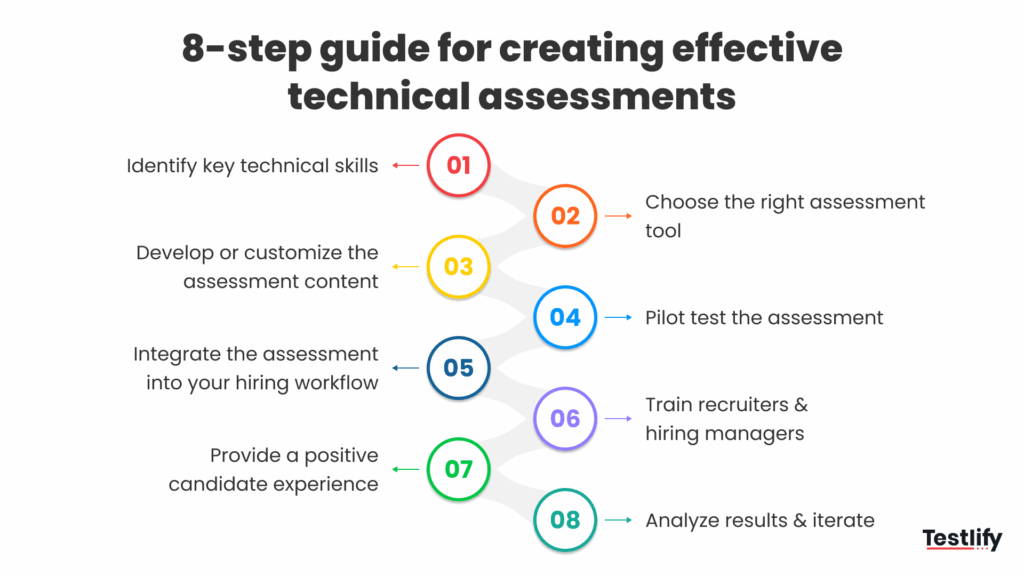
- Name the competencies: Sit with the hiring manager and write down the two or three things a new hire must be able to do in week one. If the list runs past five, the role is probably two roles.
- Decide what counts as evidence: For a back-end role that might be a multi-file coding task with hidden test cases. For a data role, a SQL task against a realistic schema. For a support engineer, a written troubleshooting scenario.
- Set the bar before you see anyone: Agree the cut-off score, who reviews borderline results, and what happens on a tie. Deciding after the first candidate scores 68 is how bias gets in.
- Build or pick the assessment: Use a library test where the skill is standard and write custom questions where the work is specific to your stack. Weight each test by how much it matters to the role.
- Pilot it on people you already trust: Give it to three current employees in the role. If strong performers score badly, the test is wrong, not them. This one step catches most broken assessments.
- Wire it into the workflow: Trigger the invite from the ATS stage, push the score back, and let a score threshold move the candidate forward instead of a manual copy-paste.
- Train the people reading the reports: Show recruiters and hiring managers what a percentile means, what it does not, and how to read per-skill results.
- Review the data every quarter: Compare assessment scores with how those hires actually perform, then adjust the bar or the questions.
How do you connect technical assessments to your ATS?
Connecting technical assessments to your ATS means the assessment invite, score and report move with the candidate automatically, so the ATS stays the single record of every hiring decision. Tracking breaks when the score sits in one tool and the candidate stage in another, and someone has to move it by hand.
Judge an integration on four things rather than on the length of its logo wall:
- Two-way sync: The ATS stage change sends the invite, and the score and report come back to the candidate profile without exports.
- Threshold-based movement: A candidate who clears the cut-off can advance automatically, while borderline scores route to a reviewer.
- Reviewer trail: Scores and notes are recorded per reviewer, with a log of who changed what and when.
- Clear sync boundaries: Ask the vendor which actions do not sync for your specific ATS, because depth varies by integration.
Testlify connects with 100+ ATS and HRIS platforms, including Workday, SAP SuccessFactors, Greenhouse, Lever, SmartRecruiters and BambooHR, with two-way sync and a REST API and webhooks for custom setups. See the full list on the integrations page, or read how ATS-integrated assessments improve hiring.
How do you set up a technical assessment in Testlify?
Setting up a technical assessment in Testlify takes five steps and usually a few minutes for a standard role. The AI test builder can also generate a first draft of the assessment straight from a job description, which you then edit.
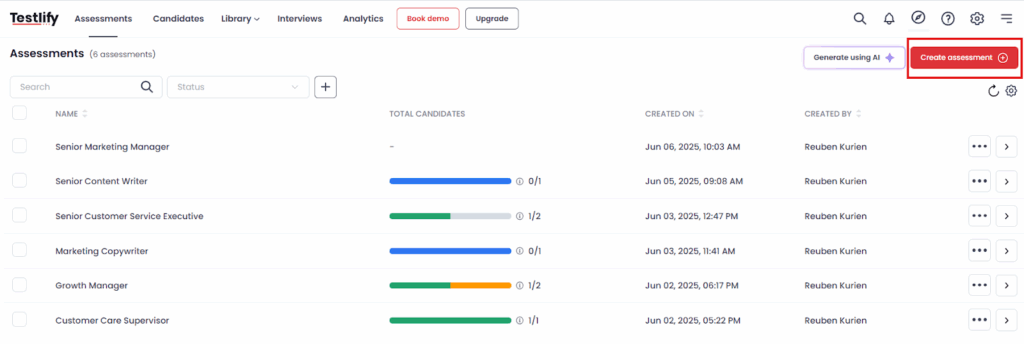
1. Create the assessment: Start a new assessment from the dashboard and give it the requisition name your team will recognize later.
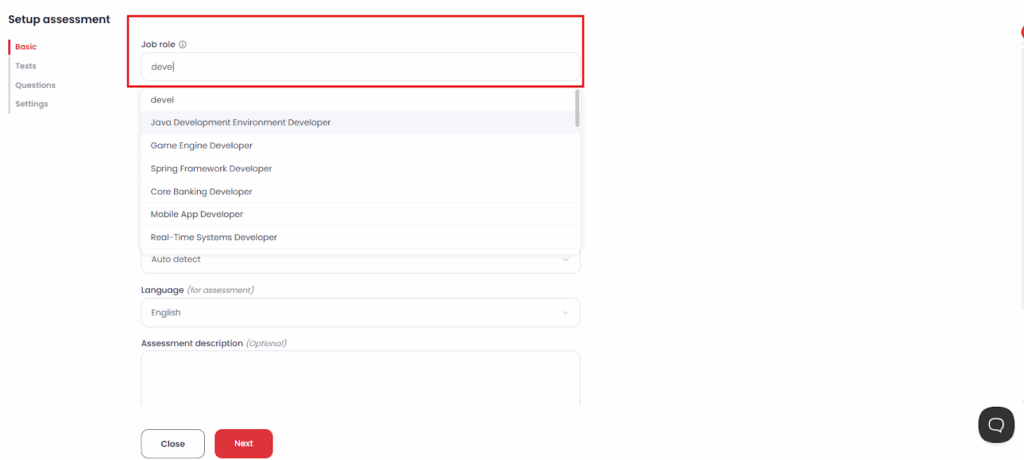
2. Enter the job details: Add the role, seniority, and the skills you named in step one of the rollout. These drive the test recommendations you see next.
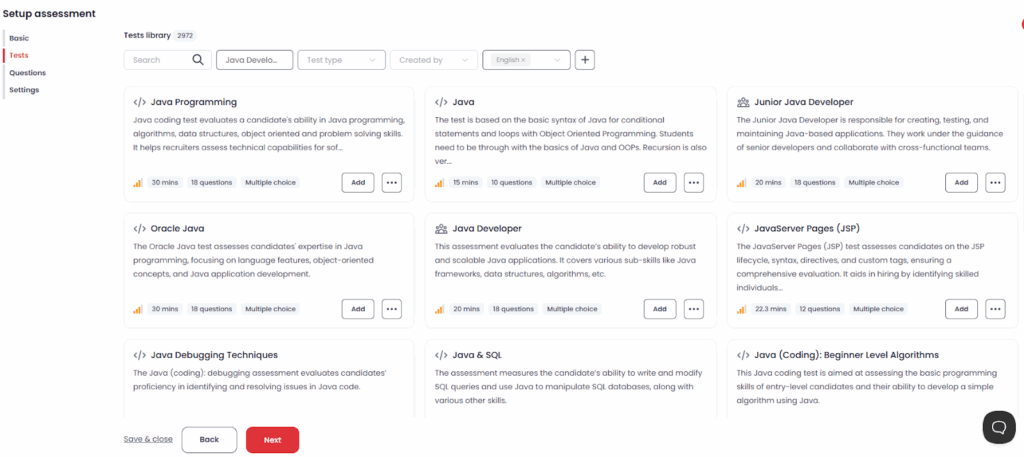
3. Add tests and questions: Pull from the library across coding, programming, engineering, cognitive, and role-specific categories, or write your own. Coding questions run against test cases you define, and you can bulk upload test cases to save setup time.
4. Configure the settings: Set time limits, shuffle questions, weight each test by importance, choose the proctoring level the role needs, and add your branding.
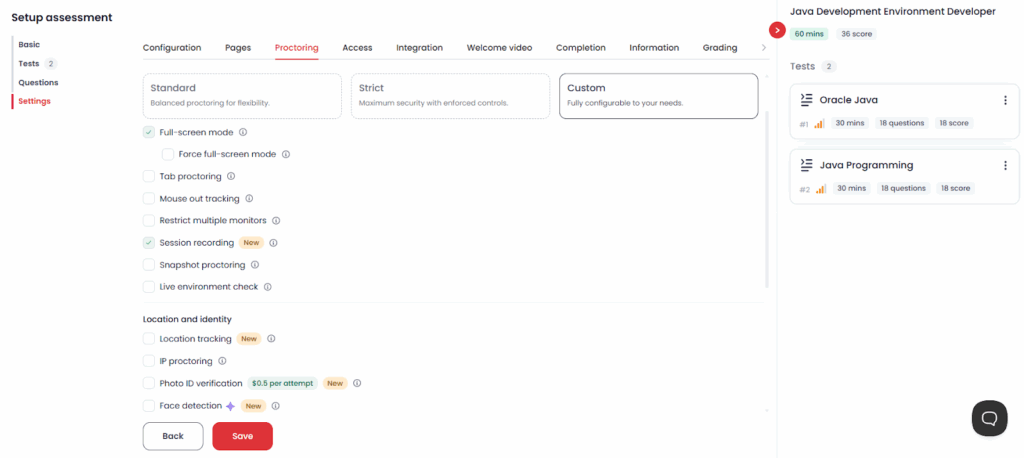
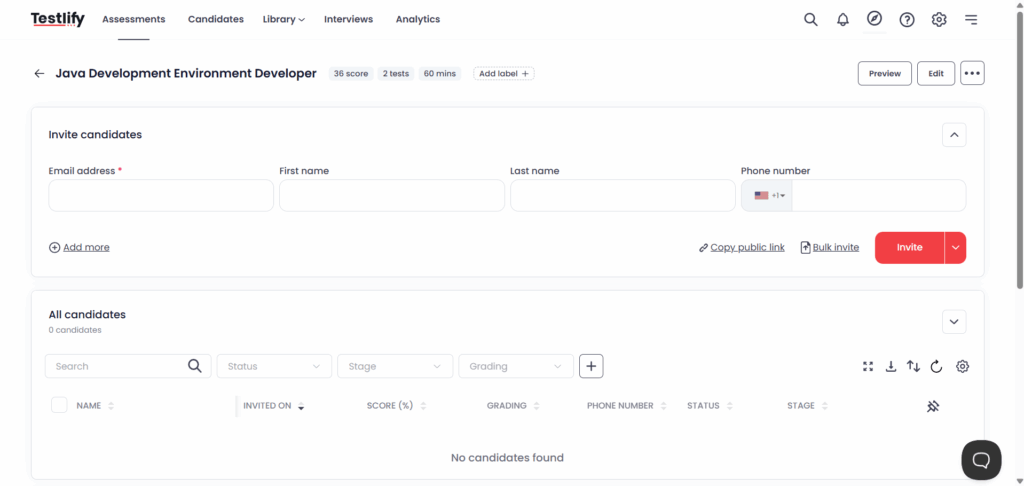
5. Invite candidates: Send invites from your ATS by email, by bulk upload, or through a public link, then watch scores arrive in the candidate list.
How do you handle AI-assisted cheating in technical assessments?
AI-assisted cheating is best handled with layers: verify identity, control the test environment, design questions that reward reasoning, and confirm the work in a live follow-up. No single check is enough on its own, and none should reject a candidate automatically.
The pressure is real. Gartner research reported by HR Dive predicts that by 2028, one in four candidate profiles worldwide could be fake, and 6% of 3,000 candidates surveyed admitted to interview fraud. Gartner's advice to employers is a multi-layered approach, clear rules on acceptable AI use, and assessments paired with interviews that confirm who the candidate is and what they can do.
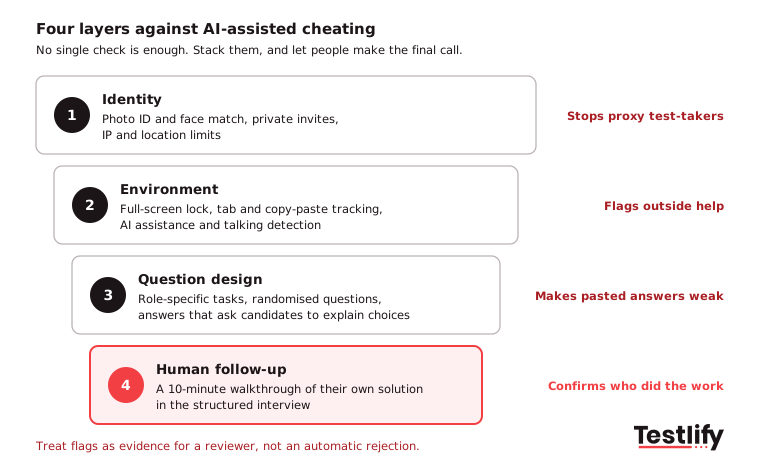
First decide whether you care for each role. For many engineering jobs, directing an AI tool to a working answer is now part of the work, and some teams test that on purpose by allowing AI and scoring the reasoning.
Where you need unaided work, Testlify's anti-cheating and proctoring includes 20+ proctoring checks, such as full-screen enforcement, tab and copy-paste tracking, AI assistance detection and photo ID with face match. Treat every flag as evidence for a reviewer, then ask the candidate to walk through their own solution in the interview.
How do you keep technical assessments fair and compliant?
Technical assessments stay fair and compliant when they test only what the job requires, score every candidate the same way, keep records, and get checked for adverse impact by group. The rules now differ by location, so check where your candidates sit, not only where your office is.
- United States: EEOC guidance on employment tests says a test must be job-related and appropriate for the employer's purpose. The employer stays responsible for the test's validity even when a vendor supplies the documentation.
- New York City: Local Law 144 allows an automated employment decision tool only if it had a bias audit within one year of use, a summary is published, and candidates get notice 10 business days before use. Testlify publishes its own NYC bias audit.
- European Union: The EU AI Act treats AI used in recruitment as high-risk. After the Digital Omnibus deal, Sidley reports that those obligations move from 2 August 2026 to 2 December 2027. Confirm the final text before you plan around the new date.
Two practices can help reduce most of the risk: have a human review every rejection close to the cut-off score, and compare pass rates across groups every quarter. scoring can be automated, but accountability must remain human.
How do you know if your technical assessments are working?
Technical assessments are effective when they reduce time to shortlist, improve the interview-to-offer rate, and predict on-the-job performance without significantly lowering completion rates or creating disparities in pass rates across groups. track these metrics from your first requisition so you can identify issues early and measure impact over time.
Metric | What it tells you | Warning sign |
|---|---|---|
Completion rate | Whether the test length and invite are reasonable | Below roughly two in three starters finishing |
Time to first shortlist | Whether the filter saves recruiter time | No change after rollout |
Interview-to-offer rate | Whether the shortlist is stronger | Same or lower than before |
Pass rate by group | Whether the test screens out a group unevenly | A clear gap with no job-related reason |
Question analytics | Which questions separate strong and weak candidates | Questions everyone gets right or everyone skips |
Six-month performance | Whether scores predict on-the-job results | High scorers doing no better than others |
In our own research with SHRM Labs, we have seen that 44.5% of HR leaders say no one formally validates their assessments. A quarterly review of these six numbers is the simplest way to stop being part of that group.
Pro tip: Before you change a question set, re-score your last 20 hires against the new version. If your best performers would have failed it, the problem is the new assessment.
Key takeaway: The assessment narrows the field; a structured interview makes the call. The OPM guide to structured interviews is a good template if your team has never written one.
What mistakes should you avoid when adding technical assessments?
The most common mistakes come from treating the test as the whole process. Watch for these five:
- Testing everything: A test that covers ten skills measures none of them well. Stick to the two or three the role lives on.
- Setting the bar after the fact: Moving the cut-off once you see scores invites bias and arguments.
- Letting the score auto-reject: Scores should rank and route candidates; people should make rejection calls near the line.
- Skipping the pilot: An untested assessment often fails strong current employees, and nobody notices until good candidates disappear.
- Using one test for every level: Graduate and senior candidates need different questions, or the test mostly measures years of experience.
Start with one role and measure it
Start small. Pick one role, name the competencies, build one assessment, pilot it on three current employees and place it between application and first interview. Measure recruiter hours saved and the interview-to-offer rate, then roll it to the next role family.
Testlify covers the assessment half of that process: role-specific and coding tests, weighted scoring with multiple reviewers, 20+ proctoring checks, question analytics and two-way sync with the ATS your team already uses. Book a demo and bring a live requisition, or start with a 7-day free trial, no credit card needed.
Frequently asked questions (FAQs)

Related resources
View all
Talent assessment
Can technology prevent cheating in online tests?
Talent assessment
Online proctors in test fairness and integrity

Talent assessment
How to build a successful sales team

Talent assessment
How to build a successful marketing team

Talent assessment
How to choose the right technical assessment tool

Talent assessment
Types of technical assessment while hiring candidates
Get started.
Hire on proof, not resumes.
Run your first skills-based assessment free — no credit card required.