
Technical assessment: types, benefits and how to run one
What a technical assessment is, the main types, how to design and run one fairly, mistakes to avoid and how to pick a platform in 2026.

A technical assessment is a structured, scored test that shows whether a candidate can do the technical work a role requires, such as writing code, querying a database or using a specific tool. Every candidate gets the same task and the same scoring, so hiring teams compare people on evidence instead of resume claims and interview impressions.
Hiring for a technical role on a resume alone is a guess. A candidate can list ten years of Python and still freeze on a basic debugging task, while a self-taught developer with no degree can outperform everyone in the room. The gap between what people claim and what they can do is where a technical assessment earns its place.
That gap keeps growing. The World Economic Forum's Future of Jobs Report 2025 expects nearly 40% of job skills to change by 2030, and 63% of employers name skills gaps as the biggest barrier to transforming their business. When the skills keep moving, a credential from five years ago says less every year, and evidence of current ability says more.
TL;DR / Key takeaways
- A technical assessment is a scored, standardized test of the job-specific skills a role runs on. Examples include writing code, querying a database or using a tool.
- Use it before interviews to decide who gets interview time. The score shows whether someone can do the work; the interview shows how they will do it here.
- LinkedIn's Skills Signal report found companies using skills-based searches are 12% more likely to make quality hires.
- Keep a screening test to 30 to 60 minutes and build tasks from what the person will do in the first ninety days.
- Build a separate version per seniority level, and set weights and cut scores before the first candidate applies.
- Stack Overflow found 84% of developers use or plan to use AI tools. Either lock the session down or score how candidates check AI output.
- Review the test every 6 to 12 months and retire the weakest 10% of questions every quarter.
 ChatGPT
 Gemini
 Claude
 Grok
 Perplexity
What is a technical assessment?
A technical assessment is a pre-employment test that measures a candidate's job-specific technical skills and problem-solving under standardized conditions. Instead of trusting a resume line, the hiring team gives every candidate the same task and the same scoring, then compares people on what they can do rather than how well they interview.
The key word is job-specific. A technical assessment targets the hard skills a role runs on: writing and debugging code, querying a database, building a spreadsheet model, configuring a network or reading an engineering drawing. Soft skills like communication and teamwork are assessed in other ways, and Testlify's guide to hard skills vs soft skills spells out the difference.
Technical screening and a technical assessment are related but not the same. Screening sits earlier, is shorter and usually automated, and its job is to shrink a large applicant pool. An assessment is the deeper, scored evaluation that produces the evidence a hiring decision rests on. Teams often buy one and expect the other, so it pays to decide which job each step does. Testlify's page on technical screening covers the first stage in detail.
One more useful split: an interview tells you how someone talks about the work, while a technical assessment shows you the work. The strongest hiring processes use both, in that order, so interview time goes to people who have already shown they can do the job.

Why do technical assessments matter in hiring?
Technical assessments matter because they replace the weakest signal in hiring, self-reported skill, with a measured one. A good test raises quality of hire, cuts bias, shrinks the shortlist to people who can do the job and leaves a record that explains every decision. For technical roles, where a wrong hire is expensive and slow to unwind, that shift pays off quickly.
Skills-first hiring also widens the pool. LinkedIn Economic Graph's Skills Signal report (June 2025) found that workers matched by skills rather than job titles qualify for over 3x as many roles, and that companies using skills-based searches are 12% more likely to make quality hires. A test that measures the skill directly is how a hiring team captures that advantage.

Here is where the value shows up day to day:
- Validates skills beyond the resume: Candidates prove the ability in practice, which closes the gap between what a resume claims and what a person can do.
- Better quality of hire: People advance because they demonstrated the skill, not because they described it well, so the shortlist is stronger before the first interview.
- Less bias: Standardized tasks and consistent scoring give a bootcamp graduate and a computer science graduate the same chance to prove the same skill.
- Faster screening at volume: When 300 people apply, an auto-scored test surfaces the 20 worth a call in hours, and recruiters stop reading every application by hand.
- A stronger employer brand: A relevant, well-run test tells candidates the company hires on merit and respects their time.
- Data for better decisions: Every completed test adds comparable data points, so teams can benchmark candidates and later check which scores line up with on-the-job success.
- A defensible decision: Scored evidence tied to the job gives a clear, consistent record of why one candidate advanced and another did not.
Pro tip: Do not treat the score as the hiring decision. Use it to decide who gets interview time. The score answers "can this person do the work", and the interview answers "how will they do it here, with this team". Keeping those two questions apart gives better answers to both.
How does a technical assessment work?
A technical assessment works in seven steps: define the target skills, choose the format, fix the rubric, send the test, score it consistently, shortlist on the results and give feedback. Every step stays the same for every applicant, so the differences you see come from the candidates, not from who happened to get an easier task.
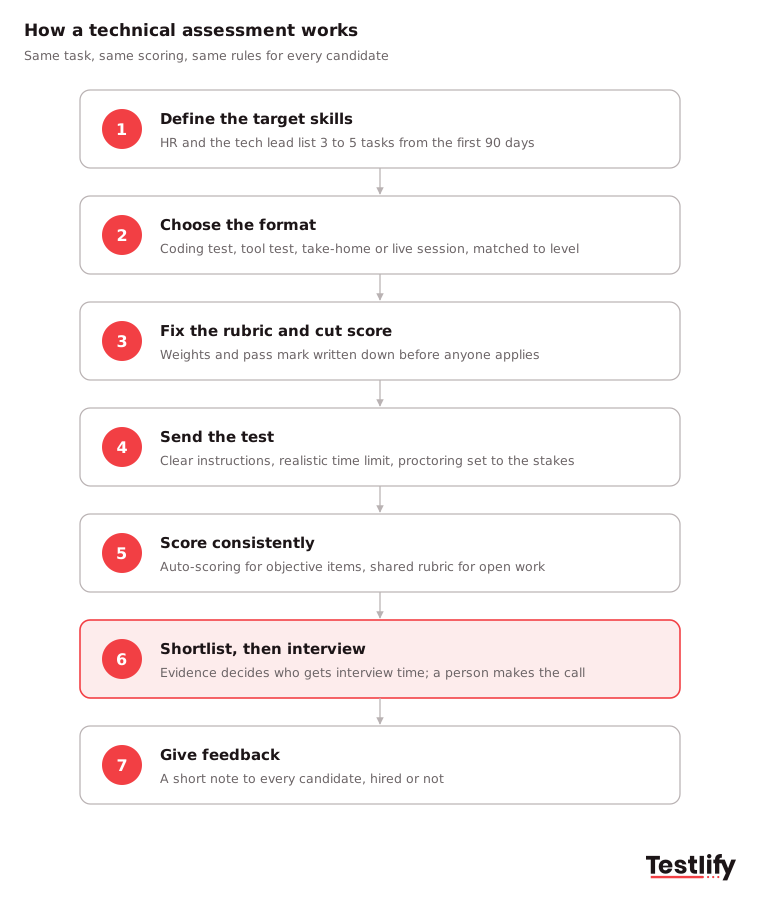
- Define the target skills: Start from the job, not the job advert. HR captures the context of the role, and the technical lead names the three to five tasks the person will do in the first ninety days.
- Choose the format: Pick a coding test, tool test, take-home project or live session that mirrors how the work really happens, and scale the scenario to seniority.
- Fix the rubric and cut score: Decide what each competency is worth and where the pass mark sits before the first candidate applies.
- Send the test: Invite candidates with clear instructions, a realistic time limit and the level of proctoring the role warrants.
- Score consistently: Automated scoring handles objective items such as multiple-choice questions and unit tests, and a shared rubric keeps human reviewers aligned on open tasks.
- Shortlist on the evidence: Advance candidates on demonstrated skill, then use interviews for judgment, communication and team fit.
- Give feedback: A short note on how each person did respects their time and protects your employer brand, even for people you do not hire.
Platforms make most of this repeatable. A hiring team can pick a ready-made test or build a custom one, set duration and difficulty, add role-specific questions, send invites from the ATS and get automated scores and analytics back. Testlify's guide on how to read technical assessment results covers the last steps in more depth.
What are the main types of technical assessments?
The main types of technical assessments are coding tests, knowledge and programming quizzes, software and tool tests, role-specific simulations, take-home projects, live technical interviews and cognitive ability tests. Each type measures a different slice of ability, and most strong processes stack two: a short screen to shrink the pool, then a deeper task for finalists.
Type | What it measures | Best for | Team time and candidate experience |
|---|---|---|---|
Coding test | Writing, debugging and reasoning through code under a time limit; auto-scored on correctness and efficiency | Software, data and IT roles at the screening stage | Low team time; convenient but can feel impersonal |
Knowledge or programming quiz | Understanding of concepts, frameworks and languages through multiple-choice and short questions | Roles that need concept knowledge more than hands-on coding | Very low team time; quick for candidates |
Software and tool skills test | Hands-on skill in a specific tool such as Excel, SQL, CAD or a cloud platform | Roles that run on one core application every day | Low team time; feels close to the job |
Role-specific or engineering simulation | A realistic task from the role, such as a capture-the-flag challenge, a circuit design or a data model | Engineering, security, data and other specialist roles | Medium setup; strong preview of the job |
Take-home project | Work quality, scoping and documentation when time pressure is off | Senior roles where depth beats speed | High scoring time; depends on a clear brief and time cap |
Live technical interview, whiteboard or pair programming | Real-time thinking, communication and how a candidate explains choices | Final-round validation of shortlisted candidates | High team time; can feel daunting without clear framing |
Cognitive ability test | Logic, numerical and verbal reasoning as a signal of problem-solving potential | Early-career and high-volume roles | Very low team time; adds context to technical scores |
Two more methods round out the list rather than replace it. Behavioral interviews and situational judgment tests assess teamwork, communication and adaptability, so a strong coder who cannot collaborate does not slip through. Peer reviews or team exercises let future colleagues weigh in on how a candidate is likely to work with the existing team.
Technical assessments are not only for software. Engineering, finance, analytics, IT support and digital marketing roles all have hands-on tasks you can test. Testlify's coding tests, role-specific tests, software skills tests and engineering skills tests give task-shaped starting points, and its guide to cognitive ability tests explains where aptitude scores fit.
What skills does a technical assessment measure?
A technical assessment measures the hard, role-specific skills a job depends on: programming and code quality, data and database work, system design, tool proficiency and applied problem-solving. Good tests also capture how a candidate reaches an answer, because the reasoning is often what separates a strong hire from a lucky guess.
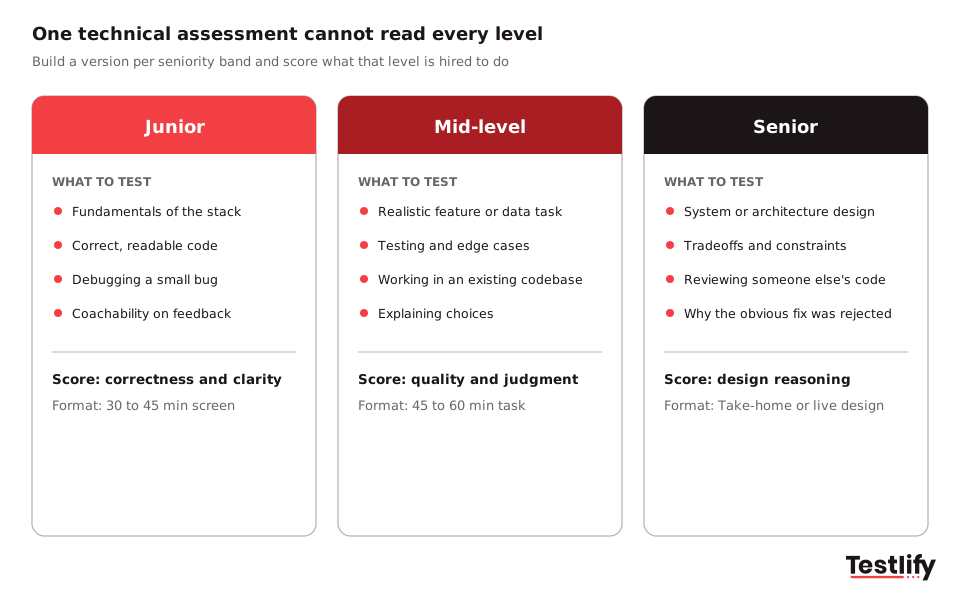
The level you hire for changes what counts as evidence. Juniors should show fundamentals and coachability, mid-level candidates should handle a realistic task in an existing codebase, and seniors should show design judgment, tradeoff reasoning and the ability to explain why they rejected the obvious approach. A senior who scores 90% on a junior test has proved nothing about seniority, so build a version per level instead of moving one pass mark.
The common trap is testing skills the role does not use. A back-end engineer rarely needs a front-end puzzle, and a data analyst rarely needs system design theory. Every question that misses the real job adds length and pushes away strong candidates who notice the mismatch. Test what the person will do in their first ninety days, and little else.
How do you design and administer a technical assessment?
Designing and administering a technical assessment comes down to five things: clear objectives, the right format, a fair process, real support for candidates and objective scoring. Teams that get these right before the first invite rarely need to fix the test later.
### 1. Define clear objectives and job requirements Run a short job analysis with the hiring manager and a future teammate. List the languages, frameworks, tools and domain knowledge the role needs, and note the soft skills you will assess elsewhere. Map four to six job-critical competencies, for example API design or SQL optimization, and write them into the job description so candidates can judge their own fit. Testlify's guide to competency-based assessment covers this step in detail.
### 2. Choose the right format Use coding tests and practical tasks when the job is hands-on, and short quizzes when the role needs concept knowledge more than coding. Combining methods works well: a coding test for the skill, then a follow-up conversation where the candidate explains the approach.
### 3. Build fairness into the design Hide names, schools and other background details during the first review. Write instructions in plain language that candidates from any background can follow, avoid culture-specific references in questions and offer accessibility accommodations on request.
### 4. Give candidates the resources and support they need Explain the format, duration and scoring up front. Allow the documentation and libraries someone would use on the job, set enough time to think rather than rush, and name a contact who can answer questions during the test.
### 5. Evaluate results objectively Set weights and cut scores before candidates arrive, score with a rubric anchored to observable behavior (correctness, clarity, tradeoffs, testing) and pair automated scoring with a short live session where the candidate walks through the work. Use panel discussion to question the evidence, not to overwrite totals, then share constructive feedback with every candidate.
Keep the test short and relevant. For a screen, 30 to 60 minutes is enough, and 45 to 60 minutes works well before interviews are scheduled. Long tests do not find better people; they lose good ones who have other offers. Offer a shorter version where accessibility needs call for it.
How should you prepare candidates for a technical assessment?
Preparing candidates for a technical assessment means removing every surprise that is not part of the skill being tested. Candidates who know the format, scope and rules spend their energy on the task, which gives you a truer read of their ability and fewer drop-outs.
- Share clear expectations: Say whether it is a timed coding test, a take-home or a live session, how long it takes, which platform it runs on and whether questions can be revisited.
- Explain the scope: Name the topics covered, for example data structures, SQL or system design, and the languages, libraries or frameworks candidates will use.
- Offer practice material: Share one or two sample questions at the real level of difficulty so candidates can calibrate.
- State the AI and resources policy: Tell candidates whether AI tools, documentation or search are allowed, and how proctoring works.
- Invite them to think out loud: In live sessions, say that you value reasoning and clarifying questions, not only the final answer. Many candidates freeze under silence.
- Explain what happens next: Tell people when they will hear back and what feedback they will get.
Unstated time limits and questions that cannot be revisited cause a lot of avoidable abandonment. In practice, a short "what to expect" email before the invite removes most of it.
What are the most common technical assessment mistakes?
The most common technical assessment mistakes are testing the tool stack instead of the tasks, treating difficulty as rigor, using one test for every level, deciding the score after the panel debate and never retiring old questions. Each mistake still returns a number, which is why teams keep running broken tests without noticing.
- Testing the tool stack instead of the actual tasks: Tests built from the job advert ask about technologies and end up ranking vocabulary. A developer who has shipped production services in one framework will learn yours in a few weeks. Build tasks from what the person will do in the first ninety days instead.
- Treating difficulty as a substitute for relevance: A famously hard algorithm puzzle mostly measures who practised interview questions last month. Strong engineers with other offers abandon tests that feel disconnected from the work, yet finish longer ones that look like the job. Ask whether a current team member would recognise the task from their week, and cut anything that fails.
- Running one test across every seniority level: Juniors and seniors need different evidence, so a single test reads only one level correctly. Build two versions: one scoring correctness and clarity, one scoring the reasoning behind a design decision.
- Deciding the score after the panel debate: Discussion tends to converge on whoever speaks with most conviction. Set weights and cut scores in advance, let the arithmetic produce the ranking and date the rubric document.
- Never retiring the question bank: A question a chatbot answers in four seconds no longer measures the candidate. Retire the weakest 10% of questions every quarter.
Run this four-check audit on your live test once a quarter. It takes about an hour.
Check | Question to ask | Warning sign | Fix |
|---|---|---|---|
Relevance | Would a current team member recognise this task from their week? | Questions match the advert, not the job | Rebuild from first-90-day tasks |
Level fit | Does a separate version exist for each seniority band? | One test, three pass marks | Split into two or three versions |
Scoring | Were weights and cut scores written before candidates applied? | Reviewers agree a score afterwards | Fix the rubric and date the document |
Freshness | When was a question last retired? | More than 12 months ago | Quarterly review, retire the weakest tenth |
How do you keep a technical assessment fair and legally defensible?
A technical assessment stays fair and legally defensible when it is job-related, given the same way to everyone and reviewed for its effect on different groups. In the US, the Uniform Guidelines on Employee Selection Procedures allow pre-employment tests that are job-related and consistent with business necessity, and the same evidence that proves job-relatedness protects you if a decision is challenged.
Three habits cover most of the risk:
- Document the job analysis: Keep a dated record that ties each competency in the test to a real task in the role.
- Run one scored process for everyone: Same instructions, same time limits, same rubric, with blind review of background details and behavioral anchors in the rubric.
- Review pass rates by group: Check score data at least once a year, and adjust scoring or content if any group is negatively affected for reasons the job does not explain.
Local rules can add obligations. New York City's Local Law 144 requires a bias audit for automated employment decision tools, and Testlify's third-party NYC bias audit of its Matching Model, completed June 16, 2023, shows what that looks like in practice. For more on reducing bias across the funnel, see Testlify's guide to overcoming unconscious bias in hiring.
How do technical assessments work when candidates use AI?
Technical assessments still work when candidates use AI, but the questions and the integrity model have to change. The Stack Overflow 2025 Developer Survey found that 84% of developers use or plan to use AI tools in their work and 51% of professional developers use them daily, so recall questions and classic puzzles that a chatbot solves instantly no longer separate candidates.
Hiring teams have two honest options, and they suit different roles:
- Lock the session down where unaided ability matters. Use identity checks, full-screen enforcement, tab and copy-paste tracking, question randomization and AI-assistance detection, scaled to the stakes of the role.
- Make AI part of the task where the job uses it daily. Let candidates use an assistant, then score how they direct it, check its output and correct its mistakes. The same survey found that more developers distrust the accuracy of AI tools (46%) than trust it (33%), so verifying AI output is a real job skill worth testing.
Pick one model per role and tell candidates which one you chose. Testlify's guide to online test integrity covers the proctoring side, and Testlify's anti-cheating and proctoring includes 20+ proctoring checks, from webcam snapshots and tab proctoring to AI assistance detection.
What are the common myths about technical assessments?
The common myths about technical assessments are that they scare off good candidates, slow hiring down, only suit some roles, add bias, are easy to cheat and are not accurate enough to bother with. Each myth comes from a badly run test, not from testing itself.
Myth | Reality |
|---|---|
Technical assessments scare away good candidates | Candidates accept a test when it is relevant, reasonably short and clearly explained; irrelevant or overlong tests are what drive drop-off |
Assessments slow down hiring | Auto-scored screens cut the time spent reading resumes and running first calls, so qualified candidates reach interviews sooner |
Assessments only suit some roles | Tests can be matched to almost any role and level, from entry-level support to senior engineering, by choosing the right type |
Assessments are unfair and biased | Well-designed tests reduce bias by holding every candidate to the same job-related criteria and scoring |
Candidates can easily cheat | Modern platforms combine proctoring, plagiarism checks, randomized questions and AI-assistance detection |
Assessments are not 100% accurate, so why bother | No method is perfect, but measured evidence beats resumes and unstructured interviews; use the test as one input alongside structured interviews |
How do teams use technical assessments to find top talent at scale?
Teams use technical assessments at scale by automating the first screen and saving human time for finalists. A short, role-matched test goes out the moment someone applies, and only candidates who clear a clear bar reach a recruiter. The pattern holds whether you hire five people or five hundred.
Demand makes speed matter. The US Bureau of Labor Statistics projects employment of software developers, QA analysts and testers to grow 10% from 2025 to 2035, against 3% for all occupations, with about 106,100 openings a year. Teams that can spot real ability quickly win those hires.
Consider a 500-person software company hiring 20 engineers a quarter. Without screening, recruiters read hundreds of resumes and phone-screen dozens of people who look right on paper and struggle on a real task. With a 45-minute coding test sent on application, the same team can cut a six-week screening loop to about ten days, because the shortlist is scored before the first call. That is an illustrative scenario, but it mirrors how large technical employers run high-volume hiring: assess first, interview the proven few.
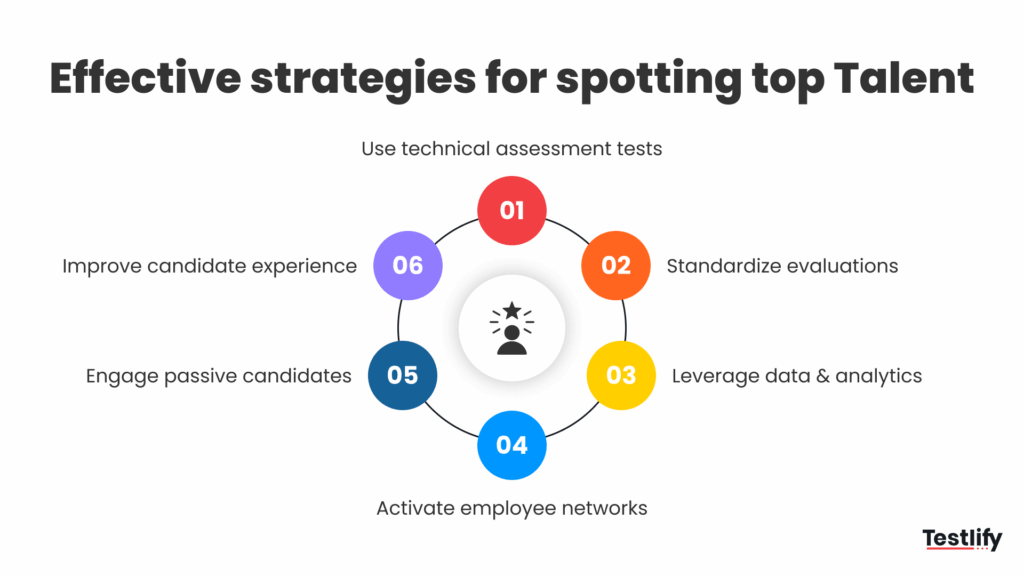
The technical assessment works best inside a wider top-talent strategy:
- Test early: A small project or coding task at the application stage gives an accurate baseline before resumes sway anyone.
- Standardize evaluations: Structured interviews with fixed questions and rubrics let you compare finalists side by side.
- Use the data: Combine test scores, interview ratings and resume data into one profile per candidate, then check which scores predicted success.
- Activate referrals and passive talent: Employee referrals, meetups and hackathons fill the top of the funnel; the test keeps the bar the same for every channel.
- Keep the process fast and transparent: Auto-graded tests, quick follow-up on shortlisted candidates and a clear outline of each stage keep top candidates from accepting another offer first.
How do you choose a technical assessment platform?
Choose a technical assessment platform on five things: how well its tests match your roles, how fairly it scores, how it protects integrity, how cleanly it fits your hiring workflow and how easy it is for candidates. A big library is worth little if the questions do not reflect your jobs, so start with role coverage.
- Role coverage: Can it test the stacks and tools your team uses, and can you customize or build tests when the library falls short?
- Fair, consistent scoring: Automated scoring, weighted criteria and clear rubrics so results mean the same thing for every candidate and reviewer.
- Assessment integrity: Proctoring and anti-cheating controls you can dial up or down by role, without treating every candidate like a suspect.
- Workflow fit: ATS integrations, automated invites and reporting, so assessment is one step in hiring rather than a separate chore.
- Candidate experience: A test people can start quickly and finish without friction, in their language where needed.
Testlify covers the assessment and screening slice of this stack: 3,500+ tests across coding, role-specific, software and cognitive skills, an AI test builder that drafts a custom assessment from a job description, a live coding environment that supports 45+ coding languages, 20+ proctoring checks, weighted scoring and two-way sync with 100+ ATS and HRIS tools through Testlify integrations. A person still makes the final call. For a wider view of the category, read Testlify's guide on how to choose the right technical assessment tool.
See who can do the job before you interview
Build a role-matched technical assessment, send it on application and let a scored shortlist reach your recruiters. Browse the Testlify test library or book a demo to see it with your own roles. Testlify offers a 7-day free trial with no credit card.
Frequently asked questions

Related resources
View all
Skill assessment
The future of coding assessments in the hiring process

Skill assessment
Common mistakes to avoid while creating coding assessment

Skill assessment
How to use coding assessments to hire the right talent

Skill assessment
Build development teams with teamwork assessments

Skill assessment
Identify top talent using skill assessments

Skill assessment
Scale QA teams with attention-to-detail test
Get started.
Hire on proof, not resumes.
Run your first skills-based assessment free — no credit card required.