
How to choose employment assessment tools: 2026 guide
A buyer's guide to employment assessment tools: test types, must-have features, compliance, pricing models and a six-step way to choose.

Employment assessment tools are software platforms that test job candidates on the skills, abilities and work style a role needs, then score every candidate on the same criteria. Hiring teams use them to replace resume guesswork with evidence, shortlist faster and keep decisions fair. The right tool depends on your roles, hiring volume, tech stack and compliance needs.
TL;DR / Key Takeaways
- Employment assessment tools test candidates on job skills before the interview, so every applicant is scored on the same criteria and the shortlist rests on evidence instead of resumes.
- The main types are skills tests, work simulations, cognitive ability, situational judgment, personality and language tests. Most roles need two or three types combined.
- Define the role, volume and hiring stage first. Compare tools only after you know which gap the interview cannot fill.
- Must-haves in 2026: role-specific and custom tests, ATS integration, anti-cheating checks, explainable scoring, a short mobile candidate experience and fairness evidence.
- The tool must be job-related and fair under EEOC rules, NYC Local Law 144 and the EU AI Act. The employer stays responsible even when the vendor supplies the evidence.
- Pricing is per candidate (credits), per seat or an enterprise quote. Ask what "unlimited" really covers.
- Pilot on current employees and one live role before you sign, then review scores against hiring manager ratings every quarter.
 ChatGPT
 Gemini
 Claude
 Grok
 Perplexity
What are employment assessment tools?
Employment assessment tools are platforms that let employers send candidates structured tests, simulations or interviews, score the answers automatically and compare candidates side by side. They sit between the application and the interview, so recruiters spend interview time on people who have already shown they can do the work.
Most platforms combine a library of ready tests with a way to build custom ones, plus proctoring, reports and an ATS connection. A pre-employment assessment can be a 10-minute skills check for a support role or a two-hour coding task for a senior engineer. The tool is the system that runs, scores and records all of it.
Employment assessment tools are different from an applicant tracking system. The ATS stores applications and moves candidates through stages. The assessment tool measures what candidates can actually do and sends the result back to the ATS.

Why do hiring teams use employment assessment tools?
Hiring teams use employment assessment tools because resumes and unstructured interviews do not show who can do the job, and hiring is still hard. According to the SHRM 2025 Talent Trends findings, 69% of employers still struggle to fill full-time roles, 51% report a low number of applicants and 41% say candidates ghost them during the interview process.
When applicants are scarce and some disappear mid-process, every hour a recruiter spends on the wrong candidate costs more. Assessments help in four ways:
- Faster shortlists: Automated scoring ranks every applicant within hours, so recruiters call the strongest people first. Testlify reports a 55% faster time-to-hire for its customers.
- Better hires: A candidate who has written working SQL or handled a realistic customer chat has shown the skill, not only claimed it.
- Fairer decisions: Every candidate gets the same questions and the same scoring rules, which cuts the room for hiring bias.
- Wider talent pools: Skills-first screening lets you consider people with the right ability but a different title or no degree. The skills-based hiring statistics show how much that widens the pool.
Across the teams we work with at Testlify, the biggest early win is usually recruiter time: fewer first-round calls with candidates who were never a fit.
What types of employment assessment tools are there?
Employment assessment tools come in six main types: skills tests, work simulations, cognitive ability tests, situational judgment tests, personality and culture assessments, and language and typing tests. Each one shows something different, so most roles need two or three combined rather than a single test.
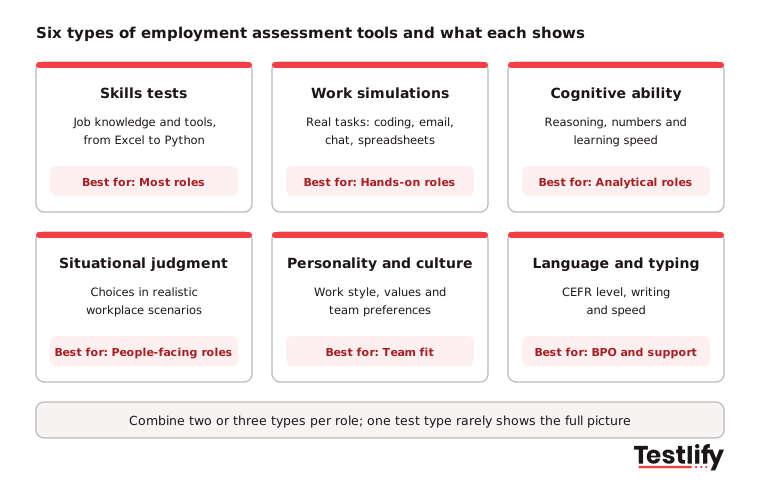
Type | What it shows | Best for | Watch out for |
|---|---|---|---|
Skills tests | Knowledge of a tool, language or domain (Excel, Python, accounting) | Almost every role | Knowing facts is not the same as doing the work |
Work simulations | How a candidate handles a real task: coding, email, chat, spreadsheets | Technical, support and office roles | Longer to take, so place them after a first screen |
Cognitive ability | Reasoning, numbers and how fast someone learns | Analytical and fast-changing roles | Use with skills tests, never as the only gate |
Situational judgment | Choices in realistic workplace scenarios | Customer-facing, sales and people roles | Answers must match how your team actually works |
Personality and culture | Work style, values and team preferences | Team fit, alongside other tests | Self-reported, so never a pass or fail on its own |
Language and typing | Written and spoken level (CEFR A1 to C2), typing speed | BPO, support and global teams | Test the language the job is done in |
Personality tests: These assessments gauge a candidate's traits, values and behaviors. They help you judge cultural fit and how someone will work with the current team, but they work best next to skills evidence.
Cognitive assessments: Cognitive ability tests measure problem-solving, critical thinking and decision-making. They suit roles such as data analysis or research where people must learn quickly.
Skills tests: Skills tests evaluate a specific ability such as coding, writing or a language. They give concrete proof for technical roles and any job that depends on one core skill.
Situational judgment tests: Situational judgment tests present real-world scenarios and ask candidates to choose a response. They show judgment, adaptability and how someone handles pressure.
Newer formats such as one-way video interviews and AI-led chat or voice interviews add a structured conversation to the same scorecard, which helps when you hire for communication skills at volume.
What should you define before you compare tools?
Hiring teams should define four things before they compare employment assessment tools: the skills each role needs, the hiring volume, the stage where the test will sit and the question the interview cannot answer. Without these, every demo looks good and the choice comes down to the slickest sales pitch.
Use this short worksheet for each role family:
- Key competencies: List the three to five skills that separate a strong hire from an average one. For a technology startup, that may be technical skills and problem-solving. For a collaborative culture, it may be communication and teamwork.
- Industry needs: A healthcare employer, a BPO and a marketing agency need different tests. Note any licenses, languages or tools that are specific to your field.
- Volume and stage: High-volume roles need a short, mobile test early in the funnel. Senior roles can take a longer task after a first conversation.
- The open question: Write down what interviews for this role cannot show today, for example "Can this person debug code under time pressure?" Pick the test type that answers it.
- Culture and values: Decide which behaviors matter for long-term fit, and how you will test them without screening out people who simply think differently.
Pro tip: Match assessment length to the role. A common rule of thumb is under 30 minutes for hourly roles, about an hour for entry-level professionals and longer only for managers and executives. Long tests early in the funnel are the main cause of candidate drop-off.
How do you check that a tool measures the right skills?
Buyers check that an employment assessment tool measures the right skills by asking two questions: does the test reflect the real work of the role, and does it give the same result when the same person takes it again? A test that fails either question produces scores that look precise but do not help you decide.
Job relevance: The test should measure the skills, knowledge or behaviors the job actually needs. If you use a problem-solving test for an analyst role, the questions should look like problems an analyst solves. Ask the vendor who wrote the test, how subject matter experts reviewed it and how often it is updated.
Consistency: A dependable test gives similar results across repeat attempts and across reviewers. Automated scoring helps, as long as the scoring rules are visible. For open answers, ask whether two reviewers would give the same score using the vendor's rubric.
Proof from your own hires: The strongest check is local. Have current employees whose work you know take the test. If your best performers do not score well, the test is measuring the wrong thing for your team.
How do employment assessment tools stay fair and compliant?
Employment assessment tools stay fair and compliant when every test is tied to the job, given the same way to every candidate, checked for adverse impact and adjusted for candidates who need accommodations. The rules differ by region, and the employer is responsible for meeting them, not the vendor.
Rule | Where | What it means for your assessment tool |
|---|---|---|
Title VII, ADA and ADEA | United States | Tests that screen out a protected group must be job-related and consistent with business necessity; offer reasonable accommodations |
NYC Local Law 144 | New York City | An automated employment decision tool needs a bias audit within one year before use, a public summary and notice to candidates |
EU AI Act, Annex III | European Union | AI used to filter applications or evaluate candidates is classed as high-risk and needs human oversight and documentation |
GDPR and local privacy laws | EU, UK and others | Collect only the data you need, say how long you keep it and where it is stored |
The EEOC guidance on employment tests makes two points every buyer should note. First, the employer remains responsible for its tests even when a vendor supplies the supporting evidence. Second, if a test screens out a protected group, the employer should look for an equally effective test with less adverse impact.
Diversity and inclusion go beyond the legal minimum. Choose tools that let you review pass rates by group, remove questions that rely on cultural knowledge the job does not need, and offer extra time or screen-reader support. According to the EU AI Act text (Regulation 2024/1689), high-risk recruitment AI must be built so a person can oversee and override its results, so keep a human decision on every rejection.
The candidate matching model Testlify uses had a third-party NYC Local Law 144 bias audit, completed on June 16, 2023.
What features should employment assessment tools have?
Employment assessment tools should have role-specific and custom tests, realistic simulations, ATS integration, a short mobile candidate experience, anti-cheating checks, explainable scoring, fairness reporting and strong data security. These eight features decide whether the tool works at scale or turns into another login nobody uses.
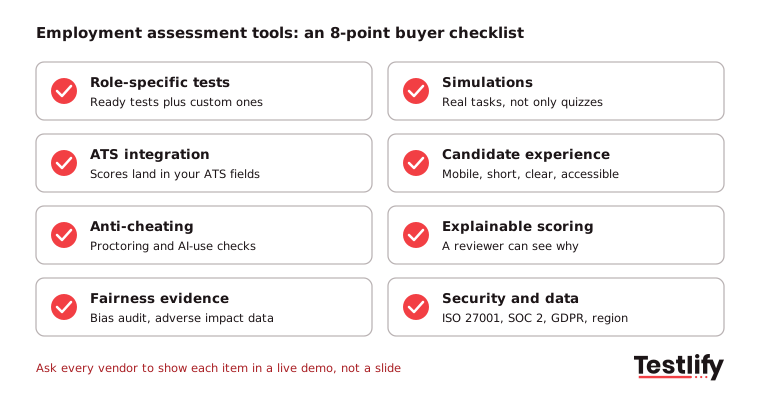
### Customization Ready tests cover common roles, but you also need custom questions, your own scenarios and scoring weights. Customized assessments that mirror the real tasks of a role reduce the risk of hiring someone who looks good on paper but cannot deliver. ### Integration Check the integration with your applicant tracking system or HRIS. Scores should land in structured ATS fields and trigger the next stage, not arrive as a PDF someone pastes into notes. ### User-friendliness Recruiters should be able to set up a test without training, and hiring managers should read a report in two minutes. ### Candidate experience Clear instructions, mobile support, a realistic time limit and feedback where possible. The test is often a candidate's first real interaction with your company, and a poor candidate experience costs you the best applicants first. ### Anti-cheating and identity checks Candidate fraud is rising. A Gartner survey from July 2025 found that 6% of 3,000 candidates admitted to interview fraud, and Gartner predicts that 1 in 4 candidate profiles worldwide could be fake by 2028. Look for proctoring, AI-assistance detection and ID checks. ### Explainable scoring Every AI score should show the answer behind it and the criteria used. The same Gartner survey found only about a quarter of candidates trust AI to assess them fairly, so transparent scoring protects your employer brand. ### Reporting Per-skill breakdowns, benchmarks against other candidates and exports that let you track results against quality of hire. ### Security ISO 27001, SOC 2 Type II and GDPR compliance, role-based access and a choice of data region for global teams.
How are employment assessment tools priced?
Employment assessment tools are priced in four common ways: per candidate through credits, per seat or job on a subscription, unlimited use on an annual contract, or a custom enterprise quote. The cheapest headline price often becomes the most expensive once you add integrations, proctoring and extra users.
Pricing model | How it works | Fits | Ask before you sign |
|---|---|---|---|
Per candidate (credits) | You pay when a candidate starts or is invited | Variable or seasonal hiring | Do credits expire? Is it charged on invite or on start? |
Subscription by seat or job | Monthly or annual fee for users or open jobs | Steady hiring with small teams | What happens when you add a recruiter or a job? |
Unlimited annual | Flat fee for a set number of candidates or users | High, predictable volume | Does "unlimited" cover candidates, tests and users, or only one of them? |
Enterprise quote | Custom contract with SSO, SLA and add-ons | 500+ employees, regulated industries | Which features are add-ons, and is the price locked for renewal? |
Also check whether ATS integrations, white label, advanced proctoring and ID verification are included or charged per use. Testlify is credit-based: one credit is used only when a candidate starts an assessment, and every plan comes with a 7-day free trial with no credit card. Current plans are on the Testlify pricing page.
Which employment assessment tools should be on your shortlist?
The employment assessment tools most mid-market and enterprise teams shortlist include Testlify, TestGorilla, TestDome, Mercer Mettl and iMocha. Each one covers skills testing, but they differ in test depth, simulations, proctoring and how much they focus on hiring versus workforce skills. The table below uses each vendor's own positioning, checked on October 28, 2026.
Tool | How the vendor positions it | Known for | Compare |
|---|---|---|---|
Testlify | AI-native skills assessment and interviewing platform | 3,500+ tests, simulations, AI interviews, 20+ proctoring checks, 100+ ATS integrations | |
TestGorilla | "The proof-first AI recruiting platform" | Skills tests for high-volume screening | |
TestDome | Work-sample tests with AI proctoring | Coding and domain work samples | |
Mercer Mettl | Assessments with AI and human-assisted proctoring | Exams and proctored assessments at scale | |
iMocha | "Skills and Work Intelligence Platform" | Skills mapping for hiring and upskilling |
### Testlify Testlify turns a job description into a role-specific assessment in under a minute with its AI test builder, then scores every response and ranks candidates. The library holds 3,500+ tests across technical and non-technical roles, with 25+ question types, coding and Microsoft Office simulations, chat simulations and one-way or AI-led video, voice and chat interviews. Subject matter experts can also build custom tests, which are reviewed before they ship. Testlify is rated 4.7 on G2 and is used by 1,500+ talent teams.
### TestGorilla TestGorilla now presents itself as a proof-first AI recruiting platform built around skills tests. Teams that mainly screen high volumes with standard tests often start here. Check how much you can customize questions and scoring for your own roles.
### TestDome TestDome focuses on work-sample tests and screens 100+ skills, with AI proctoring that separates domain skill from AI help. The work-sample focus suits developer and analyst roles; teams hiring across many non-technical roles should check coverage.
### Mercer Mettl Mercer Mettl combines assessments with secure exam delivery and both AI and human-assisted proctoring. Buyers who also run certification or campus exams often shortlist it.
### iMocha iMocha positions itself as a skills and work intelligence platform, so it leans toward mapping and building workforce skills as well as hiring. Teams that only need pre-hire screening should check whether they pay for features they will not use.
If you want a broader view of how these platforms fit together, see how to build a hiring process with talent assessment tools.
How do you pilot an employment assessment tool before you buy?
Hiring teams pilot an employment assessment tool by running it on current employees first, then on one live role, and comparing the scores with what they already know about performance. A two to four week pilot shows more than any demo: completion rates, candidate feedback, recruiter effort and whether the scores match reality.
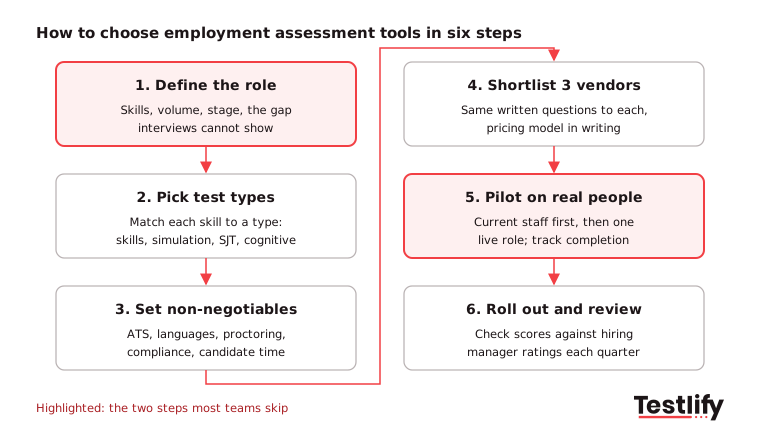
- Define the role: Fill in the worksheet above for one role with steady hiring.
- Pick test types: Match each key skill to a test type from the table, and keep the total time within your limit.
- Set non-negotiables: ATS integration, languages, proctoring, data region and accessibility. Any vendor that misses one drops out.
- Shortlist three vendors: Send each one the same written questions (below) and ask for the pricing model in writing.
- Pilot on real people: Test current employees, then run the tool on one live role. Track completion rate, time per candidate and candidate feedback.
- Roll out and review: Train recruiters and hiring managers, then compare scores with hiring manager ratings and early retention every quarter.
Questions to send every vendor:
- Who writes and reviews your tests, and how often are they updated?
- Can you show pass rates across candidate groups for this test?
- How does your scoring explain a result to a reviewer and to a candidate?
- How do you detect AI-assisted answers and confirm candidate identity?
- Which ATS fields does your integration write to, and does it sync both ways?
- Where is candidate data stored, for how long, and who can see it?
We have seen pilots fail for one reason more than any other: the team never agreed what a score would change. Decide before launch whether the result is a gate, a guide for the next interview or one input into the debrief.
Key takeaway: Pick employment assessment tools by the gap you need to close, prove them on your own people, and keep a person in charge of every final decision.
Ready to try Testlify?
Testlify gives hiring teams one platform for skills tests, simulations and AI interviews, with 3,500+ ready tests, 20+ anti-cheating and proctoring checks, 15+ languages and 100+ ATS and HRIS integrations including Workday, Greenhouse, Lever and SAP SuccessFactors. Every candidate is scored on the same criteria, results sync to your ATS, and the core anti-cheating and proctoring checks are included in every plan. Testlify holds ISO 27001 and SOC 2 Type II and supports GDPR.
Browse the Testlify test library, start a 7-day free trial with no credit card, or book a demo to see a shortlist built from one of your own job descriptions.
Frequently asked questions
Related resources
View all
Talent assessment
Talent assessment case studies: How top companies hire better

Talent assessment
How to assess candidates for your talent pool

Talent assessment
Talent pool vs talent pipeline: the difference and how to build both

Talent assessment
How to use talent assessment to improve employee performance

Talent assessment
The future of hiring assessments: 7 shifts HR leaders should plan for

Talent assessment
24 best talent assessment tools for hiring in 2026
Get started.
Hire on proof, not resumes.
Run your first skills-based assessment free — no credit card required.