
How to interpret technical assessment results
How to read technical test scores: integrity checks, percentiles, cut scores, skill breakdowns, red flags and the handoff to interviews.

A candidate scores 85% on a coding test, and the hiring manager wants an offer by Friday. Before you agree, ask one question: what does that 85% actually mean?
Without a benchmark, an integrity check and a skill breakdown, a total score is just a number. Reviewers read it differently, and that is how strong candidates get missed and weak ones get through.
This guide shows how to interpret technical assessment results in a fixed order, from integrity checks to the interview handoff. You will learn how to read percentiles, set cut scores, spot red flags and turn scores into fair hiring decisions.
TL;DR:
- Read a technical test report in this order: integrity signals, overall score against a role benchmark, skill breakdown, question-level detail, then context such as time and seniority.
- A percentage is the share of questions answered correctly. A percentile is a rank against other test takers. A 75% can sit at a low percentile on an easy test.
- There is no universal pass mark. Set the cut score per role from how many people you need to interview, then check it against the performance of people already in the job.
- Proctoring flags are prompts to review the session, not proof of cheating. With 84% of developers using or planning to use AI tools, check AI-assistance and copy-paste signals on every remote test.
- Use weak skill areas to plan interview questions, not to reject on one number. Treat candidates close to the cut score as a review band.
- Check that selection rates stay above four-fifths of the highest group's rate, and compare scores with 90-day performance at least once a year.
 ChatGPT
 Gemini
 Claude
 Grok
 Perplexity
What do technical assessment results show?
Technical assessment results usually show five things: an overall score, a score for each skill or section, the answer to every question, how the candidate worked (time, attempts, code playback) and integrity signals from proctoring. The overall score is the headline, but the decision is made in the other four.
Report part | What it tells you | What to check |
|---|---|---|
Overall score | How the candidate did on the whole test | Compare with a role benchmark, not with 100% |
Skill or section scores | Which skills drove the total | Do the strong skills match what the job needs most? |
Question-level detail | The actual answers, code and test cases passed | Partial credit, edge cases, quality of open answers |
Work pattern | Time per question, attempts, code playback | Rushed guesses, long idle gaps, sudden jumps |
Integrity signals | Tab switches, copy-paste, webcam and AI-assistance flags | Open the session before you trust the score |
If you are new to the format, start with what a technical assessment is and why teams use one. The rest of this guide assumes you already have a report in front of you.

How to interpret technical assessment results step by step
Interpreting technical assessment results works best as a fixed reading order that every reviewer follows for every candidate. A fixed order stops one impressive number from shaping the whole review, and it makes decisions easier to explain to a hiring manager or an auditor later.
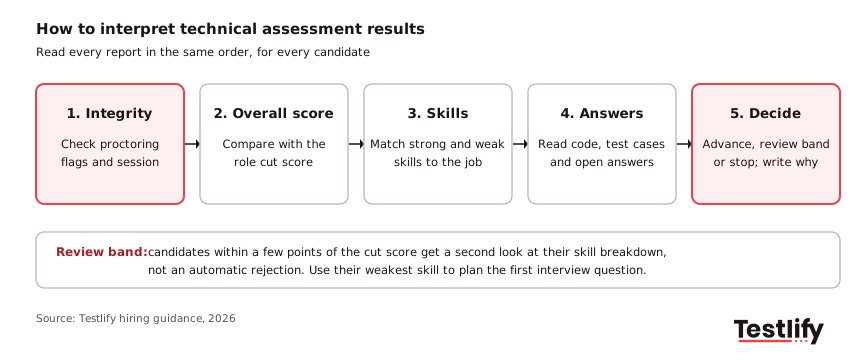
- Check integrity first: Look at proctoring flags before the score. A high score from a session with copy-paste bursts and repeated tab switches needs review before it counts.
- Read the overall score against a benchmark: Compare it with the role's cut score and with the scores of people already doing the job well, not with a perfect 100%.
- Open the skill breakdown: Two candidates with the same total can have opposite profiles. Match the strongest and weakest skills to what the job needs in its first six months.
- Review the question-level answers: Read the code, the SQL, the written explanations. Look at which test cases failed and why.
- Add context: Consider time taken, seniority, the test level (beginner, intermediate or advanced) and any accommodations the candidate used.
- Treat the score as a range: A candidate two points below the cut score is not clearly weaker than one two points above it. Put both in a review band and let the interview decide.
- Write down the decision: Record the score, the reason to advance or stop, and the questions to ask next. This is what makes the process consistent across reviewers.
Pro tip: Agree on the reading order and the cut score with the hiring manager before the first candidate finishes. Changing the bar after seeing scores is the fastest way to bring bias back in.
The need for a shared method is real. In the Testlify Skills-First Talent Report 2026, produced with SHRM Labs, only 8.4% of HR and talent leaders were very confident their process picks the best candidate, and 45.8% said the result varies by hiring manager or role.
What is the difference between a raw score, a percentage and a percentile?
A raw score is the number of points earned, a percentage is that score as a share of the maximum, and a percentile is the candidate's rank against a group of people who took the same test. Percentages show how much of the test a candidate got right, while percentiles show how that compares with other people.
Score type | What it means | Common trap |
|---|---|---|
Raw score | Points earned, for example 34 of 40 | Means nothing without the test's difficulty |
Percentage | Raw score divided by the maximum, for example 85% | Read as a school grade; 70% is not "a C" |
Percentile | Share of the comparison group scoring at or below the candidate | Depends entirely on who is in the comparison group |
Weighted score | Sections or tests multiplied by their importance for the role | Weights set after seeing results |
AI or rubric score for open answers | An answer rated against criteria agreed in advance | Accepting it without reading a sample of answers |
The comparison group matters most. A 70th percentile against entry-level applicants is a different result from a 70th percentile against senior engineers.
Testlify's guide to percentile scores explains how the group is chosen and why a 70th percentile is not a 70% pass rate.
What counts as a good score, and where should the cut score sit?
A good score is one that clears the cut score you set for that role, and there is no universal number. The right cut score depends on how many candidates you need to move forward, how demanding the role really is, and how people already in the job scored on the same test.
A simple way to set it is to work backwards from the interview slots you have:
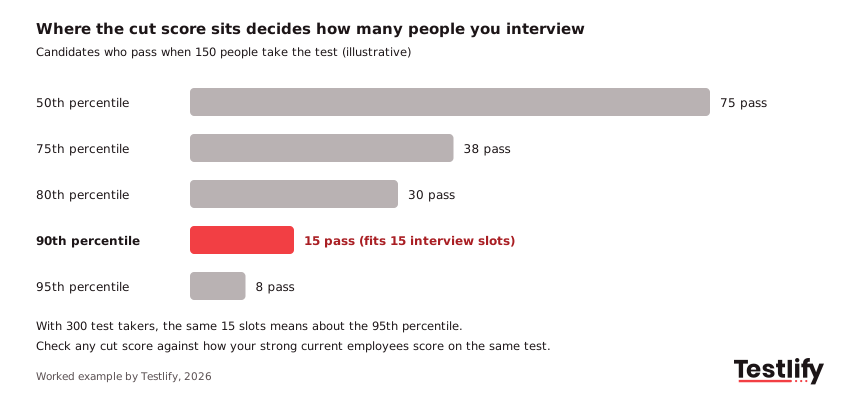
- Count the interview slots: If the hiring manager can interview 15 people for two openings, that is the number the cut score has to deliver.
- Count the expected test takers: If 150 candidates are likely to finish the test, you need roughly the top 10% to pass.
- Set the first cut score from that ratio: In this example, the 90th percentile. With 300 test takers, the same 15 slots means the 95th percentile.
- Check it against current employees: If several of your strong engineers would fail the cut score, it is too high or the test measures the wrong things.
- Use a review band: Candidates just under the cut score get a second look at their skill breakdown rather than an automatic rejection.
For high-volume roles a higher cut score is usually fine because the pool is large. For niche specialist roles a high bar can leave nobody to interview, so start lower and rely more on the skill breakdown.
How should you read skill and question-level results?
Skill and question-level results should be read against the job, not against each other. A backend role may need strong SQL and API design and only basic front-end knowledge, so a low front-end section score matters far less than a low database score.
For coding questions, look past the pass rate:
- Test cases passed: Most coding scores are the share of hidden test cases the code passes. Check whether failures are edge cases (empty input, large data) or the main logic.
- Efficiency: Code that passes small tests but times out on large ones shows a gap in algorithms or data structures.
- Readability: Clear names, small functions and comments matter for any role where people review each other's code.
- Approach: Code playback shows whether the candidate planned, tested and fixed, or pasted a full solution in one move.
For multiple-choice sections, look at which topics were missed together. Three wrong answers on indexing in a SQL test point to one gap that can be taught or probed.
Three wrong answers spread across unrelated topics point to guessing. For a deeper look at code review, see how to analyze and interpret programming test results.
How do you check that a score reflects the candidate's own work?
A score reflects the candidate's own work when the proctoring record shows a normal session: the candidate stayed in the test window, did not paste large blocks of code, and the webcam or screen record shows one person working alone. Check this before you rely on any high score from a remote test.
AI tools make this step more important each year. The Stack Overflow Developer Survey 2025 found that 84% of developers use or plan to use AI tools in their work.
That is normal on the job, but it changes what an unsupervised test score means.
- Treat flags as prompts, not verdicts: One tab switch can be a notification. Twenty tab switches followed by a perfect answer deserve a look at the recording.
- Look for patterns: Long idle time, then a complete solution pasted at once, is a stronger signal than any single flag.
- Decide your policy in advance: If AI help is allowed in the job, say so in the test instructions and assess how candidates use it. If it is not allowed, say that too and apply the same rule to everyone.
- Confirm in the interview: Ask the candidate to walk through their own answer. People who wrote the code can explain why they made each choice.
Testlify's anti-cheating and proctoring page lists the checks a report can include, from full-screen enforcement to AI assistance detection.
How do you compare candidates fairly?
Candidates are compared fairly when every one of them takes the same test, under the same conditions, scored against the same criteria and the same cut score. Fairness breaks when reviewers apply different bars to different people or explain away a low score for one candidate and not another.
Three habits help:
- Same test, same settings: Keep time limits, allowed tools and test level identical for everyone applying to the role.
- Rubrics for open answers: Agree what a strong, acceptable and weak answer looks like before reading the first one.
- Check selection rates: Under the US federal four-fifths rule in 29 CFR 1607.4, a group whose selection rate is below 80% of the highest group's rate is generally treated as evidence of adverse impact. If your cut score produces that gap, review the cut score and the test content.
Accommodations are part of fairness too. A candidate who used extra time under an agreed accommodation should be read against the same cut score, without a note that discounts the result.
What red flags should you look for in test results?
Red flags in test results are patterns that suggest the score does not mean what it seems to mean. Each one is a reason to look closer, not a reason to reject.
- Very high score in very little time: Especially on open coding tasks, this can mean outside help or a leaked question.
- Strong overall score, failing core skill: A total lifted by easy sections can hide a gap in the one skill the job needs most.
- Perfect code, weak explanation: Clean code with a vague or wrong written explanation of how it works.
- Identical answers across candidates: The same unusual solution from several people suggests shared answers.
- Scores that drift by reviewer: If one reviewer's manual scores sit far above or below the others, the rubric is not being applied the same way.
- Everyone fails, or everyone passes: The test is the wrong level for the role, or the cut score is off.
How do you combine test results with interviews?
Test results and interviews work best together when the test decides who gets an interview and the interview tests what the score could not. Use the skill breakdown to plan questions: a candidate who scored low on system design but high on coding gets a design scenario, not another algorithm puzzle.
A weighted scorecard keeps the final decision consistent:
Evidence | Example weight for a mid-level developer | What it covers |
|---|---|---|
Technical test | 40% | Core coding and problem solving |
Technical interview | 30% | Design choices, how they explain their own code |
Structured behavioral interview | 20% | Collaboration, ownership, communication |
Work sample or references | 10% | Evidence from real past work |
Agree the weights with the hiring manager before interviews start, and score each part separately before adding them up. Testlify's guides to the interview scorecard and to running a structured interview show how to set this up.
Share results with candidates too. Short, specific feedback on what went well and what was missing improves candidate experience, and Testlify has a guide on how to give constructive feedback to candidates.
How do you know your test results predict job performance?
Test results predict job performance when people who scored higher before hiring also do better in the role. The only way to know is to check: compare test scores with manager ratings, ramp-up time or retention after 90 days, and adjust the cut score or the test when the link is weak.
Most teams skip this step. In Testlify's 2026 research, 44.5% of HR and talent leaders said nobody formally validates their assessments.
The interest is there: LinkedIn's Future of Recruiting 2025 found that 89% of talent acquisition professionals expect measuring quality of hire to become more important, but only 25% are highly confident they can measure it.
A simple yearly check is enough to start:
- Pull the scores of last year's hires: List the test score and the skill breakdown for each person hired through the test.
- Add one outcome: Use a 90-day manager rating, time to first shipped work, or whether the person stayed.
- Compare high and low scorers: If the higher scorers are not doing better, look at which sections predict success and which do not.
- Adjust and repeat: Change the weights, the cut score or the test content, then check again next year.
The Testlify quality of hire calculator can help you turn those outcomes into one number to track.
How does Testlify help you read test results?
Testlify helps hiring teams read test results by putting the score, the skill breakdown, the answers and the proctoring record in one candidate report. Reviewers see why a candidate scored the way they did, not only the total.
- Skill-level reports: A per-skill breakdown, a scoring breakdown for each question and the candidate's actual answers, with AI-written pros and cons and AI-suggested follow-up questions for the interview.
- Benchmarks and weights: Global and assessment-level benchmarking, weighted scoring and question analytics, explained on the reporting and analytics page.
- Integrity record: 20+ proctoring checks, including session recording, copy-paste tracking, tab proctoring and AI assistance detection.
- Coding and technical depth: A library of 3,500+ tests, including coding tests in 45+ programming languages, with automated scoring explained in how Testlify AI scoring works.
- Fits your stack: Results sync to 100+ ATS and HRIS tools, and reports export to CSV or PDF or share by link.
Ready to read every result the same way?
Pick a technical role you are hiring for, set its cut score with the hiring manager, and run the same test for every applicant. Book a demo to see the full candidate report, or start a 7-day free trial with no credit card needed.
Frequently asked questions (FAQs)

Head of Assessments
Usha brings a rare depth of expertise to Testlify’s assessment function, over 40 years of multidisciplinary experience spanning banking, insurance, healthcare, automotive, IT services, manufacturing, pharmaceuticals, and enterprise software. At Testlify, she ensures that every assessment, scoring methodology, and competency structure meets the highest standards of enterprise-grade transparency, fairness, and consistency, the kind that holds up under audit and earns the trust of the world’s most rigorous hiring teams.
LinkedInRelated resources
View all
Talent assessment
How to evaluate coding assessments

Talent assessment
Leveraging AI for cheating prevention in online assessments

Talent assessment
Maintaining fairness designing cheating resistant online tests: a guide for hiring teams

Talent assessment
Ensuring integrity in online tests with Anti-cheating measures

Talent assessment
How to choose employment assessment tools: 2026 guide

Talent assessment
Talent assessment case studies: How top companies hire better
Get started.
Hire on proof, not resumes.
Run your first skills-based assessment free — no credit card required.