
How to use coding assessments to hire the right talent
A practical process for developer hiring: what to test, when, for how long, how to handle AI use, and how to score and decide fairly.

Knowing how to use coding assessments to hire the right talent comes down to five decisions: which skills the role needs, where the test sits in your process, how long it runs, what candidates may use, and how you score and act on the results. Get those right and a coding test cuts weak fits early, gives every candidate the same fair shot, and sends your engineers only the people worth an interview.
Get them wrong and the same test drives good developers away, rewards whoever is best at prompting an AI tool, and fills your shortlist with false positives. The steps below are written for TA leaders, recruiting ops teams and hiring managers who run developer hiring at volume.
TL;DR / Key Takeaways
- Use a coding test to decide who reaches a technical interview, not to make the final hire on its own.
- Define 3 to 5 must-have skills for the role first, then build or pick a test that checks only those.
- Keep the first screening test to 30 to 60 minutes. Save longer, realistic tasks for the shortlist.
- Write an AI rule for every stage and tell candidates before they start: 84% of developers use or plan to use AI tools.
- Score everyone on one weighted rubric, agree the cut-off before results arrive, and send borderline scores to human review.
- Ask every finalist to explain and change their own code live. That step confirms who did the work.
- Track completion rate, pass rate by group and 90-day performance, and retire questions that stop predicting success.
 ChatGPT
 Gemini
 Claude
 Grok
 Perplexity
Why do skills tests matter more in developer hiring now?
Skills tests matter more in developer hiring now because demand stays high and resumes say less than ever. The US Bureau of Labor Statistics projects jobs for software developers, QA analysts and testers to grow 10% from 2025 to 2035, with about 106,100 openings a year. Every one of those openings draws applicants whose resumes, often polished with AI, look alike.
A bad technical hire is expensive. SHRM puts the cost of replacing a bad hire at 50% to 200% of the person's salary, depending on seniority. A short, job-relevant test before any interview is the cheapest place to catch a mismatch: your engineers only spend interview hours on people who have already shown they can code.
The test only helps when it is used well. A long, puzzle-heavy test filters for free time and contest practice, not for the work your team does. The rest of this guide shows how to avoid that.

What should you decide before you send a single test?
Hiring teams should decide the role's must-have skills, its level and its success measures before anyone writes or picks a test. Sit down with the hiring manager and one engineer from the team for 30 minutes and agree on four things:
- Must-have skills: The 3 to 5 skills a new hire uses in the first 90 days, such as "builds REST endpoints in Node.js" or "writes SQL joins for reporting".
- Nice-to-have skills: Skills you can teach after hiring. Keep these out of the screening test.
- Level: Junior roles need language basics and simple data structures. Mid-level roles need applied problem solving and working with APIs. Senior roles need design judgement, code review and debugging other people's code.
- What good looks like: The output the hiring manager expects from a strong candidate, written down before anyone sees a result.
Write the answers into a one-page skills sheet. That sheet drives every later step: the test, the rubric, the interview questions and the final scorecard. If a skill is not on the sheet, do not test it.
Pro tip: Ask the hiring manager which skills their last two strong hires had on day one and which they learned on the job. The day-one list is your test; the learned list is not.
Which format fits each stage of your hiring process?
The right format depends on the stage: short automated tests suit the screen, realistic tasks suit the shortlist, and live sessions suit the finalists. Using one format for every stage is the most common reason a coding process feels slow to candidates and noisy to hiring managers.
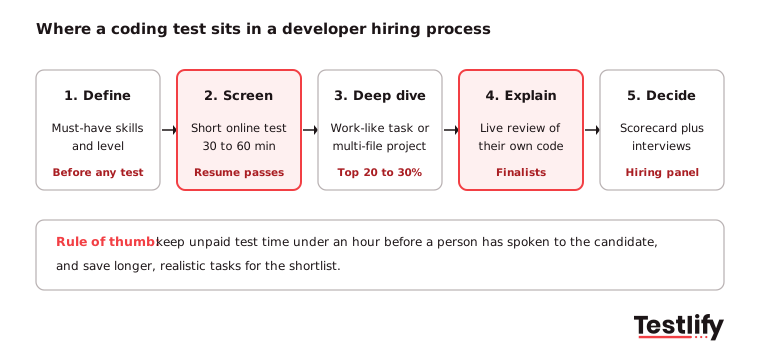
For a full comparison of each coding assessment type, including take-home projects and live challenges, see our types guide. For roles with fewer than 20 applicants, you can skip the screen and go straight to a short take-home task.
How long should a developer skills test be?
A developer skills test at the screening stage should take 30 to 60 minutes, and never more than one hour before a person from your team has spoken to the candidate. Experienced developers often have several offers in play; a three-hour unpaid task before a recruiter call is where many of them drop out.
Use these limits as a starting point:
- Screening test: 30 to 60 minutes, two to three coding questions, one easier than the others.
- Shortlist task: 60 to 90 minutes timed, or a take-home scoped to about two hours with a clear definition of "done".
- Live session: 30 to 45 minutes, including time for the candidate's questions.
Tell candidates the time limit, the number of questions and the languages allowed in the invite. Watch your completion rate: if more than a quarter of invited candidates never finish, the test is probably too long, too hard for the level, or badly explained.
How do you design tasks that look like the real job?
Hiring teams design job-like tasks by taking a small, real problem from the team's own work and stripping out anything confidential. A backend role might get "add an endpoint and a test to this small service"; a data role might get "clean this CSV and answer three questions with SQL".
Good tasks share four traits:
- Same stack: The language, framework and tools the new hire will use. Testing Java for a Python role tells you little.
- Real code, not puzzles: Debugging, reading existing code, adding a feature or fixing a failing test. Avoid brain teasers and obscure algorithms the job never needs.
- One clear brief: Inputs, expected output, constraints and how it will be scored, written in plain English with no local slang.
- Room to show judgement: A small trade-off, such as speed vs readability, gives stronger candidates a chance to stand out.
Refresh questions at least once or twice a year. Popular questions leak to forums, and a leaked question measures memory, not skill. Large, randomized question pools make leaks less useful. For a deeper checklist on writing questions, read our guide to designing coding tests.
What AI policy should a technical test have?
A technical test should have a written AI rule for each stage, shared with candidates before they start. AI help is now normal at work: the Stack Overflow Developer Survey 2025 found that 84% of respondents use or plan to use AI tools in their development process, and 51% of professional developers use them daily. A test with no stated rule will be read as "anything goes" by some candidates and as "no AI" by others, and the scores stop being comparable.
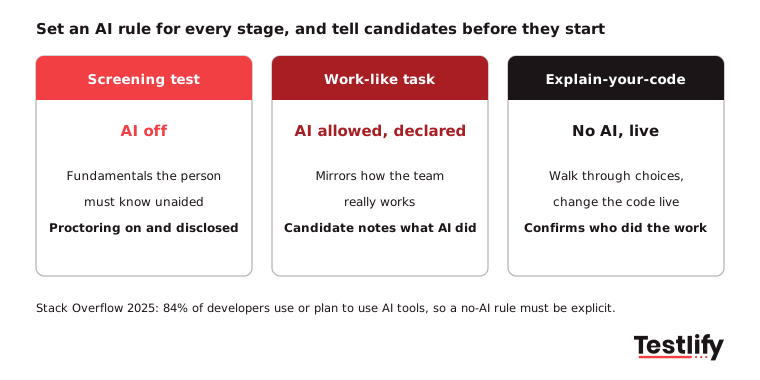
A simple policy that works for most teams:
- Screening test, AI off: Check the fundamentals a developer must know unaided. Say so in the invite and use proctoring to back it up.
- Shortlist task, AI allowed and declared: Let candidates work the way your team works, and ask them to note where they used AI and what they changed.
- Explain stage, no AI, live: The candidate walks through their code and makes a small change in real time.
The same survey found that 46% of developers distrust the accuracy of AI output, and 66% say their top frustration is AI answers that are "almost right, but not quite". That is exactly the skill worth testing at the shortlist stage: can the candidate spot and fix what the AI got wrong?
How do you keep results honest without hurting candidates?
Hiring teams keep results honest by layering light checks, telling candidates about them up front, and treating every flag as evidence for a human to review rather than an automatic rejection.
The scale of the problem is real. Testlify COO Namrata Kamdar told SHRM Labs that across the teams on the platform, three warning signs show up most: a gap between test scores and answers to follow-up questions, unusually short completion times, and lower accuracy on scenario questions than on multiple choice. In the same article, an analysis of nearly 20,000 interviews by the interview platform Fabric found signs of cheating in 38.5% of candidates, rising to 48% for technical roles.
Use checks in proportion to the risk of the role:
- For every test: Randomized questions, copy-paste tracking, tab and full-screen monitoring, and an honesty agreement.
- For senior or sensitive roles: Webcam snapshots, AI assistance detection and photo ID matching.
- For finalists: The live "explain your code" step, which no overlay tool can sit through for you.
Say which checks are on in the invite, and let candidates run a system check first. Heavy monitoring with no warning feels hostile and pushes honest candidates away. See how layered anti-cheating and proctoring checks work in practice.
How do you score results and set a fair cut-off?
Hiring teams score fairly by using one weighted rubric for every candidate and agreeing the cut-off before the first result arrives. Auto-grading handles correctness against test cases; a reviewer adds judgement on structure and readability for shortlist tasks.
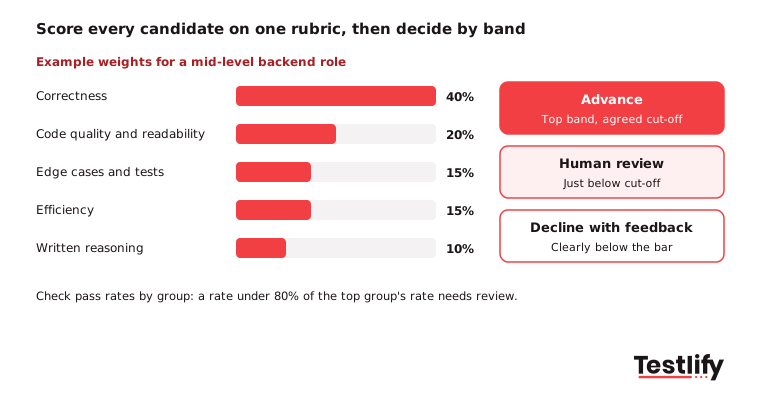
Turn scores into three bands instead of a single pass mark. Advance: above the agreed cut-off. Human review: just below it, where a reviewer reads the code before deciding. Decline with feedback: clearly below the bar. A percentile cut-off, such as the top 30% of your own pool for that role, adapts better than a fixed 70% score.
Check the results for fairness. Under the federal Uniform Guidelines on Employee Selection Procedures, a selection rate for any group below four-fifths (80%) of the rate for the highest group is generally treated as evidence of adverse impact. If one group passes far less often, review the questions for job relevance before the next round. For more on reading results, see how to evaluate coding test results.
How should the test fit into interviews and the final decision?
The test should decide who earns an interview, and the interviews should build on what the test showed. Give interviewers the candidate's submission and score before the call, and plan questions around it: "Why did you choose this data structure?", "How would this change with 10 times the traffic?", "Change this function to handle a new rule."
Combine the evidence on one interview scorecard tied to the skills sheet from step one. Add a structured interview for teamwork and communication, which a coding test does not measure well. Pair programming on the candidate's own code shows both at once: how they think, and how they take a suggestion.
Key takeaway: A high test score earns a conversation, not an offer. A strong hire has a good score, explains their code clearly and fits the skills sheet.
How do you treat candidates well during technical tests?
Hiring teams treat candidates well by being clear before the test, quick after it, and specific in their feedback. Developers talk to each other, and a frustrating test becomes a story on a forum.
- Before: Explain why you use a test, what it covers, how long it takes, which tools are allowed, and who to contact if something breaks. Offer a practice question.
- During: Use a real coding environment with syntax highlighting and the option to run code, not a plain text box.
- After: Reply within a few working days. Share a short note on strengths and gaps, even with candidates you decline. Our guide on giving constructive feedback to candidates has templates.
Ask every candidate two quick questions after the test: was it clear, and did it feel relevant to the job? Low scores on either question point to the part of the test to fix.
Which metrics show your process is working?
Five metrics show whether your coding test process is working: completion rate, pass rate by stage, adverse impact ratio, interview-to-offer ratio and new-hire performance at 90 days. Review them every quarter with the hiring managers.
Metric | What it tells you | Warning sign |
|---|---|---|
Completion rate | Whether the test is a fair ask | Below 75% of invited candidates finish |
Pass rate by stage | Whether the cut-off is set right | Almost everyone, or almost no one, passes |
Adverse impact ratio | Whether any group is filtered out unfairly | Any group under 80% of the top group's rate |
Interview-to-offer ratio | Whether the test sends the right people forward | Interviewers reject most people who passed |
90-day performance vs test score | Whether the test predicts the job | High scorers do no better than low scorers |
When a question's scores stop lining up with on-the-job results, retire it. The skills-based hiring statistics roundup has more benchmarks to compare against.
How does Testlify support this process?
Testlify supports each step, from building the test to scoring and syncing results to your ATS:
- Build fast: Pick from 3,500+ tests, such as the Python coding test, or generate a role-specific assessment from a job description. Mix coding questions with any of 25+ question types.
- Test real work: Live coding tests run in 45+ programming languages, and multi-file projects in Node.js, Python and Java run in a proctored VS Code environment. Durations are preset at 30, 60 or 90 minutes or set to your own.
- Keep it honest: 20+ proctoring checks, including AI assistance detection, copy-paste tracking and tab proctoring, with custom tolerance so one flag does not end a test.
- Decide on evidence: Auto-grading, per-skill breakdowns, benchmarks and AI-suggested follow-up questions for the interview, plus live coding and pair-programming interviews.
- Fit your stack: Two-way sync with 100+ ATS and HRIS tools, so scores land next to the candidate record.
Testlify's matching model also completed a third-party NYC Local Law 144 bias audit on June 16, 2023.
Ready to hire developers on evidence?
Start with one open developer role. Write the skills sheet, set up a 45-minute screening test and a shortlist task, and compare the shortlist with your last hire for the same role. Explore the developer hiring workflow, start a 7-day free trial with no credit card, or book a demo to see it with your own roles.
Frequently asked questions

Content Writer
Yashika Khandelwal is a Content Writer with 3+ years of experience creating research-backed content on hiring, talent assessment, and HR technology. She is a registered Organizational Psychologist and subject matter expert who combines behavioral science with practical recruitment insights to produce accurate, evidence-based content.
LinkedInRelated resources
View all
Skill assessment
How to build a software development team in 2026

Skill assessment
Identify top talent using skill assessments

Skill assessment
Scale QA teams with attention-to-detail test

Skill assessment
Importance of accountability skills for responsible work performance

Skill assessment
Benefits of conflict management in the workplace

Skill assessment
How to Assess Positive Attitude in Candidates
Get started.
Hire on proof, not resumes.
Run your first skills-based assessment free — no credit card required.