
Must have elements in programming test design: a 2026 checklist
A 10-point checklist for building a coding test for developer hiring, with time limits, task counts, a scoring rubric and an AI-use policy.

The must-have elements in programming test design are the parts every coding test for hiring needs before a single candidate sees it: a skill map tied to the job, a sensible length, realistic tasks, clear setup, a scoring rubric, an AI-use policy, integrity checks, fair access, a pilot run, and a feedback loop. Miss one and the scores stop telling you who can do the work.
This checklist is for TA managers, recruiting ops teams, and hiring managers who build or buy coding tests for developer roles and want results they can defend.
 ChatGPT
 Gemini
 Claude
 Grok
 Perplexity
TL;DR
- A good programming test checks 1 to 3 core skills from the job, not everything a developer might know.
- Keep a screening test to 45 to 70 minutes with 2 to 4 tasks. Longer tests lose strong candidates.
- Score with a written rubric: hidden test cases for correctness, plus code quality, efficiency, and partial credit.
- Write an AI-use policy into the test. 84% of developers now use or plan to use AI tools, so silence invites confusion.
- Match integrity checks to the stakes: randomized questions and copy-paste tracking for a screen, full proctoring for a final round.
- Have a current engineer take the test before launch. If it takes them more than half the time limit, cut scope.
- Close the loop: debrief the hiring manager, send candidates short feedback, and compare scores with later interview results.

What are the must-have elements in programming test design?
The must-have elements in programming test design are ten checks that make a coding test fair, job-relevant, and quick to score. A test that passes all ten measures the skills the role needs, respects candidate time, scores every answer the same way, and holds up when a hiring manager or a rejected candidate asks why.
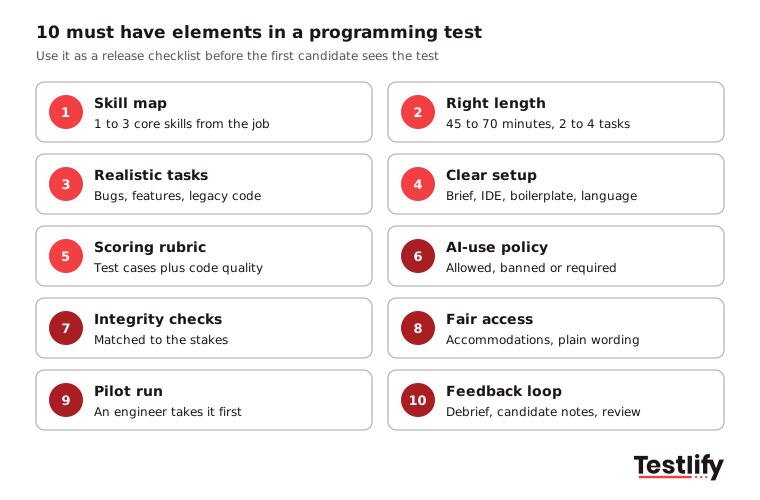
# | Element | What good looks like | How to check it |
|---|---|---|---|
1 | Skill map | 1 to 3 core skills taken from the job description | Hiring manager signs off the list |
2 | Right length | 45 to 70 minutes, 2 to 4 tasks for a screen | Pilot time is under half the limit |
3 | Realistic tasks | Bugs, small features or legacy code like the real job | An engineer on the team says "we do this" |
4 | Clear setup | Plain brief, working IDE, starter code, language choice | No candidate asks what the task means |
5 | Scoring rubric | Test cases plus quality criteria, with partial credit | Two reviewers give the same score |
6 | AI-use policy | Allowed, banned or required, stated up front | Policy appears in the invite and the brief |
7 | Integrity checks | Matched to the stage and the stakes | Flags are reviewed by a person |
8 | Fair access | Accommodations, plain wording, no trick questions | Accommodation route is in the invite |
9 | Pilot run | A current engineer takes the full test | Timing and wording fixed before launch |
10 | Feedback loop | Debrief, candidate feedback, score review | Scores compared with later rounds each quarter |
The sections below explain each element and the numbers behind it.
Why does every coding test start with a skill map?
A coding test starts with a skill map because every task and every score has to trace back to something the job needs. Sit down with the hiring manager and list the 1 to 3 skills that separate a good hire from a weak one in the first six months, such as debugging an API, writing SQL against a messy schema, or building a React component.
Narrow beats broad. A test that tries to cover algorithms, system design, testing, and three frameworks in one hour measures none of them well. CodeSignal's guidance on assessment design makes the same point: measure one key skill, or a few core skills, per test.
A written skill map also protects you. The EEOC's guidance on employment tests says employers should make sure a test is job-related and consistent with business necessity. A skill map signed off by the hiring manager is the simplest record that it is.
Pro tip: Write the skill map as tasks, not topics. "Find and fix a failing payment webhook" is testable. "Knows Node.js" is not.
How long should a coding test be, and how many tasks?
A screening coding test should take 45 to 70 minutes and hold 2 to 4 tasks. Adaface recommends 45 to 60 minutes for a screen, and CodeSignal reports 60 to 70 minutes as the best length, with two coding tasks and no more than four. Later rounds can go longer because fewer, more committed candidates take them.

Length is a candidate experience decision as much as a measurement one. Developers have options: the US Bureau of Labor Statistics projects 10% growth in software developer, QA analyst and tester jobs from 2025 to 2035, with about 106,100 openings a year. A three-hour unpaid screen for a role with that much demand mostly filters for candidates with spare time.
Two simple rules keep length under control:
- One easier task first: Open with a task most qualified candidates can finish, so nerves do not decide the result.
- One task that separates: Add a harder task that shows who can go beyond the basics, and give partial credit on it.
Which task types belong in a coding test?
The task types that belong in a coding test are the ones closest to the daily work: fixing bugs, extending existing code, building a small feature and, for senior roles, designing a system. Short knowledge questions can sit at the start, but they should never carry most of the score.

Task type | What it shows | Best for | Watch out for |
|---|---|---|---|
Short knowledge questions | Language and framework basics | Quick first filter | Easy to look up, weak signal alone |
Algorithm challenge | Problem solving, data structures | Graduate and junior roles | Rarely mirrors the real job |
Debugging task | Reading code, finding root causes | Every level | Needs a realistic codebase |
Feature in existing code | Working with legacy code, conventions | Mid and senior roles | Setup time eats into the limit |
Take-home project | Code organization, tests, docs | Senior roles, small pools | Outside help, long hours |
Live pair programming | Reasoning, communication, collaboration | Final rounds | Interviewer consistency |
System design | Trade-offs, architecture | Senior and lead roles | Hard to score without a rubric |
CoderPad's checklist for realistic assessments puts legacy code and freedom to choose libraries high on the list for senior roles, and that matches what we have seen: senior candidates show their level when they improve code someone else wrote, not when they reverse a linked list.
For junior roles, keep tasks self-contained and tell candidates exactly what "done" means. For senior roles, leave some ambiguity on purpose and score how they ask clarifying questions. For more on keeping tasks realistic, see these best practices for designing coding assessments.
What should the instructions and setup include?
The instructions and setup should let a candidate start coding within two minutes: a plain brief written like a real ticket, a working editor, starter code that already parses the input, and a free choice of language unless the role truly needs one. Every minute spent decoding the task is a minute not spent showing skill.

- A ticket-style brief: State the goal, the inputs, the expected output, and one worked example.
- A real editor: Candidates use an IDE at work. Syntax highlighting, a run button, and visible test cases cut false negatives.
- Starter code: Boilerplate that reads the input lets the candidate spend time on the problem, not on parsing.
- Language choice: Unless the job needs a specific stack from day one, let candidates solve in the language they know best.
- Visible rules: Time limit, what tools are allowed, and how the work will be scored, all on the first screen.

How should a coding test be scored?
A coding test should be scored against a written rubric that combines automated test cases for correctness with human-readable criteria for problem solving, code quality, efficiency, and communication. Each criterion gets a weight and partial credit, so a near miss on a hard task does not count the same as a blank answer.
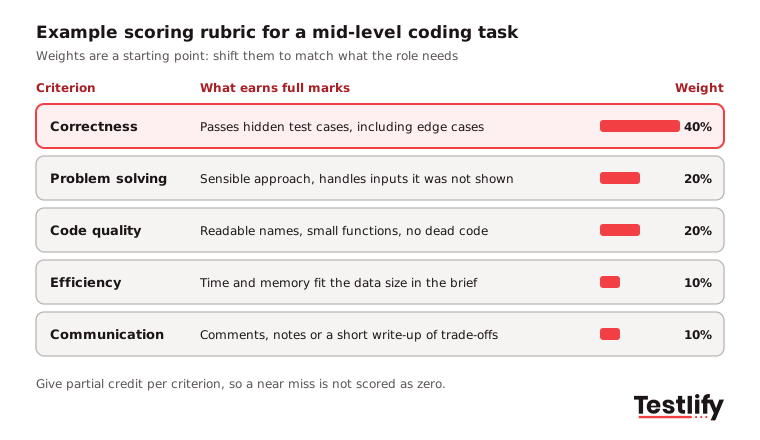
- Hidden test cases: Keep some test cases hidden, including edge cases such as empty input, very large input, and invalid data.
- Quality criteria: Readable names, small functions, and no dead code are scored the same way for everyone.
- Partial credit: Score each criterion separately, so a candidate who solves 80% of a task is ranked above one who solved none.
- Two reviewers on borderline scores: If they disagree by more than one band, the rubric wording needs work.
Automated scoring handles correctness at scale. A person should still read the code of every shortlisted candidate and every close rejection. Once scores come in, the guide on how to read programming test results walks through question-level analysis and when to trust a score.

Key takeaway: If two engineers cannot score the same answer within one band of each other, the problem is the rubric, not the candidate.
What should a coding test's AI-use policy say?
A coding test's AI-use policy should say, before the test starts, whether AI assistants are banned, allowed, or required, and how their use affects the score. The policy is now a core element because most developers use these tools at work, and a test that ignores them measures a way of working that no longer exists.
The Stack Overflow Developer Survey 2025 found that 84% of respondents use or plan to use AI tools in their development process, up from 76% a year earlier, and 51% of professional developers use them daily. The same survey found 46% distrust the accuracy of AI output and 66% are frustrated by AI answers that are "almost right, but not quite." That last number is the case for testing judgment, not just output.
Pick one of three policies per stage:
- Banned: Best for short screens of fundamentals. Back it with integrity checks and say so in the invite.
- Allowed: Best for realistic feature or debugging tasks. Score the final code and ask for a short note on what the AI got wrong.
- Required: Best for roles where AI-assisted work is the job. Give a task where the AI's first answer is subtly wrong and score how the candidate catches it.
Whichever you choose, state it in the invite, in the brief and in the scoring rubric. A policy that lives only in the hiring manager's head is not a policy.
Which integrity checks does a remote coding test need?
A remote coding test needs integrity checks matched to its stage: light checks such as question randomization, copy-paste tracking and tab monitoring for an early screen, and heavier ones such as webcam snapshots, screen recording and identity checks for a final round. The aim is trustworthy scores without treating every candidate as a suspect.

- Question pools and randomization: Different candidates get different versions, so leaked answers lose value.
- Copy-paste and tab tracking: Large pasted blocks or long time away from the test are flagged for review.
- AI assistance detection: Useful only when your policy bans AI. If AI is allowed, do not penalize it.
- Similarity checks: Compare submissions with each other to spot shared answers.
- A person reviews every flag: An automated flag is a reason to look, never an automatic rejection.
Refresh your question pool at least twice a year and check whether your tasks have been posted online. For the full picture of the options, see the anti-cheating and proctoring features.
Why should an engineer pilot the test before launch?
An engineer should pilot the test before launch because it is the only reliable way to find unclear wording, broken test cases and a time limit that is too tight. Ask a current team member at the target level to take the full test under real conditions, then fix what they trip over.
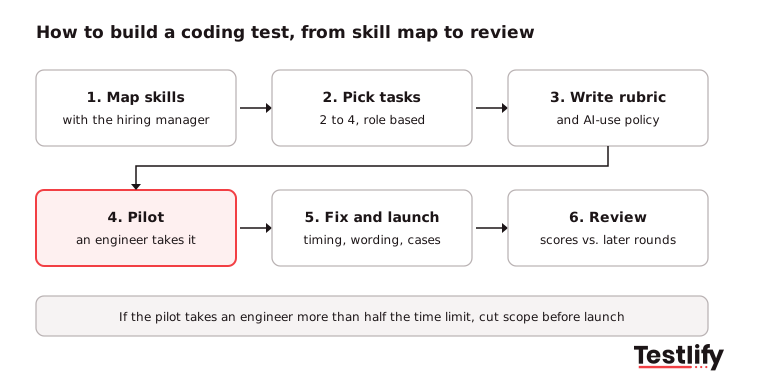
Use three release gates for the pilot:
- Timing: If your engineer needs more than half the time limit, candidates will run out of time. Cut scope.
- Clarity: Every question the engineer asks about the brief becomes a line in the brief.
- Scoring: Score the engineer's answer with the rubric. If a strong team member scores below your pass mark, the bar is wrong.
Across the teams that skip this step, the first week of live candidates becomes the pilot, and the early scores are the ones nobody trusts.
How do you close the loop with candidates and hiring managers?
You close the loop by debriefing the hiring manager on every shortlist, sending candidates short feedback, and checking every quarter whether test scores line up with interview and on-the-job results. Feedback turns a one-off test into one that gets better with every hire.

- Debrief the hiring manager: Walk through the top candidates' code, not just their scores, before the next round.
- Use the test in the next round: Codility's engineering team recommends a debrief where the candidate talks through their solution. It shows how they take feedback and explain trade-offs, and it fits naturally into a structured interview.
- Tell candidates where they stood: Even two lines on strengths and gaps improve how candidates talk about your hiring process.
- Review the test every quarter: Drop tasks that everyone passes or everyone fails, and replace any task that has leaked.
- Offer accommodations: Put a route for extra time or assistive technology in the invite, so candidates with disabilities can ask without friction.
How does Testlify cover the must have elements in programming test design?
Testlify covers the must have elements in programming test design with a library of ready-made coding tests, a live coding environment, rubric-based automated scoring and built-in integrity checks, so a TA team can build a role-based test without writing every task from scratch.
- Skill map and tasks: 3,500+ tests in the Testlify test library, including programming and coding tests by role and level, plus custom tests built by subject matter experts on request.
- Setup: Coding questions run in a live coding IDE with 45+ programming languages, and the AI test builder can draft an assessment from a job description.
- Scoring: Automated scoring, AI candidate insights with a per-skill breakdown, weighted scoring, question analytics and benchmarking.
- Integrity: 20+ proctoring checks, including copy-paste tracking, AI assistance detection, question randomization and webcam snapshots.
- Later rounds and fit: Live coding and pair-programming interviews, and 100+ ATS and HRIS integrations with two-way sync.
For more on running developer hiring end to end, see the complete guide to programming tests.
Ready to build your next coding test?
Start with the skill map, keep the test under 70 minutes, and write the rubric and AI-use policy before you invite anyone. To skip the blank page, browse the coding tests in the Testlify library or start a 7-day free trial. No credit card is needed, and you pay only when a candidate starts a test.
Frequently asked questions (FAQs)

Content Writer
Yashika Khandelwal is a Content Writer with 3+ years of experience creating research-backed content on hiring, talent assessment, and HR technology. She is a registered Organizational Psychologist and subject matter expert who combines behavioral science with practical recruitment insights to produce accurate, evidence-based content.
LinkedInRelated resources
View all
HR & recruitment
IT skills testing: Everything you need to know

HR & recruitment
Lead generation team: roles, structure, and how to build one

HR & recruitment
What are operations teams and how do they work?

HR & recruitment
Personality tests for cultural fit: Spot hiring red flags

HR & recruitment
The lateral hiring process: a 7 stage playbook

HR & recruitment
How to streamline the hiring process with digital solutions
Get started.
Hire on proof, not resumes.
Run your first skills-based assessment free — no credit card required.