
How to create clear and engaging job postings
A step-by-step guide to job postings that the right people find, read and apply to, with a template, a rewrite example and a checklist.

Knowing how to create clear and engaging job postings comes down to one idea: write for the candidate, not for your org chart. A clear job posting tells people what the job is, what they will achieve, what they need, what they will be paid and how to apply. An engaging one gives them a reason to pick your role over the 20 others in their search results.
Recruiters and TA teams write dozens of postings a month, often by pasting the internal job description into a job board. That shortcut costs applicants. The steps below show how to turn a role into a posting that the right people find, read to the end and apply to, and how to check it is working once it goes live.
TL;DR:
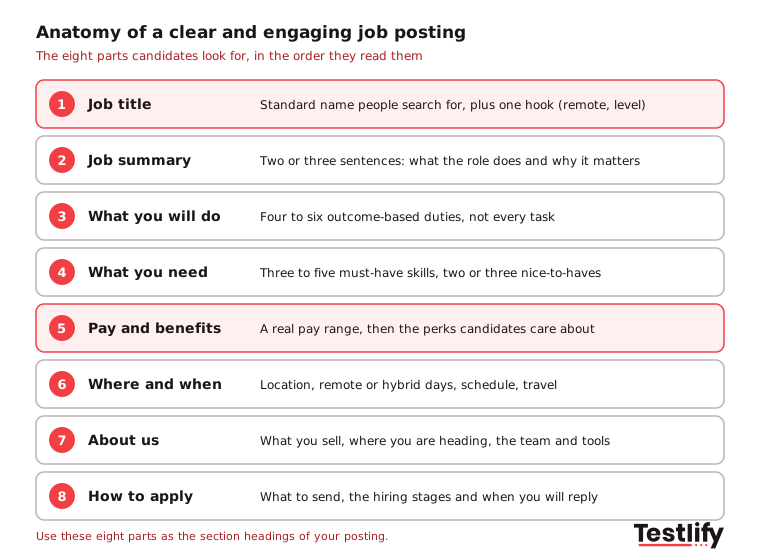
- A clear and engaging job posting has eight parts: a searchable title, a short summary, outcome-based duties, skills-first requirements, pay and benefits, location, a short company intro and simple application steps.
- Use the standard job title people search for and add at most one hook, such as "remote" or the seniority level. Skip "ninja", "guru" and internal acronyms.
- List four to six outcomes instead of every task, and keep requirements to three to five must-haves plus two or three nice-to-haves.
- Show the pay range. Indeed Hiring Lab found 57.8% of US postings on Indeed included pay in September 2024, so a posting without it now stands out for the wrong reason.
- Write to the candidate as "you", speak as "we", use active voice and drop wording that signals a preferred age or gender.
- Track view-to-apply rate and qualified applicant rate after publishing, then screen the applicants on skills instead of resumes.
 ChatGPT
 Gemini
 Claude
 Grok
 Perplexity
What makes a job posting clear and engaging?
A clear and engaging job posting is a short, candidate-facing ad that answers the five questions every job seeker has: what will I do, what do I need, what do I get, where and when will I work, and how do I apply. Clarity gets the right people to apply. Engagement gets them to read past the title.
Clear means specific. "You will build monthly sales reports in Power BI for 12 regional managers" is clear. "You will support the sales function" is not. Engaging means the posting reads like an invitation from a team, not a list of demands from a department.
A useful test: if a candidate cannot tell after 30 seconds whether they qualify and whether the role is worth their time, the posting is not clear enough yet.

How is a job posting different from a job description?
A job posting is an external ad written to attract applicants, while a job description is an internal document that defines the role's duties, reporting line and requirements. The job description is the source; the posting is the short, persuasive version a candidate actually reads.
Job descriptions matter in their own right. They set clear expectations before someone starts, help managers assign duties, and give you a fair yardstick to compare candidates on skills and experience. Use them as the input, then cut and rewrite for the posting. If you need a starting point for the internal document, the Testlify job description templates cover hundreds of roles.
Aspect | Job description | Job posting |
|---|---|---|
Audience | Hiring team, HR, the employee | Job seekers |
Purpose | Define the role and its duties | Attract the right applicants |
Tone | Neutral, complete | Direct, written to "you" |
Length | As long as the role needs | Short enough to read on a phone |
Includes pay | Often a grade or band | A real pay range |
Where it lives | HRIS, offer letters, reviews | Careers page, job boards, social |
For more on where the ad itself runs, see job advertising vs job posting.
10 steps for creating clear and engaging job postings
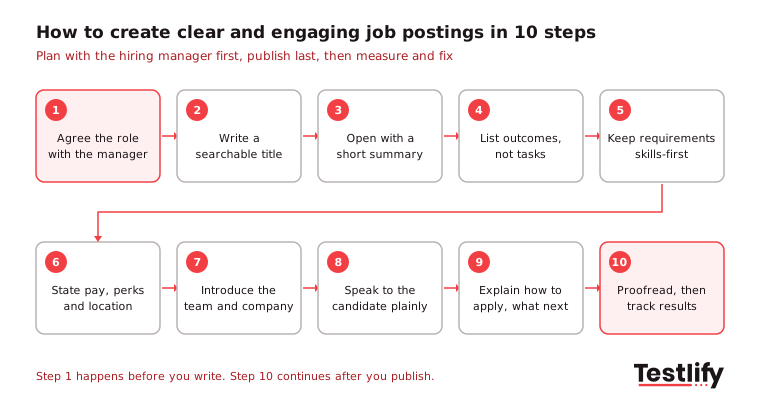
Creating clear and engaging job postings takes ten steps: agree on the role with the hiring manager, write a searchable title, open with a short summary, list outcomes, keep requirements skills-first, state pay and location, introduce the team, write in plain active language, explain how to apply, then proofread and track results.
1. Agree on the role with the hiring manager
Before anyone writes a word, sit down with the hiring manager for 15 minutes. Agree on the three or four results the new hire must deliver in the first year, the skills they need on day one, what can be learned on the job, and how you will screen for those skills. Write the posting from that list, then adapt it to your standard job-ad style. Postings written without this step tend to list every skill anyone has ever wanted, which scares off good candidates and lets weak ones through.
2. Write a job title people search for
The job title is the first thing candidates see and decides whether they click. It should be:
- Accurate: Match the real level and scope. Use "Manager" only if the person manages people, and keep "Chief" or "Head of" for roles that actually set strategy.
- Realistic: Use the standard name for the role. Titles like "guru", "magician", "ninja" or "unicorn" make candidates roll their eyes, do not describe the work and do not match what people type into job boards.
- Meaningful: Avoid strings of business words and internal acronyms. "Dynamic Markets Administrator" says nothing; "Business Development Representative" tells a sales candidate exactly what to expect.
Add at most one hook if it helps, such as "Customer Support Specialist, Remote (US)" or "Senior Data Analyst, Healthcare". More than that crowds the title and hurts search.
3. Open with a short job summary
The summary is your two-to-three sentence elevator pitch: what the role does, who it works with and why it matters to the business. It bridges the title and the details below it, so a candidate who reads only this paragraph still knows whether to keep going.
Weak: "We are looking for a motivated marketing coordinator to join our dynamic team." Clear: "You will run our email and paid social campaigns for three product lines, working with two designers and a growth lead to double qualified sign-ups this year."
4. List outcomes, not every task
Responsibilities are the backbone of the posting, so make them specific and keep them short. Four to six bullets is enough. A list of more than about ten responsibilities reads as micromanagement and puts off the self-motivated people you want.
- Avoid vague lines: "You will be part of our marketing team" tells the candidate nothing. "You will set up tracking for our online campaigns and report weekly results in Google Analytics" does.
- Describe the work as it is today: The role will grow as the company does, but list the core duties now, not every task it might take on in three years.
- Lead with outcomes: "Cut first-response time on support tickets below 2 hours" says more than "respond to tickets".
5. Keep requirements skills-first
Every extra requirement shrinks your applicant pool, so separate what is truly needed on day one from what can be learned. A workable rule of thumb is three to five essential qualifications plus two or three desirable ones. Cut anything new hires could pick up on the job or will rarely use.
Frame requirements around what the person will do rather than the credential they hold. "Use your knowledge of CRM software to build strong client relationships" works better than "Certification in CRM tools required", and "You can deliver error-free reports on deadline" beats "detail-oriented and able to multitask", which could describe any job. A candidate who looks strong on paper is not always the best fit, and a rigid credential list screens out people who could do the work well.
Employers are moving this way. According to SHRM's report on Indeed data, about 30% of US job postings in April 2024 asked for a set number of years of experience, down from 40% two years earlier, and 52% listed no education requirement at all. Read more on the approach in what skills-based hiring is and why it matters.
6. State pay, benefits and location
Candidates want the full package, not just the salary. Give a real pay range (more on that below), then group benefits into a few clear buckets so they are easy to scan:
- Financial: Bonuses, stock options and other parts of total pay.
- Growth and learning: Training budgets, certifications and conference attendance. Early-career candidates often look for these first.
- Health and wellness: Health cover, gym memberships and wellness programs.
- Work-life balance: Remote or flexible work arrangements, flexible hours and paid leave.
- Everything else: Perks that show your culture, such as a well-designed office, team events or offsites.
Then say where and when the work happens: the city or region, whether the role is on-site, hybrid (and how many office days) or remote (and in which countries or time zones), the schedule, and any travel. Location details also help local candidates find the posting in search.
7. Introduce the team and the company
Candidates are choosing an employer, not just a job, so give them a short, honest "about us". Cover what you sell or provide (vital for smaller companies people may not know), your mission in one line, and where the company stands now, for example entering a new market or growing a team after a funding round.
Then make it concrete for the role:
- The team: Who they will work with and who they report to.
- Tools and technologies: The stack the team uses every day. Engineering candidates look for this first.
- Key clients: A few recognizable customers, which matters to marketing and sales candidates.
- Recent wins: Projects, sales milestones or campaigns, which appeal to people who like measurable results.
A good company section works as a two-way filter: people who share your values lean in, and people who would not fit opt out. For more ideas, see building a strong employer brand.
8. Write to the candidate in plain, active language
How you phrase each line matters as much as what you include. Three habits make a posting feel like an invitation:
- Say "you", not "they": "You will collaborate with our marketing team" helps a candidate picture the job. "They will collaborate with the marketing team" reads like an internal memo about someone else.
- Say "we", not the company name: "Here at ABC, we provide our customers with X" lands better than "ABC is a global provider of X".
- Use active voice: "The goal is to ensure our products are designed within quality standards" leaves candidates guessing whether they work alone or in a team. "You will work with our design team to build products that meet client requirements" removes the doubt.
Keep sentences short, skip jargon and spell out acronyms.
9. Explain how to apply and what happens next
A posting's job does not end at the last bullet. Tell candidates exactly what to send (resume, portfolio, a short answer to one question), link straight to the application form, and outline the hiring stages, who will contact them and roughly when. Ask only for what you need to screen at this stage; every extra field loses applicants.
Then apply to your own job. Go through every step on a phone as a candidate would, and fix anything slow or confusing. A clean application flow is part of a good candidate experience and reflects well on you as an employer.
10. Proofread, publish and track results
Typos and grammar mistakes make candidates question your professionalism and attention to detail. Proofread the posting, then ask a colleague, ideally someone in the same role, to read it with fresh eyes. Publish, and come back after a week to check the numbers in the section on measuring results below.
Pro tip: Write the posting in the same session as the screening plan. If a requirement is in the posting, there should be a way to test it; if you cannot test it, question whether it belongs there.
Should a job posting include the pay range?
A job posting should include the pay range in almost every case, because candidates expect it and a growing number of US states and cities require it. A real range, not "competitive salary", saves time on both sides and filters out people whose expectations do not match the budget.
Pay transparency is now the norm. Indeed Hiring Lab found that 57.8% of US job postings on Indeed included salary information in September 2024, up from 52.2% a year earlier. In New York, where pay ranges are required in job ads, the share was 97.7%. Laws in California, New York, Washington DC, Hawaii and Maryland, among others, have pushed the numbers up.
Keep the range honest: wide enough to cover the real offer, narrow enough to mean something. If you hire in several locations, list the range per location or state how location affects pay. Testlify's guide to pay transparency covers the rules in more detail.
How do you keep job postings inclusive?
Inclusive job postings use gender-neutral wording, focus on skills instead of personal traits, and avoid any line that signals a preferred age, gender, background or personality. Inclusive wording widens your applicant pool and keeps you clear of discrimination rules.
The EEOC states that a job ad may not show a preference for, or discourage, people based on protected traits, and gives ads asking for "females" or "recent college graduates" as examples. Wording like "young, energetic salespeople" or "digital native" has the same problem.
- Use neutral titles and pronouns: "Salesperson" not "salesman", and "you" throughout.
- Describe skills, not traits: "Experience designing corporate logos in Figma or Illustrator" instead of "youthful and creative".
- Question degree requirements: Ask whether the skill could come from work experience, a certificate or training.
- Add an equal opportunity statement and an accommodation contact: Candidates who need adjustments should know whom to ask.
For more tactics, read how to attract diverse candidates to your job postings.
How long should a job posting be?
A job posting should be long enough to answer the candidate's five questions and short enough to read on a phone, which for most roles means roughly 300 to 700 words. Senior and specialist roles can run longer; high-volume hourly roles should be shorter.
Format matters as much as length:
- Short paragraphs: Three or four sentences at most.
- Clear headings: Use the eight parts above as section headings so candidates can jump to pay or requirements.
- Bullets for duties and requirements: Four to six bullets each.
- Mobile check: Preview the posting on a phone before you publish, and avoid symbols or tables that break on small screens.
How do you get more of the right people to see a job posting?
You get more of the right people to see a job posting by using the words they search for, posting where they look, and asking your own people to share it. Job boards and search engines match postings on the title and the terms in the body, so the plain title and specific skills you wrote earlier already do most of the work.
- Use searchable terms: Include the standard job title, key skills and tools, and location terms (city, region or "remote") naturally in the text.
- Post where candidates look: Your careers page, the main boards for your market and niche boards for the role. Explore our article on the best job boards for more details.
- Ask for referrals: Close the posting with a line inviting readers to share it, and give employees a simple way to refer people. Employees often know people with the right skills who would fit the team, and a well-run employee referral program rewards the people who send them.
What does a clear job posting look like?
A clear job posting replaces vague, company-centred lines with specific, candidate-centred ones. The table below rewrites common lines from a typical posting into clearer versions you can copy.
Part | Vague version | Clear and engaging version |
|---|---|---|
Title | Customer Happiness Ninja | Customer Support Specialist, Remote (US) |
Summary | Join our fast-growing, dynamic team! | You will answer chat and email questions from 300+ small business customers and help them get set up in their first week. |
Duty | Handle customer tickets | Resolve 40 to 60 chats a day and keep customer satisfaction above 90% |
Requirement | 3+ years of experience, degree preferred | You can explain a technical fix in plain English and type at 40+ words per minute |
Pay | Competitive salary | $48,000 to $56,000 a year, plus a quarterly bonus |
Location | Flexible | Fully remote within the US, shifts between 8am and 6pm ET |
Apply | Send your CV | Apply in 5 minutes with your resume and one short answer. We reply within 7 days. |
You can reuse this template for any role:
- Job title: Standard title plus one hook.
- Summary: Two or three sentences on what the role does and why it matters.
- What you will do: Four to six outcome-based bullets.
- What you need: Three to five must-haves, two or three nice-to-haves.
- Pay and benefits: A real range, then benefit buckets.
- Where and when: Location, remote or hybrid days, schedule.
- About us: What you do, where you are heading, the team and tools.
- How to apply: What to send, the stages and when you will reply.
Which mistakes make job postings less engaging?
The mistakes that make job postings less engaging are the ones that make candidates do extra work: decoding a title, guessing the pay, wading through 15 bullets or wondering if they will ever hear back.
Mistake | Why it hurts | Fix |
|---|---|---|
Creative or internal job title | Nobody searches for it | Use the standard title |
Copy of the internal job description | Too long, written for HR | Rewrite for the candidate |
10+ responsibilities | Reads as micromanagement | Four to six outcomes |
Long wish-list of requirements | Strong people self-select out | Three to five must-haves |
No pay range | Fewer clicks, mismatched applicants | State a real range |
Gendered or age-coded words | Narrows the pool, legal risk | Neutral, skills-based wording |
Vague location | Wrong-location applicants | Say on-site, hybrid or remote |
No next steps | Candidates drop off | Explain stages and timing |
Typos | Looks careless | Proofread with a second reader |
How do you check a job posting before and after it goes live?
A job posting is checked twice: once before publishing, for clarity and accuracy, and once a week or two after, against the numbers. The pre-publish check catches errors; the post-publish check tells you whether the posting is attracting the right people.
Before you publish, run through this checklist:
- Clarity: Can a stranger say what the job is after reading the title and summary?
- Accuracy: Has the hiring manager signed off on duties, requirements and pay?
- Inclusion: Have you removed gendered, age-coded and jargon-heavy words?
- Format: Does it read well on a phone?
- Application: Have you applied to the role yourself, start to finish?
After it goes live, track four numbers in your ATS or job board:
- View-to-apply rate: Low means the title gets clicks but the posting does not convince.
- Qualified applicant rate: The share of applicants who meet your must-haves. Low means the posting is too vague about requirements.
- Drop-off during the application: High means the form is too long.
- Time to fill: Compare with similar roles to spot postings that need a rewrite.
Key takeaway: A clear and engaging job posting is never finished at publish. Treat the first two weeks as a test, then fix the weakest part, usually the title, the requirements or the application flow.
How do you screen the applicants a job posting brings in?
Screening the applicants a job posting brings in works best when you test the same skills the posting asked for, instead of reading hundreds of resumes. A clearer, more open posting usually brings more applicants, so the screening step has to scale with it.
Hiring teams already see skills as the deciding factor. In LinkedIn's Future of Recruiting 2025, over nine in ten TA professionals said accurately assessing a candidate's skills is crucial to improving quality of hire, and 26% of paid job posts on LinkedIn did not require a degree, up from 22% in 2020.
Testlify connects the posting to the screening step:
- Same job description, same skills: The AI test builder turns a job description into a role-specific assessment in under a minute, drawing on 3,500+ validated tests in the test library.
- Resumes sorted for you: The AI resume screener pulls resumes from your ATS and gives each an explainable match score.
- Fair, comparable results: Every candidate takes the same test, with 20+ proctoring checks, and integrations with 100+ ATS and HRIS tools keep results in one place.
To see whether better postings lead to better hires, track quality of hire for each role.
Ready to screen applicants on skills, not resumes?
Your job posting brings the right people in; a skills test shows you who can do the job. Start a 7-day free trial of Testlify, no credit card required, and build your first assessment from the same job description you used for the posting.
Frequently asked questions (FAQs)

Human Resources Lead
Snehi Parmar leads People at Testlify, owning hiring, culture, performance, and retention for a 90-person team. She writes on practical HR strategy and building people processes that scale.
Related resources
View all
HR & recruitment
How to Bridge Communication Gaps During Interviews

HR & recruitment
Transparent Communication in Hiring: A 2026 Guide for Recruiters

HR & recruitment
Skills based hiring best practices: how to implement them in 2026

HR & recruitment
What is skills-based hiring? Importance & how to get started

HR & recruitment
Recruitment Software for Small Businesses: The 2026 Buyer’s Guide

HR & recruitment
How to use recruitment technology to improve your hiring process
Get started.
Hire on proof, not resumes.
Run your first skills-based assessment free — no credit card required.