
How to administer programming tests effectively
Effective programming tests require clear goals, realistic design, balanced difficulty, fair evaluation, constructive feedback & continuous improvement for optimal hiring outcomes.

There are plenty of platforms to conduct coding tests. Most of them have solid features. Yet many recruiters still struggle to identify good candidates.
The problem usually isn’t the tool. It’s the approach. If the test is poorly structured, too hard, too easy, or unclear, even the best platform won’t deliver the desired outcomes, ultimately leading to bad hires.
So before we jump into building a test, let’s get the basics right: what you need to decide upfront, how to structure the test, and how to conduct a programming skills test in a way that’s fair and role-relevant.
Recommended Reading: Why should recruiters use programming tests?
 ChatGPT
 Gemini
 Claude
 Grok
Grok Perplexity
TL;DR – Key takeaways
- If you want to conduct coding tests that actually predict job performance, stop starting with random questions. Start by writing a 5-line “definition of good” for that exact role (Day-1 tasks, must-have skills, and what you won’t judge).
- Pick one main skill lane per test (practical build, debugging, or DSA). Mixing everything in one assessment is the fastest way to reject good candidates for the wrong reason.
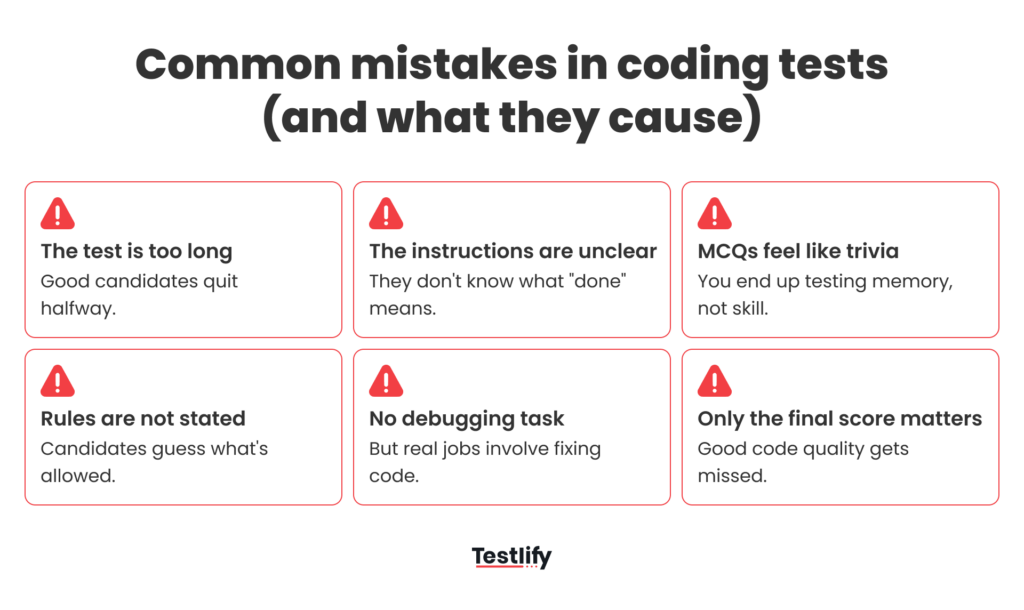
- Treat instructions like a mini README and add a “Your solution is complete when…” checklist. This single block improves submission quality more than adding extra questions.
- Time-box the test and make partial submissions acceptable: “Max X minutes/hours. If unfinished, submit and add ‘What I’d do next’.” You’ll get cleaner signals and fewer drop-offs.
- Use integrity controls in layers: randomization and time windows for early rounds, proctoring only when stakes are high, and judge patterns (not one-tab-switches) so genuine candidates don’t get punished.

Before you conduct coding tests or programming tests, get 4 things clear:
Most recruiters open a test platform and start picking questions.
That’s exactly where things go wrong. If you don’t decide what you’re actually trying to measure, the test becomes a random filter. And random filters don’t create desired outcomes.
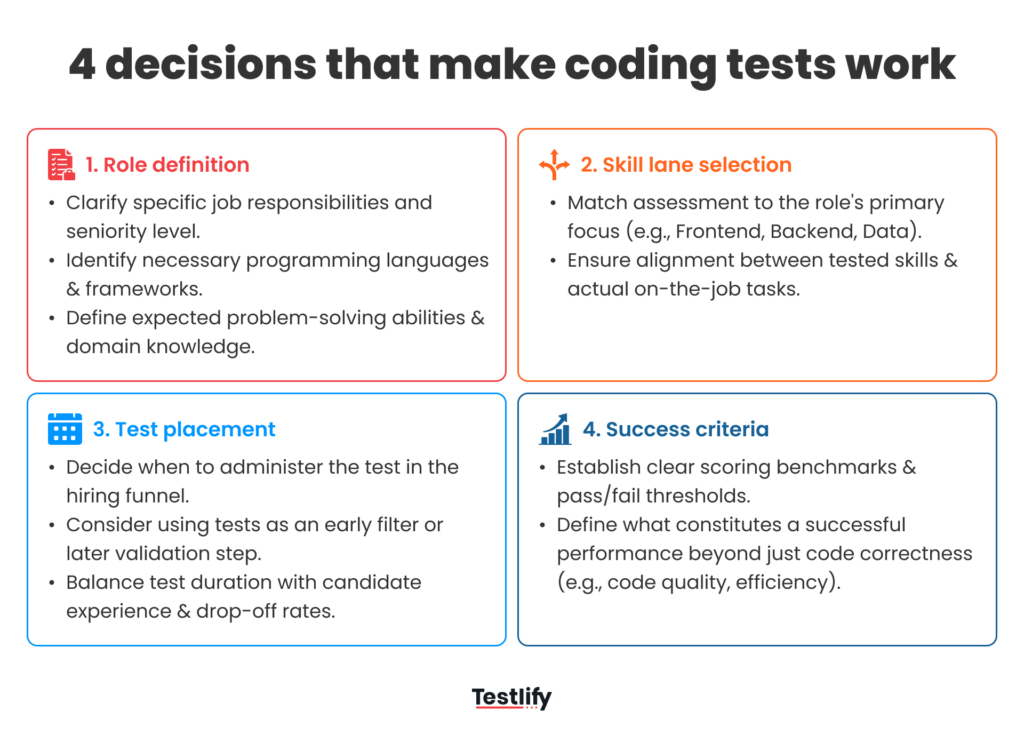
Define what “good” looks like for this role
Don’t start with questions. Start with what you’re trying to observe. Ask yourself: what will the candidate actually do in the job?
Build features? Debug production issues? Write SQL? Review PRs? Optimize performance? Work with frameworks (React, Spring, Django), and so on. Then, decide the seniority signal you’re hiring for.
For junior roles, “Good” usually means potential to learn, grasping basic logic, handling simple edge cases, and following instructions. For senior roles, “Good” means architectural thinking, performance awareness, strong debugging, trade-off analysis, and system design.
Choose the skill area you’re actually testing (don’t mix everything)
This is where most coding tests/programming tests quietly fail: they evaluate the wrong aspect of a candidate’s skills. A lot of tests end up checking memory (syntax tricks, trivia, niche DSA patterns) instead of capability. Here’s a simple way to decide what to test.
Algorithmic vs. practical: pick one as the main focus
Algorithmic (DSA) tests are useful when the job truly needs deep optimization and strong data-structure thinking (think performance-heavy systems, big data, low-latency work). But for most roles, DSA-heavy tests create false negatives. You reject developers who can build great products simply because they haven’t practiced “invert a binary tree” in a while.
Practical (domain-specific) tests usually predict job performance better for startups and most enterprise teams. Examples:
- Backend: build a small API endpoint with validation and clean error handling
- Frontend: fix a broken component and add one small feature
- Full-stack: connect a simple flow end-to-end with basic data handling
Language-specific vs. language-agnostic: decide how strict you need to be
- Language-agnostic (“solve in any language”) is good when you’re hiring generalists. You’re open to different stacks, or you care more about approach than syntax.
- Language-specific is important when: the role needs someone productive quickly, you can’t afford a long ramp-up, or the job has real constraints (example: Java memory issues, React patterns, Node async behavior).
Instead of saying “we need a Python dev,” explain why Python matters here. Is it just a matter of preference, or is it the actual environment they’ll work in from day one?
Don’t ignore debugging, it’s the real job
Most tests only ask candidates to write new code from scratch. But in real teams, developers spend a big chunk of their time reading, debugging, and improving existing code. So consider adding at least one of these:
- a buggy function with 2–3 realistic issues
- a small PR-style review: “what would you change and why?”
- a messy code snippet where they need to refactor for readability
This signals a practical question: can they work in a real codebase?
Decide where this test sits in your hiring process
A coding test is not “Step 1” by default. Where you place it changes everything: completion rates, candidate drop-off, and how much time your team saves. Put it too early, and you’ll lose strong candidates who aren’t ready to invest time yet. Put it too late, and you’ll waste interview hours on people who can’t meet the bar.
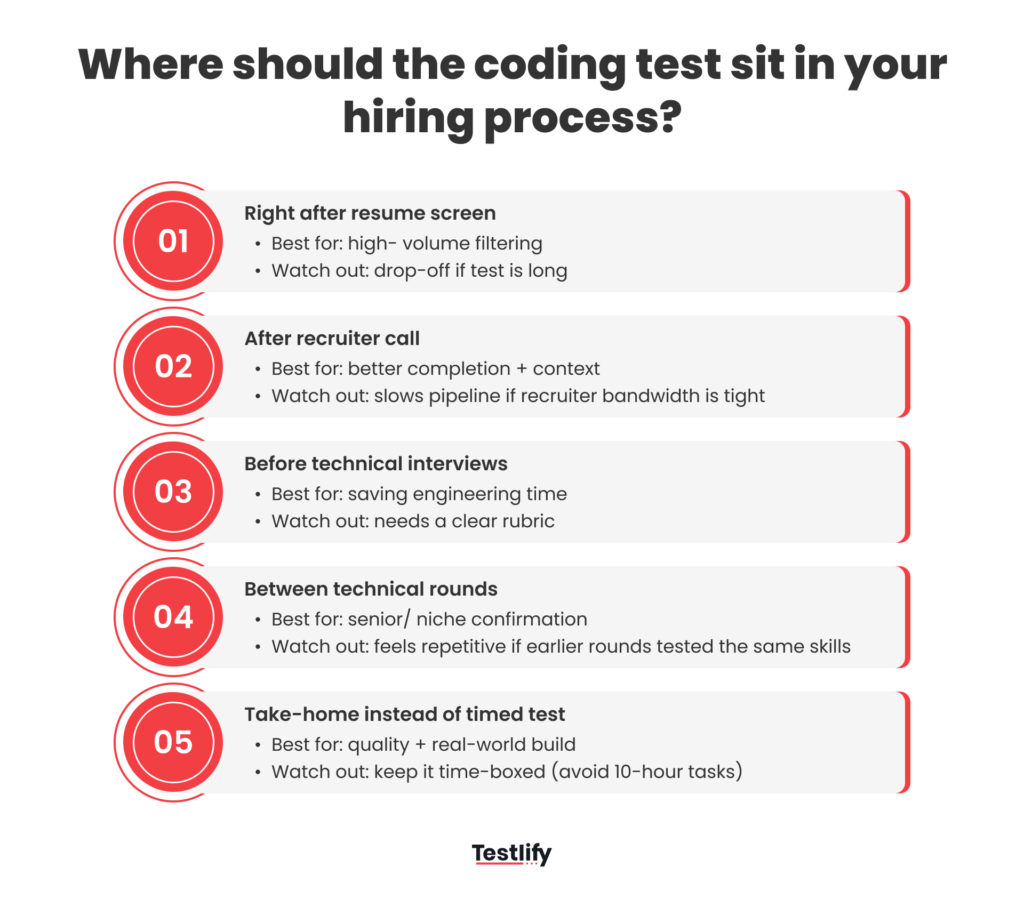
The simplest way to get this right is to choose the placement based on your hiring volume, role seniority, and the cost of interviews for your team.
Where you place the coding test | When it works best | Why it works | What to watch out for |
|---|---|---|---|
Right after resume screen | High-volume roles, internship/junior hiring, early filtering | Quickly reduces load before interviews | Drop-offs if the test is long or unclear |
After recruiter call | When role needs context, you want better completion | Candidates understand the role before investing effort | Slows down pipeline if recruiter bandwidth is limited |
Before technical interviews | When interviews are expensive (engineering time) | Prevents wasted interview slots | Needs strong rubric, otherwise “score debates” start |
Between technical rounds | Senior roles, niche roles, when you need confirmation | Helps validate depth after initial discussion | Can feel repetitive if earlier rounds already tested coding |
Take-home as a replacement for a timed test | When real-world work matters more than speed | Shows how they build in a natural environment | Higher plagiarism risk, slower cycle time |
Set success criteria upfront
Set your success criteria upfront when you send the test. Otherwise, the same score will mean different things to different people, and you’ll end up debating results instead of making decisions.
Also, don’t judge everything by one number. A candidate who writes correct code but takes a little longer can be a better hire than someone who finishes fast with messy logic. If you define a small rubric upfront (correctness, edge cases, code quality), your shortlist becomes consistent and fair.
Pick the right test format
Once the basics are clear, the next decision is simple but high-impact: what type of test are you running? The format decides what you can assess, how fair it feels, and how many good candidates will actually complete it. When you conduct programming tests, the best format is usually the one that aligns with the job and remains easy to execute at scale.
MCQ & Short coding tasks (Best for early filtering)
Use this format for the top of the funnel when conducting high-volume hiring (over 100 applicants). At this stage, it is about efficiency rather than deep assessment.
Most MCQs ask trivia like “What is the output of this obscure function?” Unfortunately, this doesn’t work now. Instead, show a snippet of buggy code and ask, “Why will this fail in production?” or “Which line causes the memory leak?”
Timed coding test (Best for core problem-solving)
A timed coding test is one in which you set time limits for the candidate to solve or write code. It gives a good edge on the efficiency part, but has a high risk of “false negatives. A 45-60-minute automated test can do a good job here. If it’s longer than 60 minutes, drop-off rates may rise (up to 50%).
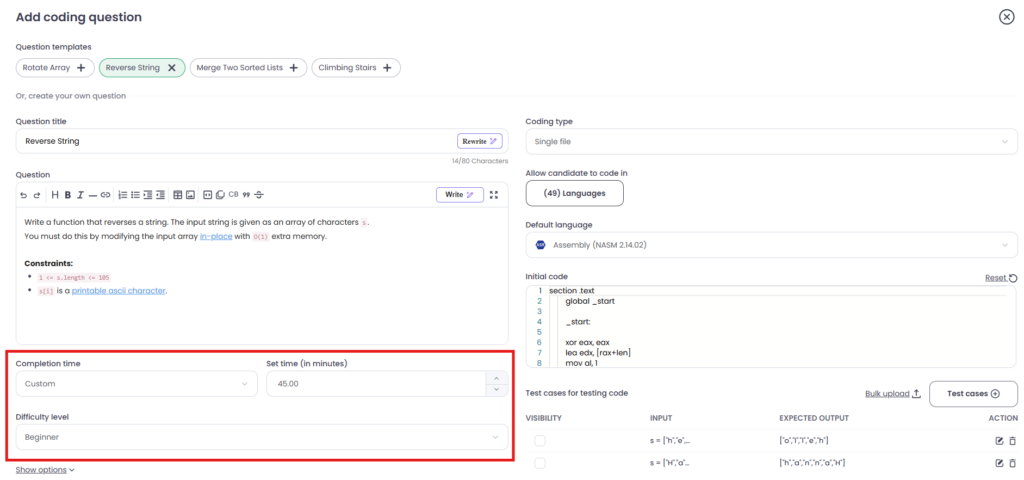
Timed tests are best for mid-level roles where you need to verify that they can actually write the code.
Take-home assignment
In these assignments, you can give a project (e.g., “Build a small REST API“) to candidates to do on their own time. These types of tests are best for senior or lead-level roles where architecture, code cleanliness, and documentation matter more.
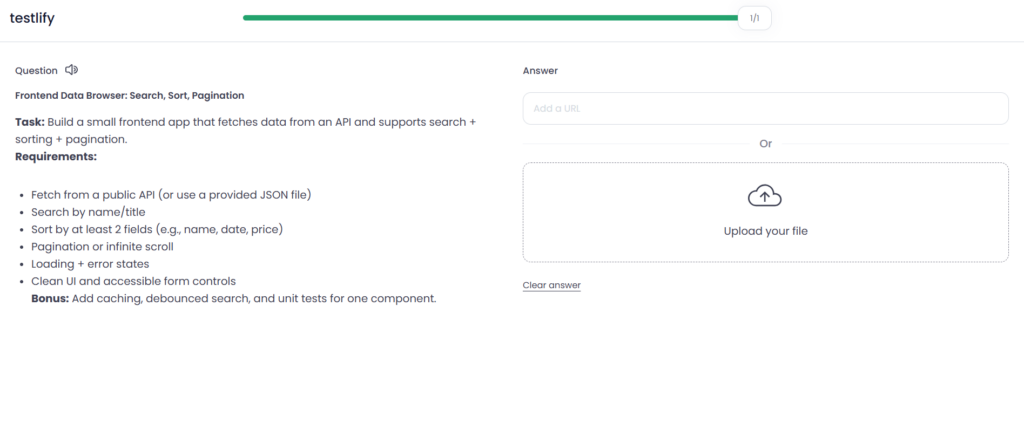
For this test type, the biggest problem is that take-homes take too long (10+ hours). This shouldn’t be the case. Try to limit the time.
Live pair programming
Pair programming works well for roles where collaboration is the job (e.g., senior or lead roles). The final round is good for this type of test.
In a live pair programming test, the candidate codes in real time with an interviewer. They usually share a screen or use a shared editor, get a small problem (like fixing a bug or building a simple feature), and talk through their thinking as they work.
The goal isn’t just the final answer. It’s to see how they break down the problem, ask clarifying questions, handle feedback, and communicate while coding, similar to how they’d work with a teammate on the job.
The code review simulation
Code review tests are becoming more common, and senior engineers spend 50% of their time reading and reviewing other people’s code.
Candidates get a piece of functional but “unstructured” code as a question and are asked to conduct a code review. It’s best for senior engineers and QA roles. You might worry that ChatGPT can find bugs for the candidate, but in reality, it struggles to replicate the specific tone and prioritization.
Learn More: How to choose the right programming test for your hiring needs?
If your situation looks like this | Use this format |
|---|---|
Lots of applicants, need fast filtering | MCQ & short coding task |
Most typical dev hiring, want balanced signal | Timed coding test |
You care more about code quality than speed | Take-home assignment |
You want to test collaboration and judgment | Live pair programming |
The most overlooked part: instructions candidates can actually follow
A coding test can go wrong even when the candidate is strong, simply because the instructions are unclear. If they don’t know what’s expected, they spend time decoding the prompt instead of coding. And then you get weak submissions for the wrong reason.
So write your instructions clearly. Give one line of context, then clear bullets for the task, the environment, and exactly how to run and submit. At the end, add a success checklist: “Your solution is complete when…” (tests pass, edge cases are handled, basic errors don’t crash the app).
Also, be upfront about time and scope. Say something like: “Please spend no more than 3 hours. If you don’t finish, submit what you have and add a ‘What I would do next’ file.” This keeps the assignment fair and still shows you how they think.
This part can be controversial, but if it fits your role, allow real-world behavior. You can instruct the candidate to use Google/StackOverflow.” In a real job, no one codes in a vacuum without any resources. If you want to keep it controlled, add: ‘Don’t copy-paste full solutions, and mention any references in a short note.
Cheating prevention without treating everyone like a suspect
You don’t need to run every coding test like an interrogation. The goal is to protect test integrity without frustrating genuine candidates. The clean way to do this is to match controls to the risk level.
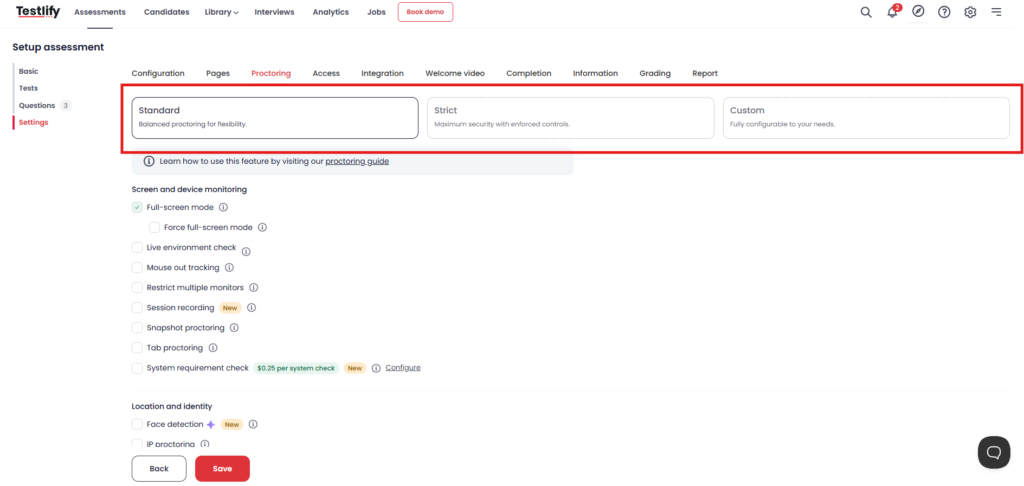
Start by deciding the stakes:
- Low stakes (intern/junior, early screen): keep it light. Randomize questions, set a clear time window, and watch for obvious copy-paste patterns.
- Medium stakes (mid-level roles): add basic proctoring signals, such as tab-switch alerts and screen activity flags.
- High-stakes (senior roles, final rounds, high-trust hiring): use stronger checks, but stay transparent about what’s being monitored.
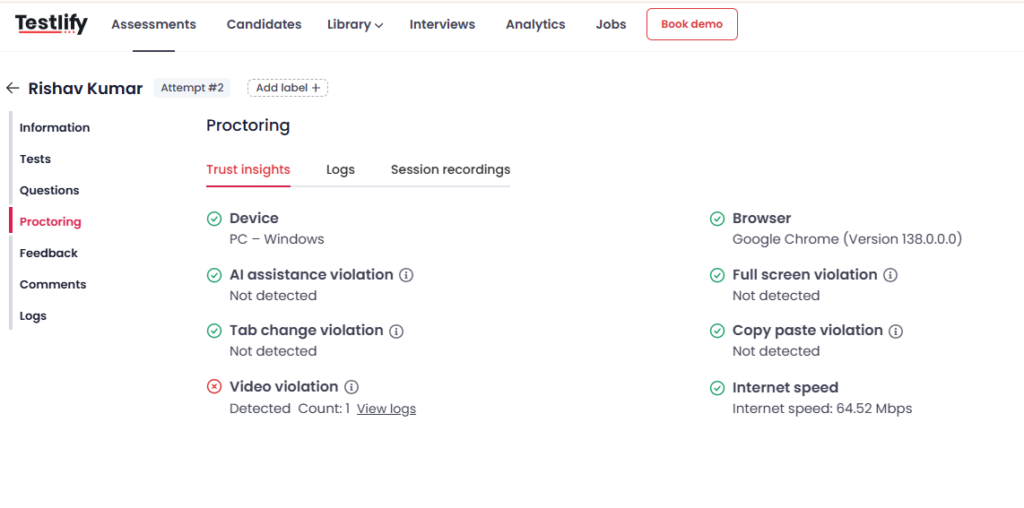
After the test, focus on patterns, not single alerts. One tab switch doesn’t prove cheating, but repeated switches, long idle gaps, and suspicious paste behavior together can be a real signal.
Learn More About Proctoring:
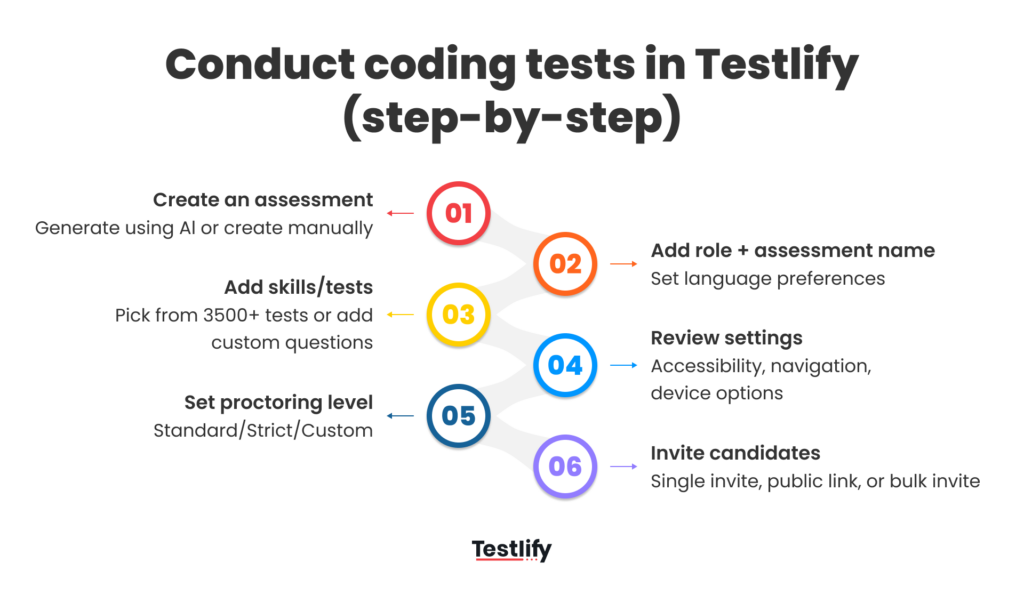
How to conduct coding tests with Testlify (step-by-step)
Here’s a simple workflow you can follow inside Testlify, from creating the assessment to inviting candidates.
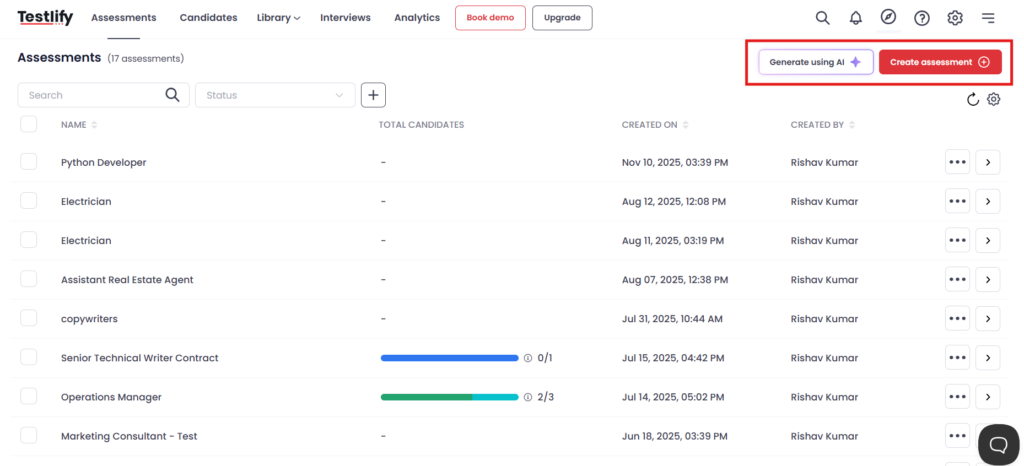
Step 1: Choose how you want to create the assessment
Go to Assessments and click either:
- Generate using AI (if you want a quick starting draft), or
- Create an assessment (if you want to build it manually)
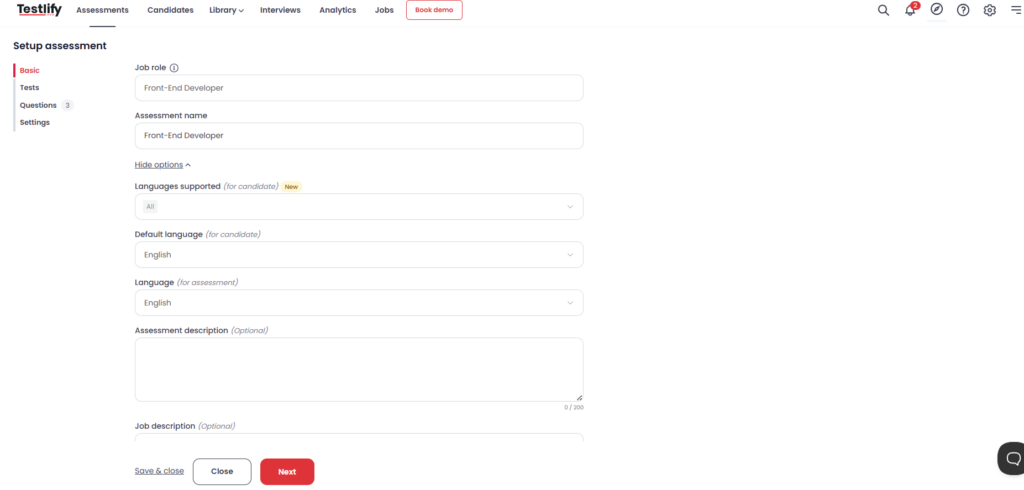
Step 2: Add the basics (role, name, language)
In the Basic setup screen, fill in:
- Job role (example: Front-End Developer)
- Assessment name (keep it role + level if possible)
- Languages supported (for candidates) (if you’re okay with multiple)
- Default language (for candidate) and Assessment language
- Optional: Assessment description (what the test covers) and Job description
Then hit Next.
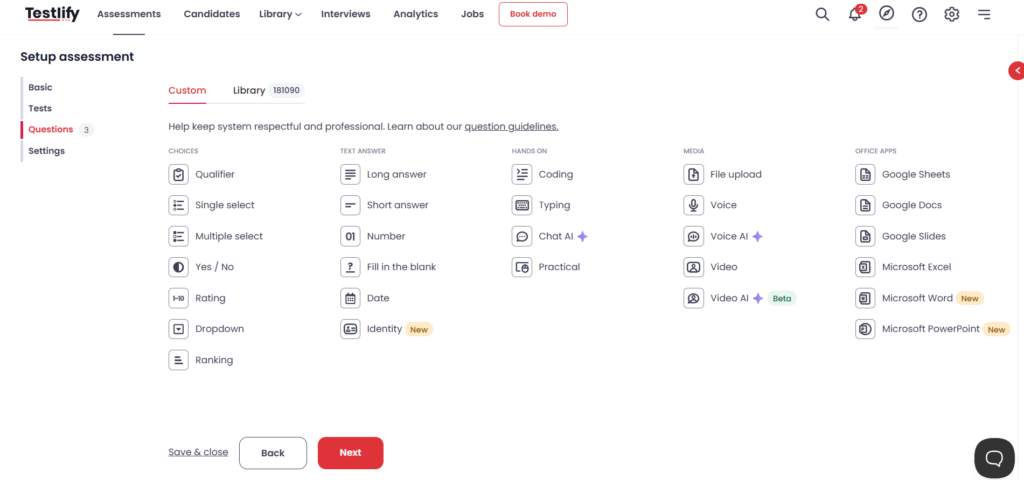
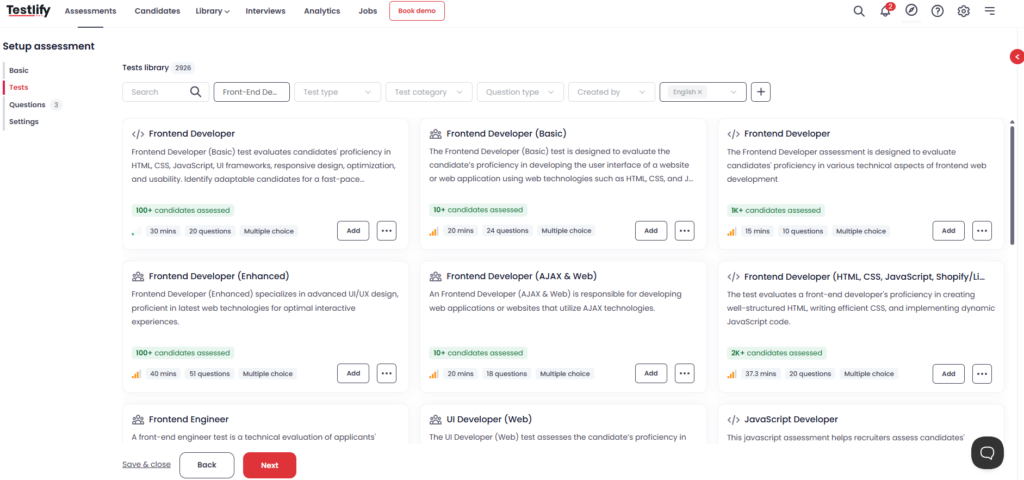
Step 3: Add tests from the library (or build your own questions)
Now you have two practical options:
Option A: Pick a skill-based test from the Test Library. Search for the role (example: “Frontend Developer”), compare the options, and click Add on the one that matches your level and time limit.
Option B: Create your own questions. Add questions using different question types (MCQ, coding tasks, etc.).
Tip: Most teams create a mix of both options: one core skill test & a couple of role-specific questions (Custom Questions).
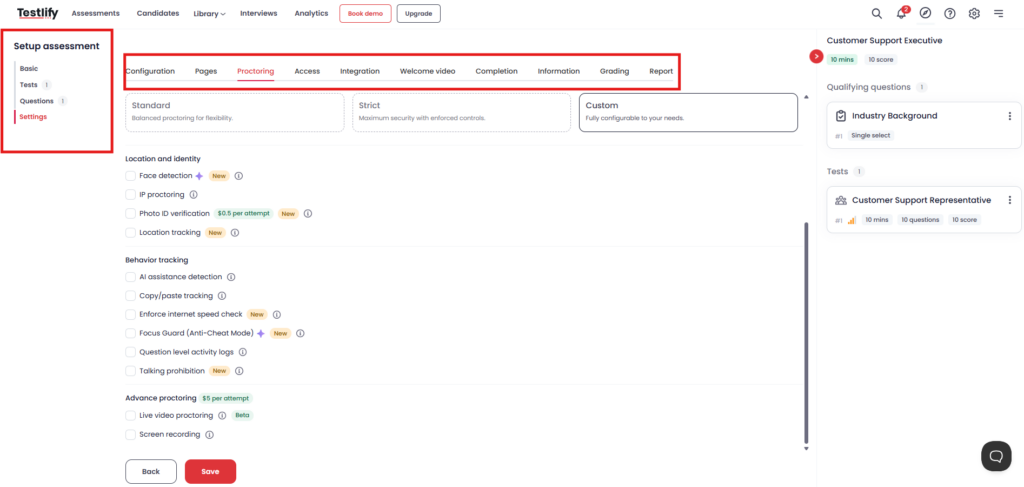
Step 4: Review settings and proctoring based on your role and risk level
Go to Settings and enable only what you need. Keep the experience smooth for genuine candidates. If the role needs stronger integrity controls, open Proctoring, and choose a level like:
- Standard (balanced)
- Strict (more enforced controls)
- Custom (pick exactly what you want)
Step 5: Invite candidates (single or bulk)
Once the test is ready, move to the invite screen. You can:
- Invite candidates one-by-one (email, name, phone)
- Bulk invite for high-volume hiring
- Or copy a public link if that fits your process
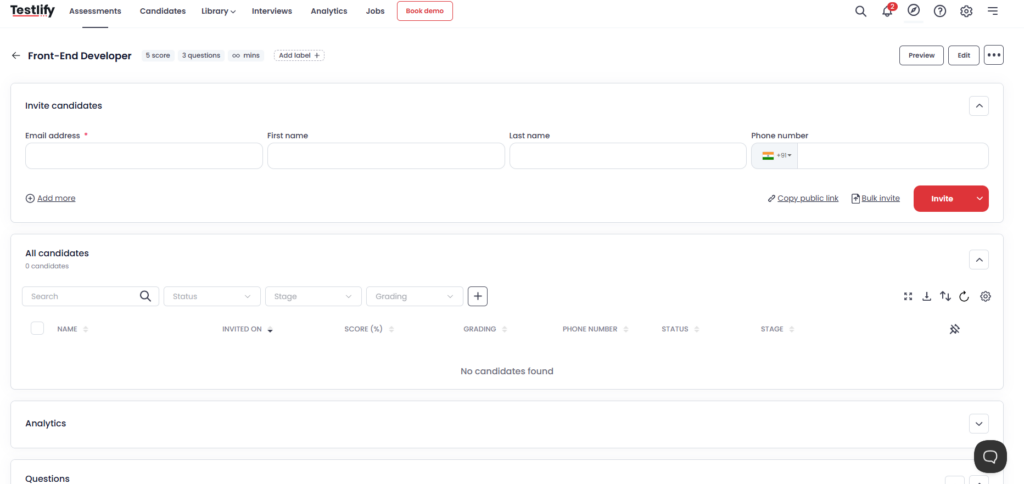
That’s it. After the invites go out, you can track attempts and results from the same assessment view.
What’s next: How to analyze and interpret programming test results?
Conclusion
A coding test only helps when it gives you a clear signal. If the test is random, the results will be random too, no matter which tool you use.
You can set up a role-specific programming test in Testlify in a few minutes, add the right skills from the library, tune the settings, and invite candidates in bulk when you’re hiring at scale.
Book a demo to see how it looks for your exact role and hiring flow.
Frequently asked questions (FAQs)

Content Writer
Yashika Khandelwal is a Content Writer with 3+ years of experience creating research-backed content on hiring, talent assessment, and HR technology. She is a registered Organizational Psychologist and subject matter expert who combines behavioral science with practical recruitment insights to produce accurate, evidence-based content.
LinkedInRelated resources
View all
Programming tests
Why should recruiters use programming tests?
Programming tests
Programming tests: A complete guide for recruiters

HR & recruitment
AI across all stages of the hiring process in 2026

AI in recruitment
Best practices for hiring data analysts using assessments?

Candidate assessment
What tools support voice responses for language proficiency testing?

Candidate assessment
How do ATS-integrated assessments streamline hiring workflows?
Get started.
Hire on proof, not resumes.
Run your first skills-based assessment free — no credit card required.