
How to use recruitment technology to improve your hiring process
A step-by-step plan for TA teams: find the stage that slows hiring, pick the right tool, connect it to your ATS, pilot it and measure it.

Knowing how to use recruitment technology to improve your hiring process starts with one question: which stage loses you the most time or the best candidates? Find that stage, pick one tool built for it, connect it to your applicant tracking system, pilot it on one role against a baseline, and keep only what moves the number.
Most teams do it the other way round. They buy a platform, switch everything on, and six months later nobody can say whether hiring got faster or better. This guide gives you the order that works, the tool for each stage and the metrics that prove it.
 ChatGPT
 Gemini
 Claude
 Grok
 Perplexity
TL;DR
- Start with the bottleneck, not the tool: measure each hiring stage first, then fix the one that loses the most time or the best candidates.
- An ATS is the base layer. Every other tool should plug into it, or your data splits across systems.
- Skills assessments fix the biggest quality problem: 93% of TA pros told LinkedIn that accurately assessing skills is crucial for quality of hire.
- Recruiters using generative AI save about 20% of their work week, according to LinkedIn's Future of Recruiting 2025 report.
- Roll out in 90 days: baseline, choose, connect, pilot on one role, then scale or drop.
- AI screening is regulated. NYC Local Law 144 needs a yearly bias audit and candidate notice, and the EU AI Act treats CV-sorting tools as high-risk from 2 December 2027.
- Judge success on time to hire, quality of hire and candidate drop-off, never on how many features you switched on.

How can technology help your hiring process?
Technology helps your hiring process in four ways: it removes admin work, speeds up each stage, makes every candidate's evaluation consistent, and gives you data to decide with. The gains are real but uneven. They show up only in the stages where your process was slow or inconsistent to begin with.
- Less admin: Parsing resumes, sending updates and booking interviews take hours a week. Automation gives that time back to recruiters for candidate conversations.
- Faster stages: Self-scheduling and on-demand assessments remove the days candidates spend waiting for a slot.
- Consistent evaluation: Every candidate for a role gets the same questions and the same scoring rules, which is the base of fair hiring.
- Better decisions: Reports show where candidates drop out, which sources produce hires and how long each stage takes.
LinkedIn's Future of Recruiting 2025 report found that 37% of organizations are actively integrating or experimenting with generative AI in hiring, up from 27% a year earlier. Recruiters who use it save about 20% of their work week, and they put that time into candidate screening (35%) and skills assessments (26%).
For where the category is heading next, see our roundup of recruitment technology trends.
Which hiring stage should you fix first?
The hiring stage to fix first is the one where your numbers are worst against your own targets. Pull the last two quarters of data from your ATS and measure five stages: attract, screen, assess, interview and decide. The stage with the longest delay or the steepest drop-off is your starting point.
Stage | Warning sign | What to measure |
|---|---|---|
Attract | Few qualified applicants per opening | Qualified applicants per role, cost per applicant by source |
Screen | Recruiters spend days reading resumes | Time from application to shortlist |
Assess | Many shortlisted candidates fail the interview | Interview pass rate of shortlisted candidates |
Interview | Candidates wait a week for a slot | Days from shortlist to first interview |
Decide | Offers stall in debriefs, new hires leave early | time to hire, 90-day retention, hiring manager satisfaction |
Pro tip: Write the baseline down before you talk to any vendor. A demo always looks good. A number you measured last quarter tells you whether the tool you bought actually helped.
What tools fix each stage of hiring?
Each hiring stage has its own kind of tool. Job distribution and career sites fix attraction, an ATS with AI resume screening fixes screening, skills tests fix assessment, scheduling and structured video tools fix interviews, and scorecards and reports fix decisions. Buy only the column you need now.
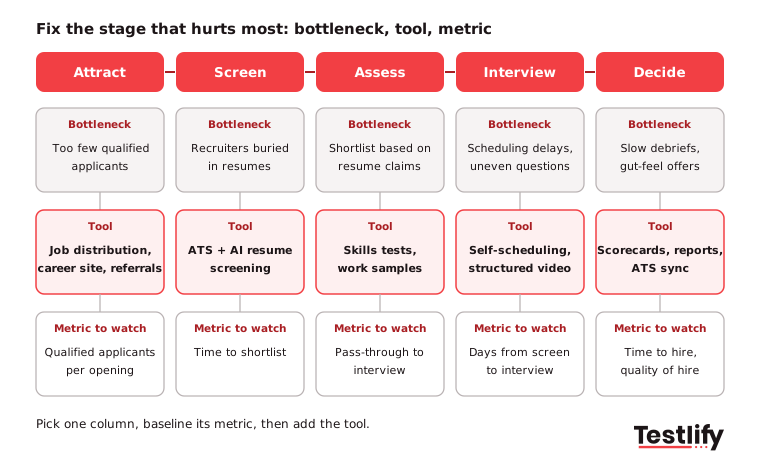
- Attract with job distribution and a mobile-ready career site: Post once to many job boards, keep the application short, and let candidates apply from a phone. Employee referral tools help here too.
- Screen with an ATS and AI resume screening: An applicant tracking system (ATS) stores every application and moves candidates through stages. AI resume screening adds a match score against the job's requirements so recruiters read the top of the pile first.
- Assess with skills tests and work samples: Short, role-specific tests show what a candidate can do, not only what the resume claims. This is the stage that most improves quality of hire.
- Interview with self-scheduling and structured video: Candidates pick their own slot or record answers on their own time. A structured interview keeps questions and scoring the same for everyone.
- Decide with scorecards, reports and ATS sync: Interviewers score against the same criteria, results flow back to the ATS, and the hiring manager sees one view of each candidate.
If you want a fuller view of how these layers fit together, our guide to building a recruitment tech stack covers the architecture.
How do you put the tools to work, step by step?
Putting hiring tools to work takes about 90 days when you follow a fixed order: baseline, choose, connect, pilot and decide. The order matters more than the software. Skipping the baseline or the pilot is how teams end up paying for tools nobody can prove are working.
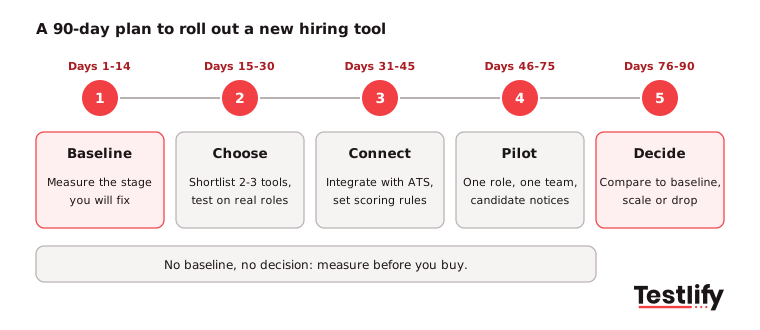
- Baseline the stage (days 1 to 14): Record the current number for the stage you chose, for example 9 days from application to shortlist. Note volume per role so you compare like with like.
- Choose two or three tools (days 15 to 30): Run each one on a real, closed role. Check the output against the hires you already made.
- Connect to your ATS (days 31 to 45): Set up the integration, the scoring rules and the pass thresholds. Agree who reviews borderline candidates.
- Pilot on one role and one team (days 46 to 75): Tell candidates how the tool is used. Keep a person reviewing every automated rejection during the pilot.
- Compare and decide (days 76 to 90): Put the pilot numbers next to the baseline. Scale the tool to similar roles if the metric moved, adjust the setup if it moved a little, and drop it if it did not.
- Train hiring managers: Show them how to read scores and reports. A tool that hiring managers ignore changes nothing.
- Review every quarter: Recheck the metric, the candidate feedback and the drop-off rate, then pick the next stage to fix.
Key takeaway: One tool, one stage, one metric at a time. Each improvement is easy to prove, and the next budget request writes itself.
How do skills assessments improve quality of hire?
Skills assessments improve quality of hire by checking what candidates can do before anyone spends interview time on them. A resume shows where someone worked. A role-specific test shows whether they can do the job you are hiring for, scored the same way for every applicant.
LinkedIn's 2025 research backs this up: 93% of TA pros say accurately assessing a candidate's skills is crucial for improving quality of hire. A good assessment step has three parts:
- Role-specific content: Tests built from the job description, covering the hard skills, the software and the situations the role meets every day.
- Integrity checks: Proctoring that confirms the answers are the candidate's own, which matters more now that AI assistants are one tab away.
- Clear scoring: A ranked list with per-skill scores, so the hiring manager knows why a candidate made the shortlist.
Testlify's test library has 3,500+ tests across technical and non-technical roles, and assessments include 20+ proctoring checks.
Which metrics show the technology is working?
The metrics that show hiring technology is working are time to hire, quality of hire, candidate drop-off, cost per hire, and hiring manager satisfaction. Track them for the stage you changed and for the process as a whole, so a faster screen does not hide a slower interview stage.
Metric | What it tells you | Good sign after rollout |
|---|---|---|
Time to hire | How fast you go from application to accepted offer | Fewer days, same or better quality |
Quality of hire | Whether new hires perform and stay | Higher 90-day performance ratings and retention |
Candidate drop-off | Where candidates abandon the process | Lower drop-off at the new step |
Cost per hire | What each hire costs in tools and time | Flat or lower as volume grows |
Hiring manager satisfaction | Whether managers trust the shortlist | Fewer rejected shortlists |
Quality of hire is the hardest one. LinkedIn found that 89% of TA pros expect measuring it to matter more, but only 25% feel highly confident they can measure it well. Start simple: job performance ratings and 90-day retention for every hire made through the new process. Our guide to hiring process metrics goes deeper.
What rules apply when AI screens candidates?
The rules that apply when AI screens candidates depend on where you hire, and two matter most for global teams. New York City's Local Law 144 already applies to automated employment decision tools, and the EU AI Act classifies CV-sorting and similar recruitment software as high-risk AI.
- NYC Local Law 144: An employer may use an automated employment decision tool only if it had a bias audit within one year before use, a summary of the audit is public, and candidates get notice at least 10 business days before use. The NYC Department of Consumer and Worker Protection has enforced it since July 5, 2023.
- EU AI Act: The European Commission lists employment tools such as CV-sorting software as high-risk. Its AI framework page says the rules for these Annex III use cases now apply from 2 December 2027.
- Everywhere else: Equal employment laws still apply when a tool makes or shapes the decision. Keep a person accountable for each hiring decision.
Ask every vendor for its bias audit and data processing terms before a pilot. Testlify's matching model completed a third-party NYC Local Law 144 bias audit on June 16, 2023.
When does hiring technology make things worse?
Hiring technology makes things worse when it automates a broken process, filters on keywords instead of skills, or adds tools that do not talk to each other. In each case the team moves faster in the wrong direction, and candidates feel it first.
- Automating a broken process: If the job description is vague, an AI screener ranks candidates against the wrong criteria at high speed. Fix the requirements first.
- Keyword-only filters: Strict keyword rules reject good candidates who describe the same skill in different words. Test skills directly instead.
- Tool sprawl: Five tools with five logins and no ATS sync means recruiters copy data by hand, which is the work the tools were meant to remove.
- No human review: Fully automated rejections create legal risk and lose good candidates on edge cases. The European Commission's AI Act framework lists "appropriate human oversight measures" among the duties for high-risk hiring tools. Keep a person in the loop for every rejection.
- A poor candidate experience: A 90-minute assessment before a first conversation drives strong candidates away. Keep early steps short.
How do you choose the right hiring tools?
Choosing the right hiring tools comes down to five questions: does it fix the stage you measured, does it connect to your ATS, can you explain its scores, does it meet the rules where you hire, and will candidates finish it? A tool that fails any one of them will not move your numbers.
- Fit: Does it solve the bottleneck you measured, or a problem you do not have?
- Integration: Does it sync both ways with your ATS, so nobody copies data by hand? Testlify connects with 100+ ATS and HRIS platforms through its integrations.
- Explainability: Can a recruiter see why a candidate scored as they did?
- Compliance: Is there a recent bias audit, a data processing agreement and a choice of data region?
- Candidate completion: What share of candidates finish the step, and how long does it take on a phone?
Run a two-week trial on a real role before you sign. Most vendors offer one, and it tells you more than any feature list.
Put skills data at the center of your hiring process
Testlify turns a job description into a role-specific assessment, runs structured AI interviews, scores every response and ranks candidates, with explainable results and human oversight. It works in 15+ languages and syncs results back to your ATS. Pricing is credit-based, so you pay only when a candidate starts an assessment.
Browse the Testlify test library, start a 7-day free trial with no credit card, or book a demo to see it on one of your open roles.
Frequently asked questions (FAQs)

Content Writer
Yashika Khandelwal is a Content Writer with 3+ years of experience creating research-backed content on hiring, talent assessment, and HR technology. She is a registered Organizational Psychologist and subject matter expert who combines behavioral science with practical recruitment insights to produce accurate, evidence-based content.
LinkedInRelated resources
View all
HR & recruitment
Top 10 recruitment technology trends for 2026

HR & recruitment
Employee engagement case studies

HR & recruitment
How to use recruitment technology to onboard new employees?

HR & recruitment
Virtual hiring process: 7 steps, tools and best practices

HR & recruitment
Using recruitment technology to assess candidates

HR & recruitment
How to use recruitment tech to source top talent
Get started.
Hire on proof, not resumes.
Run your first skills-based assessment free — no credit card required.