
How to analyze and interpret programming test results?
Gain insights into analyzing programming test results to understand candidates’ skills, interpret their performance accurately, and make informed hiring decisions.

You just received a notification that a candidate finished their technical assessment with an 85% score. Your first instinct is to move them straight to the next round. But in a world of AI-assisted cheating and professional test-takers, a score should be a filter, not the decision.
To understand technical competency more clearly, recruiters should review three layers of data: behavioral signals (time and proctoring), performance metrics (question-wise accuracy), and qualitative insights (AI-generated summaries).
In short, interpreting programming test results means moving from data collection to skill storytelling. Let’s break it down.
 ChatGPT
 Gemini
 Claude
 Grok
Grok Perplexity
TL;DR – Key takeaways
- Don’t judge a candidate only by the overall score. Use it to shortlist, then check the story behind it.
- Always review attempt status and time taken first. It prevents wrong decisions from incomplete or rushed attempts.
- Use question-wise performance to spot real strengths and gaps, especially on job-critical skills.
- Treat AI insights and proctoring logs as verification tools, not default proof. Use them only when something looks off.
- End every review with a simple outcome: Strong, Review, or Reject, plus 1-2 interview questions to validate quickly.

Start with the two facts that prevent wrong decisions
Before you look at question-wise performance or any code quality, pause for two quick checks. They take a minute, but they prevent the most common mistake that is making a confident call from a report that doesn’t tell the full story.
Effort and completion: did they genuinely attempt the test?
Start with completion status and time spent.
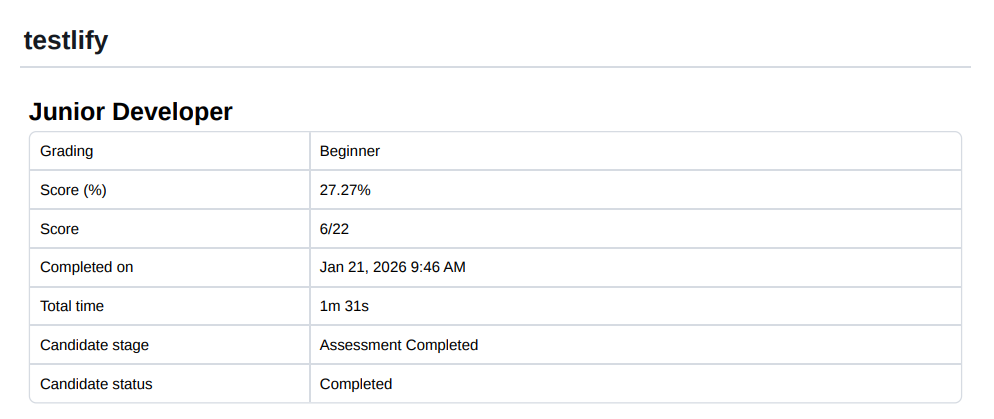
A high score means different things depending on how the attempt happened. A candidate who spent meaningful time and completed the assessment usually gives you enough evidence to review.
A very short attempt, on the other hand, can indicate rushing, guessing, disengagement, or even a tech issue. It doesn’t automatically mean anything wrong, but it tells you to be careful about over-reading the score.
Score is a filter, not a decision
Now look at the overall score. Scores are useful for triage, especially when you’re reviewing multiple submissions. But they don’t explain how the candidate arrived there.
Two candidates can land on similar scores for completely different reasons like one may miss a single edge case, while another may get correct outputs with weak reasoning. That’s why the score should move someone into the right bucket (strong / borderline / weak).
Pro Tips:
- Filter high-volume roles: For roles with hundreds of applicants, use a score threshold (e.g., top 20%) to decide whose detailed report you will open first.
- Identify outliers: A low overall score doesn’t always mean a bad candidate, but a very low score paired with very low time spent is a clear “No-Hire” signal that saves you from further review.
- Don’t ignore “beginner” gradings: Even if a candidate has a passing percentage, pay attention to how the platform grades their level. If the test was for a “Junior Developer” but the grading comes back as “Beginner,” you know there is a skill gap to investigate in the next section.
A simple way to avoid overthinking is to sort every result into one of three buckets, then decide the next step from there.
Bucket | What it usually means | What to do next |
|---|---|---|
Strong pass | Clear signal: solid score and the attempt looks genuine (reasonable time spent, clean approach) | Move to the next round and validate with a role-relevant interview (pair programming, system design, or code review based on level) |
Review | Mixed signal: score is okay but something needs a second look (rushed attempt, weak sections, missed edge cases) | Do a quick follow-up: ask them to explain their approach and make a small change/fix (10-15 mins) |
Reject | Weak signal: low score and low-quality attempt (very short time, random guessing patterns, multiple core gaps) | Close the loop quickly and respectfully; don’t drag it into more rounds |
Check question-wise performance to find the real skill story
After filtering candidates by their high-level data, the next step is to look at the “Question-Wise Performance.” This is where you move beyond a simple number and start understanding the candidate’s actual technical narrative.
In easy words, a score can tell you that they failed, but the question breakdown tells you why.
1. Separate “easy wins” from “job-critical misses”
A candidate can get an easy MCQ right in 8 seconds. That’s fine, but it’s not a strong indicator by itself. The stronger signal is when they handle a job-critical question well (debugging, reasoning, fixing issues, explaining trade-offs).
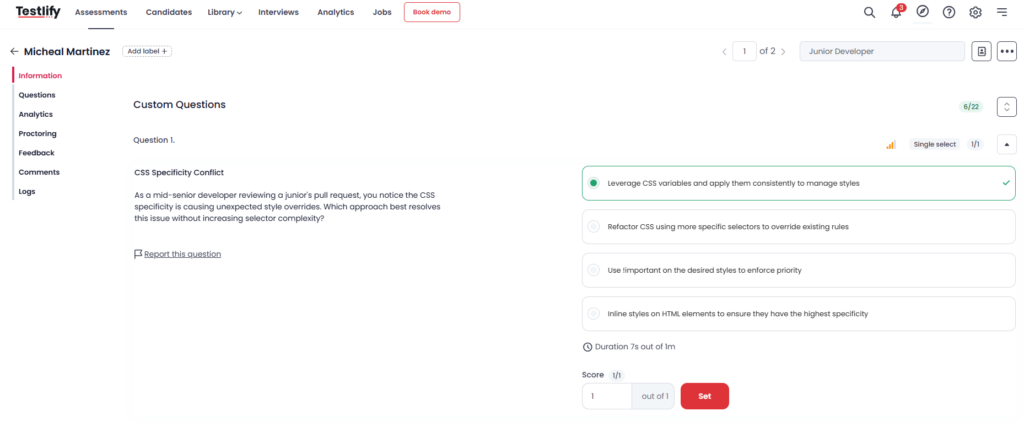
2. Use time as a “context clue” (not a scoring rule)
Now look at how long they spent per question. This helps you understand effort and confidence.
Here’s a simple way to read time:
What you see in the result | What it usually means | What you should do next |
|---|---|---|
Very fast and wrong | Guessing, rushing, or weak fundamentals | Do not rely on the overall score. Add 1 to 2 quick verification questions on the same skill. |
Very fast and a long polished perfect answer | Possible AI assistance or copy paste, or a memorized template | Ask for a short live follow up. Explain your approach. Why this trade off. Change one requirement and update the solution. |
Normal time and mixed accuracy | A genuine attempt with real strengths and gaps | Map misses to skill areas and probe only the gaps in the next round. |
Skipped or unanswered | Skill gap, low effort, or poor time management | If it is core to the role, treat it as a red flag. If it is secondary, ask a focused follow up instead of moving straight ahead. |
3. Open the Questions view and read the story behind the score
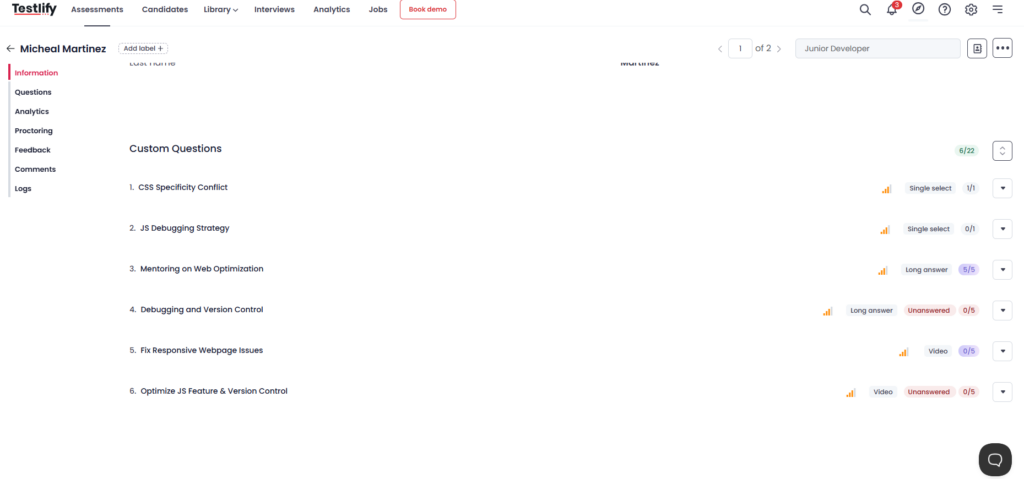
Now go to Questions. This screen shows the candidate’s performance question by question, so you’re not guessing from the overall score.
What to look at here
- Correct vs wrong: Don’t treat all right answers equally. If they got easy concept questions right but missed practical debugging ones, that’s a real gap.
- Unanswered: This is the biggest signal. When a candidate leaves long answer or video practical tasks unanswered, it often means they either couldn’t do it or didn’t put in the effort. Both matter.
- Skill coverage: Notice which areas are getting hit. For example, CSS looks okay, but JS debugging is weak. Then you know what to probe in an interview.
4. Convert question performance into skill areas
Once you have the question list in front of you, don’t read it as 22 separate answers. Group it by skill areas and look for concentration. That is how you interpret coding test results without overthinking. For example, a candidate can do fine on CSS but struggle when the task shifts to JavaScript debugging or Git workflow.
In Testlify, this becomes easier because each response ties back to specific competencies, so you can spot where the real gaps are and what to probe next in the interview.
5. Look for patterns that reveal effort and authenticity
Now turn those patterns into a simple next action, not a debate. If the candidate missed a job critical debugging question but wrote a long polished answer elsewhere, treat it as a follow up flag, not a pass. If long answer or video tasks are unanswered, especially when they are core to the role, that is usually a bigger signal than a slightly lower score.
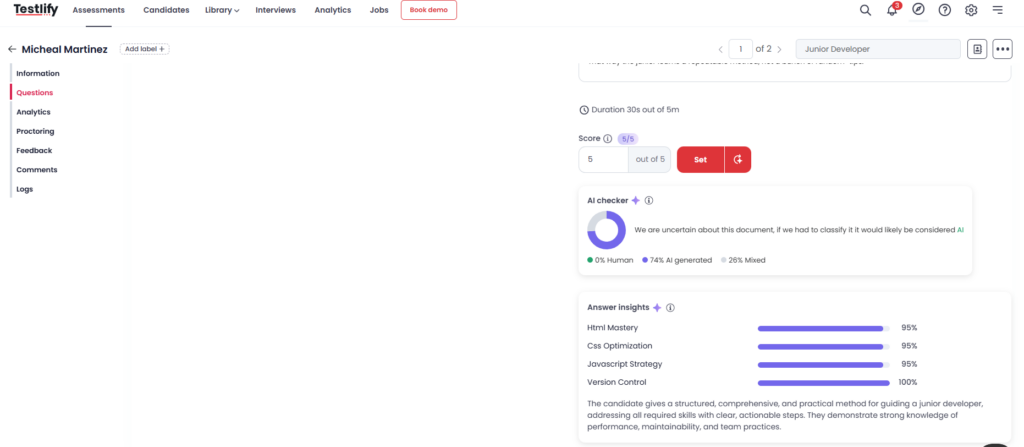
Also watch for mismatch signals like a highly structured long answer that is flagged as likely AI generated, while simpler questions in the same area are wrong. In those cases, move the candidate to a short verification round and ask them to explain one decision, then change one requirement and see how they adapt.
Use insights and evidence to support your decision
Once you’ve checked question wise performance, don’t stop at the score. Use three extra signals to make a decision you can defend.
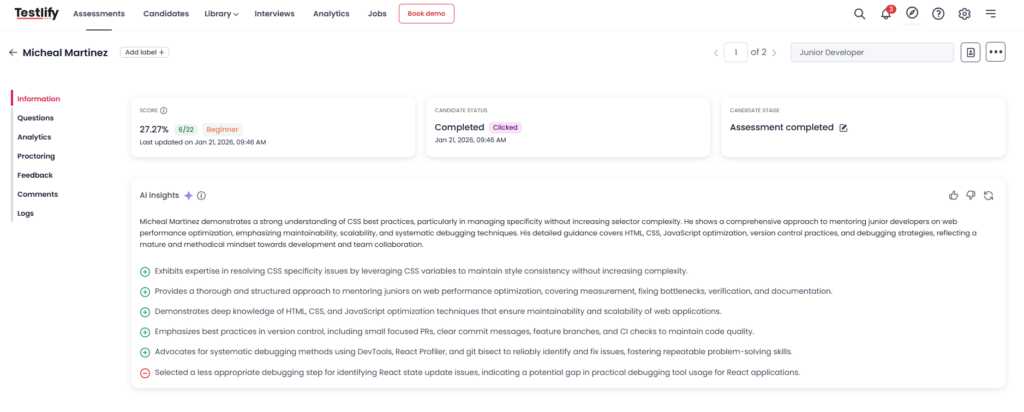
AI insights help when you are short on time
They give you a quick summary of what the candidate seems strong at, where they struggled, and what patterns showed up across answers. It is not a final verdict, but it helps you decide what to verify in the next round. For example, if the summary says “strong on CSS and performance,” you can ask one focused follow up instead of rechecking the whole submission.
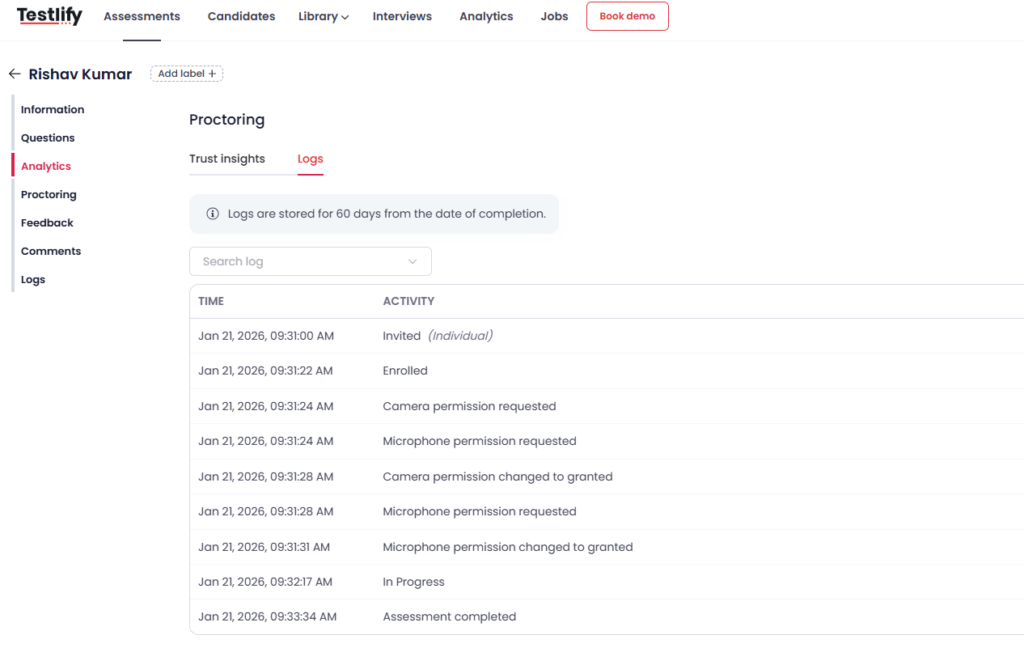
Proctoring logs are for exceptions, not for everyone
You don’t need to open logs for every candidate. Use them only when something feels odd, like a very high score with very low time, a long answer that feels out of place compared to the rest, or repeated inconsistencies. Logs help you confirm if the session looked normal, without treating honest candidates like suspects.
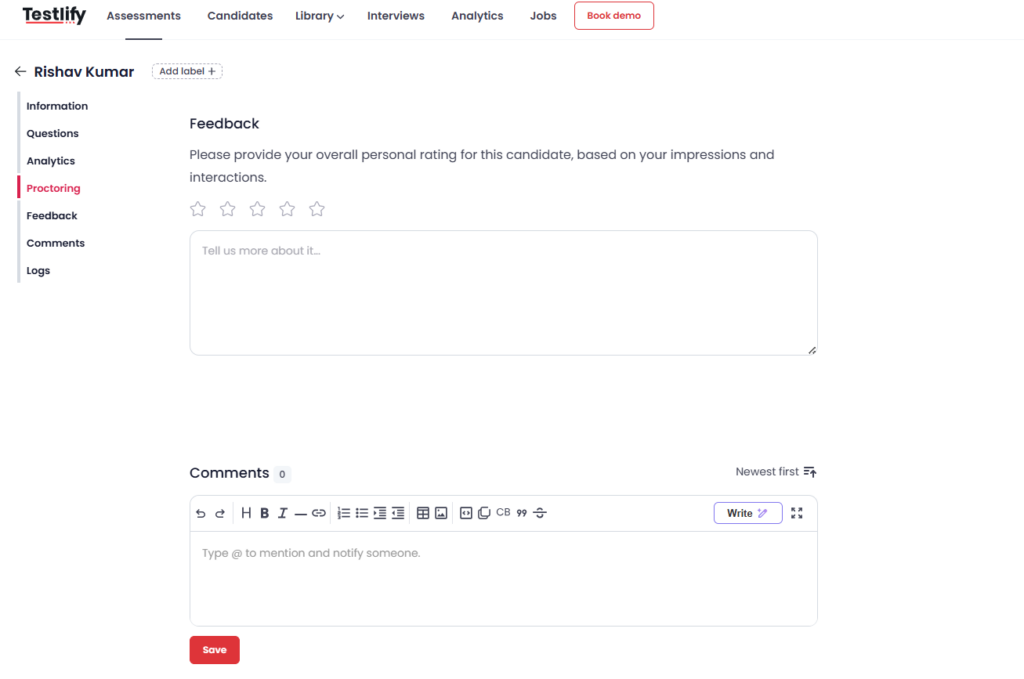
Feedback and comments save the next interviewer’s time
After reviewing, leave a short note that the next reviewer can act on. Mention what looked strong, what needs verification, and one or two questions to ask in the interview. This keeps your process consistent, reduces repeated questions, and makes the final interview more useful.
How to review results in Testlify (step-by-step)
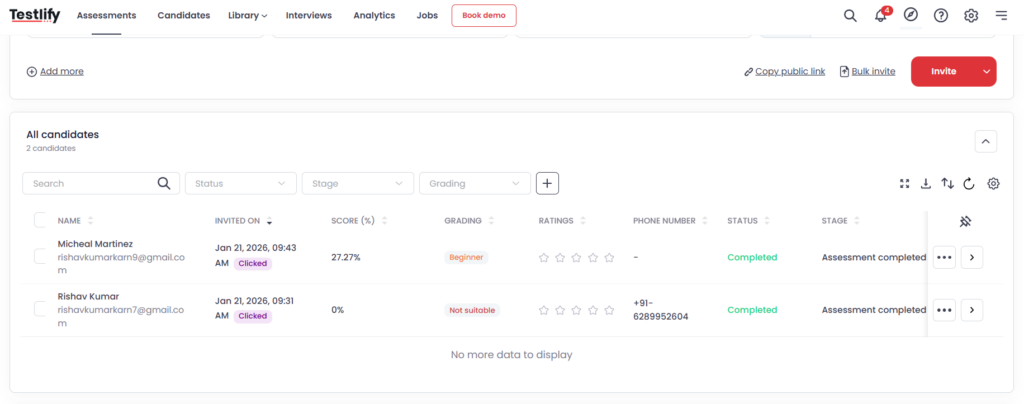
Step 1 Open the assessment and pick the candidate
Go to assessments, open the role you are hiring for, then jump to the candidates view. You will see who is invited, who completed, and their score. Start with candidates who completed the test, then open one profile to review in detail.
Step 2 Read the top level signals first
Inside the candidate profile, check three quick things before you read answers,
- Overall score
- Completion status
- The role label or stage you assigned.
This tells you whether you are looking at a strong attempt, a partial attempt, or someone who rushed the test.
Step 3 Review question wise performance
Open the questions tab. This is where the real story sits. You will see every question, the type, and whether it was answered or skipped. Use this simple reading order,
- First look at the unanswered items because they often show effort and confidence
- Then compare fast correct answers vs slow correct answers
- Finally open the questions where the candidate lost points and see what exactly went wrong
What you should look for in practice
- A quick correct answer on a basic question is fine
- A miss on a core debugging question is more important than a miss on trivia
- Skipped long answers and skipped video tasks usually signal either low effort or a real gap in practical work
Step 4 Use AI insights for a fast review
If you are short on time, open AI insights inside the candidate view. It gives you a compact summary of strengths, weak areas, and patterns across the submission. Treat it as a shortcut, not a decision.
How to use it well
Use the summary to pick one or two things to verify in the next interview
- If the summary looks overly confident but the question wise results show gaps, verify carefully
- If a long answer looks too polished compared to the rest, treat it as a prompt for follow up questions
Step 5 Check proctoring only when something looks off
Open proctoring and then Logs only in these cases
- Very high score with very low time
- Big mismatch between simple questions and long answers
- Suspicious jumps in behavior such as a long pause followed by perfect output
Logs give you an activity timeline, so you can confirm whether the session looked normal without over checking every candidate.
Step 6 Leave feedback and comments for the next interviewer
Open feedback or comments and drop a short note that saves time for the next round. Keep it practical. A good note includes,
- What the candidate did well
- What needs verification
- Two interview questions you want the next interviewer to ask
This keeps your process consistent and avoids repeating the same evaluation in every round.
Conclusion
Programming test results are only useful when they help you make the next decision with confidence. Not “who scored highest”, but who can do the work consistently when the constraints are real: time pressure, edge cases, unclear requirements, and imperfect code.
If you treat results like a scoreboard, you’ll miss strong engineers who solve the right problems in a clean, reviewable way, and you’ll over-select candidates who optimize for speed or pattern recall. The best teams use test outcomes to reduce uncertainty: they turn results into a short, structured follow-up plan. What to verify in an interview, what role level fits, and what support the candidate will need in the first 30 days.
If you want a workflow that makes this repeatable across roles and reviewers, Book a demo and see how Testlify helps you move from “scores” to hiring decisions you can defend.
Frequently asked questions (FAQs)

Content Writer
Yashika Khandelwal is a Content Writer with 3+ years of experience creating research-backed content on hiring, talent assessment, and HR technology. She is a registered Organizational Psychologist and subject matter expert who combines behavioral science with practical recruitment insights to produce accurate, evidence-based content.
LinkedInRelated resources
View all
HR & recruitment
How to attract top talent during a campus hiring drive?

HR & recruitment
How to determine the right level of difficulty in technical code screening

HR & recruitment
How to integrate problem-solving and critical thinking in programming tests

HR & recruitment
Coding bootcamps: A new frontier in developer hiring

HR & recruitment
Top 10 must-have elements in a successful programming test

HR & recruitment
Avoiding 5 common pitfalls in the developer hiring process
Get started.
Hire on proof, not resumes.
Run your first skills-based assessment free — no credit card required.