
How to build a hiring process with talent assessment tools
A 7-step plan to add skills tests, scoring rules and fairness checks to your hiring process, plus a stage map and the metrics to track.

To build a hiring process with talent assessment tools, decide which skills predict good work in the role, choose one assessment for each skill, place those assessments at the right stage of your funnel and score every candidate against the same written rules. Then connect the tools to your ATS, train reviewers and track whether the people you hire perform well.
TL;DR / Key Takeaways
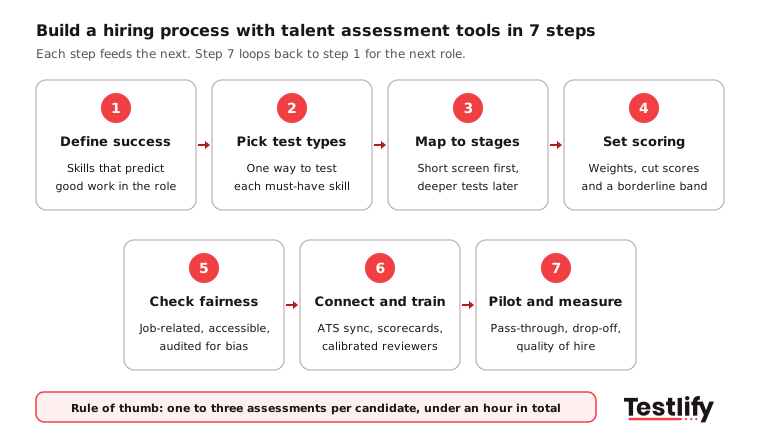
- Build the process in 7 steps: define success, pick assessment types, map them to stages, set scoring rules, check fairness, connect and train, then pilot and measure.
- Put a short skills screen at the application stage and save deeper tests, structured interviews and work samples for later stages.
- Keep it to one to three assessments per candidate and under an hour in total, or strong candidates drop out.
- Write weights and cut-off scores down before the first candidate applies, and have a person review every borderline rejection.
- Every test must be job-related. NYC Local Law 144 requires a yearly bias audit for automated hiring tools, and the EU AI Act treats recruiting AI as high-risk.
- Judge the process on pass-through rates, drop-off, time to hire and quality of hire, not on how many tests you run.
 ChatGPT
 Gemini
 Claude
 Grok
 Perplexity
What does it mean to build a hiring process with talent assessment tools?
Building a hiring process with talent assessment tools means replacing guesswork at each hiring stage with a structured test of the skills the job needs. Resumes and unstructured chats still play a part, but the shortlist and the final decision rest on scored evidence that every candidate earned the same way.
The pressure behind this shift is real. SHRM's 2025 Talent Trends report found that nearly 70% of organizations still struggle to recruit for full-time roles, and AI use in HR tasks climbed to 43% in 2025, up from 26% a year before. More applicants and more AI-written applications make resumes a weaker signal than they used to be.
Talent assessment tools are the software that makes this practical at volume: they host the tests, score them, flag cheating and push results into your applicant tracking system. If you are still comparing platforms, our guide to talent assessment tools for sourcing and screening covers the options. This guide covers the process you build around them.

Why should hiring teams build their process around assessments?
Hiring teams build their process around assessments because skills are the best evidence they can collect before day one, and assessments collect that evidence the same way for every candidate. That consistency speeds up shortlisting, makes decisions easier to defend and gives you data to improve the next hire.
The data from TA leaders points the same way. LinkedIn's Future of Recruiting 2025 found that 93% of talent acquisition professionals say accurately assessing skills is crucial to improving quality of hire. Companies running the most skills-based searches were 12% more likely to make a quality hire. Yet only 25% of TA teams feel highly confident they can measure quality of hire at all.
The main benefits for a mid-market or enterprise hiring team are:
- Faster shortlists: Auto-scored tests rank hundreds of applicants in hours, so recruiters spend time on the top of the list instead of reading every resume.
- Fairer decisions: Every candidate answers the same questions and is scored on the same rubric, which reduces the room for unconscious bias.
- Better quality of hire: Tests built around the real work predict on-the-job performance better than years of experience or a degree.
- A record you can defend: Scores, rubrics and logs show why each candidate moved forward, which matters for audits and candidate complaints.
How do you build a hiring process with talent assessment tools, step by step?
Building a hiring process with talent assessment tools takes 7 steps, and each one depends on the step before it. Skip the first and every test after it measures the wrong thing. The graphic below shows the full sequence, and the sections that follow explain each step.
Step 1: Define what success looks like in the role
Start with the work, not the job title. Sit down with the hiring manager and two or three strong performers in the role and agree on what good output looks like after six months.
- List the tasks: Write down the five to eight tasks that take most of the week, such as handling escalated tickets, writing SQL reports or closing mid-market deals.
- Turn tasks into skills: For each task, name the skill behind it: product knowledge, SQL, negotiation, written English.
- Split must-haves from nice-to-haves: Only must-have skills get a test. Nice-to-haves can come up in the interview.
- Update the job post: Replace "5+ years of experience" with the skills you just listed, so the job ad and the tests ask for the same thing.
Step 2: Choose an assessment type for each skill
Match each must-have skill to one way of testing it. One good test per skill beats three overlapping ones.
Skill you need | Assessment type that tests it |
|---|---|
Job knowledge (accounting, Python, Salesforce) | Role-specific or software skills test |
Problem solving and learning speed | |
Judgment with customers or teammates | |
Communication and spoken English | Language test or one-way video interview |
Doing the actual job | Work sample, coding task or job simulation |
Work style and team fit | Personality or culture assessment, used as a conversation guide only |
Pro tip: Use personality results to shape interview questions, never as a pass or fail gate. A cut-off on a personality score is hard to tie to job performance and easy to challenge.
Step 3: Map each assessment to a hiring stage
Place short, broad tests early and longer, role-specific ones late. Early stages filter volume, so they must be quick. Later stages compare a small group, so they can go deeper. The stage map in the next section shows a working example.
Keep the total load in check: one to three assessments per candidate and under an hour of test time for most roles. Tell candidates up front how many steps there are and how long each takes.
Step 4: Set weights, cut-off scores and a borderline band
Write your scoring rules down before the first candidate applies, so nobody adjusts them to fit a favorite.
- Weight each assessment: For a customer support role you might weight the role skills test at 50%, the situational judgment test at 20% and the structured interview at 30%.
- Set a first cut-off: Have two or three of your current solid performers take the test, and set the first cut-off a little below their scores. Adjust it after the pilot.
- Keep a borderline band: Candidates within about five points of the cut-off go to a person for review instead of an automatic rejection.
- Use scorecards for interviews: Rate each answer from 1 to 5 against written examples of a weak, average and strong answer.
Step 5: Check every assessment for fairness and accessibility
Each test has to measure the job, not something unrelated to it. Under the EEOC's guidance on employment tests and selection procedures, a test that screens out a protected group must be job-related and consistent with business necessity, and a vendor's validation does not remove the employer's own responsibility.
- Tie each test to a skill from step 1: If you cannot explain why the role needs it, drop it.
- Offer accommodations: Extra time, screen-reader support or another format for candidates with disabilities.
- Compare pass rates by group: If one group passes at a much lower rate, review the test before you use it again.
Our post on EEOC-compliant pre-employment testing goes deeper on the US rules.
Step 6: Connect the tools to your ATS and train reviewers
Assessments that live outside your ATS create copy-and-paste work and lost scores. Connect the platform so candidates get the test link automatically when they reach a stage, and scores flow back to the candidate record. Testlify connects with 100+ ATS and HRIS tools through its integrations.
Then train the people who read the results. Run a calibration session where three reviewers score the same five sample answers, compare scores and agree on what a 3 and a 5 look like. We have seen calibration fix more scoring problems than any change to the tests themselves.
Step 7: Pilot on one role, then measure and scale
Run the new process on one high-volume role for 30 to 60 days before you roll it out. Track the metrics in the section below, ask candidates for feedback and adjust cut-offs. After 90 days, check how the first hires are performing, then copy the setup to the next role.
Key takeaway: A hiring process built on assessments is only as good as step 1. If the skills list is wrong, every score after it is precise and useless.
Which assessment fits each stage of the hiring funnel?
The right assessment for each stage depends on how many candidates are left and what you still need to know about them. Use quick, auto-scored tests while volume is high and save expensive human review for the final few.
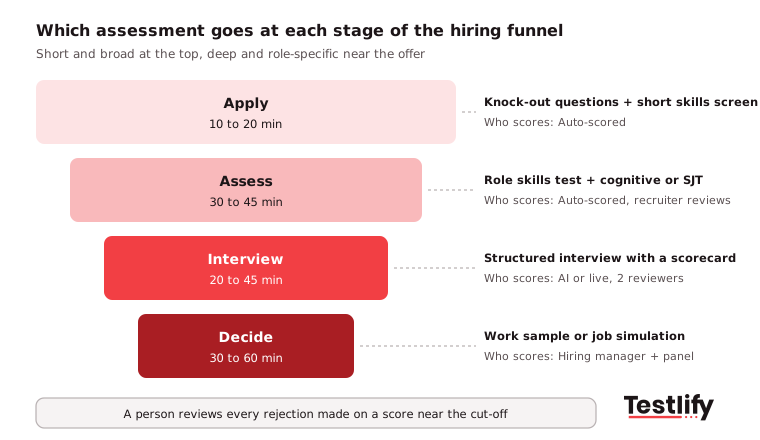
For high-volume roles such as contact center agents, the first two stages can merge into one assessment. For senior or specialist roles, skip the early screen and start with a structured interview, since experienced candidates often drop out when asked for a long test before they talk to anyone. For how these stages fit the rest of the process, see the hiring process flowchart.
What laws apply when you use assessments in hiring?
The laws that apply depend on where your candidates are, but three sets of rules cover most mid-market and enterprise teams: US anti-discrimination law, New York City's rule on automated hiring tools and the EU AI Act.
- United States: Title VII and the ADA apply to every test. Tests must be job-related, and candidates with disabilities must get reasonable accommodations.
- New York City: Under NYC Local Law 144, an employer cannot use an automated employment decision tool unless it had a bias audit within one year of use, a summary of the results is public and candidates get notice before it is used.
- European Union: The EU AI Act lists AI used to sort CVs and evaluate candidates as high-risk, with duties on risk management, human oversight and record-keeping.
- Data privacy: GDPR, CCPA and similar laws cover the candidate data your assessments collect, so check where it is stored and for how long.
Ask every vendor for its bias audit, security certifications and data-residency options before you sign. Testlify's matching model completed a third-party Local Law 144 bias audit on June 16, 2023.
What metrics show your assessment process is working?
The metrics that show an assessment process is working connect test scores to hiring speed, candidate experience and the performance of the people you hire. Review them monthly during the pilot and quarterly after that.
Metric | What it tells you | Warning sign |
|---|---|---|
Pass-through rate per stage | Whether cut-offs are set sensibly | Under 10% or over 80% passing a stage |
Assessment completion rate | Whether the test is too long or unclear | Many candidates start but do not finish |
Time to hire | Whether assessments speed up the funnel | Time to hire rises after rollout |
Quality of hire | Whether high scorers become strong employees | No link between scores and 90-day ratings |
Pass rates by group | Whether a test screens out one group unfairly | One group passes far less often |
Candidate satisfaction | How the process feels from the other side | Low ratings on length or relevance |
For quality of hire, LinkedIn found the most common measures are performance ratings (66% of companies), new hire retention (60%) and hiring manager satisfaction (44%). Testlify's free quality of hire calculator and time to hire calculator give you a baseline before the pilot starts.
What mistakes break an assessment-based hiring process?
The mistakes that break an assessment-based hiring process usually come from adding tests without changing the decisions around them. Across the teams we work with, these come up most often:
- Testing everything: Five assessments for one role exhausts candidates and adds little signal. Cut to the must-have skills.
- Same test at every stage: A second multiple-choice test late in the funnel tells you nothing new. Use a work sample instead.
- Moving cut-offs case by case: Changing the bar for one candidate undoes the fairness the process was built for.
- No integrity checks: Unproctored online tests invite outside help, including AI tools. Use proctoring and AI-assistance detection on any test that gates a decision.
- Silence after the test: Candidates who hear nothing after a test leave bad reviews. Send results or next steps within a few days, and give constructive feedback where you can.
- Never checking results against performance: Without a 90-day review you cannot tell whether the tests work.
How does Testlify help you run this process?
Testlify is an AI-native skills assessment and interviewing platform that covers each step above in one place, so you do not have to stitch separate tools together.
- Tests for every stage: 3,500+ tests across role-specific skills, software, coding, cognitive ability, situational judgment, language and personality, plus 25+ question types for custom tests.
- Faster setup: The AI test builder turns a job description into a role-specific assessment in under a minute, with suggested skills and scoring criteria.
- Interviews in the same flow: One-way video and audio interviews and AI interviews by video, voice or chat, all scored against the same criteria.
- Integrity built in: 20+ proctoring checks, including AI-assistance detection, tab tracking and webcam snapshots. See anti-cheating and proctoring.
- Fits your stack and your candidates: Two-way sync with 100+ ATS and HRIS tools, tests in 15+ languages, and ISO 27001, SOC 2 Type II and GDPR compliance.
Ready to build your assessment process?
Pick one role you hire for often, list its must-have skills and build the first assessment from the Testlify test library. You can start a 7-day free trial with no credit card, or book a demo to plan a rollout across several roles and locations.
Frequently asked questions
Related resources
View all
Talent assessment
Top coding assessment software for recruiters

Talent assessment
The latest trends in technical assessments
Talent assessment
How to integrate technical assessments into your recruiting process

Talent assessment
Can technology prevent cheating in online tests?

Talent assessment
How to build a successful sales team

Talent assessment
How to build a successful marketing team
Get started.
Hire on proof, not resumes.
Run your first skills-based assessment free — no credit card required.