
Best practices for designing and implementing employment assessments
How to design and roll out employment assessments that are fair and job-related: job analysis, cut scores, bias checks and review.
The best practices for designing and implementing employment assessments come down to one rule: test only what the job needs, the same way for every candidate, and check the results after every hiring cycle. In practice that means a job analysis first, the right mix of tests, scoring rules set before launch, a pilot, clear candidate communication, fairness checks and a yearly review.
TL;DR:
- Start every employment assessment with a job analysis. List the 4 to 6 skills that separate strong performers in the role, and test only those.
- Keep the assessment short. Most teams aim for 30 to 45 minutes in the first stage and save longer work samples for later rounds.
- Set scoring rules and cut scores before the first real candidate, using a pilot with current employees in the role.
- After every hiring cycle, compare pass rates across groups. A group passing at less than 80% of the top group's rate is a red flag under US federal guidance.
- Never reject on a score alone. Combine assessment results with a structured interview and keep a person in the loop.
- AI scoring adds rules: NYC Local Law 144 needs a yearly bias audit and candidate notice, and the EU AI Act treats hiring AI as high-risk.
- Track outcomes such as new-hire performance and early turnover, and update the assessment when the job changes.
 ChatGPT
 Gemini
 Claude
 Grok
 Perplexity
Best practices for designing and implementing employment assessments
The best practices for designing and implementing employment assessments fall into two phases. Design covers job analysis, test choice, length, scoring rules, fairness and a pilot. Implementation covers when you test, what you tell candidates, integrity checks, reviewer training, adverse impact checks and outcome tracking. Skip any one and the scores stop being useful.
Phase | Best practice | What it protects |
|---|---|---|
Design | Run a job analysis | Job relevance |
Design | Match assessment types to the role | Accuracy |
Design | Keep it short and realistic | Completion rates |
Design | Set scoring rules and cut scores up front | Consistency |
Design | Build in fairness and accessibility | Legal and ethical risk |
Design | Pilot with current employees | Calibrated scores |
Implement | Place the assessment at the right stage | Speed and drop-off |
Implement | Tell candidates what to expect | Candidate experience |
Implement | Protect test integrity | Trust in scores |
Implement | Train reviewers and pair scores with interviews | Better decisions |
Implement | Check adverse impact every cycle | Fairness |
Implement | Track outcomes and update the assessment | Long-term accuracy |

Why do employment assessments need a plan?
Employment assessments need a plan because a badly designed test does more harm than no test. A test that measures the wrong skills screens out good people, slows hiring and creates legal exposure, while the hiring team trusts a number that means little.
The pressure to hire well is high. SHRM's 2025 Talent Trends report found that 69% of organizations are struggling to fill roles, and that AI use in HR tasks rose to 43% in 2025 from 26% a year earlier. Skills checks are central to the answer: LinkedIn's Future of Recruiting 2025 report found that 93% of talent acquisition professionals say accurately assessing skills is crucial to improving quality of hire.
A plan also gives you a paper trail. If a candidate or regulator asks why someone was rejected, you can show the job analysis, the scoring rules and the review that sit behind the decision.
How do you design an employment assessment?
Designing an employment assessment means turning the job into a short, fair test with scoring rules agreed in advance. Work through six steps in order: job analysis, test choice, length, scoring, fairness and a pilot. Each step feeds the next, so a weak job analysis weakens everything after it.
1. Run a job analysis first
A job analysis lists the tasks, skills and behaviors that separate strong performers in the role from average ones. Interview the hiring manager and two or three high performers, review the job description and agree on 4 to 6 skills that matter on day one. Anything outside that list stays out of the test. For a step-by-step method, see this guide to job analysis for HR professionals.
2. Match assessment types to the role
Assessment types should follow the skills list, not habit. A coding role needs a coding task; a support role needs communication, judgment and typing checks. The types of employment assessments guide explains each format in detail.
Role type | Skills to test | Assessment types that fit |
|---|---|---|
Software and data | Coding, problem solving | Coding test, live coding task, cognitive ability |
Customer support and BPO | Communication, judgment, speed | Language test, situational judgment, typing, chat simulation |
Sales | Communication, objection handling | Role-specific test, situational judgment, one-way video or AI interview |
Finance and operations | Accuracy, spreadsheet skills | Excel or Google Sheets simulation, numerical reasoning |
People managers | Judgment, coaching, planning | Situational judgment, personality, structured interview |
Combine two or three types rather than relying on one. A skills test shows what a candidate can do today; a situational judgment test shows how they handle the job's typical problems.
3. Keep it short and realistic
Long tests lose good candidates, especially those who already have offers. Most teams aim for 30 to 45 minutes in the first stage and move longer work samples to a later round, when fewer candidates remain. Write tasks that look like the real job: a support ticket to answer, a spreadsheet to fix, a bug to find.
4. Set scoring rules and cut scores up front
Decide how each section is weighted and what score moves a candidate forward before you see the first real result. Setting the bar after scores arrive invites bias toward candidates you already like. Use a pass band (for example, 65 to 75 counts as "review") instead of one hard cut, and write down why each weight was chosen.
5. Build in fairness and accessibility
Fair tests use plain language, avoid culture-specific references and work on mobile and with screen readers. Plan accommodations such as extra time before launch, not when a request arrives. Review every question with one test: would a strong performer from any background know how to answer it?
6. Pilot with current employees
A pilot is a trial run of the assessment with people already doing the job. Ask 15 to 30 employees across performance levels, not only your stars, to take it. Check that strong performers tend to score higher, that no question confuses everyone, and that the timing works. Use the results to set your first cut scores.
Pro tip: Take the assessment yourself, as a candidate, before every launch and at least once a year. Typos, broken links and unclear instructions show up in minutes.
How do you implement employment assessments?
Implementing employment assessments means running the test the same way for every candidate, explaining it clearly, protecting the scores and checking the results. Six practices cover it: stage placement, candidate communication, integrity, reviewer training, adverse impact checks and outcome tracking.
7. Place the assessment at the right stage
Place a short skills screen right after the application for high-volume roles, so recruiters review proven skills instead of hundreds of resumes. For senior or niche roles, test after a first conversation, when candidates are already engaged. If you need more than one hour of testing, split it across two stages. For a wider view of where online recruitment assessments fit in the funnel, see our guide to online tests.
8. Tell candidates what to expect
Candidates finish more often and complain less when they know what is coming. Before the invite, tell them what the assessment covers, how long it takes, the deadline, whether it is proctored and how to ask for an accommodation. After it, send a confirmation and a timeline. Our guide to a positive candidate experience covers the messages to send.
9. Protect test integrity
Remote tests need checks that the person taking them is the candidate and that the answers are their own. Gartner found that 6% of job candidates admitted to interview fraud, according to a July 2025 report in HRD magazine. Use question randomization, time limits, copy and paste blocking, webcam snapshots and AI-assistance detection, and tell candidates which checks apply. Read more on anti-cheating and proctoring.
10. Train reviewers and pair scores with interviews
Assessment scores work best as evidence for a person, not as the decision. Train every reviewer on the scoring rules, show them how to read a report, and use the score to shape a structured interview that probes weak areas. Reviewers who override a score should write down why.
11. Check adverse impact every cycle
Adverse impact means a test passes one group at a much lower rate than another. The US Uniform Guidelines set the common benchmark: under 29 CFR 1607.4(D), a selection rate for any race, sex or ethnic group below four-fifths (80%) of the highest group's rate is generally treated as evidence of adverse impact.
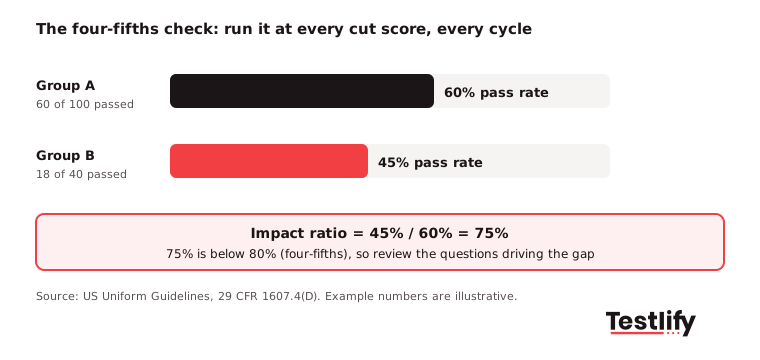
Run the check at each cut score and each stage, not only on the overall result. If a gap appears, find the questions driving it and ask whether they are truly needed for the job. A ratio under 80% is not automatically unlawful, but you must be able to show the test is job-related.
12. Track outcomes and update the assessment
Assessment scores should line up with how people do after they are hired. Track new-hire performance ratings, 90-day and one-year retention and hiring manager satisfaction, then compare them with assessment scores once or twice a year. Update questions when the job changes, when a question stops separating strong and weak performers, or when candidates start sharing answers.
Key takeaway: A good employment assessment is never finished. Design it from the job, launch it with clear rules, and review it with real hiring data every cycle.
What laws apply to employment assessments?
Employment assessments in the US fall under Title VII of the Civil Rights Act, the Americans with Disabilities Act and the Age Discrimination in Employment Act. Together they bar tests that discriminate, require accommodations and expect any test that screens out a protected group to be job-related.
The EEOC guidance on employment tests adds points every hiring team should note:
- Vendor tests: The employer stays responsible for making sure a test is properly validated for the jobs and purposes it is used for, even when a vendor supplies the documentation.
- Less discriminatory options: If a test screens out a protected group, look for an equally effective alternative with less impact, and use it if one exists.
- Accommodations: Employers must make reasonable accommodations in how tests are given, unless that would cause undue hardship.
- Updates: Tests should change as job requirements change.
Rules differ by country and state, so check local law and involve legal counsel for high-volume programs. Our guide on how HR can keep pre-hiring assessments compliant covers more.
How is AI changing employment assessment design?
AI is changing employment assessment design in two ways: it speeds up building and scoring tests, and it brings new rules on audits, notice and human review. When teams talk about designing and implementing employment assessments, best practices now include an AI checklist alongside the classic steps.
- New York City: Under Local Law 144, an automated employment decision tool needs a bias audit within one year of use, a public summary of the results and notice to candidates.
- European Union: The EU AI Act classes AI used to recruit, select or evaluate candidates as high-risk, which brings duties on risk management, human oversight and record keeping.
- Illinois: The AI Video Interview Act requires notice and consent before AI analyzes video interviews, and a 2026 amendment to the Illinois Human Rights Act bars discriminatory use of AI in employment decisions.
Candidate trust is the other challenge. Gartner found that only 26% of job candidates trust AI to evaluate them fairly, according to the same HRD magazine report. Explain what AI scores, what a person reviews and how candidates can ask questions.
What mistakes should you avoid?
The most common employment assessment mistakes are testing skills the job does not need, setting cut scores after the fact and never checking results. Each one is cheap to fix early and expensive to fix after a complaint.
Mistake | Why it hurts | Fix |
|---|---|---|
Testing generic skills "just in case" | Screens out people who could do the job | Test only the skills from the job analysis |
Assessment longer than an hour at the first stage | Strong candidates drop out | Split testing across stages |
Cut score chosen after seeing results | Invites bias and is hard to defend | Set scoring rules from pilot data before launch |
Auto-rejecting on score alone | Misses good candidates, raises legal risk | Use scores as evidence for a reviewer |
No adverse impact check | Hidden unfairness, compliance exposure | Run the four-fifths check every cycle |
Never updating questions | Stale or leaked content | Review yearly and when the job changes |
Measuring outcomes is where many teams fall short. LinkedIn's Future of Recruiting 2025 found that 89% of talent acquisition professionals say measuring quality of hire will matter more, yet only 25% are highly confident they can measure it.
How does Testlify support employment assessment best practices?
Testlify supports each step, from building a role-based assessment out of a job description to scoring, proctoring and reporting. Hiring teams keep control of the skills, weights and cut scores, and every score comes with the answers behind it.
- Design from the job: The AI test builder creates a custom assessment from a job description, with suggested competencies and scoring criteria, drawing on 3,500+ validated tests and 25+ question types.
- Realistic tasks: Coding, MS Office and Google Workspace simulations, chat simulations, and video, voice and chat AI interviews test the work itself.
- Consistent scoring: Automated and weighted scoring, score thresholds for auto-shortlisting, benchmarking and per-skill reports give reviewers the same view of every candidate.
- Integrity: 20+ proctoring checks, including webcam snapshots, copy and paste blocking, AI-assistance detection and IP restriction.
- Fairness and reach: Assessments run in 15+ languages, and Testlify's matching model completed a third-party NYC Local Law 144 bias audit on June 16, 2023.
- Fits your stack: 100+ ATS and HRIS integrations, including Workday, Greenhouse and Lever, sync results back to your hiring system.
For a closer look at rollout, read best practices in implementing hiring assessments, or book a demo to see the platform on one of your roles.
Frequently asked questions (FAQs)

People and Talent Partner
Arushi Shah runs day-to-day talent acquisition and candidate experience at Testlify. She writes on interviewing, structured hiring, and giving candidates a fair, fast process.
LinkedInRelated resources
View all
HR & recruitment
5 benefits of integrating employment assessments into your hiring process

HR & recruitment
What are employment assessments? Types, uses and how to choose

HR & recruitment
Top 25 employment assessment tools in 2026
HR & recruitment
Pre-hire testing: 7 strategies for fairer, faster hiring
HR & recruitment
Unbiased Assessments: An HR Guide to Fair Hiring and Reviews
HR & recruitment
An HR guide to pre-employment testing
Get started.
Hire on proof, not resumes.
Run your first skills-based assessment free — no credit card required.