
Online test integrity: 12 practices to prevent cheating in hiring
How candidates cheat on online hiring tests in 2026, and 12 practices that keep scores trustworthy while staying fair to honest candidates.
Online test integrity means a candidate's score reflects their own skills, earned under the same rules as everyone else, with no outside help, no stand-ins, and no leaked answers. For hiring teams, it is what makes an online assessment worth using: if you cannot trust the score, you cannot shortlist on it.
TL;DR:
- Online test integrity means every score is the candidate's own work, taken under the same rules as every other candidate.
- Cheating has moved from second phones and shared answers to AI chatbots, screen-reading apps and proxy test-takers.
- Fabric found signs of cheating in 38.5% of nearly 20,000 AI interviews, and 48% in technical roles.
- No single control works alone. Layer controls before, during and after the test.
- Role-specific questions, randomized pools and a follow-up interview do more than heavy surveillance.
- Treat a proctoring flag as a reason to review evidence, never as an automatic rejection.
- Fair integrity checks include clear notice, privacy limits and accommodations for candidates who need them.
 ChatGPT
 Gemini
 Claude
 Grok
 Perplexity
What is online test integrity?
Online test integrity is the confidence that an online assessment measured the right person, on the right skills, under fair and equal conditions. It rests on three things: the candidate is who they say they are, they answered without unauthorized help, and the test content had not leaked before they started.
Online test integrity is about the test process, not the candidate's character. Integrity tests that measure honesty as a trait are a different tool, covered in the integrity testing glossary entry.
Integrity matters more as assessments move earlier in the funnel. When a skills test decides who reaches a recruiter, a cheated score pushes an honest candidate out and lets an unqualified one in. Gartner predicts that by 2028 one in four candidate profiles worldwide will be fake, and in a Gartner survey of 3,000 job candidates, 6% admitted to taking part in interview fraud, according to Personnel Today's report of the research.

Why is online test integrity harder to protect in 2026?
Online test integrity is harder to protect because generative AI made outside help instant and nearly invisible. A candidate no longer needs a friend in the room or a leaked answer sheet: a chatbot, a phone camera app or a code assistant can produce a passable answer in seconds.
The numbers show how fast this moved. SHRM Labs reports that AI interview platform Fabric found signs of cheating in 38.5% of nearly 20,000 interviews between July 2025 and January 2026, rising to 48% for technical roles. A 2026 Fabric report found that 59% of hiring managers suspect candidates of using AI tools during live assessments.
Testlify sees the pattern in its own data. Namrata Kamdar, Testlify's co-founder and COO, told SHRM Labs that assessments that usually take 25 to 30 minutes were sometimes finished in under 10 minutes, one of the clearest signs that something other than the candidate was answering.
Gartner's research adds the other side: 39% of 3,290 candidates said they used AI during the application process. Much of that use is legitimate, such as polishing a resume. The job of an integrity program is to separate fair preparation from help during the test itself.
How do candidates cheat on online tests?
Candidates cheat on online tests in four main ways: getting help from AI or the internet, using a second device, sharing questions with other candidates, and having someone else take the test for them. Each leaves different traces, so each needs a different control.
Cheating method | What it looks like | Typical sign | Control that helps most |
|---|---|---|---|
AI chatbots and search | Questions pasted into a chatbot or search engine | Copy events, tab switches, very fast correct answers | Copy and paste blocking, tab tracking, AI-assistance detection |
Screen-reading apps | Phone camera app reads the screen and returns answers | Eyes leaving the screen, phone in webcam frame | Webcam snapshots, face and object checks |
Second device or person | Phone, tablet or helper out of view | Talking, second face, long pauses then perfect answers | Talking and face detection, session recording |
Shared questions | Answers passed around a group chat or forum | Identical answers across candidates in one batch | Randomized question pools, custom questions |
Proxy test-taker | Someone else takes the test, or controls the screen remotely | Face mismatch, odd location, remote-access tools | Photo ID and face match, IP checks, screen share |
Plagiarized written answers | Open-ended answers copied or AI-written | Text that does not match how the candidate speaks | Follow-up interview on the same task |
Several of these methods run on the same device as the test. That is why browser controls catch more than people expect, and why proctoring should watch the screen as much as the webcam.
What are the best practices for online test integrity?
The best practices for online test integrity layer controls across three stages: design the test so cheating pays off less, monitor the session so outside help is visible, and review results so suspicious scores get a second look. The 12 practices below cover all three stages.
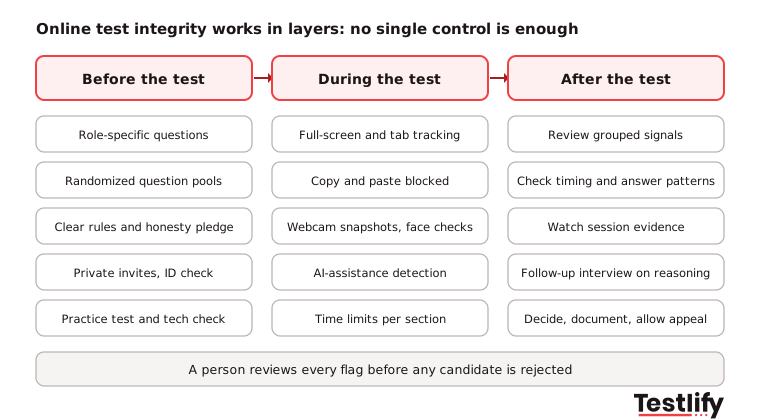
Before the test
Online assessments need to be designed carefully to ensure candidates are evaluated on their actual skills rather than their ability to find or generate answers. Recruiters can reduce the risk of cheating by combining job-specific questions, assessment security measures and clear candidate instructions. Here are five ways to make online assessments more reliable:
- Use role-specific questions: Questions built around real tasks of the job are harder to look up and harder for AI to answer well. Ask subject matter experts in your team to name the tasks, scenarios and tools a new hire meets in the first months, and test those. A library of role-based tests gives you a starting point you can customize.
- Randomize questions and answer order: Draw each candidate's questions from a larger pool and shuffle the order of answer options. Two candidates sitting the same test then see different questions in a different order, so a shared answer list loses most of its value.
- Set clear rules and ask for an honesty pledge: Tell candidates in the invite what is allowed, what is monitored and what happens if rules are broken. A short honesty agreement before the first question is a simple deterrent, and it removes the "I did not know" defense.
- Verify identity before the test starts: Send private, single-use invites instead of open links. For final-stage or remote technical roles, add a photo ID check matched against the candidate's face on camera.
- Prepare candidates for the format: A practice question and a system check before the real test cut stress and technical drop-off. Offer adjustments for candidates who need them: the EEOC states that employers must provide reasonable accommodation in how tests are given, so results reflect the skill and not a disability.
During the test
Preventing cheating during an online assessment requires monitoring candidate activity without making the experience unnecessarily restrictive. The right combination of security controls, proctoring and reasonable time limits can help recruiters identify suspicious behaviour while ensuring candidates have a fair opportunity to demonstrate their skills. Here are four measures to consider:
- Lock down the test environment: Enforce full-screen mode, track tab and window switches, restrict a second monitor, and block copy and paste. Ask candidates to close other apps and put phones away before they start, and tell them the test will check.
- Use proctoring proportionately: Webcam snapshots, face detection and talking detection catch a second person or a phone in frame. Session recording is useful for high-stakes roles. For a comparison of approaches, see AI vs human proctoring.
- Detect AI assistance and outside help: Copy and paste tracking, AI-assistance detection and question-level activity logs show when answers arrive faster or more fluently than the candidate's own pace suggests.
- Set time limits that fit the task: A time limit per section leaves enough time for an honest candidate to think, but not enough to research every answer. Limits that are too tight measure speed instead of skill, so pilot them with a few current employees first.
After the test
Cheating prevention does not end when a candidate submits an assessment. Recruiters must also review test results, investigate suspicious activity and verify that candidates can explain their answers independently. Here are three steps to follow after an online assessment:
- Check results for red flags: Look for scores far above the rest of the pool, very short completion times, sudden jumps between sections and identical answers across candidates. Run written answers through a similarity check, since copied text is easier to spot in a batch than one at a time. For more on reading the data, see how to spot cheating with test analytics.
- Review flagged sessions with evidence: Open the snapshots, logs and recording behind a flag before anyone decides. The next section sets out a simple review process.
- Confirm with a follow-up interview: Ask a strong scorer to walk through how they solved one or two questions. A candidate who did the work explains it easily. Combine the test with interviews, work samples and reference checks so no single score decides the hire.
Pro tip: Start with the cheapest controls, which are role-specific questions, randomized pools and a follow-up question in the interview. They protect integrity without adding friction for honest candidates. Add heavier monitoring only where the stakes justify it.
How do you match integrity controls to the role and stakes?
Matching integrity controls to the role means using light, low-friction controls for high-volume early screens and adding identity checks and recording only for final-stage or high-risk roles. Heavy monitoring on every entry-level test drives away good candidates without catching much more cheating.
Situation | Risk | Recommended controls |
|---|---|---|
High-volume early screen (support, sales, operations) | Shared answers, AI help | Randomized pools, tab tracking, copy and paste blocking, time limits |
Remote technical role (developers, data, IT) | AI code assistants, proxies | Everything above plus webcam snapshots, AI-assistance detection, follow-up on code |
Final stage or regulated role (finance, healthcare) | Proxy test-takers, identity fraud | Photo ID and face match, session recording, live or supervised re-test |
Internal skills checks (L&D, promotion) | Low stakes, trust matters | Clear rules, randomized questions, light monitoring |
What should you do when a result is flagged?
A flagged result should start a review, not end the candidacy. Proctoring alerts such as a tab switch or a face leaving the frame have innocent causes, from a dropped connection to a child walking into the room, so a person should check the evidence before any decision.
- Group the signals: One tab switch means little. A tab switch, a copy event and a perfect answer in 20 seconds on the same question mean much more.
- Check the evidence: Look at the snapshots, the activity log and the answer timing for the flagged questions.
- Ask the candidate: A short follow-up call on how they reached their answers resolves most unclear cases.
- Decide and document: Advance, re-test under supervision or reject, and record the reason. Apply the same standard to every candidate.
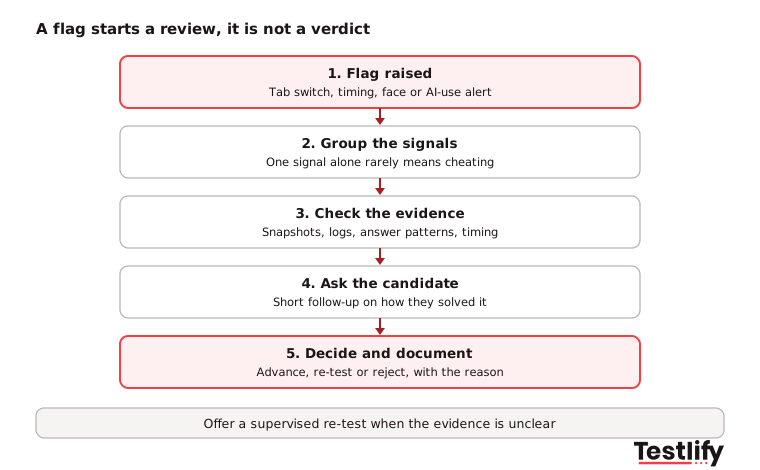
Key takeaway: Online test integrity depends as much on how you handle flags as on how you raise them. A fair review process protects honest candidates and gives you a defensible record if a decision is challenged.
How do you keep integrity checks fair for candidates?
Keeping integrity checks fair means telling candidates what is monitored and why, collecting only the data you need, and offering adjustments to people who need them. Candidates accept monitoring far more readily when it is explained up front and proportionate to the role.
- Notice: State in the invite which checks run (webcam, screen, location) and how long recordings are kept. Give candidates a contact for questions or concerns.
- Privacy: Face images used to identify someone are sensitive data in many places. The UK ICO's biometric recognition guidance covers when biometric data is special category data and when a data protection impact assessment is needed.
- AI scoring rules: If AI scores or ranks candidates, local rules may apply. New York City's Local Law 144 requires a yearly bias audit and candidate notice for automated employment decision tools. Read more on AI proctoring compliance.
- Appeals: Let candidates explain a flag or request a supervised re-test. A clear appeal route also reduces complaints.
How does Testlify protect online test integrity?
Testlify protects online test integrity with 20+ proctoring checks included in its assessments, randomized questions and role-specific tests, so hiring teams can trust scores without adding manual steps. The checks are configurable, so teams can set lighter rules for early screens and stricter ones for final stages.
- Checks during the test: Full-screen enforcement, tab proctoring, copy and paste tracking and blocking, multi-monitor restriction, webcam snapshots, face and talking detection, AI-assistance detection and the Focus Guard anti-cheat mode. See the full list on the anti-cheating and proctoring page.
- Identity and access: Private invites, IP and location restriction, honesty agreements, mandatory screen share and, per attempt, photo ID verification with face match.
- Evidence for reviewers: Question-level activity logs, timestamped logs and custom violation tolerance with auto-termination, so reviewers see exactly what triggered a flag.
- Harder-to-game content: 3,500+ tests, 25+ question types including coding, video and practical tasks, two-way AI interviews by video, voice or chat, and assessments in 15+ languages.
- Audited scoring: Testlify's matching model completed a third-party NYC Local Law 144 bias audit on June 16, 2023.
Ready to run tests you can trust?
Browse the Testlify test library to find role-specific tests for your open roles, or start a 7-day free trial with no credit card and set up your first proctored assessment today. Prefer a walkthrough? Book a demo with the team.
Frequently asked questions (FAQs)

Co-Founder and CTO
Jiten Modi is Testlify's CTO and leads a 50-person engineering organization. He writes on technical hiring, evaluating developers with real-world assessments, and building engineering teams.
LinkedInRelated resources
View all
HR & recruitment
How to set new hires up for success in their first 90 days
HR & recruitment
How to give constructive feedback to candidates
HR & recruitment
How to create a seamless candidate experience

HR & recruitment
How to Streamline Screening and Selection in 2026
HR & recruitment
How to create clear and engaging job postings
HR & recruitment
How to Bridge Communication Gaps During Interviews
Get started.
Hire on proof, not resumes.
Run your first skills-based assessment free — no credit card required.