
Measuring the ROI of ATS integrations: Formula, metrics, & example
A practical guide to the ROI of ATS integrations: the costs to count, the metrics that move, a six-step method and a worked example.

The ROI of ATS integrations is the value a hiring team gets from connecting its applicant tracking system to other tools, such as assessments, scheduling, job boards, and the HRIS, compared with what those connections cost to set up and run. Most of that value comes from recruiter hours no longer spent copying data between systems, faster movement between hiring stages, and cleaner reporting.
Proving it is harder than it sounds. In ISG's 2025 HR technology survey, only 52 percent of organizations saw quantifiable value from HR technology, yet enterprises with integrated HR, finance, and workforce planning platforms gained roughly twice the return of peers with siloed systems.
 ChatGPT
 Gemini
 Claude
 Grok
Grok Perplexity
TL;DR
- ATS integration ROI = (annual benefit - annual cost) / annual cost x 100. Report the payback period too: total first-year cost divided by monthly benefit.
- Most of the value comes from recruiter hours no longer spent copying data between systems, plus faster stage movement and cleaner reporting.
- Count connector fees, setup, testing, training, and maintenance at a fully loaded hourly cost. BLS puts private industry compensation at $46.89 per hour.
- In the worked example, 8 recruiters saving 3 hours a week returned 486% on a $9,221 first-year cost, with payback in about 2 months.
- Even 1 hour saved per recruiter per week returned 95% in the same example.
- Measure a four- to six-week baseline before go-live. Use a holdout group and measure only the steps the integration touches.
- Assessment results, interview scheduling, and the ATS-to-HRIS handoff usually pay back first, because they run on every candidate or hire.

What is the ROI of ATS integrations?
The ROI of ATS integrations is the net financial return from connecting your ATS to other hiring tools, divided by the total cost of those connections.
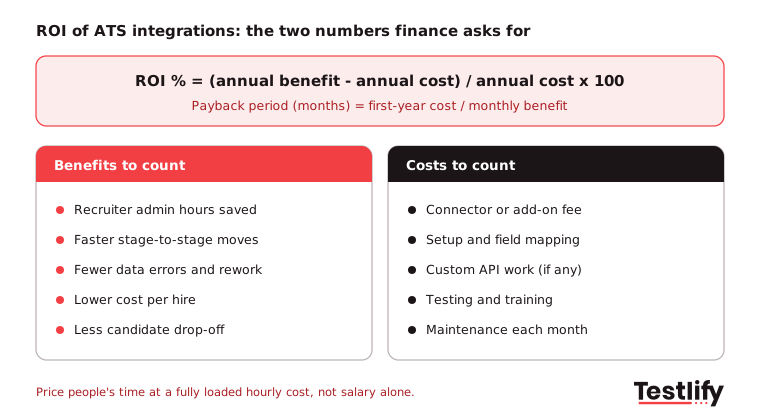
The standard formula is ROI = (annual benefit - annual cost) / annual cost x 100.
A result of 200% means every dollar spent on the integration returned three dollars of value in that year.
Two numbers belong in every business case:
- ROI percentage shows how much the integration returns per dollar spent.
- Payback period shows how fast it pays for itself: total first-year cost / monthly benefit. Finance teams often care more about this one because it answers "When do we get the money back?"
The integration's ROI is not the same as the ATS's ROI. The ATS already gives you a database and a pipeline. The integration adds value only where data is used to move by hand, by email, or not at all. For the wider picture of hiring returns, see how to measure the ROI of talent acquisition.
Why is ATS integration ROI hard to prove?
Measuring the return on investment (ROI) of ATS integration can be difficult because the benefits often come from small improvements across multiple hiring tasks. Without baseline data on time, cost, and errors before integration, it is hard to tell how much improvement the integration delivered.
Integration challenges are also widespread. HR.com's State of Today's HR Technology and Integrations 2026 report found only 21% of organizations say their HR tools integrate well or extremely well. Among organizations with poor integration, 91% say it directly affects their ability to achieve HR goals.
Three common challenges make ATS integration ROI particularly difficult to measure:
- No baseline: Teams switch the connector on, then try to remember how long the old process took.
- Hidden costs: Licence fees get counted, but IT setup, field mapping, and upkeep do not.
- Vague benefits: "Better candidate experience" is real, but it will not survive a budget review without a number next to it.
What costs go into the ROI of ATS integrations?
The costs that go into the ROI of ATS integrations are the connector or add-on fee, setup and field mapping time, testing, training, and ongoing maintenance. Count people's time at a fully loaded hourly cost, not salary alone, or the integration will look cheaper than it is.
Cost line | What it covers | How to estimate it |
|---|---|---|
Connector or add-on fee | Native integration licence, middleware or iPaaS seats | Vendor quote, per year |
Setup and field mapping | Authenticating, mapping stages, fields and statuses | IT or HRIS hours x loaded hourly cost |
Custom API work | Only if no native connector exists | Developer hours x loaded hourly cost |
Testing | Test candidates, edge cases, permissions | HRIS and recruiter hours |
Training | Showing recruiters what now happens automatically | Recruiters x hours x loaded hourly cost |
Maintenance | Fixing sync errors, updating mappings after changes | Hours per month x 12 |
For a loaded hourly cost, the U.S. Bureau of Labor Statistics is a solid public reference. Its Employer Costs for Employee Compensation release puts private industry compensation at $46.89 per hour worked in June 2026 and $78.88 for management, professional, and related roles. Use your own payroll numbers if finance will share them.
Which metrics show the return on an ATS integration?
The metrics that show the return on an ATS integration are recruiter hours spent on admin, stage-to-stage time, data errors, cost per hire, candidate drop-off, and quality of hire. Pick the four or five that the specific integration touches, not every metric in your dashboard.
Metric | What the integration changes | How to measure it |
|---|---|---|
Recruiter admin hours | No more copying scores, notes or statuses between tools | Time log on a sample of requisitions, before and after |
Stage-to-stage time | Results land in the ATS the moment they exist | ATS timestamps between stages |
Data errors | Fewer mistyped scores and duplicate records | Count of corrections per month |
Cost per hire | Less manual work and agency fallback per hire | Total hiring cost / hires, see cost per hire |
Time to hire | Faster screening and scheduling | Days from application to offer, see time to hire |
Candidate drop-off | Quicker invites and replies | Share of candidates who stop between stages |
Quality of hire | Better data on who was hired and why | Hiring manager rating and retention at 6 and 12 months |
Benchmarks help you size the prize. SHRM's 2025 benchmarking reports put the average cost per hire at $5,475 for nonexecutive roles and $35,879 for executive roles, with screening and interviewing each averaging 8 to 9 days. The same release found that only 20% of organizations track quality of hire.
Quality of hire is the metric most teams skip. LinkedIn's Future of Recruiting 2025 found that only 25% of TA professionals feel highly confident measuring it, while 93% say accurately assessing skills is crucial to improving it. If you want a starting point, try the quality of hire calculator.
How do you calculate the ROI of ATS integrations step by step?
The ROI of ATS integrations is calculated in six steps: map the manual work, measure a baseline, list every cost, switch the integration on, measure the same metrics again, and turn the difference into money. Keep the method the same before and after, or the comparison means nothing.
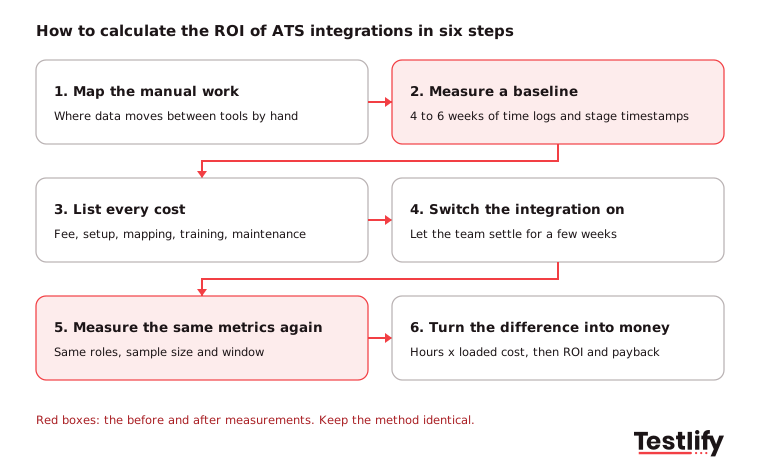
- Map the manual work: List every task where data moves between the ATS and another tool by hand: exporting assessment scores, booking interviews, and retyping offer details into the HRIS.
- Measure a baseline: For four to six weeks, log recruiter time on a sample of requisitions and pull stage timestamps from the ATS.
- List every cost: Use the cost table above for the first year, including one-off setup.
- Switch the integration on: Give the team a few weeks to settle before you measure.
- Measure the same metrics again: Same roles, same sample size, same time window.
- Turn the difference into money: Hours saved x loaded hourly cost, plus any cost per hire or agency savings you can defend, then apply the ROI and payback formulas.
Pro tip: Set the targets before go-live and leave them alone. TechTarget's guide to ATS ROI metrics advises against adjusting targets in the first few months, because users need time to adapt and early changes tend to excuse weak results.
What does a worked ROI example look like?
A worked ROI example for an ATS integration starts with one clear benefit, recruiter hours saved, and a full first-year cost. The example below uses a mid-market team of 8 recruiters who connect their assessment platform to the ATS, so scores and stages no longer need copying by hand.
The below example is just to provide a better understanding.
Line | Assumption | Annual value |
|---|---|---|
Connector or add-on fee | Vendor quote | $5,000 |
Setup and mapping | 20 IT hours x $78.88 | $1,578 |
Training | 8 recruiters x 2 hours x $46.89 | $750 |
Maintenance | 2 hours a month x 12 x $78.88 | $1,893 |
Total first-year cost | $9,221 | |
Recruiter hours saved | 8 recruiters x 3 hours a week x 48 weeks = 1,152 hours | |
Benefit | 1,152 hours x $46.89 | $54,017 |
ROI | ($54,017 - $9,221) / $9,221 x 100 | 486% |
Payback period | $9,221 / ($54,017 / 12) | about 2 months |
The hours saved figure drives almost everything, so test it. Here is the same example at different time savings:
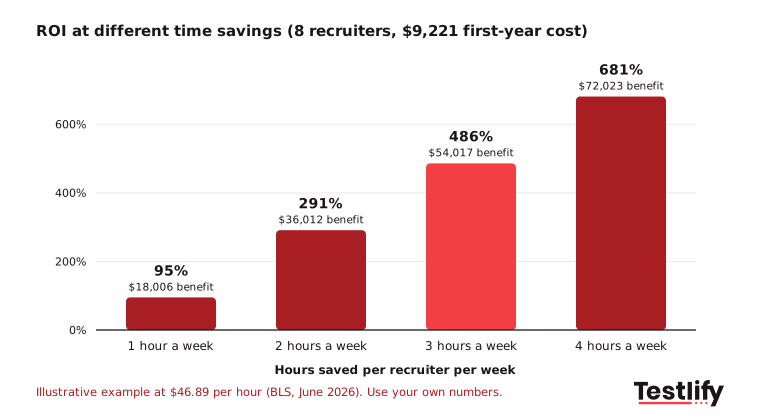
Even at one hour a week, the integration nearly doubles its cost back. The example leaves out faster time to hire, fewer lost candidates, and lower agency spend on purpose. Add those only when you have measured them, and list them as upside rather than padding the headline number.
For a sense of how much time is in play, LinkedIn's report says recruiters who use generative AI save about 20% of their work week. Integrations go after the same kind of admin time, from a different direction.
How do you prove the integration, not the ATS, drove the gain?
The integration, not the ATS, drove the gain when the improvement shows up only in the steps the integration touches. The cleanest proof compares roles or teams with the integration against similar ones without it over the same weeks, so market changes affect both groups equally.
Practical ways to separate the effect:
- Run a holdout: Switch the connector on for one region or job family first and compare it with a similar group for four to eight weeks.
- Measure the touched step only: If the integration syncs assessment results, measure time from assessment completion to the next stage, not overall time to hire.
- Use sync logs: Count how many records the integration moved. Each one is a copy-paste that did not happen.
- Ask recruiters with numbers: A short survey asking "how many minutes a day did you spend on this before?" backs up the time logs.
This is the section most ROI guides skip, and the one finance will ask about first.
Which ATS integrations usually pay back first?
The ATS integrations that usually pay back first are the ones that remove daily, repetitive data entry for many recruiters at once. Assessment results, interview scheduling and the ATS-to-HRIS handoff at offer stage tend to top the list, because they run on every candidate or every hire.
- Skills assessments: Scores, reports and stage changes flow back to the candidate record, so nobody exports and re-uploads results.
- Interview scheduling: Calendar sync removes the back-and-forth emails that slow every hiring stage.
- HRIS handoff: New hire data moves from the ATS to the HRIS once, which cuts retyping errors in offers and onboarding. See how this works with the Workday integration.
- Job boards and sourcing: Applicants land in the ATS with their source tagged, which makes cost per source reporting possible.
- Background checks: Status updates arrive in the ATS instead of a separate inbox.
Integrations also help with record keeping. The EEOC's recordkeeping rules require employers to keep personnel and employment records for one year. When every score and decision sits on the ATS record, an audit is a report, not a hunt through inboxes.
How do assessment integrations add to ATS ROI?
Assessment integrations add to ATS ROI by sending candidates, stages and scores between the assessment platform and the ATS automatically, so recruiters review results where they already work. The saving shows up as fewer manual exports and faster movement from test to interview.
Testlify connects with 100+ ATS and HR platforms, including Workday, SAP SuccessFactors, Greenhouse, Lever and SmartRecruiters, with two-way sync of candidates, stages and scores. Most integrations connect in under five minutes, and a documented REST API and webhooks cover tools without a native connector.
Two features add to the hours saved in the worked example:
- The AI resume screener pulls resumes from the ATS, gives each an explainable match score and syncs the result back.
- Score thresholds can move qualified candidates to the next stage automatically, and reporting and analytics show per-skill results for the business case.
For the hiring side of this, read how ATS-integrated assessments improve hiring.
Key takeaway: Pick the integration's own metrics, measure them before and after with the same method, price time at a loaded hourly cost, and report both ROI and payback period. A small, defensible number beats a big one finance does not trust.
If you are mapping where assessments fit in your stack, start with the test library of 3,500+ tests and try Testlify free for 7 days, no credit card needed.
Frequently asked questions (FAQs)

Wordpress Developer
Yash Patel is a Wordpress and SEO Specialist at Testlify with 3+ years of experience in technical SEO, on-page optimization, and content strategy. He works on improving Testlify's organic presence and produces content focused on hiring, talent assessment, and HR technology.
LinkedInRelated resources
View all
HR & recruitment
Mastering the art of pre-employment assessment methods

HR & recruitment
Elevate your hiring process with pre-employment testing

HR & recruitment
An HR perspective on candidate traits and nurturing soft skills

HR & recruitment
The future of ATS integration: Trends to watch in 2026 and beyond

HR & recruitment
The impact of employment testing on hiring success

HR & recruitment
Best practices for designing and implementing employment assessments
Get started.
Hire on proof, not resumes.
Run your first skills-based assessment free — no credit card required.