
How advanced excel assessments help you with hiring
Discover how advanced Excel assessments improve hiring accuracy, reduce time-to-hire, and ensure candidates have the right skills for the role.

Excel proficiency is critical across departments like finance, operations, and marketing. Yet, many hiring teams still rely on resumes or interviews to judge spreadsheet skills, leading to poor fits and costly hiring mistakes.
According to LinkedIn, 89% of bad hires lack the right hard skills, and 60% of hiring managers say skills assessments are the most reliable indicator of candidate success. Advanced Excel assessments bridge this gap by evaluating practical, role-specific abilities before the hire.
In this blog, we’ll explore how these assessments improve accuracy, save time, and help you hire more confidently.
 ChatGPT
 Gemini
 Claude
 Grok
Grok Perplexity
Why is proficiency with Excel important across roles?
With automation, dashboards, and analytics becoming a part of every department, Excel isn’t just for accountants anymore.
Here’s where Excel plays a crucial role:
- Finance & accounting: Modeling forecasts, reconciling budgets, and analyzing financial statements.
- Sales: Tracking pipelines, building performance dashboards, calculating conversion rates.
- Marketing: Analyzing campaign ROI, customer data segmentation, trend charts.
- Operations & supply chain: Inventory tracking, scheduling, and vendor analysis.
The catch? The depth of Excel needed varies by role. And that’s exactly why advanced assessments are so powerful, they let you test what matters most for the job.

What are advanced Excel assessments?
Unlike basic tests that check for SUM or COUNT functions, advanced Excel assessments evaluate deeper, task-specific skills such as:
- Building dynamic dashboards
- Writing nested formulas
- Using Power Query and Power Pivot
- Applying statistical functions
- Working with macros or VBA
- Advanced data visualization techniques
- Cleaning and transforming large datasets
These assessments often involve hands-on tasks within a live Excel file or simulated spreadsheet environment so candidates can show, not tell.
Who should you use them for?
Not every role needs an advanced Excel test. But for certain roles, it’s essential:
Financial analysts
Financial analysts rely on advanced Excel functions for tasks like forecasting, scenario modeling, and variance analysis. Their work demands precise use of nested formulas, dynamic models, and financial calculations, making a strong grasp of Excel not just useful, but critical for day-to-day performance and accuracy.
Data analysts
Data analysts frequently use Excel for cleaning, transforming, and analyzing datasets, often before moving into tools like SQL or BI platforms. Skills like pivot tables, lookups, conditional logic, and data filtering are essential for turning raw data into insights, making advanced Excel knowledge a must-have for this role.
Business intelligence or operations roles
BI and operations professionals handle large, complex datasets that require fast, accurate manipulation. Excel plays a key role in early-stage data processing, especially for reporting, metrics tracking, and trend analysis. Advanced skills help them build dashboards, automate reports, and spot inefficiencies across business functions.
Project managers
Despite the rise of project management tools, Excel remains widely used for tracking timelines, building Gantt charts, managing resources, and monitoring progress. Project managers benefit from Excel proficiency to keep teams aligned and deliverables on track using structured templates and reporting logic.
Benefits of using advanced Excel assessments
Let’s break down the value of these assessments across multiple business goals.
1. More accurate hiring decisions
Advanced Excel assessments remove the guesswork by evaluating real, job-relevant skills. Instead of relying on resumes or self-reported experience, you gain objective proof of a candidate’s ability to perform specific tasks, leading to smarter and more confident hiring decisions.
2. Time and cost efficiency
Automated Excel assessments help quickly filter unqualified applicants, reducing the time spent on lengthy interviews and manual skill evaluations. This streamlines your hiring process, cuts costs, and allows your team to focus only on the top-performing candidates.
3. Improved collaboration between HR & hiring managers
These assessments generate clear, skills-based performance data, making it easier for HR and hiring managers to align. With objective test results, decision-making becomes more consistent, less biased, and focused on actual role requirements not assumptions.
4. Faster onboarding
Candidates who already possess advanced Excel skills require less training and ramp-up time. This means they can contribute to projects sooner, adapt to workflows faster, and deliver value from day one boosting productivity across the board.
5. Better Long-term retention
Hiring candidates who match the role’s skill expectations leads to better job satisfaction and performance. When employees feel confident and capable in their work, they’re more likely to stay longer, reducing turnover and enhancing team stability.
Key skills you can evaluate with advanced excel tests
Advanced Excel covers a wide range of functions. Here are the key areas your assessment can target:
Also Read: How to tailor Excel assessments to your company needs
Related Read: Advanced Excel Assessment: How to Test Candidate Skills (2026)
Skill area | What to test | Example task |
|---|---|---|
Logical functions | IF, IFS, AND, OR, nested logic | Create conditional bonus structures |
Lookup functions | VLOOKUP, HLOOKUP, INDEX/MATCH | Match pricing to SKUs from a dataset |
Pivot tables | Summarization, filtering | Create a report showing monthly sales by product category |
Advanced charts | Dynamic charts, combo graphs | Visualize revenue vs target |
Data cleaning | Load, transform, and merge data | Clean a messy CRM export |
Macros/VBA | Automate tasks | Automate monthly report generation |
Power query | Combine the customer and order datasets | Combine customer and order datasets |
You can design tasks that mirror real business problems, giving a much clearer picture of candidate fit.
How to implement these assessments effectively
Here’s a simple 5-step process to launch your own advanced Excel assessments:
1. Define what “advanced” means for the role
Start by working with hiring managers to understand the Excel tasks tied to the role. Identify what “advanced” looks like, whether it’s financial modeling, data cleaning, or automation so your assessment focuses on the exact skills needed for day-to-day success.
2. Choose a practical testing environment
Select a testing tool that mimics real-world Excel use. Whether it’s a live spreadsheet simulation or uploading actual Excel files, the test should reflect the environments candidates will work in. Tools like Testlify support both to ensure an authentic evaluation.
3. Mix question formats
Use a variety of question types, simulations, MCQs, and case studies to assess technical skills and critical thinking. This provides a well-rounded view of how candidates approach tasks and solve problems, rather than just testing formula recall.
4. Set clear scoring criteria
Create detailed scoring rubrics for each task. Decide what success looks like: speed, accuracy, logic, or creativity, and align your scoring to those goals. This ensures fair and consistent evaluation across candidates and roles.
5. Review results with context
Go beyond just the scores. Look at how candidates approach tasks, structure their sheets, and apply logic. Hiring managers should interpret results in the context of the job, considering both technical ability and problem-solving style.
Common mistakes to avoid
Even the best tests can fail if not implemented well. Avoid these common pitfalls:
Using generic templates
Generic Excel tests often miss the mark by assessing skills that don’t match the role. To get meaningful results, tailor your assessments to the specific responsibilities of the job. This ensures you evaluate only the skills that truly impact performance and avoid wasting time on irrelevant questions.
Making it too lengthy
Long, tedious assessments lead to high dropout rates even from qualified candidates. Keep the duration between 15–25 minutes, focusing only on the most important skills. A concise, well-targeted test respects candidates’ time and gives you better insights without overwhelming them.
Not providing enough instructions
Even strong candidates can underperform if they don’t understand the task. Vague or unclear instructions create confusion and skew results. Always offer clear guidelines, context, and expected outcomes to ensure the test measures skill, not interpretation ability.
Not reviewing outliers
Don’t rely solely on scores. Sometimes a strong candidate may misread a question or make a small error. Review test submissions in context, especially for high-potential applicants, and consider overall approach, logic, and problem-solving style before making final decisions.
How Testlify makes it easy to assess advanced Excel skills?
With Testlify, you can create, customize, and deliver Excel assessments that reflect real work without needing to start from scratch.
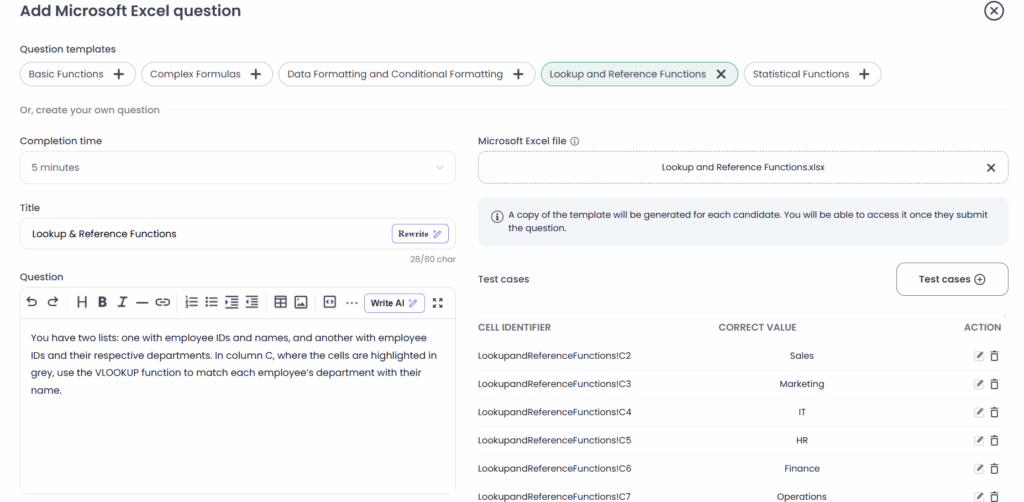
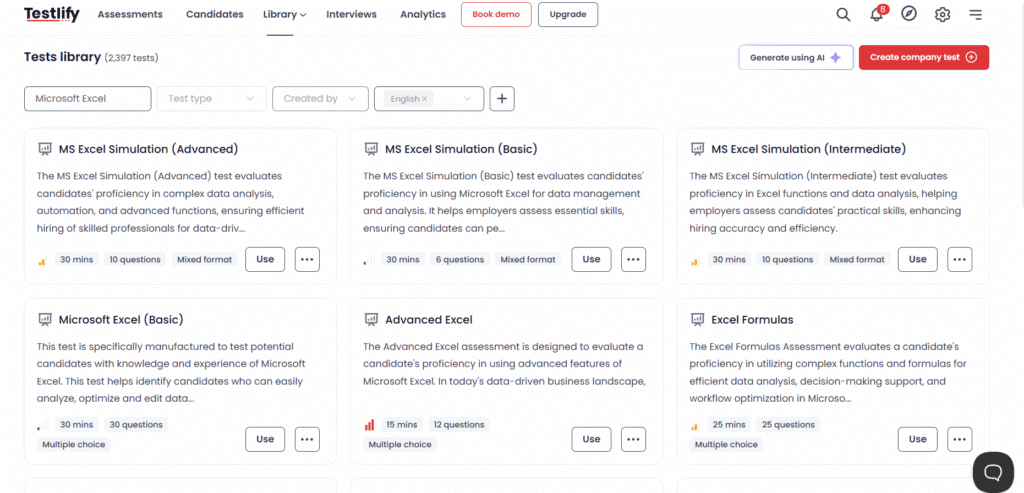
Here’s how:
- Pre-built MS Excel assessments: Choose from templates like advanced formulas, pivot tables, statistical functions, and more.
- Upload your own Excel files: Test candidates on your actual spreadsheets and business scenarios.
- Set completion times & difficulty: Tailor assessments to your hiring level, whether junior, mid-level, or expert.
- Live simulation environment: Let candidates work in an Excel-like interface or upload completed spreadsheets.
- Auto-scoring + Manual review options: Balance efficiency with precision by automating basic checks and reviewing complex answers.
- Seamless integration: Connect with your ATS and hiring workflows to keep everything streamlined.
Whether you’re hiring one analyst or scaling a full analytics team, Testlify helps you build tests that reflect reality and deliver results.
Final thoughts
Hiring someone with “Excel experience” is easy. Hiring someone who can actually do the job? That requires insight and the right assessment strategy.
Advanced Excel assessments don’t just filter candidates; they surface the people who can drive business value from day one. For large organizations where every hire counts, these tests help reduce hiring mistakes, improve efficiency, and deliver better outcomes.
The result? Higher-performing teams, faster onboarding, and better decisions powered by practical, proven Excel skills.
Ready to take your hiring to the next level? Explore how Testlify’s advanced Excel assessments can help you evaluate skills with accuracy, relevance, and scale.
Related resources
View all
Candidate assessment
Combining SJTs with other skills assessments for holistic hiring

Candidate assessment
How to adapt SJTs for global recruitment

Candidate assessment
How situational judgment tests eliminate hiring bias

Candidate assessment
Situational judgment test: addressing common 5 criticisms

Candidate assessment
How to tailor Excel assessments to your company needs

Candidate assessment
Demystifying IT skills test: Common myths and challenges
Get started.
Hire on proof, not resumes.
Run your first skills-based assessment free — no credit card required.