
Developer test: how to use one to hire engineers in 2026
How to pick, build, score and protect a developer test for hiring, with what to measure now that most developers write code with AI help.

A developer test is a pre-employment assessment that asks software engineering candidates to solve real technical tasks, such as writing, reading, debugging or reviewing code, so a hiring team can see what they can do before investing interview hours. It is not the same as "developer testing", the QA practice of developers testing their own code. This guide is about the hiring kind: how to choose a format, build one for a role, score it fairly and keep results honest now that most developers work with AI tools.
TL;DR / Key takeaways
- A developer test shows a candidate's real coding ability early, so engineers only interview people who can already do the core work.
- Use the format that matches the job: short knowledge questions to filter, a coding task to rank, and a project or live session for finalists.
- Measure more than syntax. 51% of professional developers use AI tools daily (Stack Overflow 2025), so test debugging, code review and judgment, not just typing speed.
- Keep it short. 45 to 90 minutes is enough for most roles, and long unpaid homework drives senior candidates away.
- Score with a written rubric that combines auto-graded correctness with a human read of code quality, and set the pass mark per role.
- Protect results with proctoring, plagiarism checks and identity checks. Remote hiring fraud is real: in 2025 the FBI charged four people who got hired as remote IT workers under fake identities.
 ChatGPT
 Gemini
 Claude
 Grok
 Perplexity
What is a developer test?
A developer test is a structured, timed assessment that checks whether a candidate has the technical skills a software role needs. It usually mixes coding tasks that run against test cases, short questions on concepts and frameworks, and sometimes a debugging or code review exercise. Every candidate gets the same tasks and the same scoring, which makes results comparable.
Hiring teams use a developer test for three jobs:
- Filter: Cut a large applicant pool to the people who meet the technical bar, before anyone spends time on calls.
- Rank: Put the remaining candidates in order on job-relevant evidence instead of resume keywords.
- Inform the interview: Give the engineering panel real code to discuss, so interviews go deeper than "tell me about a project".
A developer test covers one role or stack, while a broader programming test can cover many languages. For the wider picture of formats and languages, see the complete guide to programming tests.

What types of developer tests can you use?
Developer tests come in five common formats, and most good hiring processes combine two of them. Pick by what the stage needs: speed and volume early, depth and realism later.
Type | What it shows | Best stage | Typical time |
|---|---|---|---|
Knowledge questions (MCQ) | Concepts, frameworks, language rules | First filter at volume | 10 to 20 min |
Coding task with test cases | Can they write working code to a spec | Main screen and ranking | 30 to 60 min |
Debugging or code review task | Can they find bugs and judge existing code | Main screen, senior roles | 20 to 40 min |
Project in a real IDE (multi-file) | How they structure and ship a small feature | Finalists | 60 to 90 min |
Live coding or pair programming | How they think, explain and take feedback | Final interview | 45 to 60 min |
Role-specific tests save setup time. Testlify, for example, has a software developer test, a backend developer test, a frontend developer test and a full stack developer test you can use as they are or edit.
What should a developer test measure in 2026?
A developer test in 2026 should measure how a candidate solves problems, reads and fixes code, reviews AI-written code, writes code others can maintain, and explains trade-offs. Writing code from a blank page still matters, but it is no longer the whole job.
The Stack Overflow Developer Survey 2025 shows why. 84% of respondents use or plan to use AI tools in their development process, and 51% of professional developers use them every day. Yet 46% actively distrust the accuracy of AI output, against 33% who trust it. The top frustration, cited by 66%, is AI solutions that are "almost right, but not quite", and 45% say debugging AI-generated code takes more time. The skill that separates strong developers now is checking and correcting code, not producing it fastest.
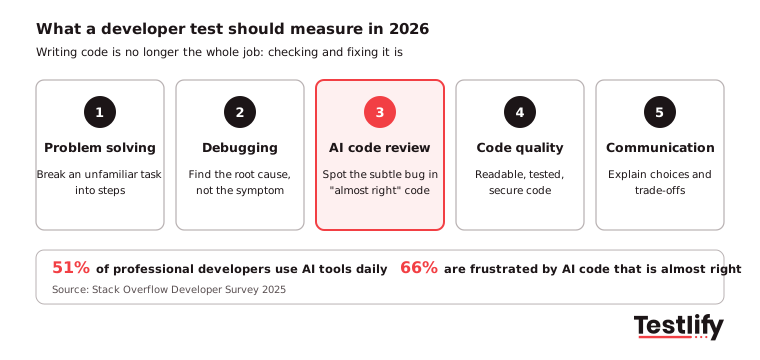
Build your developer test around five skills:
- Problem solving: Can they break an unfamiliar task into steps and pick a sensible approach? A problem solving test can sit next to the coding task for junior roles.
- Debugging: Give them broken code and a failing test. Watch whether they find the root cause or patch the symptom.
- AI code review: Show a plausible AI-generated function with a subtle bug or security flaw and ask what they would change before merging.
- Code quality: Readable names, small functions, tests, no obvious security holes. For web roles, common security flaws such as injection make good review material.
- Communication: A short written explanation of their choices, or a follow-up interview question on their own submission.
Key takeaway: If a task can be solved by pasting it into a chatbot, it measures access to a chatbot. Tasks that need reading context, spotting what is wrong and justifying a fix measure the developer.
How do you build a developer test for a role?
You build a developer test by starting from the job's real work, not from a question bank. The six steps below take a hiring manager and a recruiter about an hour for a new role.
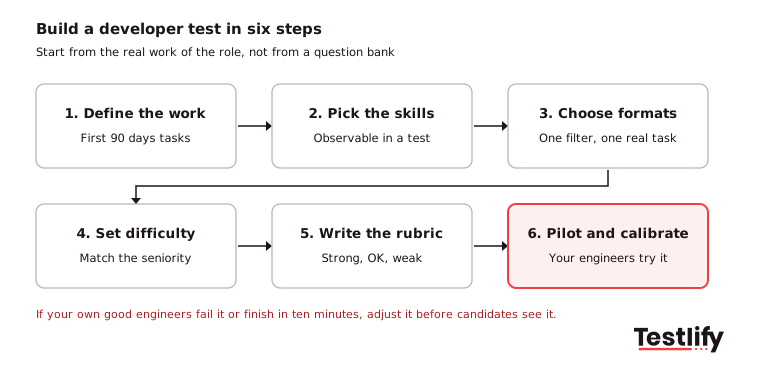
- Define the work: List the three to five tasks the new hire will do in their first 90 days, such as "build REST endpoints in Node.js" or "fix flaky React components".
- Pick the skills: Turn each task into a skill you can observe in a test. Drop anything the person will learn in week one.
- Choose the formats: Use one quick filter (knowledge questions) and one realistic task (coding, debugging or review). Save projects and live sessions for finalists.
- Set the difficulty: Match the seniority. A graduate and a staff engineer can face the same topics at different levels. Use beginner, intermediate or advanced versions of the same test rather than writing a new one per level.
- Write the rubric: Decide before anyone takes the test what a strong, acceptable and weak answer looks like, and how much each part weighs.
- Pilot and calibrate: Have two or three of your current engineers take it. If your good engineers fail it or finish in ten minutes, adjust it before candidates see it.
Pro tip: Use your own stack. A Python team testing candidates in Java learns little. Testlify's coding tests run in 45+ programming languages, so the test can match the job description.
Where does a developer test fit in the hiring process?
A developer test fits best right after the application and a light resume check, and before any engineer spends time on interviews. Placed there, it removes the biggest cost in technical hiring: senior engineers interviewing people who cannot do the basics.
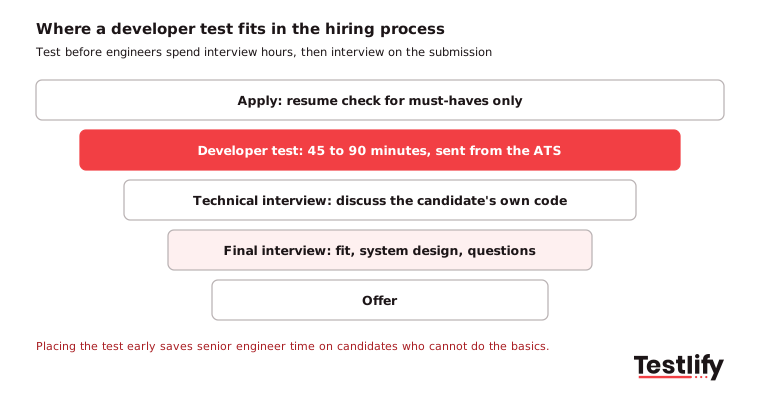
A typical flow looks like this:
- Apply and resume check: Minimum requirements only (work authorization, location, must-have stack).
- Developer test: 45 to 90 minutes, sent automatically from your ATS.
- Technical interview: The panel discusses the candidate's own submission. Ask why they made each choice.
- Final interview: Team fit, system design for senior roles, and the candidate's questions.
- Offer.
For the earlier stage, when you need to decide who even gets a test for a specialist role, see this guide to developer screening. Recruiters without a technical background can also use these software developer interview questions to run the follow-up conversation.
How do you score developer test results fairly?
Developer test results are scored fairly when every candidate is judged against the same written rubric, with automated checks for correctness and a human review of how the code is written. Auto-grading alone rewards code that passes tests but is unreadable; human review alone drifts with the reviewer's mood.
- Correctness: Share of hidden test cases passed, including edge cases. Let the platform score this.
- Code quality: Structure, naming, error handling and tests. One reviewer scores this against the rubric, ideally without seeing the candidate's name or resume.
- Approach: For review and debugging tasks, whether the candidate found the real cause and explained the fix.
- Weighting: Decide the weight of each part per role. A senior backend role might weigh quality and approach above raw correctness.
Set the pass mark from data, not from a round number. After the first 20 to 30 candidates, look at how the people you advanced actually did in interviews and move the threshold. This post on interpreting programming test results shows how to read the score report.
Fairness is also a legal question. The EEOC guidance on employment tests explains that a test can break US anti-discrimination law if it screens out a protected group and is not justified by the job. Tests built from the real work of the role, with accommodations available on request, are the safest ground.
How do you stop cheating on a developer test?
Cheating on a developer test is stopped with a mix of task design, proctoring and identity checks. No single control is enough, because the two main risks are different: a real candidate getting outside help, and a different person taking the test altogether.
- Design tasks that resist copy and paste: Use your own code, review and debugging tasks, and questions that cannot be found online. Rotate question pools.
- Decide your AI policy and say it up front: Either ban AI tools and enforce it, or allow them and grade the review and explanation. Both are valid; mixing them is not.
- Proctor the session: Webcam snapshots, tab and full-screen monitoring, copy and paste tracking and AI assistance detection flag suspicious sessions for a human to review.
- Check identity: Photo ID verification with face match, and a live follow-up interview on the candidate's own code.
The identity risk is not theoretical. According to the FBI, four North Korean nationals charged in June 2025 got jobs at two companies as remote IT workers using fake names and documents, then stole virtual currency worth more than $900,000. A developer test with identity checks, followed by a live conversation about the submitted code, makes that kind of fraud much harder. Testlify's anti-cheating and proctoring features cover these checks.
How long should a developer test be?
A developer test should take 45 to 90 minutes for most roles, and rarely more than two hours even for senior hires. Shorter tests get more completions; longer ones lose the candidates with the most options.
- Junior roles: 45 to 60 minutes. A short knowledge section and one coding task.
- Mid-level roles: 60 to 90 minutes. One coding task and one debugging or review task.
- Senior roles: Up to 90 minutes, or a short task plus a live session on the submission instead of a weekend project.
Senior developers are usually employed and selective, and many will skip an unpaid multi-day take-home. Respect their time: tell candidates how long the test takes, what it covers and whether AI tools are allowed, and send results or feedback to everyone who completes it. Remote work makes this more important, not less. In the Stack Overflow 2025 survey, 45% of US developers said they work remotely, so many of your applicants will take the test from home without anyone to ask.
What mistakes make a developer test fail?
Most developer tests fail because they test the wrong thing or ask too much. The common mistakes are easy to spot and fix:
- Puzzle questions that do not match the job: Algorithm brain teasers filter for interview practice, not for the work. Use tasks from your codebase.
- One test for every role: A frontend and a data engineering hire need different tests. Use role-specific tests and edit them.
- No rubric: Without agreed scoring, two reviewers give the same code different grades.
- Ignoring AI: Banning AI without enforcing it rewards whoever breaks the rule. Allowing it without changing the tasks measures nothing.
- Testing too late: Sending the test after three interviews wastes engineer hours the test was meant to save.
- Skipping security: Code that works but leaks data is a failed answer. The OWASP Top 10 is a good source of flaws to plant in review tasks for web roles.
- Never reviewing results: Check every quarter whether high scorers became strong hires, and drop questions that do not predict anything.
To check the rest of the process around the test, use this hiring process checklist.
How does Testlify help you run developer tests?
Testlify helps hiring teams build, send, score and protect developer tests on one platform, and send the results back to the ATS. The parts that matter most for engineering hiring are:
- Test library: 3,500+ tests, including role-specific developer tests and language and framework tests at beginner, intermediate and advanced levels.
- AI test builder: Turn a job description into a role-specific assessment, then edit the questions and scoring.
- Coding environment: Coding tasks in 45+ programming languages, plus multi-file projects in a proctored VS Code environment for Node.js, Python and Java. Durations of 30, 60 or 90 minutes, or custom.
- Scoring and reports: Automated scoring, a per-skill breakdown, AI-written insights and follow-up questions, weighted scoring and benchmarks.
- Proctoring: 20+ proctoring checks, including AI assistance detection, copy and paste tracking, webcam snapshots and face detection, with photo ID verification available.
- Interviews: Live coding and pair programming interviews for finalists, plus AI interviews.
- Integrations: 100+ ATS and HRIS integrations, including Greenhouse, Lever and Workday, with two-way sync.
Teams hiring engineers at volume can see the full setup on the developer hiring page.
Ready to run your first developer test?
Pick a role you are hiring for now, open the matching test in the Testlify test library, and edit it to fit your stack. Testlify is credit based, so you pay only when a candidate starts a test. Start a 7-day free trial with no credit card, or book a demo to see developer tests set up for your team.
Frequently asked questions

Content Writer
Yashika Khandelwal is a Content Writer with 3+ years of experience creating research-backed content on hiring, talent assessment, and HR technology. She is a registered Organizational Psychologist and subject matter expert who combines behavioral science with practical recruitment insights to produce accurate, evidence-based content.
LinkedInRelated resources
View all
HR & recruitment
HR Analytics for Data-Driven Decision Making: The 2026 Guide

HR & recruitment
How to build a resilient workforce in challenging times

HR & recruitment
CEFR certification: What it means and how employers should verify it

HR & recruitment
How to simplify candidate screening with CEFR test

HR & recruitment
CEFR language test: what it measures and how to use it in hiring

HR & recruitment
How to incorporate civil engineering test into your recruitment strategy
Get started.
Hire on proof, not resumes.
Run your first skills-based assessment free — no credit card required.