
12 common mistakes to avoid while creating coding assessment tests
Twelve mistakes that make coding tests miss good developers, from puzzle-only tasks to no AI policy, and the fix hiring teams can use.

The common mistakes to avoid while creating coding assessment tests are testing skills the role does not use, relying on algorithm puzzles, writing vague tasks, setting the wrong length, scoring without a rubric, and ignoring AI tools. Each one either filters out good developers or lets weak ones through. This guide lists 12 mistakes, why they hurt, and the fix for each.
 ChatGPT
 Gemini
 Claude
 Grok
 Perplexity
TL;DR
- The biggest mistake is testing skills the job does not use. Map every task to a requirement in the job description before you write a single question.
- Swap pure algorithm puzzles for short work-sample tasks: debugging, extending existing code, or a code review.
- Keep timed coding tasks to about 60 to 90 minutes and take-home projects under 3 hours, or pay candidates for longer work.
- Write the scoring rubric before anyone takes the test, and score readability, tests, and edge cases, not only whether the code runs.
- 84% of developers use or plan to use AI tools, according to Stack Overflow's 2025 survey. Decide and state your AI policy up front.
- Pilot every new test on two or three of your own engineers before candidates see it.

What are the common mistakes to avoid while creating coding assessment tasks?
The common mistakes to avoid while creating coding assessment tasks fall into four stages: planning the test, building the tasks, scoring the answers, and running the test for candidates. Most teams get one stage right and skip another. The table lists all 12 mistakes and the quickest fix for each.
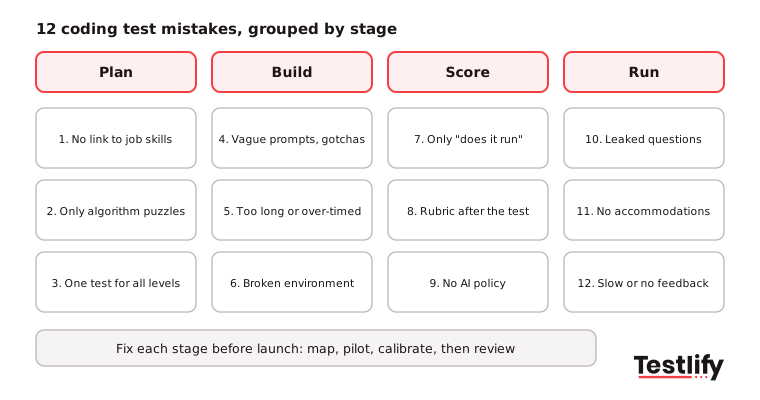
# | Mistake | What it costs you | Quick fix |
|---|---|---|---|
1 | No link to the job's real skills | You hire for skills the role never uses | Map each task to a job requirement |
2 | Only algorithm puzzles | Good practical developers fail | Add work-sample tasks |
3 | One test for every level | Seniors feel insulted, juniors drown | Separate junior and senior versions |
4 | Vague prompts and hidden gotchas | You score reading, not coding | State inputs, outputs and edge cases |
5 | Too long or needlessly timed | Strong candidates drop out | 60 to 90 minutes timed, under 3 hours take-home |
6 | Unfamiliar or broken environment | Setup errors look like skill gaps | Real IDE, tested starter code |
7 | Only checking if the code runs | Messy, unmaintainable code passes | Score readability, tests, edge cases |
8 | Rubric written after the test | Scores drift between reviewers | Write and calibrate the rubric first |
9 | No AI assistant policy | Results mean different things per candidate | Allow or block AI, and say so |
10 | Public or reused questions | Answers are one search away | Variants, rotation and proctoring |
11 | No accommodations | Unfair and legal risk | Offer extra time and formats on request |
12 | No feedback, slow results | Candidates accept other offers | Results in days, short feedback for all |
If you are still choosing between a live round, a take-home, and an auto-scored test, start with the right coding assessment format, then use this list to build it well.
Which planning mistakes make a coding test measure the wrong skills?
Planning mistakes happen before anyone writes a question: the team skips the job analysis, picks puzzles because they are easy to find, and uses one test for every level. The result is a coding test that measures something real, just not what the job needs.
Skills data is now central to hiring quality. LinkedIn's Future of Recruiting 2025 found that 93% of talent acquisition professionals say accurately assessing skills is crucial for quality of hire, and companies with the most skills-based searches are 12% more likely to make a quality hire. A test aimed at the wrong skills wastes that advantage.
1. Skipping the link to the job's real skills
Many coding tests are copied from a previous role or a question bank, so they test a language feature or data structure the team rarely touches. A backend role that lives in APIs and databases gets a graph traversal puzzle; a frontend role gets no component work at all.
Fix: List the four to six skills the hire will use in the first six months, ask the hiring manager to confirm them, and write one task per skill. Remove any task that does not map to a requirement.
2. Relying only on algorithm puzzles
Algorithm puzzles reward people who practised puzzle sites, not always people who ship working software. Senior developers in particular find them irrelevant and may drop out.
Fix: Keep one short problem-solving task if the role needs it, then add work-sample tasks: fix a bug in existing code, extend a small service, write a query against a realistic schema, or review a pull request and explain what you would change.
3. Using one test for every seniority level
A single test either bores senior candidates or overwhelms juniors, and neither group gives you a useful signal. A senior engineer asked to reverse a string learns little about your team, and a graduate asked to design a distributed cache learns even less.
Fix: Build a junior version that checks fundamentals and clean code, and a senior version that adds design choices, trade-offs and reviewing someone else's code.
Which task design mistakes frustrate strong developers?
Task design mistakes are the ones candidates notice first: unclear prompts, tests that run far too long and coding environments that fight them. Strong developers have options, so a frustrating test quietly removes the people you most want to hire.
4. Writing vague prompts and hidden gotchas
When requirements are buried in a story, edge cases are unstated, or a key detail is withheld on purpose, the test scores read and guessed rather than coded. Culture-specific references and idioms also slow down candidates who work in a second language.
Fix: State the inputs, outputs, constraints, and edge cases plainly. Use a short, realistic brief such as a ticket or an email, and say exactly what will be scored.
5. Making the test too long or needlessly timed
Take-home projects that take a full weekend and timers that add pressure without reason both push candidates away, especially people already in full-time jobs. See how test length drives candidate drop-off.
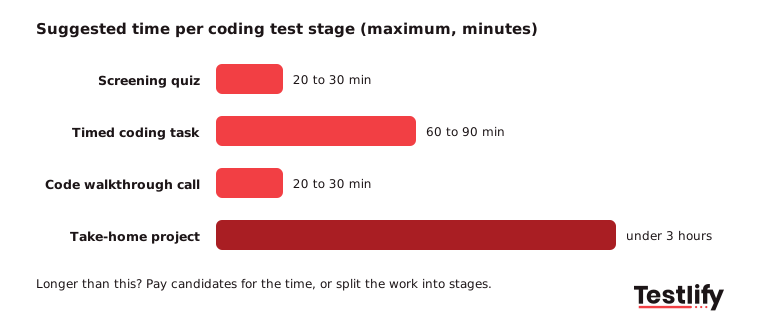
Fix: Keep timed coding tasks to about 60 to 90 minutes and take-home projects under 3 hours. Use a timer only when speed matters for the job or to keep the playing field level, and show the time per task.
6. Using an unfamiliar or broken coding environment
A plain text box with no syntax highlighting, starter code that does not compile, or test cases with a wrong expected output all look like candidate errors in the results. One setup mistake can quietly fail every candidate.
Fix: Use a real IDE with the languages the team works in, run the starter code and every test case yourself, and keep boilerplate complete so candidates spend their time on the task, not on setup.
Pro tip: Ask a developer who did not write the task to solve it cold and time themselves. Whatever confuses them will confuse every candidate.
Which scoring mistakes make coding test results unreliable?
Scoring mistakes turn a well-built test into noisy data: reviewers check only whether the output is right or decide what "good" looks like after they have seen the answers. Two reviewers then score the same code differently, and the hiring decision rests on luck.
7. Only checking whether the code runs
Passing test cases shows the code works today. It does not show whether a teammate could read, change, or trust it next month.
Fix: Score correctness, then readability, structure, naming, tests the candidate wrote, and handling of edge cases. Weight them to match the role; a platform team may weight tests more than a prototype team.
8. Writing the rubric after the test
When the rubric comes after the answers, reviewers drift toward the candidates they liked, and the rules change between batches. That makes the process hard to defend and easy to bias.
Fix: Write the rubric with the task, describe what a 1, 3 and 5 look like for each criterion, and have two reviewers score the same sample answers to check they agree. The guide to an interview scorecard uses the same approach for interviews.
How should a coding test handle AI assistants and cheating?
A coding test should state an AI policy before candidates start and protect its questions with variants, rotation, and proctoring. Without a policy, one candidate uses an AI assistant and another does not, so the same score means two different things.
9. Having no policy on AI coding assistants
AI coding tools are now part of normal work. The Stack Overflow Developer Survey 2025 found that 84% of respondents use or plan to use AI tools in development, and 51% of professional developers use them daily. The same survey found that 66% are frustrated by AI answers that are almost right but not quite, which is exactly the skill worth testing.
Fix: Pick one of two clear policies. Either block AI tools in the test and enforce it with proctoring, or allow them and test what matters now: reviewing, debugging, and correcting AI-written code. Tell candidates which policy applies before they start.
10. Reusing public or leaked questions
Popular coding questions appear on practice sites and forums soon after they are used, so a repeated question soon tests memory rather than skill.
Fix: Write your own tasks, keep several versions of equal difficulty, rotate them, and randomize question order. Add anti-cheating and proctoring checks such as copy-paste tracking, tab monitoring, and AI-assistance detection. More tactics are in this guide to stopping cheating in online tests.
Which candidate experience mistakes cost you good developers?
Candidate experience mistakes happen after the test is built: no route for accommodations, no feedback, and results that sit unreviewed for a week. Developers talk to each other, and a slow or unfair process loses offers and future applicants.
11. Forgetting accommodations and accessibility
A strict timer can be a barrier for a candidate with a disability. In the US, the EEOC's guidance on job applicants and the ADA says employers must give tests in a format that does not require an impaired skill unless that skill is what the test measures and notes that extra time can be needed.
Fix: Tell candidates in the invite how to request an accommodation, offer extra time or another format on request, and check the test works with screen readers and keyboard-only use.
12. Giving no feedback and slow results
Candidates who spend an hour or more on a test expect a result. Silence, or a decision two weeks later, sends strong developers to employers that move faster.
Fix: Review results within two or three working days, tell every candidate the outcome, and give finalists a short note on strengths and gaps. A 20 to 30 minute follow-up where the candidate walks through their code also shows communication skills that a solo test cannot.
How do you check a coding test before it goes live?
Checking a coding test before it goes live means piloting it on your own engineers, fixing what confuses them and setting pass marks from real scores. A pilot takes a few days and catches most of the mistakes above before a single candidate sees them.
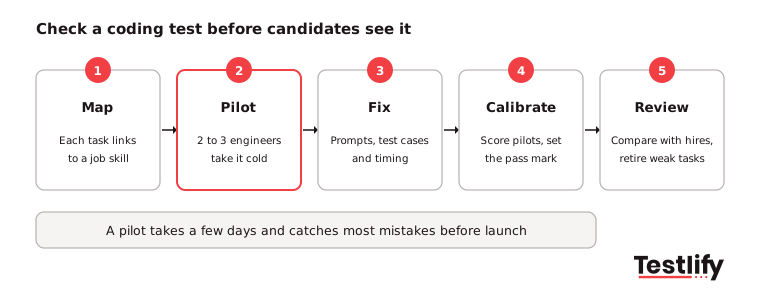
- Map: Confirm every task links to a skill in the job description and the hiring manager agrees.
- Pilot: Have two or three current engineers at the target level take the test under real conditions.
- Fix: Rewrite unclear prompts, broken test cases and tasks that ran over time.
- Calibrate: Score the pilot answers with the rubric, compare reviewers and set the pass mark.
- Review: After the first hiring round, compare scores with interview results and retire tasks that did not separate candidates.
Key takeaway: Most coding test mistakes are cheap to fix before launch and expensive after. A short pilot on your own team is the single best check. For the wider picture beyond coding, see this guide to technical assessments.
How does Testlify help you avoid these mistakes?
Testlify helps hiring teams avoid these mistakes by combining role-based coding tests, a real coding environment, structured scoring and built-in proctoring in one platform. Teams can start from a ready test or build their own from the job description.
- Role-based tests: The test library holds 3,500+ validated tests, including programming and coding tests across levels, and the AI test builder creates a custom assessment from a job description. See Testlify coding tests.
- A real coding environment: Live coding simulations support 45+ programming languages, and live coding and pair-programming interviews cover the follow-up round.
- Structured scoring: Automated scoring, weighted scoring, question analytics and benchmarking keep results consistent across reviewers.
- Integrity: 20+ proctoring checks, including copy-paste tracking, tab proctoring, AI assistance detection and question randomization.
- Candidate experience: Tests run in 15+ languages and sync with 100+ ATS and HRIS tools, so results reach the hiring team quickly.
Ready to build a coding test developers respect?
Build your first role-based coding test from a job description and pilot it with your team. Start a 7-day free trial of Testlify, no credit card required, or book a demo to see it on one of your open roles.
Frequently asked questions

Content Writer
Yashika Khandelwal is a Content Writer with 3+ years of experience creating research-backed content on hiring, talent assessment, and HR technology. She is a registered Organizational Psychologist and subject matter expert who combines behavioral science with practical recruitment insights to produce accurate, evidence-based content.
LinkedInRelated resources
View all
Skill assessment
How to use coding assessments to hire the right talent

Skill assessment
How to build a software development team in 2026
Skill assessment
Identify top talent using skill assessments

Skill assessment
Scale QA teams with attention-to-detail test

Skill assessment
Importance of accountability skills for responsible work performance

Skill assessment
Benefits of conflict management in the workplace
Get started.
Hire on proof, not resumes.
Run your first skills-based assessment free — no credit card required.