
How to use technology to support strategic human resource planning
A step-by-step look at the HR tools that make strategic workforce plans more accurate, from HRIS and skills data to AI forecasting.

Most workforce plans are out of date before the year ends. Hiring needs shift, skills age and the spreadsheet stays the same.
Technology to support strategic human resource planning fixes this by putting a tool behind each step of the plan. Skills data shows supply, forecasting estimates demand, analytics finds gaps and planning software weighs hiring, building or moving talent.
This guide shows which tool fits each step, how skills data and AI sharpen the plan, and which risks to manage. You will also get the metrics that prove it works.
TL;DR:
- Technology supports strategic HR planning by putting a tool behind each step: HRIS and skills data for supply, forecasting for demand, analytics for gaps, planning software for actions.
- SHRM's 2025 Talent Trends found 69% of organizations still struggle to fill full-time roles, and 47% have updated roles to include new skills.
- Before buying anything new, connect the HRIS and ATS you already own. Most gaps sit between tools, not inside them.
- Measure skills instead of relying on job titles, or the gap analysis compares titles and hires for gaps that may not exist.
- AI use in HR tasks rose to 43% in 2025 from 26% in 2024, per SHRM. Treat AI forecasts as a starting point for human review.
- Manage the main risks with a data owner per system, bias audits for any tool that scores people, and a person accountable for every decision.
- Track forecast accuracy, time to fill critical roles, internal fill rate and regretted attrition. Drop any tool that moves none of them within a year.
 ChatGPT
 Gemini
 Claude
 Grok
Grok Perplexity
What is strategic human resource planning?
Strategic human resource planning is the process of matching an organization's people to its business goals over the next one to three years. It compares the workforce you have today with the workforce the strategy needs, then sets out how to close the difference through hiring, training, internal moves or changes to the structure.
Most plans follow the same cycle: understand current supply, forecast future demand, analyze the gap, build an action plan, then track and adjust. For a fuller walkthrough of the cycle itself, see what strategic human resource planning is and the steps in strategic HR planning.
This guide focuses on the technology behind each step.
The pressure to plan well is real. SHRM's 2025 Talent Trends report found that 69% of organizations still struggle to fill full-time roles, and 47% have updated existing roles to include new skills.
A plan built on last year's job titles misses both problems.

How does technology support strategic human resource planning?
Technology supports strategic human resource planning by giving every step of the cycle better data and faster answers. Systems of record show who you have, analytics and AI estimate who you will need, planning tools model the options, and dashboards show whether the plan is working, so HR can update the plan every quarter instead of once a year.
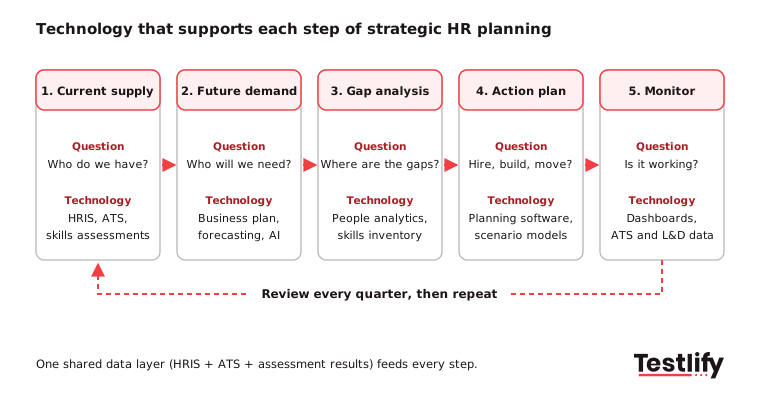
- Current supply: An HRIS holds headcount, roles, tenure and cost. An ATS holds the hiring pipeline. Skills assessments add what people can actually do, which job titles alone do not show.
- Future demand: Forecasting tools turn the business plan (new markets, products, revenue targets) into the roles and skills needed, often with AI that reads past patterns.
- Gap analysis: People analytics and a skills inventory compare supply with demand by team, location and skill.
- Action plan: Workforce planning software models scenarios such as hiring externally, reskilling, moving people internally or using contractors, each with a cost.
- Track and adjust: Dashboards pull live data from the HRIS, ATS and learning tools so the plan can be checked against reality.
Which technologies support each step of HR planning?
HR planning technology falls into six main categories: HRIS, ATS, skills assessment platforms, people analytics, workforce planning software and learning platforms. Each one answers a different planning question, and most companies already own two or three of them without connecting them to the plan.
Planning step | Technology | Question it answers | Typical output |
|---|---|---|---|
Current supply | HRIS (HR information system) | How many people do we have, where, and at what cost? | Headcount and cost by team |
Current supply | Skills assessment platform | What can our people and candidates actually do? | Scored skills profiles |
Future demand | Forecasting and AI models | Which roles and skills will the strategy need? | Demand forecast by role |
Gap analysis | People analytics, skills inventory | Where are we short, and how soon? | Gap report by skill and team |
Action plan | Workforce planning software | Should we hire, build, move or borrow talent? | Costed scenarios |
Action plan | ATS and learning platform | Can we fill the gap on time? | Hiring and training plans |
Track and adjust | Dashboards and reporting | Is the plan working? | Monthly or quarterly scorecard |
Pro tip: Before you buy anything new, list the tools you already pay for and mark which planning question each one answers. Most gaps sit between tools, not inside them, so connecting your HRIS and ATS often gives more value than adding a new platform.
For a deeper look at the forecasting side, see how to use technology to support workforce planning.
How does skills data make the plan more accurate?
Skills data makes the plan more accurate because it replaces guesses about what people can do with measured results. An HRIS knows that someone is a "Senior Analyst", but not whether they can build a forecast model in Python.
Without verified skills, the gap analysis compares job titles, and the plan hires for gaps that may not exist.
Hiring teams already feel this. LinkedIn's Future of Recruiting 2025 found that 93% of talent acquisition professionals say accurately assessing skills is crucial to quality of hire, while only 25% feel highly confident they can measure quality of hire at all.
Three sources of skills data feed a stronger plan:
- Skills assessments for candidates: Every candidate who takes a role-based test adds scored evidence, so the plan knows which external skills are easy or hard to find.
- Skills assessments for employees: The same tests, used internally, show who is ready to move into a new role and where training is needed. This feeds succession plans too: see how to use technology to support succession planning.
- Manager and peer input: Structured 360 feedback adds context that tests cannot capture, such as how someone leads a team.
Once skills are measured the same way inside and outside the company, a skills gap analysis tool can compare them directly and show whether it is faster to build a skill or buy it.
How is AI changing strategic HR planning?
AI is changing strategic HR planning by making forecasts faster to build and easier to rerun. Instead of rebuilding a spreadsheet for every question, planners can ask what happens to hiring needs if a product launch moves by six months, or which teams carry the highest attrition risk, and get an answer from live data.
Adoption is already well past the pilot stage:
- SHRM's 2025 Talent Trends found AI use in HR tasks rose to 43% in 2025, up from 26% in 2024.
- Personio's Workforce Pulse 2025, which surveyed 3,000 HR decision makers in the UK, Germany, Spain and the Netherlands, found 43% of HR leaders already use AI for strategic workforce planning.
- Gartner's 2026 HR priorities survey of 426 CHROs put AI transformation first and workforce redesign for a mixed human and AI workforce second. Gartner advises CHROs to plan for both current performance and longer-term needs at the same time.
That last point changes the plan itself. Strategic HR planning now has to forecast which tasks AI will take on, not just how many people to hire, so the demand forecast covers roles, skills and the share of work that software will do.
Why use technology to support strategic human resource planning?
Teams use technology to support strategic human resource planning because it makes the plan faster to build, easier to update and more credible with the leadership team. The biggest gains come from shared data: when HR, finance and hiring managers look at the same numbers, the plan becomes a business decision rather than an HR document.
- Decisions on evidence: Turnover, time to fill and skills data replace instinct and anecdote.
- Faster updates: A plan connected to live data can be refreshed every quarter, or after any big change, in hours instead of weeks.
- Earlier warning: Attrition risk, retirement waves and slow hiring pipelines show up before they become vacancies.
- Better build or buy choices: Skills data shows when an internal move or a training course is cheaper and faster than an external hire.
- Less admin: Automated reports free HR planners to work with business leaders instead of cleaning data.
Risks of HR planning technology and how to manage them
HR planning technology carries five main risks: poor data quality, privacy breaches, biased AI outputs, decisions without human review, and tools nobody uses. Each one is manageable with clear ownership, a few rules, and regular checks of the data that goes in and the decisions that come out.
Risk | What it looks like | How to manage it |
|---|---|---|
Poor data quality | Duplicate records, old job titles, missing skills | Name a data owner for each system and clean data before you forecast |
Privacy and security | Employee data shared too widely or stored in the wrong region | Role-based access, vendor security certifications, a data processing agreement |
Biased AI outputs | A model repeats past hiring or promotion patterns | Ask vendors for bias audits, check outputs by group, keep training data current |
No human review | Tools rank or reject people automatically | Keep a person accountable for every decision that affects someone's job |
Low adoption | Managers keep their own spreadsheets | Start with one use case leaders care about and show results quickly |
Regulation now covers some of these tools. In New York City, Local Law 144 lets employers use an automated employment decision tool only if it has had a bias audit within one year of use, a summary of the results is public, and candidates and employees get notice in advance.
Check whether any tool that scores people for hiring or promotion falls under rules like this where you operate.
How do you choose technology to support strategic human resource planning?
Choosing technology to support strategic human resource planning starts with the planning question you cannot answer today, not with a vendor list. Fix the foundation first (clean HRIS and ATS data plus measured skills), add analytics once reports take too long to build, then move to planning software and AI when leaders trust the numbers.
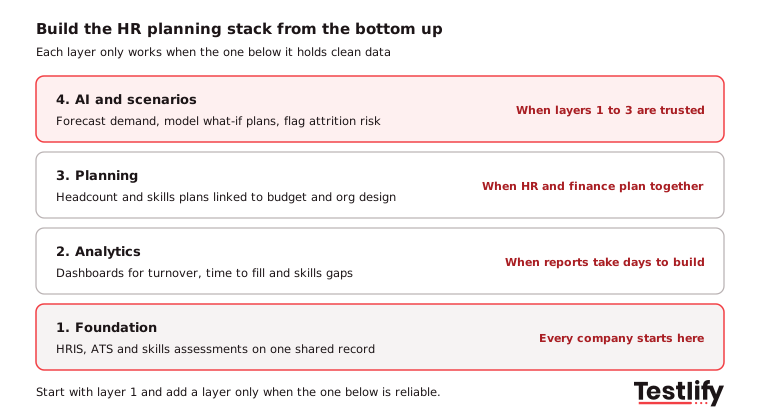
Follow these steps to roll it out:
- Write down three planning questions leaders ask that you cannot answer quickly, such as "Where will we be short of engineers next year?"
- Map each question to data: Note which system holds the data today and which data is missing.
- Fix the foundation: Connect the HRIS and ATS, and add skills assessments where skills data is missing.
- Pilot one use case: Pick one critical job family or one region, and run the full cycle there first.
- Set success measures before you start, then scale only what moves them.
When you compare vendors, ask these questions:
- Does it integrate with our HRIS and ATS in both directions, without manual exports?
- Can it model at least three scenarios side by side, with cost for each?
- Can a reviewer see why the tool made a forecast or a recommendation?
- Which security certifications does it hold, and where is our data stored?
- Has any AI feature that scores people had an independent bias audit?
How do you measure whether the technology is working?
The technology is working when the plan gets more accurate and critical roles get filled faster. Track a small set of metrics before and after the rollout, review them every quarter with finance and business leaders, and drop any tool that does not move at least one of them within a year.
Metric | What it shows | Where the data comes from |
|---|---|---|
Forecast accuracy | How close planned headcount was to actual | Planning tool vs HRIS |
Time to fill critical roles | Whether gaps close on time | ATS |
Internal fill rate | Share of roles filled by internal moves | HRIS and ATS |
Quality of hire | Performance of new hires after 6 to 12 months | Assessments plus performance reviews |
Skills gap closed | Progress on the skills the plan named | Skills assessments, learning platform |
Regretted attrition | Loss of people the plan relies on | HRIS |
For more ways to judge the plan itself, see how to measure the success of strategic HR planning.
Key takeaway: Technology improves strategic HR planning only when the data behind it is trusted. Connect the systems you have, measure skills instead of guessing them, and keep a person accountable for every decision the tools inform.
How does Testlify fit into strategic HR planning?
Testlify fits into strategic HR planning as the skills data layer: it measures what candidates and employees can actually do, so the gap analysis compares real skills instead of job titles. The same tests work for external hiring and for internal skills checks, which makes the two sets of results directly comparable.
- Skills data for any role: Choose from 3,500+ tests covering technical, cognitive, language, situational judgment and role-specific skills. You can also generate a custom assessment from a job description. Browse the test library.
- Reports planners can use: Automated scoring, per-skill breakdowns and benchmarking, with CSV and PDF export. See reporting and analytics.
- Fits the existing stack: Two-way sync with 100+ ATS and HRIS tools, including Workday, SAP SuccessFactors and BambooHR. See integrations.
- Built for global teams: Assessments run in 15+ languages. Testlify holds ISO 27001 and SOC 2 Type II certifications. Its matching model completed a third-party bias audit under Local Law 144 on June 16, 2023. Read the NYC bias audit.
Ready to add skills data to your HR plan?
Measured skills change your gap analysis, and the fastest way to see how is a walkthrough. Book a demo to see how Testlify turns assessment data into clear insights you can act on.
Frequently asked questions (FAQs)

Co-Founder and CTO
Jiten Modi is Testlify's CTO and leads a 50-person engineering organization. He writes on technical hiring, evaluating developers with real-world assessments, and building engineering teams.
LinkedInRelated resources
View all
HR & recruitment
Strategic human resource planning for small businesses

HR & recruitment
Strategic human resource planning for the future of work

HR & recruitment
Strategic human resource planning for remote teams
HR & recruitment
Strategic human resource planning for startups

HR & recruitment
How to get started with strategic human resource planning?
HR & recruitment
10 strategic human resource planning mistakes and how to fix them
Get started.
Hire on proof, not resumes.
Run your first skills-based assessment free — no credit card required.