
How to evaluate web development skills in candidates
A six-step process to evaluate web development skills: role-specific tests, code review, live coding, portfolio checks and one rubric.

A candidate talks fluently about REST APIs and React hooks, then freezes when handed a real bug. Interviews reward that kind of confident talk, so you end up hiring the best speaker instead of the best developer.
Knowing how to evaluate web development skills fixes that: watch candidates do real job work, then score it against criteria set in advance. A short role-specific test, a code review exercise and one realistic live task give you that evidence.
TL;DR:
- Evaluate web development skills in 6 steps: define the stack and level, run a short role-specific test, add a code review exercise, hold one live coding session on a real scenario, check past work, then score everyone on one rubric.
- Keep total candidate time near 2 hours for junior and mid-level roles and under 3 hours for senior roles. Longer take-homes cost you candidates without adding much signal.
- A code review exercise is the most underused method. Reading and fixing someone else's code is most of a working developer's day.
- Test front-end, back-end and full-stack roles differently. Score the two halves of a full-stack test separately; never average them.
- 84% of developers use or plan to use AI tools (Stack Overflow, 2025). Decide whether AI is allowed in each stage and tell candidates before they start.
- Check security against the OWASP Top 10:2025 and accessibility against WCAG 2.2. Most web developer tests skip both.
- Set pass thresholds before the first candidate. Thresholds set later drift toward the best candidate seen so far.
 ChatGPT
 Gemini
 Claude
 Grok
 Perplexity
What are web development skills?
Web development skills are the technical and working abilities needed to build, test, ship and maintain websites and web applications. They cover front-end code (HTML, CSS, JavaScript and frameworks such as React or Vue), back-end code (Node.js, Python, PHP or Java, plus databases and APIs), and the habits around them.
The core stack is widely shared. In the Stack Overflow Developer Survey 2025, 68.8% of professional developers use JavaScript, 63% use HTML/CSS, 48.8% use TypeScript, 49.1% use Node.js and 46.9% use React.
Because so many candidates list the same tools, the resume rarely separates them. How well they use those tools is what you need to measure.
Web development skills fall into three groups you should test separately:
- Core technical skills: Language and framework fluency, semantic HTML, CSS layout, API design, database queries.
- Engineering judgment: Debugging, reading existing code, trade-offs, security and performance awareness.
- Working skills: Explaining decisions, taking feedback, writing clear commits and documentation.

Why is it hard to evaluate web developers?
Evaluating web developers is hard because the standard hiring steps measure talk, not output. A technical interview rewards candidates who explain things well under pressure.
A long take-home rewards candidates with spare evenings. Neither shows whether someone can find a bug in a codebase they did not write.
Three things make it harder in 2026:
- Broad roles: "Web developer" can mean a React specialist, a PHP and WordPress generalist or a full-stack engineer. One generic test cannot cover all three.
- AI-assisted output: Candidates can produce working code with an AI assistant, so a correct answer alone no longer proves understanding.
- Steady demand: The US Bureau of Labor Statistics counts 220,100 web developer and digital designer jobs, with about 13,600 openings a year and a median pay of $99,520 (May 2025). At that salary, a wrong hire is expensive, as the real cost of a mis-hire shows.
The fix is a staged process where each step checks something the previous step could not.
How to evaluate web development skills step by step
To evaluate web development skills, run six steps in order and drop candidates at each gate. The early steps are cheap and automated; the later steps use engineer time only on the shortlist.
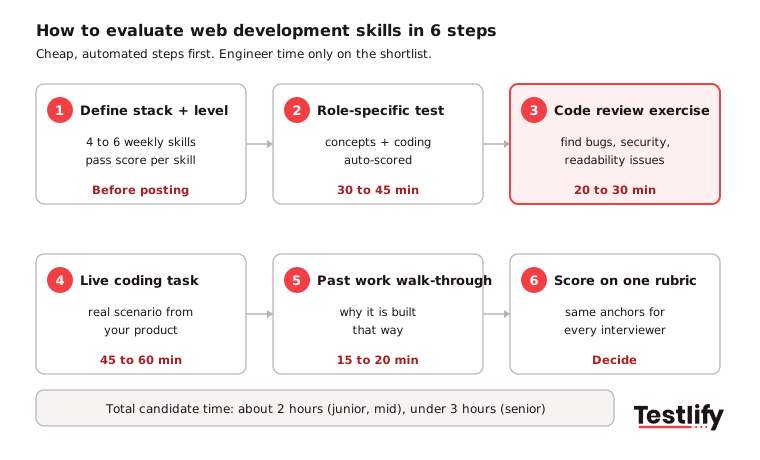
1. Define the stack and the level: Write down the 4 to 6 skills the role uses every week, for example React, TypeScript, REST APIs, Git and accessibility. Set the level (junior, mid, senior) and the pass score for each skill before you post the job.
2. Screen with a short role-specific test (30 to 45 minutes): Use a web developer test or a stack-specific one, such as the front-end developer HTML, CSS and JavaScript test. Mix multiple-choice questions on concepts with one or two coding questions that run against test cases.
3. Add a code review exercise (20 to 30 minutes): Give a short block of flawed code and ask the candidate to find the problems and suggest fixes. This step shows judgment on quality, security and readability.
4. Run one live coding session (45 to 60 minutes): Use a realistic task, such as fixing a failing API call or adding a small feature to an existing component. Watch how the candidate asks questions, tests and explains.
5. Check past work (15 to 20 minutes): Ask the candidate to walk you through one project or repository: why it is built that way and what they would change today.
6. Score on one rubric and decide: Every interviewer scores the same dimensions on the same scale. Compare candidates on evidence, not on who interviewed best.
Pro Tip: Tell candidates the stages, the time for each and whether AI tools are allowed before they start. Clear expectations raise completion rates and make results easier to compare.
Which methods work best for each skill?
The best method depends on the skill you need to see. Automated tests cover knowledge and basic coding at volume; code review and live coding cover judgment; portfolio and structured interviews cover experience and communication.
Method | What it shows | Who can run it | When to use | Candidate time |
|---|---|---|---|---|
Role-specific skills test | Language and framework fluency, basic coding | Recruiter (auto-scored) | First screen | 30 to 45 min |
Code review exercise | Debugging, quality and security judgment | Recruiter with a rubric, engineer for edge cases | After the screen | 20 to 30 min |
Live coding or pair programming | Reasoning, testing habits, communication | Engineer | Shortlist | 45 to 60 min |
Short take-home project | Larger build, structure, documentation | Engineer scores it | Optional, instead of live coding | 2 to 3 hours max |
Portfolio or repository walk-through | Real past work, growth over time | Engineer or hiring manager | Mid-level and senior | 15 to 20 min |
Structured technical interview | Depth, trade-offs, past decisions | Hiring manager | Final round | 30 to 45 min |
System design discussion | Architecture and scale thinking | Senior engineer | Senior and lead roles only | 30 to 45 min |
A structured interview asks every candidate the same questions and scores answers against the same anchors. For ready-made questions with what to look for, use this list of web developer interview questions.
Key Takeaway: Most teams run a coding test and a live interview and stop there. Adding a 20-minute code review exercise is the cheapest change with the biggest gain in signal.
How do you use a code review exercise?
A code review exercise works by giving the candidate 40 to 80 lines of realistic, deliberately flawed code and asking for a written or spoken review. Plant 5 to 7 issues of different kinds so you can see what the candidate notices first.
A code review is daily work on any team with an existing codebase, so the exercise mirrors the job. Plant a mix like this:
- Functional bug: An off-by-one error, a wrong condition or an unhandled empty response.
- Security flaw: Unvalidated input that allows injection, or an exposed API key. Map these to the OWASP Top 10:2025, where Broken Access Control is A01 and Injection is A05.
- Error handling gap: A fetch call with no failure path. Mishandling of Exceptional Conditions is new to the 2025 list as A10.
- Performance issue: A React component that re-renders on every keystroke, or a database query inside a loop.
- Readability issue: Vague names, a 60-line function, no comments where the logic is unusual.
Score what the candidate finds, how they rank the issues and whether they suggest fixes. A candidate who lists only formatting and naming problems while missing the injection risk has a review habit focused on style, not substance.
The LeadDev engineering community describes code review assignments as less common than live coding or take-homes, but closer to real working conditions and faster for both sides.
What should you test for front-end, back-end and full-stack roles?
Front-end, back-end and full-stack roles need different tests because each owns a different layer of the product. Match the assessment to the layer the hire will own, and set different pass scores for each layer.
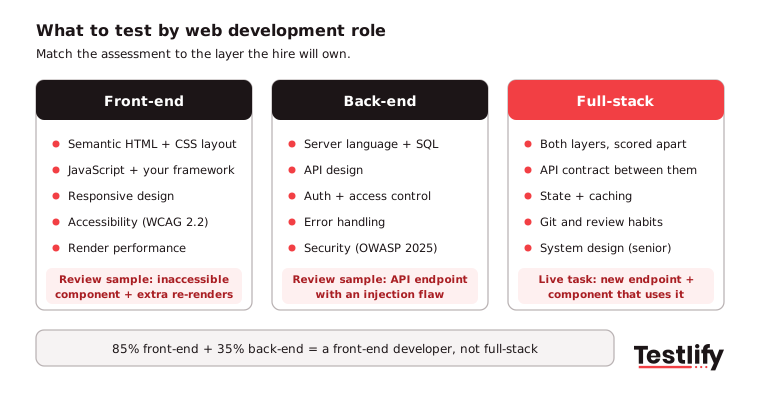
Front-end developers: Test semantic HTML, CSS layout and responsive design, JavaScript and the framework you use, browser performance and accessibility. Build the code review sample around an inaccessible component (missing labels, a div used as a button) and an avoidable re-render.
Check accessibility against WCAG 2.2, the current W3C standard, updated in December 2024.
Back-end developers: Test the server language (Node.js, Python, PHP or Java), SQL and data modelling, API design, authentication and error handling. Put a REST API endpoint with an injection flaw in the code review, and make the live task about production problems, such as stale data under load or adding rate limiting.
Full-stack developers: Test both layers and score them apart. A candidate with 85% on front-end and 35% on back-end is a front-end developer, whatever the average says.
The full-stack web developer test covers both sides. For a full-stack hiring process, see this guide to hiring a full-stack developer.
Role | Main hiring risk | Methods to prioritise | Typical candidate time |
|---|---|---|---|
Junior front-end | Knows syntax, cannot build | Skills test + code review | About 1.5 hours |
Senior front-end | Weak on architecture, performance, accessibility | Live coding + portfolio + structured interview | About 2.5 hours |
Junior back-end | Insecure code, naive API design | Language test + code review | About 1.5 hours |
Senior back-end | Poor data and scale decisions | Live coding + system design | About 2.5 hours |
Full-stack | Strong on one side, thin on the other | Split test + live integration task + system design for seniors | 2 to 3 hours |
Tech lead | Cannot defend architecture choices | System design + structured interview | About 2 hours |
How should you handle AI tools in a web developer test?
AI tools in a web developer test need a clear rule per stage, because most candidates use them at work. In the Stack Overflow 2025 AI survey, 84% of developers use or plan to use AI tools and 47.1% use them daily.
The same survey found 46% distrust the accuracy of AI output, and 66% named "AI solutions that are almost right, but not quite" as their top frustration.
That last number is the useful one for hiring. The skill that matters now is spotting and fixing code that is almost right.
Set the rules like this:
- Screening test, AI off: You want the candidate's own baseline. Use proctoring with copy and paste tracking, tab tracking and AI assistance detection.
- Code review, AI off: Reviewing flawed code is the exact skill AI makes more important.
- Live coding, AI allowed or not, but decided in advance: If allowed, ask the candidate to explain and test every suggestion they accept.
- Take-home, assume AI is used: Follow it with a 15-minute walk-through where the candidate changes the code live.
Pro Tip: If a candidate cannot explain a line they submitted, treat it as a missing skill, not a style issue.
How do you score web development skills fairly?
Scoring web development skills fairly means using one rubric with behavior-based anchors for every interviewer and every candidate. Score each dimension 1, 3 or 5 so reviewers have to take a clear position.
Dimension | 1: Weak | 3: Solid | 5: Strong |
|---|---|---|---|
Code quality | Works but hard to read; no naming pattern | Readable with small gaps | Clean, consistent, easy to change |
Debugging | Trial and error with no diagnosis | Methodical but slow to the root cause | Goes straight to the root cause and checks the fix |
Security and edge cases | Misses injection, empty and error states | Handles common cases | Spots risks unprompted and handles them |
Trade-off reasoning | One approach, no alternatives | Names trade-offs when asked | Raises trade-offs and justifies the choice |
Communication | Cannot explain the approach | Explains after finishing | Explains while working, clearly |
Suggested pass marks out of 25: 13 for junior roles, 18 for senior individual contributors and 21 for tech leads. Write them down before the first candidate.
For more on reading automated results next to rubric scores, see how to evaluate coding assessments.
After 6 to 12 months, compare each hire's scores with their performance reviews. That check shows which stages predict success on your team and which ones you can shorten.
What red flags should you look for?
Red flags in a web developer evaluation are behavior patterns that signal risk even when the total score looks fine. Two or more in one candidate is a strong reason to stop.
Red flag | What it looks like | Why it matters |
|---|---|---|
Cannot explain own code | Submitted code is correct, the walk-through is vague | Points to copied or AI-generated work without understanding |
Happy path only | No error handling, no empty or failure states | Production bugs come from edge cases |
Security blind spots | Misses injection or hard-coded secrets in review | Creates compliance and data risk |
Framework without basics | Cannot say how a hook, closure or query works | Leads to slow debugging when tools fail |
No version control habits | Single huge commits, no branching approach | Slows reviews and team delivery |
Defensive with feedback | Argues with hints during live coding | Code review will be painful for the team |
Which mistakes should you avoid when evaluating web developers?
The most common mistakes in evaluating web developers come from tests that are too long, too generic or scored too late.
- Take-homes over 3 hours: Engineering guides from daily.dev and Fred Hutch both recommend keeping take-home projects to a few hours at most, with the expected time stated upfront.
- Algorithm puzzles for product roles: Reversing a binary tree tells you little about building a checkout page. Use tasks from your own product.
- One generic test for every role: A React role and a PHP role need different screens.
- Engineers on every stage: Let automated tests and a rubric-scored code review handle the early filter so engineers see only the shortlist.
- No feedback: Candidates who get a short note on their result talk better about your company, even when they are not hired.
Testlify supports this process in one place. The test library has 3,500+ validated tests, and 25+ question types include coding questions in 45+ coding languages.
Results sync with 100+ ATS integrations. See also proctored live coding projects and how to assess technical skills.
Ready to evaluate web developers on real skills?
Pick a web developer test from the Testlify test library, add a code review question and invite your first candidates today. Start a 7-day free trial, no credit card needed, or book a demo to see the full process with your own roles.
Frequently asked questions (FAQs)

People and Talent Partner
Arushi Shah runs day-to-day talent acquisition and candidate experience at Testlify. She writes on interviewing, structured hiring, and giving candidates a fair, fast process.
LinkedInRelated resources
View all
HR & recruitment
5 tips to evaluate social media marketing skills

HR & recruitment
How to evaluate critical thinking skills in candidates

HR & recruitment
Top 7 recruitment trends in product manager hiring

HR & recruitment
5 tips to evaluate communication skills

HR & recruitment
Tips to evaluate data analysis skills when hiring in 2027

HR & recruitment
5 tips to evaluate customer service skills
Get started.
Hire on proof, not resumes.
Run your first skills-based assessment free — no credit card required.