
Salesforce skills assessment: how to test admins, developers and consultants
How to build a Salesforce skills assessment by role: which skills to test, which formats to use, how to score them and the mistakes to skip.

A Salesforce skills assessment is a timed test that checks whether a candidate can actually do the Salesforce work a role needs: configure objects and security, build Flow automation, write Apex, run discovery with a business team or report on a pipeline. It replaces guesswork from resumes and badge counts with scored evidence that every candidate earns the same way.
TL;DR / Key Takeaways
- A Salesforce skills assessment works best as a 35 to 60 minute mix of scenario questions and one hands-on task, built for one role and one Salesforce cloud.
- Test different things per role: admins on data model, security and Flow; developers on Apex, SOQL and Lightning Web Components; consultants on requirements and process design.
- A certification shows someone passed an exam. It does not show how they handle your org, so verify the badge and still test the skill.
- Weight the score toward the task the person will do in week one, set the cut-off from a pilot with two or three people already in the role, and review borderline scores by hand.
- Flow questions belong in every admin assessment now: Salesforce ended support for Workflow Rules and Process Builder on December 31, 2025.
- 93% of talent acquisition pros say accurate skills assessment is crucial to quality of hire, according to LinkedIn's Future of Recruiting 2025.
 ChatGPT
 Gemini
 Claude
 Grok
 Perplexity
What is a Salesforce skills assessment?
A Salesforce skills assessment is a pre-hire test that measures a candidate's hands-on ability on the Salesforce platform for a specific role. It usually combines scenario-based questions with a practical task, is scored the same way for every candidate, and runs before interviews so the hiring team only spends interview time on people who can do the work.
Salesforce covers a lot of ground: Sales Cloud, Service Cloud, Marketing Cloud, CPQ, Experience Cloud and a full developer platform. "Knows Salesforce" can mean a sales rep who logs calls or an architect who designs a multi-org integration. That is why a useful assessment starts from the role, not from the product name. If your team needs a refresher on the platform itself, the Salesforce glossary entry covers the basics.

Why use a Salesforce skills assessment instead of resumes or certifications?
A Salesforce skills assessment shows what a candidate can do today, while a resume shows what they say they did and a certification shows an exam they passed at some point. Salesforce resumes tend to list the same keywords (Flow, Apex, Sales Cloud), so they rarely separate a strong admin from someone who has only clicked through a trial org.
Certifications still help. Salesforce lets employers verify any certification by name on Trailhead, and certified professionals have to complete maintenance modules to keep them current. But an exam cannot show how a person handles your data model, your sharing rules or a stakeholder who changes the brief halfway through.
What you check | Resume | Salesforce certification | Salesforce skills assessment |
|---|---|---|---|
Shows real hands-on ability | No | Partly | Yes |
Same yardstick for every candidate | No | Yes, but generic | Yes, built for your role |
Covers your cloud and use case | Rarely | Only if the badge matches | Yes |
Easy to fake or inflate | Yes | Hard to fake, easy to forget | Hard, with proctoring |
Tells you who to interview first | Weakly | Weakly | Yes, ranked scores |
Hiring teams agree that skill evidence matters. LinkedIn's Future of Recruiting 2025 found that 93% of TA professionals see accurate skills assessment as crucial to improving quality of hire, and companies with the most skills-based searches were 12% more likely to make a quality hire. Only 25% felt highly confident they could measure quality of hire at all.
Which Salesforce skills should you test for each role?
Salesforce skills to test depend on the role: admins need data model, security and Flow; developers need Apex, SOQL, Lightning Web Components and integration; consultants and business analysts need requirements, process design and reporting; architects need data, security and integration design. Sales users and RevOps staff need daily CRM habits and reporting, not build skills.
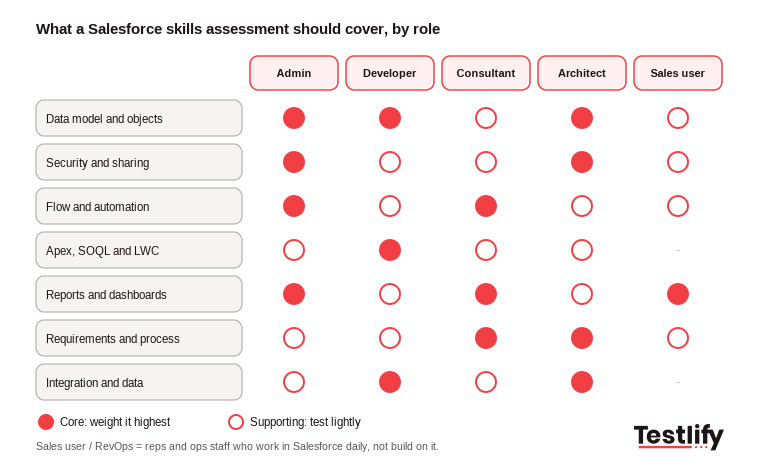
- Salesforce admin: Objects and fields, page layouts, profiles and permission sets, sharing rules, validation rules, Flow, reports and dashboards, data import and clean-up. Start with the Salesforce admin test or the broader Salesforce administration test.
- Salesforce developer: Apex classes and triggers, governor limits, SOQL and SOSL, test classes, Lightning Web Components, REST and Bulk API integration, deployment. Pair the Salesforce development test with the Apex test and a short coding task.
- Salesforce consultant or business analyst: Discovery questions, turning a business process into objects and automation, user stories, change management and reporting for leadership. A written or video case answer works better here than multiple choice.
- Salesforce architect: Data model design at scale, sharing and security across business units, integration patterns, multi-cloud and multi-org decisions. Use the Salesforce architect test plus a design question you discuss in the interview.
- Cloud specialists: Add a cloud module when the role lives in one product, such as the Salesforce CPQ test for quoting roles or the Sales Cloud test for sales operations.
- Sales reps and RevOps users: Logging activity, managing opportunities and stages, list views, forecasting and building simple reports. These candidates use Salesforce every day but do not build on it, so keep the test short.
Pro tip: Write down the four to six things the new hire must do in the first 90 days before you pick a single question. Every question in the assessment should map to one of them.
What question formats work in a Salesforce skills assessment?
Salesforce skills assessments work best with three formats: scenario-based multiple choice for breadth, a hands-on task or coding question for depth, and a short written or video answer for communication. Pure recall questions ("Which edition includes X?") are easy to look up and say little about how someone works.
- Scenario questions: "A sales manager cannot see opportunities owned by her team in another region. What do you check first?" These test judgment across many topics in a few minutes each.
- Hands-on tasks: Ask an admin to design the objects, fields and Flow for a simple approval process, or to fix a broken validation rule. Salesforce practitioners in community threads keep asking for this kind of small, realistic task over trivia.
- Coding questions: For developers, a bulk-safe trigger, a SOQL query with relationships or a small Lightning Web Component shows more than ten theory questions.
- Debug questions: Give a short Apex snippet that hits a governor limit and ask what is wrong. Debugging reveals real experience fast.
- Written or video answers: For consultants, ask them to explain a design choice to a non-technical sales director. Communication is half of that job.
Keep every format tied to the role. A developer does not need a reporting essay, and a sales user does not need a trigger.
How do you build a Salesforce skills assessment step by step?
Building a Salesforce skills assessment takes six steps: pick the role and cloud, list four to six skills from the job description, choose formats, set the time and cut-off, pilot it on people already in the role, then invite candidates and review the scores. Most teams can build and pilot one in under a week.
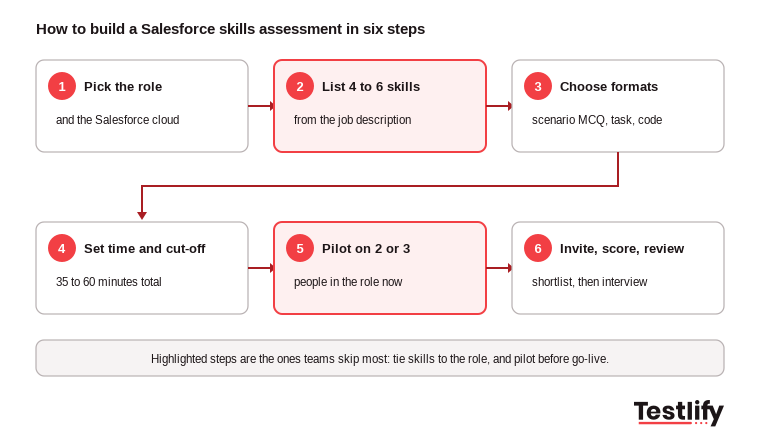
- Pick the role and the cloud: "Salesforce admin, Service Cloud, 2,000 users" gives you a far sharper test than "Salesforce person".
- List four to six skills: Pull them from the job description and the 90-day plan. Drop anything the person can learn in a week.
- Choose the formats: Use scenario questions for breadth and one hands-on or coding task for the core skill.
- Set the time and the cut-off: Aim for 35 to 60 minutes in total. Longer tests lose good candidates who already have a job.
- Pilot it: Ask two or three people who do the job well today to take it. If they fail a question, the question is the problem.
- Invite, score and review: Send the assessment early in the process, shortlist on scores, and use the interview to go deeper on the weakest area.
The pilot step is the one most teams skip. In the Testlify and SHRM Labs Skills-First Talent Report 2026, 44.5% of HR and talent leaders said no one formally checks whether their assessments work, and 47.4% said it takes more than a week to produce a first shortlist. A short pilot fixes the first problem, and an early assessment helps with the second.
The pilot also keeps the test fair. The EEOC's guidance on employment tests asks employers to make sure a test fits the specific job it is used for, and to update it when the job changes. Tie each question to a real task and revisit the test whenever the role moves to a new cloud.
How should you score Salesforce candidates?
Salesforce candidates should be scored with weighted sections, where the task closest to the real job carries the most weight, and a cut-off set from your pilot rather than a round number. Look at the score per skill, not only the total, because a strong total can hide a gap in the one skill the role depends on.
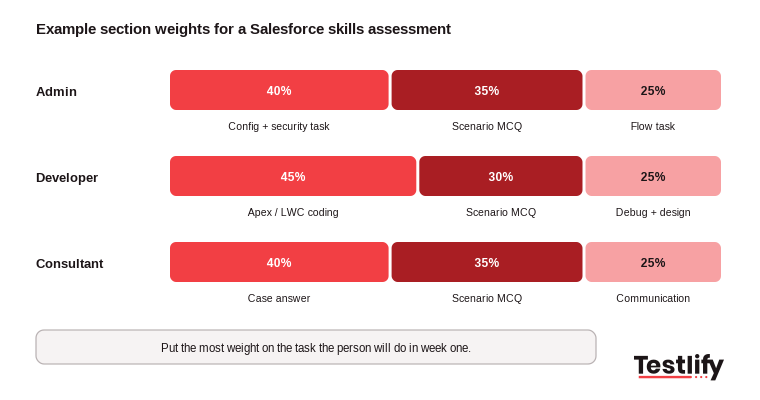
- Admin example: 40% configuration and security task, 35% scenario questions, 25% Flow task.
- Developer example: 45% Apex or Lightning Web Component coding, 30% scenario questions, 25% debugging and design.
- Consultant example: 40% written or video case answer, 35% scenario questions, 25% communication.
Set a minimum per skill as well as an overall cut-off. A developer who scores 90% on theory but cannot write a bulk-safe trigger is not ready for a production org. Review borderline candidates by hand, and compare scores with how hires perform after six months so the test improves with every hire.
Key takeaway: Weight the work, not the trivia. The section that mirrors week-one work should decide most of the score.
What mistakes make a Salesforce skills assessment fail?
Salesforce skills assessments fail when they test recall instead of work, run too long, ignore the specific cloud, or go out without cheating controls. Each of these either lets weak candidates through or pushes strong ones away, and both are costly when good Salesforce talent is hard to find.
- Testing trivia: Release names and edition limits are a search away. Ask what the candidate would do, not what a feature is called.
- Testing old automation: Questions about Workflow Rules and Process Builder are out of date. Salesforce ended support for both on December 31, 2025, and new automation is built in Flow.
- One test for every Salesforce role: An admin, a developer and a CPQ specialist need different tests. A generic test produces generic scores.
- Running it too late: An assessment after three interview rounds saves nobody time. Put it straight after the first candidate screening step.
- No integrity checks: Remote tests without proctoring invite copied answers and AI-written code.
- No feedback loop: If you never compare scores with job performance, you cannot tell whether the test works.
The pressure to get this right is real. SHRM's 2025 Talent Trends report found that 69% of organizations still struggle to fill full-time roles, and 28% now require new skills for those roles. A clear, fair test helps you move fast on the few qualified people you do find.
How does Testlify help you assess Salesforce skills?
Testlify helps you assess Salesforce skills with ready-made Salesforce tests in its library, an AI test builder, practical question types and built-in proctoring, so a hiring team can go from job description to ranked shortlist without writing every question by hand. The Salesforce tests sit inside a library of 3,500+ tests.
- Salesforce tests by role and cloud: The Salesforce online test plus admin, developer, Apex, Lightning, CPQ, Sales Cloud, Service Cloud, Marketing Cloud and architect tests that you can combine in one assessment.
- AI test builder: Paste a job description and Testlify suggests a role-specific assessment in under a minute, with AI-suggested competencies and scoring criteria you can edit.
- Practical question types: 25+ question types, including coding questions with 45+ programming languages, file upload, video and audio answers, so you can add the hands-on task and the case answer.
- Integrity checks: 20+ proctoring checks, including AI assistance detection, copy and paste tracking and webcam snapshots.
- Scoring and reports: Weighted scoring, per-skill breakdowns, benchmarking and AI candidate insights with suggested follow-up questions for the interview.
- Fits your stack: 100+ ATS and HRIS integrations with two-way sync, so scores land where recruiters already work.
Ready to test your next Salesforce hire?
Pick the Salesforce tests that match your role in the Testlify test library, add one hands-on task and invite your first candidates today. Start a 7-day free trial with no credit card, or book a demo to see a Salesforce assessment built for your team.
Frequently asked questions

Content Writer
Yashika Khandelwal is a Content Writer with 3+ years of experience creating research-backed content on hiring, talent assessment, and HR technology. She is a registered Organizational Psychologist and subject matter expert who combines behavioral science with practical recruitment insights to produce accurate, evidence-based content.
LinkedInRelated resources
View all
HR & recruitment
How salesforce test help you screen candidates

HR & recruitment
How to hire top talent using Salesforce test

HR & recruitment
How Ruby test helps you screen candidates

HR & recruitment
How to hire top talent using Ruby test

HR & recruitment
Top 5 AI recruiting tools and apps for improved hiring process and work optimization

HR & recruitment
AI in HR: use cases, benefits, risks and how to start
Get started.
Hire on proof, not resumes.
Run your first skills-based assessment free — no credit card required.