
New hire orientation for remote teams: a two-week plan
A practical two-week plan for orienting remote hires: what to ship before day one, a week-one schedule, who owns what and how to measure it.

A new hire orientation for remote teams is the planned first two weeks of a distributed job: the person gets working tools, written expectations, introductions with a reason, and one real task, all before any office could have filled the gaps. It works when it is run like a launch, with owners and dates. It fails when it is a day of video calls and a folder of PDFs.
Remote and hybrid starts are now normal, not edge cases. On days they worked, 35 percent of employed people did some or all of their work at home, according to the 2025 American Time Use Survey released in June 2026. Most teams still improvise the first two weeks.
TL;DR / Key Takeaways
- A remote orientation is a two-week program with named owners, followed by check-ins at day 30, 60 and 90. It is not a first-day event.
- The usual cause of failure is an untrained manager. Gallup found only 28 percent of hybrid managers had been trained to lead a hybrid team.
- Ship the laptop, accounts and a written two-week plan before day one. A device still in transit on day one costs most of week one.
- Cap live time at three or four meetings a day and give a small, real task inside week one.
- Measure time to first useful contribution and run a day-30 test: can the hire name who approves their work, who to ask and what the team is trying to achieve?
- Use the skills evidence from hiring to plan week three. It is the most specific training plan you already own.
 ChatGPT
 Gemini
 Claude
 Grok
 Perplexity
What is a new hire orientation for remote teams?
A new hire orientation for remote teams is the structured handover of tools, context and relationships to someone joining a distributed team, run over about two weeks rather than one morning. In an office, much of that handover happens by accident. Remote, none of it does, so every part has to be written down and assigned.
Orientation and onboarding are not the same thing. Orientation is the front end: access, expectations, introductions and the map of the place. Onboarding is the whole arc of the first 90 days or more, including training and the first performance conversation. The difference between orientation and onboarding matters because orientation is where onboarding either gets traction or quietly stalls.

Why do remote orientations fall flat?
Remote orientations usually fall flat because nobody trained the manager running them, not because managers do not care. Gallup's hybrid work research found that only 21 percent of hybrid workers had been trained to work well in a hybrid setup, and just 28 percent of hybrid managers had been trained to lead a hybrid team.
The same research found 48 percent of hybrid workers say their team never discussed a plan for working together. Teams that do have a formal plan are 66 percent more likely to be engaged and 29 percent less likely to burn out. Read it as a chain: untrained manager, no agreed norms, new hire left to guess.
Two more failures show up again and again:
- Every signal counts: A remote hire builds a picture of the job from small cues. An empty calendar says something. So does a manager who moves the first one-to-one twice.
- Overload: Orientation gets filled with everything the company wants to say and nothing the person needs that week. Compliance modules, a history deck, six tool demos, and they still cannot find the staging environment.
The wider list of new hire orientation mistakes applies here too; remote work simply makes each one more expensive.
What should a remote orientation include?
A remote orientation should include six things, in roughly this order. Anything else is optional.
- Preboarding from the day the offer is signed: Device ordered and shipped, accounts created, software installed, each with a named owner. This is pure logistics, and it is where most remote starts go wrong.
- A written two-week plan, sent before day one: Not a welcome email. A calendar they can read, with who they are meeting and why.
- Role expectations in writing: What good looks like at 30, 60 and 90 days. Vague here means anxious later.
- Introductions with a reason attached: "Meet Priya, she owns the billing service you will touch in week two" lands. "Meet the team" does not.
- A buddy who is not the manager: A buddy system gives the hire someone to ask the small questions nobody wants to ask their boss.
- One real task inside week one: Small, shippable and visible. A doc edit, a bug fix, a customer email draft.
Pro tip: Write the orientation plan in the tool where the team already works, not in a separate HR portal nobody opens twice. A plan that lives next to the work gets updated. A plan that lives elsewhere rots, and the next hire gets a stale copy.
How do you plan a remote onboarding orientation step by step?
A remote onboarding orientation is planned backwards from day one: logistics two weeks before, a tight first day, a structured first fortnight, then check-ins at 30, 60 and 90 days. The structured part is two weeks; the support carries on for three months.
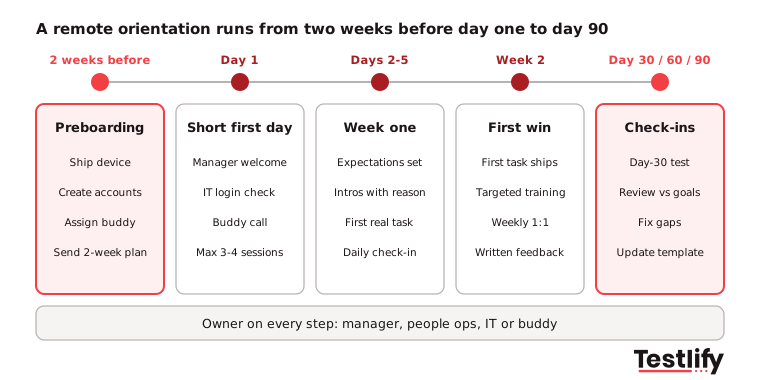
- Two weeks before day one: Order and ship the device, create accounts, add the hire to chat channels and the team calendar, assign the buddy, and send the written plan.
- Day one: Keep it short. A welcome call with the manager, an IT check that everything logs in, a buddy call and time to read. The SHRM guidance on rules for virtual onboarding makes the same point: spread tasks over days rather than cramming the first one.
- Days two to five: Role expectations, introductions with a reason, the first real task and one short daily check-in.
- Week two: The first task ships. Deeper training on the parts of the role where the hire is thinnest. First weekly one-to-one with written feedback.
- Day 30, 60 and 90: Formal check-ins against the written expectations, plus the day-30 test described below.
Plan for the role, not the calendar. A support hire may stop needing a map in 10 days. A senior engineer joining a large codebase will not, and pretending otherwise teaches them to hide that they are lost.
What does a sample week one schedule look like?
A sample week one schedule mixes no more than three or four live sessions a day with async reading and one real task. The table below is a starting point for a hire in the same time zone as their manager.
Day | Live (max 3 to 4 sessions) | Async and self-paced | Outcome by end of day |
|---|---|---|---|
Day 1 | Manager welcome (30 min), IT check (30 min), buddy call (25 min) | Read the two-week plan and team working agreement | Logged in to every tool, knows the plan |
Day 2 | Role expectations with manager (45 min), two intro calls with a reason | Recorded product or service walkthrough | Can explain what the team owns |
Day 3 | First task briefing (30 min), peer pairing (60 min) | Work on the first task | First task started |
Day 4 | Two intro calls with key partners, buddy check-in | Continue first task, write questions down | Draft of first task shared |
Day 5 | Manager one-to-one (30 min) with feedback | Short reflection: what is still unclear | First task shipped or close, blockers named |
If the hire is several hours off from the manager, move most of the live column into async video and keep one overlapping slot a day.
Who owns each part of the orientation?
The hiring manager owns the outcome of the orientation, and three other people own pieces of it. Split the ownership without naming anyone and it drifts.
Owner | Owns | Done when |
|---|---|---|
Hiring manager | Written expectations, introductions, first task, weekly one-to-ones | The hire can state what good looks like at day 30 |
HR or people ops | Paperwork, payroll, benefits, policies, the overall template | All forms complete before day one |
IT | Device, accounts, security setup, access to systems | Everything logs in on day one morning |
Buddy | Small questions, unwritten norms, social contact | Daily contact in week one, weekly after |
Across the teams we have seen run this well, the template sits with people ops and the manager fills in the role-specific parts. That keeps every orientation consistent without making it generic.
How do you keep remote onboarding orientation engaging?
Remote onboarding orientation stays engaging when you cut live hours and add real work. Seven back-to-back calls on day two is not engagement, it is endurance.
What actually holds attention, in order of how much it buys you:
- A task with a deadline this week: Nothing beats having produced something.
- Short async material the hire controls: A 20-minute recorded walkthrough they can pause beats a 60-minute live session they cannot.
- Small-group time with two or three peers: Not a 12-person welcome call. Two people, 25 minutes, no agenda.
- A manager one-to-one in the first 48 hours, then weekly: Gallup found employees who get weekly, meaningful feedback are four times more likely to be engaged, yet only 21 percent strongly agree they got that feedback in the past week.
Virtual icebreakers are a weak substitute for belonging. Two truths and a lie does not make anyone feel part of a team. Being trusted with something that matters does, and it is the core of how to manage a remote team from the first week.
Key takeaway: Count live hours on the week-one calendar before you send it. If there are more than four meetings on any day, move the extras to async video.
What tools does a remote orientation need?
A remote orientation needs fewer tools than vendors suggest: a video tool, the team chat, a shared doc for the plan, and whatever the team already uses to track work. Add an e-signature or HR system for paperwork, and that is the full list for most teams.
Where tooling earns its place is the handoff from hiring into the first month, the step almost everyone skips. By day one you already hold evidence about how the person works: which skills they tested strong on, which were thinner, and what an interviewer flagged. That evidence usually dies in the hiring system the day the offer is accepted.
Carry it forward instead. A hire who scored well on written communication skills and lower on data interpretation has just told you what weeks two and three should cover.
Testlify assessment reports include a per-skill breakdown, AI-written pros and cons and suggested follow-up questions, and they export to PDF or CSV or share as a link, so the manager can open them during orientation planning. Testlify also connects with 100+ ATS and HRIS tools through its integrations, so results sit next to the candidate record.
To be clear about the boundary: Testlify is a skills assessment and AI interviewing platform, not an onboarding platform. It does not ship laptops or track paperwork. It produces the skills evidence that makes the first month specific instead of generic. The same idea, keeping the thread from interview to onboarding, improves the candidate experience as well.
How do you measure whether the orientation worked?
Two measures carry most of the signal of whether a remote orientation worked, and neither is a satisfaction survey.
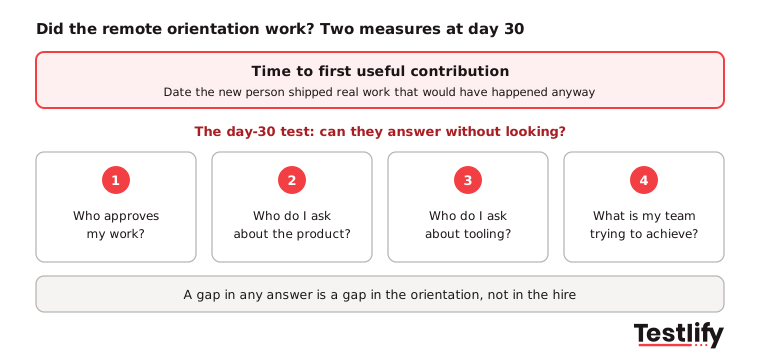
- Time to first useful contribution: The date of the first piece of work that would have happened anyway, shipped by the new person. It is specific, hard to fake, and it moves when you fix real blockers.
- The day-30 test: Ask the hire to name, without looking, who approves their work, who to ask about the product, who to ask about tooling, and what the team is trying to achieve this quarter. Gaps in those four answers are gaps in your orientation, not in the hire.
Add 90-day retention when your hiring volume makes the number meaningful, and read exit conversations with early leavers as orientation feedback. For a fuller scorecard, see how to measure the success of new hire orientations.
One caution on the default survey: asking a two-week-old employee to rate onboarding mostly measures how kind people were. That is worth knowing, but it is not the same as whether they can do the job.
How is remote orientation different from in-person?
Remote orientation has the same job as in-person orientation, but none of it happens by accident. In an office, a lot of orientation is a side effect of being in the room. Remote, every side effect has to become somebody's task.
What orientation has to deliver | In an office it happens by | Remote, someone has to build it |
|---|---|---|
Knowing who does what | Overhearing, hallway introductions | Written team map plus introductions with a stated reason |
Picking up unwritten norms | Watching how people behave | A written team working agreement |
Asking small questions | Turning to the person beside you | A named buddy and a channel where small questions are normal |
Feeling part of something | Shared lunches, ambient contact | Early ownership of real work, plus small-group time |
Knowing if you are doing fine | Constant informal cues | Weekly one-to-ones with explicit feedback |
Access to tools | Someone walks over and fixes it | A preboarding checklist with owners and dates |
Time zones are the difference teams miss most. Gallup counts 26 percent of remote-capable US workers as exclusively remote in 2026, and many of them sit hours away from their manager. If the offset is five hours, the two-week plan has to be mostly async or it becomes two weeks of 7am calls. Settle that before the offer goes out when you are hiring across time zones.
What belongs on a remote orientation checklist?
A remote orientation checklist covers four stages: before day one, day one, week one and the first 90 days. Copy this into the team's own tool and assign an owner to each line. For the wider HR version, use the onboarding checklist.
Before day one:
- Device ordered, shipped and delivery confirmed
- Accounts created for email, chat, docs and work tracker
- Paperwork, payroll and benefits forms sent and signed
- Buddy assigned and briefed
- Written two-week plan sent, with every meeting and its reason
Day one:
- IT check: every tool logs in
- Manager welcome call and buddy call
- Team working agreement shared
- No more than three or four live sessions
Week one:
- Role expectations for day 30, 60 and 90 agreed in writing
- Introductions to key partners, each with a stated reason
- First real task assigned and started
- Manager one-to-one with written feedback on day five
First 90 days:
- First task shipped and time to first contribution recorded
- Day-30 test run, gaps fixed
- Check-ins at day 60 and day 90 against the written expectations
- Orientation feedback collected and the template updated
Hire remote talent on skills evidence
A good orientation cannot rescue a poor hiring decision, and a strong hire gets wasted when nobody knows what they are actually good at. Testlify gives you role-specific skills evidence before the offer, from 3,500+ tests and structured AI interviews, which is also the raw material for a first month that fits the person. Start a 7-day free trial with no credit card, or book a demo to see how assessment results carry into planning week one.
FAQs
Related resources
View all
HR & recruitment
New hire orientations for startups: a 2027 playbook

HR & recruitment
New hire program for small businesses: a 90-day plan

HR & recruitment
New hire orientation process: 7 steps and a checklist

HR & recruitment
What are the common mistakes to avoid in new hire orientations?

HR & recruitment
How to measure the success of new hire orientations

HR & recruitment
How to deliver a new hire orientation program in 2026
Get started.
Hire on proof, not resumes.
Run your first skills-based assessment free — no credit card required.