
Workforce planning: how to build and implement a plan
A practical guide to workforce planning: the six steps, a worked example with real numbers, the metrics to track and the mistakes to avoid.

Workforce planning is the process of comparing the people and skills an organization has today with the ones it will need to reach its goals, then closing the gap through hiring, training, redeployment or contractors. Done well, it turns hiring from a scramble after every resignation into a calendar the whole business agreed on in advance.
TL;DR / Key Takeaways
- Workforce planning compares the people and skills you have with the ones your strategy needs, then closes the gap by hiring, upskilling, redeploying or using contractors.
- The process has six steps: set business goals, map current supply, forecast demand, find the gaps, act on the plan, then monitor and adjust every quarter.
- Most organizations plan on thin data. CIPD's 2024 survey found only 38% collect data to identify skills gaps, and 31% look no more than six months ahead.
- A gap is not always a hire. In a typical plan, upskilling, internal moves and contractors cover a large share of the shortfall before you open a requisition.
- Use skills data, not job titles, as your baseline. Skills assessments show what people can actually do, which makes the gap analysis and the build-or-buy call far more accurate.
- Track a short list of metrics: time to fill critical roles, internal fill rate, skills coverage, regretted attrition and cost per hire versus cost to upskill.

 ChatGPT
 Gemini
 Claude
 Grok
 Perplexity
What is workforce planning?
Workforce planning is a structured way to make sure an organization has the right people, with the right skills, in the right place, at the right time and at the right cost. It links business strategy to talent decisions: which roles you will need, how many people, with which skills, and whether you will hire, train, move or borrow them.
A workforce plan is the output of that process. It is a short, owned document that lists the critical roles, the gap for each one over the planning horizon, the action that closes it, the owner and the deadline.
Workforce planning is not the same as workforce management. Workforce management is operational and day to day: shift schedules, time tracking and productivity. Workforce planning looks 12 months to 5 years ahead and decides what talent the business needs. Management then makes the best use of the people the plan delivers.

Why does workforce planning matter for hiring teams?
Workforce planning matters because hiring without a plan is slow, expensive and reactive. When the recruiting team learns about a critical role the week someone resigns, time to fill stretches, quality drops and the business pays for it in lost output.
The data gap is wide. According to the CIPD Resourcing and talent planning report 2024, based on a survey of 1,016 HR professionals:
- Skills data is rare: Only 38% of organizations collect data to identify skills gaps, and less than a third try to identify future skill requirements. 35% collect no data on any of the areas the survey asked about.
- Horizons are short: 31% plan no more than six months ahead, while 18% plan more than two years ahead.
- Hiring is hard: 83% of organizations that tried to recruit in the previous year had difficulties, and 56% developed more talent in-house than the year before.
Skills are also moving fast. LinkedIn's Work Change Report (January 2025) found that 70% of the skills used in most jobs will change by 2030. The IBM Institute for Business Value reports that the share of the workforce needing reskilling has risen from 6% to 35%. A plan built on last year's job titles will miss most of that change.
Key takeaway: Organizations that plan can choose the cheapest way to close a gap. Those that do not plan are left with the most expensive option, an urgent external hire.
What are the types of workforce planning?
Workforce planning comes in two main types: strategic and operational. Strategic workforce planning looks one to five years ahead and asks which skills and roles the strategy will need. Operational workforce planning covers up to about 18 months and makes sure each team has enough people for the demand in front of it.
Strategic workforce planning | Operational workforce planning | |
|---|---|---|
Time horizon | 1 to 5 years | Up to 18 months |
Main question | Which skills and roles will our strategy need? | Do we have enough people for next quarter's demand? |
Typical owner | CHRO, CFO and business leaders | HR business partners, TA ops, line managers |
Main output | Skills and headcount plan per critical role | Hiring calendar, staffing schedule, monthly budget |
Example | Build a data team for a new product line | Staff a contact center for a seasonal peak |
You will also see planning described as hard or soft. Hard workforce planning is the numbers: headcount, attrition and demand models. Soft workforce planning is the judgment around them: scenarios, leadership input and the qualities you cannot count easily. A good plan uses both, because numbers without context mislead and judgment without numbers cannot be tested.
What are the key elements of workforce planning?
Workforce planning rests on four core analyses: supply, demand, gap and solution. Supply analysis describes the workforce you have. Demand analysis describes the workforce your goals require. Gap analysis compares the two. Solution analysis picks the cheapest, fastest way to close each gap.
Three supporting practices make those analyses more reliable:
- Scenario planning: Model two or three futures, such as fast growth, a flat year and a downturn, so the plan already has a response ready when conditions change.
- Workforce segmentation: Focus on critical roles first. A small number of roles usually drive most of the business result, so they deserve most of the planning effort.
- Succession planning: Name and develop internal successors for key roles before they are vacant. See the succession planning glossary entry for the basics.
How do you develop and implement a workforce plan?
Developing and implementing a workforce plan takes six steps: set business goals, map current supply, forecast demand, find the gaps, act on the plan, and monitor and adjust. Each step feeds the next, so skipping one creates blind spots that grow later. SHRM's guide to the new era of workforce planning follows a similar sequence, from auditing the current workforce to monitoring implementation.
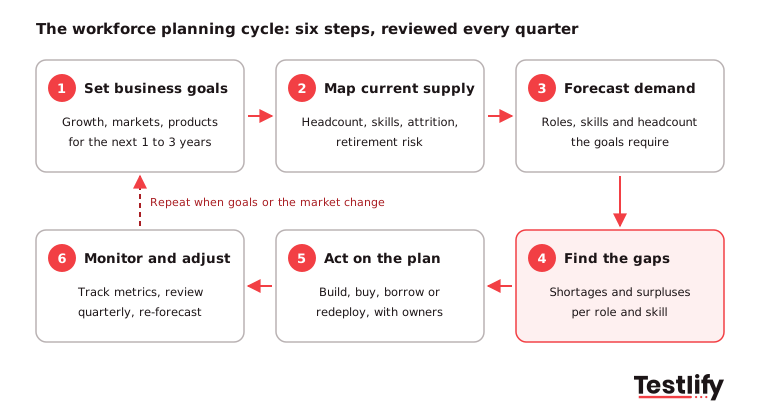
Step 1: Set business goals
Every workforce plan starts with strategy, not HR. Before you count heads, agree with senior leaders on where the business is going over the next one to three years. Are you entering a new market, launching a product, automating a process or cutting costs?
Write the goals as measurable targets, for example "open an APAC sales team of 30 people within 18 months" or "automate 40% of manual finance work by Q4". Every later decision in the plan should trace back to one of these goals.
Step 2: Map current supply
Map the workforce you have today: headcount by role and location, skills and proficiency, performance, tenure, attrition and retirement risk. Look beyond technical skills to leadership, communication and adaptability, because these decide who can move into new roles.
Questions to answer at this step:
- Which skills does the current workforce have, and at what level?
- Which roles are overstaffed, understaffed or no longer aligned with the strategy?
- Who are the high performers and likely future leaders?
- What is voluntary attrition by role, and where is churn risk highest?
- How many people may retire in the next three to five years?
Do not rely on job titles or self-reported skills alone. Objective skills assessments give a real baseline; more on that below.
Step 3: Forecast demand
Translate each business goal into the roles, skills and headcount you will need by the end of the horizon. Use two lenses:
- Demand forecasting: How many people, in which roles, with which skills will the business need? Include new products, new markets, automation and expected attrition.
- Supply forecasting: How many of those needs can be met internally through promotion, internal mobility and training, and how many must come from outside?
Inputs include historical hiring speed, attrition trends, retirement projections, technology plans and industry trends. Where uncertainty is high, forecast a range rather than a single number.
Pro tip: Ask each business leader for demand in skills, not only headcount. "Four people who can build and maintain our data pipelines" is far easier to plan for than "four more analysts".
Step 4: Find the gaps
Gap analysis compares supply (step 2) with demand (step 3) for each critical role. Gaps usually fall into three groups:
- Skill gaps: People are in place but lack the skills future roles need, such as data analysis, AI literacy or new sales tools.
- Headcount gaps: There are simply not enough people in an area to deliver the goals.
- Structural gaps: Team shape, role definitions or reporting lines do not fit the new way of working.
Surpluses matter too. A role that will shrink is a source of people you can retrain for a role that will grow. Read more on skills gaps and how to measure them.
Step 5: Act on the plan
For each gap, pick the lever that closes it at the best cost and speed:
- Build: Train and upskill existing employees. Best when the skill is learnable within the horizon and you have people with the basics.
- Buy: Hire externally. Best for scarce skills you need quickly or skills nobody inside has.
- Borrow: Use contractors, freelancers or consultants. Best for short-term or uncertain needs.
- Redeploy: Move people from shrinking roles to growing ones through internal mobility.

Then turn the choices into an action plan with owners, timelines, budgets and success measures:
- Recruitment roadmap: Roles to hire, target dates, sourcing channels and the skills each hire must prove. Write accurate job descriptions and decide how you will test those skills before the first interview. A skills-based hiring approach keeps the hiring plan tied to the skills gap.
- Learning and development plan: Which skills to build internally, who delivers the training (workshops, e-learning, mentoring, on-the-job projects) and how you will check progress.
- Succession plan: Named successors and development plans for critical roles before they are vacant.
- Engagement and retention: Targeted action for high-risk groups such as top performers, people near retirement and people with in-demand skills. Career paths, fair pay and benefits, flexible work and regular feedback all reduce the number of gaps you have to fill.
- Diversity and inclusion: Wider sourcing and fair, structured selection, so the plan widens your talent pool instead of repeating past hiring patterns.
Give every action a named owner and a deadline, and share the plan with every department it affects. Plans without owners rarely survive the first busy quarter.
Step 6: Monitor and adjust
A workforce plan is a living document. Review progress against your metrics every quarter, and re-run the full plan once a year or whenever the strategy changes. Feed what you learn back into step 1. The next section shows which numbers to watch.
What does a workforce planning example look like?
A workforce planning example shows the arithmetic behind the steps. The numbers below are illustrative, for a 400-person software company planning 12 months ahead to open a new region. Demand already includes replacing people expected to leave.
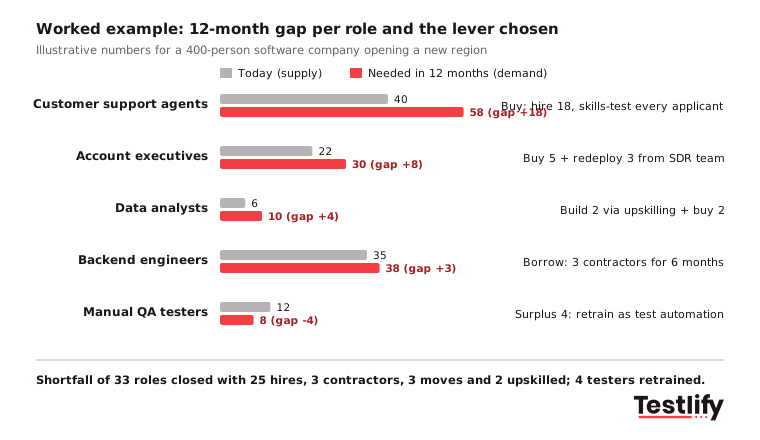
The shortfall is 33 roles, but only 25 become external hires. Three are covered by contractors, three by internal moves and two by upskilling, and the four surplus QA testers are retrained rather than let go. Without the plan, the recruiting team would likely have opened 33 requisitions and still had a QA surplus.
What should a workforce plan document include?
A workforce plan document should fit on a few pages so leaders actually read it. Use this outline:
Section | What it contains |
|---|---|
Business goals | The 3 to 5 goals the plan supports, with targets and dates |
Planning horizon and scenarios | 12, 24 or 36 months; base case plus one upside and one downside scenario |
Critical roles | The roles that drive the goals, with current headcount and skills |
Gap summary | Supply, demand and gap per critical role and skill |
Actions | Build, buy, borrow or redeploy per gap, with owner, budget and deadline |
Hiring calendar | Requisitions by month, with the skills each hire must prove |
Metrics and reviews | The KPIs below, baselines, targets and the review cadence |
Which metrics show a workforce plan is working?
The metrics that show a workforce plan is working measure speed, coverage, retention and cost. Set a baseline before the plan starts so you can show real progress, and review the numbers every quarter.
Metric | What it tells you | How to calculate it |
|---|---|---|
Time to fill critical roles | Whether hiring keeps pace with the plan | Days from approved requisition to accepted offer |
Internal fill rate | How much of demand you meet from inside | Roles filled internally / all roles filled |
Skills coverage ratio | How close you are to the skills you need | Critical skills available / critical skills required |
Regretted attrition | Whether you are losing the people the plan relies on | Leavers you wanted to keep / average headcount |
Training completion and proficiency gain | Whether build actions are working | Share completing training; score before vs after |
Cost per hire vs cost to upskill | Which lever is cheaper per role | Total hiring cost / hires, compared with training cost / people upskilled |
For more detail, see how to measure the success of a workforce plan, and use the attrition rate calculator to set your baseline.
What tools and data do you need for workforce planning?
Workforce planning needs four kinds of data: internal people data, skills data, analytics to model scenarios and external labor market data. You do not need every tool to start. Begin with your HRIS data and one objective way to measure skills, then add more as the process matures.
- HRIS: The base layer with headcount, roles, tenure, pay and performance records.
- Skills assessment platform: Objective tests that measure what employees and candidates can actually do, rather than what their titles suggest.
- People analytics and planning software: Combines HRIS data with forecasts and scenarios. Many HR suites now add AI features that suggest skills and model demand, but someone still needs to check the assumptions.
- Labor market data: Talent supply, pay benchmarks and hiring trends. Official sources such as the BLS Job Openings and Labor Turnover Survey show the wider market; it reported 7.1 million US job openings, 5.2 million hires and 3.1 million quits in August 2026.
- Succession planning tools: Track talent pipelines and development plans for critical roles.
How do skills assessments make workforce planning more accurate?
Skills assessments make workforce planning more accurate by replacing job titles with measured skills. A "senior analyst" at one company can have very different skills from the same title elsewhere, and self-ratings are generous. Tested skills give you a baseline you can trust.
The benefit shows up at every step:
- Sharper gap analysis: You see specific skill shortfalls, not a vague "talent shortage".
- Better build-or-buy calls: You know which gaps a person is close to closing with training and which need an external hire.
- More internal mobility: You can match people to adjacent roles on proven skills, not resume keywords.
- Better hires: The skills you test in candidates match the skills the plan says you need, which supports quality of hire.

Testlify lets you assess current employees and new candidates against the same skills. The Testlify test library has 3,500+ tests across technical, cognitive, language, role-specific and personality areas, and the AI test builder can create a custom assessment from a job description. Results come with automated scoring and per-skill breakdowns, and Testlify connects with 100+ ATS and HRIS tools, so skills data can sit next to the rest of your people data.
What we have seen in hiring teams is that the plan breaks at the handoff to recruiting; agreeing the skills each requisition must prove is what keeps the two connected.
What are the most common workforce planning mistakes?
The most common workforce planning mistakes are planning in isolation, planning on poor data and planning only once a year. Watch for these:
- No executive sponsor: Without C-suite support, the plan stalls. Tie it directly to revenue and growth goals.
- Poor data: Clean HRIS data before you build forecasts on it, and add real skills data.
- HR working alone: Plans written without business unit input do not match how teams work. Involve HR business partners and line managers from step 1.
- A once-a-year exercise: Markets move too fast for an annual plan. Review quarterly; CIPD found 31% of organizations look no more than six months ahead, which leaves no room for build options.
- Counting heads, not skills: A headcount plan hides the skill gaps that matter most.
- Every gap becomes a hire: Check build, borrow and redeploy options before you open a requisition.
See more common mistakes to avoid in workforce planning.
Ready to build your workforce plan on skills data?
A workforce plan is only as good as its baseline. Browse the Testlify test library to measure the skills your plan depends on, start a 7-day free trial with no credit card, or book a demo to see how skills data can anchor your next workforce plan.
Frequently asked questions about workforce planning

Wordpress Developer
Yash Patel is a Wordpress and SEO Specialist at Testlify with 3+ years of experience in technical SEO, on-page optimization, and content strategy. He works on improving Testlify's organic presence and produces content focused on hiring, talent assessment, and HR technology.
LinkedInRelated resources
View all
HR & recruitment
How to identify workforce needs: a 6-step guide for HR teams

HR & recruitment
Organizational development for startups

HR & recruitment
Organizational development for small businesses
HR & recruitment
How to choose the right organizational development intervention (with checklist)

HR & recruitment
How to measure the success of a succession planning plan?

HR & recruitment
How to implement a succession planning plan?
Get started.
Hire on proof, not resumes.
Run your first skills-based assessment free — no credit card required.