
How to evaluate React developer skills: a 2026 guide
A practical way to evaluate React developers: the skills to test at each level, task and interview formats, a scoring rubric and red flags.

A resume can say React in three places and still hide a developer who cannot debug a stale closure. Nearly every frontend applicant lists it, so teams end up with trivia quizzes and gut-feel interviews.
Knowing how to evaluate React developer skills means checking what a candidate can build, debug and explain today. The most reliable method combines a short skills test, a small work sample and a structured code review, scored on one rubric.
TL;DR:
- Evaluate React developers on evidence: a short skills test, a realistic work sample and a live code walkthrough, scored with one rubric.
- Test modern React: function components, hooks, state placement, data fetching, testing, accessibility and, for senior roles, Server Components.
- Level matters more than years: juniors build with guidance, mid-level developers own features, seniors make state and performance decisions for the team.
- Keep the take-home task to about 2 hours and ask for loading, error and empty states plus one test.
- In the 2025 Stack Overflow survey, 84% of developers use or plan to use AI tools, so judge how candidates review and explain code, not only how they write it.
- Score each skill on a 1 to 4 scale with written anchors, and have each interviewer score alone before the debrief.
- Non-technical recruiters can run the first two stages and hand engineers a ranked shortlist.
 ChatGPT
 Gemini
 Claude
 Grok
 Perplexity
What does evaluating React developer skills involve?
Evaluating React developer skills involves collecting proof of three things: that the candidate can write working React code, that they make sound decisions about state, data and performance, and that they can explain those decisions to a team. A resume and a chat about past projects show none of these reliably.
React is everywhere, which makes the evaluation harder, not easier. The Stack Overflow Developer Survey 2025 found that 46.9% of professional developers use React, so almost every frontend applicant will claim it.
The real question is which level of React they work at and whether that matches the role.
A good evaluation answers four questions for the hiring manager:
- Can they build it: Does the code run, handle real data and stay readable?
- Do they choose well: Is state in the right place, and do they know when not to add a library?
- Can they keep it working: Do they test behavior and catch their own bugs?
- Can they explain it: Can they walk a teammate through why they wrote it that way?

Which React skills should you evaluate in 2026?
React skills worth evaluating in 2026 start with JavaScript and core React, then move to state, data, testing and the newer server features. React changed a lot since many assessments were written: hooks replaced class components years ago, and React 19 added new ways to handle forms and server data.
React 19, stable since December 5, 2024 made Actions, useActionState, useOptimistic and Server Components part of everyday React. A test that still asks about componentWillMount measures history, not current skill.
Skill area | What to check | Who needs it |
|---|---|---|
JavaScript (ES2015+) | Async code, array methods, closures, modules | Every level |
Core React | Components, props, state, JSX, keys, events | Every level |
Hooks | useState, useEffect, useMemo, custom hooks, rules of hooks | Every level |
State and data | Where state lives, Context, server data with loading and error states | Mid-level and up |
Performance | Needless re-renders, memoization, code splitting, long lists | Mid-level and up |
Testing | Behavior-focused tests with a testing library | Mid-level and up |
Accessibility | Semantic HTML, focus, labels, keyboard use | Every level, owned by seniors |
TypeScript | Typed props and hooks | Most teams, check the job |
Server features | Server Components, Actions, framework routing | Senior, or teams using them |
Skip what the job does not use. If your team has no Redux, do not test Redux. A focused test gives cleaner evidence and a better candidate experience.
Pro tip: Ask the engineering lead one question before you design anything: "Which bug or delay cost us most last quarter?" The answer usually names the skill to weigh highest.
How do React skills differ by seniority?
React skills differ by seniority mostly in scope and judgment, not in the number of APIs a person knows. Juniors build features with guidance, mid-level developers own features end to end, and seniors make decisions that shape the codebase for everyone else.
Signal | Junior | Mid-level | Senior |
|---|---|---|---|
State | Local state, some prop drilling | Lifts and shares state on purpose | Picks local, server or global state per problem |
Data fetching | Fetches and renders a list | Handles loading, error and empty states | Plans caching, refetching and race conditions |
Performance | Fixes what is pointed out | Spots needless re-renders | Sets performance budgets, virtualizes long lists |
Testing | First tests with help | Tests behavior, not lines | Sets the team's test standard |
Review | Receives review | Gives useful review | Shapes conventions and mentors |
Years of experience are a weak proxy. Hooks arrived in 2019, so a claim of deep hooks experience going back further than that is worth a question.
Use the level table to decide which questions and tasks each candidate gets.
How to evaluate React developer skills step by step
The best process moves candidates from cheap, broad checks to expensive, deep ones. Each step removes weak fits before senior engineers spend time on them.
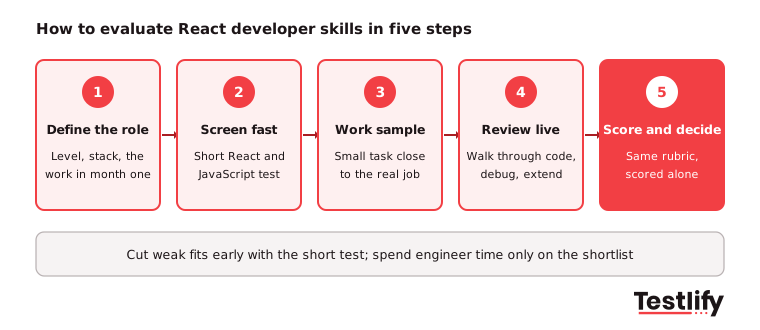
- Define the role: Write down the level, the stack (TypeScript, Next.js, a data library) and what the hire must ship in the first 90 days. This becomes the rubric.
- Screen with a short test: Use a timed React and JavaScript test of about 30 minutes to check fundamentals at scale. Add a React hooks test for mid-level roles or a senior React developer test for senior ones.
- Set a small work sample: Give the top scorers one realistic task, capped at about 2 hours.
- Review it live: Spend 45 to 60 minutes with an engineer walking through the submission, extending it and debugging a planted issue.
- Score and decide: Every interviewer scores the same rubric alone, then the panel compares evidence in the debrief.
A process like this takes about 4 hours of candidate time in total, which is fair for a skilled role and still fast enough to keep good candidates in the process.
Which assessment formats work best for React developers?
Assessment formats for React developers each show something different, so the strongest evaluations combine two or three. A short online test is best for screening many applicants; a work sample and a live review are best for the shortlist.
Format | What it shows | Time for candidate | Best stage | Watch out for |
|---|---|---|---|---|
Online skills test | Fundamentals, speed, breadth | 20 to 40 minutes | First screen | Trivia questions that do not match the job |
Take-home task | Real code, structure, testing habits | 2 hours | Shortlist | Tasks that grow into unpaid work |
Live coding or pair session | Reasoning, debugging, communication | 45 to 60 minutes | Final rounds | Nerves; let candidates use docs |
Code review exercise | Judgment, standards, AI-era review skills | 30 minutes | Mid-level and senior | Planted bugs that are too obscure |
Portfolio or GitHub review | Past work and consistency | None | Any, as support | Old or copied code; check dates |
A proctored live coding project combines the take-home and live formats: the candidate builds in a browser IDE while the session is recorded, so reviewers see the process as well as the result.
What does a good React take-home task look like?
A good React take-home task is small, close to the real job and judged on decisions rather than polish. A common and fair version: build a component that fetches items from a public API, shows them in a list and lets the user filter them.
Ask for these four things and nothing more:
- Loading, error and empty states: Each one must work, not just exist.
- A filter: Typed input or a select that filters the list.
- One meaningful test: It should check what the user sees, not internal details.
- A short README: What they would improve with more time.
Then review the submission against these questions:
- Does it run first time, and do the loading and error paths really work?
- Does state live in the right component, or is everything in one file?
- Does every list item have a stable key?
- Could a teammate read the component without help?
- Does the test check behavior?
Do not require deployment, a perfect folder structure or TypeScript unless the job needs it. Those add hours without adding evidence.
How should you score a React assessment?
A React assessment should be scored with a written rubric: each skill from the role definition gets a 1 to 4 score with a short description of what each number means. Anchored scores stop interviewers from grading on gut feel and make candidates comparable.
Score | Meaning | Example for state management |
|---|---|---|
1 | Not shown | State scattered, values out of sync |
2 | Partly shown | Works, but logic duplicated across components |
3 | Shown at level | State placed sensibly, derived values computed, not stored |
4 | Above level | Clear reasoning about local versus server state, with trade-offs |
Three rules keep scoring fair:
- Score alone first: Each interviewer submits scores before the debrief, so the loudest voice does not set the result.
- Write the evidence: One line per score, pointing to code or an answer.
- Weight what the job needs: A design-system role weighs accessibility higher; a dashboard role weighs data and performance.
An interview scorecard template makes this repeatable across roles and interviewers.
Key takeaway: The rubric is written before the first candidate applies, from the role definition in step 1. Writing it after seeing candidates bends it toward whoever impressed you most.
What red flags should you watch for?
Red flags in a React evaluation are habits that cause bugs or slow a team down, and they matter more than any single wrong answer. Watch for these:
- Cannot explain their own code: A strong signal that the take-home was not their work.
- No questions before building: Confidence without clarifying the requirement leads to rework.
- Reaches for a library first: Adding Redux or a data library before understanding the problem.
- Effects for everything: useEffect used to sync values that could simply be computed.
- Testing only when there is time: Usually means testing never.
- Missing keys or index keys on changing lists: A basic rendering bug that shows weak fundamentals.
- Ignores accessibility: Clickable divs instead of buttons, no labels on inputs.
The W3C Web Content Accessibility Guidelines are the reference most teams follow, and a candidate who mentions them unprompted is usually a strong frontend hire.
How do AI coding tools change React evaluation?
AI coding tools change React evaluation by making code writing cheaper and code judgment more valuable. According to the Stack Overflow 2025 AI survey, 84% of developers use or plan to use AI tools, 51% of professional developers use them daily, and 66% say their biggest frustration is AI answers that are almost right, but not quite.
That last number is the hiring point: a good React developer has to spot what is almost right. Adjust the evaluation in three ways:
- Decide the AI policy up front: State clearly whether AI tools are allowed in each stage, and apply it to every candidate.
- Add a review task: Give the candidate a short AI-written React component with two or three real bugs, such as a stale closure or a missing dependency, and ask them to find and fix them.
- Protect the screening stage: For the timed test, use anti-cheating and proctoring checks such as tab monitoring, copy and paste tracking and AI assistance detection, so scores reflect the candidate's own skill.
How can non-technical recruiters evaluate React developers?
Non-technical recruiters can evaluate React developers by running the parts of the process that need structure rather than React knowledge, and handing engineers only the shortlist. Recruiters own the role definition meeting, the skills test, scheduling and the scorecard; engineers own the work sample review and live session.
At screening, recruiters can also check simple signals without reading code: named products the candidate built, measurable results such as a faster page, a GitHub account with recent work and tests, and a clear answer to "What was the hardest UI problem you solved?" For more on this, see how to interview a software developer as a non-tech recruiter, and use these React developer interview questions for the live round.
How does Testlify help you evaluate React developers?
Testlify helps hiring teams evaluate React developers by turning the first two steps into a scored, ranked shortlist. Teams start from the react skills test, a 30-minute intermediate coding test that covers frontend development, debugging, unit testing and REST APIs, and combine it with JavaScript, TypeScript or senior React tests from a library of 3,500+ tests.
- Coding questions and live coding: Candidates write and run code in a browser IDE, and reviewers see the result.
- AI test builder: Paste the job description to generate a role-specific assessment in under a minute.
- 20+ proctoring checks: Webcam snapshots, tab and copy-paste tracking, and AI assistance detection keep scores honest.
- Scoring and reports: Automated scoring, per-skill breakdowns and benchmarking rank candidates on the same scale.
- ATS sync: Results flow back to 100+ ATS and HRIS integrations such as Greenhouse, Lever and Workday.
For the full hiring flow, from job post to offer, see the React developer hiring guide.
Ready to evaluate React developers on proof?
Build your React assessment from the Testlify test library, send it to your applicants and get a ranked shortlist before your engineers spend an hour on interviews. Start a 7-day free trial with no credit card, or book a demo to see it with your own role.
Frequently asked questions (FAQs)

People and Talent Partner
Arushi Shah runs day-to-day talent acquisition and candidate experience at Testlify. She writes on interviewing, structured hiring, and giving candidates a fair, fast process.
LinkedInRelated resources
View all
Skill assessment
How to evaluate candidate skills with a JavaScript Assessment

Skill assessment
Customer success manager test: how to evaluate CSM candidates

Skill assessment
How to evaluate candidates’ skills with an attention to detail visual test

Skill assessment
How to evaluate candidates skills with an adaptability test

Skill assessment
How to evaluate candidates skills with a React Native test online

Skill assessment
Data visualization exam for hiring: what to test and how to score it
Get started.
Hire on proof, not resumes.
Run your first skills-based assessment free — no credit card required.