
A complete guide to remote hiring
Learn how remote hiring works, its benefits, challenges, key tools, and a step-by-step process to build a fair and efficient global hiring system.

In just a few years, hiring has changed more than it did in decades. What started as a quick fix is now how teams grow. Remote hiring is now a strategic move for companies seeking wider reach.
Remote hiring is the practice of recruiting and onboarding employees who perform their jobs from locations other than a centralized workplace. It allows organizations to find and work with skilled professionals, wherever they are.
Recent workforce reports from Gallup and Owl Labs confirm that remote and hybrid work now make up a large share of professional jobs worldwide.
Let’s start with the question most companies need to answer before they scale their team: What is remote hiring?
 ChatGPT
 Gemini
 Claude
 Grok
Grok Perplexity
TL;DR – Key takeaways
- Remote hiring expands access to talent beyond borders and time zones.
- A clear, structured process improves fairness and reduces bias.
- Tools like ATS, skill assessments, and proctoring help keep hiring consistent.
- Compliance, communication, and onboarding define long-term success.
- Remote hiring is not a shortcut but a sustainable shift in how companies build teams.

What is remote hiring?
Remote hiring is a way for companies to recruit and onboard employees who work from wherever they are, instead of from a shared office. It focuses on skills, compatibility, and communication rather than physical presence.
In remote hiring, everything takes place online (sourcing, interviews, assessments, and onboarding). Instead of in-person meetings or office tours, recruiters use digital platforms to connect and evaluate candidates.
Reports from Gallup (2024) show that nearly three in ten full-time employees in the U.S. now work remotely at least part of the week.
And in global sectors such as technology, marketing, and consulting, remote roles account for over 30% of new hires, according to the World Economic Forum.
This model lets organizations hire the best talent for a role, even if they live in another city or country. It’s a flexible and inclusive approach that reflects how modern teams operate today.
For a data-driven look at current adoption rates, check ourremote hiring statistics and global hiring trends report
Remote hiring vs traditional hiring
Aspect | Traditional hiring | Remote hiring |
|---|---|---|
Work location | Employees work from a physical office. | Employees work from home or other remote settings. |
Hiring process | In-person interviews, on-site meetings, and local sourcing. | Entirely digital process with online assessments and virtual interviews. |
Talent reach | Limited to local or regional candidates. | Global access to skilled professionals across time zones. |
Evaluation focus | Often based on presence and in-person communication. | Focuses on skills, outcomes, and written clarity. |
Onboarding | Physical orientation and in-office training. | Virtual onboarding using tools, walkthroughs, and shared platforms. |
Benefits of remote hiring
Hiring remotely has changed how companies grow. It gives hiring teams more options and employees more flexibility. The benefits go far beyond cost-saving.
1. Reach beyond local limits
When hiring is linked to an office, many good candidates may not be available. Remote hiring eliminates that obstacle. Companies can recruit skilled individuals from any city or country and fill positions more quickly.
That larger talent pool gives companies more room to choose people with the right skills and communication habits. It also supports a more diverse and productive workforce.
2. Better retention and lower costs
Flexibility keeps employees loyal. The FlexJobs Remote Work Index reports that companies offering remote or hybrid roles see 25% lower turnover. People who can balance work with home life tend to stay and perform better.
Companies like Automattic have hired remotely for years. They hire globally, work together across different time zones, and maintain retention rates well above the industry average.
Hiring remotely also makes financial sense. Global Workplace Analytics (2024) found that businesses save about $11,000 per remote employee per year through lower office and travel costs. That saving can go back into training or team growth.
3. Stronger candidates and steady performance
Remote hiring attracts candidates who value independence and self-management. These are the qualities that directly translate into better work.
Teams that hire remotely also tend to evaluate skill more carefully. Instead of judging confidence in a room, recruiters review test results, written answers, and recorded interviews. That approach filters out bias and keeps the focus on ability.
Once hired, remote employees often show stronger consistency. Without long commutes or office distractions, they can plan their workday around focus time. Regular check-ins, shared dashboards, and clear goals help keep that productivity steady throughout the year.
To dive deeper into the key benefits and challenges of remote recruitment, read ourdetailed guide onovercoming the challenges of remote hiring
Benefit | What it means | Recent insight (2024–2025) |
|---|---|---|
Global reach | Hire skilled professionals anywhere in the world. | Remote roles now common across high-growth sectors (WEF 2025). |
Skill gap coverage | Access talent from regions where niche or technical skills are more available. | Remote recruitment helps fill hard-to-hire roles faster (LinkedIn Global Talent Report 2024). |
Retention | Flexible work builds trust and keeps employees longer. | Remote-friendly firms report lower turnover (FlexJobs 2025). |
Cost savings | Less need for office space, relocation, and travel. | Businesses save up to $11,000 per remote employee yearly (GWA 2024). |
Talent quality and performance | Skills-focused hiring attracts accountable, self-managed professionals. | Companies report better consistency and measurable output in distributed teams. |
Considerations when hiring remote workers
Hiring remotely expands access to talent, but it also brings new responsibilities. When your team operates across borders and time zones, success depends on how well you manage compliance, communication, and data security.
Legal and compliance requirements
Employment rules change by country and sometimes by state. Get the contract type right, document benefits correctly, and handle taxes in the right jurisdiction.
Missteps can lead to penalties or backdated taxes. Many global companies use Employer of Record (EOR) platforms like Deel or Remote.com to manage local contracts, payroll, and benefits legally.
The World Economic Forum expects that, by 2026, over 40% of international hires will go through such models. It is clearly understandable how important compliance support has become.
Communication and time zones
Remote teams work better when communication is planned. Set clear response times and shared hours. Decide how quickly people should reply, and pick a few hours when everyone is online at the same time. It keeps teamwork simple and reduces confusion.
A Microsoft Work Trend Index found that most managers now assess written clarity as a hiring skill. It’s one of the strongest predictors of remote success.
Building trust across cultures takes time. Here’s a practical guide onhow to overcome geographical and cultural barriers in remote hiring
Data and security practices
When the work is done across multiple locations, sensitive data moves with it. Keep access tight with company accounts, strong passwords, and two-factor authentication.
Share clear rules during onboarding for handling sensitive data, using approved tools, and reporting security issues. Remind teams not to store company files on personal drives or share credentials over chat.
Most mistakes happen before habits are set, so teach the basics early and reinforce them with short refreshers every few months.
How to build a smart remote hiring process (In 5 steps)
Remote hiring works best when it follows a clear process. Instead of responding to each role individually, top companies plan their procedures from the initial job post to the final onboarding step.
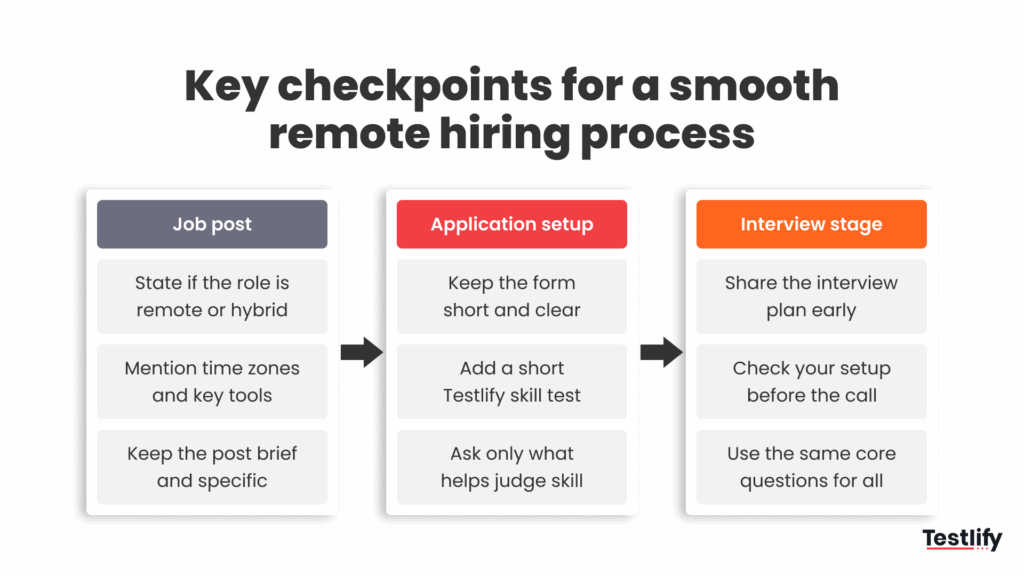
Below is the five-step framework based on what successful remote-first teams follow today.
Step 1: Create a remote-ready job post
Start with clarity. State whether the role is fully remote, hybrid, or limited to specific time zones. Include collaboration tools, team hours, and the expected communication style.
Detailed job posts attract individuals who understand remote work, reducing the number of mismatched applications.
Step 2: Set internal decision timelines
Candidate ghosting often starts inside the company. When reviews take too long, good candidates move on.
Agree in advance on how quickly resumes will be reviewed and interviews scheduled (48 to 72 hours is ideal). This keeps momentum high and shows professionalism. A well-timed process can reduce candidate drop-offs by nearly 30%.
Step 3: Use skill-based assessments before interviews
Use skill tests before interviews. Let candidates show how they think and work. With Testlify, you can build a role-specific assessment or ask the AI to suggest one from your job description.
The platform also supports multilingual assessments, allowing teams to test candidates in their preferred language. This helps evaluate real ability fairly across regions and improves communication accuracy from the very beginning.
Proctoring runs quietly to ensure fair results. Reports display candidate scores, completion time, and any alerts, giving recruiters a clear way to compare performance and maintain accurate records.
Learn more abouthow remote assessments help HR in remote hiring and keep evaluations consistent across regions.
Step 4: Keep interviews structured and transparent
Keep interviews structured and transparent. Share the format, use the same core questions, and record answers where it’s appropriate. Testlify’s AI interview helps standardize prompts and capture responses so panels review the same evidence.
Step 5: Personalize onboarding from day one
A structured onboarding process closes the loop. Give new hires a simple 30–60–90-day plan and access to tools to build confidence. Include team introductions or a short welcome session to make the experience personal.
Know more: Employee onboarding process: A complete guide for 2025
What are the best practices for remote proctoring in hiring?
Effective remote proctoring is about running a fair and defensible assessment process that candidates trust and hiring teams can rely on.
Done right, it protects the integrity of your hiring without creating unnecessary friction. Done poorly, it drives away strong candidates and exposes your organization to legal risk.
The best approach balances stringent test integrity with a positive candidate experience. Here is how to get that balance right.
1. Transparency and candidate experience
The single biggest mistake companies make with remote proctoring is surprising candidates with it.
When candidates discover mid-assessment that they are being monitored in ways they did not expect, trust breaks down immediately. Some disengage, others abandon the process entirely, and many share the experience publicly.
Set clear expectations upfront
Before the assessment begins, provide candidates with a plain-language document explaining exactly what the proctoring software monitors, whether that is webcam footage, screen activity, keystroke patterns, or background audio, and why each is necessary.
Offer practice tests
Give candidates a mock session they can complete before the real thing. This lets them verify that their hardware works (microphone, camera, internet speed) and familiarize themselves with the interface.
Provide live support
Ensure a dedicated helpdesk or named contact person is available during the assessment window.
A candidate who loses their internet connection mid-test should have a clear, fast path to resolution, not a dead end that costs them the opportunity.
2. Privacy and compliance
Remote proctoring collects sensitive data, and that creates legal obligations you cannot ignore.
Adhere to data protection laws
Depending on where your candidates are located, your proctoring vendor may need to comply with GDPR, CCPA, India’s DPDP Act, or other regional frameworks. Vet your vendor’s compliance documentation before you go live.
Secure written consent
Obtain explicit, informed consent from every candidate before the session begins. This means more than a checkbox buried in terms and conditions. Candidates should understand what data is collected, how it is stored, who can access it, and for how long.
Establish a data retention policy
Define how long assessment recordings and any biometric data are retained, and enforce deletion once the hiring decision is made.
3. Balanced monitoring: AI combined with human review
AI-powered proctoring tools are effective at scale, but they are not infallible. Treating an automated flag as a verdict is one of the most common and costly mistakes in remote assessment.
Use AI as a detection tool
AI should flag behaviors worth reviewing, such as prolonged gaze movement, background voices, or rapid window switching, but not automatically disqualify candidates. The flag is an input, not a conclusion.
Always include human review
Every AI-flagged incident should be reviewed by a human proctor or hiring manager before any action is taken. Natural behavior, a child entering the room, a ceiling fan, or an unconventional reading posture can all generate false positives.
A human reviewer adds the contextual judgment that AI cannot replicate. This two-layer approach reduces wrongful disqualifications and strengthens the legal defensibility of your assessment process.
4. Technical configuration
The technical setup of your proctoring environment directly affects both security and fairness.
Use secure browsers
Lockdown browsers that disable copy-paste, screen capture, tab switching, and unauthorized application access create a consistent testing environment for every candidate, regardless of device.
Match the level of restriction to the role
Overly restrictive monitoring for entry-level roles creates friction that is not justified by the risk.
For early-stage screening or lower-stakes skills tests, passive approaches such as automated environment checks or recorded-only sessions may be more proportionate.
Active, live proctoring with real-time human oversight makes sense for senior or high-stakes hires.
Verify ATS and tool integration
Proctoring software that does not connect cleanly with your Applicant Tracking System or technical assessment platform creates manual handoffs and data gaps. Confirm seamless integration before deploying at scale.
5. Inclusivity and accessibility
A proctoring setup that works for most candidates but systematically disadvantages others is a legal and reputational liability.
Honor accessibility accommodations
Candidates with disabilities may require screen readers, extended time allowances, or scheduled medical breaks. Ensure your assessment platform and internal recruiting process can accommodate them before the assessment begins.
Actively audit for bias
Some AI proctoring features generate disproportionate false flags for candidates with disabilities, different cultural eye contact norms, or non-traditional home environments.
Poor lighting, background noise, or movement can trigger inaccurate violations even when no misconduct occurs.
Review false-flag data regularly by demographic segment and raise recurring concerns with your vendor to improve fairness and accuracy.
Getting remote proctoring right
Remote proctoring is not a simple plug-and-play add-on within your assessment platform. It is a process that requires deliberate configuration, ongoing oversight, and a genuine commitment to fairness.
When it is set up well, it gives your hiring team confidence that every candidate is being evaluated on the same terms.
When it is set up poorly, it undermines the entire assessment, damages your employer brand, and introduces legal exposure.
Start with transparency, build in human judgment, and treat candidate experience as a design requirement, not an afterthought.
How to avoid remote hiring bias
Remote hiring helps widen your reach, but it also brings subtle risks of bias that can influence judgment without you realizing it. The goal is to make fair choices, not fast ones.
- Keep one clear process: Follow the same basic steps for every role: job post, shortlisting, tests, and interviews. When everyone uses the same plan, it’s easier to focus on skill rather than who seems more confident on camera.
- Hide details that create bias: If possible, review profiles without names, photos, or locations. It helps you see the work, not where someone comes from.
- Train your team to spot bias: Even good interviewers can make quick judgments. A short reminder or workshop on bias helps people slow down and think before they decide.
- Mix up your interview panel: Bring in people from different teams or backgrounds. It balances opinions and keeps one person’s view from dominating the decision.
- Use data to check fairness: Look at how each candidate scores on tests or interviews. Tools like Testlify store reports so you can compare results and see patterns. It’s a simple way to stay compliant and fair.
- Make interviews easy for everyone: Ask if candidates need small changes (captions, a different time zone, or extra time to respond). These details show respect and help you evaluate everyone equally.
Tools for remote recruitment
Remote hiring works best when every step connects smoothly. The right tools bring structure, transparency, and fairness to a process that happens entirely online.
At the core, three systems keep remote recruitment on track. The first is an Applicant Tracking System (ATS). It helps recruiters manage applications, notes, and communication in one place. Without it, important updates can easily get lost in long email threads.
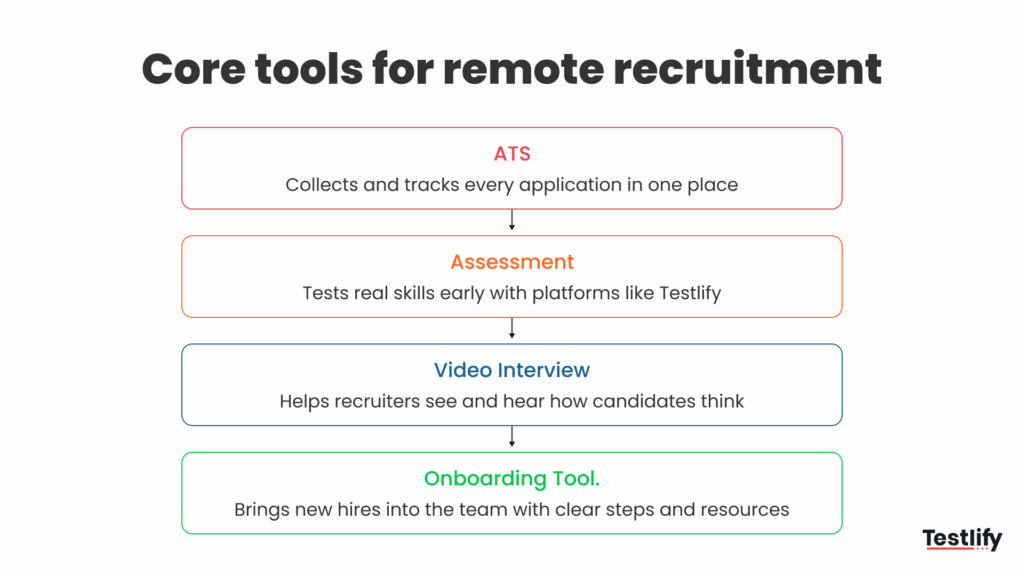
Next are skill-based assessment platforms. These tools help teams see what candidates can actually do, rather than relying solely on résumés.
Finally, onboarding and collaboration tools complete the process. Once a candidate accepts an offer, platforms like Notion or ClickUp help them get started quickly by giving access to documents, tasks, and training materials from day one.
Explore more of the top tools for efficient and effective remote hiring to build your ideal tech stack.
When these tools work together, remote recruitment becomes predictable and fair. They turn what could be a scattered process into a clear, repeatable system that builds trust on both sides.
Tool Type | Examples | Purpose |
|---|---|---|
Applicant Tracking System (ATS) | Greenhouse, Workable, Lever | Manage candidate pipeline and scheduling |
Assessment Platform | Testlify | Create skill-based, proctored tests and reports |
Video Interview Tool | Testlify | Conduct live or async interviews |
Onboarding & Collaboration | Notion, ClickUp | Help new hires start and collaborate smoothly |
Explore more of the top tools for efficient and effective remote hiring to build your ideal tech stack.
To understand how remote hiring is reshaping global workforce landscape, explore our research on global trends.
Final thoughts
Remote hiring has already reshaped how teams grow. It is not a shortcut, and it is not just about working from home. It is about building trust in a process that works across distance.
The companies doing it well keep things simple. They post clear roles, test real skills, and stay consistent from the first message to the final offer. It is slow work at first, but it pays off. Good systems bring better people and fewer mistakes.
If your team is building its own remote hiring setup, Testlify can help. You can create skill tests, run AI interviews, and keep every step fair with built-in proctoring and reports that are easy to read.
Book a demo and see how it fits into your hiring flow.
For further reading, explore Hire A Business Accountant.
Frequently asked questions (FAQs)

Director of Marketing
Akash Patange is the Director of Marketing at Testlify, where he works closely with HR leaders and recruiters to help organizations improve hiring outcomes. He writes about talent assessment, recruitment technology, and data-driven hiring practices.
LinkedInRelated resources
View all
HR & recruitment
8 Effective strategies for managing a global team

HR & recruitment
Addressing unconscious bias in hiring: strategies for overcoming

HR & recruitment
8 ways to improve quality of hire to build a high-performing team

HR & recruitment
How to recruit for small businesses: 9 steps

HR & recruitment
6 workplace inclusion strategies to build a better work environment

HR & recruitment
Top 7 strategies to create a great recruitment experience
Get started.
Hire on proof, not resumes.
Run your first skills-based assessment free — no credit card required.