
11 best time tracking tools for HR managers in 2026
Time tracking tools monitor work hours, improve efficiency, and ensure accurate payroll processing for teams and individuals.

Your time tracking dashboard can tell you a lot. It can show you who clocked in late, which projects are over budget on hours, and where your team’s productive time is actually going. What it cannot tell you is whether the person generating that data was the right hire to begin with.
That distinction matters more than most HR leaders realize. According to research, a single bad hire costs between $30,000 and $150,000 once you factor in training waste, lost team productivity, and delayed projects, none of which shows up cleanly in any timesheet.
This guide covers the best time tracking tools for HR managers in 2026, ranked by what actually matters to HR: compliance readiness, HRIS integration, and workforce planning value.
 ChatGPT
 Gemini
 Claude
 Grok
Grok Perplexity
What is time tracking, and why is it important?
Time tracking is the process of recording how employees spend their working hours, across tasks, projects, clients, or departments. At its most basic, it answers one simple question: where is the time actually going?
That sounds straightforward. But for most HR teams, the answer is surprisingly hard to find.
Many organizations still rely on manual methods, spreadsheets, paper timesheets, or end-of-week estimates filled in from memory. These approaches are slow, error-prone, and give HR managers data that is already outdated by the time it reaches them.
Modern time tracking tools automate this process. They capture hours in real time, organize data by project or team, flag anomalies, and feed approved hours directly into payroll, removing the manual steps that create errors and delays.
Why does it matter for HR teams specifically?
Time tracking is often treated as a finance or operations concern. In reality, it sits at the center of some of HR’s most critical responsibilities.
Payroll accuracy
Every payroll error has a cost, financially and culturally. Employees who are underpaid lose trust. Employees who are overpaid create compliance exposure. Accurate, real-time time tracking eliminates the guesswork that causes both.
Labor law compliance
Overtime rules, break requirements, and working hour limits vary by state, country, and employment type. A reliable time tracking system applies these rules automatically and keeps an audit trail in case a dispute ever lands on your desk.
Workforce planning
When you can see which teams are consistently over-capacity and which roles have low utilization rates, you can make a concrete case for headcount changes, backed by data, not instinct. That is a conversation HR leaders need to have with confidence.
Employee performance and development
Time data reveals patterns. A team member logging disproportionate hours on low-leverage tasks may need better prioritization support. A manager spending most of their week in meetings may have a capacity problem worth addressing. These are coaching conversations that start with data.
Remote and hybrid team visibility
Managing distributed teams without time tracking is largely guesswork. You cannot see what people are working on, whether workloads are balanced, or where bottlenecks are forming. Time tracking gives HR managers the visibility that a shared office used to provide naturally.

Top time tracking tools for HR managers in 2026
Tool | Best for | HRIS integration | Starting price |
|---|---|---|---|
Appforest | Jira-based tech teams | Via Atlassian/API | Free / ~$2/user/mo |
Toggl Track | Knowledge-work teams | Via integration | Free / $9/user/mo |
Clockify | Budget-conscious | Via integration | Free / $3.99/user/mo |
Hubstaff | HR teamsField and remote workforces | API + Zapier | $4.99/user/mo |
Harvest | Project-based organizations | Via integration | Free / $11/user/mo |
Time Doctor | Remote accountability-focused teams | API + Zapier | $6.70/user/mo |
RescueTime | Individual productivity programs | None | Free / $12/user/mo |
Everhour | PM tool-integrated teams | Via integration | Free / $8.50/user/mo |
QuickBooks Time | QuickBooks payroll users | Native (QuickBooks) | $20/mo base + $8/user/mo |
DeskTime | Automated productivity tracking | Via integration | Free / $6.42/user/mo |
Paymo | Agencies and consultancies | Limited | Free / $4.95/user/mo |
1. Appforest
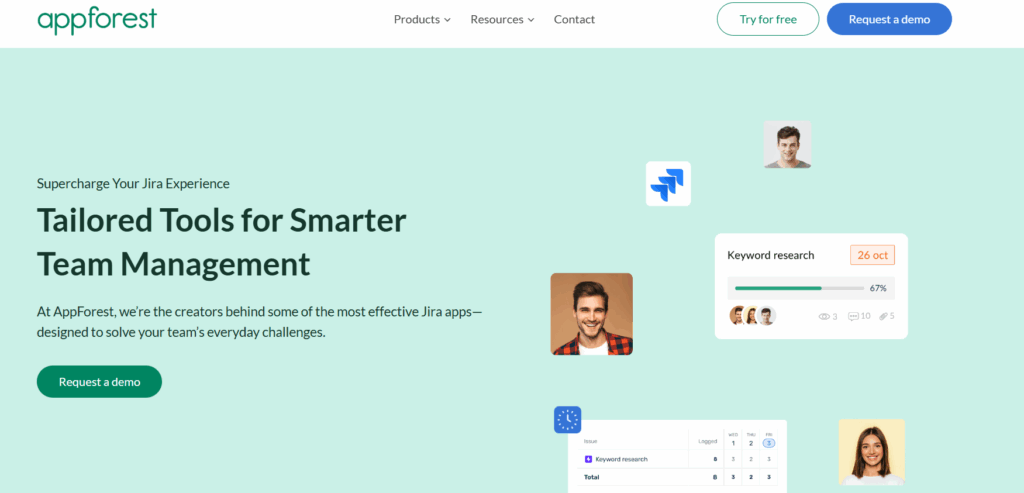
Appforest is a Jira-native time tracking app built specifically for teams that already manage their work inside Atlassian’s ecosystem. Rather than asking employees to switch between tools, it embeds time logging directly within Jira issues, so engineers, project managers, and operations teams log hours exactly where the work is already happening. HR and People Ops teams in tech-forward organizations use Appforest to gain visibility into how time is distributed across projects, sprints, and teams without disrupting existing Jira workflows. It is trusted by 100+ companies globally, including Testlify, and is available through the Atlassian Marketplace.
Key Features
- Logs hours inside Jira tickets
- Real-time project hours dashboard
- Custom daily, weekly, monthly timesheets
- CSV and PDF report exports
- Role-based permission controls
Pros
- Zero context-switching for teams
- Reduces manual logging by 30%
- Enterprise-grade security built-in
- Free for up to 10 users
- Minimal HR admin setup required
Cons
- Requires existing Jira environment
- No GPS or shift scheduling
- Limited native payroll integration
Pricing
- Free: Up to 10 users
- Paid: ~$2/user/month (10+ users)
- Available via Atlassian Marketplace
2. Toggl Track
Toggl Track is one of the most widely used time tracking tools in the market, and for good reason, it is genuinely simple to use. Employees start and stop timers with a single click, and managers get clean, readable reports without needing to configure anything complex. HR teams in professional services, consulting, and knowledge-work environments use Toggl Track to understand how time is distributed across projects, clients, and departments. If your priority is quick adoption and minimal friction, it is one of the strongest options available.
Key Features
- One-click timer across devices
- Project and client time tagging
- Exportable team productivity reports
- Team dashboard by member/project
- 100+ tool integrations available
Pros
- Fastest employee adoption rate
- Clean, non-technical interface
- Employee-visible data builds trust
- Strong free tier (5 users)
Cons
- No GPS or geofencing
- Prone to forgotten manual entries
- Advanced reporting locked behind Premium
- Limited compliance automation
Pricing
- Free: Up to 5 users
- Starter: $9/user/month
- Premium: $18/user/month
- Enterprise: Custom pricing
3. Clockify
Clockify is the most feature-rich free time tracking tool available in 2026. It covers time tracking, timesheets, scheduling, expense management, and reporting, all accessible without a subscription for small teams. For HR managers working with lean budgets or running a pilot program before committing to a paid platform, Clockify offers a lower-risk starting point than most alternatives. It is widely used by HR and operations teams in SMBs and growing mid-market companies looking for broad functionality at a controlled cost.
Key Features
- Timer-based and manual time entry
- Shared kiosk device clock-in
- Manager timesheet approval workflow
- Time audit and anomaly flagging
- 80+ platform integrations available
Pros
- Most generous free plan available
- Approval workflow supports payroll use
- Wide HR tool integration library
- Kiosk mode for shared devices
Cons
- Free plan capped at 5 users
- No GPS on lower-tier plans
- Less intuitive than Toggl Track
- Advanced features require paid upgrade
Pricing
- Free: Up to 5 users
- Basic: $3.99/user/month
- Standard: $5.49/user/month
- Pro: $7.99/user/month
- Enterprise: $11.99/user/month (billed annually)
4. Hubstaff
Hubstaff is a comprehensive time tracking and workforce management platform built for teams that need more than just clock-in and clock-out data. It offers GPS tracking, geofencing, activity monitoring, and payroll integrations, making it particularly useful for HR managers overseeing field service teams, remote workforces, or contract workers spread across multiple locations. If you manage employees who work outside a traditional office and need location-verified timesheets, Hubstaff is one of the most capable tools available.
Key Features
- GPS tracking with location-stamped timesheets
- App usage and screenshot monitoring
- Automated payroll via QuickBooks/ADP/Gusto
- Overtime alerts and shift scheduling
- Productivity reports by employee/team
Pros
- Best GPS and geofencing capability
- Direct payroll integration saves time
- Scales from small to enterprise
- Strong compliance audit trail
Cons
- Screenshots can damage employee trust
- Mandatory 2-seat minimum purchase
- Less polished mobile experience
- Excessive features for desk teams
Pricing
- Starter: $4.99/user/month (2-user minimum)
- Grow: $7.50/user/month
- Team: $10/user/month
- Enterprise: Custom pricing
5. Harvest
Harvest is a clean, well-regarded time tracking tool that is particularly strong for project-based businesses where tracking billable hours and managing client invoicing are equally important. HR and finance teams in professional services firms, agencies, and consultancies use Harvest to keep project budgets accurate, reconcile hours against deliverables, and generate client-ready reports. The interface is deliberately simple, which drives strong employee adoption rates, one of the main reasons it has maintained a loyal user base for over a decade.
Key Features
- Timer and manual project time entry
- Real-time project budget alerts
- Built-in invoicing and payment collection
- Team capacity vs. actual hours reporting
- Integrations with Asana, Jira, QuickBooks
Pros
- Cleanest interface on this list
- Budget alerts prevent project overruns
- Invoicing built directly into platform
- High long-term user satisfaction ratings
Cons
- Limited labor law compliance automation
- No GPS or geofencing capability
- Lacks HR workforce planning depth
- Expensive per-user pricing at scale
Pricing
- Free: 1 seat, 2 projects
- Pro: $11/user/month
- Premium: $14/user/month (billed annually)
6. Time Doctor
Time Doctor is a productivity-focused time tracking platform designed specifically for accountability in remote and distributed teams. It goes beyond basic hour logging, it tracks which websites and applications employees use during work hours, generates productivity scores, and sends distraction alerts when team members visit non-work sites. HR managers and operations leaders in BPO, customer service, and remote-first organizations use Time Doctor to maintain visibility over output and work patterns without requiring employees to be physically present.
Key Features
- Automatic tracking with app/website monitoring
- Distraction alerts for non-work activity
- Customizable employee productivity scoring
- Payroll sync with QuickBooks, ADP, Gusto
- Optional screenshot capture at set intervals
Pros
- Detailed data for performance reviews
- Strong remote contractor payroll integration
- 60+ platform integrations available
- Reported 22% productivity improvement
Cons
- Screenshots risk damaging team trust
- Invasive for knowledge-work environments
- No GPS or geofencing support
- Mobile app less feature-complete
Pricing
- Basic: $6.70/user/month
- Standard: $8.40/user/month
- Premium: $16.70/user/month (billed annually)
7. RescueTime
RescueTime takes a different approach from most tools on this list, it runs quietly in the background and automatically categorizes how time is spent across applications and websites, without requiring employees to manually start or stop timers. There is no input required from the user beyond installation. For HR teams trying to help employees understand their own productivity patterns, rather than monitor them from above, RescueTime is one of the most employee-friendly options available. It is particularly effective as part of a personal development or manager effectiveness program.
Key Features
- Fully automated background time tracking
- Auto-categorizes apps as productive/distracting
- Focus sessions with distraction blocking
- Weekly personal productivity email summaries
- Offline meeting and call time logging
Pros
- No manual timer management required
- Employee-first, self-awareness design
- Custom alerts for low-value activity
- Great for manager development programs
Cons
- Minimal team HR admin features
- Hard to aggregate across large teams
- No payroll or HRIS integration
- Weak project-level reporting capability
Pricing
- Free: Basic tracking, limited history
- Premium: $12/user/month
- Team: Custom pricing (verify at rescuetime.com)
8. Everhour
Everhour is a project-focused time tracking tool that works by embedding directly inside the project management platforms your team already uses, rather than asking employees to switch to a separate application. It integrates natively with Asana, Trello, Jira, GitHub, Basecamp, and ClickUp, adding time tracking controls directly inside those interfaces. For HR and operations teams where employees spend most of their day in a project management tool, this removes the biggest barrier to time tracking adoption: remembering to open another app.
Key Features
- Timers embedded inside Asana, Jira, Trello
- Real-time project budget tracking
- Team scheduling and workload management
- Built-in invoicing and billing rate management
- CSV export for payroll and reporting
Pros
- Tracks time inside existing tools
- Clean, low learning-curve interface
- No screenshots or invasive monitoring
- Competitive price for feature depth
Cons
- Requires a supported PM platform
- Limited workforce planning reporting
- Smaller integration library overall
- No GPS or geofencing support
Pricing
- Free: Up to 5 users
- Team: $8.50/user/month
- Enterprise: Custom pricing (billed annually)
9. QuickBooks Time
QuickBooks Time, formerly TSheets, is the time tracking solution built by Intuit, designed to integrate seamlessly with the QuickBooks payroll and accounting ecosystem. For HR and finance teams that already run payroll through QuickBooks, it is the most friction-free option available, approved hours sync automatically without any manual export or file upload. It also includes GPS tracking, mobile clock-in, and job-site management features that make it well-suited for organizations with field-based or project-site employees alongside their office workforce.
Key Features
- Native two-way QuickBooks payroll sync
- GPS tracking with job-site geofencing
- Mobile clock-in with Face ID/PIN
- Configurable overtime alerts for managers
- Custom job and project cost codes
Pros
- Seamless QuickBooks payroll connection
- Reliable GPS for field workforces
- Unlimited phone support included
- Strong FLSA compliance audit trail
Cons
- Costly with full QuickBooks subscription
- Limited value without QuickBooks payroll
- Reporting less deep than competitors
- Interface design feels dated
Pricing
- Premium: $20/month base + $8/user/month
- Elite: $40/month base + $10/user/month (Verify current pricing at quickbooks.intuit.com)
10. DeskTime
DeskTime is an automatic time tracking and productivity monitoring platform that begins recording as soon as an employee’s computer starts and stops when it shuts down, no manual input required. It categorizes time spent in applications and websites into productive, unproductive, and neutral buckets, giving HR managers a daily productivity score for every team member. It also includes shift scheduling, absence management, and a Private Time feature that lets employees pause all tracking when handling personal matters, a practical trust-building feature many organizations appreciate.
Key Features
- Auto-tracks from computer start/shutdown
- Categorizes apps as productive/unproductive
- Private Time employee pause mode
- Built-in shift scheduling and absence calendar
- Project tracking with hourly rate assignment
Pros
- Eliminates manual timer management entirely
- Private Time builds employee trust
- Shift scheduling included in platform
- Competitive pricing for feature set
Cons
- Interface looks and feels dated
- Screenshots require careful cultural handling
- Lacks strategic workforce planning data
- Smaller integration library than competitors
Pricing
- Free: 1 user
- Pro: $6.42/user/month
- Premium: $9.17/user/month
- Enterprise: Custom pricing (billed annually)
11. Paymo
Paymo is a project management and time tracking platform built for teams that need to manage tasks, track time, and handle client billing from a single workspace. Unlike standalone time trackers, Paymo combines resource scheduling, task management, timesheets, and invoicing into one platform, making it useful for HR and operations leaders who want to consolidate tools without moving to a full HRIS. It is particularly popular with professional services teams, small agencies, and consultancies where project-based work and accurate hour-to-invoice reconciliation are both business-critical.
Key Features
- Auto and manual task-level time tracking
- Built-in Kanban, Gantt, and calendar views
- Real-time team capacity and utilization scheduling
- Client invoicing from tracked hours directly
- Timesheet approval and payroll export
Pros
- All-in-one reduces tool sprawl
- Real capacity planning visibility included
- Modern, well-designed interface
- Strong feature-to-price ratio
Cons
- No GPS or geofencing support
- Limited HRIS stack integration
- Not suited for hourly/shift workers
- Steeper learning curve than simpler tools
Pricing
- Free: 1 user, limited projects
- Starter: $4.95/user/month
- Small Office: $9.95/user/month
- Business: $20.79/user/month (billed annually)
How to choose a time tracking tool as an HR manager?
Most buying guides tell you to evaluate time tracking tools on ease of use, pricing, and integrations. That advice isn’t wrong, it’s just incomplete for HR.
A project manager choosing a time tracker cares about billable hours and client reporting. You care about payroll accuracy, labor law compliance, employee trust, and whether the data you collect actually helps you make better workforce decisions. Those are different requirements, and they deserve different evaluation criteria.
Here are the six things that should drive your decision.
How deeply does it integrate with your HRIS?
There is a big difference between “integrates with BambooHR” and actually integrating with BambooHR. The first might mean a CSV export. The second means approved hours flow directly into payroll without anyone touching a spreadsheet.
Before signing a contract, ask the vendor to demo the payroll sync live. Watch what happens when a manager approves a timesheet. If the next step involves downloading a file and uploading it somewhere else, that is not a real integration, it is just a slightly more organized manual process.
Is it built for compliance, or does it just mention it?
Labor law is not one-size-fits-all. If you have employees in California, their daily overtime threshold kicks in after 8 hours, different from the federal 40-hour weekly rule. If you have employees in the EU, GDPR data residency requirements apply to every hour logged.
A compliance-ready tool automates these rules by employee location. It also keeps an immutable audit trail of every timesheet edit, critical if you ever face a wage dispute or a Department of Labor inquiry.
How does it treat your employees?
This one gets underweighted in most buying decisions, and it shouldn’t.
Research consistently shows that intrusive monitoring damages trust and increases stress. Tools that take random screenshots, log keystrokes, or track website activity by default create a surveillance culture, which drives disengagement and, eventually, turnover.
For most HR teams, you do not need any of that. You need to know hours worked, tasks allocated, and overtime flagged. Choose a tool where employees can see their own data, where data collection is transparent, and where the default settings do not make people feel watched.
A good rule of thumb: if you would be uncomfortable explaining exactly what the tool collects during an all-hands meeting, reconsider the tool.
Will your payroll team trust the numbers?
Time tracking only works if the data is clean. Look for tools with manager approval workflows, missed-punch alerts, and clear edit histories. If a timesheet gets changed, you should be able to see who changed it, when, and what it said before.
This matters most at scale. When you are processing payroll for 300 people, one rounding error or unapproved edit cascades into disputes, corrections, and the kind of Friday afternoon nobody wants.
Can it tell you something useful about your workforce, not just your timesheets?
The best time tracking tools double as light workforce planning tools. They can show you which departments are consistently over-capacity, which roles have high idle-time ratios, and where your highest-paid people are spending their hours.
That data is valuable when you are making a headcount case to a CFO. “Our engineering team has been running at 118% capacity for six consecutive weeks” is a far more persuasive argument than “we feel understaffed.”
Can your HR team actually set it up without IT?
This is more important than it sounds. If configuring the tool requires opening a ticket with IT, mapping employee IDs manually, or waiting for SSO provisioning, your rollout timeline just tripled.
Prioritize tools where HR admins can onboard employees, configure approval workflows, and run reports independently. Your IT team has other priorities. The faster you can go live, the sooner you see value.
Conclusion
Choosing a time tracking tool is not just a software decision, it is a workforce management decision. The right tool gives HR teams accurate payroll data, real-time visibility into team capacity, and the compliance documentation that protects the business when it matters most.
The wrong one creates more manual work, erodes employee trust, and produces data nobody acts on. The best tool is always the one that matches how your workforce actually operates. There is no universal answer. There is only the right fit for your team’s size, structure, and priorities.
Frequently asked questions (FAQs)

Content Writer
Yashika Khandelwal is a Content Writer with 3+ years of experience creating research-backed content on hiring, talent assessment, and HR technology. She is a registered Organizational Psychologist and subject matter expert who combines behavioral science with practical recruitment insights to produce accurate, evidence-based content.
LinkedInRelated resources
View all
HR & recruitment
Top 10 Workforce Management Tools for 2026 (Compared and Ranked)

HR & recruitment
Top 5 Core HR tools

HR & recruitment
10 Best Benefits Administration Tools for HR Teams in 2026

HR & recruitment
Top 7 Human Resource Management Systems

HR & recruitment
How to conduct effective interviews

HR & recruitment
Reference Checks: Best Practices, Questions and Process
Get started.
Hire on proof, not resumes.
Run your first skills-based assessment free — no credit card required.