
Sourcing tools for recruiters: 10 types to use in 2026
The 10 types of sourcing tools recruiters use in 2026, with examples, a comparison table, stack picks by role type and how to measure them.

Sourcing tools for recruiters are the software and services a talent team uses to find people for open roles, get their contact details, reach out, and keep track of every conversation until the candidate applies or is ruled out. The right mix fills roles faster because the team reaches qualified people before they ever see a job ad.
TL;DR / Key Takeaways
- Recruiters use 10 types of sourcing tools, and most teams combine three or four. Cover finding, reaching, tracking and skills-checking candidates.
- The types: professional networks, job boards, AI sourcing, contact data, Boolean search, niche communities, recruiting CRMs, your ATS, referrals and skills screening.
- Your own ATS database is usually the cheapest sourcing tool you already own. Past applicants and silver medalists are pre-qualified.
- Buy for your real bottleneck and check two-way ATS sync. Test 50 real profiles for data accuracy, then pilot on three live roles for two to four weeks.
- AI sourcing tools replace much of the searching, not the judgment. LinkedIn found teams using generative AI save about 20% of their work week.
- Judge a tool by hires, not profile views. Track reply rate, sourced-to-interview, sourced-to-hire, time to shortlist and quality of hire against inbound.
- Ask vendors for a bias audit, honor data privacy opt-outs, and keep a person on every rejection.
 ChatGPT
 Gemini
 Claude
 Grok
 Perplexity
What are sourcing tools for recruiters?
Sourcing tools for recruiters are products that help a recruiter find and contact potential candidates instead of waiting for applications. They cover search (networks, job boards, AI search engines), contact data (email and phone finders), outreach (sequenced messages) and tracking (CRMs and the ATS), so the team can build a pipeline before a role opens.
Sourcing is the proactive half of hiring. Posting a job and screening whoever applies is inbound; sourcing goes out to people who fit the role, including passive candidates who are not looking. That matters while hiring stays hard: according to SHRM's 2025 Talent Trends survey, 69% of organizations still struggle to fill roles, and social media is the most used hiring strategy, at 55% of organizations.
A sourcing tool is not the same as an applicant tracking system. The ATS manages people once they are in your process; a sourcing tool finds them and gets them there. Most teams use both and connect them, so sourced profiles land in the ATS without copy and paste. For the underlying method, see our guide to talent sourcing strategies.

Which sourcing tools do recruiters use in 2026?
Recruiters in 2026 use 10 main types of sourcing tools, and most teams combine three or four of them. The list below follows the order in which a sourced candidate moves: found, contacted, engaged, tracked and checked. Example products are named so you know what each type looks like; they are examples, not rankings.
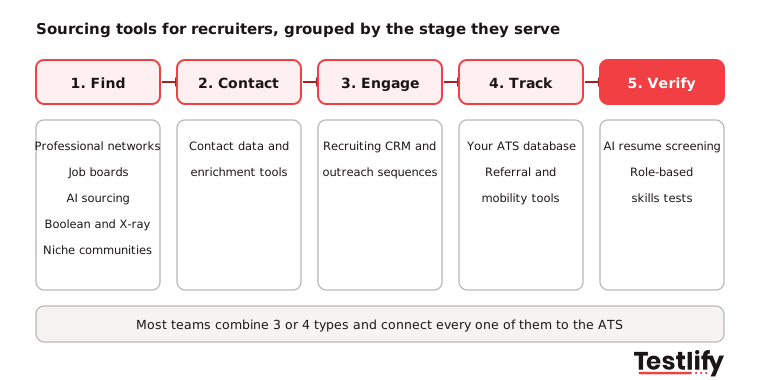
1. Professional networks
Professional networks are still the first stop for most recruiters. LinkedIn Recruiter and Recruiter Lite add advanced filters, InMail and project folders on top of the public network; Xing plays a similar role in German-speaking markets. Networks are strongest for white-collar and mid-career roles, but every competitor searches the same profiles, so messages need to be specific to stand out.
2. Job boards and resume databases
Job boards bring active candidates and, through resume search, people who applied elsewhere. Indeed, ZipRecruiter and Monster all sell resume database access alongside job ads, and Glassdoor matters more for employer branding than for search. Use boards for roles where many qualified people are actively looking. Our list of job boards worth knowing covers general and niche options.
3. AI sourcing platforms
AI sourcing platforms search many public sources at once and rank profiles against the role. Tools such as hireEZ, SeekOut, Juicebox and Fetcher accept a job description or a plain-English request instead of a Boolean string, then suggest matches and draft outreach. They save the most time on hard-to-fill roles. Check how each tool explains its ranking, because a recruiter still has to judge the fit.
4. Contact data and enrichment tools
Contact finders turn a profile into a working email address or phone number. ContactOut, Lusha and RocketReach are common browser-extension examples. The deciding factor is data accuracy: bounced emails waste sequences and hurt your sending domain, so test a sample of real profiles before you buy, and confirm how the vendor sources and stores personal data.
5. Boolean and X-ray search
Boolean and X-ray search cost nothing but time. A Boolean string combines keywords with AND, OR and NOT; an X-ray search uses Google's site: operator to search inside sites such as LinkedIn or GitHub. String builders such as Recruit'em help newer sourcers. Learn the basics in our guide to Boolean search for recruiters.
6. Niche and technical communities
Niche communities hold candidates who rarely update a LinkedIn profile. Engineers show their work on GitHub, Stack Overflow and Kaggle; designers on Behance and Dribbble; startup talent on Wellfound. Sourcing here means reading real work samples, so outreach can reference a project instead of a job title.
7. Recruiting CRMs and outreach sequencing
A recruiting CRM keeps every sourced person and every touchpoint in one place, then sends personalised sequences across email and InMail. Gem and Beamery are well-known examples, and many ATS platforms now include CRM features. CRMs turn one-off outreach into talent pools you can return to. See how a recruitment CRM differs from an ATS.
8. Your own ATS database
Your ATS is usually the cheapest sourcing tool you already own. Past applicants, silver medalists and former interns are pre-qualified and know your brand. Rediscovery features in platforms such as Workday, SAP SuccessFactors and Ashby resurface them when a similar role opens. Compare platforms in our list of top applicant tracking systems.
9. Referral and internal mobility tools
Referral tools turn employees into sourcers. Referral modules inside the ATS, or apps that share open roles to employees' networks, make it easy to suggest a contact and track the reward. Internal mobility tools do the same for current staff who want to move. Both usually bring candidates who stay longer, so give them a proper channel. Read how to get more from employee referrals.
10. Skills screening at the handoff
Skills screening tools sit at the end of the sourcing chain. Once a sourced candidate says yes, an AI resume screener or a short role-based test confirms the skills before a recruiter or hiring manager spends interview time. This is where Testlify fits: the AI resume screener pulls resumes from your ATS and gives each one an explainable match score, and skills tests check what the profile only claims.
How do the 10 types of sourcing tools compare?
The 10 types of sourcing tools differ most in who they reach, how they charge and what goes wrong when they are used badly. Use this table to spot gaps in your current stack.
Tool type | Best for | Typical cost model | Watch out for |
|---|---|---|---|
Professional networks | White-collar and mid-career roles | Per seat, per year | Crowded inboxes, generic InMails |
Job boards and resume databases | Active candidates, volume roles | Per job post or database access | Stale resumes, high applicant noise |
AI sourcing platforms | Hard-to-fill and specialist roles | Per seat or per search credit | Rankings you cannot explain |
Contact data tools | Getting a reply outside the network | Per credit or per seat | Bounce rates, data privacy rules |
Boolean and X-ray search | Any role, any budget | Free | Time cost, steep learning curve |
Niche communities | Engineers, designers, creatives | Mostly free | Community etiquette, slow outreach |
Recruiting CRMs | Talent pools, nurture campaigns | Per seat | Low adoption if not tied to the ATS |
Your ATS database | Silver medalists, past applicants | Already paid for | Out-of-date contact details |
Referral tools | Culture fit, retention | Per seat or included in ATS | Similar networks, less diversity |
Skills screening | Verifying sourced candidates | Per candidate or credit | Long tests that cause drop-off |
Key takeaway: No single sourcing tool covers every stage. A strong stack has one tool to find people, one to reach them, one place to track them and one way to check their skills.
How do you choose sourcing tools for recruiters?
Choosing sourcing tools for recruiters starts with your open roles, not with a vendor demo. Work through these six checks before you sign.
- Map your role mix: List the next 12 months of roles by family and volume. Fifty contact-center hires and five senior engineers need different tools.
- Find the real bottleneck: Look at where pipelines stall today: too few names, no contact details, low reply rates or weak shortlists. Buy for that stage first.
- Check two-way ATS sync: Sourced profiles should create or update ATS records automatically and avoid duplicate outreach to people already in process.
- Test data quality: Run 50 real profiles through any contact tool and count working emails and phone numbers.
- Look at reporting: The tool should show reply rates and which searches turned into hires, not just how many profiles were viewed.
- Pilot on live roles: Run a two to four week pilot on three open roles and compare against your current method. A sandbox demo hides the problems you will hit at scale.
Pro tip: Ask every vendor for the cost at double your current hiring volume. Per-seat and per-credit pricing can look similar at 10 roles and very different at 100.
Which sourcing stack fits volume, technical and leadership hiring?
The sourcing stack that works depends on the hiring motion. Three common patterns cover most mid-market and enterprise teams.
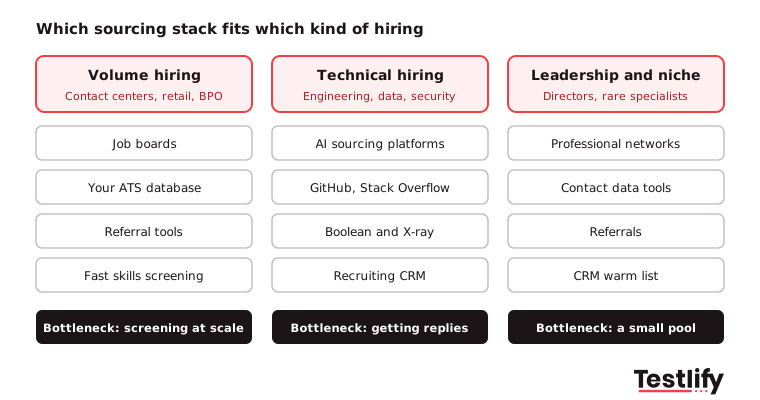
Volume hiring (contact centers, retail, logistics, BPO) runs on job boards, your ATS database and referrals, with fast screening straight after. When you plan a large recruitment drive, the constraint is rarely finding names; it is screening thousands of applicants fairly and quickly. See how teams handle volume hiring.
Technical hiring (engineering, data, security) leans on AI sourcing platforms, GitHub and Stack Overflow, Boolean and X-ray search, and a CRM for long nurture cycles. Engineers get many messages, so outreach that mentions their actual work wins replies.
Leadership and niche hiring (directors, rare specialists) relies on professional networks, contact data tools and referrals, with a CRM to keep a warm list of the 50 people you would hire tomorrow. Volume is low, so personal outreach matters more than automation.
Can AI sourcing tools replace manual sourcing?
AI sourcing tools replace much of the searching, not the judgment. They read a job description, search several sources at once, rank profiles and draft first messages, which removes hours of Boolean work. Recruiters still decide who is a real fit, write the message that gets a reply and build the relationship.
Adoption is growing quickly. The LinkedIn Future of Recruiting 2025 report found that 37% of organizations are now actively integrating or experimenting with generative AI in hiring, up from 27% a year earlier, and those teams save about 20% of their work week. The same report found that recruiters who use AI-assisted messaging are 9% more likely to make a quality hire.
The practical split: let AI build the long list and the first draft of outreach, and keep people on the shortlist and the conversation.
How do you use sourcing tools fairly and legally?
Sourcing tools need the same fairness and privacy checks as any hiring software, because they decide who is seen at all. Four rules keep a stack on the right side of the line.
- Audit automated ranking: In New York City, Local Law 144 requires a bias audit within one year before an automated employment decision tool is used, a public summary of the results and candidate notice 10 business days before use. The NYC Department of Consumer and Worker Protection has enforced it since July 5, 2023. Ask vendors whether their ranking counts as such a tool and for their latest audit.
- Respect personal data: Contact finders process personal data. Under GDPR and similar laws, record your lawful basis, tell candidates where you found them and honour opt-outs.
- Widen the pool on purpose: Referrals and a single network tend to reproduce your current team. Add niche communities and skills-based search to reach people with nontraditional backgrounds.
- Keep a person on every rejection: Use AI rankings to prioritise, not to reject without review.
Testlify's own matching model completed a third-party NYC Local Law 144 bias audit on June 16, 2023.
How do you measure whether a sourcing tool works?
Sourcing tools work when they produce hires, not when they produce profile views. Track these five numbers for each tool during the pilot and every quarter after.
Metric | What it tells you | Healthy signal |
|---|---|---|
Reply rate | Whether outreach and contact data land | Rising month on month |
Sourced-to-interview rate | Whether the tool finds people who fit | Higher than your inbound rate |
Sourced-to-hire rate | Whether the channel produces hires | Stable or rising |
Time to shortlist | Whether the tool saves recruiter time | Falling against your baseline |
Quality of hire | Whether sourced hires perform and stay | At or above other channels |
Compare each number against inbound applicants for the same role family, not against the vendor's benchmark. Our quality of hire calculator helps set a baseline before the pilot starts.
What should happen after a sourcing tool finds candidates?
After a sourcing tool finds candidates, the next step is to check their skills before anyone books an interview. Sourced profiles show what people say they can do, and they are often polished. The LinkedIn Future of Recruiting 2025 report found that 93% of talent acquisition professionals see accurately assessing a candidate's skills as crucial to quality of hire, and that companies running the most skills-based searches are 12% more likely to make a quality hire.
Testlify picks up where sourcing tools stop:
- Screen resumes in your ATS: The AI resume screener pulls resumes from your ATS, gives an explainable match score with High, Medium or Low fit labels and syncs results back. Testlify connects with 100+ ATS and HRIS platforms, including Workday, Greenhouse and SAP SuccessFactors; see integrations.
- Test the skills that matter: Send sourced candidates a short role-based assessment from the test library of 3,500+ tests, or let AI build one from your job description.
- Keep it fair and secure: Every assessment runs with 20+ proctoring checks and is available in 15+ languages, so global sourcing campaigns use one process.
For more on reaching people who are not job hunting, read our guide to passive candidates.
Ready to screen the candidates you sourced?
Sourcing fills the top of the funnel; skills screening decides who deserves interview time. Start a 7-day free trial of Testlify, no credit card required, and send your first sourced candidates a role-based test today.
Frequently asked questions
Related resources
View all
HR & recruitment
Best sourcing tools for recruiters in 2027: 10 picks compared

HR & recruitment
How to score video and audio interview responses

HR & recruitment
How to create video and audio interview questions

HR & recruitment
Challenges of using video and audio interviews

HR & recruitment
Benefits of video and audio interviews: a 2026 guide for hiring teams

HR & recruitment
How to use audio and video interviews to assess candidates
Get started.
Hire on proof, not resumes.
Run your first skills-based assessment free — no credit card required.