
What is remote proctoring? A guide for hiring teams
A plain guide to remote proctoring for hiring teams: how it works, the four types, what it catches, privacy rules and how to set the level.
A candidate aces your online coding test, then cannot explain a single line of it in the interview. AI chat assistants, proxy test takers and second-screen copy-paste are now common in online hiring.
An unproctored score tells you little about the person you are about to hire. Remote proctoring closes that gap by supervising an online test from a distance, using the webcam, microphone, screen and browser.
The guide below covers how it works, which type to choose and how to set the right level for each role.
TL;DR:
- Remote proctoring supervises online tests through the webcam, microphone, screen and browser.
- A proctored test runs in four stages: system check, locked browser, monitoring and human review.
- Proctoring catches second faces, tab switches, copy-paste and signs of AI help.
- Match the proctoring level to the role: light, standard or strict.
- Follow privacy rules on consent, biometric data and retention.
- Brief candidates early so honest people are not flagged by mistake.
 ChatGPT
 Gemini
 Claude
 Grok
Grok Perplexity
What is remote proctoring?
Remote proctoring is a way to monitor an online exam or skills assessment without a physical test centre. Software checks the candidate's identity, locks down the browser, and records webcam, audio and screen activity.
A human proctor, AI or a mix of both then flags anything that breaks the test rules for review.
Remote proctoring goes by several names: online proctoring, remote invigilation and proctored online testing all describe the same idea. The aim is the same as a supervisor in an exam hall, which is a fair test where every candidate plays by the same rules.
The difference is that the safeguards travel with the candidate's own laptop instead of sitting in a room.
Language Testing International describes the classic version: the proctor compares the candidate's face with a photo ID over the webcam, the candidate pans the room, and suspicious activity is recorded and sent to the organization running the test.

Why does remote proctoring matter for hiring in 2026?
Remote proctoring matters for hiring because online assessments now face cheating methods that did not exist a few years ago. Candidates can paste a question into an AI chatbot, ask a friend to sit the test, or read answers from a phone.
Without proctoring, a high score may reflect someone else's skill.
The fraud risk is not only about tests. HR Dive's coverage of a 2025 Gartner report says that by 2028, 1 in 4 candidate profiles worldwide could be fake, and that 6% of 3,000 surveyed candidates admitted to interview fraud, either posing as someone else or having someone pose as them.
For a recruiting team running hundreds of assessments a month, remote proctoring does three jobs:
- Protects the shortlist. Scores from a proctored test can be trusted enough to rank candidates and move fast.
- Keeps the process fair. Honest candidates are not out-ranked by people who used outside help.
- Leaves an audit trail. Time-stamped evidence supports a retest or rejection decision if a candidate questions it.
Read more on the wider problem in how to stop cheating in online tests.
How does remote proctoring work?
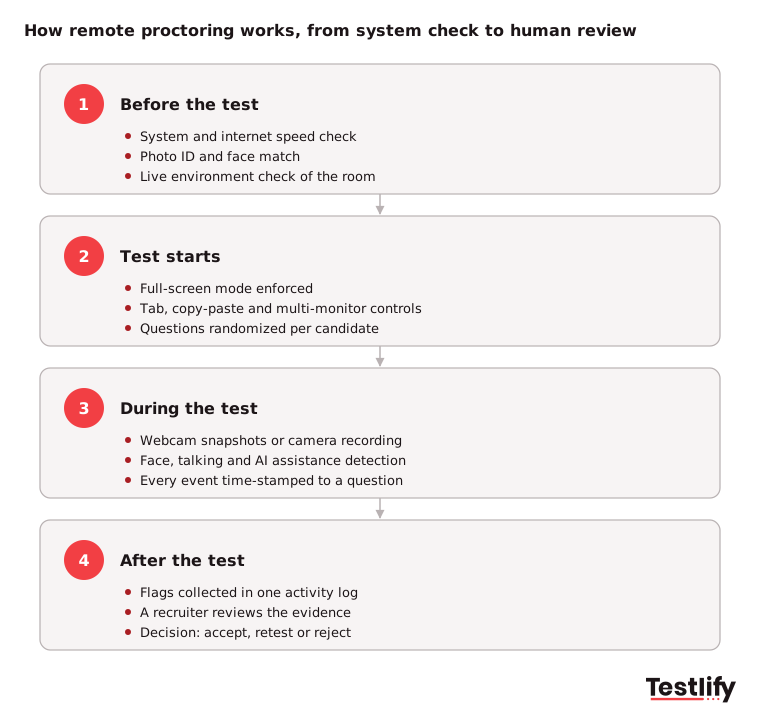
Remote proctoring works in four stages: checks before the test, a locked-down test environment, monitoring during the test, and a review after it. Each stage blocks a different kind of cheating, and the evidence from all four ends up in one report that a recruiter or proctor reviews before any decision.
1. Before the test: system check and identity
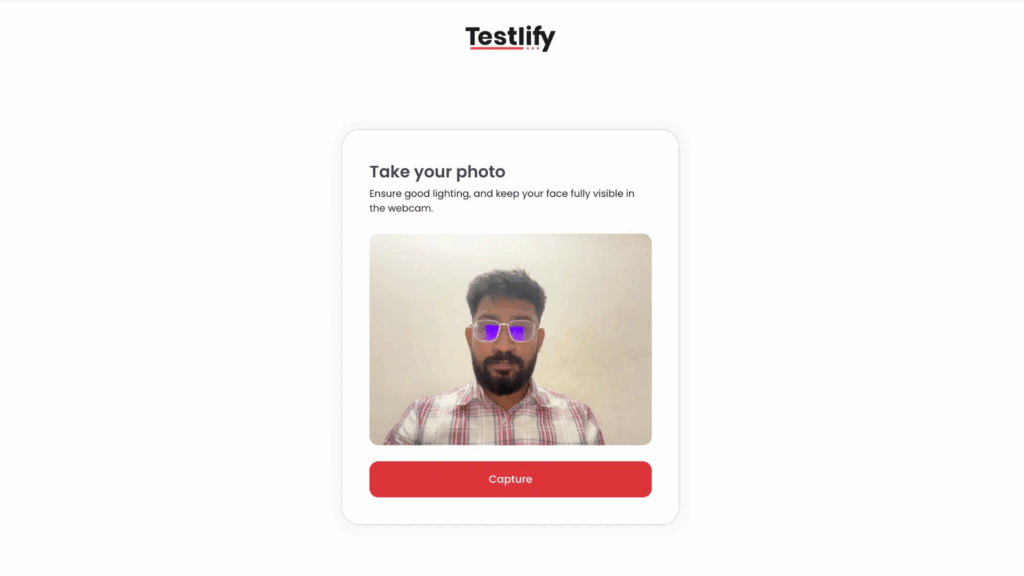
When the candidate opens the test link, a system check confirms the browser, webcam, microphone and internet speed will hold up for the whole session. The candidate then proves identity, usually with a photo ID and a live face match against the ID photo.
Some platforms add a live environment check, where the candidate shows the room and desk on camera.
2. Test starts: a locked-down browser
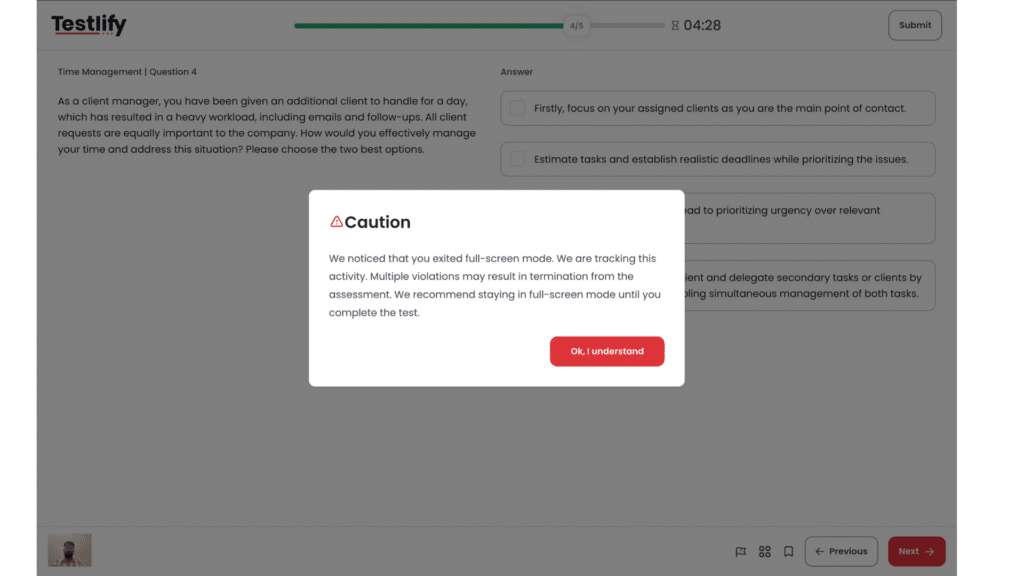
Once the test begins, the screen switches to full-screen mode. Opening another tab, pasting text, or plugging in a second monitor is either blocked or logged.
Question order is often randomized, so two candidates cannot easily swap answers.
3. During the test: webcam, audio and screen monitoring
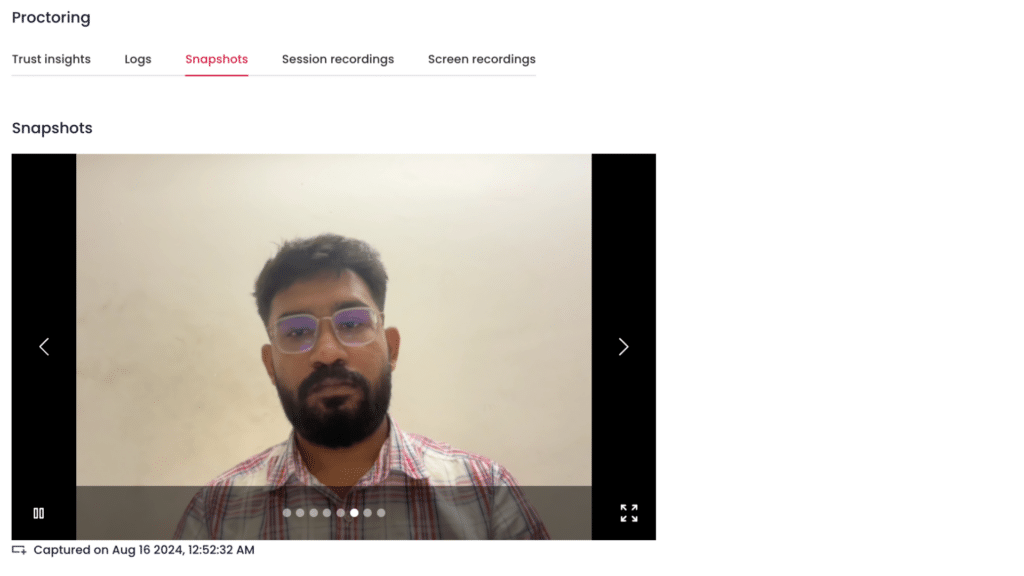
While the candidate works, the system takes webcam snapshots or records video, listens for talking, and watches for a missing face or a second face. Newer systems also look for signs of AI assistance.
Every event is time-stamped and tied to the question on screen at that moment.
4. After the test: evidence and human review
When the test ends, the flags, snapshots, IP address and activity log land in one report. A recruiter or proctor reviews the flagged moments and decides whether to accept the score, ask for a retest or reject the attempt.
A flag is a prompt for review, not a verdict.
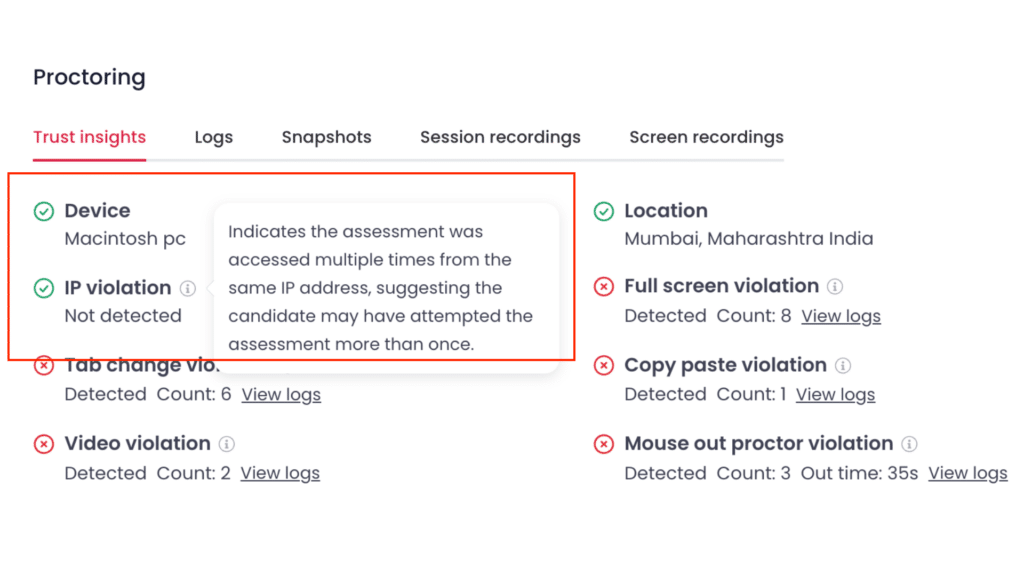
Pro tip: Decide your review rule before you send the first invite, for example "two or more tab switches during a coding question means a retest". A written rule keeps every reviewer consistent and makes decisions easy to defend.
What are the types of remote proctoring?
Remote proctoring comes in four types: live proctoring, automated (AI) proctoring, record and review, and hybrid proctoring. The types differ in who watches, when they watch, and how many sessions one person can cover.
Most hiring teams use automated or hybrid proctoring because candidate volumes are too high for live watching.
Type | Who watches | When | Best for | Trade-off |
|---|---|---|---|---|
Live proctoring | A human proctor | In real time | Senior or regulated roles, small groups | Needs scheduling and proctor time |
Automated proctoring | AI software | In real time, reviewed later | High-volume screening | Can raise false flags without human review |
Record and review | A human reviewer | After the test | Mid-stakes tests | No one can stop cheating as it happens |
Hybrid | AI flags, human decides | Both | Most hiring programs | Needs a clear review rule |
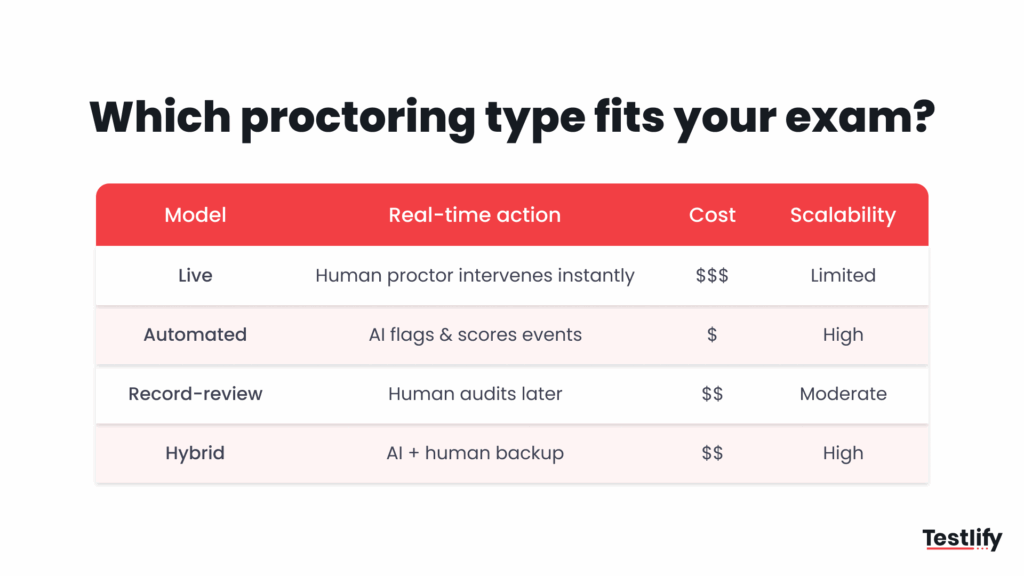
- Live proctoring: a person watches through the webcam and shared screen and can pause the test or message the candidate. More detail in live proctoring explained.
- Automated proctoring: AI monitors every session and flags events for review, so hundreds of candidates can test at the same time. See automated proctoring.
- Record and review: the session is recorded and a reviewer checks it later, often at higher playback speed.
- Hybrid: AI watches every session and a human steps in only for flagged events. The trade-offs are covered in AI vs human proctoring.
How is remote proctoring different from traditional proctoring?
Remote proctoring differs from traditional proctoring in where the candidate sits and how evidence is collected. Traditional proctoring needs a test centre, a fixed time slot and an invigilator in the room.
Remote proctoring moves the same safeguards online, so candidates test from their own device and the system keeps a digital record.
Aspect | Traditional (test centre) | Remote proctoring |
|---|---|---|
Location | Fixed venue, candidate travels | Anywhere with a webcam and internet |
Scheduling | Fixed slots | Candidate picks a time within a window |
Scale | Limited by seats and staff | Hundreds of sessions at once with AI |
Identity check | ID checked at the desk | Photo ID and face match on camera |
Monitoring | Invigilator watches the room | Webcam, audio, screen and browser controls |
Evidence | Paper incident notes | Time-stamped snapshots, recordings and logs |
Candidate experience | Travel, time off work | Familiar device, less travel, some privacy concerns |
For hiring, the biggest gap is speed. A remote proctored test can go out the same day a role opens, and results arrive as soon as the candidate finishes.
What does remote proctoring detect?
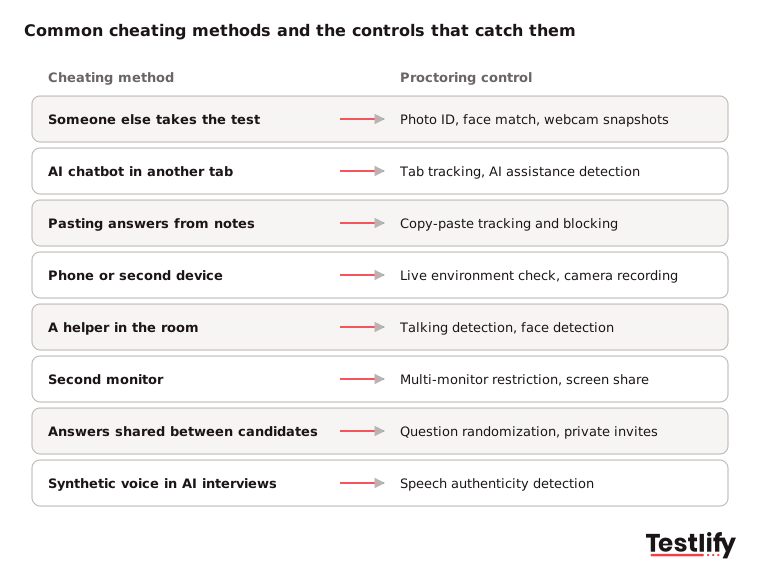
Remote proctoring detects behaviour that suggests outside help or a different person taking the test. Common examples are a second face on camera, a missing face, talking, leaving full-screen mode, switching tabs, pasting text, using a second monitor and signs of AI assistance.
Each control targets one cheating method, so stacking controls closes more gaps.
Phones are the hardest case. A webcam cannot always see a phone held below the desk, so proctoring relies on indirect signs: repeated glances away from the screen, a face leaving the frame, or a live environment check before the test starts.
Pair proctoring with question types that are hard to look up, such as practical tasks and coding exercises, for the strongest protection.
What features should remote proctoring software have?
Remote proctoring software should cover identity, browser control, monitoring, configurable rules and clear reporting. For hiring teams, the platform should also sit inside the assessment tool itself, so recruiters do not have to manage a second product, a second login or a separate consent flow for every candidate.
- Identity verification: photo ID, face match and repeat face checks during the test.
- Browser lockdown: full-screen enforcement, tab tracking, copy-paste blocking and multi-monitor restriction.
- AI monitoring: face detection, talking detection and AI assistance detection, with every flag time-stamped.
- Recording options: webcam snapshots for most tests, plus camera or screen recording for high-stakes rounds.
- Configurable rules: set how many violations are tolerated before a warning or an automatic end to the test.
- Room checks: a live environment check that shows the desk and room before the test begins.
- Reporting: a single activity log per candidate that a reviewer can read in minutes.
- Compliance basics: security certifications, data residency choices and a clear data retention policy.
For a longer checklist, read proctored exams and the key features to look for.
How do you choose the right proctoring level for each role?
The right proctoring level depends on the stakes of the role and the stage of hiring. Early screens and personality tests need light controls, volume skills tests need standard monitoring, and coding, finance or senior roles need strict settings with identity checks and recording.
Matching the level to the stakes protects results without driving honest candidates away.
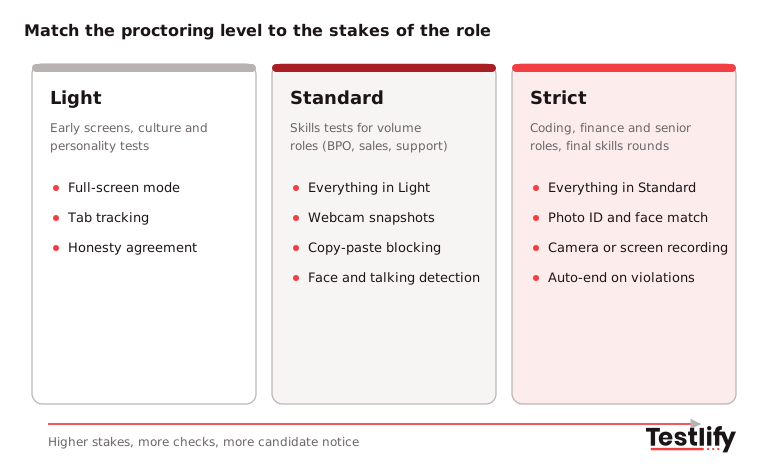
Key takeaway: Stricter is not always better. Every extra control adds friction and more chances for a false flag, so save strict settings for the tests where a wrong hire costs the most.
What are the limits and risks of remote proctoring?
Remote proctoring has three main limits: false flags, technical failures and candidate stress. An AI system can flag a candidate who looks away to think, a weak connection can end a session early, and constant monitoring can make some people perform worse.
None of these is a reason to skip proctoring, but each needs a plan.
- False flags: treat every flag as a prompt for human review, never as an automatic rejection.
- Technical failures: run a system check before the test and offer a retest path for dropped sessions.
- Accessibility: offer accommodations, such as extra time or permission for assistive tools, and tell candidates how to request them.
- Candidate trust: explain what is monitored and why. Unexplained monitoring feels like surveillance; explained monitoring feels like fairness.
- Determined cheaters: no proctoring setup stops every attempt. Combine proctoring with practical tasks and a follow-up interview on the same skills.
Is remote proctoring legal, and what about privacy?
Remote proctoring is legal in most countries when the candidate is told what is collected, why, and for how long, and when the data is stored securely. Rules tighten when proctoring uses face matching or AI decisions, because biometric data and automated hiring tools carry extra obligations in the EU, the UK and several US states.
- Biometric data: under GDPR Article 9, biometric data used to uniquely identify a person is special category data. Processing needs a lawful exception, such as explicit consent, plus strong security.
- AI rules in the EU: Annex III of the EU AI Act lists AI used to monitor prohibited behaviour during tests in education, and AI used to recruit, select or evaluate candidates, as high-risk. Expect duties around human oversight, logging and transparency.
- Disclosure and consent: show candidates a clear notice before the test starts, explain which checks are on, and record their agreement.
- Retention: keep recordings and snapshots only as long as you need them for the hiring decision and any appeal.
For a deeper look, see AI proctoring compliance and Testlify's GDPR approach. This section is general information, not legal advice; check local rules with your legal team.
How do you prepare candidates for a remotely proctored test?
Candidates should know before test day what equipment they need, which checks will run, and what is not allowed. Clear instructions cut drop-off, reduce support tickets and lower false flags, because most flags come from honest people who did not know the rules.
Send the guidance with the invite, not on the test screen.
Exam bodies give a useful model: candidates run a compatibility check in the room they will test in, clear the desk, remove phones and have photo ID ready. A hiring version can be shorter:
- Use a laptop or desktop with a working webcam and microphone, on a stable connection.
- Run the system check from the invite link before the test day.
- Sit alone in a quiet, well-lit room with a clear desk.
- Keep phones, notes and second screens out of reach.
- Stay in full-screen mode and do not open other tabs.
- Contact the recruiter before the test if you need an accommodation.
Step-by-step setup for recruiters is in how to set up a proctored exam.
How does Testlify handle remote proctoring?
Testlify builds remote proctoring into every assessment, so there is no separate tool to buy or connect. Recruiters choose from 20+ proctoring checks per test, set how many violations are tolerated, and review every flag in one candidate report with time-stamped evidence.
The checks include full-screen enforcement, tab proctoring, copy-paste tracking and blocking, multi-monitor restriction, webcam snapshots, camera recording, face and talking detection, AI assistance detection, IP and location restriction, question randomization, honesty agreements and a live environment check. Focus Guard adds a stricter anti-cheat mode, and speech authenticity detection covers Voice AI and Video AI interviews.
Photo ID verification with face match and live video proctoring are available per attempt for high-stakes tests.
Proctoring works across the 3,500+ tests in the Testlify test library, from coding and cognitive ability to language and role-specific skills. The full list of controls is on the anti-cheating and proctoring page.
Final thoughts
Remote proctoring has become a normal part of online hiring, not an extra. Done well, remote proctoring protects the shortlist, keeps the process fair for honest candidates and gives recruiters evidence they can stand behind.
Done badly, remote proctoring creates false flags and drop-off.
The teams that get the most from proctoring match the level to the stakes, tell candidates what to expect, and keep a human in every decision.
Want to see how proctoring works inside a skills assessment? Book a demo with the Testlify team.
Frequently asked questions (FAQs)

Human Resources Lead
Snehi Parmar leads People at Testlify, owning hiring, culture, performance, and retention for a 90-person team. She writes on practical HR strategy and building people processes that scale.
Related resources
View all
Proctoring
AI-powered proctoring: how it works and where it fits
Proctoring
What is automated proctoring? Explained simply
Proctoring
What is online proctoring? A simple guide
Proctoring
How to set up a proctored exam: A simple guide for secure online assessments
Proctoring
Online proctoring services compared: top 5 tools vs Testlify
Proctoring
Lockdown browser: Features, benefits & limitations
Get started.
Hire on proof, not resumes.
Run your first skills-based assessment free — no credit card required.