
AI-powered proctoring: how it works and where it fits
Learn what AI proctoring is, how it works, key features, benefits, limitations, and how recruiters use it to ensure secure and fair online assessments.
Every remote assessment you send out runs on one quiet assumption: the person you scored is the person who did the work, alone. That assumption is harder to hold than it used to be. Generative AI can now produce human-quality answers to many test questions, and academic researchers have warned that text detectors and proctoring tools are unlikely to be fool proof against it.
When you cannot tell whether a score reflects the candidate or a chatbot in the next browser tab, every hiring decision built on that score inherits the doubt. You either trust the result or you re-interview, and re-interviewing at volume is exactly the cost screening was meant to remove.
This guide shows you how AI-powered proctoring works, where it genuinely helps, where it fails, and how to run it without punishing honest candidates.
 ChatGPT
 Gemini
 Claude
 Grok
Grok Perplexity
TL;DR
- AI-powered proctoring verifies identity, monitors the test session, and flags suspicious behavior for a person to review. It does not decide who cheated and it does not make the hire.
- It scales screening: one reviewer can oversee hundreds of sessions instead of watching each live.
- Its weak spots are real. Facial-recognition accuracy varies by demographic group, false positives happen, and generative AI is a moving target.
- The honest use is as one integrity layer, paired with assessment design and human judgment, not a lie detector.
- Deploy it in proportion to the stakes: light-touch for early screens, stricter for final or credential-bearing assessments.

What is AI-powered proctoring?
AI-powered proctoring is technology that supervises an online assessment on your behalf. It checks that the right person is present, watches the webcam, microphone, and screen during the test, and scores each session for signals that suggest a rule was broken. A recruiter or hiring manager then reviews anything it flags. Think of it as an automated invigilator that surfaces evidence, not a judge that reaches a verdict.
That distinction matters, so hold it throughout: proctoring produces evidence, people make the decision. The software can tell you a second face appeared on camera or a candidate switched tabs eleven times. It cannot tell you why, and it should never auto-reject anyone. Treating a flag as proof of cheating is the fastest way to lose a good hire and invite a fairness complaint.
If you are new to the category, start with the online proctoring basics and the difference between AI versus human proctoring before you pick a strictness level. The rest of this guide assumes you want proctoring for hiring assessments, not classroom exams.
How does AI-powered proctoring work?
Most systems run in three stages: a check before the test, live monitoring during it, and a scored review after. The candidate sees a short setup step and then takes the assessment as normal. The AI works in the background and hands anything unusual to a human.
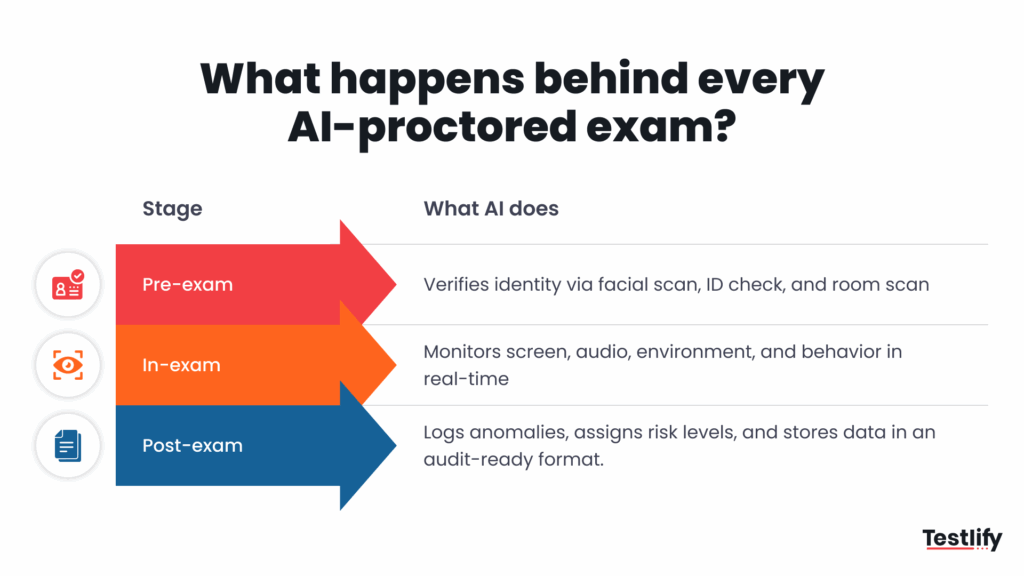
Before the test: identity and environment checks
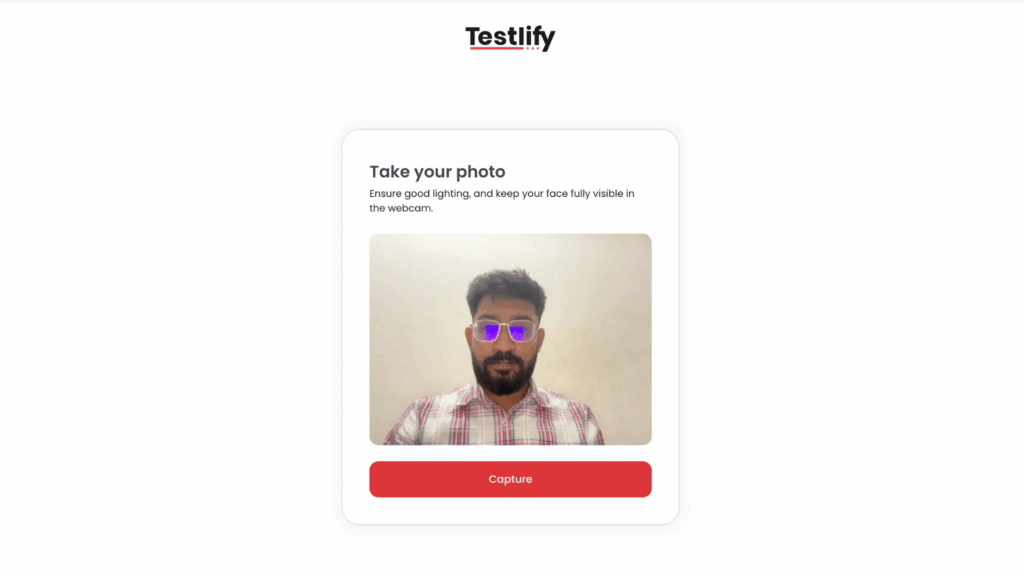
The candidate confirms who they are, usually with a webcam photo matched to a photo ID, and does a quick scan of their room and desk. The goal is narrow: rule out an impersonator and a phone taped to the monitor before a single question loads. This is where dual-camera setups help, one angle on the screen and one on the wider room.
During the test: live signals
As the candidate works, the system reads a handful of signals: face presence and count, gaze direction, voices or coaching in the audio, tab switches, copy-paste, full-screen exits, and connections to a second monitor. None of these is a smoking gun on its own. Looking away could be thinking. Two voices could be a delivery at the door. The value is in patterns, not single moments.
After the test: risk scoring and human review
When the test ends, the AI bundles the flags into a session score and a timeline a reviewer can scrub through. Good tools sort alerts by severity, so a reviewer spends two minutes on a clean session and ten on a messy one instead of watching every recording end to end. That triage is the real productivity win, not the flagging itself.
What types of AI proctoring are there?
AI proctoring typically falls into three approaches, each balancing cost, candidate experience, and detection speed differently. The right choice depends on the risk and stakes of the role you’re hiring for.
Automated AI proctoring
AI monitors the assessment for suspicious behavior, such as tab switching, unusual movements, multiple faces, or unauthorized devices, and flags potential violations automatically.
Live AI-assisted proctoring
AI monitors the assessment in real time while a human proctor handles flagged events or steps in when something requires judgment. This adds human oversight without requiring someone to watch every candidate continuously.
Post-assessment review
AI records and analyzes the assessment session, then highlights suspicious events for recruiters or hiring teams to review afterward. This works well when you need an audit trail without adding live monitoring or significant candidate friction.
How to choose the right AI proctoring approach
The best approach depends on how much human oversight you need, how many candidates you’re assessing, and the consequences of a compromised assessment.
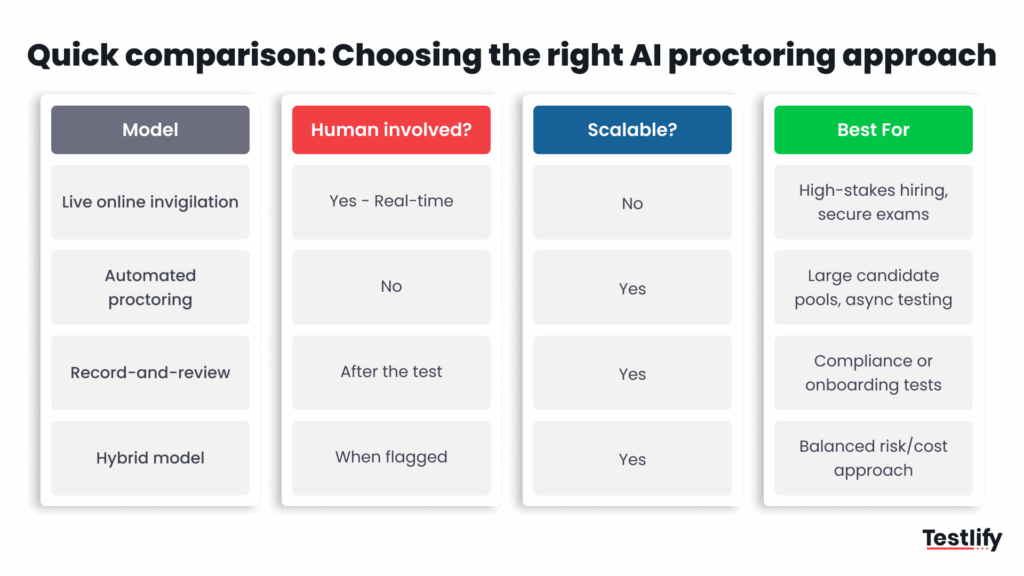
Live online invigilation for high-stakes assessments
Live proctoring puts a human in the session in real time, making it the strongest option when assessment integrity is critical. It works best for high-stakes hiring, secure exams, and roles where cheating could have significant consequences, but it is less scalable and more resource-intensive.
Automated proctoring for high-volume hiring
Automated proctoring uses AI to monitor candidates without a human watching each session live. It is a better fit for large candidate pools and asynchronous assessments, where you need consistent monitoring at scale without adding substantial staffing costs.
Record-and-review for compliance and auditability
Record-and-review captures the assessment session and allows a recruiter or reviewer to examine it afterward. This approach works well for compliance, onboarding, and situations where you need an evidence trail without real-time intervention.
Hybrid proctoring for a balance of risk and scale
A hybrid model combines AI monitoring with human review when something is flagged. It gives teams the scalability of automated proctoring while keeping human judgment in the loop, making it a strong option when you need a balance between assessment security, cost, and candidate experience.
For most hiring teams, record and review handles the top of the funnel and AI-assisted live covers the roles where a bad hire is expensive. Fully automated proctoring belongs on practice runs, never on an assessment that gates a decision, because nobody is there to overturn a wrong flag. If you run certifications, the rules tighten again; see how this plays out in certification testing.
AI Proctoring vs live proctoring
Both approaches aim to protect assessment integrity, but they differ in how monitoring happens, how much human involvement is required, and how easily you can scale them. AI proctoring is generally better suited to high-volume hiring, while live proctoring makes more sense when the assessment is particularly high-stakes.
Factor | AI proctoring | Live proctoring |
|---|---|---|
How it works | AI monitors the candidate and flags suspicious behavior automatically. | A human proctor watches the candidate in real time. |
Human involvement | Usually limited to reviewing flagged events. | Required throughout the assessment. |
Scalability | High. Multiple candidates can be assessed simultaneously. | Limited by the number of available proctors. |
Cost | Generally lower because monitoring is automated. | Higher because it requires dedicated human reviewers. |
Detection | Identifies patterns such as tab switching, multiple faces, or unusual activity. | A proctor can observe behavior and make contextual judgments in real time. |
Candidate experience | Usually more flexible and convenient, particularly for asynchronous assessments. | More controlled and potentially more intrusive. |
Response to suspicious behavior | Flags events for review, depending on the platform. | The proctor can intervene immediately. |
Best for | High-volume hiring, remote assessments, and asynchronous testing. | High-stakes assessments, secure exams, and situations requiring continuous oversight. |
Main limitation | AI flags can require human review and may not provide enough context on their own. | Expensive, difficult to scale, and dependent on proctor availability. |
Bottom line: Choose AI proctoring when you need scalable, consistent monitoring, and live proctoring when real-time human judgment is worth the additional cost and candidate friction.
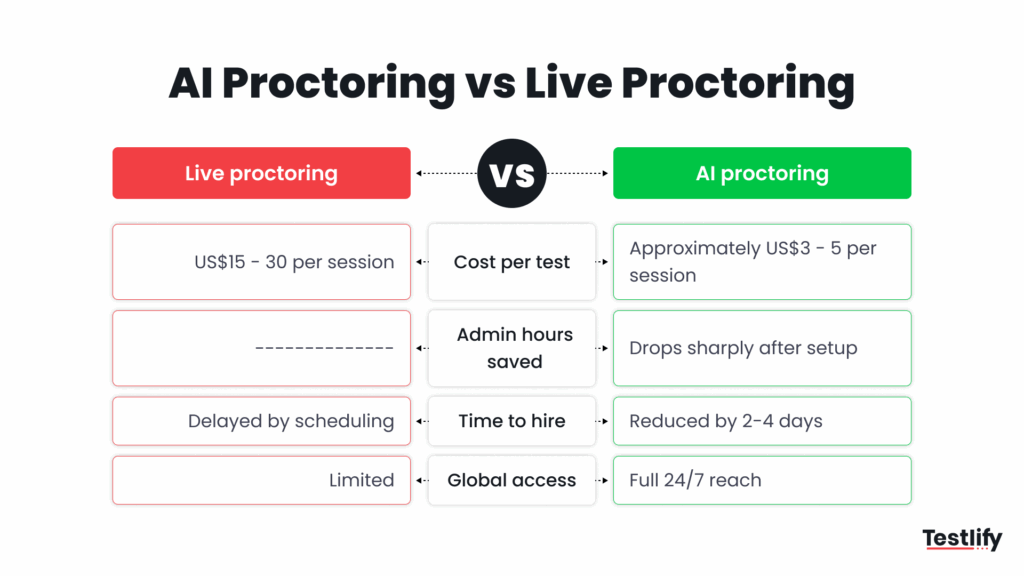
The operational difference between AI and live proctoring
The biggest difference is how much time, money, and coordination each approach requires. Live proctoring adds a human to every session, while AI proctoring automates monitoring and lets hiring teams review exceptions instead of supervising every candidate.
Benefits of AI proctoring for hiring teams
Skills-based hiring only works if the skill scores are real. The World Economic Forum expects 39% of core job skills to change by 2030, down from 44% projected in 2023, which pushes more weight onto what candidates can actually do rather than what their resume claims. Proctoring is what keeps those do-the-work scores trustworthy at scale.
Screen at volume without hiring proctors
The clearest win is headcount you do not spend. One reviewer triaging AI-scored sessions can cover the ground that would take a room of live invigilators. For a team running hundreds of assessments a week, that is the difference between proctoring everything and proctoring nothing.
Shorter, more defensible hiring cycles
Because sessions are scored as they finish, you are not waiting on manual review to move a shortlist forward. You also get a reviewable evidence trail: a timeline, snapshots, and a session score you can point to if a rejected candidate asks why. That record protects the candidate as much as the employer.
Pro tip: Tell candidates what the proctoring will and will not capture before they start, in plain language. A one-line note (“we use webcam and screen monitoring during this 30-minute test; a person reviews any flags”) cuts anxiety, cuts drop-off, and heads off the “nobody told me” complaint that turns a flag into a dispute.
Limitations of AI proctoring
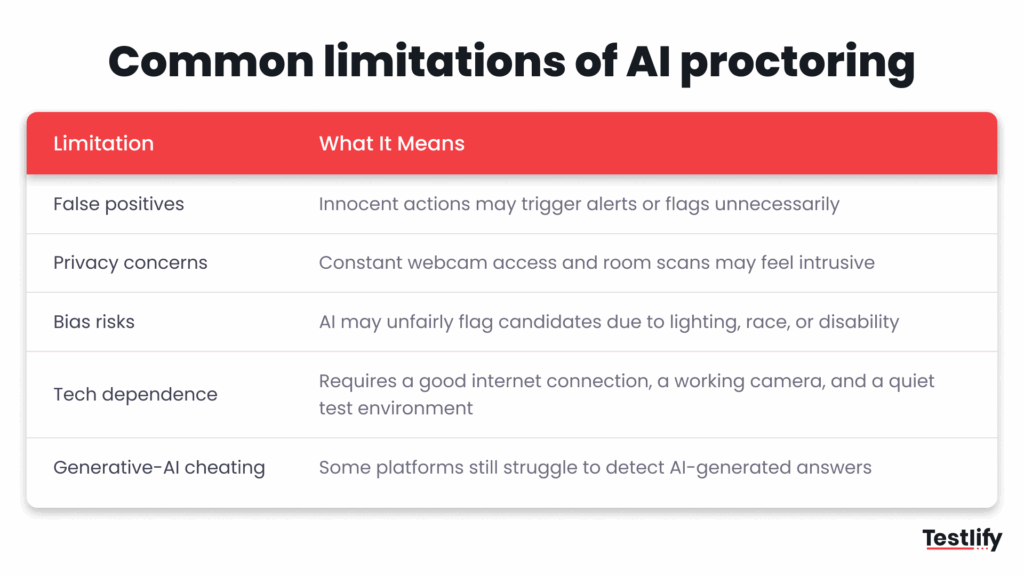
This is the section most vendor pages skip, so read it closely. Proctoring has real limits, and pretending otherwise is how teams end up rejecting good people on bad signals.
Accuracy is not equal across groups
Facial recognition, the backbone of identity and face-presence checks, does not perform the same for everyone. In a landmark test of nearly 200 algorithms drawn from 18 million images (report NISTIR 8280, published 2019), the U.S. National Institute of Standards and Technology found demographic differentials in false-match rates, often by a factor of 10 to 100 depending on the algorithm, with higher error rates for Asian, African American, women, elderly, and child faces.
In hiring, a false flag is not a rounding error; it is a real person wrongly suspected. Pick tools that publish demographic testing and always keep a human between a flag and a rejection.
Flags are not proof
A tab switch might be an accidental keystroke. A second voice might be a roommate. A frozen camera might be a weak connection. Automated systems generate false positives, and the candidates most likely to be flagged for “unusual” behavior are often those with disabilities, caregiving interruptions, or poor bandwidth. Every flag needs context before it counts against anyone.
It deters more than it prevents
Proctoring changes behavior more than it stops it. A 2025 study in the Journal of Intelligence of remote testing found no significant overall difference in scores between proctored and unproctored conditions, which suggests the main effect is deterrence and a cleaner evidence trail, not a hard wall against cheating. Treat it as a strong lock, not an unbreakable one, and pair it with privacy-by-design: collect the minimum, disclose it, and store it no longer than you need.
How to deploy AI proctoring fairly
The way to get value from AI proctoring without creating unnecessary fairness problems is to treat it as a system of controls, not a single setting. The goal is to protect assessment integrity while using only the level of monitoring the role genuinely requires.
- Set strictness by stakes. A first-round skills screen may need basic identity verification and light monitoring. A high-stakes assessment for a finance, healthcare, or security role may justify stronger controls and human review.
- Verify identity, then step back. Confirm that the right person is taking the assessment, then keep monitoring as unobtrusive as possible. Honest candidates should be able to focus on demonstrating their skills rather than managing the technology.
- Send every flag to a human. A suspicious event should trigger a review, not an automatic rejection. Give reviewers enough context to determine whether the behavior actually indicates misconduct.
- Collect evidence proportionately. Keep the information needed to investigate potential violations and support hiring decisions. Avoid collecting or retaining data that has no clear purpose.
- Build assessments that are difficult to shortcut. Role-specific tasks, follow-up questions, practical scenarios, and requests for candidates to explain their reasoning can provide stronger evidence of ability than monitoring alone.
- Test the process for unintended bias. Review completion rates, false-positive flags, and candidate feedback across different groups. If a control creates disproportionate friction without improving assessment integrity, reconsider whether it belongs in the process.
Here is how that looks in practice. A support team hiring 40 remote agents a quarter runs a 25-minute situational judgment and typing assessment as the first screen, with record-and-review proctoring and identity verification on. AI scores every session overnight; a coordinator reviews only the 6 or 7 flagged as high risk the next morning.
Candidates who reach the final round retake a shorter task under AI-assisted live proctoring, where a recruiter can watch in real time. The team keeps its shortlist honest without asking a human to watch 300 hours of webcam footage.
Proctoring earns its place only when people stay in charge of the call. As Testlify’s founder Abhishek Shah put it when describing the company’s approach to AI in hiring:
It’s not about replacing recruiters. It’s about empowering them to focus on high-value decisions rather than repetitive tasks.
Abhishek Shah, Founder, Testlify
If you are choosing a tool, weigh it against these layers rather than a feature checklist; the AI proctoring buyer’s guide walks through the questions to ask, and the high-stakes proctored exam guide covers setup for the highest-stakes cases.
Run fairer, more secure assessments. Turn on identity checks and AI proctoring, keep every decision human-led, and give your team an evidence trail it can stand behind. Start free with Testlify, or book a demo to see proctoring configured for your specific roles.
Key takeaways
- Proctoring produces evidence, not verdicts. The AI flags and scores; a person decides. Keeping that line clear is what protects both your hires and your fairness posture, so never let a tool auto-reject.
- Match strictness to stakes. Light-touch monitoring for early screens, full controls for final or credential-bearing tests. Over-proctoring a practice test just adds friction and drop-off for no integrity gain.
- Bias is a real risk, so plan for it. Facial-recognition accuracy varies by demographic group, which means demographic testing and a human review step are not optional; they are how you avoid wrongly flagging real candidates.
- Generative AI outpaces detection. No monitor catches every chatbot. Assessment design, live explanation, follow-ups, and role-specific tasks carry the defense that detection alone cannot.
- It deters and documents more than it prevents. Research shows scores barely move with proctoring on, so value it as a strong lock plus an audit trail, and pair it with privacy-by-design data handling.
- Keep humans in charge. The best integrity setup makes reviewers faster and decisions more defensible without ever handing the hire to an algorithm.
Frequently asked questions

B2B SaaS Content Writer
Rishav Kumar is a B2B SaaS content writer with 4 years of experience. He loves crafting engaging content. Always exploring fresh ideas, he's passionate about helping businesses grow through impactful writing.
LinkedInRelated resources
View all
Proctoring
What is automated proctoring? Explained simply
Proctoring
What is online proctoring? A simple guide
Proctoring
How to set up a proctored exam: A simple guide for secure online assessments
Proctoring
Online proctoring services compared: top 5 tools vs Testlify
Proctoring
Lockdown browser: Features, benefits & limitations
Proctoring
AI proctoring compliance: GDPR & FERPA explained
Get started.
Hire on proof, not resumes.
Run your first skills-based assessment free — no credit card required.