
Online proctoring services compared: top 5 tools vs Testlify
Compare top proctoring services with Testlify. Discover the best tools for secure, scalable online exams, hiring, and remote assessments.
Remote hiring made skills tests standard, and it made cheating easy. A candidate can screen-share the questions, paste them into an AI chatbot, or have a stronger friend sit the assessment. Online proctoring services exist to close that gap. This guide compares the top five dedicated proctoring tools against Testlify, an assessment platform with proctoring built in, so you can pick the right fit for hiring.
Short answer up front: dedicated proctoring vendors like Honorlock, Examity, ProctorU, Talview, and Proctorio are strong when your main job is watching an exam. If your main job is hiring, a platform that scores the assessment and proctors it in one place removes a second tool, a second login, and a second bill. The rest of this guide shows where each option wins, what it costs, and how well it holds up against AI-era fraud.
 ChatGPT
 Gemini
 Claude
 Grok
Grok Perplexity
TL;DR
- Online proctoring services monitor a test taker during a remote assessment using webcam, screen, browser, and identity checks, then flag anything that looks like cheating for a human to review.
- Cheating on unsupervised online exams is common. A 2023 systematic review found 44.7% of students admitted to it, and proctoring measurably reduced it.
- Honorlock, Examity, ProctorU, and Proctorio were built for education and certification exams. Talview leans toward hiring. All five proctor tests they do not create.
- Testlify differs by combining the assessment and the proctoring in one platform, so hiring teams score skills and protect integrity without stitching two tools together.
- The risk is growing, not shrinking. Gartner expects one in four candidate profiles to be fake by 2028, so identity and AI-assistance checks now matter as much as watching the screen.
- Pick on five things: what you are protecting, how strict the role needs to be, the candidate experience, whether the tool fits your hiring workflow, and the real cost per protected assessment.

What are online proctoring services?
Online proctoring services are tools that supervise a candidate during a remote test to keep the result trustworthy. They combine identity verification, webcam and microphone monitoring, screen recording, a locked-down browser, and behavior signals such as tab switching or a second face in frame. Some use software alone (automated), some add trained human reviewers (live), and many blend both (hybrid).
The point is not to accuse people. It is to give the person making a decision enough evidence to trust the score, or to know when they cannot. That distinction matters more in hiring than in a classroom, because a bad decision here follows the company for years.
Why does proctoring matter for AI-era hiring?
Assessment integrity used to be an education problem. It is now a hiring problem, because the same generative AI tools that help employees do their jobs also help candidates fake their way through a screening test. McKinsey’s State of AI 2025 research found that 88% of organizations now report regular AI use in at least one business function, up from 78% a year earlier. When that much of the workforce leans on AI day to day, a remote skills test has to confirm the answers came from the candidate, not a chatbot.
The scale of the problem is documented in hiring specifically, not just in classrooms. SHRM Labs analyzed nearly 20,000 interviews between July 2025 and January 2026 and found that 38.5% of candidates showed signs of cheating, rising to 48% for technical roles. As Testlify’s Namrata Kamdar told SHRM, a genuine high performer can explain their thinking; a candidate faking the skill cannot. Hiring teams face that gap the moment a test moves off-site.
The cost of getting it wrong is not abstract. SHRM benchmarking puts the average cost per hire at $4,129, and a wrong hire wastes far more once ramp time and re-hiring are counted. Skills tests are worth protecting because they work: SHRM Labs’ own conclusion is that assessment design, not just monitoring, is what keeps a skills test predictive, since a standardized test that never changes is easier to game than a role-specific one. A test built to predict performance is only useful if the score is real.
Can online proctoring catch AI and deepfakes?
Partly, and the honest answer matters. Modern proctoring flags likely AI assistance, such as a paste from a chatbot or a sudden tab switch, and locks down the easy routes to one. Identity fraud is the harder problem: face-swap and deepfake candidates are rising fast, so identity and liveness checks now carry as much weight as screen monitoring.
The threat is no longer hypothetical. Gartner projects that by 2028, one in four candidate profiles worldwide will be fake, and in a 2Q25 survey of 3,000 job seekers, 6% admitted to some form of interview fraud, from impersonation to having someone else sit the session. For a remote hiring test that means two jobs at once: confirm the person is who they claim to be, and confirm the answers are theirs. AI-assistance detection handles the second by flagging chatbot-style behavior and, where the rules allow, ending a session when AI-generated responses are detected. The first needs photo ID and face verification at the door, which is exactly where software-only tools that never involve a human reviewer fall short. Pairing automated flags with human review turns a suspected deepfake or an AI-assisted answer into reviewable evidence, rather than a silent pass or an automatic reject.
How do you evaluate a proctoring service?
Before comparing brands, get clear on what you actually need. Most buyers over-index on strictness and under-index on candidate experience, then wonder why good applicants drop out. Run the role through Testlify’s Proctoring Fit Checklist, five criteria that matter more than any single vendor’s feature list.
- Real-time monitoring and violation handling. Does the tool watch during the test and flag issues as they happen, or only produce a report afterward? Live handling stops problems mid-assessment.
- Identity and environment checks. Photo ID verification, face match, room scan, and second-device detection confirm the right person is taking the test in an allowed setting.
- AI-assistance and lockdown controls. With chatbots one alt-tab away, you want copy-paste blocking, tab-switch detection, full-screen enforcement, and signals that flag likely AI use.
- Candidate experience. Heavy proctoring scares off strong, honest applicants. Match strictness to the stakes. A senior finance role justifies more friction than a junior support role.
- Workflow fit. Does proctoring live inside your assessment and hiring flow, or bolt on as a separate system your team has to run alongside the test?
Pro Tip: Set the proctoring level per role, not once for the whole company. A single strict default punishes candidates for low-risk roles and trains your team to ignore a flood of minor flags. Reserve the heaviest controls for high-stakes, high-trust positions where a faked score does real damage.
Does the tool fit your ATS and LMS stack?
Most of the five tools compared here were built to sit inside a learning management system, proctoring an exam that already exists in Canvas, Blackboard, or a certification portal. Hiring works differently. The assessment usually lives in an applicant tracking system, and proctoring has to plug into that flow without adding a second login for recruiters or a second onboarding step for candidates. Teams that treat proctoring as a bolt-on typically end up building a manual bridge between two systems, the same problem a pre-employment testing rollout runs into when the assessment tool and the ATS were never designed to talk to each other.
Higher education and certification vs corporate hiring
Honorlock, Examity, ProctorU, and Proctorio built their proctoring stack for exams in a classroom or a certification body, where the test taker is already enrolled and the population is largely fixed for a semester. Corporate hiring is a different shape of problem. Candidates are external, unscreened, and increasingly remote by default. The U.S. Bureau of Labor Statistics put telework at 22.6% of the workforce in March 2026, which means a large share of first-round hiring now happens with nobody in the room to catch a stand-in test taker. Harvard Business Review’s 2026 analysis of more than 6,000 screening sessions found that generative AI is already skewing early hiring toward candidates who are best at gaming the process, not doing the job, the exact failure mode proctoring is built to catch before an offer goes out. A hiring team weighing this should also plan for what happens after a flag, since a good candidate experience depends on clear communication once proctoring closes a case, not just a clean test session.
Testlify vs the top 5 proctoring services
The five most-compared proctoring tools are strong products. The important difference for a hiring team is not feature-by-feature. It is that four of the five were built to proctor exams other systems create, and most grew up in higher education. Testlify approaches the same problem from the hiring side: the assessment and the proctoring are one product.
Capability | Testlify | Standalone proctoring tools |
|---|---|---|
Primary design goal | Assess skills and proctor in one platform | Proctor exams built elsewhere |
Built for | Hiring and pre-employment screening | Mostly education and certification |
Test library included | Yes, large role-based library | No, you supply the test |
Proctoring modes | Standard, strict, and custom | Auto, live, or hybrid, varies by vendor |
AI-assistance detection | Yes, with configurable actions | Varies by vendor |
Setup for a hiring team | One tool, one login | Assessment tool plus a separate proctoring tool |
Testlify vs Honorlock
Honorlock is well established in higher education, with hybrid AI-plus-live proctoring and deep integrations into learning management systems for mid-stakes exams at volume. That heritage is its strength for universities. For a recruiting team, the gap is the test itself: Honorlock watches the exam, but you still need a separate platform to build and score the skills assessment. Testlify handles both, which is why it fits a hiring workflow more cleanly than a classroom-first tool.
Testlify vs Examity
Examity serves universities, certification bodies, and enterprise testing, offering several proctoring levels from automated to fully live. It is a capable, flexible proctoring layer. The trade-off for hiring is the same as with any exam-first vendor: you manage the assessment in one place and the proctoring in another. Teams that assess a lot of candidates usually want fewer moving parts, not more.
Testlify vs ProctorU
ProctorU, now part of Meazure Learning, is known for scale and for letting you choose a light automated mode or full live proctoring. That range suits high-volume certification and academic programs. For pre-employment screening, its focus stays on invigilation rather than on building role-based assessments, so a hiring team pairs it with a testing tool. Testlify keeps the two together and adds hiring-specific reporting on top.
Testlify vs Talview
Talview is the closest of the five to hiring, combining interviews and proctoring with AI monitoring for recruitment and certification. If your process is interview-led, that is a reasonable fit. Testlify’s difference is depth on the assessment side: a broad library of skills, coding, cognitive, and behavioral tests, with proctoring layered onto each, so the decision rests on measured skills rather than mostly on the interview.
Testlify vs Proctorio
Proctorio is a fully automated, software-only proctoring service that runs as a browser extension inside an LMS, built for high-volume academic exams. Automation keeps it fast and cheap at scale, but software-only monitoring means no human is reviewing edge cases in the moment. Testlify pairs AI monitoring with human oversight, so a flag becomes reviewable evidence rather than an automatic verdict, which matters when a hiring decision hangs on it.
Here is how the six options line up at a glance for a hiring team.
Tool | Built for | Proctoring approach | Assessment included | Best for |
|---|---|---|---|---|
Testlify | Hiring and screening | AI plus human review, 3 modes | Yes, role-based library | Teams that want assessment and proctoring in one place |
Honorlock | Education, certification | Hybrid AI plus live | No | LMS-based exams at volume |
Examity | Education, enterprise testing | Automated, live, or hybrid | No | Buyers who want to set a proctoring level per exam |
ProctorU | Education, certification | Automated or full live | No | High-volume programs that need a live option |
Talview | Hiring, certification | AI monitoring with interviews | Partial, interview-led | Interview-led recruitment |
Proctorio | Education | Automated, software-only | No | High-volume academic exams on a budget |
Where Testlify fits: assessment plus integrity
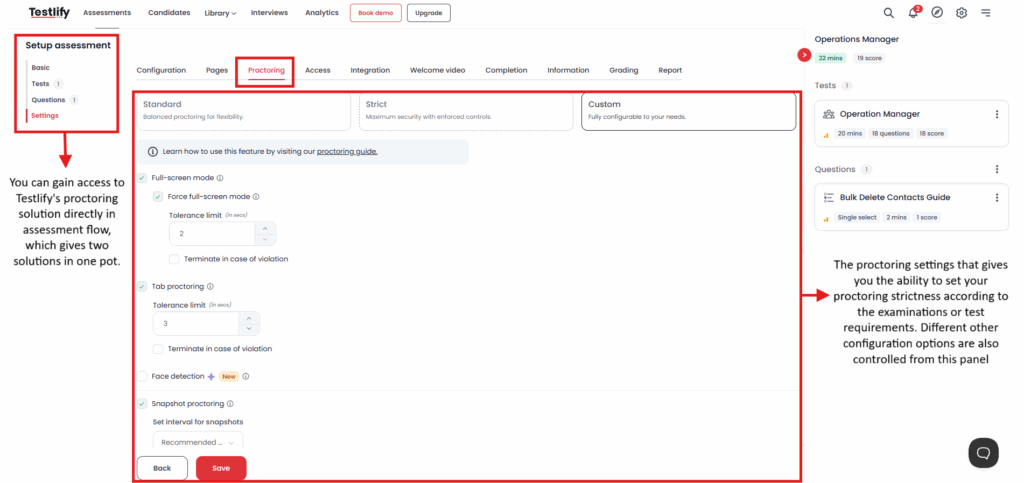
Testlify is a pre-hire assessment platform with proctoring built into the same workflow, not a standalone exam-watching service. You build the test from a role-based library, invite the candidate, and proctor the session from one dashboard. This is the honest scope: Testlify is strong for hiring and screening, and it is not trying to be a university exam-hall replacement.
The integrity side follows the Testlify Assessment Integrity Framework, which protects the trustworthiness of a result through identity checks, environment control, behavior monitoring, AI-assistance detection, reviewable evidence, and configurable strictness, while keeping the final judgment with a human. The idea is simple: results are only useful if a hiring team can trust how they were produced, and no flag should auto-reject a person without review.
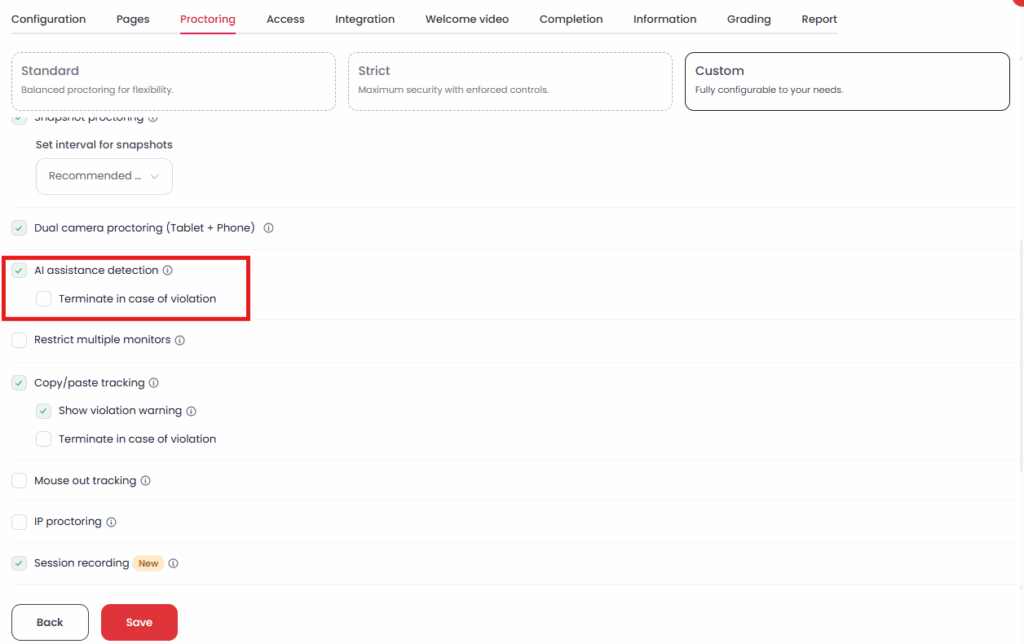
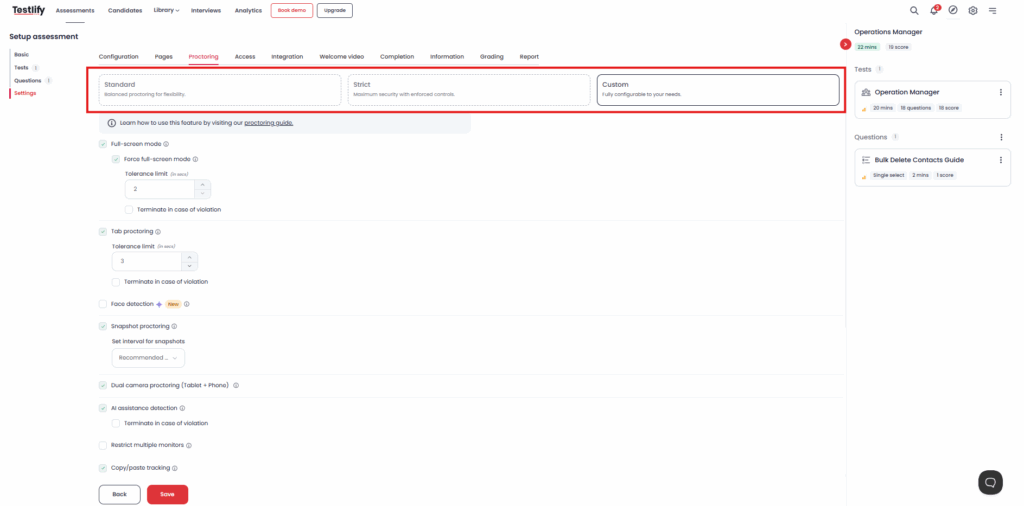
In practice that means three proctoring modes. Standard balances monitoring with a light candidate experience. Strict enforces full-screen, blocks copy-paste, and detects multiple monitors or a second face. Custom lets you set tolerance limits and actions per role, including terminating a session when AI-generated responses are detected. A 500-person company hiring 30 engineers a quarter can run standard proctoring on early screens and switch to strict only for final coding rounds, instead of buying and running a separate proctoring tool for the whole funnel.
For a deeper look at the mechanics, three Testlify explainers go further: how online proctoring works, the types of online proctoring, and the trade-offs between human and AI proctoring. Each one covers a slice of what the framework above pulls together.
How much do online proctoring services cost?
Online proctoring is priced in three main ways: per exam or session, per seat as a subscription, or bundled into an assessment platform. Dedicated vendors usually charge per session, and live human proctoring costs more than automated software. Which one is cheapest depends on how many candidates you test and how often.
A per-exam price looks small until you multiply it across a big applicant pool. Say you screen 200 candidates in a month. At a $10 automated-session fee that is $2,000 before you have scored a single skill, and a live-proctored session costs several times more because a person is watching. A per-seat subscription is easier to forecast when you hire steadily. The cost most teams miss is the second tool: when proctoring sits outside your assessment platform, you pay for the proctoring, the assessment tool, and the hours your team spends moving candidates and results between them. A platform that scores the test and proctors it together removes that third cost, which is why cost per protected assessment, not the sticker price of one exam, is the number worth comparing.
How do you roll out proctoring without hurting candidates?
The fastest way to waste a proctoring tool is to switch every control to maximum and surprise applicants with it. Strong candidates have options, and a clunky, invasive test is an easy reason to walk. A few practical moves keep integrity high and drop-off low.
Tell candidates up front. A short line in the invite that explains the test is proctored, what gets recorded, and why, removes the surprise and filters out people who were planning to cheat anyway. Transparency is a deterrent on its own. Next, tier the strictness. Early-funnel screens for a large applicant pool can run light monitoring, while final-round assessments for a senior or high-trust role earn full lockdown and identity verification. One setting for every role is the mistake that generates a flood of low-value flags.
Then plan for the review, not just the capture. Proctoring produces evidence, and someone has to read it. Decide in advance who reviews flagged sessions, what counts as a real violation versus noise (a glance away is not a second person in the room), and how a candidate can respond before any decision is made. That last point protects both fairness and your brand. Run a small pilot on one role before you turn proctoring on across the pipeline, so you learn your own false-positive rate on friendly candidates first. Get these basics right and proctoring stops feeling like surveillance and starts working as quiet insurance on every score.
Which proctoring service should you choose?
If you run academic or certification exams at volume and already have a testing system, a dedicated proctoring vendor is a sound choice, and the five above are among the best known. If your goal is hiring, the calculus changes. You are not just watching a test, you are measuring skills and making a decision, and a unified platform removes the seam between those two jobs. Fewer tools, one candidate experience, and integrity signals that sit next to the score the recruiter is reading.
See proctoring and assessment in one place. Build a role-based skills test, set the proctoring level per role, and review flagged sessions next to the score, without running a second tool. Start free or book a demo to see how Testlify protects assessment integrity across your hiring funnel.
Key takeaways
- Integrity is now a hiring problem, not just an education one. Generative AI lets candidates fake remote tests, so any team that screens off-site needs a way to trust the score. Skipping proctoring on skills tests quietly erodes the one signal that predicts performance.
- The cheating gap is measured, not theoretical. A 2023 review found 44.7% of students admitted online-exam cheating, and proctoring reduced it. Treat that as your baseline risk when you move a hiring assessment online, and set controls before the first candidate, not after a bad hire.
- Fake candidates are the fast-growing threat. Gartner expects one in four candidate profiles to be fake by 2028, so identity and liveness checks now matter as much as watching the screen. AI-assistance detection catches the chatbot; identity verification catches the impostor.
- Standalone proctoring tools proctor tests they do not build. Honorlock, Examity, ProctorU, and Proctorio grew up in education and watch the exam only, so a hiring team still runs a separate assessment tool. That seam costs time, money, and a second candidate login.
- A unified platform removes that seam. Testlify scores the skills and proctors the session in one place, which matters most for teams assessing many candidates who do not want to stitch two systems together.
- Match strictness to stakes. Heavy proctoring drives off honest applicants, so set the level per role. Reserve strict, full-lockdown mode for high-trust positions and keep early screens light to protect your funnel.
- Compare cost per protected assessment, not sticker price. A cheap per-exam rate multiplies across a big applicant pool, and running proctoring as a separate tool adds a hidden third cost in licenses and handoffs. For steady hiring, one platform that scores and proctors together is usually the lower total cost.
Frequently asked questions

B2B SaaS Content Writer
Rishav Kumar is a B2B SaaS content writer with 4 years of experience. He loves crafting engaging content. Always exploring fresh ideas, he's passionate about helping businesses grow through impactful writing.
LinkedInRelated resources
View all
Proctoring
Lockdown browser: Features, benefits & limitations

Proctoring
AI proctoring compliance: GDPR & FERPA explained

Proctoring
How to build a proctored exam for high-stakes assessment
Proctoring
AI vs human proctoring: What works best?
Proctoring
AI Proctoring Solution: A 2026 Buyer Guide for Hiring Teams
Proctoring
What is proctoring-as-a-service, and how does it work
Get started.
Hire on proof, not resumes.
Run your first skills-based assessment free — no credit card required.