
What is a proctored exam? How it works, types and rules
What a proctored exam is, how online proctoring works step by step, the five types, the rules candidates follow and how to keep it fair.

A proctored exam is a test taken under supervision, by a person, by software or by both, so the organization running it can confirm who is taking the test and that the candidate follows the rules. Proctored exams started in classrooms and test centers. Today most run online, with a webcam, a locked-down browser and a reviewer who checks anything the software flags.
TL;DR:
- A proctored exam is a supervised test where a person, software or both confirm identity and check that the candidate follows the rules.
- Unsupervised online tests are easy to game with helpers, AI chatbots or impersonation, so scores are hard to trust.
- Invite, system check, identity check, monitored exam, logged flags and human review.
- In-person, live online, record and review, AI (automated) and hybrid.
- Tab switches, a different or second person, extra screens, outside voices, copy-paste and AI help. Software flags events, and a person decides.
- Sit alone in a quiet room, stay in full screen and in camera view, and keep phones and notes out of reach.
- Set proctoring to the stakes of the decision. More checks add friction and review work.
- Tell candidates what is monitored, offer accommodations, keep a human in the loop and limit data retention.
- Run proctored assessments with 20+ proctoring checks in the same platform you use to build and score the test.
 ChatGPT
 Gemini
 Claude
 Grok
Grok Perplexity
What is a proctored exam?
A proctored exam is any test where an invigilator, called a proctor, watches the test taker to make sure the result is honest. The proctor checks identity before the test starts, watches for banned behaviour during it, and reports anything suspicious afterwards. A proctored test can happen in a test center, in an office, or online through remote proctoring.
The word comes from "proctor", the person who supervises an exam. In online settings the proctor may be a human watching a live feed, an AI system that flags events for later review, or a mix of the two. Universities use proctored exams for finals, licensing bodies use them for professional certifications, and employers use them for skills tests that decide who gets an interview or an offer.

Why are proctored exams used in hiring?
Proctored exams are used in hiring because remote assessments are now easy to game. A candidate taking an unsupervised online test can ask a friend, paste a question into an AI chatbot, or hand the whole test to someone else. When the score decides who reaches the final round, an unproctored result is hard to trust.
The data from 2025 and 2026 shows why employers moved proctoring from universities into hiring:
- Impersonation is real: In a Gartner survey of 3,000 candidates, 6% admitted to interview fraud, either posing as someone else or having someone else pose as them. Gartner also predicts that by 2028, 1 in 4 candidate profiles worldwide could be fake (HR Dive, August 2025).
- AI help is common: The same Gartner research found that 4 in 10 candidates use AI during the application process, including for assessment answers.
- Cheating shows up in interviews too: An analysis of nearly 20,000 interviews by the interview platform Fabric found that 38.5% of candidates showed signs of cheating (SHRM Labs, 2026).
- Fraud is a security risk, not only a bad hire: The FBI has warned that North Korean IT workers have been observed using AI and face-swapping technology in video job interviews, and advises employers to verify identity during interviewing, onboarding and employment (FBI IC3 public service announcement, January 2025).
In Testlify's own platform data, we have seen a pattern that Testlify co-founder and COO Namrata Kamdar described to SHRM Labs: assessments that usually take 25 to 30 minutes being completed in under 10 minutes. A score that arrives that fast deserves a second look, and a proctored exam gives the reviewer the evidence to make that call.
How does a proctored exam work?
A proctored exam works in three phases: checks before the test, monitoring during it, and review after it. Online, most of the work is automated and a person steps in only where the software raises a flag.
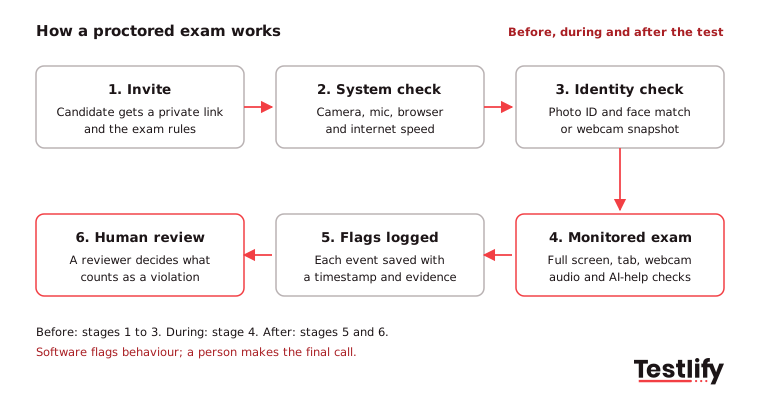
- Invite: The candidate receives a private link with the exam rules, the time limit and what will be monitored.
- System check: The platform tests the camera, microphone, browser and internet speed so that technical problems do not show up as false flags later.
- Identity check: The candidate shows a photo ID or takes a webcam photo that is matched against the person taking the test. Some exams also ask for a room scan.
- Monitored exam: During the test, the software enforces full screen, tracks tab switches and copy-paste, takes webcam snapshots or records video, and listens for voices.
- Flags logged: Every event is saved with a timestamp, so a reviewer can see what happened and when.
- Human review: A recruiter or proctor reviews the flags and decides whether anything counts as a violation. Software suggests; a person decides.
For a hands-on set-up checklist, see how to set up a proctored exam.
What are the types of proctored exams?
Proctored exams come in five types: in-person, live online, record-and-review, AI (automated) and hybrid. The right type depends on how many candidates you test, how much a wrong result would cost, and how much reviewer time you have.
Type | How it works | Best for | Trade-off |
|---|---|---|---|
In-person | A proctor supervises candidates in a test center or office | Licensing exams, final rounds for sensitive roles | Travel, scheduling and room costs |
Live online | A person watches the webcam and screen in real time | Small batches of high-stakes exams | Expensive per candidate, needs booked time slots |
Record and review | The session is recorded and a person reviews it later | Certifications where results can wait a day | Review time grows with every candidate |
AI (automated) | Software monitors the session and flags events | High-volume screening across time zones | Flags need a human check to avoid unfair rejections |
Hybrid | AI monitors every session; a person reviews flags or joins live | Most pre-employment and certification exams | Needs a clear policy on who reviews what |
Testlify has separate guides on live proctoring, AI-powered proctoring and AI vs human proctoring if you are choosing between them.
What does a proctored exam detect?
A proctored exam detects behaviour that suggests outside help, a second person or a different test taker. Proctoring software does not read minds. Proctoring software records events, and those events only mean something when a reviewer looks at them in context.
Common checks in an online proctored exam include:
- Leaving the test: Full-screen exits, tab switches and the mouse leaving the test window.
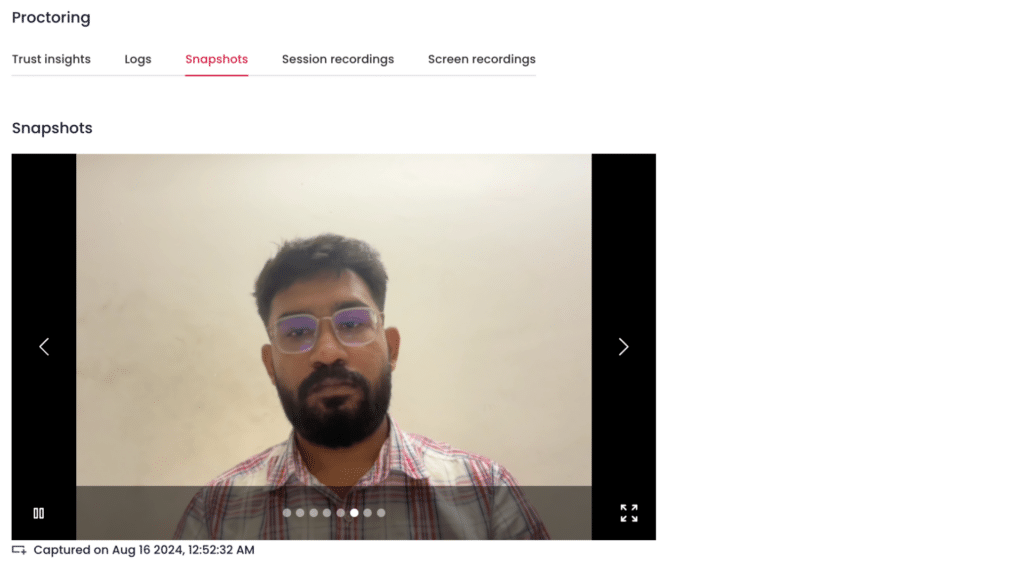
- A different person: Webcam snapshots, face detection, multiple faces in frame, and photo ID with face match.
- A second screen: Multi-monitor detection and mandatory screen share.
- Talking or outside voices: Audio monitoring and talking detection.
- Copied answers: Copy-paste tracking and blocking.
- AI help: AI assistance detection that flags patterns consistent with a chatbot writing the answer.
- Location: IP and location restrictions for exams that must be taken in a given country.
A proctored exam can catch a phone only indirectly: through the webcam, through the candidate looking away often, or through voices picked up by the microphone. A phone used fully out of view may not be caught by software alone, which is why high-stakes exams add a room scan or a live proctor.
Pro tip: Treat signals as a group. As the SHRM Labs piece puts it, tab switching, completion time, answer changes and mouse movements should be grouped rather than each treated as an indicator of cheating. One tab switch is noise; a tab switch, a pasted answer and a 6-minute finish together are worth a review.
What are the rules for candidates taking a proctored exam?
Candidates taking a proctored exam are expected to sit alone, in a quiet room, with only the allowed materials, and to stay in view of the camera until they submit. The organization running the exam sets the rules, and the proctor or software records anything that breaks them.
Typical rules for an online proctored exam:
- Use a laptop or desktop with a working webcam and microphone, and run the system check before the test day.
- Sit alone in a quiet, well-lit room. Nobody else should enter.
- Keep phones, notes, books and second screens out of reach unless the exam allows them.
- Stay in full screen and do not open other tabs or apps.
- Do not read questions aloud, talk to anyone or wear headphones unless allowed.
- Keep your face in view of the camera for the whole session.
- Ask for any accommodation, such as extra time, before the exam, not during it.
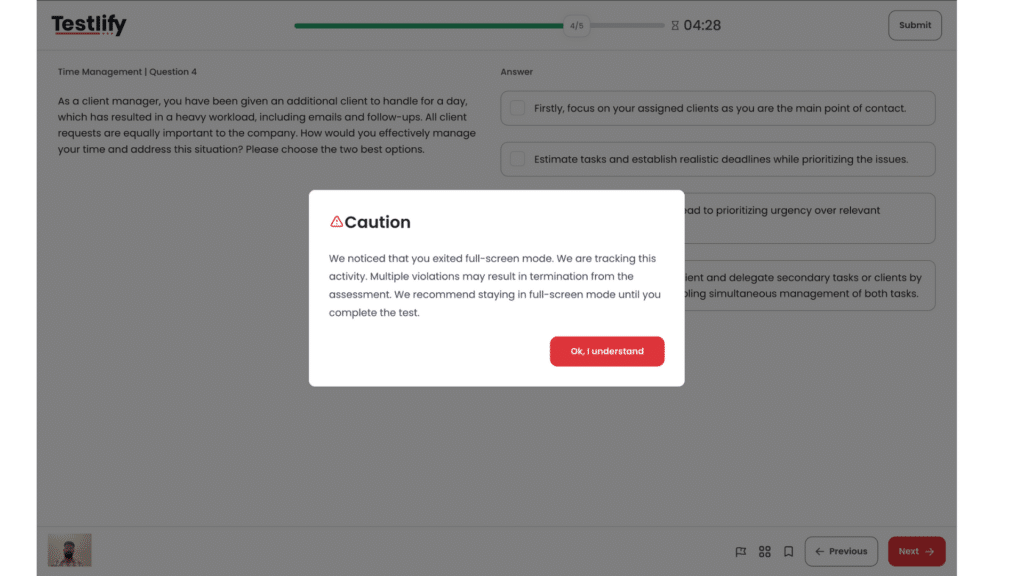
What happens when a rule is broken depends on the exam settings. A minor event may trigger an on-screen warning, like the full-screen warning above. Repeated violations can end the test automatically if the employer has set a violation limit. In most cases the result is not decided on the spot: the flags go to a reviewer who decides whether the score stands.
Which proctoring level fits which exam?
The proctoring level should match the stakes of the decision the exam feeds. A short screening quiz does not need ID checks and video recording; a certification or the final test for a role with system access does.
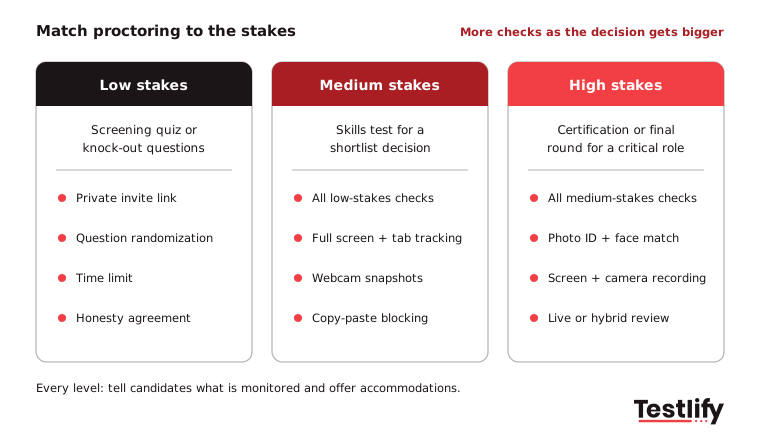
Stakes | Example | Suggested checks |
|---|---|---|
Low | Knock-out questions, short screening quiz | Private invite, question randomization, time limit, honesty agreement |
Medium | Skills test that decides the shortlist | Low-stakes checks plus full screen, tab tracking, webcam snapshots, copy-paste blocking |
High | Certification, final round for a critical or remote role with system access | Medium-stakes checks plus photo ID and face match, screen and camera recording, live or hybrid review |
More proctoring is not always better. Every extra check adds friction for honest candidates and review work for your team. Start from the decision the score drives, then add checks until a wrong result would no longer be expensive.
Kamdar's advice in the SHRM Labs piece points the same way: proctoring works best alongside better test design, such as role-specific tasks and follow-up questions where candidates explain how they reached an answer. "A genuine high performer can explain their thinking," she said. "A skillfisher can't."
How do you keep a proctored exam fair for candidates?
A proctored exam stays fair when candidates know what is monitored, can ask for accommodations, and are never rejected by a flag alone. Fairness is also a legal question: monitoring, AI scoring and disability access are all regulated in many places.
- Tell candidates up front: List what the exam records (webcam, screen, audio) and why, in the invite and again on the start screen.
- Offer accommodations: For licensing and certification exams in the US, ADA.gov testing accommodations guidance lists extended time, screen reader software and distraction-free settings as examples, and says testing entities must respond to requests in a timely manner. Employers have similar duties for pre-employment tests.
- Keep a person in the loop: Software flags can be wrong: a poor connection, a noisy flat or a candidate who looks away to think can all trigger events. A human reviewer should confirm before any rejection.
- Check AI rules where you hire: New York City's Local Law 144 requires a bias audit within one year of use, public audit results and candidate notice for automated employment decision tools (NYC Department of Consumer and Worker Protection). Testlify published its own NYC bias audit for its matching model, completed on June 16, 2023.
- Keep data only as long as needed: Recordings and ID images are personal data. Set a retention period and follow GDPR or local privacy law.
Key takeaway: A proctored exam should make results easier to trust, not make honest candidates feel like suspects. Clear notice, accommodations and human review do more for fairness than any single monitoring setting.
How does Testlify run proctored exams?
Testlify runs proctored exams inside the same platform used to build and score the assessment, so there is no separate proctoring tool to connect. Hiring teams pick a test from the test library of 3,500+ tests or generate one from a job description, then choose the proctoring settings for that assessment.
The anti-cheating and proctoring feature set includes 20+ proctoring checks, among them:
- Full-screen enforcement, tab proctoring and mouse-out tracking
- Webcam snapshots, camera recording, face detection and talking detection
- Multi-monitor restriction and mandatory screen share
- Copy-paste tracking and blocking, and AI assistance detection
- IP and location restriction, question randomization and honesty agreements
- Custom violation tolerance with auto-termination
- Question-level activity logs and timestamped reports for reviewers
For high-stakes exams, photo ID verification with face match and live video proctoring with screen recording are available as paid add-ons per attempt. Results, flags and recordings sit in one candidate report, so a recruiter can review the evidence next to the score.
If you want to see these settings on a real assessment, book a demo and the team will walk you through a proctored test end to end.
Frequently asked questions (FAQs)

Content Writer
Yashika Khandelwal is a Content Writer with 3+ years of experience creating research-backed content on hiring, talent assessment, and HR technology. She is a registered Organizational Psychologist and subject matter expert who combines behavioral science with practical recruitment insights to produce accurate, evidence-based content.
LinkedInRelated resources
View all
Proctoring
AI vs human proctoring: What works best?
Proctoring
AI Proctoring Solution: A 2026 Buyer Guide for Hiring Teams
Proctoring
What is proctoring-as-a-service, and how does it work
Proctoring
Types of online exam proctoring: Which one’s right for you?
Proctoring
Human proctors with AI alerts: Best of both sides?
Proctoring
What is live proctoring? Secure online exam guide
Get started.
Hire on proof, not resumes.
Run your first skills-based assessment free — no credit card required.