
Types of online exam proctoring: Which one’s right for you?
Discover the 4 main types of online exam proctoring and learn how to choose the right one for secure, fair, and scalable online testing.
Online exam proctoring is how a remote test gets supervised. The setup confirms who is taking the exam, watches the session for rule-breaking, and leaves a record a human can review afterwards. Four models do that job, and they differ mainly in who is watching and when.
The stakes here are not theoretical. A 2024 systematic review of exam cheating in the Journal of Academic Ethics pooled 25 samples drawn from 19 studies and 4,672 participants, and found that 44.7% of students admitted cheating in an online exam. Split by period, that was 29.9% before the pandemic and 54.7% during it. That is the gap a proctoring setup is being asked to close.
So the question is not whether to supervise a remote exam. It is how much supervision the exam actually warrants, and what it costs you in candidate experience to get it.
 ChatGPT
 Gemini
 Claude
 Grok
Grok Perplexity
TL;DR
- Online exam proctoring runs in four models: live, record-and-review, automated or AI, and hybrid. Each one buys a different amount of control.
- A proctoring type describes how the exam is supervised. A proctoring feature is a single control, like an ID check, that can sit inside any of the four types.
- Match the model to exam stakes and candidate volume first, then pick the features. Doing it the other way round gets expensive fast.
- Hybrid is the default answer for most higher-stakes hiring and certification work, because it keeps human judgment in the loop without staffing a proctor to every session.
- A flag is evidence for a person to review, never a verdict. Decide your review policy before you turn any of this on.

What is a proctor-based exam?
A proctor-based exam is any test supervised by a proctor, whether that proctor is a person watching live or software watching on their behalf. The supervision does three things: it verifies identity, it enforces the rules of the exam, and it produces reviewable evidence about how the session ran.
That last part gets skipped in most explanations, and it matters more than the first two. Identity checks and rule enforcement are worth little if nobody can go back and see what actually happened. Evidence is what makes a result defensible when a candidate disputes it.
The term shows up in two places that look similar and are not. In academic testing, a proctor is often a named invigilator responsible for a room or a cohort. In hiring, online proctoring usually means an automated layer with human review attached. Same word, different staffing model.
What are the four types of online exam proctoring?
The four types are live proctoring, record-and-review proctoring, automated or AI proctoring, and hybrid proctoring. They sit on a spectrum from fully human to fully software, and the practical difference is when a human gets involved: during the session, after it, or only when something is flagged.
Type | Who supervises | When a human acts | Best when |
|---|---|---|---|
Live proctoring | A human proctor, in real time | During the exam | The exam is high-stakes and intervention has to be immediate |
Record-and-review | Software records, a human reviews later | After the exam | You want human judgment but not live staffing |
Automated or AI | Software, continuously | Only if you build review in | Volume is high and consistency matters most |
Hybrid | Software watches, humans judge flags | On flag, during or after | You want oversight at scale, which is most of the time |
Live proctoring
Live proctoring puts a human proctor on the session in real time through webcam, microphone, and screen share. If something looks wrong, they can pause the exam, ask the candidate to fix it, or log the incident on the spot.
It is the strictest option and the most expensive one, because you are paying for a person's attention for the length of every exam. It fits licensure tests, certification exams, and anything where a disputed result carries legal or regulatory weight. The trade is candidate experience: being watched live is stressful, and it demands a stable connection from someone who may not have one.
Record and review proctoring
Here the full session is captured and a reviewer watches it afterwards, either end to end or only the moments the system marked. Nobody intervenes during the exam.
This suits programs that run in batches or across time zones, where scheduling a live proctor for every candidate is impractical. The obvious catch is that you find out about a problem after the fact. If your process depends on stopping a session mid-flight, this is the wrong model.
Automated or AI proctoring
Automated proctoring hands the watching to software. It tracks the signals a proctor would look for, such as a second face in frame, a tab switch, a copy-paste, or a long look away from the screen, and turns them into flags.
It scales in a way the other models do not, which is why volume screening lives here. But software reads behavior, not intent. A flag means something unusual happened, not that someone cheated, and treating those as the same thing is how good candidates get rejected for looking at their own keyboard. Candidates already sense this. A Gartner survey found that just 26% of job applicants trust AI to evaluate them fairly.
Hybrid live proctoring: when humans step in
Hybrid proctoring lets software carry the monitoring and brings a human in when the system surfaces something worth a second look. The human can join the session while it is running or review the clip afterwards, depending on how you configure it.
For most hiring and certification programs this is the sensible default. You get human judgment on the cases that need it and you do not pay for it on the cases that do not. It only works if the rules are settled in advance though: what the system flags, who reviews it, and what actually counts as a violation. Skip that and hybrid just means inconsistent.
Hybrid proctoring systems: what they include
A working hybrid setup is usually four things stacked together. An identity layer, so the right person starts the exam. A monitoring layer, capturing webcam, screen, and browser activity. A flagging layer that scores the session against your rules. And a review queue where a human sees the flagged clip with enough context to make a call.
The review queue is the piece teams underbuild. A system that files flags nobody ever triages is not oversight, it is a log file.
Online proctoring AI vs live vs hybrid explained
The three approaches trade the same three things against each other: cost, speed of intervention, and how much human judgment sits behind a decision. Nothing gives you all three.
Dimension | AI proctoring | Live proctoring | Hybrid proctoring |
|---|---|---|---|
Human involvement | None during the exam | Continuous | On flag only |
Intervention | Cannot intervene | Immediate | Possible, depends on setup |
Scales to volume | Yes | Poorly | Yes |
Cost driver | Software | Proctor hours | Software plus review time |
Main failure mode | Unreviewed false flags | Cost and candidate stress | An unstaffed review queue |
Does any of it work? The peer-reviewed answer is a qualified yes. Writing in Computers in Human Behavior Reports in 2020, Dendir and Maxwell compared identical online courses with and without remote proctoring and concluded that online proctoring mitigates cheating. Proctored cohorts scored lower, which the authors read as less cheating rather than worse students.
The effect is not uniform, though. A 2024 Open Praxis study of 252 undergraduates across six courses found that adding proctoring software did not produce a measurably lower course grade overall, with the effect showing up in some courses and not others. Proctoring changes behavior where behavior needed changing. It does not do much where it did not. For a closer head-to-head on the two poles, the comparison of AI and human proctoring goes deeper than this page does.
Which types of online examination can be proctored?
Most of them, with one real constraint: the exam has to run in an environment the proctoring layer can see. That rules in browser-delivered assessments and rules out anything the candidate completes offline and uploads.
- Multiple choice and knowledge tests. The easiest case. Short, timed, and heavily automatable.
- Coding assessments. Proctorable, but expect copy-paste and tab-switch flags to fire constantly, because that is how developers work. Tune the rules or the noise buries you.
- Cognitive and psychometric assessments. Usually short enough that live proctoring stays affordable.
- Long-form written exams. Record-and-review fits better than live, since the value is in the artifact, not the moment.
- Practical or simulation tasks. Proctorable when they run in the browser. Screen capture matters more than webcam here.
Take-home work and portfolio submissions are the genuine exception. There is no session to supervise, so integrity there comes from task design, not proctoring.
What is a proctoring environment?
A proctoring environment is the physical and digital space the candidate takes the exam in: the room, the desk, the device, the browser, and whatever else is within reach. Checking it means confirming that space matches the rules before the exam starts and stays that way during it.
In practice an environment check is a short scan at the start of the session, often a camera sweep of the room and desk, plus device-side controls like full-screen enforcement and multi-monitor detection. Testlify's live environment check uses a second phone or tablet to capture a side view of the room that a laptop webcam cannot see.
Get this wrong in the strict direction and you exclude people. A candidate in a shared apartment, a co-working space, or a house with kids is not cheating by having a room you can hear. Write the environment rules for the exam you are actually running, not for a testing centre you wish they were in.
How do proctoring types differ from features?
A type is the supervision model. A feature is a single control inside it. The two get used interchangeably and they are not the same thing, which is why proctoring conversations so often go in circles.
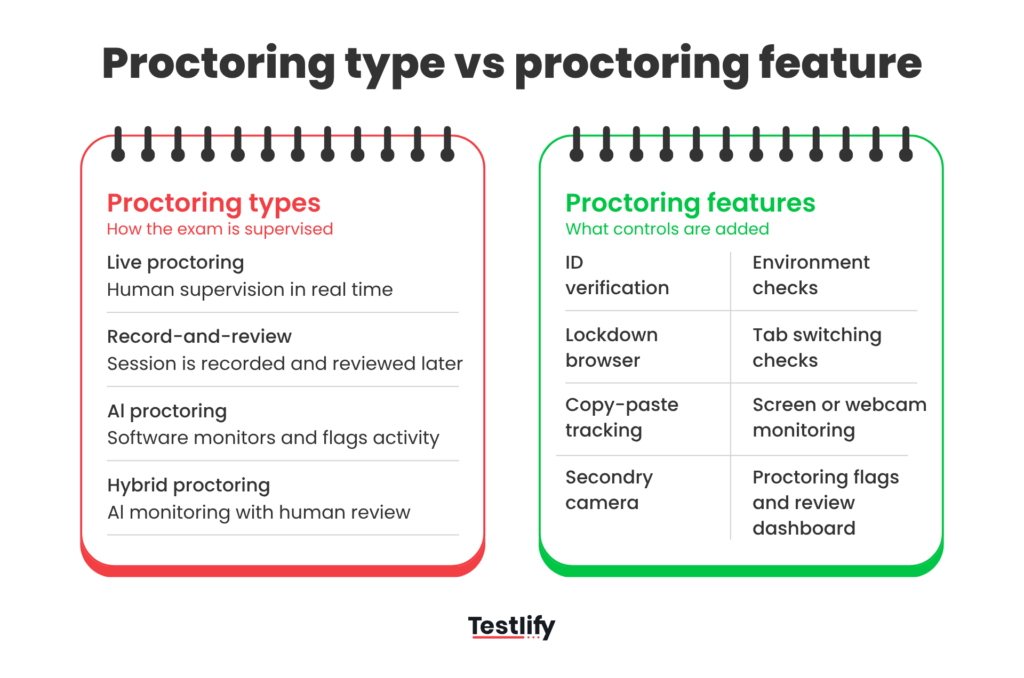
ID verification, environment scans, lockdown browser, copy-paste monitoring, and screen recording are features. Every one of them can run inside a live exam, a recorded one, or an automated one. What changes between types is not the control, it is who looks at the output and when.
So the order of decisions matters. Pick the type from the stakes and the volume. Pick the features from the specific rules of your exam. Reversing that leaves you with a pile of enabled controls and no clear idea of who reviews them, which is the most common way a proctored exam setup ends up both strict and useless.
Which proctoring model fits your exam stakes?
Three inputs decide it: how much the result matters, how many people are taking it, and how much friction the candidate will tolerate before they abandon the exam. That third one gets ignored and it is usually the one that bites.
Exam | Stakes | Volume | Recommended model | Why |
|---|---|---|---|---|
Certification and licensure | High | Low to medium | Live or hybrid | Disputed results carry weight, so identity assurance and fast intervention earn their cost |
University midterms and finals | Medium to high | Medium to high | Record-and-review or hybrid | Cohorts are too large for live staffing but too consequential for unreviewed automation |
Hiring assessments | Medium | Medium to high | Hybrid | Candidate experience is a hiring input, so oversight has to stay light until something is flagged |
Internal compliance testing | Medium | Medium to high | AI or record-and-review | The requirement is a consistent audit trail, not real-time intervention |
High-volume screening | Low to medium | High | AI | Consistency across thousands of sessions beats depth on any single one |
Low-stakes quizzes | Low | Any | Light AI or none | Proctoring cost exceeds the value of the result |
How do you choose a proctored setting?
Work through it in order rather than starting from the feature list, which is where most teams start and why most teams over-configure.
- Name the risk. What specifically goes wrong if someone cheats on this exam? A wrong hire, a void certificate, a compliance finding? If you cannot name it, you are over-proctoring.
- Pick the type from that risk and your volume. Use the table above. Hybrid is the right default for hiring work.
- Choose features against your actual rules. Only turn on a control that enforces a rule you have written down.
- Decide the review policy before launch. Who looks at a flag, within what window, and what threshold justifies action.
- Tell candidates what is monitored. Clear disclosure cuts anxiety and complaints, and depending on where your candidates sit, consent and notice may also be a legal requirement.
- Re-tune after the first cohort. Your first flag threshold will be wrong. Look at what fired, and on whom.
Pro tip: before you go live, run the exam yourself under the exact settings you plan to ship. That dry run is where over-strict configurations usually get caught, often when the person who wrote the rules trips their own lockdown browser.
How Testlify supports different proctoring needs
Testlify treats proctoring as a set of controls you match to the exam rather than one fixed mode. That is the Testlify Assessment Integrity Framework: protect assessment validity through identity checks, proctoring controls, AI assistance detection, suspicious-behavior signals, and reviewable evidence, while the final judgment stays with a person. The framework is deliberate about that last clause, because a flag that nobody adjudicates is not integrity.
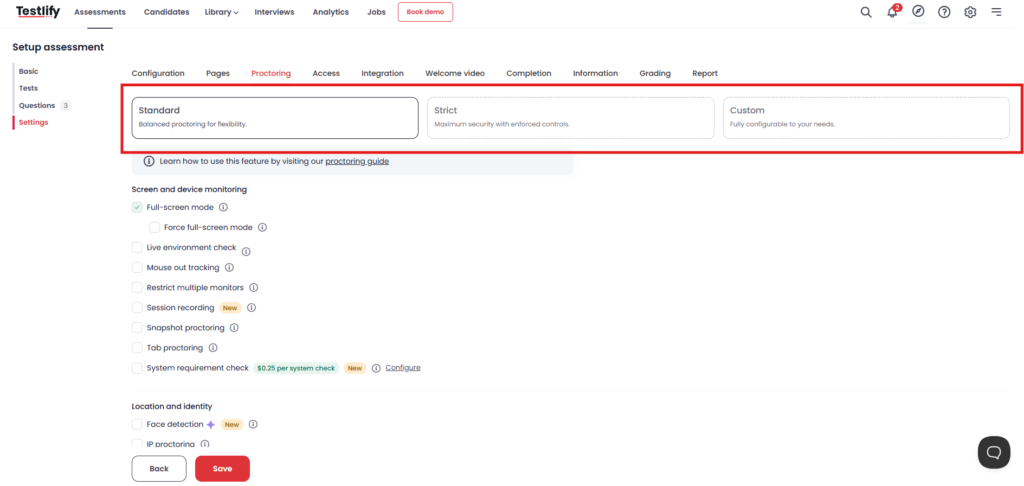
For stricter oversight, Live Video Proctoring keeps a closer view of the session when it genuinely matters who is on the other side of the screen. That fits certification-style work more than volume screening.
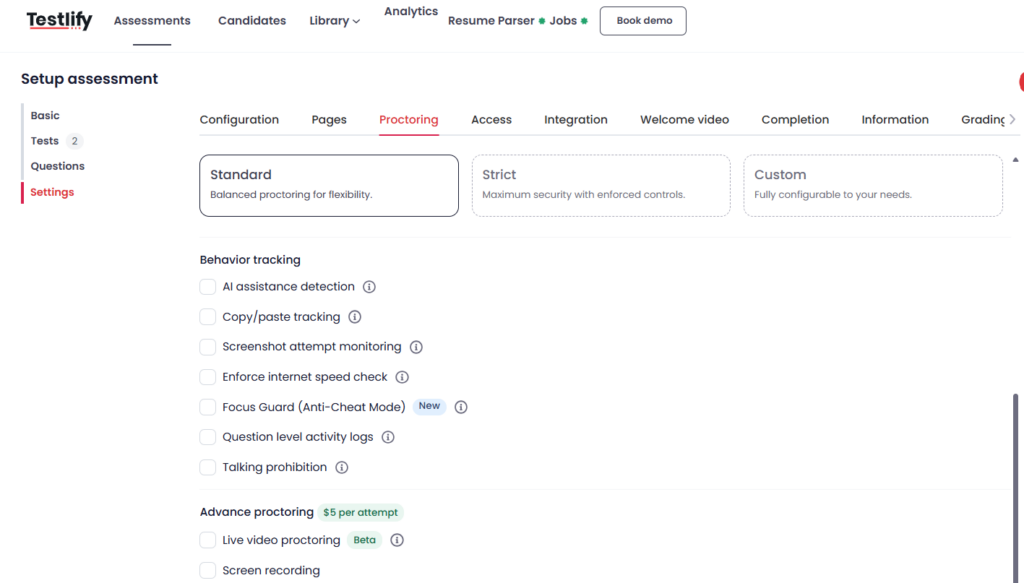
When the constraint is volume instead, Advanced Video Proctoring and Proctoring Flags surface the sessions worth attention so reviewers are not watching every assessment start to finish. This is the review-queue half of hybrid, and it is the part that decides whether hybrid works for you.
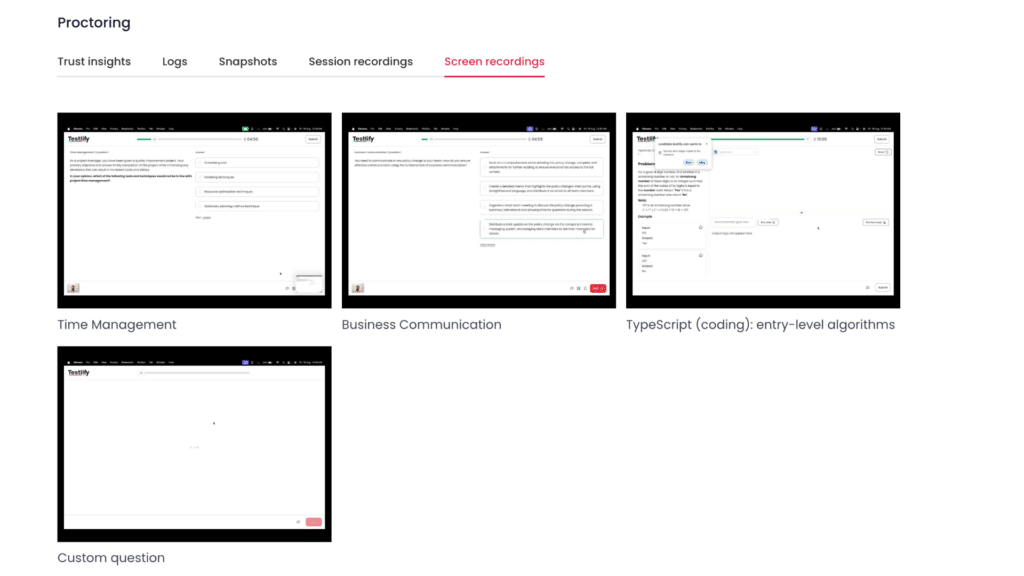
Identity assurance sits underneath all of it, and it is the layer under the most pressure right now. Generative tools have made it cheap to present as someone else on a video call, so confirming that the person assessed is the person hired is no longer a formality you can wave through at offer stage.
Not every control needs to be on. Pick a strict setup for high-risk exams, a lighter review workflow for large-scale testing, and a device-aware setup when candidate access is the binding constraint. If you want to see what that looks like configured for your own exam, book a demo and walk through the settings against a real role.
Key takeaways
- Four models, one spectrum. Live, record-and-review, AI, and hybrid differ by when a human gets involved, not by which features they carry. Once you see it as a spectrum from fully staffed to fully automated, choosing stops being a vendor question and starts being a risk question you can answer yourself.
- Type first, features second. The supervision model follows from exam stakes and candidate volume. Features follow from the written rules of that specific exam. Teams that pick features first end up with a strict configuration nobody can explain and no clear owner for the output.
- Hybrid is the working default for hiring. It keeps human judgment on the cases that need it without staffing a proctor to every session. That only holds if the review queue is actually staffed, which is the assumption most hybrid rollouts get wrong.
- A flag is evidence, not a verdict. Software reads behavior, not intent, and the peer-reviewed record shows proctoring reduces cheating without being uniform across contexts. Decide who reviews flags and what threshold justifies action before launch, or you will be making that call under pressure on a real candidate.
- Candidate experience is part of the design, not a cost of it. With only 26% of applicants trusting AI to assess them fairly, over-strict environment rules exclude people who were never going to cheat. Write the rules for the room your candidates actually have.
- Identity assurance is the layer changing fastest. Impersonation is a live problem rather than a forecast, so treat verification as a standing requirement you re-check, not a box the proctoring vendor ticks once at setup.
FAQs

B2B SaaS Content Writer
Rishav Kumar is a B2B SaaS content writer with 4 years of experience. He loves crafting engaging content. Always exploring fresh ideas, he's passionate about helping businesses grow through impactful writing.
LinkedInRelated resources
View all
Proctoring
Human proctors with AI alerts: Best of both sides?
Proctoring
What is live proctoring? Secure online exam guide

Proctoring
What is remote proctoring? Ultimate guide
Proctoring
AI-powered proctoring: how it works and where it fits
Proctoring
What is automated proctoring? Explained simply
Proctoring
What is online proctoring? A simple guide
Get started.
Hire on proof, not resumes.
Run your first skills-based assessment free — no credit card required.