
Human proctors with AI alerts: Best of both sides?
Discover how human proctors with AI alerts, secures online exams, cuts false flags, and gives students a fair, stress-free test day.
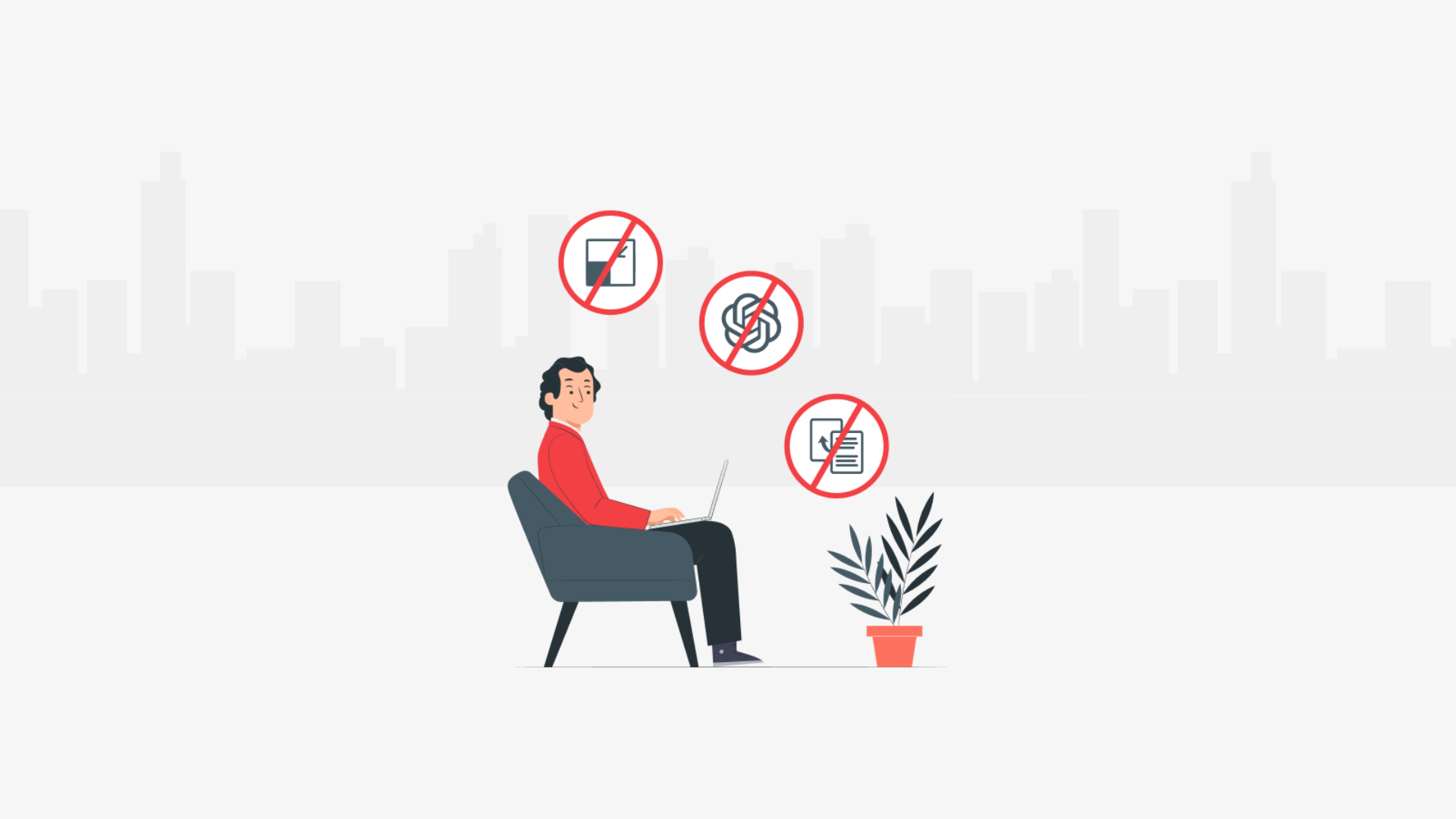
Online tests are being adopted everywhere. Due to this, remote proctoring is no longer optional. It’s the backbone of exam integrity today. In 2023, 65% of academic institutions used remote proctoring platforms for major exams.
But there’s a problem; concerns have been raised on both sides. AI proctoring systems alone often raise false negatives. Human proctors, on the other hand, can’t scale fast enough.
So, what’s the solution? It’s pretty simple: combine AI with human oversight (Human proctors with AI alerts – Hybrid proctoring). A model where machines handle the heavy monitoring and humans address the grey areas.
The result? Faster decisions, fewer mistakes, and a better test experience for honest candidates. Let’s break it down to understand how it works, where it’s used, and what makes it different.
 ChatGPT
 Gemini
 Claude
 Grok
Grok Perplexity
What is hybrid proctoring?
Hybrid proctoring involves combining human proctors and AI-powered proctoring systems to monitor online exams. The idea is straightforward: constant monitoring should be done by AI, and human intervention should happen whenever suspicion arises.
This combination is effective because AI, on its own, can sometimes make mistakes. It might flag a totally harmless action as cheating, which adds a ton of stress for an honest student. A purely automated system misses the real-world context.
Let’s understand how it happens step by step.

Why human and AI makes sense in remote proctoring
Using only AI proctoring systems for online exams is efficient. They’re affordable and easily scale. But relying solely on AI comes with real issues. The main problem? AI often flags normal behavior as suspicious or potentially cheating.
On the other hand, using just human proctors isn’t practical at scale. Humans can accurately interpret context. However, with 50+ students, it can be error-prone. That’s exactly why combining AI proctoring systems and human oversight works best.
- AI proctors constantly monitor test-takers in real-time.
- They catch subtle signs, such as unusual eye movements, background sounds, or facial recognition issues.
- When AI flags something suspicious, human proctors step in quickly.
- Humans check the flagged activity and use their judgment to decide if there’s actual cheating.
Benefits of combining AI and human oversight
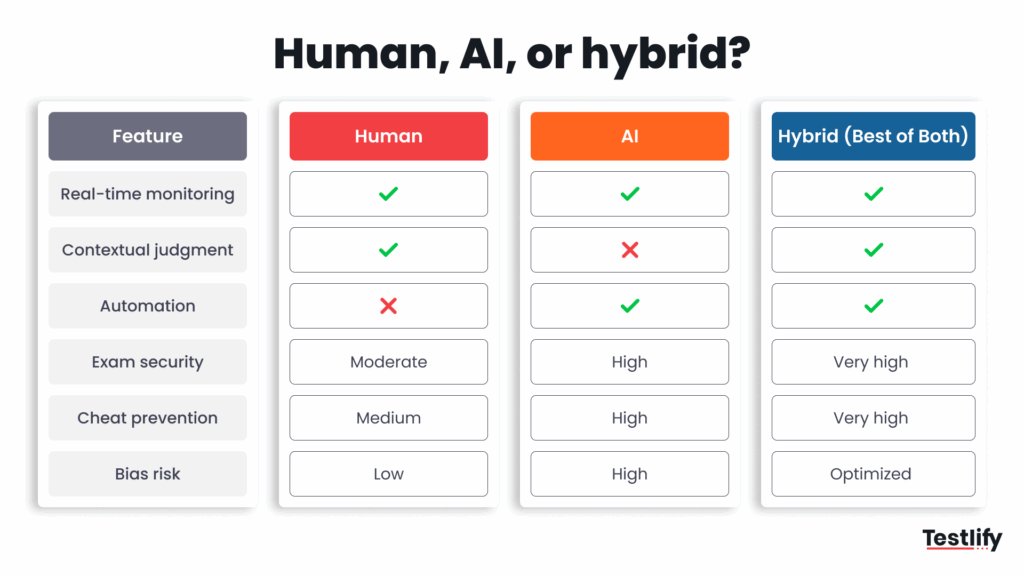
Let’s understand why hybrid proctoring stands out as a straightforward solution to make online exams secure and fair.
Benefits | How AI Helps | How Human Proctors Help | Result |
|---|---|---|---|
Real-Time Monitoring | AI proctors can instantly detect issues such as unusual eye movement or multiple faces. | Humans quickly check and verify these AI-flagged alerts. | Immediate and accurate response. |
Reduced False Alarms | AI flags potential issues, but sometimes makes mistakes. | Human judgment identifies what is a real issue and what is not. | Fair and stress-free test experience. |
Improved Exam Integrity | AI constantly monitors test takers in real time, making cheating difficult. | Humans handle complex situations, confirming genuine cases of cheating. | Stronger exam security and trust. |
Scalability | AI easily scales up, monitoring thousands of exams simultaneously. | Humans efficiently review flagged alerts, handling only critical cases. | Large-scale assessments with accuracy. |
Better Candidate Experience | AI operates discreetly, without disrupting the test-taking process. | Humans ensure alerts don’t falsely accuse honest candidates. | Candidates feel respected and less anxious. |
Learning and Improvement | AI continuously learns through machine learning, becoming smarter over time. | Human feedback helps AI refine its accuracy. | Continuous improvement in reliability. |
How hybrid proctoring works: Step by step
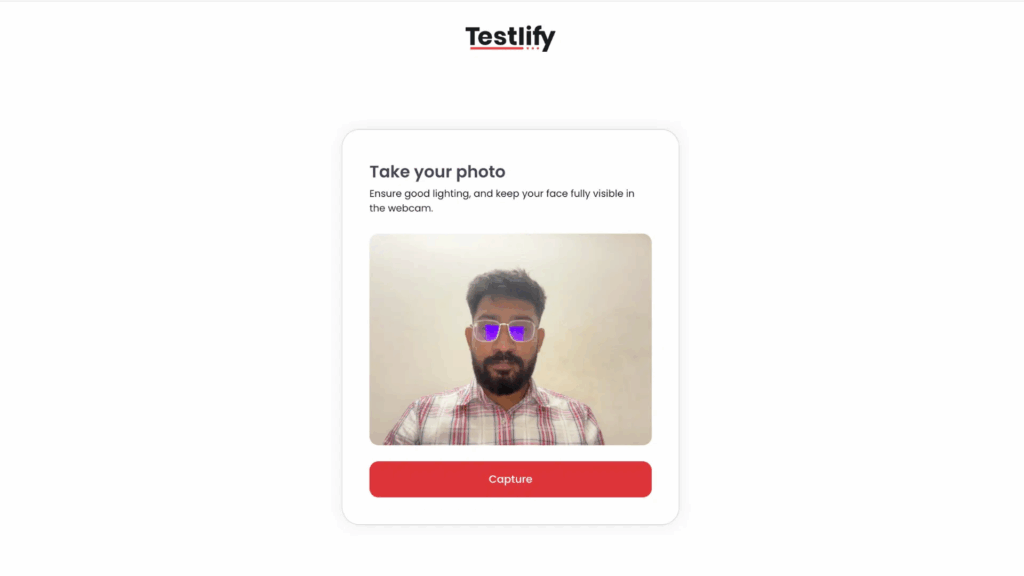
Hybrid proctoring starts the moment a candidate signs in to an online exam. First, identity is confirmed. Testlify uses facial recognition to authenticate the test taker. This early check stops impersonation and sets a solid baseline for exam integrity.
Once the test begins, AI proctoring systems quietly take over the heavy watch. They monitor test takers in real-time, tracking background voices, extra faces, sudden tab changes, and copy-paste attempts.
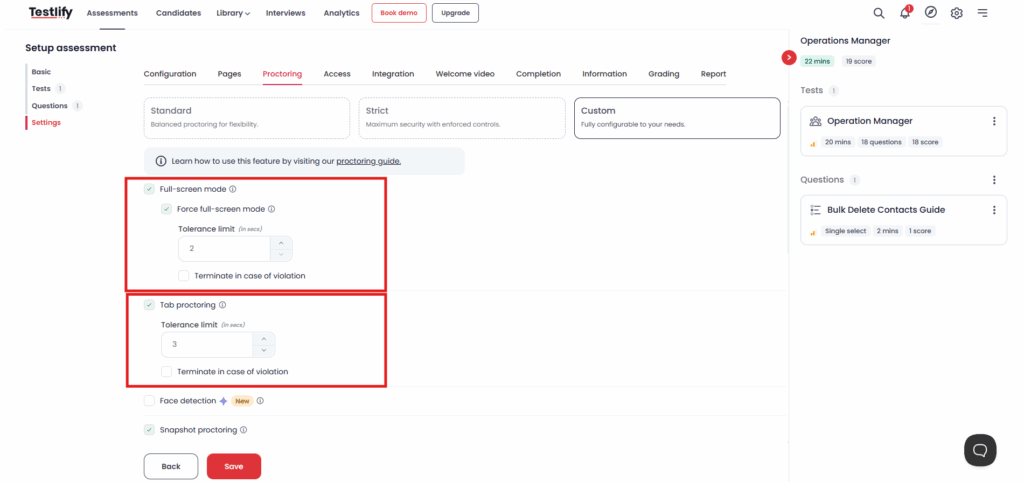
The tolerance limit can be set for these violations. Till the limitations exist, the candidates get a warning on their side if any violations occur.
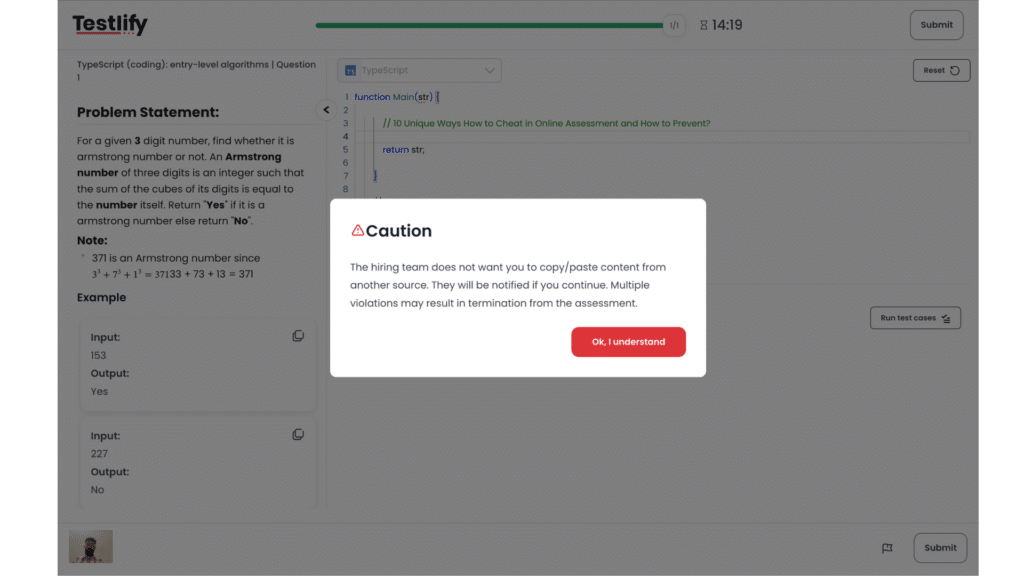
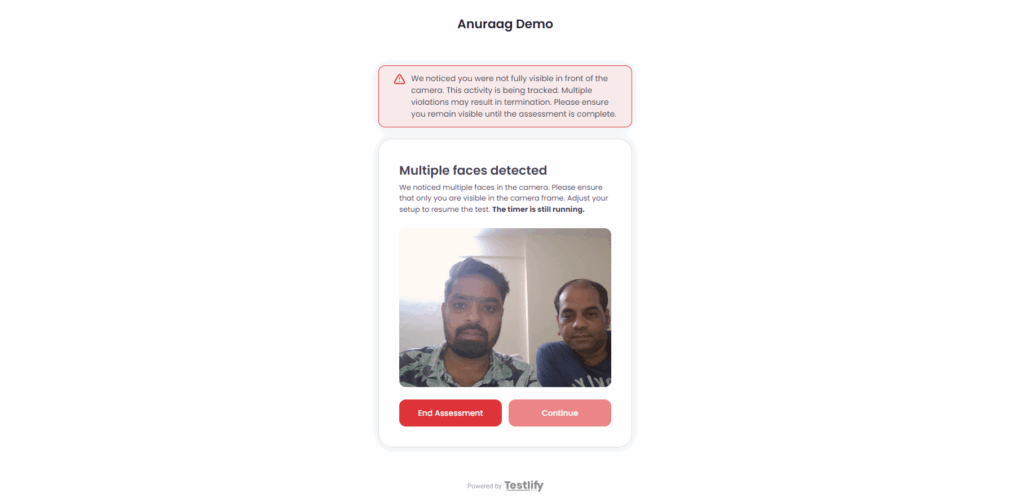
Human proctors come in the moment a flag appears. They review the short video clip or live feed to see if the alert truly signals academic dishonesty.
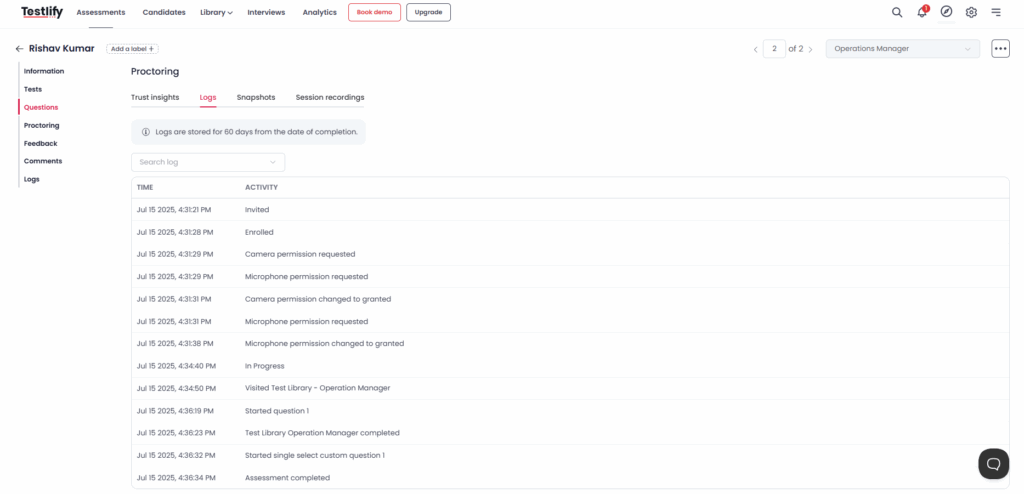
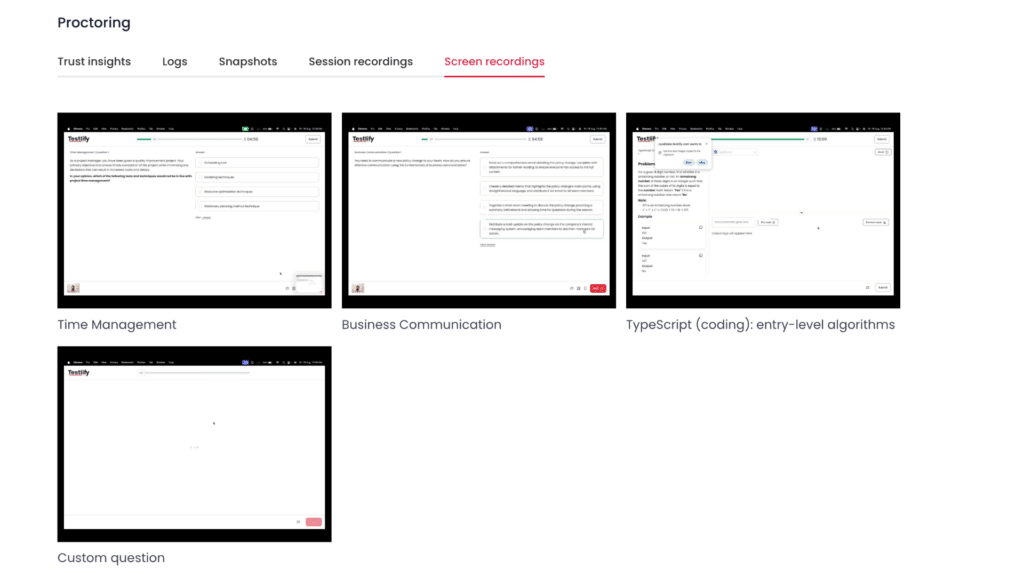
When cheating is evident, the proctor can pause or terminate the session immediately. If it’s a false alarm, the exam will continue without interruption.
After the exam finishes, flagged incidents are stored securely in accordance with GDPR compliance and deleted after a specified period of time.
See it in action: How Testlify does it right
Testlify conducts a simple identity check at the beginning of the exam. It involves taking a quick selfie for facial recognition. The identification process happens in seconds.
During the test, Testlify’s AI proctoring systems take rapid webcam snapshots. The system monitors test takers in real-time, scanning for extra faces, unusual eye movements, or sudden audio spikes. If something looks off, it is instantly flagged by AI.
That alert pops onto a dashboard where trained human proctors review the clip. They decide if the behaviour is harmless or trustworthy academic dishonesty. A single click by the live proctor can warn, pause, or end the session.
Testlify enables humans and AI to collaborate, consistently conducting safer and more equitable remote proctoring.
Final thoughts: Why is hybrid the future
The online test will always rise, and so will the possibilities of cheating. One-size solutions do not work anymore. Fully automated proctoring systems misjudge the context in which they operate, whereas human-proctoring teams cannot scale fast enough.
A hybrid solution, therefore, makes perfect sense. If secure online proctoring matters to you, the smart move is clear: combine AI with human judgment and step confidently into the future.
Ready to try it? Testlify’s hybrid proctoring services combine AI vigilance with human insight. Book a demo and see the difference.
Frequently asked questions (FAQs)

B2B SaaS Content Writer
Rishav Kumar is a B2B SaaS content writer with 4 years of experience. He loves crafting engaging content. Always exploring fresh ideas, he's passionate about helping businesses grow through impactful writing.
LinkedInRelated resources
View all
Proctoring
What is live proctoring? Secure online exam guide

Proctoring
What is remote proctoring? Ultimate guide
Proctoring
AI-powered proctoring: how it works and where it fits
Proctoring
What is automated proctoring? Explained simply
Proctoring
What is online proctoring? A simple guide
Proctoring
How to set up a proctored exam: A simple guide for secure online assessments
Get started.
Hire on proof, not resumes.
Run your first skills-based assessment free — no credit card required.