
What is automated proctoring? Explained simply
Learn what automated proctoring is, how it works, its benefits, and how it helps prevent cheating in online exams using AI and secure monitoring tools.
With an increasing number of colleges and businesses relying on remote proctoring, there is already a demand for safe, equitable, and scalable systems. Conventional techniques, such as live online invigilation, can be resource-intensive and biased against humans.
According to a 2023 report by Educause, nearly 66% of higher education institutions in North America have adopted some form of online or automated proctoring to support remote assessments.
Automated proctoring flags suspicious behavior and reduces the risk of cheating. In this guide, we’ll break down what automated proctoring actually means, how it works, and what you need to know before using or choosing a tool.
 ChatGPT
 Gemini
 Claude
 Grok
Grok Perplexity
What is automated proctoring?
Automated proctoring is a technology-driven method of monitoring online exams using AI tools instead of human invigilators.
Unlike traditional proctoring, which relies on a person to supervise the exam in real-time, automated systems perform the task. They monitor candidate behavior, scan the room, track screen activity, and raise alerts when suspicious actions occur.
This approach makes remote exam monitoring more scalable, cost-effective, and less prone to human error. With growing concerns about impersonation and exam fraud, automated proctoring offers a modern solution.

How does automated proctoring work in a step-by-step process?
AI proctoring is designed to mimic how a human invigilator would monitor a test. It uses smart technologies to maintain the fairness and integrity of proctored exams from start to finish. Below are the steps that explain how it usually works.
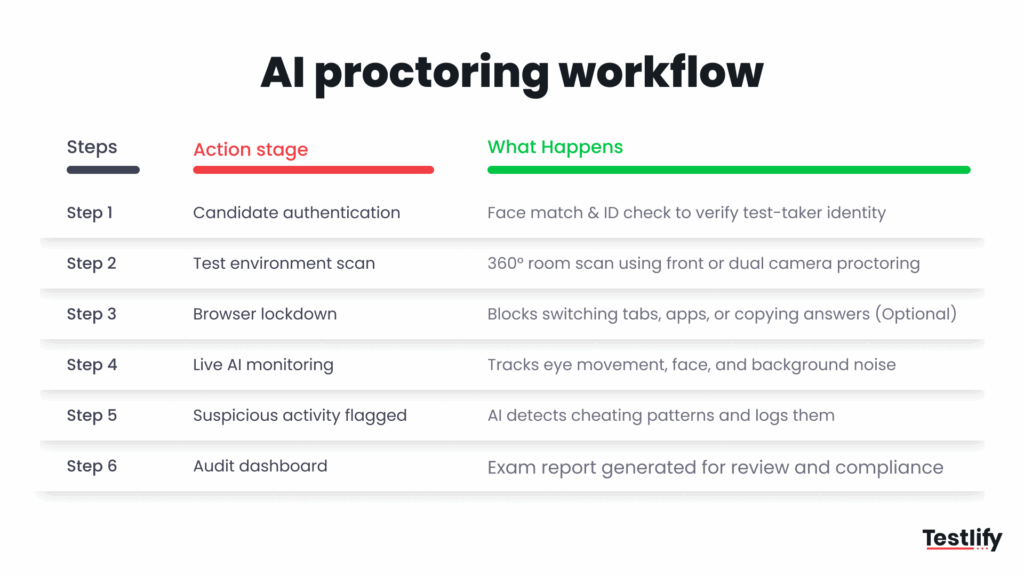
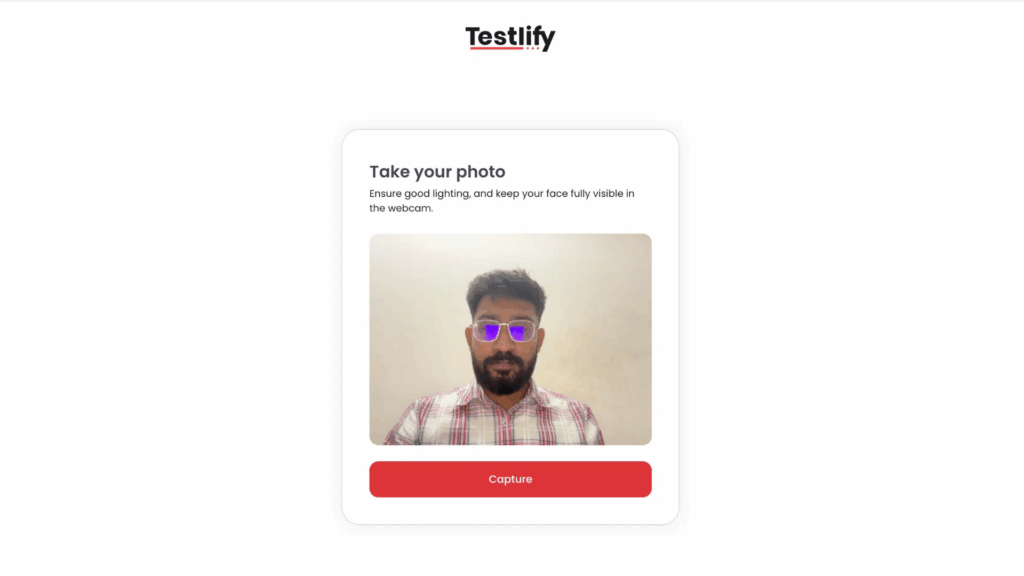
Step 1; Candidate authentication
Before the exam begins, the system verifies the identity of the test-taker. This can involve facial recognition and ID capture. It prevents impersonation from the very beginning.
Step 2: Test environment setup
The platform may ask the candidate to perform a room scan using their webcam. AI assessment platforms like Testlify support a dual-camera proctoring feature for better visibility.
Here, the candidate needs to set up two cameras. The primary camera will be the webcam, which covers the candidate and their background. On the other hand, the candidate can place another device behind them to provide a view of the desk and their front-facing view.
Step 3: Browser lockdown activation
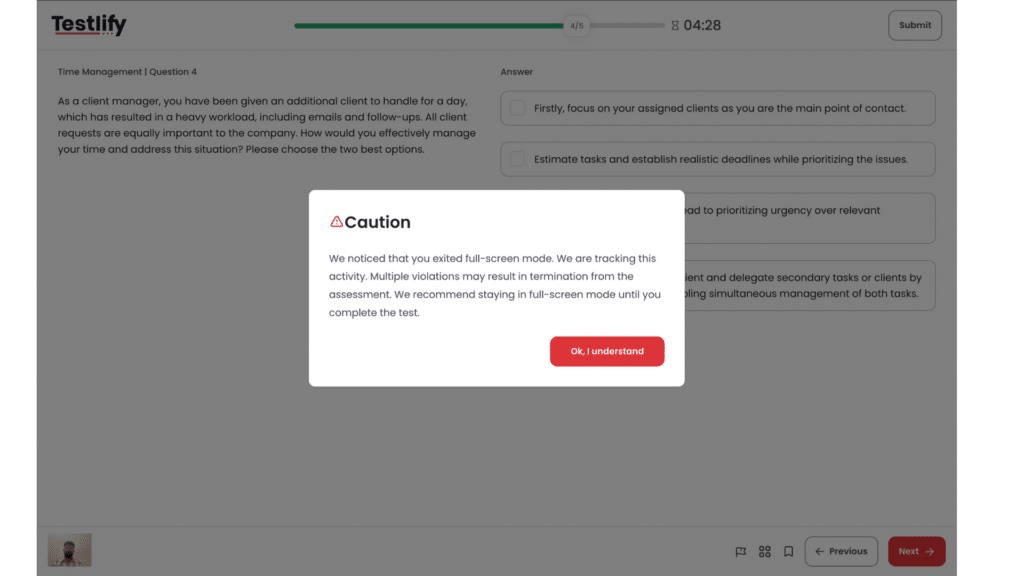
Once the exam begins, browser lockdown prevents the test-taker from opening new tabs or accessing other resources. This adds a critical layer of security, especially in unsupervised environments, but it’s an optional feature.
Step 4: Live remote exam monitoring (AI-based)
As the test progresses, AI algorithms monitor for suspicious behavior. Tools like facial recognition can flag if someone else enters the room or if the test-taker is frequently distracted or out of the frame.
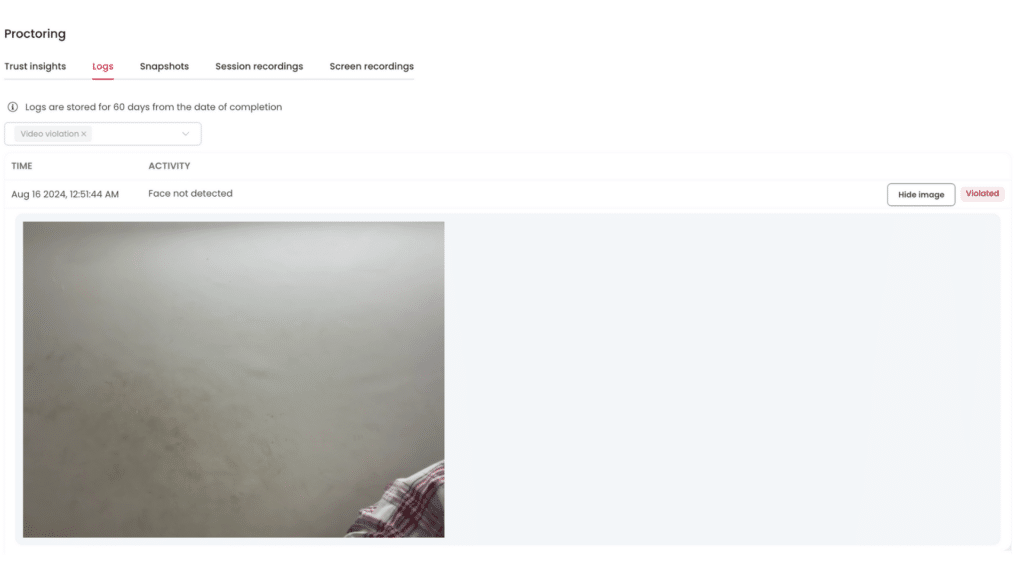
Step 5: Real-time flagging and recording
Suppose anything unusual is detected, like frequent mouse-outs, multiple tab switches, full-screen exits, or background voices. In that case, Testlify automatically flags the event and logs it in a detailed audit dashboard.
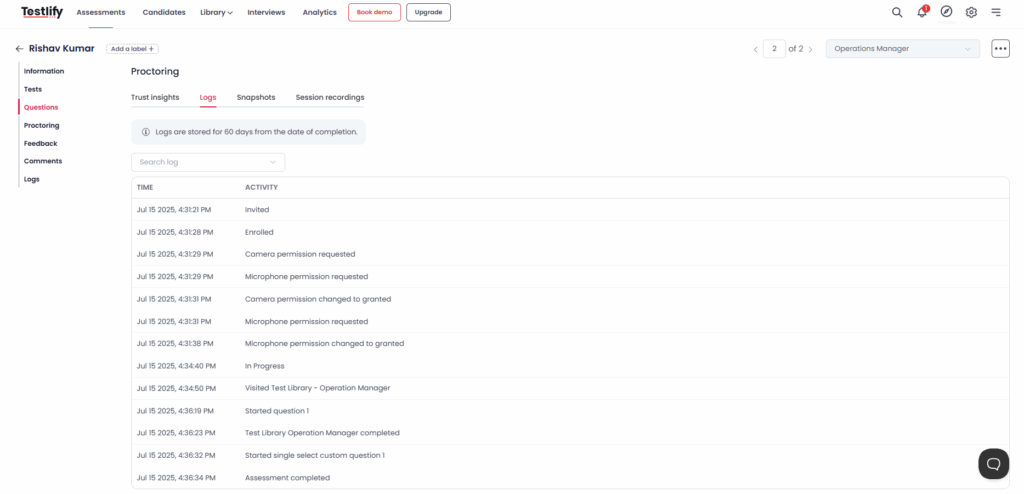
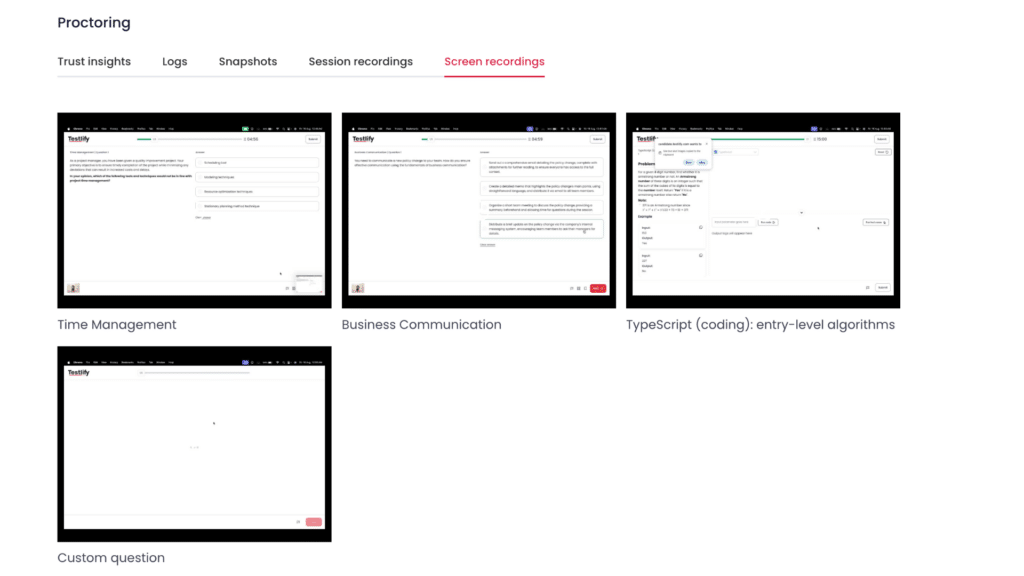
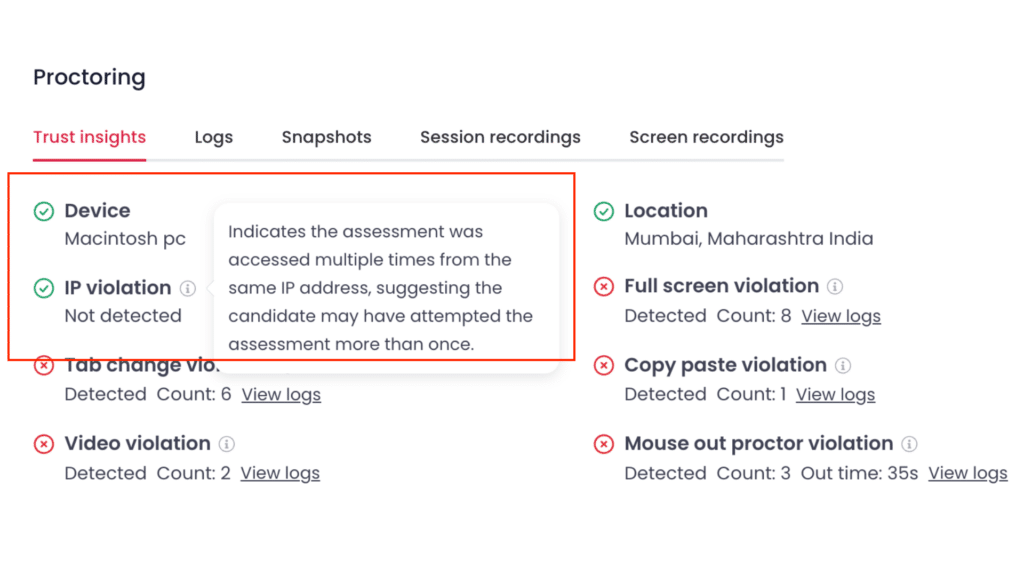
Step 6: Post-exam review and compliance
After the test, institutions receive a detailed report on their dashboard, which displays all flagged events, recordings, and environmental checks. This supports compliance with privacy and education laws, such as the GDPR.
What technologies power automated proctoring?
Automated proctoring relies on a combination of AI tools and intelligent monitoring features to simulate the role of a human invigilator. These technologies work together to detect suspicious behavior and prevent cheating.
Below are the core technologies that make it possible:
Tech | Typical behaviours it flags |
|---|---|
Facial recognition | Impersonation, a second face entering the frame |
Eye-movement tracking | Frequent glances off-screen, reading hidden notes |
Browser lockdown | Tab-switching, screen-sharing, and opening search engines |
Room scan/dual-camera proctoring | Hidden phones, notes on walls, and an extra monitor |
Audio monitoring | Someone whispering answers, collaboration via call |
AI algorithms | Pattern anomalies, multi-signal cheating attempts, generative-AI cheating |
Audit dashboard | Consolidates every alert with a single click for review |
What are the benefits of automated proctoring?
Automated proctoring offers a secure solution for institutions as exams move from traditional classrooms to online platforms. Here are its main benefits:
1. Scalable remote exam monitoring
Whether you’re testing 10 candidates or 10,000, automated proctoring eliminates the need to hire a large number of human invigilators.
Automated proctoring works 24/7 across time zones, making it ideal for universities, global certifications, and remote hiring assessments.
2. Stronger cheating detection
AI-powered proctoring is faster and more consistent than manual review. It catches unusual behaviors often within seconds.
3. Reduced human bias
Unlike traditional proctored exams, AI proctoring ensures fairness by applying the same rules to everyone. With sound bias mitigation it helps eliminate the inconsistent judgments and unfair accusations that can sometimes arise from human invigilators.
4. Real-time alerts
Institutions don’t need to constantly monitor everything. Automated proctoring flags suspicious activity in real-time, saving timestamps for easy review later. The dashboard facilitates quicker and simpler post-exam analysis, making it ideal for documenting audits or disputes.
5. Greater accessibility
Learners who are unable to travel to a testing location can access automated proctoring because AI proctoring helps you operate globally.
Additionally, this supports individuals in remote areas, working professionals, and those with limited mobility, all without sacrificing the caliber of the exam.
6. Lower operational costs
Institutions and businesses save a lot of money by eliminating the need for staffing, scheduling, and physical infrastructure.
One case study found that in-person exams cost around £270 (US$324) per person, covering venue, staff, security, and logistics. An AI proctoring tool could cut that cost by up to 80%.
What are the limitations or concerns of automated proctoring?
Although automated proctoring has many advantages, it also has drawbacks. It must be implemented carefully to prevent technical problems, user discomfort, or ethical issues, just like any other AI-driven system.
The main restrictions and issues to be mindful of are listed below:
1. False positives and over-flagging
AI systems aren’t perfect. Sometimes, harmless behaviors, like adjusting your seat or looking around, can trigger flags. These false positives can cause stress for candidates and require additional review time for administrators.
2. Bandwidth and device issues
Hardware compatibility and a steady internet connection are prerequisites for automated proctoring. Remote exam monitoring can be unreliable or discriminatory in areas with poor connectivity, particularly for students who lack modern technology or a quiet space.
3. Algorithmic bias
Some AI models have struggled with accurate facial recognition for individuals with darker skin tones or in poor lighting. If not properly trained, this can lead to unfair flagging or exam interruptions, potentially eroding trust in the system.
Testlify, however, has an edge in this regard. Its AI model is specifically trained to handle these situations with ease.
4. Limited context understanding
Unlike human invigilators, AI doesn’t understand intent. It may flag a student glancing away to think or reacting to an unavoidable noise as suspicious.
Without a hybrid model that combines automation with human review, these limitations can result in unnecessary disputes.
Despite these concerns, most can be addressed through thoughtful platform selection.
Explore More: A complete guide to human proctoring vs AI proctoring.
Who should use automated proctoring?
Universities are no longer the only places using automated proctoring. It can be used by any organization that administers remote tests, including EdTech platforms, certification bodies, colleges, and businesses.
Organization type | Why it’s useful | Common use cases |
|---|---|---|
Colleges & Universities | Secure online exams for large student groups | Semester exams, entrance tests, and online degree assessments |
Certification Bodies | Prevent impersonation and maintain exam integrity at scale | IT, finance, HR certifications; industry-standard credentialing |
Corporates & Enterprises | Assess job candidates and upskill employees remotely | Pre-hiring assessments, L&D evaluations, and compliance testing |
EdTech Platforms | Deliver verified learning outcomes to global users | Course-end exams, skill badge tests, certificate-issuing programs |
How to choose the right proctoring tool?
Selecting the best automated proctoring solution can be overwhelming due to the abundance of available tools. It all boils down to trust, though. Your team needs a tool that is safe, accurate, equitable to candidates, and simple to use.
Here’s what to look for:
- Strong cheating detection capabilities
- Privacy and compliance readiness
- Real-time monitoring with smart alerts
- Customizability and flexibility
- Seamless integration with ATS & LMS
Why does Testlify stand out?
Testlify offers educators and recruiters a comprehensive evaluation solution by integrating automated proctoring with skill assessments.
It helps you maintain test integrity without complicating the process with features such as browser lockdown, dual-camera procotoring, and AI monitoring.
Testlify offers intelligent flagging, complies with international compliance standards, and was developed with privacy in mind. In short, pick a tool that supports fairness, efficiency, and peace of mind.
Final thoughts
A workable solution is automated proctoring, which uses AI technologies to safeguard the integrity of remote tests without the drawbacks of manual invigilation.
These technologies, which range from browser lockdown and audit dashboards to facial recognition and eye movement tracking, aid in detecting cheating, protecting data, and guaranteeing adherence to regulations such as GDPR, FERPA, and ISO 23988.
Whether you’re a university administering entrance exams, a business evaluating job applicants, or a platform offering certifications, choosing the right tool matters. That’s where solutions like Testlify can make a difference.
On a single platform, it provides integrated proctoring, skill evaluations, intelligent AI flagging, and infrastructure that is ready for compliance.
Frequently asked questions (FAQs)

B2B SaaS Content Writer
Rishav Kumar is a B2B SaaS content writer with 4 years of experience. He loves crafting engaging content. Always exploring fresh ideas, he's passionate about helping businesses grow through impactful writing.
LinkedInRelated resources
View all
Proctoring
What is online proctoring? A simple guide
Proctoring
How to set up a proctored exam: A simple guide for secure online assessments
Proctoring
Online proctoring services compared: top 5 tools vs Testlify

Proctoring
Lockdown browser: Features, benefits & limitations

Proctoring
AI proctoring compliance: GDPR & FERPA explained

Proctoring
How to build a proctored exam for high-stakes assessment
Get started.
Hire on proof, not resumes.
Run your first skills-based assessment free — no credit card required.