
AI Proctoring Solution: A 2026 Buyer Guide for Hiring Teams
Looking for the right AI proctoring solution. This guide breaks down what really matters, security, experience, and exam integrity.
In 2025, 88% of students said they had used generative AI for assessments, up from 53% a year earlier, according to the Higher Education Policy Institute’s student AI survey. Overall AI use hit 92% that year, up from 66% in 2024. The same shortcut now sits in front of every candidate you assess remotely.
That is the real cost of weak proctoring. A score you cannot trust moves the wrong person to the next round, and a bad hire is expensive to unwind. Yet most remote testing still runs wide open: of 119 UK universities surveyed, 78% still used online exams, and 68% proctored none of them, even though lockdowns ended back in 2021.
This guide shows you how to choose an AI proctoring solution that actually holds up in real hiring conditions, not just in a demo. You will get a clear feature checklist, a way to match strictness to the stakes, and a method for reviewing flagged sessions without punishing honest candidates.
 ChatGPT
 Gemini
 Claude
 Grok
Grok Perplexity
TL;DR – Key takeaways
- With most candidates comfortable using generative AI, your tool has to flag AI-assisted answering, not only wandering eyes, or the score means little.
- A real AI proctoring solution does four jobs: it verifies identity, secures the test environment, detects suspicious activity in real time, and hands your team reviewable evidence. Miss one and the chain breaks.
- Match strictness to the stakes. A short screening test does not need the same controls as a final, high-stakes assessment. Forcing maximum proctoring on every candidate adds friction without adding trust.
- A flag is a prompt to review, not a verdict. The best platforms give recordings, logs, and timestamps so a person decides, because not every alert means cheating and auto-rejection is unfair.
- Test it before you buy it. Run a real assessment in a trial and check whether the controls work on the devices your candidates actually use. A polished demo proves nothing.
- Testlify combines AI assistance detection, dual-camera proctoring, and 20+ advanced AI-powered proctoring features to ensure secure, cheat-resistant assessments without disrupting the candidate experience.

What is an AI proctoring solution?
An AI proctoring solution is software that monitors a remote assessment as it happens. It confirms the candidate is who they claim to be, watches the test environment for unauthorized help, flags unusual behavior in real time, and stores evidence a reviewer can check later. The aim is simple: make the results of remote assessments trustworthy enough to act on.
This sits inside the broader Testlify Assessment Integrity Framework, which protects the trustworthiness of results through six layers: identity assurance, environment control, behavior monitoring, AI-assistance detection, reviewable evidence, and configurable strictness, with the final judgment always kept human-led. Use it as the lens for everything below. A tool that covers only one or two layers will leak.
The need is not theoretical. One systematic review found 44.7% of students self-reported cheating on online exams. Hiring assessments face the same pressure, often with more on the line.
What should an AI proctoring solution do?
Good proctoring does more than point a webcam at someone. It should protect integrity across the whole session: confirm identity, lock down the environment, catch suspicious activity while the test is live, and give your team enough context to judge a flagged session fairly. If a tool cannot do these four basics well, it will struggle the moment real candidates start gaming it.
What it should do | Why it matters for hiring |
|---|---|
Verify identity | Confirms the person who registered is the person taking the test, not a stand-in. |
Secure the environment | Limits tab switching, copy-paste, and outside tools that quietly inflate scores. |
Detect activity in real time | Flags a second voice, a new face, or AI-assisted answering as it happens. |
Support fair review | Gives recordings, logs, and timestamps so a human makes the final call. |
What are the main types of online proctoring?
Not every assessment needs the same level of control. Most setups fall into four models, and the right one depends on exam stakes, review capacity, budget, and how much friction your candidates will tolerate.
AI (automated) proctoring
AI proctoring runs entirely on software: the system watches the webcam feed, browser activity, and audio in real time and flags suspicious behavior without a human watching live. It is the only model that scales to thousands of candidates at once, since cost per session stays flat whether ten people test or ten thousand.
The tradeoff is that flags still need a person to review them afterward, so this model works best paired with a fast review workflow rather than left to run unchecked. High-volume screening rounds are where it earns its keep.
Live proctoring
A trained human proctor watches the session as it happens over video and can intervene the moment something looks wrong, from pausing the test to ending it outright. That real-time judgment catches ambiguous situations an algorithm would either miss or over-flag.
The cost of that judgment is capacity, since one proctor can realistically watch only a handful of sessions at a time, which makes this model expensive and slow at volume. Reserve it for small, high-stakes batches such as final-round technical exams or licensing tests.
Record-and-review proctoring
The session records in full, and a reviewer watches it back after the candidate finishes, rather than during the test itself. This removes the need for live staffing while still giving a reviewer the complete picture instead of just an automated summary.
The gap is speed, since nothing gets caught until someone actually watches the footage, which delays a decision if a role needs to move fast. It suits teams with review capacity but no budget for live monitoring or dedicated proctoring staff.
Hybrid proctoring
AI monitors every session in real time, and a person reviews the flags it raises or joins live only when the stakes call for it. This is the model most hiring teams land on, since it keeps the cost profile of automated proctoring while still routing judgment calls to a human.
Getting it right means tuning what counts as a flag worth a human look, because too sensitive a threshold buries reviewers and too loose a one lets real issues through. For a deeper breakdown of all four models, see the types of online exam proctoring.
Key takeaway: The model is not a one-time choice for the whole company. Match it to the assessment: automated for volume screening, hybrid for most everyday hiring, and live or record-and-review reserved for the rounds where a wrong call is expensive.
Which features matter most in AI proctoring?
A modern AI proctoring solution should help you verify identity, control the test environment, catch suspicious activity in real time, and review flagged sessions with evidence. That is the line between basic monitoring and a system that genuinely protects a result. Here is what each layer looks like in practice.
Identity verification and candidate presence
The first job is making sure the right person is taking the test, and that they stay in the seat. Look for photo ID verification, face detection, and alerts when a face is missing or more than one appears. These checks cut impersonation risk before the assessment even starts.
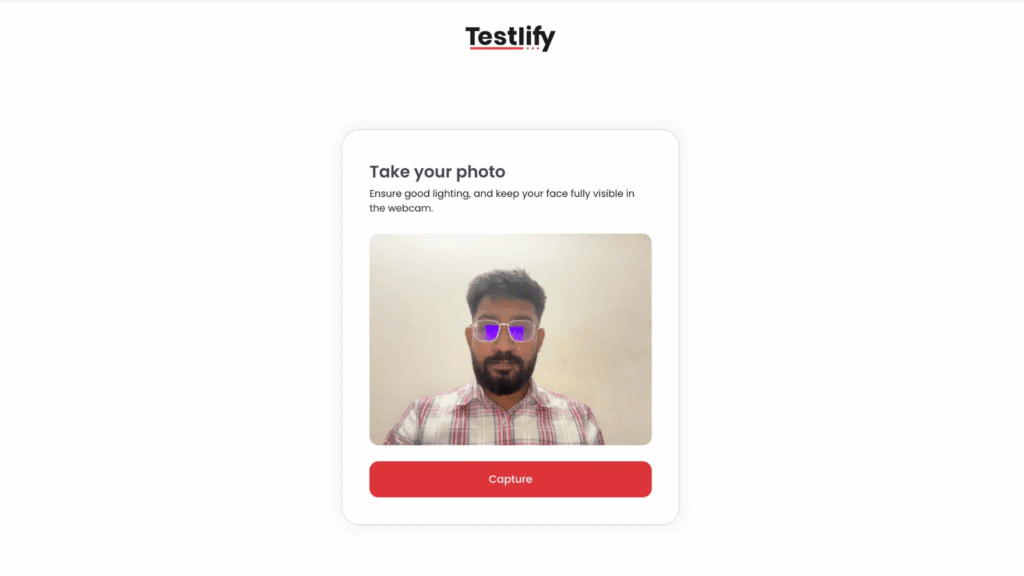
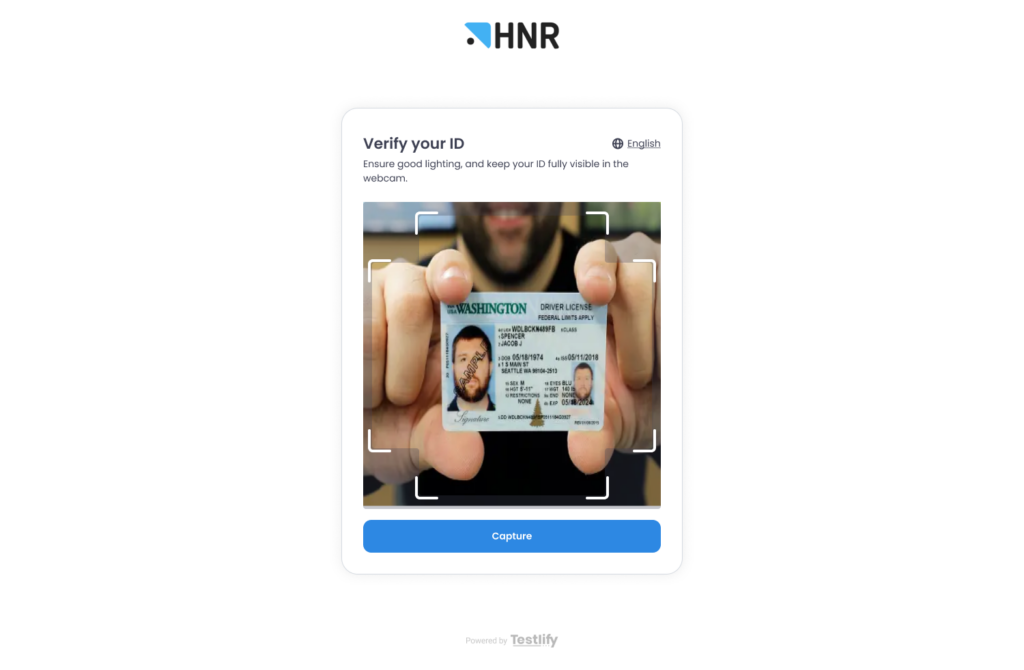
In Testlify, identity is supported through face detection, photo-based verification, and proctoring flags that give reviewers more context on unusual behavior.
Test environment controls
Identity checks alone are not enough. A candidate can still switch tabs, copy a question into another tool, or slip outside the assessment window. Environment controls close those gaps. Look for lockdown browser settings, full-screen enforcement, tab-switch monitoring, copy-paste tracking, and a quick system check that confirms the camera, microphone, and browser work before the test starts.
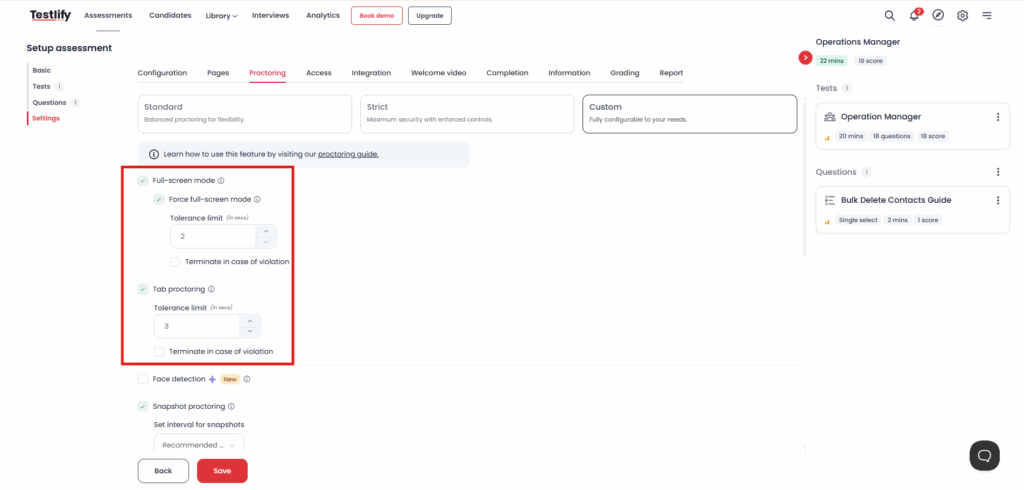
In Testlify, these live in the proctoring settings: full-screen mode, tab proctoring, copy-paste tracking, mouse-out tracking, and system compatibility checks.
Real-time suspicious activity detection
Proctoring also has to notice behavior that signals outside help: an unexpected voice, a sudden screen change, eyes drifting off-screen, or AI-assisted answering. The point is speed. A strong platform flags these moments live so your team can act or review them later, instead of finding out after the offer goes out.
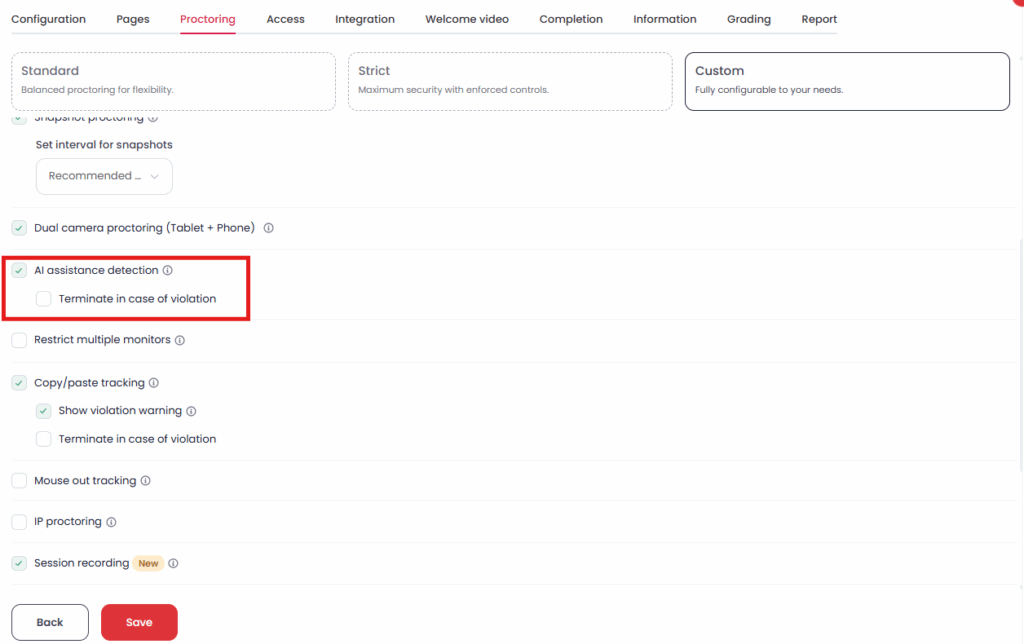
In Testlify, this includes AI-assistance detection, talking prohibition, a live environment check, and dual-camera support that builds a fuller, 360-degree view of the room without leaning only on a human proctor.
Review evidence for fair decisions
Flags on their own are noise. Your team needs evidence it can actually look at, because not every alert means cheating. A modern solution should capture session recordings, snapshots, question-level activity logs, timestamps, and plain violation summaries. Sometimes a reviewer needs the full picture before deciding either way.
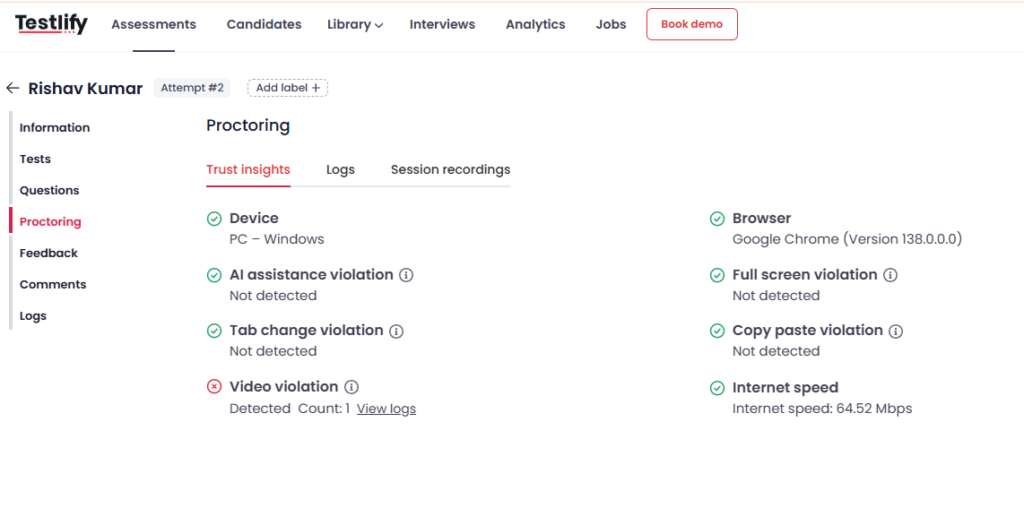
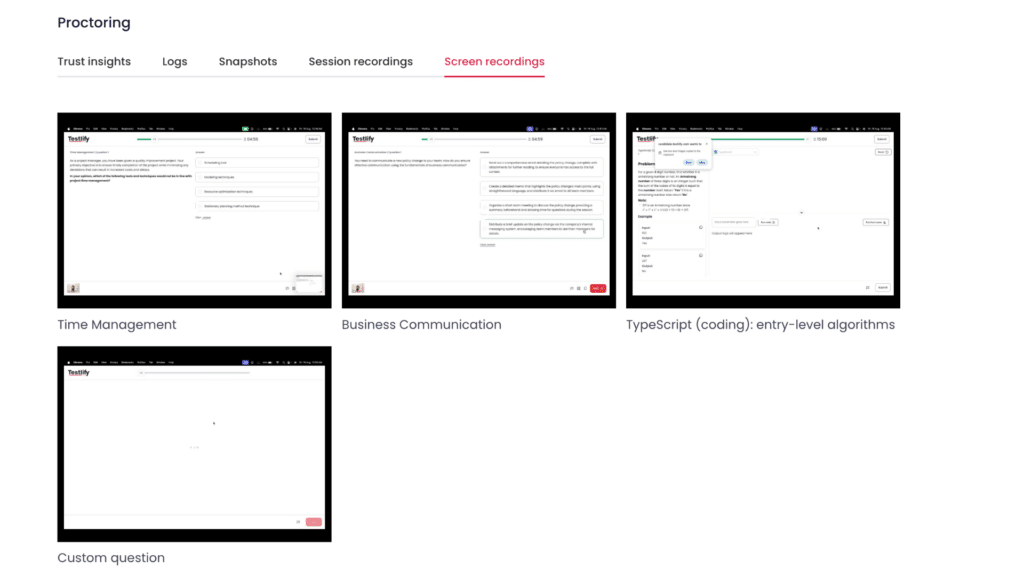
Testlify supports this with session recording, question-level logs, snapshot proctoring, and proctoring flags, so teams move faster without trading away fairness.
Flexible controls for the stakes
A short screening test and a final-round assessment do not deserve the same rules. Light monitoring suits one; stricter limits and stronger evidence suit the other. Look for a platform that lets you decide when to warn, when to flag, and when to end a session based on the test you are running, instead of forcing one setup on everyone.
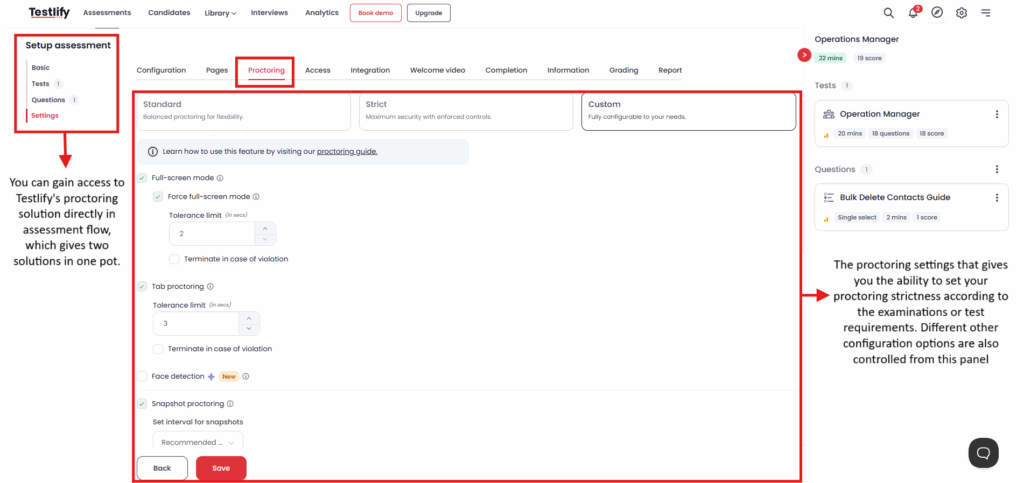
In Testlify, you can configure violation limits, snapshot intervals, and individual monitoring controls to fit the assessment rather than the other way round.
Pro tip: before you roll a proctor out widely, run one real assessment through it on the exact devices your candidates use, including older laptops and mobiles. Most failures are not detection misses, they are setup friction: a camera that will not start or a lockdown setting that blocks an honest candidate. Catch that in a trial, not on a finalist.
Benefits of AI proctoring
Getting the integrity layer right pays off well beyond stopping cheating in the moment. Six benefits show up consistently once a hiring team runs AI proctoring at scale.
Scales to high-volume hiring
Software does not run out of energy the way a live proctor does, so a hiring team can run one candidate or ten thousand through the same monitoring at the same cost per session. That makes AI proctoring the only practical option for high-volume screening rounds.
Reduces cost per assessment
Removing the need for a dedicated human proctor on every session cuts the per-candidate cost of maintaining test integrity. Teams that once reserved proctoring for final rounds only can now afford to apply it earlier in the funnel, where it catches problems before they reach a hiring manager.
Improves candidate trust in results
A visibly monitored, evidence-backed process reassures candidates who did the work honestly that the process will not let a cheating competitor slip past them into the next round. Industry research on remote proctoring found 87% of test takers rated the experience positively, which cuts against the assumption that AI monitoring damages candidate experience.
Speeds up review and decision time
Automated flags with timestamps and logs let a reviewer jump straight to the moment that mattered instead of watching an entire recording end to end. That turns a review that once took twenty minutes per flagged session into one that takes two or three.
Strengthens legal defensibility
A rejection backed by a timestamped recording, an activity log, and a clear violation summary holds up far better under a candidate dispute or an audit than a recruiter’s unsupported judgment call. That evidence trail is what turns a proctoring flag into a decision a hiring team can defend after the fact, not just act on in the moment.
Works across time zones and locations
Automated monitoring runs the same way at 2 a.m. in one time zone as it does at 2 p.m. in another, with no need to staff a live proctor around a candidate’s schedule. That makes it the only integrity model that fits a distributed hiring pipeline without forcing every candidate into a narrow testing window.
Key takeaway: The business case for AI proctoring is not just fewer cheaters caught. It is a testing process that scales, costs less per candidate, and produces evidence a hiring team can stand behind later.
Challenges of AI proctoring and how to overcome them
AI proctoring is not a set-and-forget layer. Five challenges show up often enough that a hiring team should plan for them before rollout, not after a candidate complaint.
False positive flags and candidate anxiety
An overly sensitive system flags normal behavior, such as glancing away to think or a sibling walking through the room, as suspicious. Overcome it by treating every flag as a prompt for human review rather than an automatic penalty, and by calibrating sensitivity thresholds against real test sessions before a wide rollout.
Privacy and data protection concerns
Recording a candidate’s webcam, screen, and browsing activity raises real data protection questions, and workplace surveillance research shows 56% of employees report stress or anxiety tied to being monitored. Overcome it by disclosing exactly what is recorded, how long it is retained, and who can access it, before the candidate ever sits the test.
Device and connectivity inconsistency
A proctoring tool that works perfectly on a new laptop can fail on an older machine, a low-bandwidth connection, or a mobile browser, locking out a qualified candidate before the test even starts. Overcome it by running a system check before the assessment begins and by testing the tool on the actual range of devices your candidate pool uses, not just a demo machine.
Accessibility for candidates with disabilities
Standard proctoring rules, such as constant eye-on-screen requirements or strict time limits, can penalize candidates with visual impairments, motor conditions, or attention-related disabilities for behavior that has nothing to do with dishonesty. Overcome it by building an accommodation path into the workflow before launch, not as an exception handled case by case after a complaint.
Detection gaps against evolving AI tools
Generative AI tools change faster than any single detection rule, so a system tuned to catch last year’s shortcuts can miss this year’s. Overcome it by layering identity checks, browser lockdown, and behavior monitoring together, since no single method catches everything on its own, and by updating detection rules on a real cadence instead of a one-time setup.
Challenge | Impact on hiring | How to overcome |
|---|---|---|
False positive flags | Honest candidates get flagged, damaging trust in the process | Human review on every flag, calibrated sensitivity |
Privacy concerns | Candidates disengage or drop out over surveillance worries | Upfront disclosure of recording, retention, and access |
Device inconsistency | Qualified candidates locked out by tech, not ability | Pre-test system check, real-device trial before rollout |
Accessibility gaps | Candidates with disabilities penalized for non-dishonest behavior | Built-in accommodation path, not case-by-case exceptions |
Detection gaps | New AI shortcuts slip past outdated detection rules | Layered detection methods, regular rule updates |
Key takeaway: None of these challenges are a reason to skip proctoring. They are a checklist for rolling it out responsibly, and skipping any one of them is what turns a good tool into a candidate-experience or compliance problem.
How do you choose the right AI proctor?
Run any shortlist through this checklist before you book a demo or start a trial, since the goal is not the longest feature list. It is a tool that covers all six integrity layers and still feels manageable for your team and your candidates.
Identity and environment coverage
Confirm the vendor covers both halves of the front door: who is taking the test, and where they are taking it. Ask for photo ID verification and face detection with alerts for no face or multiple faces, plus full-screen enforcement, tab-switch monitoring, and copy-paste tracking on the environment side.
A vendor that covers identity well but skips environment controls, or the reverse, leaves half the integrity chain open. Ask specifically how each half handles a candidate who has no working webcam or an outdated browser, since that is where thin coverage shows up first.
Real-time detection and evidence quality
Check that suspicious activity, an outside voice, AI-assisted answering, or a second face gets flagged while the test is live, not discovered only after the candidate has already moved to the next round. Then check what evidence backs that flag: a usable tool hands over recordings, snapshots, question-level logs, and a plain summary, not just a numeric risk score.
Ask to see an actual flagged session during the demo, not a slide describing the feature. A vendor that cannot show you real evidence output is telling you something about what your reviewers will actually get.
Configurable strictness by stakes
Confirm you can set different rules for different assessments: lighter monitoring for an early screening round, stricter limits and mandatory reviews for a final-round or licensing exam. A tool that forces one setting on every candidate either annoys low-stakes test takers with excess friction or under-protects the assessments that actually need scrutiny.
Device compatibility and candidate experience
Confirm the tool works on the actual mix of desktop, laptop, and mobile devices your candidate pool uses, not just the machine in the vendor’s demo. Then check the experience from the candidate’s side: how long the identity check takes, what happens when a system check fails, and whether instructions are clear enough that an honest candidate does not trip a flag by accident.
Privacy and compliance fit
Ask exactly how long recordings and logs are retained, who inside your organization can access them, and which data protection standards the vendor follows for the regions you hire in. A vendor that cannot answer these clearly in a sales call will not get clearer once you are a customer.
Key takeaway: A feature checklist only tells you what a tool can do in theory. Testing it against your actual devices, your actual stakes, and your actual compliance requirements is what tells you whether it will hold up in a real hiring pipeline.
Why does Testlify fit hiring teams?
Hiring teams need more than a basic online proctor bolted onto a test. They need an integrity layer built into the assessment itself, one that protects results without making honest candidates jump through hoops.
Testlify brings all four integrity jobs into one workflow instead of stitching together separate tools for identity, environment, detection, and evidence.
- Identity: Face detection and photo-based verification confirm who is actually taking the test.
- Environment: Full-screen enforcement, tab and copy-paste monitoring lock down the test window.
- Detection: AI-assisted detection, live environment checks, and dual-camera support catch suspicious activity as it happens.
- Evidence: session recording and question-level logs give reviewers the context to judge a flagged session fairly.
Every one of these settings adjusts by role or assessment, so a quick screening test and a final-round exam are never held to the same rules. AI surfaces the evidence and the flags, and your team still makes the final call on every candidate.
Want a quick look at how Testlify handles proctoring?
Choose AI proctoring with confidence
Start with one decision, not a feature spreadsheet: pick your highest-stakes assessment and ask whether your current setup can verify identity, lock the environment, catch AI-assisted answering, and hand you evidence to review. If any answer is shaky, that is the gap to close first. Then run a trial assessment on real candidate devices and watch how the flags read, before you standardize on a tool.
Want to see it on your own assessment? Book a demo and walk through how Testlify protects integrity at hiring scale, while keeping the final decision with your team.
Frequently asked questions (FAQs)

B2B SaaS Content Writer
Rishav Kumar is a B2B SaaS content writer with 4 years of experience. He loves crafting engaging content. Always exploring fresh ideas, he's passionate about helping businesses grow through impactful writing.
LinkedInRelated resources
View all
Proctoring
What is proctoring-as-a-service, and how does it work
Proctoring
Types of online exam proctoring: Which one’s right for you?
Proctoring
Human proctors with AI alerts: Best of both sides?
Proctoring
What is live proctoring? Secure online exam guide
Proctoring
What is remote proctoring? Ultimate guide
Proctoring
AI-powered proctoring: how it works and where it fits
Get started.
Hire on proof, not resumes.
Run your first skills-based assessment free — no credit card required.