
What is online proctoring? A simple guide
Online proctoring helps teams run secure remote assessments with the right mix of identity checks, monitoring, and fair review.
Online proctoring is the process of supervising an assessment remotely. It helps verify identity, watch for rule violations, and keep the result fair when the test is taken remotely. Depending on the setup, it can include ID checks, browser controls, webcam monitoring, and session review.
As more assessments move online, protecting exam integrity has become harder. The Journal of Academic Ethics indicates that 44.7% of surveyed students self-reported cheating in online exams.
Organizations now have to think about risks like impersonation, AI-assisted answering, hidden devices, remote access tools, and other workarounds that can affect fairness if the testing environment is not controlled properly.
This guide will help you make sense of that. We will break down how online proctoring works, the main models used today, the risks it is designed to reduce, the features that matter most, and the trade-offs recruiting teams should think about before choosing the right setup.
 ChatGPT
 Gemini
 Claude
 Grok
Grok Perplexity
TL;DR
- Nearly 45% of students admit to cheating in online environments without controls.
- AI flags are data points, not proof. Humans must make the final decision.
- Excessive security can increase test anxiety and reduce the performance of honest candidates.
- Proctoring is one layer of a broader assessment design; it doesn’t eliminate cheating entirely but significantly raises the barrier to entry for misconduct.
- The right proctoring model depends on the stakes, candidate volume, and whether you need live intervention or post-exam review.
- Strong online proctoring combines identity checks, browser controls, visual monitoring, and audit logs to make remote assessments more credible and easier to review.

How does online proctoring work?
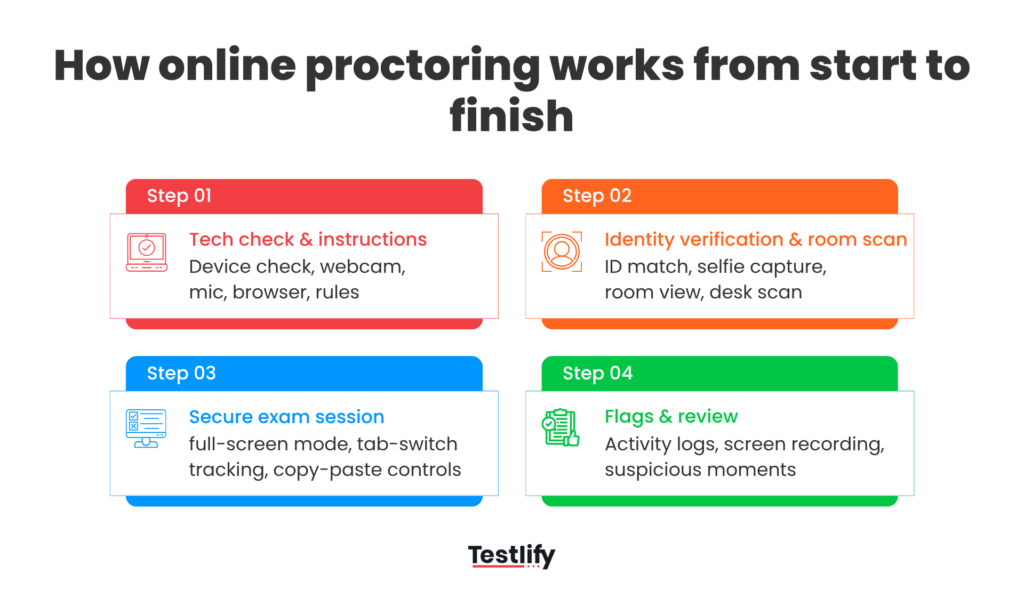
Online proctoring usually follows a simple flow. First, the system checks whether the candidate can take the exam properly. Then it verifies who they are, secures the test session, watches for suspicious activity during the exam, and finally saves the right evidence for review. Each step is meant to reduce uncertainty, so the final result is easier to trust.
Pre-exam tech checks and candidate instructions
The process starts before the first question appears. Most online proctoring platforms run a quick system check to confirm the candidate’s device, browser, webcam, microphone, and internet connection are working properly. This reduces avoidable issues once the exam begins.
This stage also sets the rules clearly. Candidates are usually told what is allowed, what is not, what permissions they must grant, and how the session will be monitored.
Identity verification and room scan
Once the candidate is ready, identity verification begins. This often includes a government ID check, a live photo or selfie match, and in some setups, biometric verification. The purpose is to make sure the person starting the test is the same person who was invited to take it.
Identity verification is important in remote hiring and other high-stakes assessments where impersonation is a real risk.
After identity checks, many platforms ask the candidate to show their surroundings. This can include a desk scan, a live environment check, or even a second camera angle in stricter setups. The aim is to catch obvious risks early, such as hidden notes, another device nearby, someone else in the room, or off-camera help waiting just outside the view.
Secure session controls during the exam
Once the exam starts, this is where lockdown browsers, full-screen rules, copy-paste restrictions, tab-switch tracking, and app blocking come in. These controls help stop common workarounds such as opening search engines, switching to messaging apps, screen sharing, or using remote access tools during the test.
Many modern systems also monitor behavior during the session. That can include webcam and screen recording, face and eye movement tracking, object detection for phones, and logs for actions like tab changes or unusual typing behavior.
In more advanced setups, the software can also look for signs of virtual machines, browser extensions, or other technical tricks used to cheat.
Flags, recordings, and post-exam review
Online proctoring does not always mean a human watches every second live. In many cases, the system records the session, flags suspicious moments, and creates an audit trail that reviewers can check later. That may include video clips, screen recordings, snapshots, timestamps, suspicion scores, and question-level activity logs showing how long someone spent on each part of the exam.
This matters because raw monitoring alone is not enough. Review is what turns data into a decision.
For example, if a candidate disconnects, reconnects, and submits a difficult answer almost instantly, the timeline gives reviewers useful context. Strong platforms make it easier to understand what happened, separate harmless behavior from real misconduct, and make a fair final call.
What are the main types of online proctoring?
In practice, most platforms use one of three models, or a mix of them. The real difference is, who is watching, when suspicious activity is handled, and how much scale the process can support.
Live remote proctoring
Live remote proctoring means a human proctor watches the session as the candidate takes the exam. The proctor may monitor through webcam, screen share, chat, or voice, and can step in immediately if something looks wrong.
That real-time intervention is what makes this model different. If a candidate keeps looking off-screen, leaves the frame, tries to use another device, or fails an environment check, the proctor can pause the test, ask for a fresh room scan, issue a warning, or end the session based on the rules in place.
This model is usually chosen for high-stakes exams where immediate action matters more than scale. It works well when the cost of a bad decision is high, such as certification exams, licensing tests, university entrance assessments, or tightly controlled internal evaluations.
Automated or AI-based proctoring
AI-powered proctoring or automated proctoring uses software to monitor the session instead of relying on a human to watch live from start to finish. The system can verify identity, enforce browser restrictions, track tab switches, record the screen and webcam feed, detect phones or extra faces, and flag unusual behavior for review.
This model is popular because it is easier to run at scale. A hiring team can assess many candidates across locations without needing a live proctor for every session. That makes it practical for volume hiring, campus drives, large applicant funnels, and distributed testing programs.
Its biggest strength is coverage and consistency. The system can watch for the same rule violations across every session, create logs automatically, and surface suspicious moments faster than a manual reviewer could from raw footage alone.
But automated proctoring still needs human judgment. A flag is not proof of cheating by itself. Looking away from the screen or reconnecting after a network issue may be harmless.
Record and review proctoring
Record and review proctoring sits between live monitoring and fully automated decisioning. The session is recorded, the system may still apply some checks or controls, but the actual review happens after the exam rather than during it.
This model is useful when organizations want evidence and auditability without the cost and complexity of live proctors. Reviewers can go back to flagged timestamps, watch the relevant clips, check activity logs, and decide whether the session looks clean.
For many teams, this is the most practical middle ground. It gives more flexibility than live proctoring and more context than basic automated alerts alone. It is especially useful when the exam does not require instant intervention, but still needs a fair review trail.
Hybrid proctoring
Hybrid proctoring combines automated monitoring with human review. The system watches the session and surfaces suspicious events, while a human reviewer or proctor steps in during or after the exam when judgment is required.
Hybrid proctoring is a good fit when you want stronger oversight than pure automation, but do not want every session fully watched from start to finish. It often suits higher-stakes remote exams with larger candidate volumes.
This model works only when the rules are clear. You need to decide what the system should flag, what a human should review, and what should count as a real violation. Without that, the process becomes inconsistent.
Which model fits which use case?
The right model depends on three things: how high the stakes are, how many people you need to assess, and whether you need to intervene during the session or review it later.
Proctoring model | Best fit for | Main strength |
|---|---|---|
Live remote proctoring | High-stakes, low-volume, tightly controlled exams | Immediate action and stronger human judgment during the test |
Automated or AI-based proctoring | High-volume hiring, remote assessments, distributed test programs | Scalable, consistent, and faster to run across many candidates |
Record and review proctoring | Mid-to-high stakes assessments where audit trails matter but live monitoring is not required | Good balance of flexibility, evidence, and reviewer context |
Hybrid setup | Teams that want scale without losing oversight | Balances efficiency with fairness |
Know More: Types of online exam proctoring
What is the difference between a proctoring type and a proctoring feature?
These two things are often treated as if they mean the same thing, but they do not. A proctoring type is the way an online exam is supervised. It tells you who is monitoring the test and when they act. A proctoring feature is a specific control used during that exam. It tells you what checks are in place to protect the testing session.
This difference matters because the same feature can be used across more than one type of proctoring.
For example, a live-proctored online exam may still include ID verification, an environment check, and browser controls. An AI-proctored exam may use many of those same features too. What changes is not the control itself, but the way the exam is monitored and reviewed.
That is why choosing the right online exam proctoring setup usually happens in two steps. First, decide the type based on exam stakes, scale, and how much human involvement you need. Then choose the features based on the rules of the exam, the testing environment, and the level of control required.
What kinds of risks is online proctoring designed to prevent?
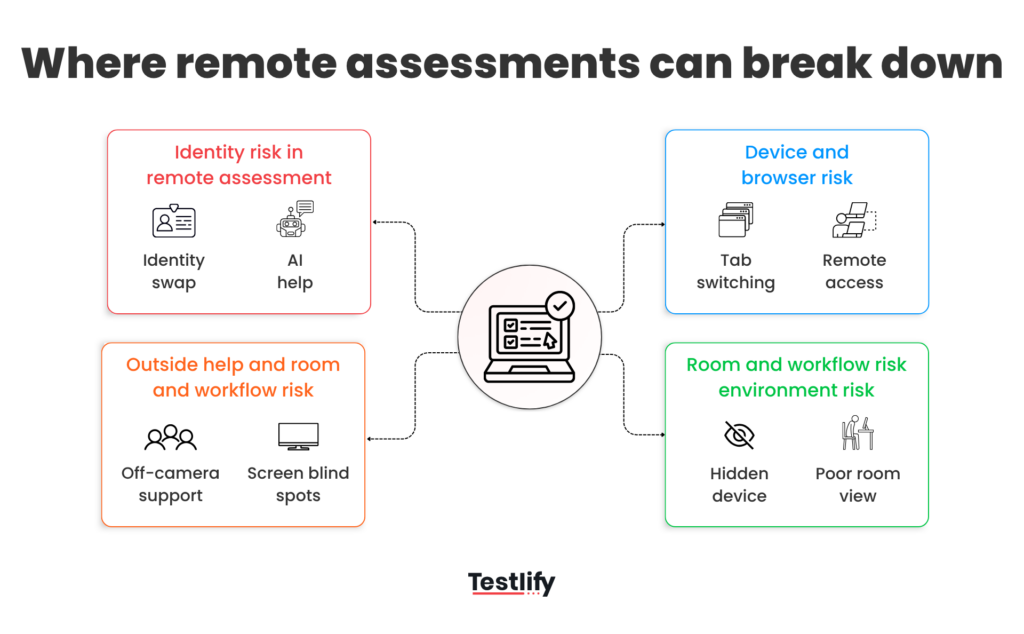
Online proctoring is not just about catching obvious cheating. The real job is to reduce the ways a remote test can be manipulated when no one is physically in the room. That includes identity fraud, AI-assisted answering, hidden devices, off-camera help, browser workarounds, and technical tricks that make a session look normal when it is not.
Impersonation and proxy test-taking
the wrong person takes the test. In remote hiring, certification, and other high-stakes assessments, a stand-in can completely distort the result. That is why many proctoring flows start with ID verification, face matching, and continuous webcam checks, not just a one-time login.
If the face on screen changes, another person enters the frame, or the session shows signs of swapping candidates, the platform can flag it for review. This is a core use case for online proctoring
Impersonation is not just a policy problem on paper. There are open online posts advertising “bypass” help and real-time support for proctored exams, which shows there is still an active market for impersonation and assisted testing. That is exactly why identity verification matters so much at the start of a session.
AI tools, search help, and unauthorized assistance
This is the risk that has changed the most. It is no longer just about someone opening Google in another tab. Candidates may try to use ChatGPT, browser-based AI helpers, hidden overlays, screen-reading tools, or external help from another person during the session.
Some assessment vendors now openly discuss the rise of AI-assisted cheating and the need to detect attempts to hide or bypass monitoring, while recent research also suggests a meaningful share of candidates are willing to use AI tools in assessments.
That is why lockdown and proctoring tools focus so much on restricting what else can run during the session. Lockdown Browser prevents access to other URLs, apps, printing, and copying. In plain terms, these controls are meant to make it harder to jump from the test to outside help.
Hidden notes, extra devices, and off-camera support
A lot of real-world cheating is low-tech and practical. Hidden notes on the desk, a second phone just outside the webcam frame, a smartwatch, an extra monitor, or another person sitting nearby can be enough to compromise the session. This is where room scans, secondary camera setups, object detection, and repeated visual checks matter.
Major platforms specifically call out phone usage, multiple people in frame, and off-camera assistance as risks worth flagging, because these are common, scalable, and hard to catch without structured monitoring.
Tab switching, screen sharing, and remote access tools
Not every violation is visible on camera. Some of the most important risks happen on the device itself. Candidates may switch tabs, leave full-screen mode, use copy-paste, open messaging apps, share their screen, or connect to remote access tools so someone else can guide or control the session.
Proctoring systems try to reduce this through lockdown controls, focus tracking, browser event logs, and alerts tied to suspicious system behavior.
Technical workarounds and testing environment blind spots
Some of the hardest online proctoring risks are not obvious at all. They come from gaps in what the system can actually see.
A candidate may keep the test screen looking clean while getting help somewhere just outside the monitored view, such as a phone placed below the webcam line, a poor room angle that hides part of the desk, weak lighting, or an incomplete environment scan. That is exactly why stricter proctoring setups now use room scans and, in some cases, a secondary mobile camera to widen visibility beyond one webcam view.
There is also a more technical side to this. Some users try to create distance between the monitored browser and what they are really doing by using software or settings that interfere with screen sharing, limit visibility, or disrupt the session at useful moments.
In current remote-testing setups, vendors still actively troubleshoot extension-related screen-sharing failures and secure exam providers still restrict certain network conditions because these setup-level gaps can weaken monitoring even when the candidate appears normal on screen.
The real risk here is not just suspicious behavior. It is a test environment that looks compliant while leaving enough blind spots for outside help, hidden workflows, or partial monitoring to slip through.
What features matter most in a modern online proctoring platform?
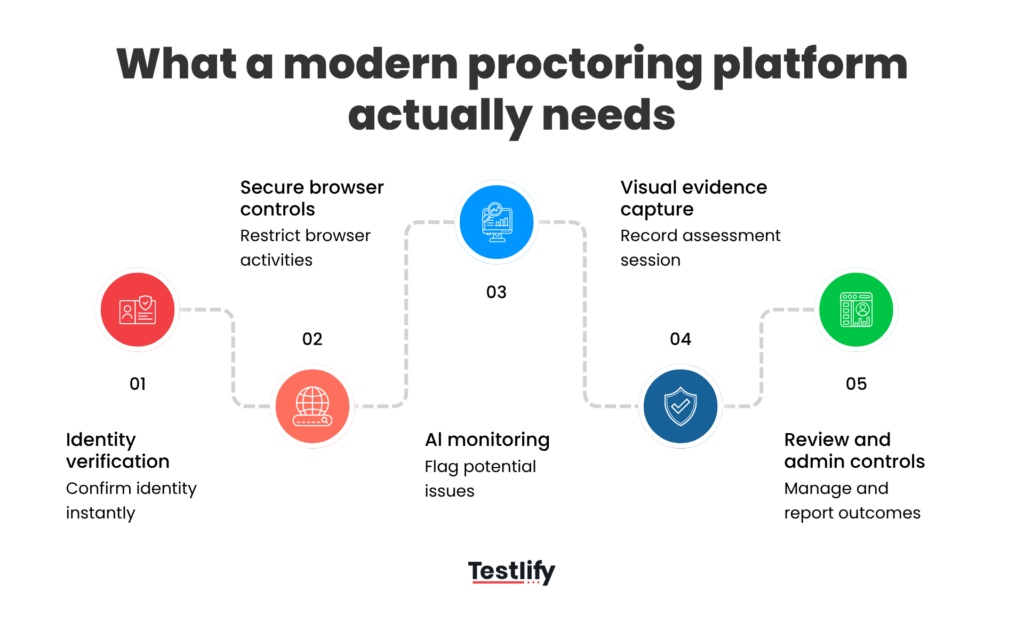
A modern online proctoring platform should do more than record a webcam feed. It should verify identity, control the test environment, detect suspicious behavior, preserve evidence for review, and let teams decide how strict the session needs to be.
Identity verification controls
The first job of any online proctoring platform is simple: make sure the right person is taking the test. Strong systems do this before the exam starts and keep checking during the session.
Testlify’s current remote proctoring flow, for example, includes photo ID verification, live face checks, and time-stamped webcam snapshots that can raise flags if the face disappears or a seat swap is suspected.
Watch: Reliable way to verify candidate identity during online assessments
Browser restrictions and secure exam settings
Identity checks are only one part of the job. A candidate may still try to leave the assessment, open another site, copy answers, or switch into other apps. That is why secure browser controls matter so much. LockDown Browser prevents printing, copying, visiting another URL, and accessing other applications during an exam.
Testlify’s current setup similarly uses full-screen enforcement, tab proctoring, and copy-paste tracking, with configurable violation limits when a candidate repeatedly breaks secure mode.
AI monitoring and human review
A good platform should not force teams to choose between human oversight and automation. The better approach is to combine both.
In Testlify’s current setup, AI proctoring can flag behaviors like looking away from the screen, muted microphones, or suspicious typing patterns, while live monitoring allows a human proctor to step in when a session needs judgment rather than just a rule-based alert. That balance matters because not every flag means cheating, and not every suspicious session should be judged by automation alone.
Room scan, screen recording, and visual controls
Some of the biggest online proctoring risks happen outside a single webcam frame. A useful platform should widen visibility, not just watch a face.
Testlify offers environment checks, dual-camera setups, continuous screen sharing, snapshot proctoring, and full session recording so reviewers can understand what happened both on screen and in the wider environment.
Logs, thresholds, and other administrative controls
The best proctoring setup is also manageable on the admin side. That means clear activity logs, usable evidence, and settings that match the stakes of the exam.
Testlify highlights question-level activity logs, IP tracking, flagged video moments, and security modes that can be set to standard, strict, or custom. In practice, these controls are what turn raw monitoring into something a recruiter, examiner, or reviewer can actually use to make a fair decision.
Explore More: AI proctoring solution: buyer’s guide
Matching testlify's proctoring tools to your use case
Testlify offers different controls that can be matched to the level of oversight needed, the scale of the assessment, and the device conditions candidates are likely to use. For stricter live oversight, Testlify provides live video proctoring, useful for higher-stakes exams where confirming the right person is taking the test and keeping a closer view of the session matter most. When the main challenge is scale, advanced video proctoring and proctoring flags surface sessions that may need attention, so teams do not have to manually watch every assessment from start to finish. And testlify's live environment check pairs a desktop or laptop with a second phone or tablet to capture a side or over-the-shoulder view of the room, for a stronger option when the testing environment itself needs closer monitoring.
What are the biggest concerns and limitations of online proctoring?
Online proctoring can improve trust in remote assessments, but it is not frictionless. Research on remote-proctored exams keeps pointing to the same trade-offs: false positives, privacy concerns, technical barriers, added stress, and the fact that proctoring alone is not a perfect fix.
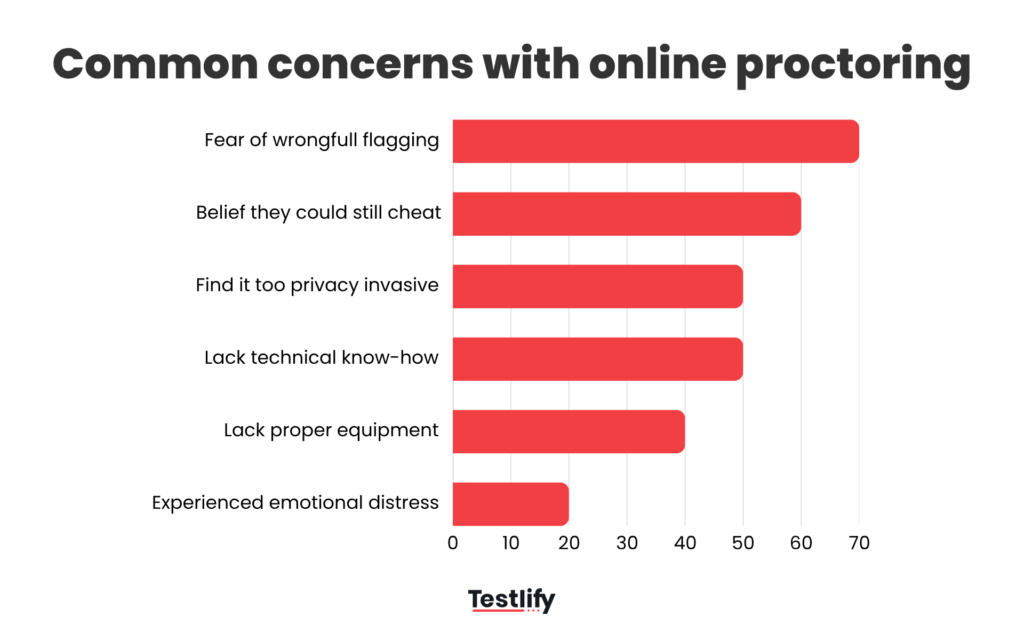
- False positives can damage trust: In one 2023 study, 68.3% of students who ranked all concerns said they were very concerned about being wrongfully flagged by proctoring software. That is a strong reminder that automated alerts need human review, not blind enforcement.
- Privacy is still the biggest objection for many test takers: A survey of 102 students found that 52% agreed online proctoring was too privacy invasive, while only 39% said they preferred an online proctored exam. When a platform records the screen, webcam, microphone, ID, and room view, consent and data handling matter a lot.
- Not every candidate has the same setup quality: In one study, 38% of students were somewhat or not at all confident they had the equipment needed for online proctoring, and 52% were somewhat or not at all confident they had the technical know-how to set it up properly. Another study found 18.5% struggled to find a quiet space and 8.4% faced Wi-Fi issues during the exam.
- The experience can add stress and test anxiety: The same University of Minnesota study found that only 40% of students felt comfortable or very comfortable in the testing environment. Another peer-reviewed study reported emotional distress related to remote proctoring in 21.4% of respondents.
- Proctoring does not eliminate cheating by itself: In the privacy survey, 61% of participants said they believed they could still cheat if they wanted to. That matters because even a strong online proctoring setup works best as one layer in a broader assessment design, not as the only safeguard.
Learn More: AI vs human proctoring: What works best?
How do you choose the right level of online proctoring?
The right setup depends on one simple question: how much damage does a bad result cause? If the assessment is only one early signal in the hiring process, you usually do not need the strictest controls. But if the result will strongly influence who moves forward, who gets certified, or who is trusted with a high-risk role, the proctoring level needs to go up as well.
Low-stakes vs high-stakes assessments
Not every assessment needs the same amount of control. A short screening test for early filtering is very different from a final-stage technical assessment, a certification exam, or a compliance-based evaluation.
For low-stakes assessments, the goal is usually to discourage casual misuse without creating too much friction. For high-stakes assessments, the goal shifts from convenience to defensibility. You need stronger proof that the right person took the test, followed the rules, and completed the session fairly.
When live proctoring makes sense
Live proctoring makes the most sense when real-time intervention matters. That usually happens when the assessment is high value, tightly controlled, or difficult to repeat.
If a candidate leaves the frame, fails an environment check, or appears to get outside help, a live proctor can step in immediately.
When automated monitoring is enough
Automated monitoring works well when scale matters more than live intervention. It is often enough for remote hiring teams running large volumes of assessments across locations and time zones.
In these cases, the platform can handle identity checks, browser restrictions, screen recording, suspicious behavior flags, and review trails without needing a human to watch every session in real time. That keeps the process more efficient while still giving teams useful evidence if something needs to be checked later.
Also Watch: Testlify’s Proctoring features
How to balance security with fairness
This is where many teams get it wrong. Stronger security is not always better if it adds more friction than the assessment actually needs.
A good setup should protect the integrity of the result without making honest candidates feel trapped, confused, or unfairly judged. That means matching the controls to the stakes, giving clear instructions upfront, and using human review before making serious decisions based on flags alone.
Assessment scenario | Recommended proctoring level | Why it fits |
|---|---|---|
Early-stage screening test | Light automated monitoring | Good for scale, lower friction, enough to discourage basic misuse |
Mid-stage skills assessment | Automated monitoring & review trail | Adds stronger control without making the experience too heavy |
Final-stage role-critical assessment | Strict automated monitoring or record-and-review | Better evidence, stronger audit trail, still more scalable than full live monitoring |
Certification or high-risk evaluation | Live proctoring | Best when real-time intervention and stricter oversight are necessary |
Large-volume remote hiring | Automated monitoring | Practical for distributed candidates and easier to run consistently |
Sensitive assessment with borderline cases expected | Hybrid setup | Combines scale with human judgment where it matters |
Read More: Testlify vs top proctoring services
Final Thoughts
Online proctoring is not about making assessments harder. It is about making remote results more trustworthy when the stakes are real. The key is choosing a setup that fits the role, the risk, and the candidate experience, instead of applying the strictest controls everywhere.
If your team is looking for a practical way to run secure remote assessments without losing fairness or flexibility, Book a demo today.
Frequently asked questions (FAQs)

B2B SaaS Content Writer
Rishav Kumar is a B2B SaaS content writer with 4 years of experience. He loves crafting engaging content. Always exploring fresh ideas, he's passionate about helping businesses grow through impactful writing.
LinkedInRelated resources
View all
Proctoring
How to set up a proctored exam: A simple guide for secure online assessments
Proctoring
Online proctoring services compared: top 5 tools vs Testlify
Proctoring
Lockdown browser: Features, benefits & limitations
Proctoring
AI proctoring compliance: GDPR & FERPA explained

Proctoring
How to build a proctored exam for high-stakes assessment
Proctoring
AI vs human proctoring: What works best?
Get started.
Hire on proof, not resumes.
Run your first skills-based assessment free — no credit card required.