
WordPress developer skills: what to look for and how to assess them
Which WordPress developer skills matter in 2026, how they change by role and seniority, and a five-step way to assess them before you hire.

WordPress developer skills are the coding, platform and working skills a person needs to build, extend and maintain sites on WordPress: PHP, HTML, CSS, JavaScript and MySQL, plus WordPress-specific know-how such as hooks, block themes, plugins, the REST API and secure coding. For a hiring team, the hard part is not the list. It is telling a developer who can configure a theme from one who can write safe, maintainable code, and doing that before the offer.
TL;DR:
- A WordPress developer needs PHP, HTML, CSS, JavaScript and MySQL, plus WordPress hooks, themes, plugins, the block editor and the REST API.
- Security is the skill most worth testing: Patchstack logged 7,966 new WordPress vulnerabilities in 2024, and 96% of them were in plugins.
- Match the skills to the role. A theme developer, a plugin developer and a WooCommerce developer need different strengths.
- Senior developers should show judgment on security, performance and code review, not only more features shipped.
- Assess in five steps: define the role, screen with a short skills test, run a paid work sample, discuss the code, then score everyone on one rubric.
- Never hire on a portfolio alone. Page builders can make a polished site without any custom code behind it.
 ChatGPT
 Gemini
 Claude
 Grok
 Perplexity
What are WordPress developer skills?
WordPress developer skills cover three layers: the web languages WordPress is built on, the WordPress platform itself, and the working habits that keep client sites stable. A developer strong in all three can take a design or a business request and turn it into code that survives updates, traffic and attacks.
Demand for these skills is steady because so much of the web runs on WordPress. W3Techs reports that WordPress powers 39.5% of all websites and 58.2% of sites that use a known content management system (checked November 2026). Developers still invest in it too: in the Stack Overflow Developer Survey 2025, 13.6% of respondents said they did extensive WordPress work in the past year and 18.9% did extensive PHP work.
The title "WordPress developer" covers very different jobs, from someone who assembles sites with themes and page builders to an engineer who writes custom plugins used on thousands of sites. If you are new to the platform, the WordPress glossary entry explains the basics.

Which technical skills does a WordPress developer need?
A WordPress developer needs five core languages and six platform skills. The languages are PHP, HTML, CSS, JavaScript and SQL for MySQL or MariaDB. The platform skills are hooks, themes, plugins, blocks, the REST API and secure coding. The table shows what good looks like for each one and how to check it.
Skill | What good looks like | How to check it |
|---|---|---|
PHP | Writes clean, modern PHP; knows arrays, classes, namespaces and error handling | Short PHP coding questions |
HTML and CSS | Semantic, responsive and accessible markup | Fix a broken template or layout |
JavaScript | Uses modern JavaScript; can read React code used in the block editor | Debug a small front-end script |
MySQL | Understands the WordPress database tables and uses WP_Query over raw SQL | Explain how they would fetch posts by a custom field |
Hooks (actions and filters) | Changes behavior without editing core or parent theme files | Add a feature through a hook in a work sample |
Themes and block themes | Builds templates, child themes and block themes with theme.json | Review a template change |
Plugins | Registers custom post types, taxonomies and settings; enqueues scripts properly | Build a tiny plugin |
Blocks (Gutenberg) | Builds custom blocks with attributes and styles | Walk through a block they built |
REST API | Reads, extends and secures endpoints | Add a custom endpoint with a permission check |
Security | Sanitizes input, escapes output, uses nonces and capability checks | Spot the holes in a code sample |
Tooling | Git, WP-CLI, local environments, debugging tools | Ask how they deploy and roll back |
The official WordPress coding standards are a fair yardstick for code quality, since most experienced WordPress developers already follow them. Candidates who know the standards write code that the next developer can maintain.
PHP deserves the most weight. WordPress core, themes and plugins are written in it, so weak PHP shows up as fragile code everywhere else. A general PHP skills test checks the language basics, and the PHP for WordPress test checks PHP in a WordPress context.
Pro tip: Ask candidates which WordPress version changed their workflow most. Developers who keep up will talk about the block editor, block themes or full site editing. Developers stuck on older habits will not.
Which soft skills matter for WordPress developers?
WordPress developers need communication, scoping and reliability as much as code. Many WordPress roles sit close to marketing teams or clients, so the developer has to turn loose requests into clear tasks, explain trade-offs in plain language and keep stakeholders updated. Delicious Brains, a long-running WordPress plugin company, lists active listening, managing expectations and documentation among the skills that matter most.
- Translating requests: Turns "make the homepage faster" into specific, testable tasks.
- Explaining trade-offs: Tells a marketing lead why a plugin adds risk, without jargon.
- Scoping and estimates: Breaks work into steps, flags delays early and sticks to agreed scope.
- Documentation: Leaves notes and comments so another developer can take over a site.
- Attention to detail: Checks mobile views, forms, redirects and caching before handing work back.
The easiest way to check these is during the work sample review: ask the candidate to explain their solution to a non-technical person on the panel.
How do WordPress developer skills differ by role?
WordPress developer skills differ by role because the title covers at least five distinct jobs. Every role shares the base languages, but the skill to test first changes. Write the job description around the role you actually need, then test that role's lead skill before anything else.
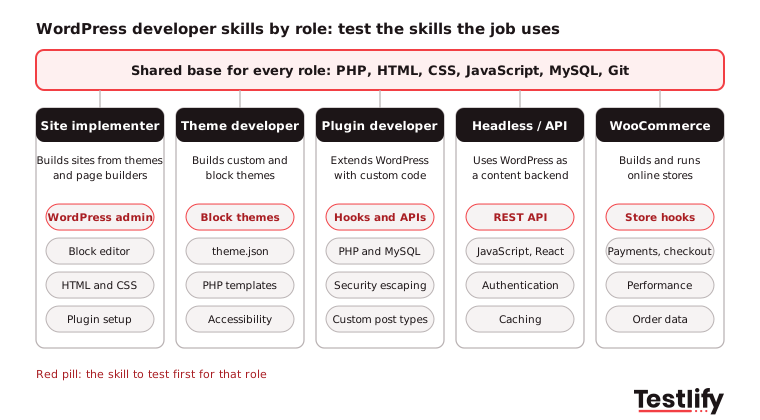
- Site implementer: Builds sites from existing themes, the block editor and page builders. Test WordPress admin, block editor and plugin setup skills.
- Theme developer: Builds custom or block themes. Test block themes, theme.json, PHP templates and accessibility. The WordPress theme customization test covers this.
- Plugin developer: Extends WordPress with custom code. Test hooks, PHP, data handling and security. The WordPress plugin development test covers this.
- Headless or API developer: Uses WordPress as a content backend for a JavaScript front end. Test the REST API, authentication and caching. The API integration in WordPress test covers this.
- WooCommerce developer: Builds and runs online stores. Test WooCommerce hooks, checkout and payment flows, and performance under load.
Hiring the wrong type is a common and costly mistake. A strong site implementer can look like a developer in a portfolio review, then struggle the first time a feature needs custom code.
What should junior, mid-level and senior WordPress developers know?
Junior, mid-level and senior WordPress developers differ less in the tools they know and more in the judgment they show. Juniors follow patterns, mid-level developers build features on their own, and seniors protect the codebase: they review code, plan for security and performance, and decide what not to build.
Level | Should be able to | Assess with |
|---|---|---|
Junior (0 to 2 years) | Edit themes, use hooks from examples, fix CSS and simple PHP bugs, use Git | Skills test on PHP, HTML, CSS and WordPress basics |
Mid-level (2 to 5 years) | Build custom themes and plugins, use the REST API, write secure code without reminders | Skills test plus a 90-minute work sample |
Senior (5+ years) | Design plugin architecture, review others' code, tune performance, plan updates and security fixes | Work sample plus a code review discussion |
Pay follows the same curve. The US Bureau of Labor Statistics puts the median pay for web developers at $92,650 a year (May 2025) and projects 4% job growth from 2025 to 2035. A senior WordPress specialist usually sits above that median, so a clear skills bar for each level helps you avoid paying senior rates for junior work.
How do you assess WordPress developer skills?
Assessing WordPress developer skills works best in five steps: define the role, screen with a short skills test, run a paid work sample, discuss the code, then decide against one rubric. Each step filters on evidence, so interviewers spend time only on candidates who can already do the work.
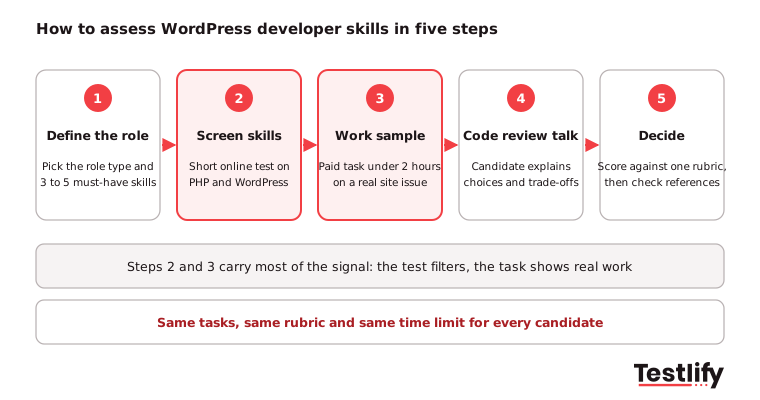
- Define the role: Pick the role type from the list above and write down three to five must-have skills. Everything after this step tests those skills and nothing else.
- Screen skills: Send every applicant the same short online test, about 30 to 45 minutes, covering PHP and WordPress concepts. A ready-made WordPress developer test saves you writing questions from scratch.
- Run a work sample: Give the top scorers a small, paid task that mirrors the job, capped at two hours. Pressidium, a WordPress hosting company, also recommends a small paid test project before committing to a bigger job.
- Discuss the code: In a structured interview, ask the candidate to walk through their task: why they used a hook there, how they handled user input, what they would change with more time. The PHP developer interview questions give you more questions to use.
- Decide: Score every candidate against the same rubric, compare, then check references for the finalists.
Key takeaway: Use the same tasks, rubric and time limit for every candidate. Consistency is what makes the scores comparable and the process fair.
For the wider hiring process, from sourcing to the offer, see how to hire a WordPress developer.
What makes a good WordPress work sample task?
A good WordPress work sample is small, paid, realistic and scored on criteria agreed before anyone sees the code. It should mirror a task from the first month in the job and take no more than two hours. Longer unpaid tasks put off strong candidates who already have offers.
Three tasks that work well:
- Plugin task: "Build a small plugin that adds a Testimonials post type and a shortcode or block that lists the latest three." Tests hooks, custom post types, output escaping and code structure.
- Theme task: "Add a new pattern and a custom template to this block theme, with styles set in theme.json." Tests block themes, templates and accessible markup.
- Debug task: "This page loads in eight seconds and the contact form fails. Find out why and fix what you can." Tests debugging, query performance and plugin conflicts.
Score each task on the same five criteria:
Criterion | What earns full marks |
|---|---|
Works as asked | Meets the brief, no fatal errors, no PHP notices |
WordPress way | Uses hooks and core APIs instead of editing core or hard-coding |
Security | Sanitizes input, escapes output, checks nonces and capabilities |
Quality | Readable code that follows WordPress coding standards, with clear names and comments |
Accessibility and performance | Semantic markup that meets WCAG guidelines, no needless queries or heavy scripts |
Which red flags point to weak WordPress skills?
Weak WordPress skills usually show in how a candidate solves problems, not in what they list on a resume. Watch for answers that work today but break on the next update, leak data or slow every page down.
- Edits core or parent theme files: Changes vanish on the next update. Strong developers use hooks and child themes.
- Plugin for everything: Installs a plugin for a ten-line change. Every extra plugin is more code to patch.
- No escaping or nonces: Prints user input straight to the page. This is the root of cross-site scripting.
- Cannot explain the portfolio: Shows polished sites but cannot say what they coded and what a page builder did.
- No version control: Edits live sites over FTP with no Git history and no staging site.
Security deserves extra weight. Patchstack's State of WordPress Security in 2025 report counted 7,966 new vulnerabilities in the WordPress ecosystem in 2024, up 34% on 2023.
Of those, 96% were in plugins and 33% were still unpatched when they were made public, and cross-site scripting made up almost half. Candidates should know the common web risks in the OWASP Top 10 and how WordPress functions such as esc_html and wp_verify_nonce prevent them. The WordPress security test checks this directly.
How does Testlify help you assess WordPress developer skills?
Testlify lets you assess WordPress developer skills with ready-made tests and your own work samples in one place, so every candidate is scored the same way. You can combine WordPress, PHP and role-specific tests into one assessment and send it to all applicants at once.
- Ready-made tests: A library of 3,500+ tests, including WordPress, PHP, plugin, theme, security and performance optimization tests.
- Your own tasks: 25+ question types, including coding questions in a live coding environment, file uploads for work samples and video answers for explaining code.
- Built from your job description: The AI test builder suggests a role-specific assessment from your job description.
- Fair, checked results: 20+ proctoring checks, including copy and paste tracking and AI assistance detection, plus automatic scoring and a per-skill breakdown for each candidate.
- Fits your stack: Integrations with 100+ ATS and HRIS tools, including Greenhouse, Lever and Workday.
Ready to assess your next WordPress developer?
Build a WordPress assessment in minutes and see who can really code before the first interview. Browse the Testlify test library or start a 7-day free trial of Testlify, no credit card required.
Frequently asked questions

Senior SEO Specialist
Soham is a senior SEO specialist specializing in B2B HR tech. He covers search, answer, and generative engine optimization (SEO/AEO/GEO) for talent acquisition, skills-based hiring, and assessment-driven recruiting audiences.
LinkedInRelated resources
View all
Skill assessment
How to evaluate candidates’ skills with a Docker assessment

Skill assessment
How to evaluate candidates’ skills with a TypeScript assessment

Skill assessment
How to evaluate candidates’ skills with an accounting manager test

Skill assessment
5 tips to evaluate search engine optimization (SEO) skills

Skill assessment
5 tips to evaluate database management skills

Skill assessment
5 tips to evaluate customer satisfaction analysis skills
Get started.
Hire on proof, not resumes.
Run your first skills-based assessment free — no credit card required.