
How to evaluate candidates skills with a React Native test online
A practical way to screen React Native developers: an online skills test, a short coding task, agreed cut scores and a code walkthrough.

Knowing how to evaluate candidates skills with a React Native test online comes down to four moves: test the skills the role really uses, add one short coding or debugging task, agree the pass mark before anyone applies, and confirm the result in a code walkthrough. Done that way, an online test cuts a long applicant list to a shortlist you can defend, without weeks of take-home projects.
TL;DR / Key Takeaways
- Screen React Native candidates with an online test, a short coding task and a code walkthrough.
- Test JavaScript or TypeScript, components, navigation, APIs, debugging, performance and native modules.
- React Native 0.76 made the New Architecture the default in October 2024. Seniors should know it.
- Agree the cut score before the first invite, and read section scores, not only the total.
- Judge candidates within 10 points of the cut on their coding task.
- Give everyone the same questions, proctor remote tests, review every rejection.
 ChatGPT
 Gemini
 Claude
 Grok
 Perplexity
What should a React Native test online measure?
A React Native test online should measure the skills a developer uses every week on a mobile team: JavaScript or TypeScript, React fundamentals, layout, navigation, state, API work, debugging, performance and native platform knowledge. Soft skills such as problem solving and how a candidate explains a bug matter too, but they belong in the walkthrough.
React Native is not a niche skill. According to the 2024 Stack Overflow Developer Survey, 8.4% of all respondents and 9% of professional developers used React Native, close to Flutter at 9.4%. That size of talent pool means plenty of applicants, and plenty of CVs that list React Native after one tutorial.
Skill area | What good looks like | How to test it |
|---|---|---|
JavaScript and TypeScript | ES6+, async and await, types that catch bugs | MCQ plus a short coding question |
Components, JSX, state and props | Small reusable components, clear data flow | Code reading questions |
Layout and styling | Flexbox layouts that work on small and large screens | Fix a broken layout |
Navigation | Stacks, tabs, deep links in React Navigation | Scenario questions |
State management | Picks Context, Redux or Zustand for a reason | Trade-off question in the walkthrough |
APIs and third-party libraries | REST or GraphQL, Firebase, error states | Build or fix a data screen |
Debugging and testing | React Native DevTools, logs, Jest unit tests | Debug a sample app |
Performance and native | List rendering, re-renders, native modules | Senior coding task |
Both old Testlify guides on this topic listed Flexbox, JSX, components and asynchronous code, and those still hold. What has changed is the platform underneath. The React Native team's 0.76 release notes (October 23, 2024) made the New Architecture the default and made React Native DevTools the default debugger, so a senior test that still asks about the old bridge and the deprecated Navigator component is out of date.

How to evaluate candidates skills with a React Native test online, step by step
To evaluate candidates skills with a React Native test online, define the role, choose a test that matches it, add one small practical task, set the cut score in advance, walk through the candidate's code, and decide with the evidence in front of you. The whole process fits in about one week of candidate time.
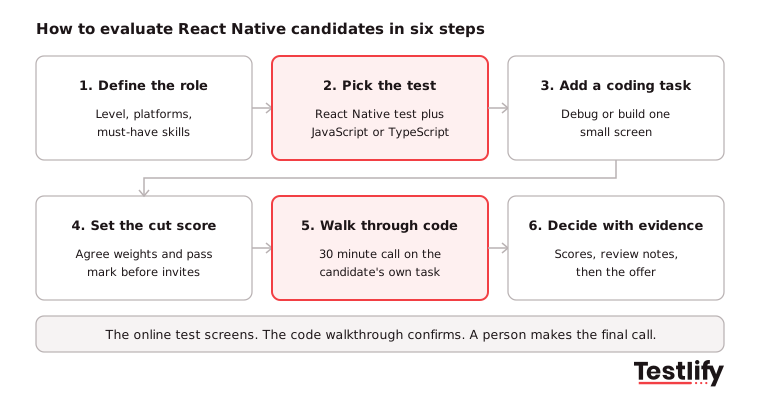
- Define the role: Write down the level, whether the app is iOS, Android or both, and the three skills a new hire must have in month one. A team rebuilding a checkout flow needs different skills from a team shipping a new design system.
- Pick the test: Start with a React Native test and add the language underneath it: a JavaScript test or a TypeScript test. Add a Redux test only if your app uses Redux.
- Add one practical task: Give a small bug-fix or build task of 30 to 60 minutes. A login screen with validation or a list that renders slowly says more than a week-long take-home project.
- Set the cut score: Agree the pass mark and section weights with the hiring manager before the first invite. Changing the bar after you see scores invites bias.
- Walk through the code: Spend 30 minutes with the candidate on their own task. Ask why they chose a structure and what they would change with more time.
- Decide with evidence: Put test scores, task notes and walkthrough notes side by side, then decide. A person, not the score, makes the final call.
For recruiting ops teams running several mobile roles at once, this order also protects engineering time and shortens time-to-hire: engineers only meet candidates who already cleared the test and the task.
Pro tip: Send the same test, with the same time limit, to every candidate for the role. A level playing field is the main reason to test online at all, and it is easy to lose when recruiters start adding questions for one candidate.
Which question formats work best for React Native candidates?
React Native candidates are best assessed with a mix of formats: multiple choice for broad knowledge, coding questions for working code, a debugging task for real problem solving, and a code walkthrough for judgment. No single format covers everything, so the test and the interview should each do the job they are good at.
Format | Best for | Time | Watch out for |
|---|---|---|---|
Multiple choice | Fast screening of core concepts | 15 to 25 min | Rewards memory over building |
Coding question | JavaScript or TypeScript logic | 20 to 40 min | Needs a real IDE, not a text box |
Debugging task | Finding and fixing real bugs | 30 to 45 min | Keep the sample app small |
Take-home project | Senior design choices | 2 to 4 hours max | Drop-off from strong candidates |
Code walkthrough | Judgment, trade-offs, communication | 30 min | Needs a trained engineer |
Across the teams we have seen hire mobile developers, the drop-off problem is real: long unpaid projects lose the candidates who have other offers. Keep the online part under 90 minutes in total and save deeper work for the final round.
How do you test debugging and error handling?
Debugging and error handling are best tested by handing the candidate a small React Native app with two or three planted bugs and asking them to find, fix and explain each one. Watching how someone isolates a problem tells you more than any question about debugging tools.
A good debugging task includes one crash, one layout bug and one logic bug, such as a list that shows stale data after a refresh. Strong candidates show four habits:
- Isolate first: They reproduce the bug and narrow it down before changing code.
- Use the tools: They reach for React Native DevTools, console logs and network inspection instead of guessing.
- Handle errors properly: They add error states and messages, not empty catch blocks.
- Explain the fix: They can say what caused the bug and how to stop it coming back, ideally with a Jest test.
Communication is part of the skill. A developer who fixes a bug but cannot explain it will slow down every code review, so score the explanation as well as the fix.
How do you check UI, performance and integration skills?
UI, performance and integration skills are checked with scenario questions and one task that touches real device behavior: a screen that must fit small and large phones, a long list that must scroll smoothly, and a data call that must handle slow or failed responses. These are the areas where web React experience alone falls short.
- UI and components: Ask the candidate to fix a Flexbox layout that breaks on a small screen, or to split a large screen into reusable components built on View, Text and Pressable.
- Accessibility: Check that they add accessibility labels and readable touch targets. The W3C WCAG 2.2 guidelines are the reference most product teams follow.
- Performance: Give a slow FlatList and ask how they would cut re-renders. Senior candidates should mention memoization, list virtualization and profiling.
- Integration and third-party libraries: Ask how they would add Firebase auth or a payments SDK, how they judge whether a library is maintained, and what happens when it breaks on an OS update.
- Security: Ask where they would store a login token. Insecure data storage and insecure communication both sit on the OWASP Mobile Top 10 for 2024.
How should skills differ by seniority?
React Native skills should be weighted by seniority: junior candidates are judged mostly on fundamentals, mid-level candidates on building real features, and senior candidates on architecture, performance and native work. Using one test and one cut score for every level either rejects good juniors or lets weak seniors through.
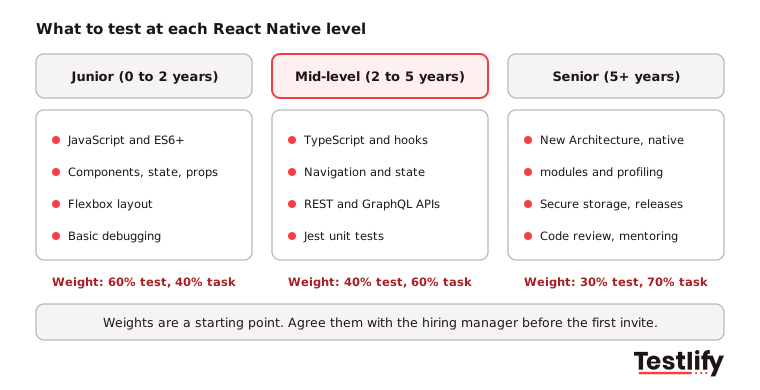
Senior hiring is where a test saves the most time. The US Bureau of Labor Statistics projects 10% employment growth for software developers, QA analysts and testers from 2025 to 2035, with about 106,100 openings a year, so experienced mobile developers will stay in demand and slow interviews will keep losing them.
How do you read React Native test results?
React Native test results are read in three passes: compare the overall score with your cut score, check each section score for a gap in a core skill, then review the proctoring log. A high total with a near-zero debugging section is a different candidate from a steady score across every section.
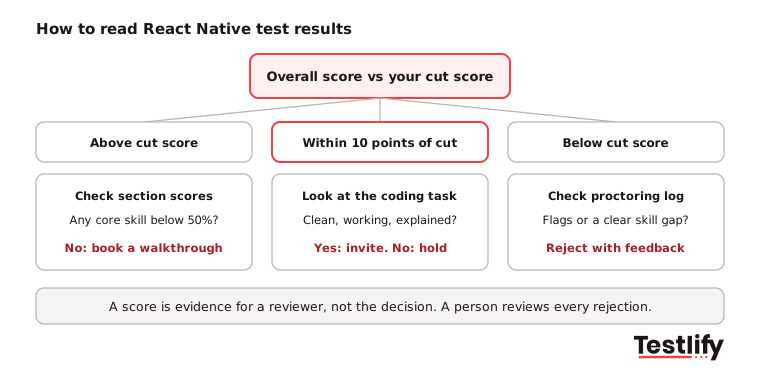
- Above the cut score: Check that no core skill is below 50%, then invite to the code walkthrough.
- Within 10 points of the cut score: Let the coding task decide. Clean, working code that the candidate can explain beats a few extra multiple-choice points.
- Below the cut score: Check the proctoring log and the section scores. Reject with short feedback, and treat a single weak area as a training need when the role allows it.
Use the results to plan the interview, too. A candidate who scored low on state management gets a state management question in the walkthrough, so you test the gap instead of repeating what the test already proved.
Key takeaway: The test is a screen, not a verdict. The numbers tell you who to talk to and what to ask. The walkthrough and a person's judgment make the decision.
What interview questions should follow the test?
Interview questions after a React Native test should ask candidates to explain decisions in their own code and past work, because that is where inflated CVs show. Listen for named tools, real trade-offs and results, not definitions.
Question | Look for | Red flag |
|---|---|---|
Walk me through a performance problem you fixed. | Profiling tool, cause, measured result | No tool, no numbers |
How do you choose a state management approach? | Picks by app size and team | One library for everything |
How do iOS and Android differ in your last app? | Platform-specific code, native modules | "They are the same" |
What changed for you with the New Architecture? | Fabric, TurboModules, library upgrades | Has not heard of it (senior) |
How do you store tokens and secrets on the device? | Secure storage, no plain AsyncStorage | Hard-coded keys |
For more prompts by role, see the Testlify interview questions for mobile developers and the guide to structured interviews, which keep the walkthrough consistent across interviewers.
How does Testlify help you evaluate candidates with React Native tests?
Testlify helps hiring teams evaluate candidates with React Native tests by putting the skills test, coding questions, proctoring and scoring in one assessment that syncs with the ATS. Recruiters send one link, and engineers only review candidates who already passed the bar.
- Ready-made tests: The React Native online test sits in a library of 3,500+ tests, so you can pair it with JavaScript, TypeScript, Git and problem solving tests in one assessment.
- Real coding: A live coding IDE supports 45+ coding languages, and 25+ question types include coding, file upload and video answers for the walkthrough prep.
- Built from your job description: The AI test builder turns a job description into a custom assessment in under a minute, and you can add your own debugging task.
- Fair and secure: 20+ proctoring checks, including tab tracking, copy and paste blocking and AI assistance detection, keep remote results honest. See anti-cheating and proctoring.
- Scores you can use: Weighted scoring, per-skill breakdowns, benchmarks and AI-written strengths and gaps show where each candidate stands, and results sync to 100+ ATS and HRIS tools through Testlify integrations.
Planning the full process for the role? The React Native developer hiring guide covers sourcing, salaries and onboarding, and the front end developer job description helps you write the post that attracts the right applicants.
Ready to evaluate candidates with React Native tests?
Send your first React Native assessment today. Start a 7-day free trial of Testlify, no credit card required, or book a demo to see the React Native test, coding questions and proctoring on your own role.
Frequently asked questions

Content Writer
Yashika Khandelwal is a Content Writer with 3+ years of experience creating research-backed content on hiring, talent assessment, and HR technology. She is a registered Organizational Psychologist and subject matter expert who combines behavioral science with practical recruitment insights to produce accurate, evidence-based content.
LinkedInRelated resources
View all
Skill assessment
Data visualization exam for hiring: what to test and how to score it

Skill assessment
How to evaluate candidates’ skills with a full stack developer test

Skill assessment
How to evaluate candidates’ skills with a C# assessment

Skill assessment
WordPress developer skills: what to look for and how to assess them

Skill assessment
How to evaluate candidates’ skills with a Docker assessment

Skill assessment
How to evaluate candidates’ skills with a TypeScript assessment
Get started.
Hire on proof, not resumes.
Run your first skills-based assessment free — no credit card required.