
How to choose the right attention to detail test
Pick the test type that matches the job's costly errors, keep it short and realistic, check fairness and score accuracy before speed.

Knowing how to choose the right attention to detail test starts with one question: which mistakes would hurt this role most? An attention-to-detail assessment checks how accurately a candidate compares, checks, and copies information. The right one mirrors the errors your new hire must catch, takes 10 to 30 minutes, and is scored on accuracy before speed.
 ChatGPT
 Gemini
 Claude
 Grok
 Perplexity
TL;DR
- Choose the test type by the errors the job cannot afford: textual for documents and records, visual for designs and layouts, numerical for figures and data entry, and procedural for steps and rules.
- Write down 5 to 7 real, costly mistakes from the role before you look at any test. Every question should map to one of them.
- Keep it short. Most teams run the Testlify textual test as 20 questions in 12 minutes and place it before the first interview, not after.
- Score accuracy first and speed second, and look at which kind of mistake a candidate makes, not only the total.
- Set the passing bar from the scores of your current strong performers, never from a vendor default.
- In the US, the EEOC expects any test that screens people out to be job-related, and you stay responsible for that even when a vendor built the test.
- Pair the score with a short work sample or structured interview question before you make an offer.

What does an attention-to-detail assessment measure?
An attention-to-detail assessment measures how accurately someone notices, compares, and checks small pieces of information under realistic conditions. O*NET defines attention to detail as "a tendency to be detail-oriented, organized, and thorough in completing work" and rates how much it matters in 891 occupations.
Most tests break the skill into a few sub-skills:
- Exact match: Spotting whether two names, codes, numbers, or email addresses are identical, including a transposed digit.
- Error detection: Finding the mistake in a sentence, table, invoice, or image.
- Data checking: Reconciling two records and finding what is missing, duplicated, or wrong.
- Rule following: Applying an instruction or policy correctly, step by step, including at the boundary cases.
- Consistency: Keeping the same level of accuracy from the first question to the last, when focus starts to drop.
A resume line that says "detail-oriented" tells you none of this. A short test shows how a candidate actually performs on the same tasks as everyone else.
Which roles need an attention-to-detail assessment?
Roles where one missed figure, clause, or entry causes rework, lost money, or a safety risk need an attention-to-detail assessment most. O*NET gives its top impact score for attention to detail to accountants and auditors, bookkeeping clerks, air traffic controllers, acute care nurses, clinical data managers, and computer programmers, among others.
In practice, hiring teams use these assessments most for:
- Finance and accounting: Bookkeepers, payroll and billing staff, accounts payable clerks, and auditors.
- Operations and admin: Office assistants, receptionists, executive assistants, data entry clerks, order processors.
- Customer support and BPO: Agents who update records, process claims, or follow scripts and policies.
- Healthcare administration: Medical records, billing, and coding staff.
- Legal and compliance: Paralegals, legal secretaries, compliance analysts.
- Design and QA: Graphic and UX designers, QA testers, content and proofreading roles.
For entry-level hiring, where candidates have little work history to judge, the score often carries more weight than the resume. For admin and clerical roles, pair it with a clerical aptitude test.
What are the main types of attention to detail assessments?
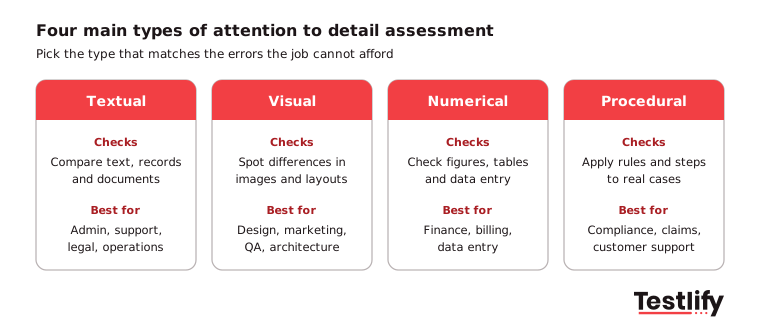
The main types of attention to detail assessments are textual, visual, numerical and procedural tests, plus job simulations that mix them. Each one catches a different kind of error, so the right choice depends on what the person will check all day.
Type | What candidates do | Best for | Watch out for |
|---|---|---|---|
Textual | Compare sentences, spot spelling, wording and formatting differences, check records | Admin, support, legal, operations | Can favor fluent readers of the test language |
Visual | Spot differences in images, layouts and designs, match patterns | Design, marketing, QA, architecture | Weak signal for roles that rarely handle visuals |
Numerical and data entry | Compare figures, reconcile tables, check calculations, type codes accurately | Finance, billing, data entry, inventory | Typing speed can mask accuracy if timed hard |
Procedural | Apply rules and steps, triage cases by policy | Compliance, claims, customer support | Needs clear, unambiguous instructions |
Job simulation | Do a real task, such as checking an invoice or editing a report | Final stages, senior or specialist roles | Takes longer to build and to score |
Two more formats appear in older guides. Multiple-choice questions are quick and easy to run at scale, but guessing can lift scores, so use enough questions. Memory and observation tasks or personality-style questionnaires describe a person's working style rather than their accuracy, so treat them as context, not as the test itself.
How to choose the right attention to detail test in 6 steps?
How to choose the right attention to detail test comes down to six steps: list the costly errors, match the type, check the format, set length and timing, trial it on your own people, and decide how scores will be used. Follow them in order and the choice usually becomes obvious.
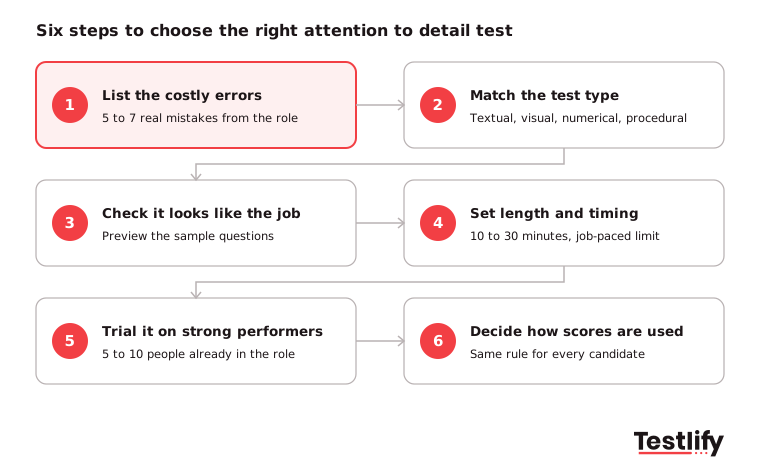
- List the costly errors: Run a quick job analysis with the hiring manager and one strong performer. Write down 5 to 7 mistakes that actually cost money or time in this role, such as a wrong bank detail, a missed policy exception, or a mislabeled shipment.
- Match the test type to those errors: Mostly text and records point to a textual test. Mostly images point to a visual test. Mostly figures point to numerical or data entry. Mostly rules point to procedural. Many roles need a mix.
- Check the content to see if it looks like the job: Preview the sample questions. A claims processor should compare policy numbers and dates, not abstract shapes. Candidates also take a test more seriously when it looks like the work.
- Set length, difficulty, and timing: Pick a level that matches the role (entry-level vs experienced) and a time limit that matches the real pace of the work. See the next section for numbers.
- Trial it on current employees: Ask 5 to 10 people already doing the job well to take it. If they do not score well, the test is measuring something else.
- Decide how scores will be used: Agree up front whether the score is a pass mark, a ranking input or one factor next to interviews, and apply the same rule to every candidate.
Pro tip: If two test types both look right, run both as short sections in one assessment rather than one long test. A 12-minute textual section plus a 10-minute numerical section usually tells you more than 30 minutes of one type.
How long should the assessment be, and when should candidates take it?
An attention to detail assessment works best at 10 to 30 minutes, taken right after the application and before the first interview. Longer tests add little new information and raise drop-off, while early placement means interviewers only spend time on candidates who already showed they are accurate.
Some reference points:
- Short screen: The Testlify textual test can run up to 59 questions, but most teams run 20 questions in 12 minutes.
- Fuller screen: The Testlify visual test has 57 questions in 30 minutes, which suits roles where visual checking is the core of the job.
- Timing: Match time pressure to the job. A heavy time limit partly measures speed, so a role that rewards careful checking should get a generous limit.
Few teams test this early today. According to the Testlify Skills-First Talent Report 2026, a survey of 131 HR and TA leaders run with SHRM Labs, only 6.9% assess candidates before the first interview, and 32.8% use no skills assessment at any stage.
For remote and hybrid roles, see how teams run virtual attention to detail tests without losing control of the setting.
How to choose the right attention to detail test for high-volume hiring?
High-volume teams, such as contact centers, BPOs and operations hubs, should choose a short, auto-scored test that runs before any human review and syncs scores back to the ATS. When hundreds of people apply for the same role, manual checking is the bottleneck the test is meant to remove.
What matters more at volume:
- Automatic scoring: No reviewer time per candidate, and the same scoring for everyone.
- Integrity checks: Unsupervised tests at scale need proctoring such as tab tracking, copy and paste blocking and webcam snapshots, plus randomized question order.
- Mobile-friendly and short: Many hourly and entry-level candidates apply from a phone, so keep the test under 15 minutes.
- ATS sync: Scores should land in the candidate record so recruiters can sort and advance without switching tools.
- Several language options: Large hiring drives often reach candidates in more than one language.
Should you use a ready-made or a custom assessment?
A ready-made assessment is the right start for most roles, and a custom one makes sense when the role handles industry-specific documents, codes or rules. Ready-made tests are quick to set up and give you scores you can compare across candidates from day one. Custom tests take more effort but can use your actual forms, product codes and policies.
Many employers already build their own. NACE's Job Outlook 2025 survey of 237 employers found that 64.8% use skills-based practices for new entry-level hires, and close to 40% of those use internally created assessment tools, compared with about one quarter using externally created tools. NACE
If you build or customize, keep these rules from test design in mind:
- Mirror real work: Use realistic scenarios, such as a dataset with a few planted errors or a contract with one wrong date.
- Mix difficulty: Include easy, medium and hard items so the test separates good from great, not only weak from good.
- Vary the items: Change formats and stimuli so candidates cannot learn a pattern and coast.
- Write clear instructions: A confusing instruction adds an error that has nothing to do with attention to detail.
- Pilot first: Run it with a small group, remove questions everyone gets right or wrong, and fix anything people misread.
- Review it yearly: Update items when the job's tools or documents change.
How do you score results and set a passing bar?
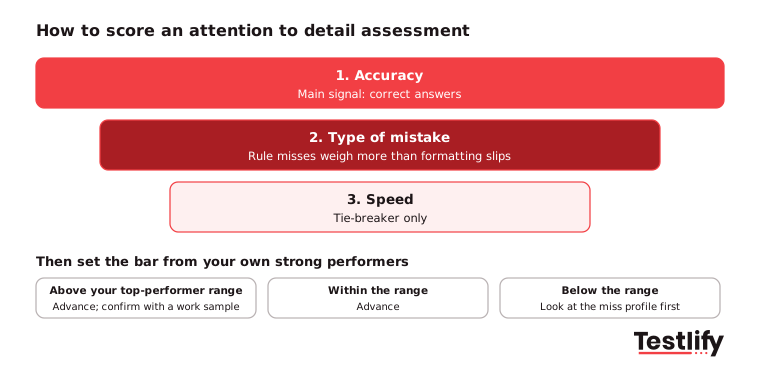
Scoring an attention to detail assessment works best when accuracy comes first, speed second, and the passing bar comes from the scores of people who already do the job well. A raw total alone hides the difference between a candidate who made one serious error and one who made three harmless ones.
A practical scoring approach:
- Score accuracy first: Correct answers are the main signal. Treat speed as a tie-breaker, never as the main score.
- Look at the miss profile: Group mistakes by type, such as transposed digits, missed rule exceptions or formatting slips. Two rule-violation misses matter more for a compliance role than two formatting slips.
- Weight what matters: Give more weight to the sections that match the role's costliest errors.
- Set the bar from your benchmark: Use the scores of current strong performers, then compare candidates against the wider candidate pool.
- Confirm with a second signal: Follow strong scores with a short work sample or a structured interview question, such as "Tell me about a time you caught an error before it went out."
Red flags worth a second look include a perfect score finished unusually fast on an unproctored test, and a pattern of misses on boundary cases in a rules-heavy role.
Key takeaway: A score is only as useful as the bar you compare it to. Set the bar from your own top performers, use the same rule for every candidate, and confirm the result with one job-like task.
How do you keep the assessment fair and legally sound?
A fair attention to detail assessment measures only skills the job needs, runs the same way for every candidate, and is checked for unequal pass rates between groups. In the US, the EEOC says a test that screens out a protected group more often must be "job-related and consistent with business necessity", and employers stay responsible for that even when they rely on a vendor's documentation.
Steps that keep the process fair:
- Tie every section to the job: Keep your list of costly errors as the record of why each section is there.
- Standardize everything: Same questions or equal versions, same instructions, same time limit, same scoring.
- Score blind: Hide names and personal details from anyone reviewing results.
- Check pass rates: Compare outcomes across groups to spot adverse impact, and switch to an equally effective option with less impact if one exists.
- Offer accommodations: Extra time, screen-reader support and no color-only cues for candidates who need them. The EEOC treats refusing a reasonable accommodation in test administration as discrimination unless it causes undue hardship.
- Keep the language plain: A textual test should not reward vocabulary the job never uses.
- Explain the test: Tell candidates what it covers and how long it takes, and give them a practice question.
What should you ask a vendor before you buy?
A test vendor should show you how the test was built, who it was tried on, and how its scores differ across groups before you buy. Many buyers never ask. The Testlify Skills-First Talent Report 2026 found that 44.5% of HR and TA leaders say no one formally checks their assessments, and only 12.4% expect adverse impact data from a provider.
Questions worth asking:
- What job tasks does each section reflect, and can I preview every question type?
- Who took the test during development, and how large was that group?
- Do you share pass-rate data by group, and how often do you review it?
- Can I set my own passing bar, weight sections and benchmark against my own employees?
- What accommodations and language options does the candidate side support?
- How do you prevent cheating, and what does the candidate see?
- Does the score sync to our ATS, and can I export full reports?
How does Testlify help you test attention to detail?
Testlify gives hiring teams ready-made attention to detail tests, the option to build a custom one, and the scoring and integrity controls to run them at scale. You can start from the attention to detail test for visual roles, or the Attention to Detail (Textual) Test for records-heavy roles.
- Two ready tests, plus related skills: The visual test covers exact match, spotting differences, identifying mistakes and detail-oriented proofreading. The textual test covers proofreading, record reconciliation and character comparison. Combine either with data entry, proofreading or cognitive ability tests from a library of 3,500+ tests.
- Custom tests: The AI test builder turns a job description into a custom assessment in under a minute, with 25+ question types including file upload, practical tasks and typing.
- Scoring you can compare: Automated and weighted scoring, benchmarking and per-skill breakdowns in the reporting dashboard.
- Integrity at scale: 20+ proctoring checks, including tab tracking, copy and paste blocking, webcam snapshots and question randomization.
- Fits your stack: 100+ ATS and HRIS integrations and 15+ languages.
Ready to find your most accurate candidates?
Pick the role where errors hurt most, add an attention to detail section to its assessment, and compare the results with your current top performers. Browse the Testlify test library and start a 7-day free trial, no credit card required, or book a demo to see the tests on a real role.
Frequently asked questions

Content Writer
Yashika Khandelwal is a Content Writer with 3+ years of experience creating research-backed content on hiring, talent assessment, and HR technology. She is a registered Organizational Psychologist and subject matter expert who combines behavioral science with practical recruitment insights to produce accurate, evidence-based content.
LinkedInRelated resources
View all
Skill assessment
Assessing skills with computer literacy test results: a guide for hiring teams

Skill assessment
Top language assessment tools for hiring in 2026

Skill assessment
Why is a product manager assessment essential for recruiting?

Skill assessment
Why an accounting manager test is essential for recruiting

Skill assessment
Why is a performance marketing test essential for recruiting?

Skill assessment
Why is a customer success manager test essential for recruiting?
Get started.
Hire on proof, not resumes.
Run your first skills-based assessment free — no credit card required.