
How AI interviewers are reducing time-to-hire across industries
Learn how AI interviewers are assisting recruiters in making quicker, more equitable hiring decisions across industries, cutting down on time-to-hire, and increasing screening efficiency.

Once considered an internal efficiency metric, the time-to-hire has evolved into a strategic business indicator. Why? Because in 2025, every extra day you take to close a role could mean losing top talent, and inflating costs.
Upwork’s analysis, which draws on SHRM data, estimates that it takes an average of 36 days to fill a typical position, resulting in approximately $4,000 in lost productivity. Multiply that across dozens of open roles, and the hiring lag quickly becomes a growth blocker.
That’s why more teams are turning to AI interviewers to remove the delays that don’t add value. In this blog, we’ll break down how AI interviewers are helping companies cut time-to-hire and improve screening workflows. Let’s dive in.
 ChatGPT
 Gemini
 Claude
 Grok
Grok Perplexity
How do AI interviewers speed up the hiring funnel?
Traditional recruitment pipelines often stall due to manual bottlenecks. However, AI interviewers are now specifically targeting these weak points.
The average recruiter spends 10 to 20 seconds reviewing a single resume, yet unconscious bias and fatigue can still creep in.
AI-powered screening systems, by contrast, can parse hundreds of resumes in seconds using contextual NLP. Businesses that use AI resume screening have reduced early-stage screening times by up to 75%.
AI interviewers operate around the clock. Candidates can record their responses to structured questions at any time. Once submitted, AI engines analyze responses using a combination of:
- Voice tone
- Response confidence
- Keyword coverage
- Micro-pauses and hesitation markers

What tangible impact has AI made across industries?
AI interviewers are now more than just a trendy term in various sectors, including retail, tech startups, and corporate human resources. Let’s examine three companies that have successfully implemented AI interviews.
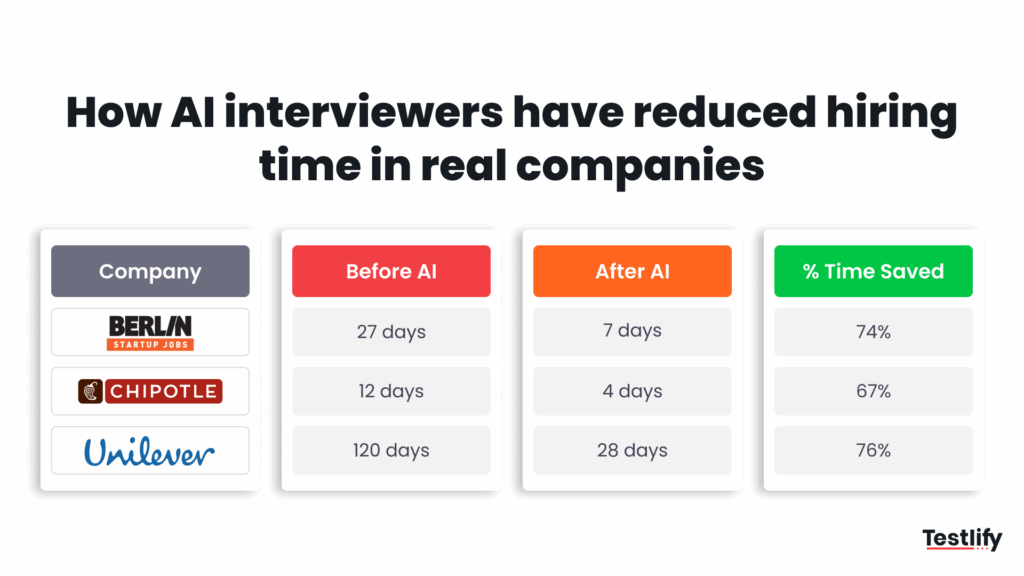
Berlin startup slashes hiring time by 74%
After incorporating AI interviews into its hiring process, a Berlin-based software startup reported that it had cut its average time-to-hire from 27 days to just 7 days.
In the past, interview coordination resulted in week-long delays. With an AI interview, candidates completed interviews within 24 to 48 hours.
Chipotle’s AI bot ‘Ava Cado’ cuts hiring time by 75%
Fast-casual giant Chipotle deployed an AI-powered recruitment chatbot named Ava Cado, which conducts preliminary interviews via text and voice.
This assisted Chipotle in reducing its average time to hire from 12 days to 4 days, particularly for frontline positions such as servers and kitchen workers.
Unilever saves 50,000 hours of manual screening.
To address its global hiring issue, Unilever included an AI video interview in its hiring process. Before AI was introduced, filling each role required weeks of phone screens.
After integration, they saved more than 50,000 recruiter hours annually and reduced the process from four months to just four weeks.
Explore: Testlify’s newly launched average time-to-hire calculator.
What other benefits do AI interviewers offer besides speed?
AI interviewers offer several benefits that expedite the overall hiring process, in addition to reducing the time-to-hire. Here are some examples of how these tools truly benefit each step of the hiring process.
A better candidate experience
Async AI interviews eliminate last-minute rescheduling and time zone issues by allowing candidates to respond at a time and location that works for them. This raises completion rates and creates a favorable first impression.
Reduced costs
When recruiters use AI interviewers, they spend less time on follow-ups, screening, and coordination. This helps reduce time to fill without increasing headcount.
More consistent hiring decisions
AI interviewers eliminate human inconsistency. The process is more equitable and compliant since all candidates receive the same questions and are assessed using the same criteria.
Data-driven hiring
AI systems examine confidence, sentiment, hesitation, and delivery in addition to scoring responses. This provides recruiters with a more thorough and organized perspective of candidate behavior.
Additionally, hiring teams can defend their decisions with data, improving transparency during audits or disputes.
Faster internal collaboration
AI-generated shortlists, scorecards, and video snippets facilitate hiring managers’ asynchronous review of candidates. They can now scan, compare, and discuss more quickly, eliminating the need to sit through entire interviews.
Scalable hiring
AI interviewers scale easily, whether you’re hiring 500 seasonal workers in 30 days or growing a team after funding. With no decrease in speed or consistency, they can screen 100 or 1000 applicants.
Are there any risks with AI interviewers?
Yes, and ignoring them is what separates smart implementation from shallow automation.
AI interviewers are unquestionably quick and effective, but they aren’t perfect. It’s critical to comprehend the risks and how responsible teams are handling them.
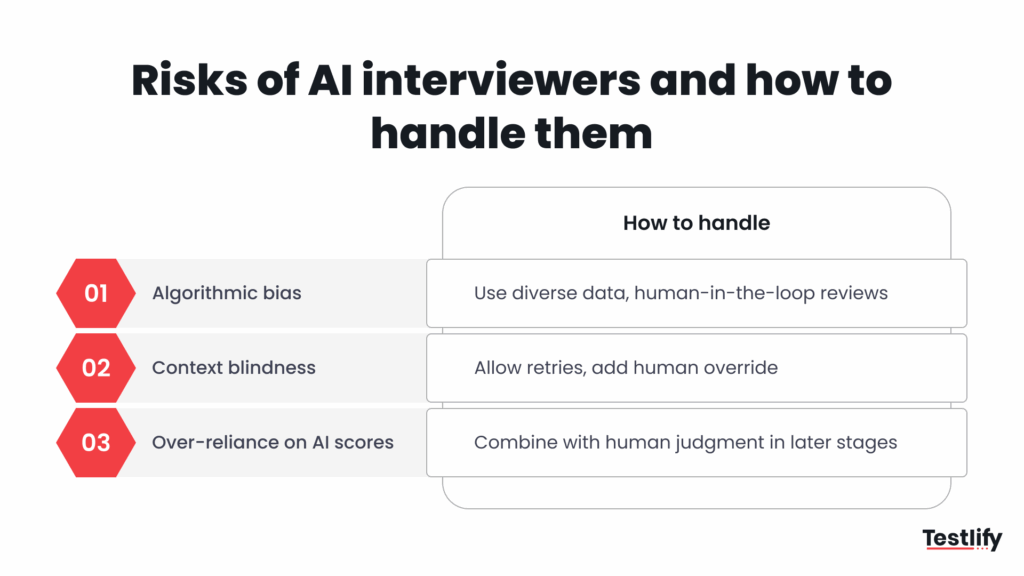
Risk of bias: Algorithms can mirror human prejudices
The objectivity of AI systems depends on the quality of the data on which they are trained. AI models may reinforce rather than rectify bias if past hiring practices exhibit it, such as favoring particular accents or speech patterns.
Lack of context and empathy
AI interviewers can evaluate hesitation, tone, and confidence, but they are unable to determine the reason behind a person’s hesitation.
Did the candidate pause due to network lag? Did they fumble because English isn’t their first language? When AI works alone, these human subtleties might be lost.
For example, a candidate facing network jitter or background noise might get penalized for “low confidence,” despite strong content.
Over-reliance on AI scoring
Instead of treating AI scores as signals, some teams view them as final judgments. However, a candidate’s 78% score might not accurately represent their capacity for leadership, originality, or cultural fit.
Human conversation still reveals the “intangibles” that data alone cannot capture, but AI excels at early-stage screening and analysis.
What’s the future of AI interviewers in talent acquisition?
AI interviewers are part of a long-term evolution in the hiring process. As we look ahead, three significant shifts are shaping the future of AI interviewers:
1. From an optional tool to a hiring standard
More than 70% of enterprise HR teams currently utilize AI in some capacity for screening and interviewing purposes. The fastest-growing adoption is in:
- Remote-first startups hiring globally
- BPOs and customer support firms processing 1000s of applicants/month
- Retail chains scaling for seasonal spikes
This trend shows no sign of slowing. Why? Because recruiters want to focus on high-leverage tasks
2. Deep learning will make interviews more conversational
Current AI tools can evaluate tone, pace, and pause, but future versions will do more:
- Adaptive follow-ups: AI interviewers will ask context-aware questions based on candidate responses.
- Hyper-personalization: roles matched dynamically to candidate profiles.
Companies like Testlify are already prototyping these enhancements.
3. Global regulations will push for transparency and fairness
The rise of AI in hiring also brings scrutiny. Laws are catching up fast:
- Illinois Video Interview Act (U.S.)
- EU AI Act
The future of AI interviewers lies in aligning with human needs and regulatory demands.
Can Testlify help streamline time-to-hire without sacrificing quality?
Now that we’ve explored the benefits, risks, and real-world use of AI interviewers, one question remains: Which platforms can actually put all these ideas into practice?
Testlify’s AI interview solution helps recruitment teams handle what slows them down the most:
- Async AI interviews: Candidates can respond at their own pace
- AI scoring dashboards: Confidence, tone, pauses, and delivery are evaluated with transparency
- Human review layer: Recruiters can override scores and leave structured feedback
- Scalable across roles: From 50 to 5,000 applicants per month
- Seamless ATS integration: Offers the option to integrate with 100+ ATSs
Internal data snapshot (Q1 2024)
From 2,000 candidates screened via Testlify’s AI interview flow:
- 3.8% were flagged for human review based on unusual hesitation/confidence patterns
- Recruiters saved an average of 8 hours per open role.
- Candidate drop-off rates dropped by 28% in high-volume roles (e.g., support, sales)
Final words
AI interviewers, when implemented thoughtfully, create space for recruiters to do what truly matters. The goal isn’t to replace humans in the hiring process. It’s to give that human more insight and control.
Ready to Make Your Interviews Work Harder (So You Don’t Have To)? Looking to reduce time-to-hire without sacrificing candidate quality or fairness?
Testlify’s AI interview platform helps you screen at scale, get structured insights, and bring consistency to every early-stage interview. Learn more or get started with Testlify’s AI-powered interview solution.
Frequently asked questions (FAQs)

B2B SaaS Content Writer
Rishav Kumar is a B2B SaaS content writer with 4 years of experience. He loves crafting engaging content. Always exploring fresh ideas, he's passionate about helping businesses grow through impactful writing.
LinkedInRelated resources
View all
HR & recruitment
Best Alternatives to Traditional Interviews for Modern Hiring
HR & recruitment
AI interviewer vs human interviewer: Who makes better hiring?

HR & recruitment
Why remote companies are leaning on AI interviews for global hiring

HR & recruitment
HR in the higher education industry
HR & recruitment
AI Phone Screening for Recruiters: A 2026 Guide for Hiring Teams
HR & recruitment
AI candidate screening: a 2026 guide for hiring teams
Get started.
Hire on proof, not resumes.
Run your first skills-based assessment free — no credit card required.