
Chat simulation assessments: what they measure and how to run one
How chat simulation assessments work, what they measure, sample scenarios for support roles and how to score them fairly at volume.

A chat simulation is a pre-employment assessment in which a candidate handles a realistic text conversation with a simulated customer or colleague, usually played by AI, and is scored on how clearly, accurately and kindly they resolve it. Instead of asking people how they would handle a frustrated customer, you watch them do it, in the same channel the job uses.
 ChatGPT
 Gemini
 Claude
 Grok
 Perplexity
TL;DR
- A chat simulation drops the candidate into a live-style chat with an AI customer and scores each reply on clarity, tone, empathy, accuracy and resolution.
- A chat simulation shows what a typing test or a multiple-choice quiz cannot: how someone writes under pressure, handles pushback, and closes the issue.
- It fits any role that works in writing with customers or colleagues: live chat and email support, helpdesk, inside sales, BPO, and contact center agents.
- Build it from one real ticket, write the AI customer with the C.R.A.F.T. method, and score against 4 to 6 job-related criteria agreed before launch.
- Keep a person in the loop: review borderline scores, offer accommodations, and tell candidates that AI helps score the conversation.
- For chat-only roles, pair a 10 to 15 minute chat simulation with a short typing test and a role-specific skills test.

What is a chat simulation assessment?
A chat simulation assessment is a test that recreates a real written conversation from the job, such as a customer asking about a late order or a colleague asking for help in a team chat, and records how the candidate responds. The other side of the chat is played by AI that follows a brief: who the customer is, what they want, and how they behave.
Older chat simulations were scripted. The candidate picked from preset replies or typed into a fixed tree, and the customer always said the same thing next. An AI chat simulation is open-ended. The candidate writes freely, and the AI customer reacts to what they actually said, asks follow-up questions, and pushes back when an answer is vague. That makes the conversation feel like a real shift, and it makes the result harder to game.
Testlify offers chat simulation as part of its Chat AI interviews, one of the 25+ question types you can add to an assessment.
How does a chat simulation work?
A chat simulation works in five steps: the hiring team picks a scenario, briefs the AI customer, the candidate holds a timed conversation, each reply is scored against set criteria, and the team reviews a report before deciding who moves forward. Every candidate gets the same scenario and the same scoring, so results can be compared across the pool.
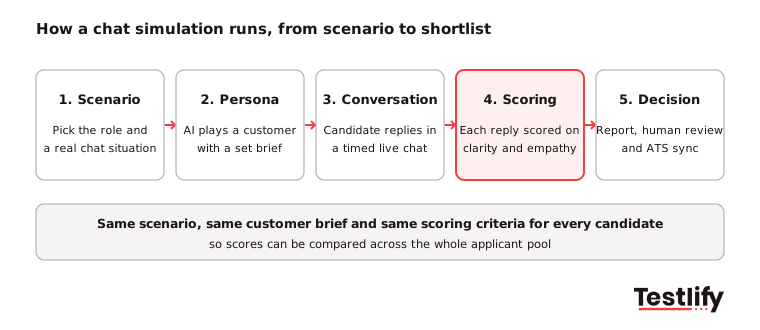
- Scenario creation: Choose a situation the new hire will face in their first month, such as a refund request, a password reset, or a delivery complaint.
- Persona and prompts: Write the brief for the AI customer: their profile, their opening message, the follow-up questions they will ask, and one harder moment, such as a refusal or a policy question.
- Candidate interaction: The candidate chats with the AI customer in real time. Some simulations are timed to match the pace of a live queue.
- Performance evaluation: Each reply is scored on criteria the recruiter set, such as clarity, tone, empathy, accuracy, and whether the issue was resolved.
- Analytics and review: The report shows scores per criterion, the full transcript, and AI-written notes. A recruiter reviews it, adjusts a score if needed, and moves the candidate on in the ATS.
What does a chat simulation measure?
A chat simulation measures the written communication and problem-solving skills that decide whether someone does well in a chat role. O*NET's profile of customer service representatives lists active listening, reading comprehension, critical thinking, and written expression among the core skills, and a chat transcript shows each of them directly.
Skill | What you see in the transcript | Example of a strong signal |
|---|---|---|
Written clarity | Short, plain sentences the customer can act on | Gives the next step in one line, not a paragraph |
Tone and empathy | Acknowledges the problem before solving it | "Sorry your order is late. Let me check where it is." |
Listening and comprehension | Answers the question actually asked | Spots that the customer wants a refund, not a replacement |
Problem solving | Asks the right question, then fixes the issue | Confirms the order number before promising a date |
Accuracy | Follows the policy in the brief | Offers the refund window the scenario allows, not a guess |
Handling pushback | Stays calm and firm when told no | Explains the policy and offers an alternative |
Grammar and spelling | Clean, professional writing | No errors that change the meaning |
Chat simulations also surface soft skills that are hard to judge from a resume: emotional intelligence, patience, and how a person adapts when the conversation changes direction. Testlify also offers an empathy assessment when you want a separate score for that trait.
Which roles should take a chat simulation?
Chat simulation suits any role where most of the work happens in writing with customers or colleagues. The most common are live chat agents, email and ticket support, technical helpdesk, inside sales and online sales associates, and agents in BPO and contact centers who switch between channels.
Demand for these roles stays high even as automation grows. The US Bureau of Labor Statistics counts 2,666,000 customer service representative jobs in 2025 and projects about 289,500 openings a year through 2035, almost all from people leaving the role. That is a lot of repeat hiring, which is where a consistent, automated first screen pays off.
Chat simulation also works outside support. A sales development role can face a prospect who raises a price objection. An HR operations hire can answer an employee asking about leave. A team lead can handle a colleague who missed a deadline in a team chat. If the job has a hard conversation in writing, you can simulate it. Teams hiring at scale in BPO and contact centers tend to use it as the first step after the application.
How is chat simulation different from a typing test or a quiz?
Chat simulation differs from a typing test or a knowledge quiz because it scores the whole conversation, not one skill on its own. A typing test shows speed and accuracy. A multiple-choice quiz shows whether someone knows the policy. Only a simulation shows whether they can use that knowledge, in writing, with a customer who is not happy.
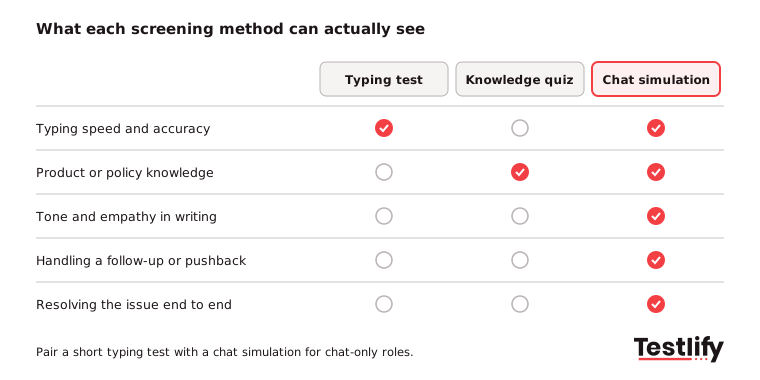
Method | What it shows | What it misses | Best use |
|---|---|---|---|
Words per minute and accuracy | Tone, judgment, problem solving | Minimum speed bar for chat-only roles | |
Knowledge quiz | Product and policy knowledge | How the person writes and reacts | Roles with a heavy policy load |
Choices in workplace scenarios | Real writing, follow-ups | Early screen for judgment | |
Chat simulation | Writing, empathy, accuracy and resolution together | Spoken communication | Any chat or written support role |
Live interview | Motivation, fit, spoken skills | Consistency across candidates | Final rounds |
The work itself is also getting harder. Gartner's survey of 265 customer service leaders, run in April and May 2025, found that live chat and self-service are set to overtake traditional channels by 2027. Gartner also notes that because simple cases are now solved in self-service, the assisted conversations left for human agents are more complex. A test that only measures typing speed screens for the easy part of the job.
What are the benefits of chat simulation for hiring teams?
Chat simulation gives hiring teams evidence of real job skills early in the process, for every applicant, without booking a single interview. The main benefits carried over from both of our earlier guides, and confirmed by the teams that use it, are these:
- Authentic evidence: Candidates show how they communicate instead of describing it. You read the transcript, not a claim on a resume.
- Soft skills you can score: Empathy, patience, and conflict handling are visible in how someone phrases a reply to an upset customer.
- Problem-solving in context: You see whether the candidate asks the right question first or jumps to an answer.
- A realistic job preview: Candidates experience the actual work. People who dislike it can step out before day one, which cuts early attrition.
- Time saved at volume: Hundreds of candidates can take the same simulation at once, in any time zone, with automated scoring. Recruiters only review the best and the borderline.
- More consistent decisions: Every candidate gets the same scenario and the same criteria, which reduces the room for gut feel and unconscious bias in the first screen.
- A better candidate experience: A conversation feels closer to the job than a long questionnaire and gives strong candidates a chance to stand out.
Key takeaway: The value of a chat simulation comes from realism and consistency. Keep the scenario close to the real job and keep the scoring the same for everyone.
How do you build a chat simulation that tests the right skills?
A chat simulation tests the right skills when it starts from a real situation in the job and a short list of skills you have agreed to score. Build it in this order:
- Define the objective: Pick 4 to 6 skills from the job description that matter most in the first 90 days, such as clarity, empathy, policy accuracy, and de-escalation.
- Take a real ticket: Use a common or difficult conversation from your own queue, with personal details removed. Realism is what makes the answers meaningful.
- Fill in the scenario fields: Scenario (for example, a customer shopping for a laptop), customer profile (limited technical knowledge, cares about battery life), and objective (explain technical points in simple terms).
- Write the opening and follow-ups: One clear, open opening message, two or three follow-up questions, and one harder moment, such as "Why is this one more expensive?"
- Give clear instructions: Tell candidates what the conversation is about, how long they have and that they should treat it like a real customer.
- Pilot it: Have two or three of your best current agents take it. Their transcripts become your benchmark for a strong answer.
To write the AI customer, the Testlify help center describes a five-part method called C.R.A.F.T.: Clarify the role, Reinforce consistency, Ask one thing at a time, Feed context regularly, and Test and tweak. Each step stops a specific failure, such as the AI customer drifting out of character or asking three things at once.
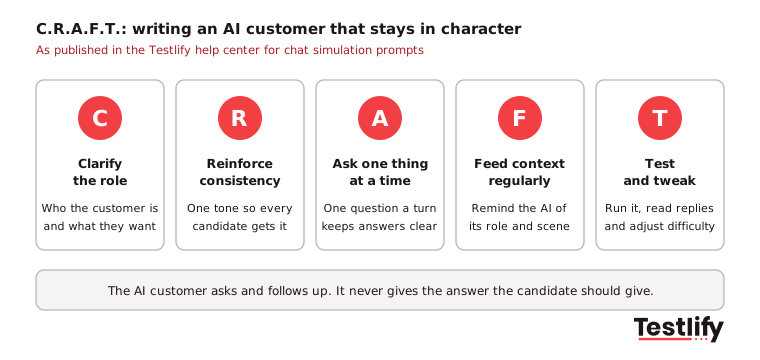
Pro tip: Tell the AI customer what it must never do: give the candidate the answer, switch roles or answer its own questions. Most broken simulations fail because the customer starts helping the candidate.
What do good scenarios look like for common roles?
Good chat simulation scenarios are specific, short and built around one decision the candidate has to make. Here are examples you can adapt for common roles:
Role | Scenario | AI customer brief | What to score |
|---|---|---|---|
Live chat agent, e-commerce | Order is five days late | Annoyed, wants a refund, has the order number | Empathy, policy accuracy, clear next step |
Technical support | Cannot log in after a password reset | Not technical, short on time | Plain-language steps, checking understanding |
Inside sales | Prospect says the price is too high | Interested but comparing two tools | Discovery questions, handling the objection |
Banking support | Card declined while abroad | Worried, unsure about security | Calm tone, verification steps, compliance |
HR operations | Employee asks how much leave is left | Polite, wants a quick answer | Accuracy, clarity, privacy |
Team lead | Colleague in a team chat missed a deadline | Defensive | Directness, tone, agreeing a plan |
Keep each simulation to one scenario and around 10 to 15 minutes. Longer chats add fatigue without adding much signal. If the role needs several chats at once, test that in a separate timed task rather than making one conversation longer.
How should you score chat simulation responses?
Chat simulation responses should be scored against a short rubric agreed before anyone takes the test, with each criterion tied to a skill the job needs. The EEOC's guidance on employment tests says a test must be job-related and its results suited to the employer's purpose, so every score you use to reject someone should trace back to the job.
Criterion | Weight (example) | Strong (8 to 10) | Weak (1 to 4) |
|---|---|---|---|
Resolution | 25% | Solves the issue or sets a clear next step | Leaves the customer without an answer |
Accuracy | 20% | Follows the policy in the brief | Promises something the policy does not allow |
Empathy and tone | 20% | Acknowledges the problem, stays warm | Cold, defensive or scripted |
Clarity | 20% | Short, plain, easy to act on | Long, vague or full of jargon |
Grammar | 15% | Clean, professional writing | Errors that confuse the meaning |
Adjust the weights to the role. A banking chat role might put accuracy first. A retail role might weight tone higher. Then calibrate: score the transcripts from your best current agents and set your pass mark just below their range. Recheck the scores against the performance of people you hire after the first few months.
How do you keep AI-scored chat simulations fair?
AI-scored chat simulations stay fair when they use job-related criteria, keep a person reviewing the decisions, tell candidates how AI is used and give accommodations to people who need them. These are also the points regulators look at.
- Bias audits and notice: New York City's Local Law 144 requires a yearly bias audit and candidate notice when an automated tool substantially helps decide who is hired. The NYC Department of Consumer and Worker Protection page explains the rules. Testlify completed a third-party NYC bias audit of its matching model in June 2023.
- Human review: Let AI score the conversation, but have a recruiter check borderline results and every rejection near the pass mark.
- Accommodations: Offer extra time or another format to candidates who ask for it, such as people using assistive technology.
- Language fairness: Score grammar only when written English is part of the job, and run the simulation in the candidate's working language where you can.
- Clear criteria: Publish what you score in the instructions. Candidates do better, and the process is easier to defend.
What mistakes should you avoid when setting one up?
The most common chat simulation mistakes come from vague prompts and unclear scoring, not from the technology. Watch for these:
- Role confusion: Without a clear role, the AI customer drifts between personas and the chat stops feeling real.
- Inconsistent tone: If you do not fix the customer's mood, one candidate gets a calm customer and the next an angry one.
- Overloaded prompts: Asking three things in one message gets three half-answers.
- Context loss: In long chats, the AI can forget the scenario unless the prompt reminds it.
- Candidate control: Some candidates try to steer the chat or get the AI to break character. Tell the AI customer to stay in role.
- Testing the wrong job: A complex technical scenario for an entry-level chat role filters out people who would learn it in a week.
- No benchmark: Without transcripts from your best agents, you cannot tell what a good score looks like.
How does chat simulation work in Testlify?
Chat simulation in Testlify runs as an AI-led, asynchronous chat that you add to any assessment alongside other tests. You set the scenario and the AI customer, candidates take it on desktop or mobile, and replies are scored automatically in real time.
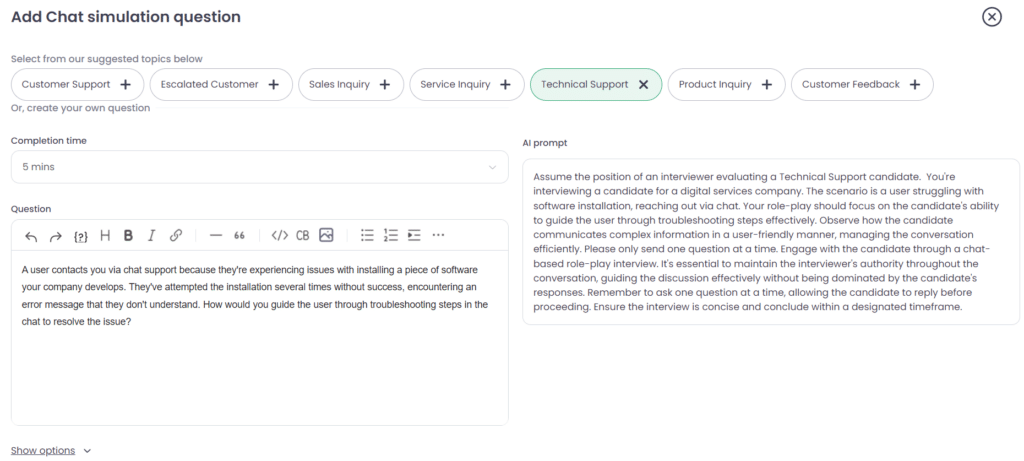
- Workplace channels: Simulations can mirror Slack threads, live customer chats and internal help desks.
- Two formats: Live-style timed conversations for fast-paced roles, and scenario-based simulations that test reasoning and customer handling.
- Automatic scoring: Replies are scored on clarity, tone and empathy, with insights on grammar and problem solving and a structured report. Recruiters can adjust any score, and human review is available for high-priority roles.
- Anti-cheating: Assessments include 20+ proctoring checks, such as tab tracking, copy and paste blocking and AI assistance detection.
- Languages and integrations: Run assessments in 15+ languages and sync results with 100+ ATS and HRIS tools, including Workday, Greenhouse and Lever.
Most support teams combine the chat simulation with a role-specific test from the library of 3,500+ tests, such as the live chat support skills test, and a short typing test. For more on the support use case, see our guide to chat AI interviews for support hiring and our pre-hire assessments for call centers.
Ready to try chat simulation on your next support hire?
Chat simulation is one of the fastest ways to see who can do a chat job before you spend time on interviews. Start a 7-day free trial with no credit card, build a simulation from one of your own tickets and send it to your next batch of applicants, or book a demo to see it set up for your roles.
Frequently asked questions (FAQs)

Content Writer
Yashika Khandelwal is a Content Writer with 3+ years of experience creating research-backed content on hiring, talent assessment, and HR technology. She is a registered Organizational Psychologist and subject matter expert who combines behavioral science with practical recruitment insights to produce accurate, evidence-based content.
LinkedInRelated resources
View all
HR & recruitment
Types of Assessment Questions and How to Use Them in Hiring

HR & recruitment
9 benefits of cognitive testing in hiring, and how to get them

HR & recruitment
Developer test: how to use one to hire engineers in 2026

HR & recruitment
HR Analytics for Data-Driven Decision Making: The 2026 Guide

HR & recruitment
How to build a resilient workforce in challenging times

HR & recruitment
How to incorporate CEFR test into your recruitment strategy
Get started.
Hire on proof, not resumes.
Run your first skills-based assessment free — no credit card required.