
Remote assessment: how it works and how to use it in hiring
What a remote assessment is, how it works, which test types to use, how to stop cheating and how to add remote tests to your hiring.
A remote assessment is a test or task that a job candidate completes online, from their own location, instead of at an office or test center. The hiring team sends one link, the candidate takes the test on their own device, and the platform scores every answer against the same criteria. For hiring teams, remote assessment is how you check real skills before you spend interview time, whether the role is remote, hybrid, or on-site.
 ChatGPT
 Gemini
 Claude
 Grok
 Perplexity
TL;DR
- A remote assessment is an online test of a candidate's skills, taken from anywhere and scored the same way for everyone.
- The main types are skills tests, coding and simulations, cognitive ability tests, situational judgment tests, video or AI interviews, and language or typing tests. Most roles need 2 to 4 of them.
- Remote assessments are as reliable as in-person tests when the test matches the job, the conditions are the same for everyone, and proctoring checks identity and behavior.
- Place the assessment right after the application, keep it under about 45 minutes, and tell candidates what is checked and why.
- Security works in layers: system and ID checks before the test, tab, webcam, and copy-paste tracking during it, and a person reviewing flagged sessions after it.
- SHRM found 69% of organizations still struggle to fill full-time roles in 2025, so a fast, fair first screen pays off quickly.

What is a remote assessment?
A remote assessment is any evaluation of a person's knowledge, skills, or abilities that happens without both people in the same room, usually over the internet. In hiring, it means an online test, task, or interview that a candidate completes from home, scored by software, and reviewed by the hiring team.
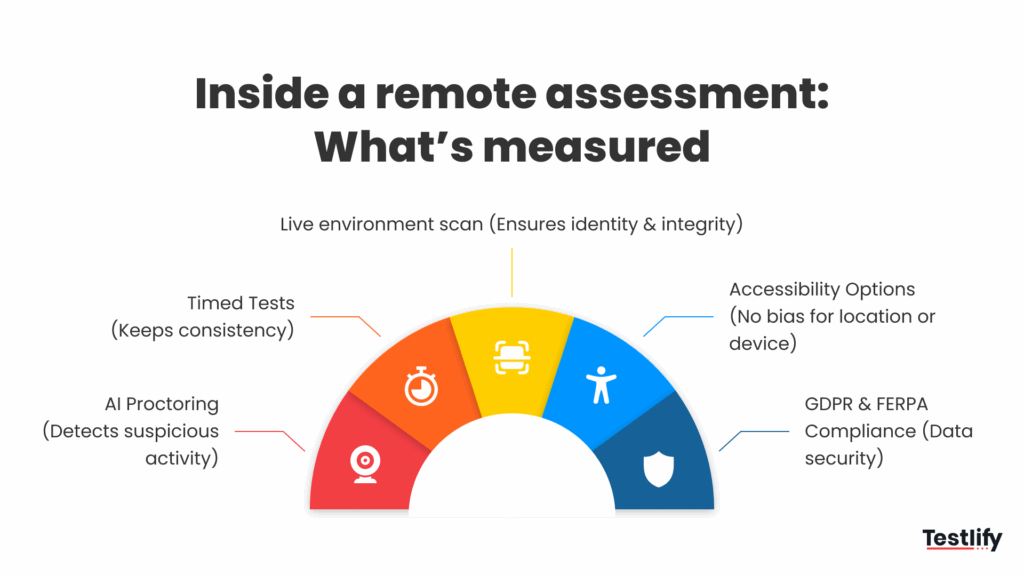
Three terms get mixed up, so it helps to separate them:
- Remote assessment: Describes how the test is delivered (online, from anywhere). The role itself can be remote, hybrid, or on-site.
- Remote work assessment: Describes what is measured: whether a person will do well working remotely, through traits like self-management, written communication, and time management.
- Online assessment: Used almost interchangeably with remote assessment, since nearly every remote test today runs in a browser.
Remote assessments cover technical tests, cognitive ability tests, personality and behavior questionnaires, and evaluations of hard and soft skills. Because every candidate gets the same questions under the same conditions, results can be compared side by side.
How does a remote assessment work?
A remote assessment works in six steps: the team defines the skills, builds the test, invites candidates by link, the candidate takes a timed and proctored test, the platform scores and ranks every result, and a person reviews the shortlist. No proctor or room is needed at any point.
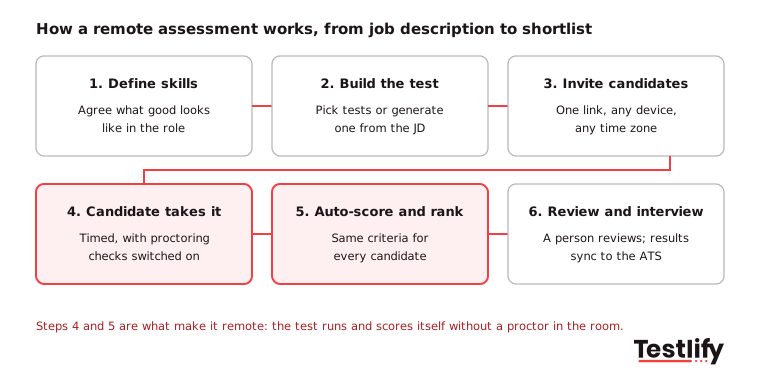
- Define the skills: Ask the hiring manager what good looks like in the first 90 days, then pick the 4 to 6 skills that matter most.
- Build the test: Choose ready-made tests for each skill or generate an assessment from the job description. Add custom questions for anything specific to your team.
- Invite candidates: Send one link by email, from your ATS, or by WhatsApp. Candidates take the test on their own schedule, which removes time-zone problems.
- Candidate takes the test: The test runs in the browser with a timer, and the proctoring checks you switched on, such as webcam snapshots or full-screen mode.
- Score and rank: The platform scores each answer against the same criteria and ranks candidates, with a per-skill breakdown.
- Review and interview: A recruiter reviews the top candidates and any flagged sessions, and the results sync back to the ATS for the interview stage.
Key takeaway: The value of a remote assessment comes from steps 1 and 6. A test built on vague skills, or a ranking nobody reviews, gives you a fast answer that may be wrong.
What types of remote assessment can you use?
Remote assessments fall into six main types: skills tests, coding and simulations, cognitive ability tests, situational judgment tests, video or AI interviews, and language or typing tests. Each one shows something different, so most roles combine two to four types.
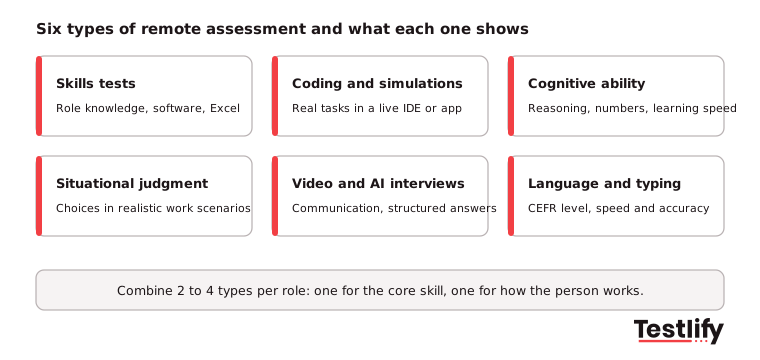
Type | What it shows | Best for | Example |
|---|---|---|---|
Skills tests | Role knowledge and software skills | Most professional roles | Excel, accounting, digital marketing tests |
Coding and simulations | How someone does the actual task | Developers, analysts, office roles | Coding tests in 45+ programming languages, MS Office and Google Workspace simulations |
Cognitive ability | Reasoning, numeracy, learning speed | Graduate and high-volume roles | Numerical and logical reasoning tests |
Situational judgment | Choices in realistic work situations | Customer-facing roles, managers | |
Video and AI interviews | Communication and structured answers | Sales, support, remote roles | One-way video interviews, chat, voice and video AI interviews |
Language and typing | Language level, speed and accuracy | Contact centers, global teams |
For technical roles, a coding task that mirrors real work shows more than any number of multiple-choice questions. Candidates write and run code in the browser, and the hiring team sees the result and the code quality.
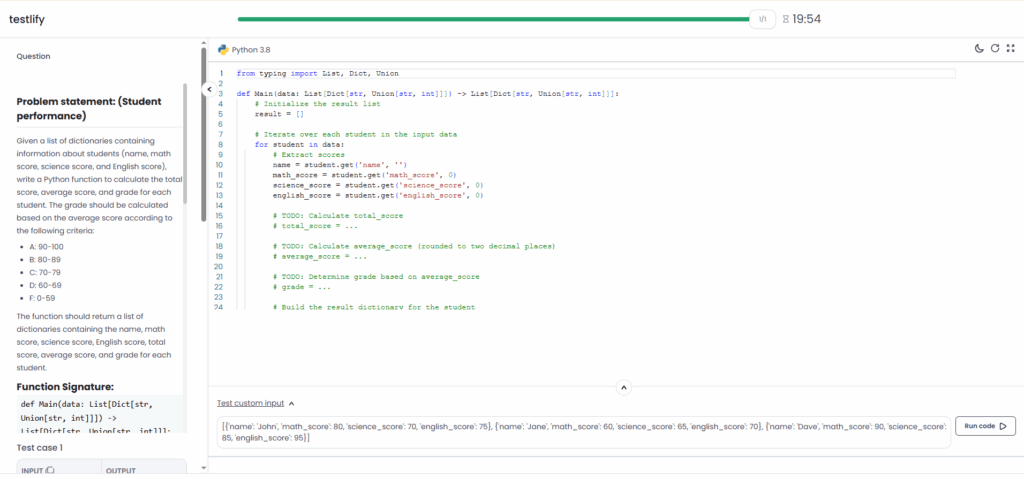
For soft skills such as accountability and communication, situational judgment tests and one-way video questions work better than a live call. They show how a candidate handles a missed deadline, critical feedback or asynchronous teamwork, and every candidate faces the same scenario.
Why do hiring teams use remote assessments?
Hiring teams use remote assessments to judge candidates on proven skills instead of resumes, to reach a wider talent pool, to screen faster and to make decisions on comparable data. The benefits apply to on-site roles too, but they matter most when candidates are spread across cities and time zones.
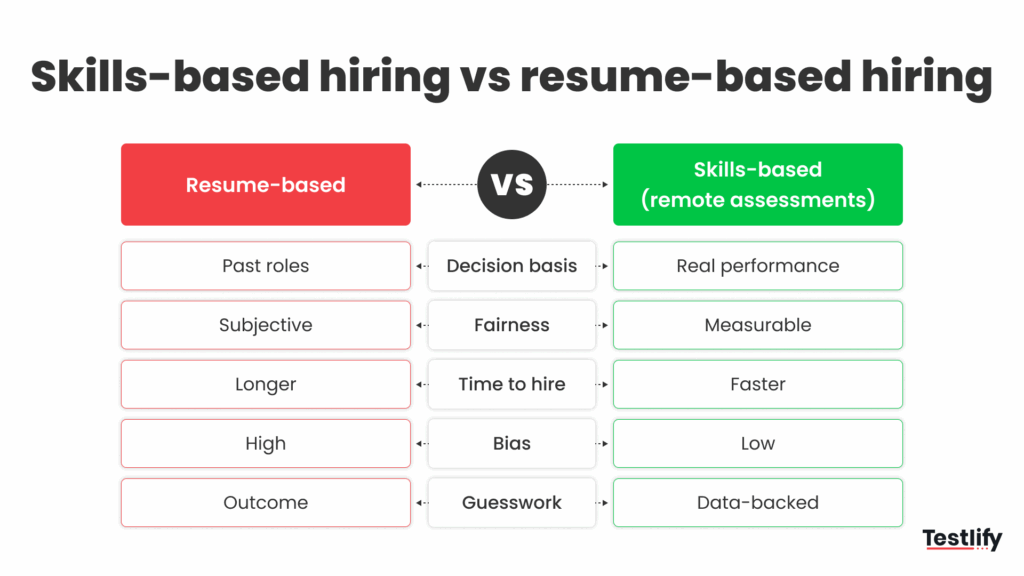
- Skills over resumes: A resume shows where someone worked. A remote assessment shows what they can do today, which reduces bias from school names and job titles and supports quality of hire.
- A wider, fairer talent pool: Candidates take the same test under the same conditions wherever they live. Distributed work is now normal: Gallup's hybrid work indicator shows that, as of August 2026, 54% of remote-capable US employees work hybrid and 25% work exclusively remote.
- Faster screening: The assessment replaces the first manual screen. Recruiters only interview people who already passed, and Testlify is built to give you a ranked shortlist in 30 minutes.
- Comparable data: Every candidate gets a per-skill score on the same scale, so debates move from "I liked her" to "she scored highest on client communication."
- Better candidate experience: No travel, no test center, and a flexible time slot. Candidates can show their skills in a setting that feels like the real remote job.
- Lower cost per hire: Fewer interviews per hire and no venue or travel costs.
Are remote assessments as effective as in-person assessments?
Remote assessments are as effective as in-person assessments when three conditions hold: the test matches the job, every candidate takes it under the same rules, and identity and behavior are checked. Without those, an in-person test is not more accurate, just more expensive.
Remote assessment | In-person assessment | |
|---|---|---|
Reach | Any location, any time zone | Candidates who can travel |
Consistency | Same questions, timer and scoring for all | Depends on the room and the assessor |
Cost per candidate | Low, no venue or travel | Venue, travel and assessor time |
Speed to shortlist | Hours | Days to weeks |
Integrity | Proctoring checks, logs and recordings | A person in the room |
Non-verbal cues | Limited, partly covered by video answers | Full |
Main risk | Weak test design, tech problems | Interviewer bias, limited reach |
Employers are moving this way. NACE's Job Outlook 2025 Spring Update found almost two-thirds of employers use skills-based hiring to identify candidates, and more than two-thirds of those apply it always or most of the time, mostly in screening and interviewing.
The gaps of remote testing are real but manageable. Missing non-verbal cues can be covered with a short video answer, and technical problems shrink when candidates run a system check before they start.
What are the challenges of remote assessment?
The main challenges of remote assessment are judging soft skills and team fit without meeting, verifying technical ability and identity, protecting data, keeping candidates engaged, technology problems, and time-zone scheduling. Each one has a practical fix inside the assessment itself.
Hiring is still hard: SHRM's 2025 Talent Trends research found 69% of organizations still struggle to fill full-time roles. That makes a remote screen that fails quietly an expensive problem.
Challenge | What goes wrong | Fix |
|---|---|---|
Remote work skills | Self-motivation and time management do not show in a resume | Situational judgment tests and a timed, self-paced task |
Technical ability | Claims on a profile cannot be checked in a call | Coding tasks and simulations that mirror the real job |
Team and culture fit | Communication style is hard to read without meeting | Written and one-way video answers scored on a rubric |
Identity and cheating | Someone else takes the test, or uses AI tools | Photo ID and face match, webcam snapshots, AI assistance detection |
Data security | Candidate data and test content leak | Certified platform (ISO 27001, SOC 2 Type II, GDPR) and private invites |
Candidate experience | The process feels cold and one-sided | Clear instructions, a realistic time estimate and fast feedback |
Technology barriers | Slow internet or an old browser breaks the test | A system check before the test and a support contact |
Time zones | Live sessions are hard to schedule | Asynchronous tests with a fixed completion window |
Flexibility vs accountability | Candidates who need structure struggle remotely | Deadline-based tasks that show how a person plans their time |
For a wider view of remote hiring problems beyond testing, see the top challenges in remote hiring and how to overcome them.
How do you keep a remote assessment secure?
A remote assessment stays secure through layered checks: confirm the device and the person before the test, track behavior during it, and have a person review anything flagged after it. Proctoring confirms who took the test and how. Good test design decides whether the score means anything.
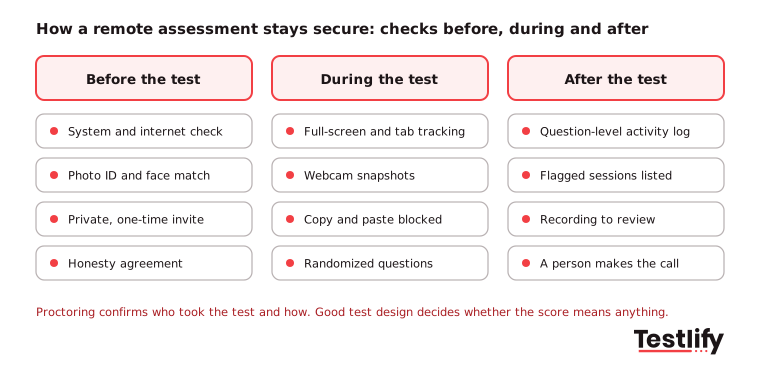
- Before the test: A system compatibility check, photo ID with face match, private one-time invites and an honesty agreement.
- During the test: Full-screen mode, tab and mouse-out tracking, webcam snapshots, copy and paste blocking, AI assistance detection and randomized questions.
- After the test: A question-level activity log, a list of flagged sessions and recordings to review. A person decides what a flag means; a flag alone should never reject a candidate.
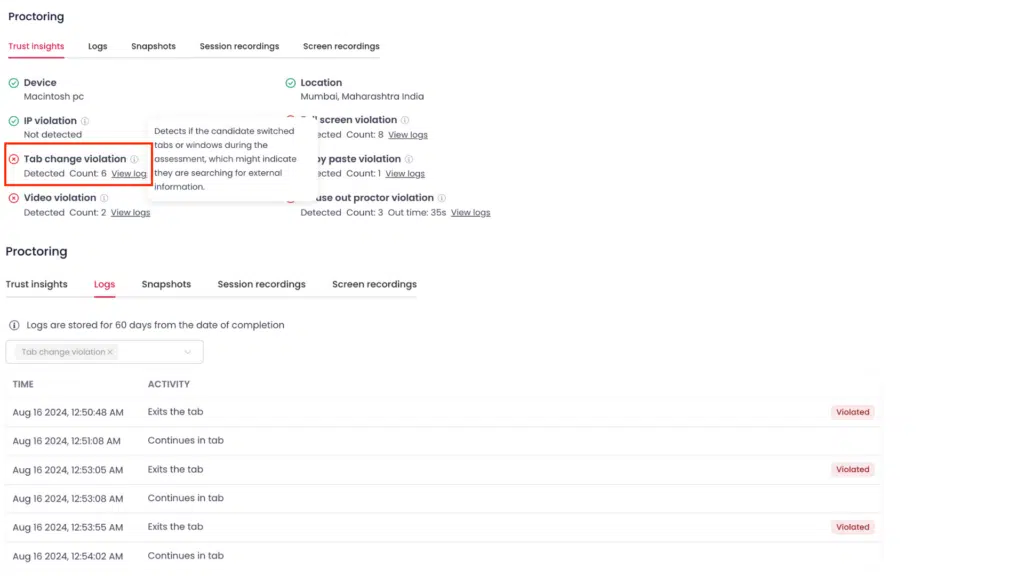
Testlify includes 20+ anti-cheating and proctoring checks, which you can switch on per assessment. Use the lightest set that protects the result: a typing test needs fewer checks than a certification-level coding exam.
Compliance matters as much as cheating. If you hire in New York City and use software to score or rank candidates, NYC Local Law 144 requires a bias audit in the past year, published results and notice to candidates at least 10 business days before the tool is used. Testlify had a third-party bias audit of its Matching Model completed in June 2023. Offer accommodations such as extra time or an accessible format to candidates who ask for them.
How do you add remote assessments to your hiring process?
Remote assessments work best placed right after the application, built on the skills the role needs and scored the same way for every candidate. The steps below combine what works for distributed teams with what keeps the process fair.
- Set a standard process: Use the same test, timer, instructions and pass mark for everyone applying to a role. Write it down so every recruiter runs it the same way.
- Match tests to the role: For an account manager, test written tone and client communication. For a software developer, test problem-solving and code. Mix a core-skill test with one that shows how the person works.
- Put the test early: An assessment at the top of the funnel filters before anyone spends interview time. Keep it under about 45 minutes so strong candidates finish it.
- Tell candidates what to expect: Share the time needed, the skills covered, the proctoring used and how their data is handled.
- Train the people who review results: Interviewers need to know how to read a score report, how to probe weak areas in the next round and how to spot bias in their own judgment.
- Connect it to your ATS: Send invites and pull results inside the tool your team already uses, so scores sit next to the candidate record.
- Review and improve: Every quarter, compare test scores with interview outcomes and early job performance. Drop questions that do not separate strong from weak candidates, and read candidate feedback.
Pro tip: Before you send the assessment to candidates, ask two people already doing the job well to take it. If they do not pass comfortably, the test is too hard or measures the wrong thing.
Remote assessment also works for longer, paid trials. Automattic, the company behind WordPress.com and fully remote, describes a hiring process with a coding challenge followed by a paid, part-time trial project of two to eight weeks that both sides use to judge fit. Few teams need a trial that long, but the idea scales down: a short, realistic task tells you more than another interview round. For more methods, see practical ways to evaluate job candidates remotely.
What should you look for in a remote assessment tool?
A good remote assessment tool covers the skills you hire for, protects test integrity, fits your ATS and gives reports a hiring manager can read in minutes. Check these points before you buy:
- Test range: Tech and non-tech roles in one library, plus custom questions. Testlify has 3,500+ tests and 25+ question types, including coding, video, audio and file upload.
- Speed to build: Can you generate a role-specific assessment from a job description, or do you start from a blank page?
- Integrity: Proctoring checks you can switch on per test, ID verification and AI assistance detection.
- Candidate experience: Mobile-friendly tests, clear instructions and tests in 15+ languages for global hiring.
- Integrations: Two-way sync with your ATS. Testlify connects with 100+ ATS and HRIS tools, including Workday, Greenhouse and Lever.
- Reporting: Per-skill scores, benchmarks, candidate comparisons and shareable reports.
- Security and compliance: ISO 27001, SOC 2 Type II, GDPR and a published bias audit.
Try a remote assessment with Testlify
Testlify turns a job description into a role-specific remote assessment, runs it with built-in proctoring and gives you a ranked shortlist with explainable scores. It is credit-based, so you pay only when a candidate starts a test. Browse the Testlify test library or book a demo to see a remote assessment built for one of your open roles, or start a 7-day free trial with no credit card.
Frequently asked questions (FAQs)

B2B SaaS Content Writer
Rishav Kumar is a B2B SaaS content writer with 4 years of experience. He loves crafting engaging content. Always exploring fresh ideas, he's passionate about helping businesses grow through impactful writing.
LinkedInRelated resources
View all
Remote hiring
System compatibility check: how to prevent online assessment failures
Remote hiring
How to foster team cohesion and engagement in a remote workforce
Remote hiring
Remote Hiring Tools: Build Your 2026 Hiring Stack
Remote hiring
How to overcome geographical and cultural barriers in remote hiring

Remote hiring
5 practical ways to evaluate job candidates remotely

Remote hiring
Best practices for remote employee management
Get started.
Hire on proof, not resumes.
Run your first skills-based assessment free — no credit card required.