
How to use AI in recruiting using Testlify
How to use AI in recruiting with Testlify: screen resumes, validate skills, run interviews, and standardize decisions with human oversight.

AI can help a lot in recruiting. 64% Organizations report already using AI to support HR activities including recruitment, interviewing, and hiring.
The practical way to use AI is to apply it across the funnel, not as a one-off tool. Testlify supports this end-to-end approach with AI features for screening, assessments, and interviews while keeping human oversight in place.
In this guide, we’ll walk through a step-by-step recruiting workflow using Testlify, so you can make confident and evidence-backed hiring decisions.
 ChatGPT
 Gemini
 Claude
 Grok
Grok Perplexity
TL;DR – Key takeaways
- Define role requirements and success criteria before using any AI in recruiting.
- Use Testlify’s AI Resume Screener to shortlist faster with consistent job-fit evaluation.
- Validate skills with the test library or AI-assisted assessment creation, not resumes alone.
- Use AI chat simulations and structured interviews to test judgment and communication at scale.
- Protect integrity with custom proctoring and standardize decisions using weighted scoring and clear rubrics.

Step 1: Define role requirements and success criteria
Before analyzing any resume, get a clear idea of what’s required for the role. Lock three things:
- Core skills (must-have vs nice-to-have)
- Minimum criteria (experience, domain exposure, location/shift, notice period, etc.)
- Success criteria (what good performance looks like in the first 60–90 days)
If you need a quick draft, use Testlify’s Job Description Generator, then tighten it with the hiring manager so the criteria is realistic and testable. As candidates increasingly rely on AI to find jobs, applying basic generative engine optimization to these descriptions ensures your open roles are actually surfaced and cited by the digital assistants top talent use. Once this is clear, you can move to the next step.
Step 2: Screen resumes using Testlify’s AI Resume Screener
Once your role criteria is set, use Testlify’s AI Resume Screener to evaluate resumes against that criteria instead of scanning manually. It can analyze resumes pulled from your ATS and generate a job-fit score, along with clear fit labels like High/Medium/Low, based on the requirements you define.
How to run it in a clean, recruiter-friendly way:
- Set the screening criteria (skills, experience, keywords that matter, deal-breakers).
- Sync or import resumes from your ATS so screening happens in your existing workflow.
- Review match scores & fit labels, then shortlist the “High” group first and manually review edge cases in “Medium.”
- Use the output as decision support, not an auto-reject machine. Keep human oversight on exceptions and non-traditional profiles.
After you shortlist, don’t stop at resume signals. The next step is to validate skills with assessments so you’re selecting candidates based on proof.
Step 3: Validate skills with assessments and the test library
Resumes tell you what a candidate claims. Assessments tell you what they can actually do. In Testlify, you can validate skills in two practical ways: start from the test library or build a custom assessment using AI.
Read More: How to create an Assessment using AI
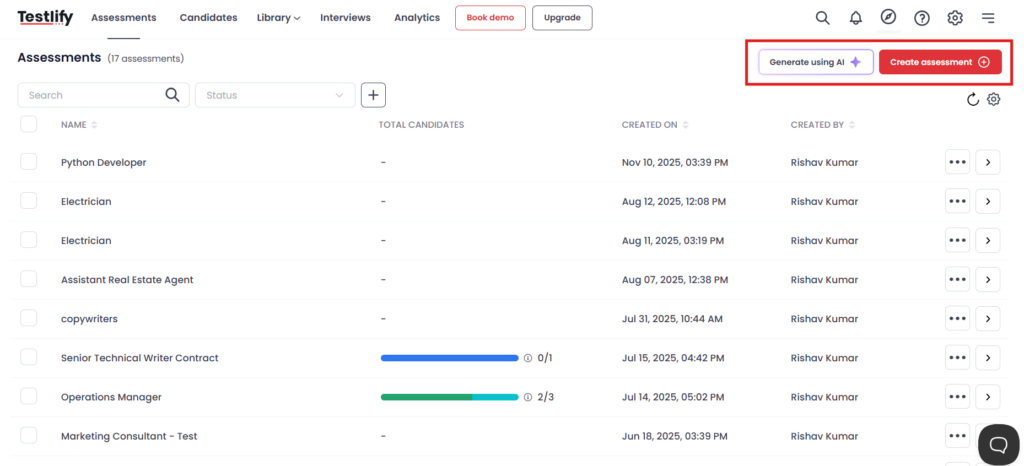
What this step looks like:
- Start with a ready-made test from Testlify’s 3,500+ test library for common skills across roles.
- Create a role-specific assessment using AI by entering the skills, experience level, and preferred question types, then let the platform generate a draft you can refine.
- Customize the test settings so it matches the role: difficulty, time limits, and the mix of modules/questions.
- Use results to shortlist based on proof of skill and keep human review for close calls.
Once skills are validated, the next step is to see how candidates apply them in realistic situations using AI chat simulations.
Watch: How to create assessmentin Testlify
Step 4: Evaluate judgment with AI chat simulations
Use Testlify’s AI chat simulations to run role-based scenarios like handling an angry customer, qualifying a lead, resolving an internal conflict, explaining a technical decision, or prioritizing tasks under pressure. You set the context, then candidates respond in a guided chat format.
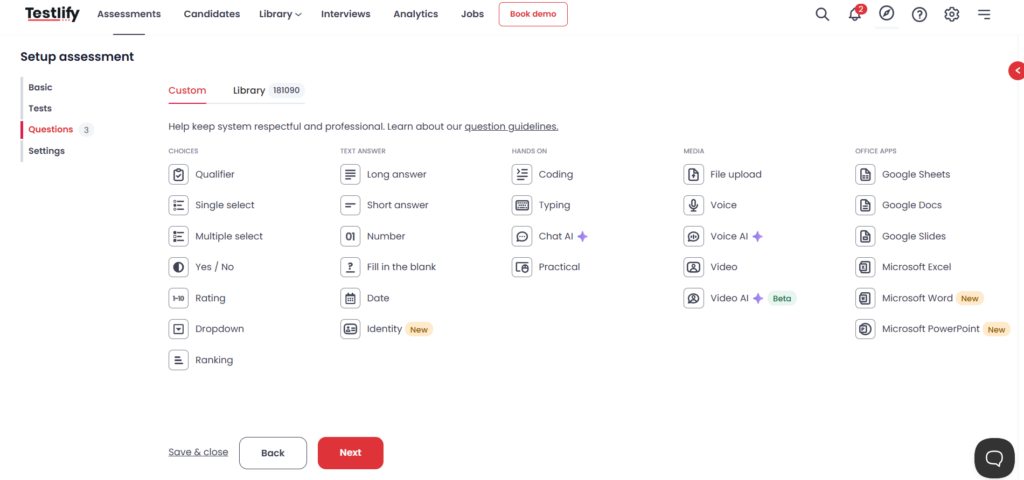
How to use this step well:
- Pick scenarios that match the job (2–3 is enough for most roles).
- Define what you’re evaluating (problem framing, clarity, judgment, tone, and decision quality).
- Review the transcript and score consistently, with human oversight for edge cases.
Once you’re confident in judgment and communication, move to the next step.
Step 5: Run structured interviews with AI support
After you’ve screened resumes and validated skills, interviews should confirm role fit, thinking, and communication. Testlify helps you standardize interviews using AI video interviews and AI audio interviews, so every candidate is evaluated on the same criteria.
Watch to learn more about AI video interview:
AI interview formats in Testlify (quick comparison)
Interview format | What it is | Best for | What you can evaluate |
|---|---|---|---|
AI Video Interview | Candidates record video answers to structured questions (often async). | Customer-facing roles, leadership roles, roles where presence and communication matter. | Communication clarity, confidence, explanation quality, structured thinking. |
AI Audio Interview | Candidates record voice-only answers to structured questions. | High-volume hiring, phone-first roles, roles where voice communication matters but video is not needed. | Speaking clarity, reasoning, tone, conciseness, role understanding. |
How to use this step?
- Use the same questions for the same role so evaluation stays fair and consistent.
- Keep it short: 5–8 questions is enough for most screening rounds.
- Score with a fixed rubric (role knowledge, clarity, decision-making, communication).
- Use AI support to scale review, but keep human judgment for final decisions.
Next, once interviews are done, move to Step 6.
Step 6: Ensure test integrity with AI proctoring
If you’re using assessments to make hiring decisions, you also need confidence that the results reflect the candidate’s own work. Testlify’s AI-powered proctoring and anti-cheating features help you do that by monitoring behavior during the test and creating a clear audit trail for review.
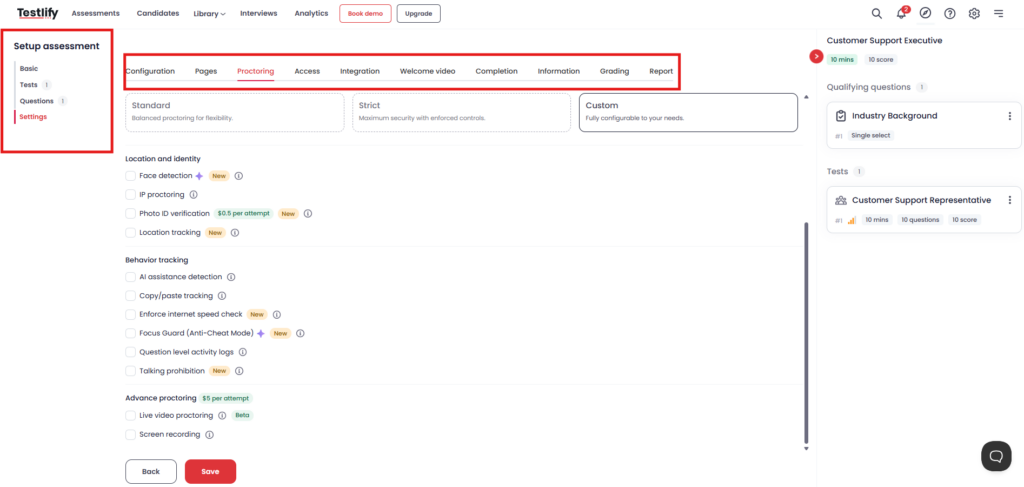
- Browser and screen controls: Full-screen mode, tab/window switch detection, copy-paste restrictions, and rule-based violation limits.
- Monitoring evidence: Activity logs, snapshots/recording (based on settings), and flagged events for quick review.
- AI-based checks: Detection signals for suspicious patterns and AI assistance, where enabled.
- Live options for high-stakes roles: Live proctoring/screen monitoring when required.
- Custom proctoring settings by role: use strict settings for high-stakes roles, and lighter settings for early-stage or volume hiring.
- Candidate-friendly configuration: reduce friction by enabling only what you need, and clearly communicating rules upfront.
Once integrity is handled, the next step is to consolidate results across screening, assessments, and interviews for clean, consistent decisions.
Step 7: Consolidate results and standardize decisions
At this stage, consolidate the data so the final decision is consistent. In Testlify, you can review resume screening results, assessment performance, simulations, and interview outcomes together, then apply a clear scoring logic.
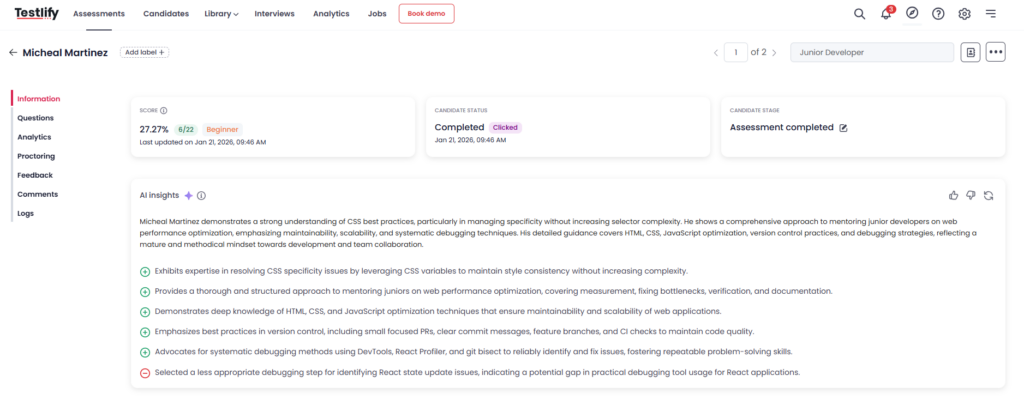
A practical way to do this is Weighted Scores: you assign higher weight to the skills that matter most for the role, so the overall score reflects your priorities (for example, core job skills matter more than a secondary skill). This keeps decisions evidence-based, reduces bias from different interviewer preferences, and makes it easier to explain why one candidate moved forward and another didn’t.
Once your shortlist is ready, push the outcome to your ATS to keep the hiring workflow clean.
Step 8: Sync workflows with your ATS
Testlify seamlessly integrates with 100+ ATS tools, so your recruiting process stays connected from screening to evaluation. Once the integration is set up, you can invite candidates to assessments from your ATS and view summarized assessment results directly inside your ATS, without switching between systems.
Common mistakes to avoid
The most common mistake is using AI without clear job requirements. If the role criteria is vague, every step after that becomes inconsistent. Another issue is treating AI scores as a final decision. Use them to speed up evaluation, but keep human judgment for context, edge cases, and non-traditional profiles.
Teams also tend to over-proctor early stages, which can hurt candidate experience and drop-off rates.
Finally, avoid running too many steps for every role. Keep the workflow lean: screen, validate core skills, interview with a rubric, and document decisions so hiring managers stay aligned.
Common mistake | Why it causes problems | What to do instead |
|---|---|---|
Starting without clear job requirements | AI screening and evaluation becomes inconsistent and hard to defend. | Define must-haves, nice-to-haves, and success criteria before screening. |
Treating AI scores as the final decision | Good candidates can get missed; edge cases don’t get fair review. | Use AI as decision support, add human judgment for close calls and exceptions. |
Relying only on resumes | You shortlist based on keywords, not proven skill. | Validate skills with role-based assessments before interviews. |
Unstructured interviews | Different interviewers judge differently, leading to bias and weak comparisons. | Use consistent questions and a fixed rubric for the same role. |
Over-proctoring every stage | Candidate experience drops and completion rates can fall. | Use stricter proctoring only for high-stakes roles or later stages. |
Too many steps for every role | Hiring slows down and teams lose focus. | Keep the funnel lean and role-specific; remove steps that don’t add signal. |
Conclusion
AI can improve recruiting when it’s used across the workflow, not as a standalone shortcut. With Testlify, you can screen faster, validate skills with assessments, evaluate judgment through simulations, and standardize decisions with clear scoring, while keeping human oversight where it matters.
If you want to build a more consistent, evidence-based hiring process without adding extra manual work, book a demo and see how Testlify fits your recruitment flow.
Frequently asked questions (FAQs)

B2B SaaS Content Writer
Rishav Kumar is a B2B SaaS content writer with 4 years of experience. He loves crafting engaging content. Always exploring fresh ideas, he's passionate about helping businesses grow through impactful writing.
LinkedInRelated resources
View all
AI in recruitment
AI recruitment platforms: Buyer’s guide

AI in recruitment
Will AI replace recruiters in 2026? The real answer

AI in recruitment
Top AI use cases in recruitment by funnel stage

AI in recruitment
Benefits of AI in recruitment & its challenges

AI in recruitment
AI in recruitment: The complete 2026 strategy guide

AI in recruitment
Best practices for hiring data analysts using assessments?
Get started.
Hire on proof, not resumes.
Run your first skills-based assessment free — no credit card required.