
AI recruitment platforms: Buyer’s guide
AI recruitment platforms buyer’s guide: what to check in screening, skills tests, AI interviews, ATS fit, security, and fairness before you choose.

If you’re searching for AI recruitment platforms, you’re probably trying to fix one of these:
- too many applicants to screen
- too much time wasted in shortlisting
- inconsistent hiring decisions across interviewers
The promise of AI in recruitment is to reduce manual work and make screening more consistent. This buyer’s guide will help you pick the right platform based on what you actually need: shortlisting, skills testing, video interview workflows, scoring, ATS fit, and basic risk controls. No hype. Just a checklist you can use to compare options quickly.
 ChatGPT
 Gemini
 Claude
 Grok
Grok Perplexity
TL;DR – Key takeaways
- Good ai recruitment platforms should reduce screening time while keeping shortlists explainable and recruiter-controlled.
- Skills testing matters more than big test libraries, prioritizing role-fit, quality, and clear scorecards.
- Use AI interview and video workflows to scale early interviews without losing structure or consistency.
- ATS integrations and automation decide adoption, avoid tools that create extra steps outside your ATS.
- Don’t ignore security, compliance, fairness, and AI-powered proctoring if you’re using results for hiring decisions.

What an AI recruitment platform should do
When people say “AI recruitment platforms,” they usually mean one system that can screen, assess, and support hiring decisions without creating extra work for recruiters.
In real recruiting processes, a platform is only useful if it removes manual effort, keeps evaluation consistent, and fits into your applicant tracking system.
Screen candidates fast
A good platform should help you move from too many applicants to a clean shortlist without turning screening into a black box. That means candidate screening that’s quick, explainable, and consistent across roles.
Recruiters should be able to see why someone is ranked higher, not just a score. It should also reduce repetitive work like sorting, tagging, and routing candidates to the next step. If it can’t speed up the first screening round, it won’t lower workload for recruitment teams.
Validate skills
Resumes are not proof of skill, especially now. An AI powered platform should let you validate skills early through structured assessments, role-based questions, and (when required) coding tests. The goal is to reduce weak interviews and improve hiring decisions by using consistent indications.
Good skills testing also helps candidate experience because strong candidates don’t get stuck waiting for manual shortlisting, and weak fits don’t get dragged through long hiring processes.
Evaluate communication and decision-making
Most bad hires aren’t because someone failed a test. They happen because communication, judgment, or role-fit wasn’t evaluated well. That’s where tools like video interview workflows and AI-driven interview scoring can help, if they’re structured.
The platform should support a repeatable interview process: same criteria, clear scoring, and an easy way for recruiters hiring and hiring managers to review responses. If it adds friction or creates confusing reports, your team won’t use it consistently.
Stay safe and fair
If you’re using artificial intelligence in hiring, you need basic controls that protect the business and the candidate. Security matters (access, data handling, audit readiness), but fairness matters too. The platform should support structured evaluation and reduce subjective scoring where possible, without turning everything into automation.
At minimum, it should help you explain decisions, keep processes consistent, and avoid risky mystery scoring. If a tool can’t help you defend hiring decisions, it’s not ready for serious recruiting.
The buyer’s checklist for ai recruitment platforms
Most ai recruitment platforms sound similar on demo calls. The difference shows up once recruiters start using them daily. This checklist keeps you focused on what actually affects recruiting processes.
Shortlisting and resume screening
This is the first make-or-break test for any ai recruitment platform. If it can’t turn a messy pile of resumes into a clean shortlist quickly, everything else (assessments, interviews, analytics) becomes a slower version of the same problem.
What to check as a recruiter:
- It explains the “why,” not just the score: You should see clear reasons behind a match, so you can defend hiring decisions and sanity-check the output. If the tool only gives a number, it’s basically asking you to trust a black box.
- You can set simple rules for moving people forward: The best tools let you define what a good fit looks like for the role and then use that to auto-shortlist or route candidates to the next step.
- It works inside your workflow: Resume match scores should sync back to your applicant tracking system, so recruiters aren’t copying notes between tools.
- It reduces manual screening time in a visible way: The output should feel like “I can shortlist faster” not “I now have one more dashboard to check.”
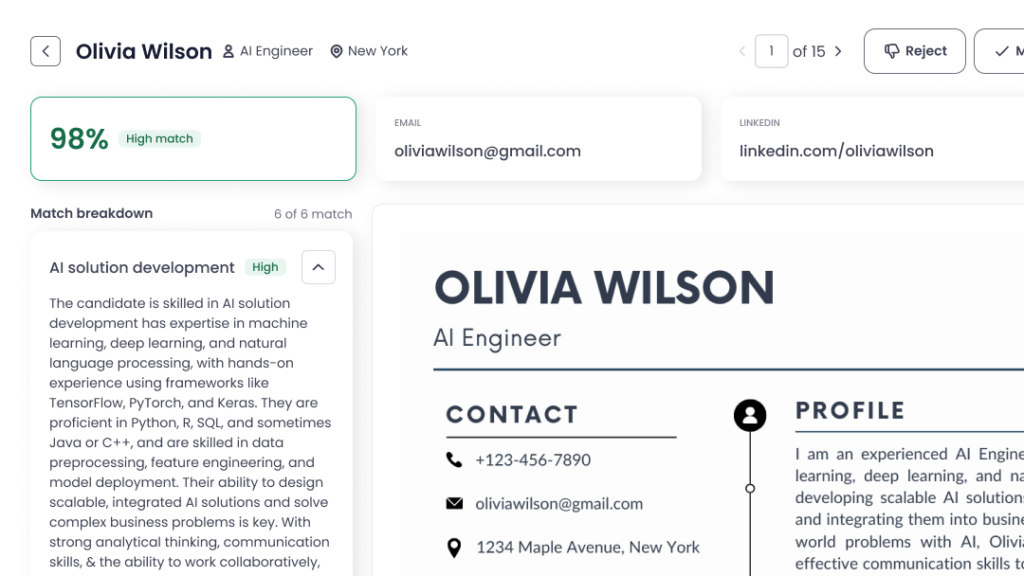
Testlify’s AI Resume Screener is positioned around a very practical workflow: it pulls resumes from your ATS, evaluates against role criteria, shows fit labels (High/Medium/Low) with explainable match scores, can auto-shortlist and trigger assessments, and then syncs scores and results back to the ATS.
Skills testing and assessment quality
This is where ai recruitment platforms either help you hire better or just add another step to your recruiting processes. Good skills testing should do two things: validate what matters for the role, and make hiring decisions more consistent without dragging out the hiring process.
What to check as a recruiter:
- A big test library is nice, but quality comes from expert design and ongoing review. Testlify claims its assessments are developed by subject matter experts, guided by frameworks, reviewed, and then monitored after publishing to check effectiveness.
- You should be able to start from validated templates and tweak them, or build from scratch for niche roles.
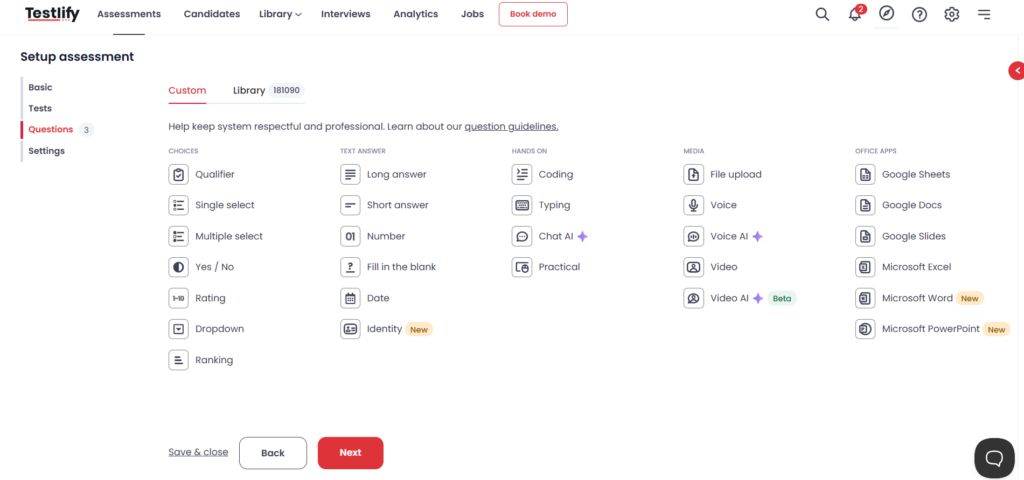
- Real roles need more than MCQs. Look for job-relevant formats (qualifiers, fill-in, rating, file-based prompts) so you can test how someone thinks, not just what they remember. Testlify lists a wide set of custom question types.
- A useful platform lets you standardize scoring and still control what matters most (weights by skill/question). Testlify mentions weighted scoring and an AI-driven auto-scoring system that covers several question formats.
If your assessments feel random, too long, or irrelevant, strong candidates drop-offs. You want the assessment to feel like a fair, job-related step. (This is less about AI and more about basic recruiting platform hygiene).
If your priority is assessment quality, Testlify leans on “built on science” positioning: expert-developed tests, structured review, and intelligent monitoring after release.
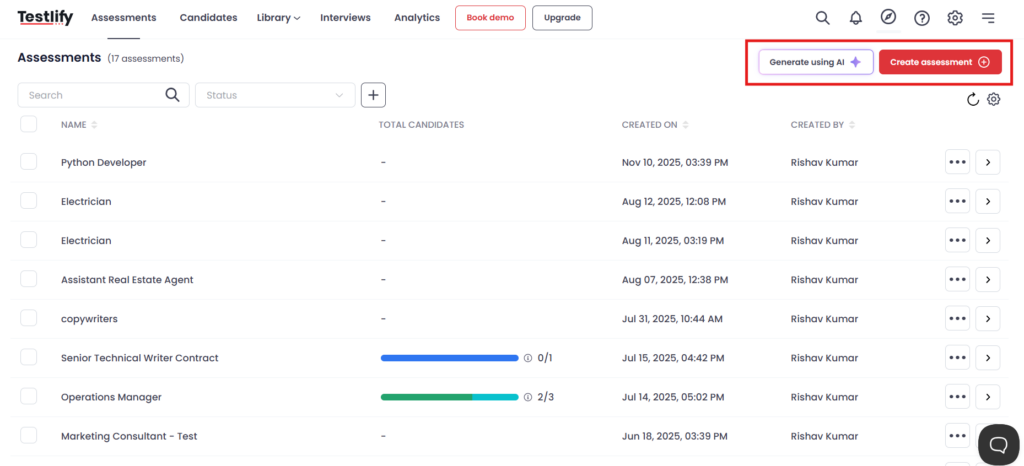
On the practical side, it also supports fast setup. Choose from 3,500+ validated assessments, customize, or build from scratch using an AI assessment builder.
Coding tests (if you hire tech roles)
Resumes and interviews don’t reliably show how someone codes. A good coding test gives recruiters and hiring managers a real signal early.
What to check as a recruiter:
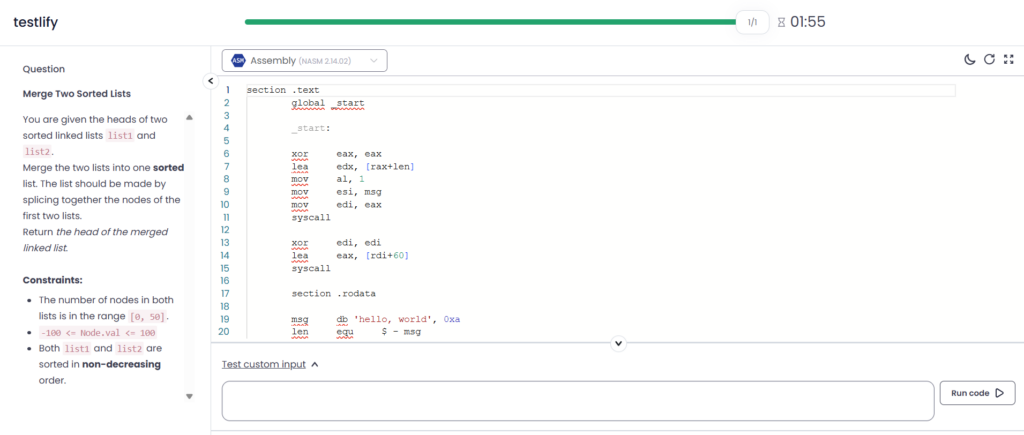
- You want a setup where candidates can actually write and run code, because that shows problem-solving and debugging, not memorization. Testlify coding tests stand as a strong option.
- If you hire across multiple teams, the platform should support the languages you actually use. Testlify claims support for 45+ programming languages.
- The best platforms let you assign real-world tasks so you’re not filtering people based on puzzle (Leetcode-Style) performance. Testlify explicitly helps in assigning real-world tasks inside the platform.
- Coding tests get gamed easily if the platform has no guardrails. Testlify coding tests run in a secure, fully proctored environment.
- Recruiters should be able to share a clear outcome with hiring managers (who passed, why, and what it means).
If your team wants a straightforward way to validate technical skills, Testlify’s pitch is simple: live coding tests in 16+s, built around real-world tasks, run in a secure/proctored environment.
Video interviews and high-volume workflows
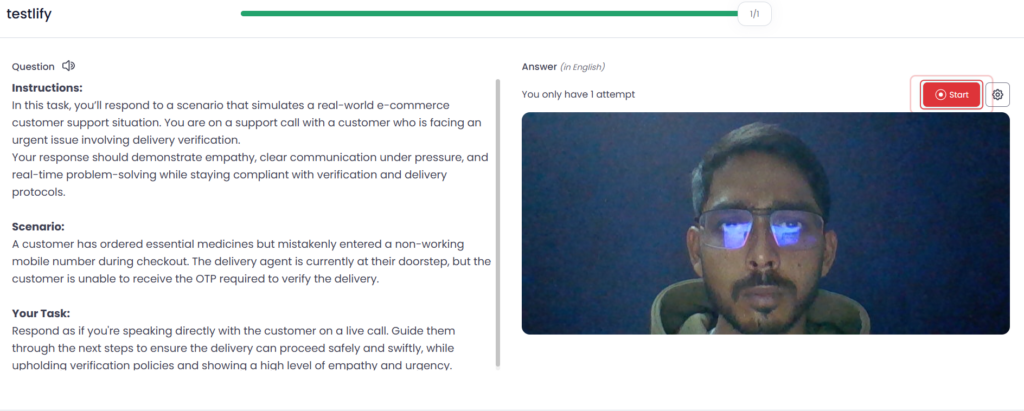
When you’re hiring at volume, the goal is a faster, more consistent interview process. This is where AI interview capability matters. What to check as a recruiter:
- Look for structured audio & video interview simulations where candidates answer job-specific prompts at their convenience, and the system can evaluate responses in a consistent way.
- The platform should explain what it’s scoring (communication, role-fit signals, confidence, etc.) and let you review quickly. Testlify’s AI evaluates responses and scores skills, communication, and confidence for conversational audio/video interviews.
- High-volume hiring breaks when every role needs a fresh process. Testlify helps create custom, job-specific questions for candidates to answer on their own time.
- You want workflows that let multiple reviewers collaborate, compare candidates, and move faster without endless meetings.
- For high-volume recruiting, “another dashboard” kills adoption. The video interview / AI interview output should fit into your existing recruiting platform and ATS workflow.
If your biggest pain is early-stage interviews slowing everything down, Testlify’s positioning is basically: AI interview in audio and video formats, with custom questions and automatic evaluation/scoring.
Reports and analytics
Reports should help recruiters make faster, clearer hiring decisions, not create more dashboards. In AI recruitment platforms, look for analytics that show skill-level breakdowns, overall scores, and easy comparisons across candidates, so recruitment teams can shortlist confidently.
Testlify highlights candidate report cards, score distribution insights, strengths and gaps, and AI-driven summaries that make screening faster without guessing.
ATS integrations and automation
If an ai recruitment platform doesn’t fit your applicant tracking system, it won’t get used. The basics: two-way syncing of candidates, stages, scores, and notes, so recruiters aren’t updating two tools. Automation matters too, like routing high-fit candidates to the next step, triggering skills tests after screening, and pushing results back into the ATS for clean hiring decisions.
Testlify seamless ATS integration and workflow automation across screening, assessments, and interviews reduce admin work for recruitment teams.
Security and compliance
Security isn’t a bonus feature in ai recruitment platforms. You’re handling candidate data, assessments, and interview recordings, so you need clear controls and proof, not vague promises.
Check for recognized standards like SOC 2 Type II and ISO 27001, and baseline privacy compliance such as GDPR and CCPA, plus clear documentation on how data is stored and accessed.
Fairness and bias controls
Fair hiring is hard to do at speed, which is why this matters in ai recruitment platforms. Look for two things: structured evaluation (so candidates are judged on the same criteria) and integrity controls (so the results you rely on aren’t gamed).
On the fairness side, Testlify helps reduce bias through standardized assessments and ongoing test monitoring. On the integrity side, its AI-powered proctoring includes controls like browser lockdown, tab-switch/copy-paste flags, environment checks, and AI-assistance detection, which helps keep screening signals consistent across job seekers.
Conclusion
Choosing between AI recruitment platforms comes down to one thing: do you get clearer hiring decisions with less effort, without adding risk or friction for candidates. Use the checklist, shortlist 2–3 options, and run a quick pilot on one real role so you can judge signal quality, workflow fit, and candidate experience in practice.
If you want to see how an AI resume screener, skills tests, AI interviews, and reporting can work together in one flow, book a demo of Testlify and compare it against your current process.
Watch how Testlify works:
Frequently asked questions (FAQs)

B2B SaaS Content Writer
Rishav Kumar is a B2B SaaS content writer with 4 years of experience. He loves crafting engaging content. Always exploring fresh ideas, he's passionate about helping businesses grow through impactful writing.
LinkedInRelated resources
View all
AI in recruitment
Will AI replace recruiters in 2026? The real answer

AI in recruitment
Top AI use cases in recruitment by funnel stage

AI in recruitment
Benefits of AI in recruitment & its challenges

AI in recruitment
AI in recruitment: The complete 2026 strategy guide

AI in recruitment
Best practices for hiring data analysts using assessments?
AI in recruitment
How to run role simulations through video interview prompts?
Get started.
Hire on proof, not resumes.
Run your first skills-based assessment free — no credit card required.