
Top AI use cases in recruitment by funnel stage
Explore real use cases of ai in recruitment across the hiring funnel, with examples and tips to avoid bias, bad data, and compliance gaps.
If you’ve ever looked at your hiring dashboard and thought, “We’re getting applications, so why is this role still open?”, you’re not the only one. In my experience, most teams don’t actually have a sourcing problem. They have a funnel problem.
AI can help, but only when it’s used on purpose. Not as a shiny add-on, and definitely not sprinkled everywhere. The real wins come from applying it to the right stage of the hiring process, with clear boundaries around what it should do and what humans still need to own.
This guide breaks down practical AI use cases stage by stage, backed by real examples from companies that have shared what they’re doing publicly, including Unilever and L’Oréal. And because speed isn’t the only goal, we’ll also cover where human judgment matters most and the ethical basics you shouldn’t skip.
 ChatGPT
 Gemini
 Claude
 Grok
Grok Perplexity
TL;DR – Key takeaways
- AI helps most when you use it to fix one funnel bottleneck at a time, not everywhere at once.
- Start at the top: use AI to make job descriptions clearer so the right people apply and fewer drop off early.
- In screening, AI can organize resumes, highlight relevant skills, and help you prioritize, but borderline candidates still deserve a quick human look.
- For pre-qualification and scheduling, automation saves hours and speeds up replies, which protects good candidates from slipping away.
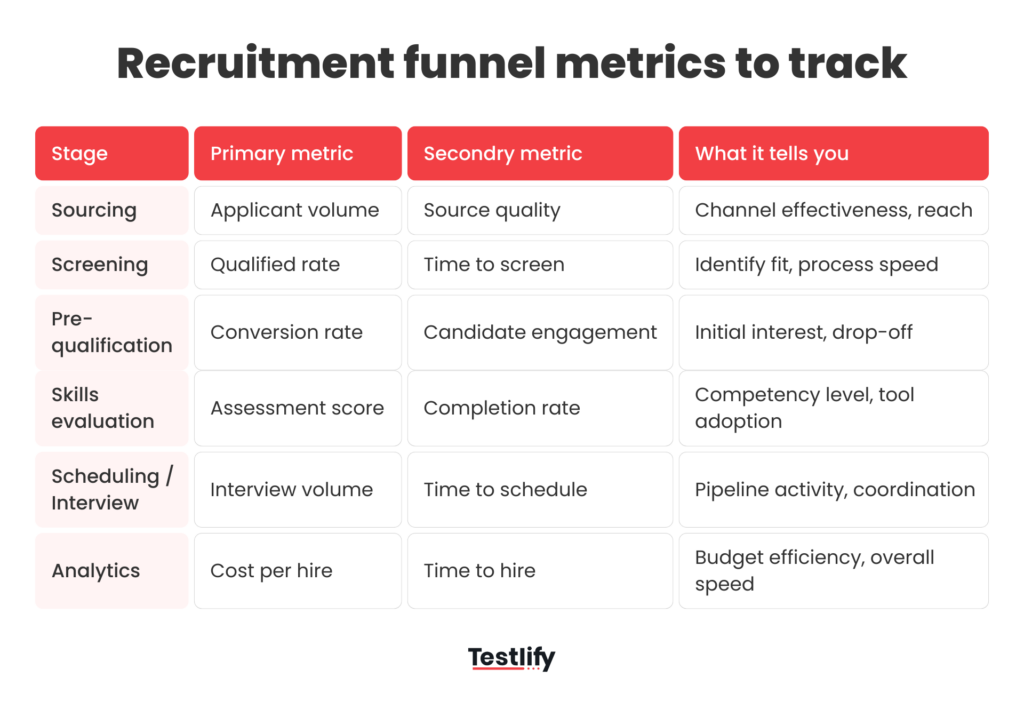
- Keep guardrails: stay job-relevant, disclose AI use, track basic metrics (qualified rate, time to fill, conversion), and keep humans owning final decisions.

Stage 1: Candidate sourcing (start with the job description)
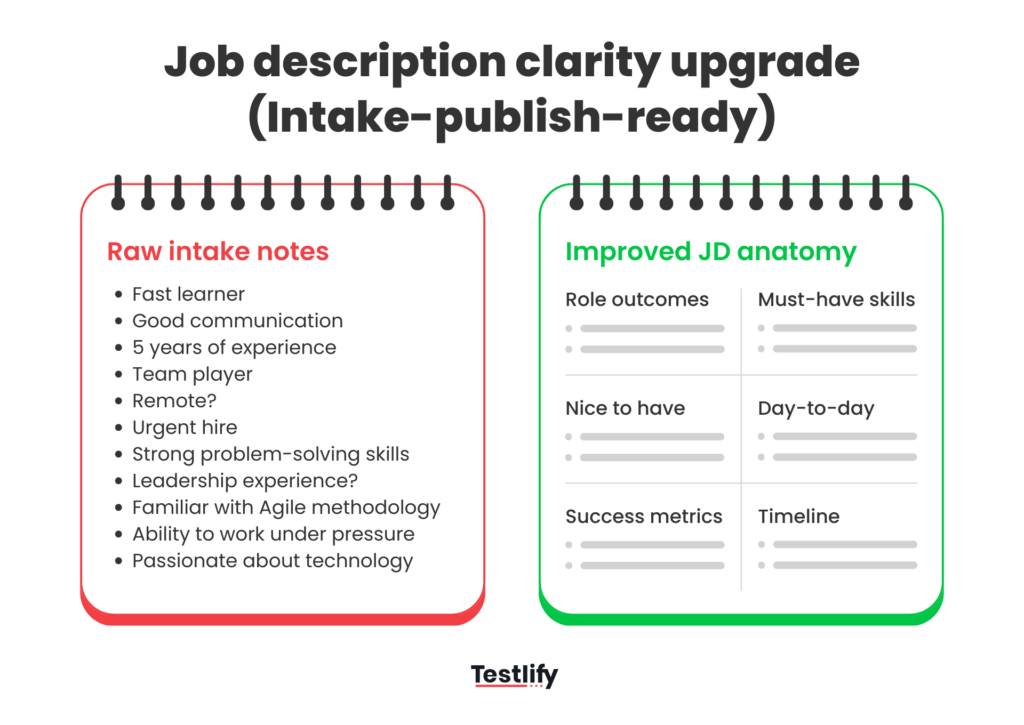
Most of the candidate sourcing problems start with the job post. When a JD is vague, it pulls in the wrong crowd. Then resume screening feels messy, the hiring team gets stuck in back-and-forth, and the whole hiring funnel slows down. The right people don’t always apply, and some strong candidates drop off early because they can’t quickly understand the role.
This is where AI use cases in recruitment can be genuinely useful. AI can help you turn scattered input from hiring managers into a job post that’s clear, specific, and easier for job seekers to understand. It can also catch the usual filler phrases and rewrite them into something more practical.
Here’s the simplest way to think about what AI can do at this stage:
- Draft and refine job descriptions from a short intake (responsibilities, must-have skills, success outcomes)
- Improve clarity and structure (less fluff, more specifics, easier to skim)
- Suggest edits based on performance (if the wrong people are applying, or the right people aren’t)
What should you track here? Keep it simple. Watch your click-to-apply conversion rate, the number of qualified applicants per role (not total applicants), and whether roles start moving faster into a strong shortlist. When those improve, you usually see time to fill come down.
Try Out: Job Description Generator
Stage 2: Resume screening
Resume screening is one of those steps where it gets messy fast. You have a stack of resumes, a hiring manager who wants “top 10 by tomorrow,” and a role that sounds straightforward until you see how differently people describe the same skills.
This is where AI in recruitment can actually earn its place. by helping you turn a pile of PDFs into something structured and easier to review. Here’s what AI is genuinely useful for during resume screening:
- Parsing resumes into clean profiles (skills, tools, titles, tenure, projects) so you’re not hunting line by line
- Matching resumes to job requirements based on skills and context, not just keywords
- Surfacing potential candidates you might miss because their resume format is weird, or their job titles don’t match your internal language
- Summarizing “why this person might fit” in plain language for recruiters and hiring managers
- Routing and prioritization (for example: “meets must-haves,” “needs review,” “clearly not eligible”)
Tools like Testlify’s AI Resume Screener help by converting resumes into explainable job-fit scores (High/Medium/Low), so you can prioritize review instead of starting from scratch every time.
Stage 3: Pre-qualification
This is the point in the hiring funnel where you’re just trying to answer a simple question: is this person worth moving forward right now, or are we wasting everyone’s time?
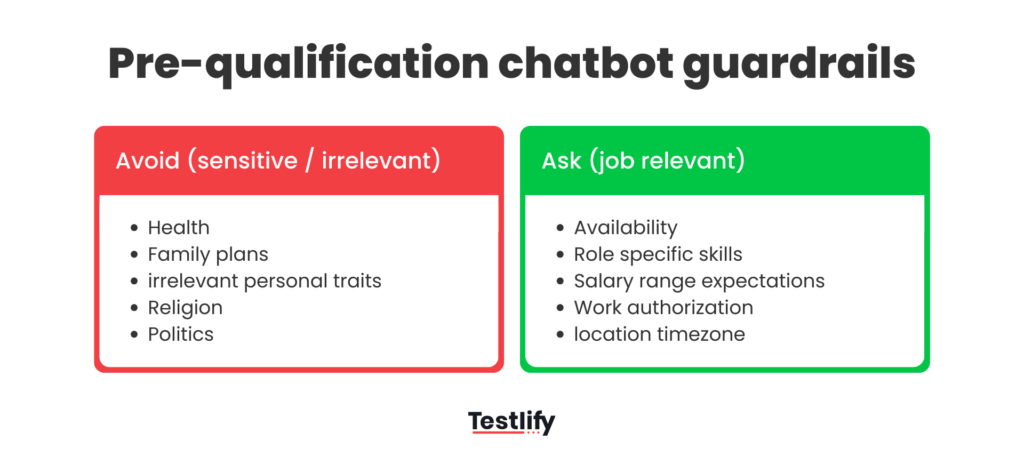
In most teams, pre-qualification is where bottlenecks quietly build up. Recruiters end up repeating the same basic questions all day (availability, location, work rights, salary range), and good candidates sit waiting for a response.
The best way to use AI here is as a friendly first touch: it asks a short set of role-relevant questions, answers FAQs, and routes people to the next step. L’Oréal did this with a recruitment chatbot that could answer candidate questions, check hard requirements, and pass the transcript into their system so recruiters could focus on more qualified profiles.
Here’s what good pre-qualification usually looks like in practice,
- Chat Bot: A quick Q&A AI Chat simulation that confirms must-haves and clears confusion early.
- AI Audio Interview: A couple of structured audio questions to understand basics like motivation, availability, and role fit
One reason chat works so well is speed. Candidates get responses in real time, and your team doesn’t have to babysit the inbox. For high-volume hiring, McDonald’s uses the Olivia assistant through McHire to capture candidate info, screen, and support interview scheduling.
A quick word of caution: pre-qualification is also where you want to be careful with ethical considerations. Keep questions job-relevant, be clear when candidates are interacting with an AI tool, and make sure there’s a human way to step in when someone gets stuck or the context is unusual.
Stage 4: Skills evaluation
Skills evaluation is where you finally get a real answer: can this person actually do the work?
This is why assessments tend to be the most high-impact part of the funnel. A well-designed test cuts through polished resumes, fancy titles, and keyword stuffing. It also makes the process fairer for people who are strong but not great at selling themselves on paper.
The trick is keeping assessments practical. The best ones feel like a small slice of the job, not an exam.
Here’s what typically works
- Role-based skills tests (coding, SQL, writing, sales scenarios, support tickets) that reflect what the job actually needs.
- Work samples with a clear rubric (so evaluation isn’t just “vibes”).
- Short, structured assessments that respect candidate time and still give signals.
AI can support this stage by speeding up test creation (especially for role variations), standardizing scoring, and highlighting patterns so humans can review faster. But the final call should still have human judgment in it, especially for edge cases.
This is also where Testlify fits naturally. You can build role-specific assessments quickly using its 3500+ test library (and customize when needed), then use built-in anti-cheating and remote proctoring controls for higher-stakes roles, while keeping the candidate experience smooth.
You’ll also find real-world proof that companies treat this stage seriously. Unilever has talked publicly about using gamified assessments as part of early hiring to speed up recruitment, lower costs, and reduce bias risks.
And in a very different context, PTC shared how switching to structured coding assessments helped reduce time-to-hire and made collaboration between recruiters and hiring managers smoother.
Stage 5: Interview scheduling
Interview scheduling sounds like a small admin task, but it’s one of the easiest ways to lose a strong candidate. A couple of back-and-forth emails, one missed reply, one calendar clash, and suddenly the process feels slow and disorganized.
This is also one of the cleanest places to use automation, because the goal is simple: get the interview booked fast, with as little friction as possible.
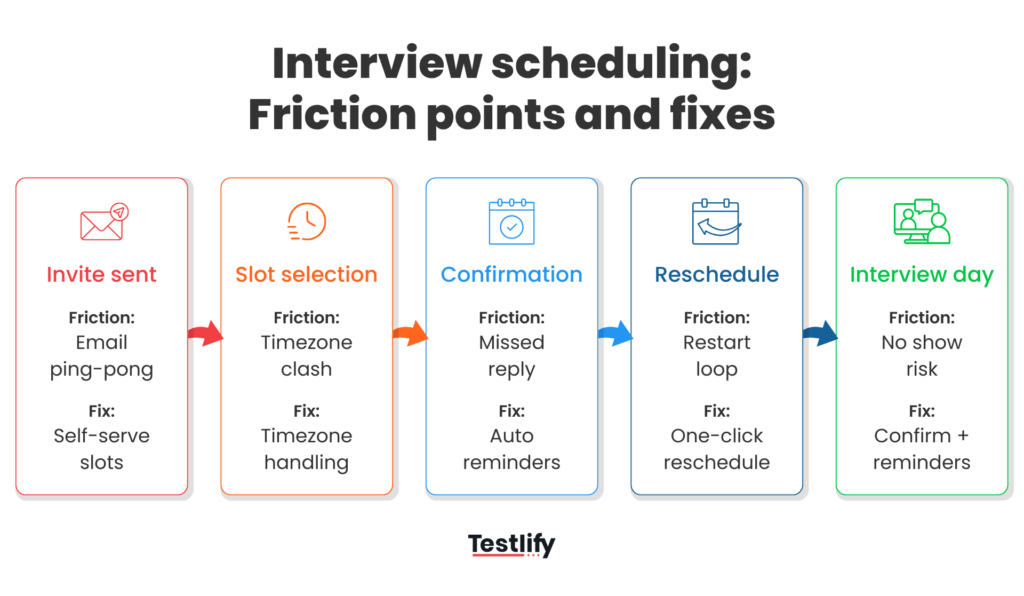
Here’s what AI helps with at this stage:
- Let candidates pick from approved slots, without waiting on a coordinator.
- Handle reschedules automatically (without starting from scratch).
- Send confirmations and reminders so fewer people no-show.
The impact can be very real when you’re hiring at scale. General Motors has shared a case study where automated scheduling cut time-to-schedule from five days to 29 minutes, along with reported cost savings.
Stage 6: Structured interview
A structured interview keeps your hiring process from turning into “who asked better questions.” Everyone gets the same core prompts, answers are scored on a shared rubric, and hiring managers compare candidates on evidence, not gut feel. It also makes feedback cleaner and faster, especially when multiple interviewers are involved.
This is where AI video interviews can help. Used well, they support consistency by running the same questions for every candidate, capturing responses in one place, and making it easier to review and share notes without losing context.
The key is boundaries: AI can organize and summarize, but decisions still need human judgment. If you want a practical way to run structured AI video interviews, Testlify supports AI video interviews with built-in evaluation workflows.
Watch to know more:
Stage 7: People mapping & analytics
This is the stage where everything finally comes together. Instead of judging candidates in bits and pieces, you’re looking at the full picture, what their resume shows, how they performed in the assessment, what came out during pre-qualification, and how they handled the structured interview.
Done well, this also gives you clarity on what’s happening across the funnel. You can see where strong candidates are dropping off, which step is slowing things down, and what’s quietly adding extra effort or delays.
Testlify fits neatly here by pulling those signals into clear scorecards and insights, so hiring managers can compare candidates consistently and the hiring team can spot what’s working across roles.
Conclusion
Hiring doesn’t need to feel chaotic or slow. With the right combination of structure, simple automation, and clear accountability, you can move faster without cutting corners.
If you want to put this into practice quickly, Testlify can help you run a cleaner, more consistent hiring workflow, from screening through evaluation and scorecards. Book a demo to see how it fits your roles and hiring goals.
Frequently asked questions (FAQs)

B2B SaaS Content Writer
Rishav Kumar is a B2B SaaS content writer with 4 years of experience. He loves crafting engaging content. Always exploring fresh ideas, he's passionate about helping businesses grow through impactful writing.
LinkedInRelated resources
View all
AI in recruitment
Benefits of AI in recruitment & its challenges

AI in recruitment
AI in recruitment: The complete 2026 strategy guide

AI in recruitment
Best practices for hiring data analysts using assessments?
AI in recruitment
How to run role simulations through video interview prompts?

AI in recruitment
What tools offer AI-generated questions for custom assessments?

AI in recruitment
How does Testlify’s AI scoring handle open-ended answers and code quality?
Get started.
Hire on proof, not resumes.
Run your first skills-based assessment free — no credit card required.